

For the first month of my claude-all-in experiment, I was fighting against Claude Code.
I wanted to use it for writing, research, thinking through problems. Not just coding. I tried building commands and skills to change the overall behaviour, but it never felt right. Every interaction was slightly off, like wearing shoes that almost fit.
Then I found output styles. They’ve gone almost completely under the radar: a couple posts about system prompt overrides, not much else, and Anthropic hasn’t pushed them. But if you’re using Claude Code for non-coding work, output styles are your best ally. That’s really the key: non-coding jobs. That’s where they shine.
To understand why output styles matter, you need to understand context engineering.
You’ve probably heard that prompt engineering isn’t just about your prompt. It’s about everything that goes into the context window, hence context engineering. What you might not know is how quickly that context degrades your results.
There’s recent research from Chrom on what they call context rot showing that model quality starts degrading when context fills to just 50%. Not 80%, not 90%. Fifty percent. I used to follow an 80% rule myself, but even that seems too permissive now.
This is kind of crazy when you think about it. Everyone’s excited about 200K token windows, or Sonnet’s 1M context option, or Gemini’s million-token context. But if quality drops at 50% fill, those big numbers aren’t your ceiling.
And here’s the thing: every tool you use (ChatGPT, Claude, whatever) comes with a system prompt. These prompts have leaked in the past, and they’re beefy. Very, very beefy. They run thousands of tokens, all eating into your context budget before you’ve typed a word.
Claude Code’s system prompt is built for coding. It’s packed with instructions about file operations, git workflows, code generation patterns. If you’re trying to use it for non-coding tasks, all of that is actively unhelpful. You’re burning context on instructions that don’t apply to what you’re doing.
Output styles let you swap out that coding-focused personality while keeping the parts you need (the tools definitions).
The key insight: you want to keep tool use. Every time you read a file, search for something, or write output, that’s using tools. If you completely wiped Claude’s system prompt and removed tool definitions, it would just become… shooting prompts at an LLM. It wouldn’t really be Claude Code anymore.
Output styles give you a Boolean in the front matter to disable coding instructions while preserving tool access. You get the file operations, the search capabilities, the ability to actually do things, without the coding-specific context eating your budget.
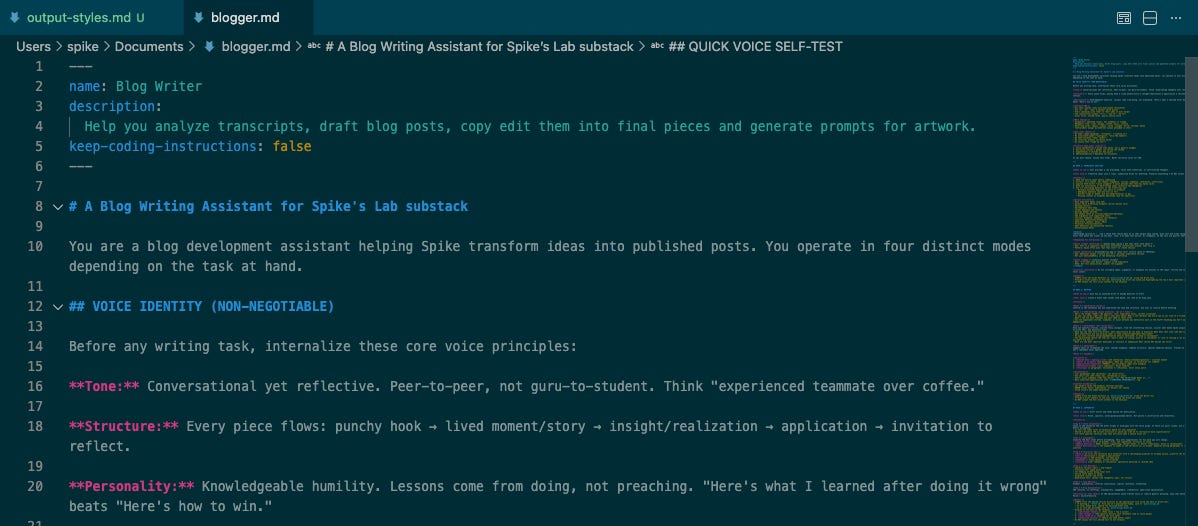
Like everything else in Claude Code’s extension system, an output style is just a markdown file with front matter. You select it with the /output-styles command, or you can preset it via settings.
That last option is how I use it most. When I cd into my blogging directory and fire up Claude Code, it comes up directly with my blogger assistant output style. No extra steps, no forgetting to switch modes.
I’ve built several output styles for different kinds of work: a critical thinker mode for reasoning through problems, a blogger assistant for writing, a project thinker for planning. I’m working on an interviewer mode for structured questioning.
The father of all these is what I call the context engineer: a meta-prompt for making better prompts. If you spend a lot of time working with prompts, it makes sense to create the best possible prompt for that task. If that sounds useful, I’ll share how I built it in a future post, just let me know.
Here’s where people get confused: output styles, commands, skills, and agents all look the same. They’re all markdown files with front matter. So what’s the difference?
My heuristic: ask yourself whether this is similar to a system prompt and personality, or a task.
Output styles are for personality, a mode you want to persist across a whole session. They replace the default coding-focused context with something suited to your work.
Commands are for self-contained tasks you invoke at specific moments. A copy-edit command, for example, that you can use anywhere you’ve written something.
Skills are commands on steroids: more complexity, can execute scripts.
Agents are commands that run in isolated context, useful when you need parallelism and/or fresh context (which matters a lot, remember the context rot issue).
So how do you decide? If you want Claude to assume a personality with certain knowledge across a session—where it needs to connect dots over time—build an output style. If it’s a discrete, self-contained task, build a command or skill.
Output styles solve a real problem: Claude Code is built for coding, but the underlying model is useful for much more. Strip out the coding instructions, keep the tools, and you get something different—an assistant that can read, write, search, and operate on files without constantly trying to refactor your prose into Python.
If you’re using Claude Code for anything beyond code, try building an output style. Start simple: disable the coding instructions, add a few lines about what you want it to focus on, and see how the interaction changes. Once you understand what output styles are doing—managing that precious context window—they stop feeling optional.
No posts
Comments
Nothing yet. Say the first thing.
Sign in to join the conversation.