
A few months ago, my design team and I decided to create our first AI agent. The goal sounded simple enough: build a Discovery Agent to scan blogs, social posts, and even private company updates to help us understand what’s happening in our industry. FYI, I work in the supply chain world, and I am building the next-generation product for returns.
We wanted the agent to categorise everything, from pain points and goals to emerging trends, so that as a product team, we could quickly get the pulse of the industry, without spending hours scrolling through feeds.
We analysed the tools available for creating AI agents and selected Lovable and n8n. Lovable seemed great for vibecoding our way through a front-end, and n8n would have allowed us to make the intelligence needed to perform the actions. Our initial database was going to be a simple Google Sheet, which would have been perfect for a proof of concept.
It didn’t feel that ambitious, until it was!
We encountered obstacles almost immediately. Not because the technology wasn’t available, but because it was far too prominent in our thinking. The outcome is now excellent, and the process has taught me a lot about how NOT to build an AI agent and how to get value from one.
Here are the four biggest lessons I learned.
We started by saying, “Let’s build a discovery agent that can scrape the internet for insights about returns”. The idea was to capture everything from blogs to social posts. We started with Reddit, thinking we’d get raw, unfiltered feedback from people complaining, venting, or sharing experiences.
But we didn’t actually know what we’d use that data for. It sounded cool, but was it useful? It’s not very design like to think “What could this AI agent do?” and that’s why we had to slow down and ask the right question: “What problem are we solving?”.
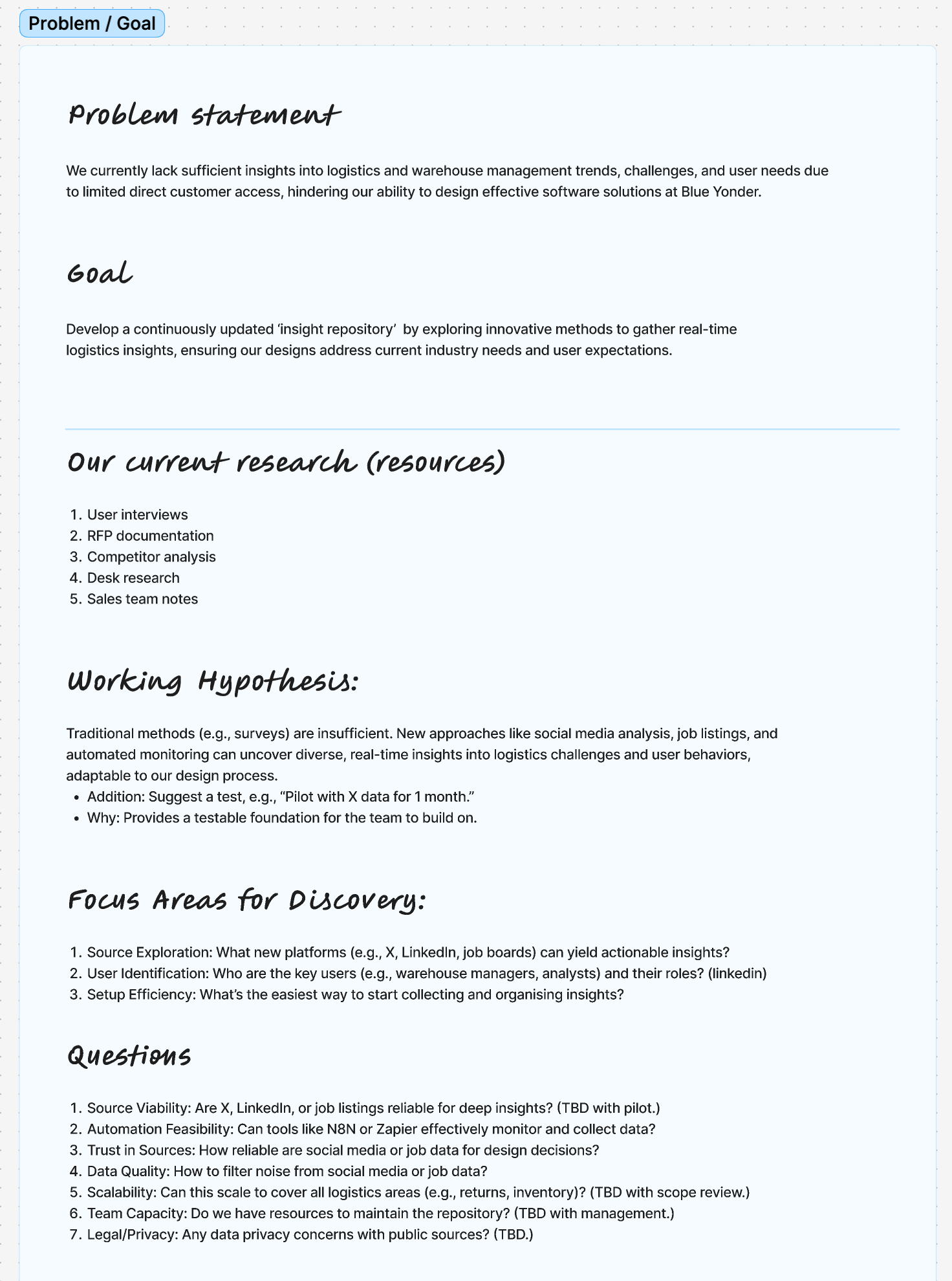
A simple design critique turned things around. By showing the early idea to colleagues, we were able to discuss why this might be valuable. The lightbulb moment was realising the agent could act as a market sense check, helping us understand the themes, pain points, and goals that customers, managers, or operators are talking about.
That reframing allowed us to design the process with intention. Instead of just scraping content, the agent would:
Gather relevant mentions of returns from specific sources.
Categorise them by products (e.g. “kiosk”, “processing”, “returns management”).
Feed those categories into a dashboard showing trends by product type.
That way, when a product manager or designer logs in, they can immediately see what’s rising to the surface. For example:
At return kiosks, speed and queue length are the biggest frustrations.
For returns management systems, high transportation costs are a recurring theme.
Now, instead of boiling the ocean and treating returns as one big, shapeless problem, we can target the areas where the pain is most acute and make better product roadmap decisions.
Spend time in the problem areas, understand what outputs you are interested in and why. The fundamentals of product development remain unchanged with AI.
Share quickly and gather consensus. AI enables us to create a better-shaped draft, helping us refine our ideas faster and narrow down use cases.
Map the process in detail before you jump to solutions.
Our first prompts were huge! AI is meant to be smart, so we wanted it to do everything we had in our mind in one go. We wanted the agent to gather, summarise, categorise, and analyse everything. Unsurprisingly, this led to hallucinations, jumbled insights, and a very tired sounding AI.
For our discovery agent, we specifically created an AI agent node in n8n, which allowed us to connect it to OpenAI and add a specific system prompt as part of the settings.
We used this feature and incorporated all relevant information into the system prompt. Everyone on the team is relatively new to prompt engineering, but we watched loads of videos, saw what other teams were doing, and came up with our own version of the prompt.
We specified the role, the behaviour, and the task, and we thought we did a good job. However, the outcome was pretty poor. We didn’t get consistent results, and the Agent wasn’t completing all the tasks we specified in the system prompt. It was clearly too complex, and we asked the AI to accomplish too many things.
We returned to our workflow, mapping out everything that needed to happen, dividing the task into separate task nodes, and determining when each task should be completed. This helped us realise we needed more than one Agent.
We required multiple agents to perform functions simultaneously. Then we could use a different node in n8n to combine all the answers into a single output, providing the outcome we were looking for.
In hindsight, we were asking one agent to do the work of five.
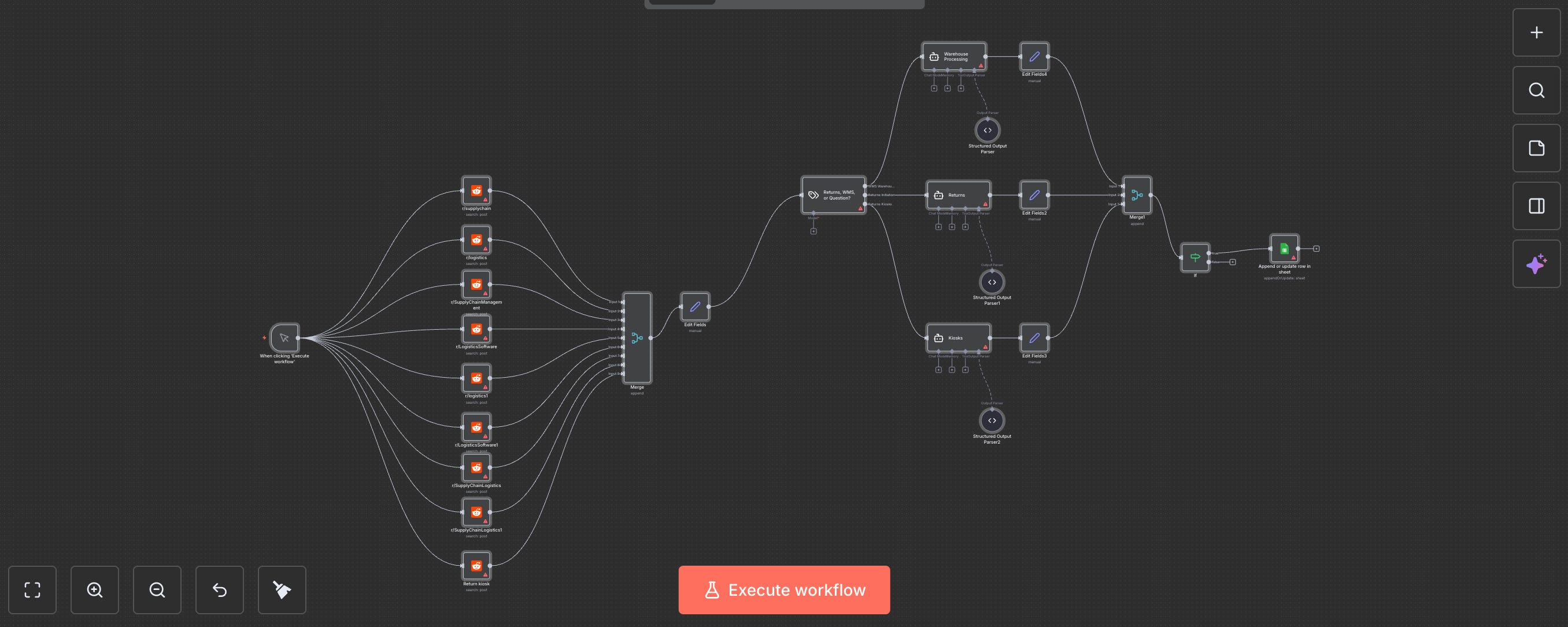
I am sharing this image not to showcase how impressive the workflow looks or how many nodes we have added. That’s rubbish for LinkedIn clickbait. In fact, my team, which kept working on this for a bit, tried to simplify it and cut down the number of nodes. We weren't aiming for something cool, but for a workflow that is manageable and easy to maintain, if possible. This demonstrates how clearly we managed to input information into different AI agents, depending on what data we wanted to extract.
Split tasks into atomic steps. For example, have one agent (or process) for finding content, another for categorising, and another for analysis. In our case, we created an agent for each product for which we needed insights, and then we combined all insights into our database.
Write focused prompts that target one action at a time. They don’t necessarily need to be short. It’s more about providing the agent with a focus.
Think like a production line: each agent does its bit, passes it along, and you combine the outputs at the end.
Like many designers, when we get an idea, we jump into the shiny tools. In this case, we went straight into Lovable and n8n to start building our agent before we had a real plan.
It was fun… for about 20 minutes. Then we hit a wall because we didn’t actually know in detail what the agent was meant to do. We were letting the tool lead the thinking rather than the other way around.
We started noticing this when our agent's results were poor. We fixed the prompt a few times, but nothing changed; we just got a different type of bad results.
Resist the urge to open your AI tool immediately. Write your concept first, then map out the system journey.
Define your success criteria — what does good look like?
Prototype on paper. Simulate the agent’s behaviour with your team before automating anything.
Start playing with the tools, but only to help you figure out more about what you need to know and flesh things out.
When we started building the Discovery Agent (and this also happened with other agents), we underestimated how critical prompting would be. In n8n, you add an AI Agent node, connect it to a model (in our case, OpenAI’s ChatGPT), and feed it a prompt.
At first, our prompts were too simplistic and rushed, so the results were just as fuzzy. And because every subsequent node in the flow depended on that output, the whole chain was weakened. The technical wiring of the agent and its connecting nodes wasn’t the real challenge. The real challenge was telling the AI exactly what to do in a way it could consistently deliver.
We dove deeper into prompt engineering, pulling in resources from other teams, watching tutorials, and experimenting with structure. So we learned quite a lot about what makes a good prompt.
The structure seems to help a lot, and that’s what we focused on.
Specify the AI role
Explain the task in detail. Even use AI to simplify how you explain the task within the prompt. But keep the scope narrow and consider using another agent to handle separate tasks if possible. This can guarantee better results.
Specify the outcome in detail and format too. Providing an example of the outcome helps to ensure you get precisely what you are looking for
Tell the AI what NOT to do - this has been pivotal to fix any hallucination we noticed in previous iterations.
The improvement was immediate. Suddenly, the outputs were sharper, cleaner, and more reliable, which made the entire agent more valuable.
We re-learned once more that good product thinking beats good technology every time. AI is powerful, but without a clear purpose and a simple structure, it will happily generate beautiful nonsense all day long. The magic happens when you design the process first and let AI fill the gaps, not define them.
Also, it’s always better to create things as a team and bring different expertise into the mix.
The world of AI moved incessantly, and it’s hard to keep up with it. The same applies to our experiment with n8n and the creation of an agent. It was always intended to be experimental and never to replace a team, so we didn’t invest much in it or maintain it. We aimed to demonstrate what was possible and understand what we could learn to redefine our design practices. This showed us that we can, and should, prototype in the wild more often.
However, a few months on, n8n has changed massively! Today, we would probably do things differently on the platform. I suggest you explore how to prompt n8n to create a workflow, as this can streamline your process. I have tested it, and it works pretty well, but like everything nowadays, it needs quite a lot of tweaks!
What remains essential is that you continue to think and understand what your users want and need. Happy prompting!
I have been to Malaga for the Wey Wey Web conference and MCed for the first time in my life. It was a blast! Also run a workshop called "Adopting a product mindset" mainly aimed at developers, to get a grasp of what PMs and Designers do! If you are interested, get in touch!
I also sprained my ankle in Malaga, but that didn’t stop me from rushing back home to watch CMAT on stage. It was super fun, and I absolutely love how free she is and how she managed to turn the internet's worst body-shaming into a total pop frenzy!
Comments
Nothing yet. Say the first thing.
Sign in to join the conversation.