
In a few days, Notion will start charging for Custom Agents. If you’ve been experimenting with them while they’re free, you’re about to see a bill. And if you haven’t thought about how you’re using them, that bill might surprise you.
This isn’t a breakdown of the pricing page. You can read that yourself. This is about how to think about the costs, how to decide what’s worth keeping, and how to structure your AI usage so you’re not burning money on things that don’t need to be expensive.
Let’s clear this up first, because there’s still confusion.
You pay for two things: Custom Agents and Database Agents. That’s it.
Personal Agent, the one in the bottom-right corner that you chat with all day, is included in your plan. No limits. Enterprise search, meeting notes, AI summaries, all the built-in AI features: included. The usage-based pricing applies to Custom Agents (the ones that run in the background, triggered by events, operating autonomously) and Database Agents (the autofill agents that sit on your databases and fill properties when pages are created or updated). Both use the same credit system. Both start billing on May 4.
Database Agents are easy to forget about because they’re quieter. You set one up to auto-categorise new entries or generate summaries on page creation, and it just runs. But every trigger fires credits. If you’ve got a busy database with an autofill agent on “page create” and “page update,” that’s a lot of runs you might not be tracking.
The same cost levers apply: check the model (hover over it before you hit run), consider whether the trigger needs to fire on every update or just on create, and scope the context to the smallest set of pages the agent needs.
For Custom Agents specifically, the first cost-saving strategy is obvious: if you can do it with your Personal Agent, do it with your Personal Agent. I’ve seen people chatting with Custom Agents for tasks that the Personal Agent handles just fine. That’s harmless while it’s free. It won’t be soon.
From here on, I’ll just say Custom Agents, but everything applies to Database Agents too. Same credit system, same cost levers, same decisions.
This is where the money conversation gets uncomfortable.
I have a Custom Agent that syncs my calendar to my Notion meetings database. Every time someone books, changes, or cancels something, the agent picks it up: creates the meeting record, connects the people, links the project, sets up the CRM entry. It runs all day, every day.
Based on our usage during the free period, it will cost roughly $150 AUD per month.
If you think of that as a SaaS subscription, you’ve got a problem. Nobody’s paying $150 a month for a calendar sync tool. Calendly is $20. Zapier could do a basic version for $30.
But it’s not a SaaS tool. It’s intelligence. It’s reading calendar invites, understanding who the people are, finding them in my CRM, connecting them to the right projects, and making judgment calls about how to categorise things. That’s a person’s job. And $150 a month for a person doing that work around the clock is cheap.
The frame shift is: compare it to what a person would cost, not what a SaaS tool would cost. How much time does it save you? How consistently does it run compared to you remembering to do it? What’s the cost of you missing it entirely?
My calendar sync is worth every cent. But I had to stop thinking about it like software to see that clearly.
I’ll share what we’re actually seeing at Smooth Ops, because vague talk about “it could be expensive” isn’t useful.
Our calendar sync agent: ~$150 AUD/month. Running on Claude Sonnet, processing every calendar change across multiple team members’ diaries.
Our client email capture agent: tracking to roughly the same. It watches sent emails, summarises them, finds the relevant person and project in the CRM, and creates an engagement record. Every sent client email, automatically filed and connected.
Those are the expensive ones. They run constantly and they use Sonnet for every step.
The important question for each one: is this worth it? For the calendar sync, absolutely. The CRM stays current, meeting briefs get prepared automatically, and I never miss a new contact. For the email capture, I’m less sure. Most of that workflow doesn’t actually need AI. The only genuinely intelligent step is summarising the email. Everything else, finding the contact, creating the record, connecting the project, is just database logic that an automation tool could handle for a fraction of the cost.
That’s the kind of honest assessment every agent needs.
We think about AI in Notion in three layers. This isn’t how Notion describes it. It’s how we’ve found it actually works in practice.
Agents are the top layer. The orchestrators. Your Personal Agent is one: always on, no extra cost, human-in-the-loop. Custom Agents are the other: automated, triggered by events, running in the background, and about to start costing money. Both are AI identities with instructions, but they serve different purposes.
Skills are the middle layer. These are individual Notion pages, each describing exactly how to do one specific task. A client catch-up brief. A meeting follow-up. A lead qualification workflow. Each skill defines scope, inputs, steps, output format, and rules.
Here’s the critical thing for cost: skills are portable. The same skill works whether your Personal Agent calls it in conversation or a Custom Agent triggers it in the background. When your Personal Agent runs a skill, it’s free. When a Custom Agent runs the same skill, it costs credits. Same instructions, same output, different billing.
This means you can develop and refine skills using your Personal Agent at no extra cost, and only point a Custom Agent at them when you’ve decided the automation is worth paying for.
Guides are the reference layer. Pages that skills pull in when they need deeper insight: a voice and style guide, a scoring rubric, client intelligence, internal process docs. They keep skills lean by externalising the reference material. Update a guide once, every skill that references it benefits.
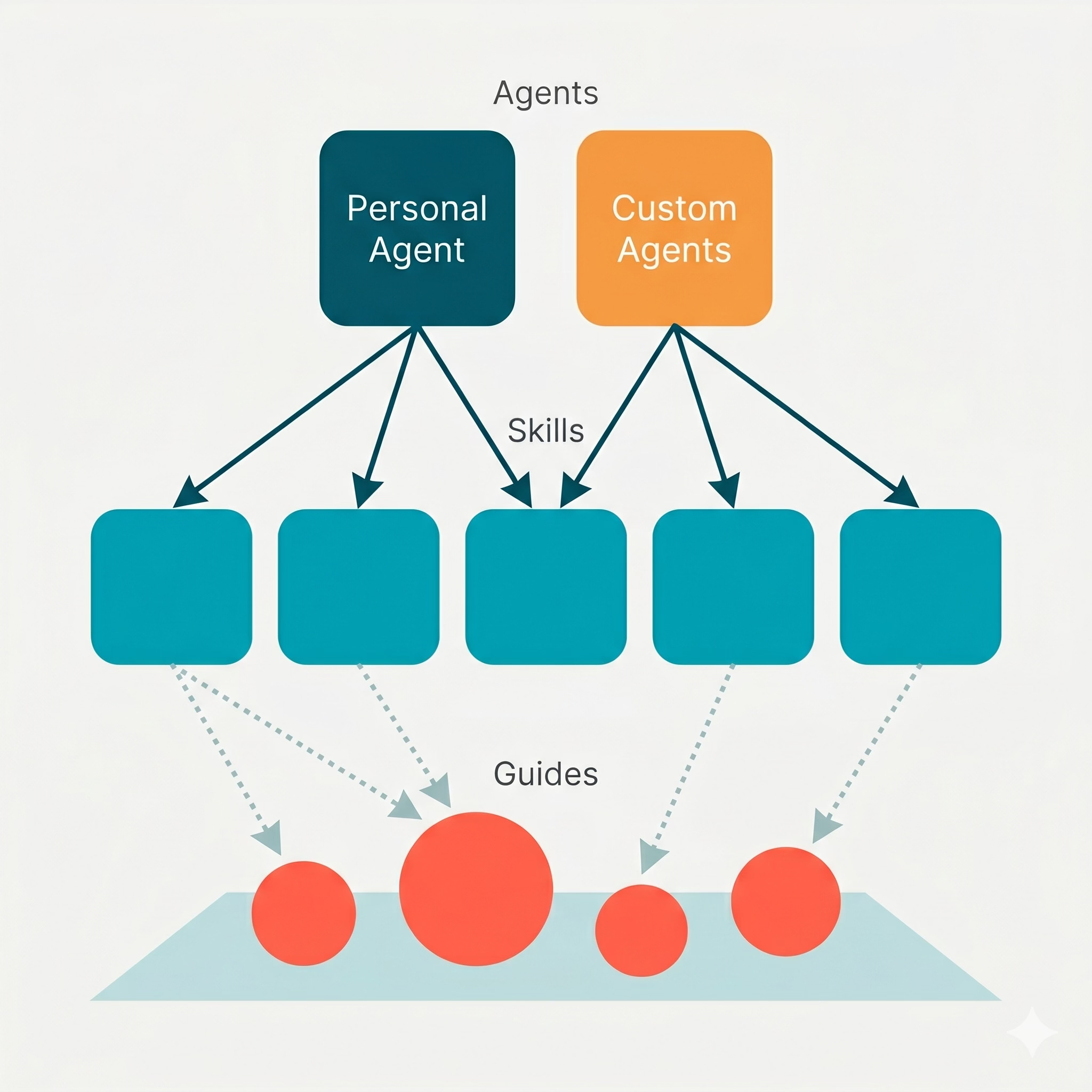
The three-layer model isn’t just tidy architecture. It directly controls cost. Skills are free to run manually. Guides are free to maintain. The only thing that costs money is the Custom Agent layer, and you get to choose exactly which workflows justify that spend.
Every Custom Agent lets you pick which AI model it runs on. For the Claude models, Opus is the smartest and the most expensive. Haiku is the cheapest and fastest but less capable. The open models will be cheaper again.
Most people set a high end model and forget about it. That’s fine for complex work: writing strategy docs, making judgment calls, handling nuanced context. But a calendar sync doesn’t need Opus. It needs to follow a process reliably. Haiku might do the job at a fraction of the cost.
Experiment. Drop a model tier and see if the output quality holds. If it does, you’ve just cut your bill significantly.
You can’t switch models mid-run inside a single Custom Agent. But you can split a workflow into pieces.
Say your agent creates a meeting record (procedural, doesn’t need a big brain) and then prepares a strategic agenda (complex, needs the best model). Make those two separate agents. The first one runs on Haiku, creates the record, and ticks a checkbox. The second one triggers on the checkbox, runs on Opus, and writes the brief.
You’ve just moved the bulk of the work to a cheaper model and only used the expensive one where it matters.
This is the uncomfortable one. A lot of what Custom Agents do isn’t actually AI work.
Take my email capture agent. The workflow is: a new email is sent, grab the recipient address, search the CRM for a matching contact, find the linked project, create an engagement record, copy the subject line and metadata across. The only AI step is summarising the email content. Everything else is just data lookup and record creation.
If I used an automation tool like n8n or Make for the data plumbing and only used a Custom Agent for the summary step, the cost would drop dramatically. Maybe from $150 to $15.
Not everyone can build those automations. That’s fair. The value of Custom Agents is that you describe what you want in plain English and it handles the rest. But if you have the capability, or can get help with it, splitting the AI work from the non-AI work is the single biggest cost lever you have.
If five people on your team each have a calendar sync agent with their own instructions, you’ve got five sets of logic to maintain, five agents that might behave differently, and five separate cost lines.
Put the instructions in a shared skill. Point every agent at the same page. One source of truth, consistent behaviour, and when something needs fixing, you fix it once.
For every Custom Agent you’re running, ask three questions.
1. Does this need to be automated? If a human triggering the same skill via Personal Agent is fast enough, you might not need the Custom Agent at all. The automation is the expensive part, not the intelligence.
2. Does every step need AI? If your agent is doing five things and only one of them requires intelligence, you’re paying Opus prices for database lookups. Consider whether parts of the workflow could be handled by automations or simpler tools.
3. Is the output worth the cost? Compare it to a person’s time, not a SaaS subscription. If the agent saves you 30 minutes a day of work you’d otherwise have to do manually, and that time is worth more than the agent costs, keep it. If it’s doing something nice-to-have that you could live without, maybe it goes.
For us, the calendar sync survives easily. The email capture is getting rearchitected, not because it doesn’t work, but because we can get 90% of the value for 10% of the cost by being smarter about what actually needs AI.
If you haven’t thought about this yet, here are some paths forward:
This week: Look at your Custom Agent usage dashboard. See what’s costing you. For each agent, define what it does and whether you could do that manually with your Personal Agent instead.
This month: For the agents you’re keeping, check the model. Drop anything that doesn’t need the best model to a cheaper tier. Test the output. If it holds, leave it.
Longer term: Start thinking in layers. Build your workflows as skills first. Refine them using your Personal Agent for free. Only promote to a Custom Agent when you’ve validated the workflow and decided the automation is worth the spend.
The pricing is coming. The costs will be real. But they’re manageable if you stop thinking of Custom Agents as a product you subscribe to and start thinking of them as intelligence you deploy deliberately.
This article accompanies Episode 9 of the Notion in Practice podcast, where Tim and Jerwin dig into Custom Agent pricing, the three-layer model, and real cost data from a live workspace. For a deeper look at the full architecture including skills, kits, and guides, read: Zuck Built an AI Agent to Run Meta. I Built 30 to Run My Consulting Practice. .
Tim Jeffries runs Smooth Ops, a Notion consulting practice that builds operational systems for growing businesses. He’s a Notion certified consultant and partner based in Victoria, Australia.
No posts
Comments
Nothing yet. Say the first thing.
Sign in to join the conversation.