23. 2. 2023 · Notes · 27 min read · [edit]
- Lecture overview
- Bulk-Synchronous Parallel (BSP) model
- Scaling rules
- CUDA programming
- Thread scheduling
- Optimizing Matrix Multiplication
- Parallelism
- Profiling
- Scheduling optimizations
- \(n\)-body optimization
- Host-device optimizations
- Productivity
- Stencil computations
- GPU programming models
- Consistency & Coherence
Preface
This website contains my lecture notes from a lecture by Kazem Shekofteh from the academic year 2022/2023 (University of Heidelberg). If you find something incorrect/unclear, or would like to contribute, feel free to submit a pull request (or let me know via email).
Lecture overview
- Introduction [slides]
- CUDA programming [slides]
- Basic architecture [slides]
- Matrix multiplication optimizations [slides]
- Parallel computing [slides]
- Profiling [slides]
- Scheduling optimizations [slides]
- -body optimization [slides]
- Host-device optimizations [slides]
- OpenACC [slides]
- Stencil computations [slides]
- OpenCL [slides]
- Consistency & Coherence [slides]
Bulk-Synchronous Parallel (BSP) model
- established in 1990
- attempt to describe GPU computing
- parallel programs are split into supersteps
- compute something
- communicate what you did
- synchronize with other processors
- parallel slackness: number of virtual processors , physical processors
- : not viable
- : unpromising wrt. optimality
- : leverages slack to schedule and pipeline computation – latency tolerance
Scaling rules
Moore’s law
A law about the exponential increase of processing power, has many variants:
- 1965: number of transistors will double each year,
- 1975: every two years,
- CPU performance will double every 18 months,
- memory size four times every three years, etc.
Amdahl’s law
We want to find the maximum possible improvement, when given
- parallel time of the task, serial time of the task,
- parallel execution units
- best case: linear (if superlinear, something is wrong)
- usually has diminishing returns
CUDA programming
- compute kernel as C program, executed on GPU
- explicit data and thread-level parallelism
- computing, not graphics processing
A program always consists of two parts:
- host = CPU (no/little parallelism)
- device = GPU (high parallelism)
- made up of kernels, which are C functions that are executed on the GPU
- are launched asynchronously (wrt host, not wrt each other)
| |
Overview
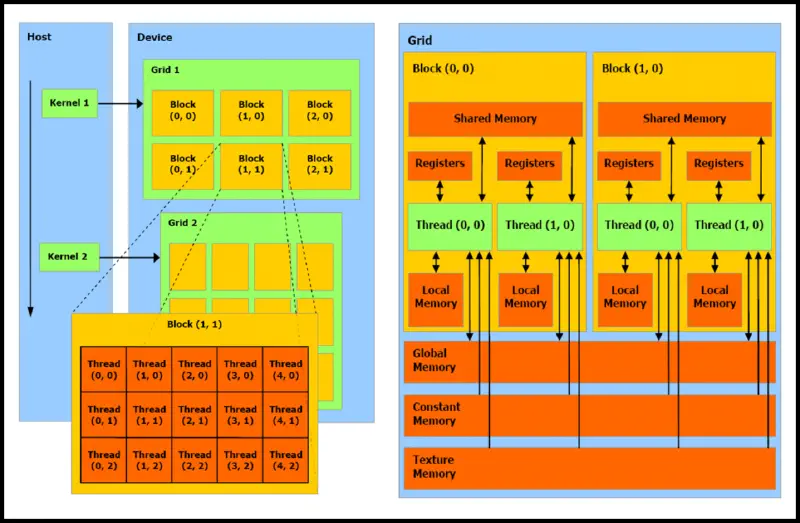
- general kernel syntax is
kernel <<<blockCount, blockSize>>> (args)blockCountandblockSizearedim3and can be 1D/2D/3D
- each thread has a unique
threadIdx.{x,y,z} - each block has
blockIdx.{x,y,z}(andblockDim.{x,y,z}for size)- will be assigned to one streaming multiprocessor
- they are sometimes called Cooperative Thread Arrays (CTAs)
- we have to make sure that the GPU has enough SMs and threads/block to start!
Memory
Global/device memory
- accessible from all threads
- high latency
- lifetime exceeds thread lifetime
- can be quite large, depending on the GPU
- includes thread’s local memory (is only thread-local)
- has address interleaving: successive addresses are mapped to different memory banks so sequential access by multiple threads is faster (each accesses different bank)
- allocation:
cudaMalloc(&dmem, size); - deallocation:
cudaFree(dmem); - transfer (blocking):
cudaMemcpy(*dest, *src, size, transfer_type);- the
transfer_typeiscudaMemcpy<FROM>To<TO>(Host/Device)
- the
Shared memory
only accessible from the thread’s block
access cost is (in the best case) equal to register access
lifetime is same as thread block lifetime
can be around for a block (with SM having more to accommodate more blocks)
organized into banks:
- typically 16-32 banks with 4B width
- parallel access if no conflict (otherwise results in serialization)
can be static/dynamic, based on if it’s known at compile time or not
- the access time shouldn’t differ (at least not significantly)
| |
Registers
- are at thread level
- depend on run-time configuration
- max. 255 registers/thread
- we can’t really specify what will become a register
- register spilling: if source code exceeds the usage of registers, they spill into local memory
Host memory
- pinned (i.e. can’t be paged out by the system)
- use
cudaMallocHost - is a scarce resource (locks memory out for other processes)
- the OS might limit how much of this can be done
- can be faster if we’re doing a lot of computation on it
- use
- pageable (unpinned)
- just use
malloc
- just use
Code examples
Allocating memory:
| |
Copying memory:
| |
Variable declaration
| Prefix | Location | Access from | Lifetime |
|---|---|---|---|
__device__ | global memory (device memory) | device/host | program |
__constant__ | constant memory (device memory) | device/host | program |
__shared__ | shared memory | device | thread block |
Function declaration
| Prefix | Executed on | Callable from |
|---|---|---|
__device__ | device | device |
__global__ | device | host |
__host__ | host | host |
__global__defines a kernel, return type isvoid__host__and__device__can be combined- for functions executed on the GPU:
- no recursion
- only static variable declarations
- no variable parameter count
Coalescing
Combining fine-grain access by multiple threads into a single operation.
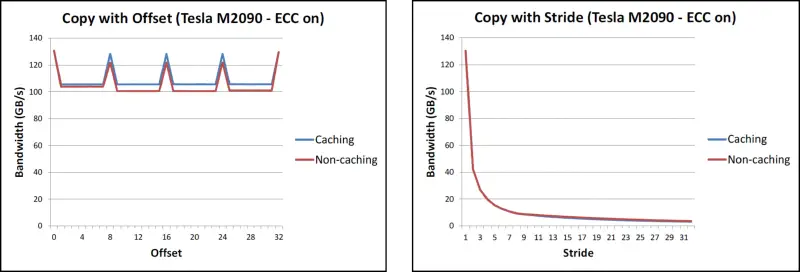
- for global memory, addresses should be multiples of cache line size
- if done improperly, results in significant bandwidth decline:
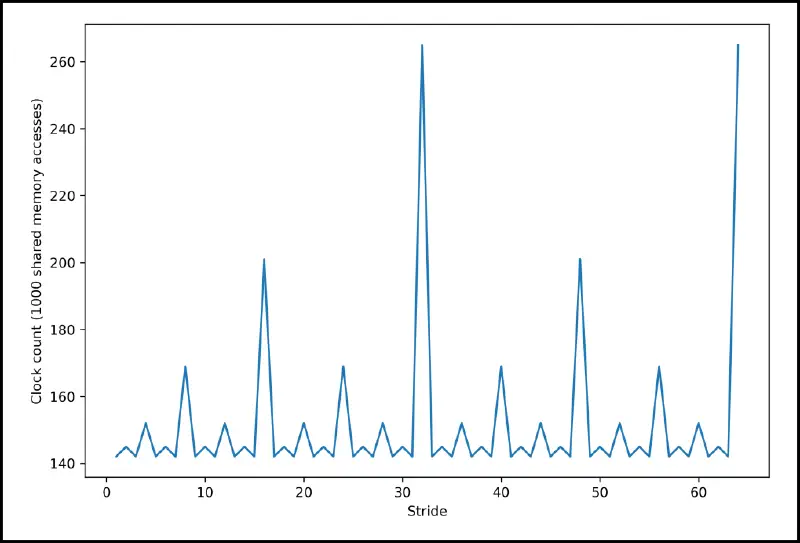
- for shared memory, concurrent access by different threads is handled by the memory banks
- for our cluster, there were banks, where successive mapped to successive banks (mod ), which made the stride pattern look like this:
- thread scheduling does not result in coalesced access, needs to be handled manually!
Thread scheduling
- up to 1k threads per block
- one block executes on one SM (up to )
- no global synchronization! (context switching on GPU is waaaay too expensive)
- threads in a block grouped into warps of (scheduling units of GPU)
- implementation decision, not CUDA
- all threads in a warp execute the same instruction (on their own data and registers)
- for conditionals, a mask is used (all of them still execute the same instruction but only the result of those with the mask are written to the memory)
| |
During execution, the hardware schedules blocks to SMs
- happens repeatedly – when some blocks terminate, others will be distributed
- the number depends on a block’s resources (for ex. allocated shared memory)
A SM has multiple warp schedulers that can execute multiple warps concurrently:
- context switching is fast (as opposed to CPU), since the data stays on-chip
- if a warp doesn’t have resources, it is stalled while they are fetched
- this happens really fast because the data stays in registers
- there are multiple policies for scheduling warp executions:
- Round Robin – fetched in a round robin manner
- Least Recently Fetched – fetch based on which has not been fetched the longest
- Fair – fetch for the one with the least amount of fetches
Optimizing Matrix Multiplication
Naive (CPU)
- nothing too interesting, just three loops
- can be further improved by changing the order of addition for better cache hits
| |
Naive (GPU)
- looping handled by a single thread block
- per loop, we do 2 FLOPS and 2 memory accesses
| |
Multiple thread blocks (GPU)
- we can split the matrix by thread blocks so each thread does a single index
- no longer limits us to arrays of size (max TPB)
| |
Using shared memory (GPU)
- we can utilize shared memory to greatly improve the FLOP/global memory access ratio
- then all threads operate on those
- main trick: copy parts of the matrix from global memory to shared memory!
- creates an additional loop: we tile the blocks such that they fit into shared memory
Note: I think that the code in the presentation is wrong – the tiling doesn’t make sense for sizes other than the size of the block (otherwise threads are writing out of bounds). I’ve modified it, hopefully it’s somewhat correct.
| |
- the
__syncthreads();synchronizes all threads within a single block (“wait here”)- behaves as a barrier to make sure all threads are on the same page
- useful particularly when repeatedly writing/reading shared memory
- RAW (true/data dependency): don’t read before you finish writing
- WAR (anti-dependency): don’t write before you finish reading
- WAW (output dependency): if the last write is important, make sure it’s the last
Parallelism
- sequential program
- single thread of control
- instructions executed sequentially
- concurrent program
- several autonomous sequential threads
- parallel execution possible
- execution determined by implementation
- is not parallelism – we can implement concurrency by interleaving on a single CPU, it just indicates that the threads are independent
Various levels of parallelism:
- Instruction Level Parallelism (ILP) – parallelism of one instruction stream
- huge amount of dependencies and branches
- limited parallelism: pipelining, out-of-order execution
- Thread Level Parallelism (TLP) – parallelism of multiple independent instruction streams
- less amount of dependencies, no limitations due to branches
- limited by the maximum number of concurrently executable streams
- Data Level Parallelism (DLP) – applying one operation on multiple independent elements
- parallelism depends on data structure
- vectorization techniques (single instruction processing multiple values)
- Request Level Parallelism (RLP) – datacenter and customers
The lecture goes into theoretical parallel algorithm design.
Synchronization
Definition (synchronization): enforcement of a defined logical order between events. This establishes a defined time-relation between distinct places, thus defining their behavior in time.
- SIMD (warps on GPU): one instruction, no synchronization necessary
- MIMD: synchronization necessary (shared variables, process synchronization, etc.)
Profiling
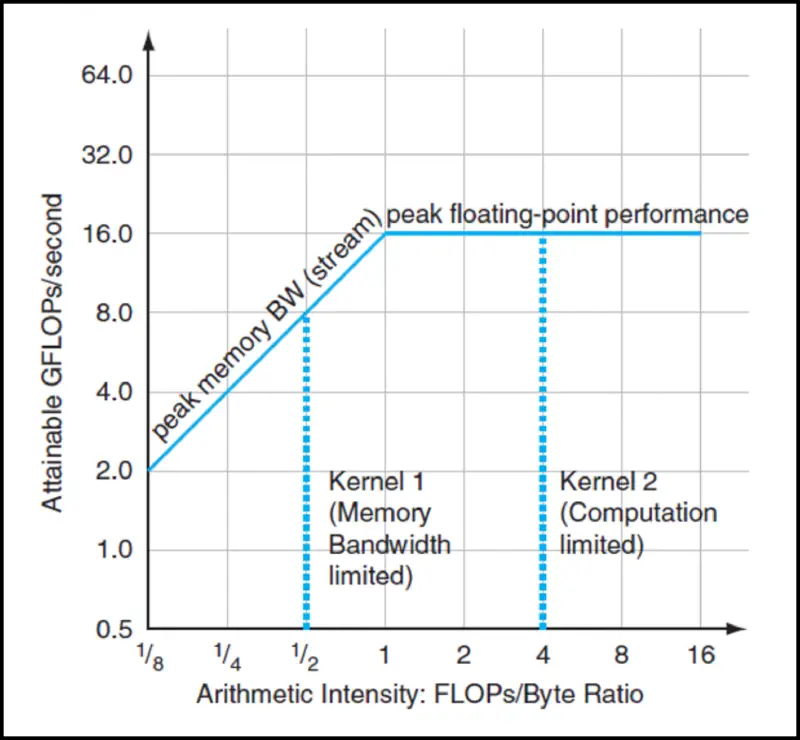
Definition (arithmetic density) , sometimes called computational intensity is the ratio between floating point operations and data movements, i.e.
To evaluate performance, we use the roofline model:
- the performance is limited by its weakest link – either memory-bound or compute-bound
- obviously depends on the hardware (memory-bound program can become compute-bound when run on a different machine)
- by optimizing performance, the line can be stretched in both directions
The lecture goes into CUDA profiling. Here are some important concepts:
- Nsight – records and analyzes kernel performance metrics (in detail)
- compute/memory graphs, roofline analysis, etc.
Scheduling optimizations
- common and important data parallel primitive (sum, histogram, etc.)
- easy to implement but hard to implement fast
- to process very large arrays, we will require more than one SM – synchronization problem
- solution: one reduction layer will be one kernel launch
- the examples don’t actually do this, but in practice this would be done
- we’re also assuming associativity (so we can do shenanigans with the order of operations)
Naive implementation
- we’re implementing a reduction add
- one kernel launch will solve a reduction subtree of its block size
- the thread structure is 1D, shared memory stores the subtree
- the output is an array of the results of each block
- this isn’t entirely Naive, we’re already using shared memory
| |
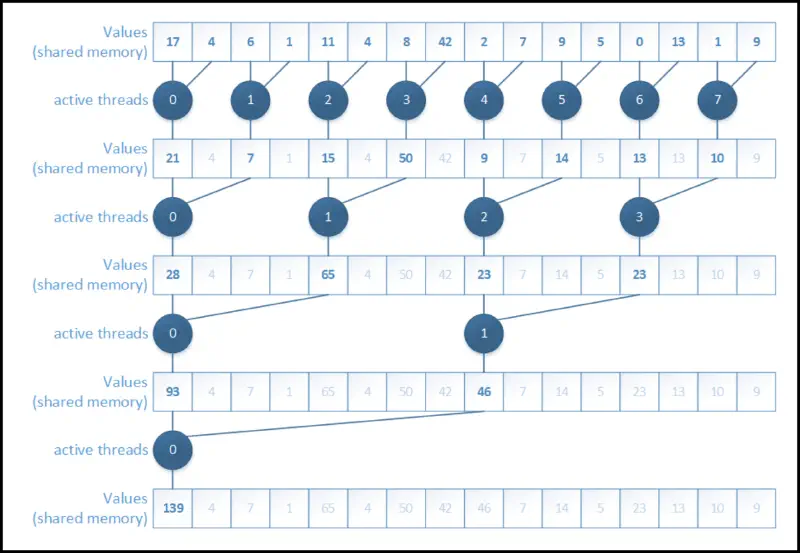
Interleaved address divergent
- remember that all threads in a warp execute the same instructions
- the previous code uses threads from all over the place – let’s use the ones from the start
- improves performance by almost ! (see table below)
| |
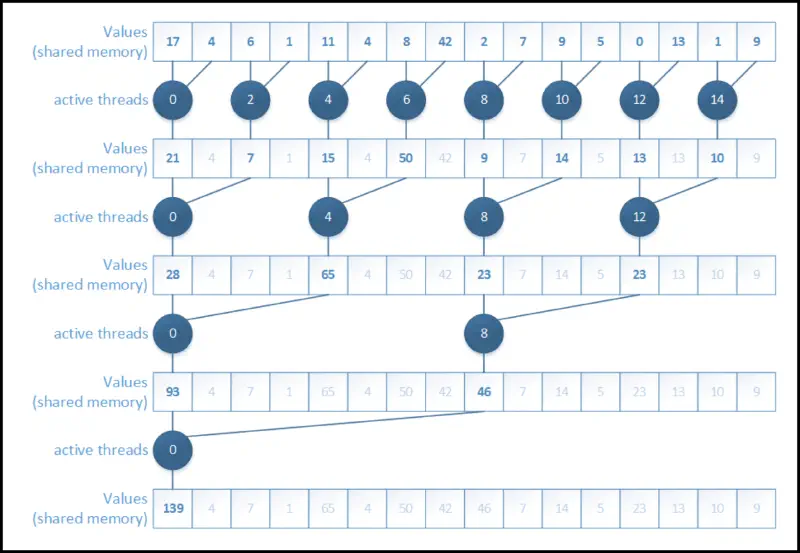
Resolving bank conflicts
- consecutive threads should access consecutive memory addresses
- see memory bank stride access graph from a few sections ago
- another large performance increase (see table below)
- this version seems like the most intuitive one to implement
| |
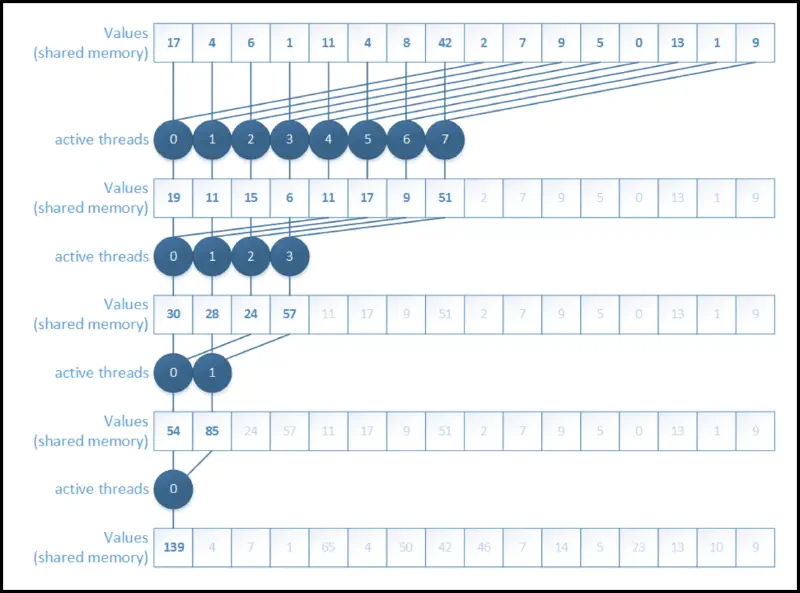
Making use of idle threads
- after the first iteration, half of the threads don’t do anything
- they just load something to shared memory at the beginning and are done
- idea: start with half of the blocks and do the first operation while loading
- almost double performance increase again!
| |
Manual unrolling
- when we have one warp left, we don’t need any
__syncthreads()calls - a bit ugly but functional and further increases the speed
| |
Overview
Here is an overview of the versions we have implemented so far (the values in the table are GB/s for the given version and TPB):
| Version \ TPB | ||||||
|---|---|---|---|---|---|---|
| naive | ||||||
| addresses | ||||||
| banks | ||||||
| first add | ||||||
| unrolling |
-body optimization
- we have bodies and want to evaluate their movement
- uses Newton’s second law of motion
- movement is approximated by temporal discretization (i.e. move by some small time)
I’m not writing the formulas from the slides, this isn’t a physics course.
AOS vs SOA
- AOS: Arrays of Structures
- data grouped per element index, different element types next to each other
- typical in most applications
- consecutive threads won’t access consecutive places in memory
| |
- SOA: Structures of Arrays
- data grouped per element type, elements distributed among different arrays
- typical in GPU applications (where multiple threads are accessing memory concurrently)
| |
Naive implementation
- single thread takes care of a single body (if blocks cover bodies)
| |
| |
#pragma unrollwill reduce branch overhead- the factor has to be determined empirically
- be careful – if isn’t a multiple, might not do some calculations/segfault
Shared memory
- split inner loop into sections (by block width) that are saved to shared memory
- each thread still computes all interactions for one body, but in block-sized chunks
| |
Host-device optimizations
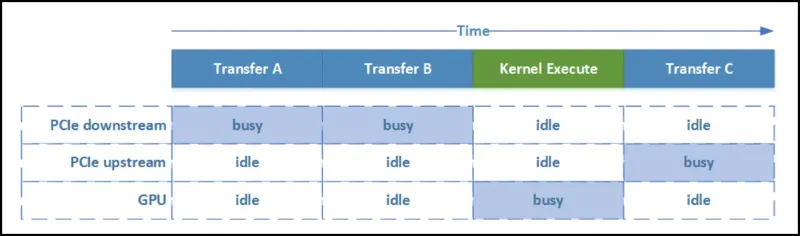
- streams – CPU/GPU concurrency!
- concurrent copy & execute (memcpy & kernel execute)
- here is a nice presentation that sums them well
Host-device synchronization
- context-based – block until all outstanding CUDA operations have completed
cudaMemcpy(),cudaDeviceSynchronize()- all of these operate on the default stream
- is special: will block all other streams until it is finished
- stream-based – block until all outstanding CUDA operations in a stream have completed
cudaStreamSynchronize(stream)– wait until operations on this stream finishcudaDeviceSynchronize()– wait until operations on ALL streams finish- the user specifies which stream a kernel launch/memory operation goes to
kernel <<< ..., cudaStream_t stream >>>cudaMemcpyAsync(..., cudaStream_t stream)
- the number of streams depends on the architecture
- we can also insert events and check when they have been completed
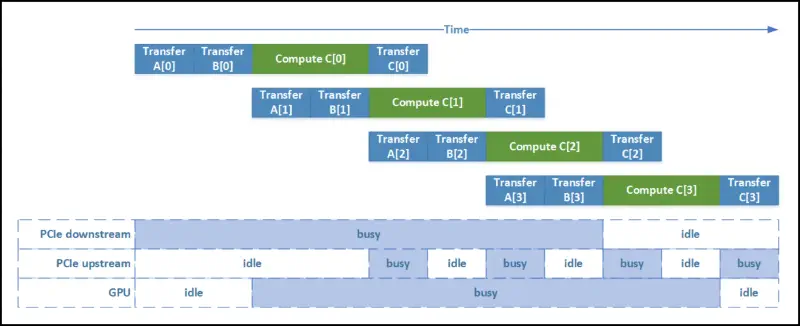
| |
Issues
- hardware used to only have two types of queues:
- copy engine – issues copy operations
- kernel engine – launches kernels
- when the stream is processed, the following happens, resulting in sequential execution
- we have to move the kernel launches after the copies!
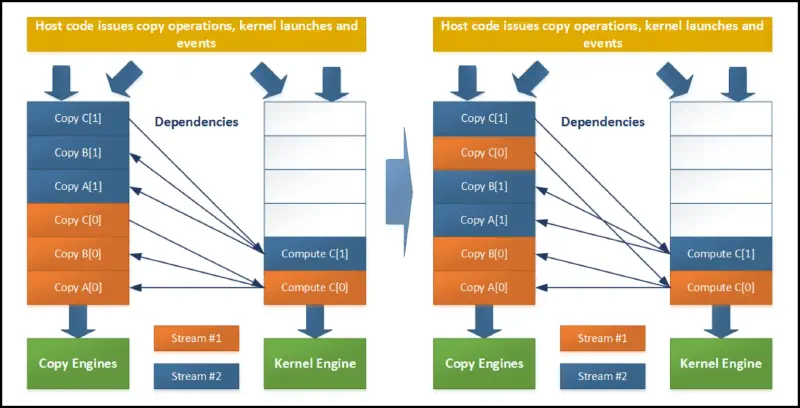
| |
- the newer architectures are better and have multiple hardware queues
- be careful, some operations implicitly synchronize all other CUDA operations
- page locked memory allocation (
cudaMallocHost()orcudaHostAlloc()) - device memory allocation (
cudaMalloc()) - non-async versions of memory operations (
cudaMemcpy(),cudaMemset())
- page locked memory allocation (
Virtual Shared Memory
lets CPU and GPU have the same address space
nicer to deal with (only one type of pointers)
access costs can be quite significant
Unified Virtual Addressing (UVA)
- support since CUDA 4
- single virtual address space for all memory in the system
- GPU code can access all memory
- does not automagically migrate data from one physical location to another
Unified Memory (UM)
- newer way (CUDA 6) of handling memory
- pool of managed memory that is shared between CPU and GPU
- automatic (page) migration between CPU and GPU domains
Productivity
- make compiler responsible for low-level implementations
- generate kernels, launch them
- handle data movements, optimizations
- simplifies the writing process
OpenACC
- directive-based programming model to off-load compute-intensive loops to accelerators
- cross-platform (C, C++, Fortran)
- execution model: host-directed execution with an attached accelerator device
- offloading compute-intensive regions
- coarse-grain parallelism: fully parallel execution across execution units gang parallelism
- limited support for synchronization
- CUDA: grid level
- fine-grain parallelism: multiple threads on a single execution unit worker parallelism
- latency hiding techniques
- CUDA: warps at block level
- SIMD/vector operations: multiple operations per thread vector parallelism
- CUDA: threads at block level
- compiler takes care of memory
- is implemented using directives
#pragma acc directive-name [clauses]parallel– user responsible for finding parallelismskernel– compiler responsible for finding parallelismsloop [clause]– share among threads/execute sequentiallygang– among thread blocksworker– among thread warps of a blockvector– among threadsseq– sequential execution
data [clause]copy– H2D at region start, D2H at region endcopyin/copyout– in/out devicecreate– device allocationpresent– note that the data is already there
- is an iterative process (test, see how it does, repeat)
Naive version
| |
kernels pragma
- the compiler will let us know what it did
- which kernels it launched
- what it copied
| |
parallel loop pragma
- “please, distribute this loop over different threads”
| |
data pragma
- “please, copy this data to the accelerator”
- “now distribute this for loop, oh and also you have the data already”
| |
Nested loops
| |
Stencil computations
- iterative kernel that updates regular arrays based on certain patterns
- useful for image processing, partial differential equations, fluid dynamics, etc.
Image processing
- connected component labeling – identify connected areas in this image
- each segment will be labeled with a different value
- -way or -way connectivity (we do )
- for an image, we apply a threshold to create a black/white image
Note: I am beyond confused to what the algorithm actually is, this is my best guess:
- parallelly set labels to the entire stencil (taking threshold into account)
- parallelly (repeatedly) merge labels (taking the minimum)
- will be done diagonally
- wavefronts – storing previous elements in shared memory to reduce memory contention
Partial differential equations
Read the slides, I’m fairly certain this isn’t too important.
Performance optimizations
- stencil codes are memory-bound
- when partitioning the data, there is overlap (called the halo)
- vertical halos are poorly aligned in memory
- marching planes – only keep 3 planes in shared memory, cycling the buffers
GPU programming models
- up to now, we’ve seen CUDA
- similar approach: OpenCL (imperative language)
- directive-based: OpenACC (declarative language, we’ve seen it)
OpenCL
Platform model
- host stays host
- compute devices are things like GPUs
- contain compute units (SMs), which have processing elements (≈ CUDA cores / threads)
Execution model
- host code (sequential parts, control)
- kernels still run on device (computational intensive part)
- context – devices, kernel objects, program objects, memory objects
- we have to explicitly create queues for different types of commands
- work item – kernel function in execution for a single point in the defined index space
- global ID / work group ID + local ID
- work group – organization structure of work items with a given kernel instance
- synchronization between work groups not possible (same as CUDA)
- can synchronize between work items
NDRange: -dimensional index space
| CUDA | OpenCL |
|---|---|
| Grid | NDRange |
| Thread Block | Work group |
| Thread | Work item |
| Thread ID | Global ID |
| Block index | Block ID |
| Thread index | Local ID |
Different types of kernels exist:
- OpenCL kernels: kernel objects associated with kernel functions (user kernels)
- Native kernels: execution along with OpenCL kernels on a device and shared memory objects
- Built-in kernels: specific for a particular device
Memory model
- memory regions: distinct memories visible to both host and device
- memory objects: objects defined by the OpenCL API
- Shared Virtual Memory: virtual address space exposed to both host and devices (UM in CUDA)
- has special memory objects: buffer, image, pipe
| CUDA | OpenCL |
|---|---|
| Host memory | Host memory |
| Global/device memory | Global memory |
| Shared memory | Local memory |
| Registers/local memory | Private memory |
Consistency & Coherence
Ordering problem: threads operate independently: which order to apply?
Cache coherence: two threads write to same variable, which gets written to cache:
- caches have to be coherent (all threads see the same value)
- different cache policies:
- write-back: write to cache, at some later point write to memory
- write-through write to cache and immediately to memory too
- both cases have coherence problems, if we don’t update caches of other threads
- a microarchitectural feature
Memory consistency: the order in which memory operations appear to be performed
- as opposed to coherence, focuses on the order of execution
- strict: any write seen immediately
- sequential: write by different processors needs to be seen in the same order by all processors
- highly relaxed for GPU, few guarantees
__threadfence()stalls current thread until all writes to shared/global memory are visible to other threads (if_threadfence_block()then only shared memory)__syncthreads()is a stronger version since it also synchronizes thread execution
- an architectural feature
Comments
Nothing yet. Say the first thing.
Sign in to join the conversation.