
Betteridge’s Law of Headlines states:
“Any headline that ends in a question mark can be answered by the word no.”
When journalists and reviewers frame a title as a question, it intrinsically suggests the presence of significant doubt; otherwise they would simply state it as fact.
So, is Deckle a Scrivener replacement? No. Not yet.
At this point I imagine the more pressing question is “what the heck is a Deckle?”
Before we begin: Deckle kindly provided me with early access to the software. During this period I’ve been in frequent contact with them, asking questions and making annoying feature suggestions. Several of my requests have already been added as features, which is nice.
All that said, everything you’re about to read are my thoughts alone — they haven’t seen any of this article prior to me publishing it.
I’m always alert for interesting writing tools. This year I’ve been collecting the names of software and services to check out (Lacuna! Scriptri! Atticus! Reedsy Studio! Open Atelier! Affinity!), and I’ll probably write about each of them on the newsletter at some point.
Deckle was not on my radar until early June, when the developer got in touch asking if I was interested in taking a look. Reader, I was.
For some context, I’ve been a Scrivener user since 2012. It’s what I’ve used for all four of my major serials and I’ve written about how I don’t think I could write and publish in the way I do without it. Here’s a tour of my Tales from the Triverse project file from 2025:
I evangelise about Scrivener whenever I get the chance. That said, it is notorious for two things:
A very steep learning curve for new users
A compile/export interface that is confusing: highly complex yet also somehow underpowered
It’s why I turned to Reedsy Studio back in 2024 when I produced the ebook and paperback of No Adults Allowed. The idea of doing it in Scrivener didn’t really compute. Reedsy makes everything easy but is extremely restrictive; I’ve also designed a cover and interior for a client using Affinity Studio, which is at the opposite end of the spectrum, in terms of power and difficulty.
Along comes Deckle, which claims to do all the important Scrivener bits and have the easy export of something like Reedsy and retain the design flexibility to make it your own.
It’s currently in early access before moving to v1 in early August, and I’ve been testing it out for the last few weeks. There’s a lot of promise here.
The fundamentals, then:
($107 early access price until August 8)
Local install
Licence covers 2 devices
Mac, Windows and Linux
At the top, then, we have a very solid licence model. There’s no Adobe-style subscription bullshit — it’s a single purchase and you’re sorted. This isn’t a web-based app that disappears when you don’t have access to the internet. Your project files remain on storage devices that you own, rather than in a third party’s magical cloud. It’s not inexplicably Mac-only, like Vellum.
That Deckle is available on the three main computer systems is convenient and unusual. It’s also increasingly critical, rather than being a simple personal preference. I’ve spent much of 2026 researching how to extricate myself from certain large corporations based in countries which unfortunately aren’t as friendly to the UK as they used to be, and Scrivener was one of the last programs keeping me tied to Windows.
Lots of programs claim to do X, Y and Z, without quite meeting expectations. Deckle is currently in early access and has been rapidly evolving even while I’ve been testing it. I’m writing this on 18 July and there have been two significant updates in as many days. A month or two from now it could be different again: that’s why this is very much ‘first impressions’ rather than any kind of review.
Here’s Deckle:
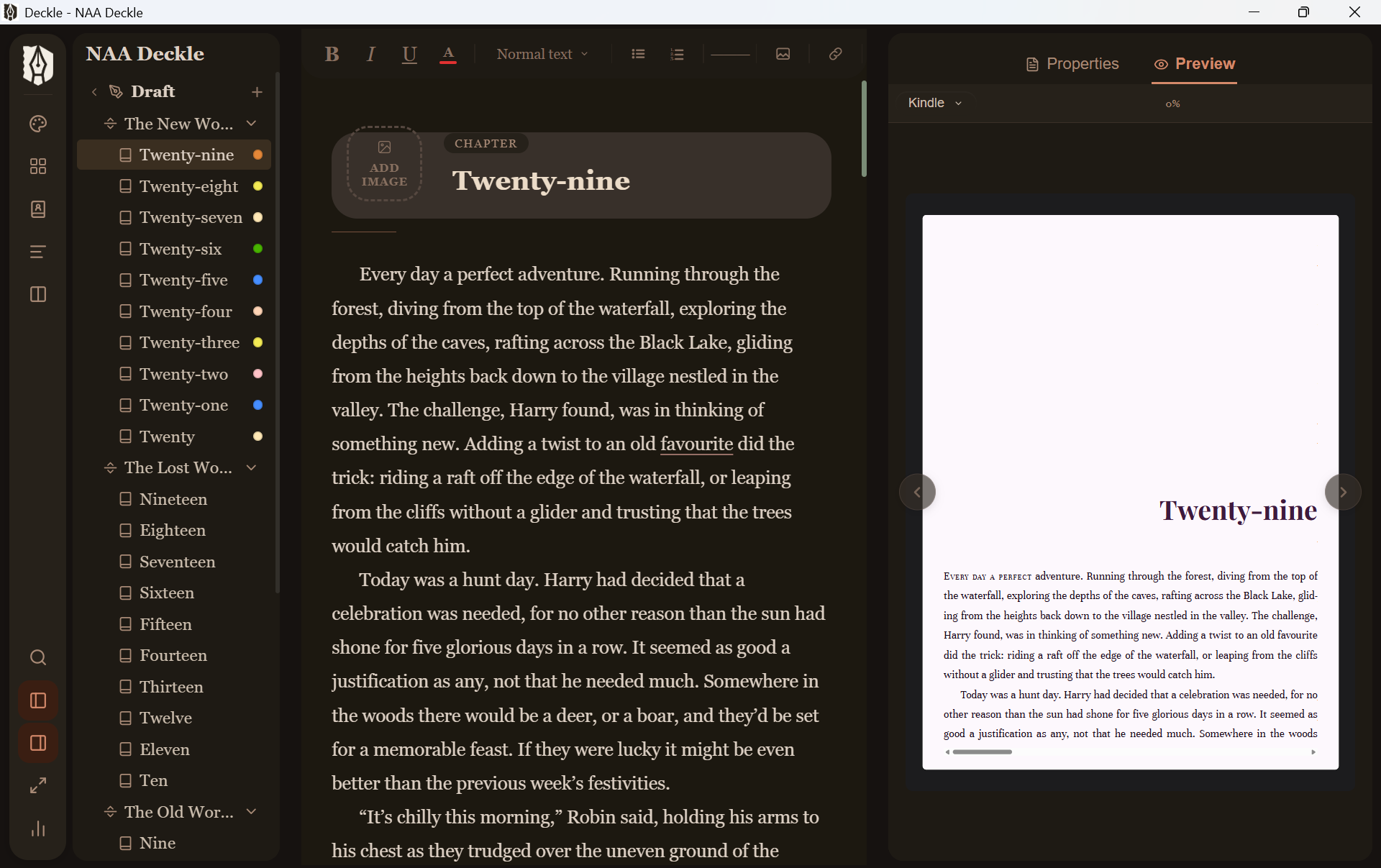
That’s the first chapter of my book No Adults Allowed. Elements of the layout will seem familiar to Scrivener users, with the binder on the left showing the chapters and the editor in the middle. Here’s an annotated version of that screenshot:
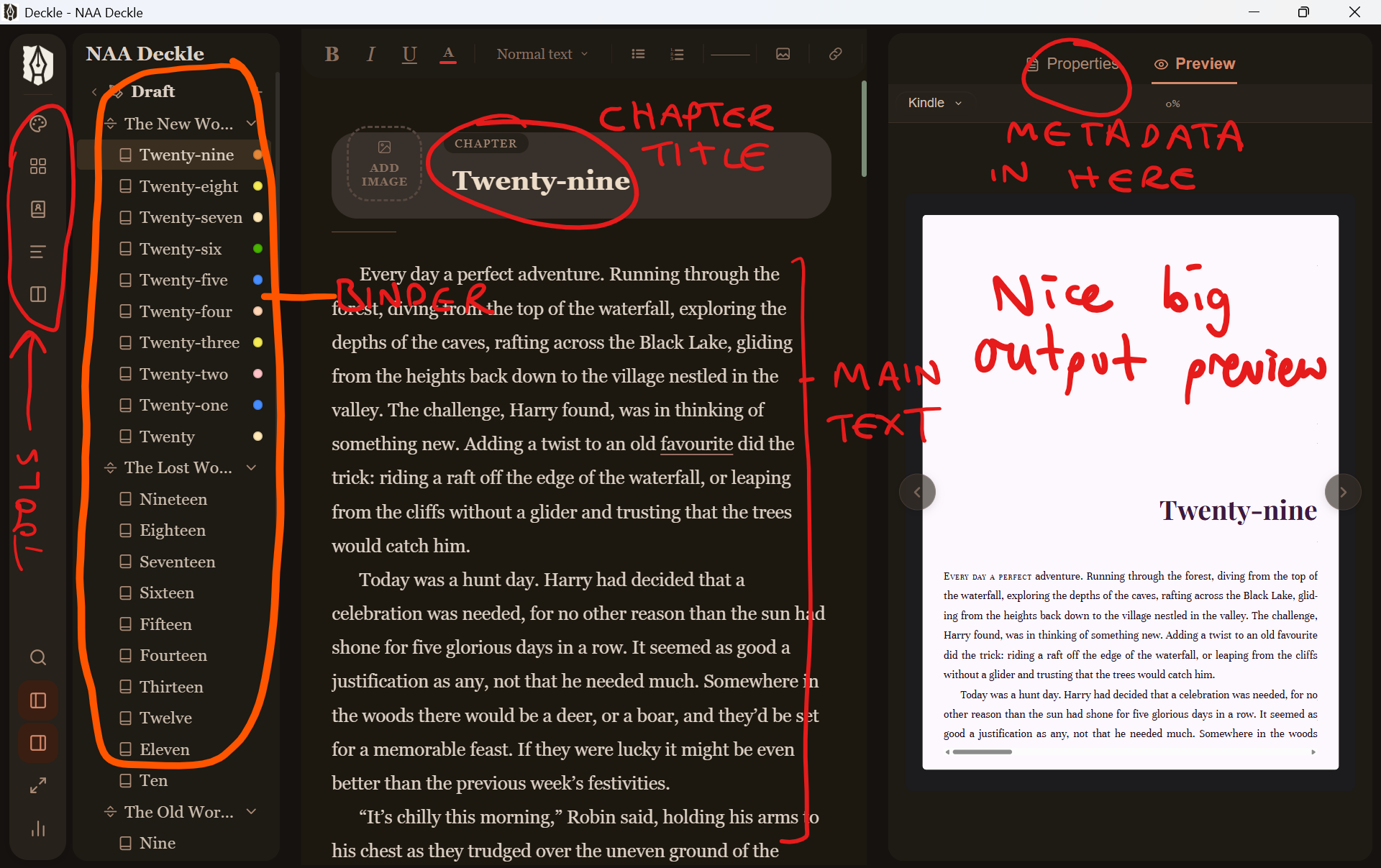
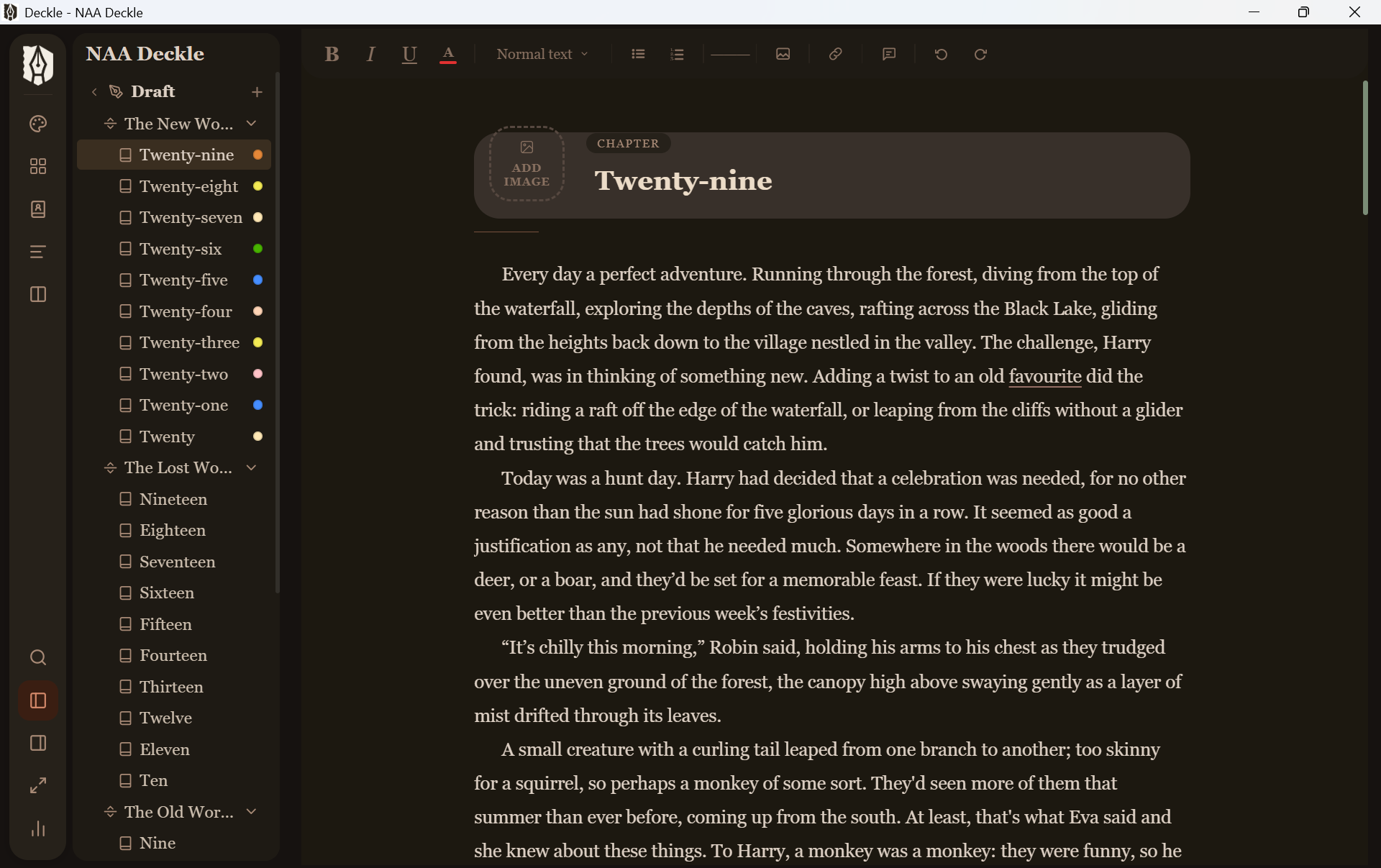
The big shift from Scrivener is that preview on the right. This is a live, updating view of what your exported book will look like, complete with your chosen styles. It means you always know what to expect, rather than waiting until a compile is finished only to discover that something’s in the wrong place.
You can hide it away of course, if you’re focusing on the writing:
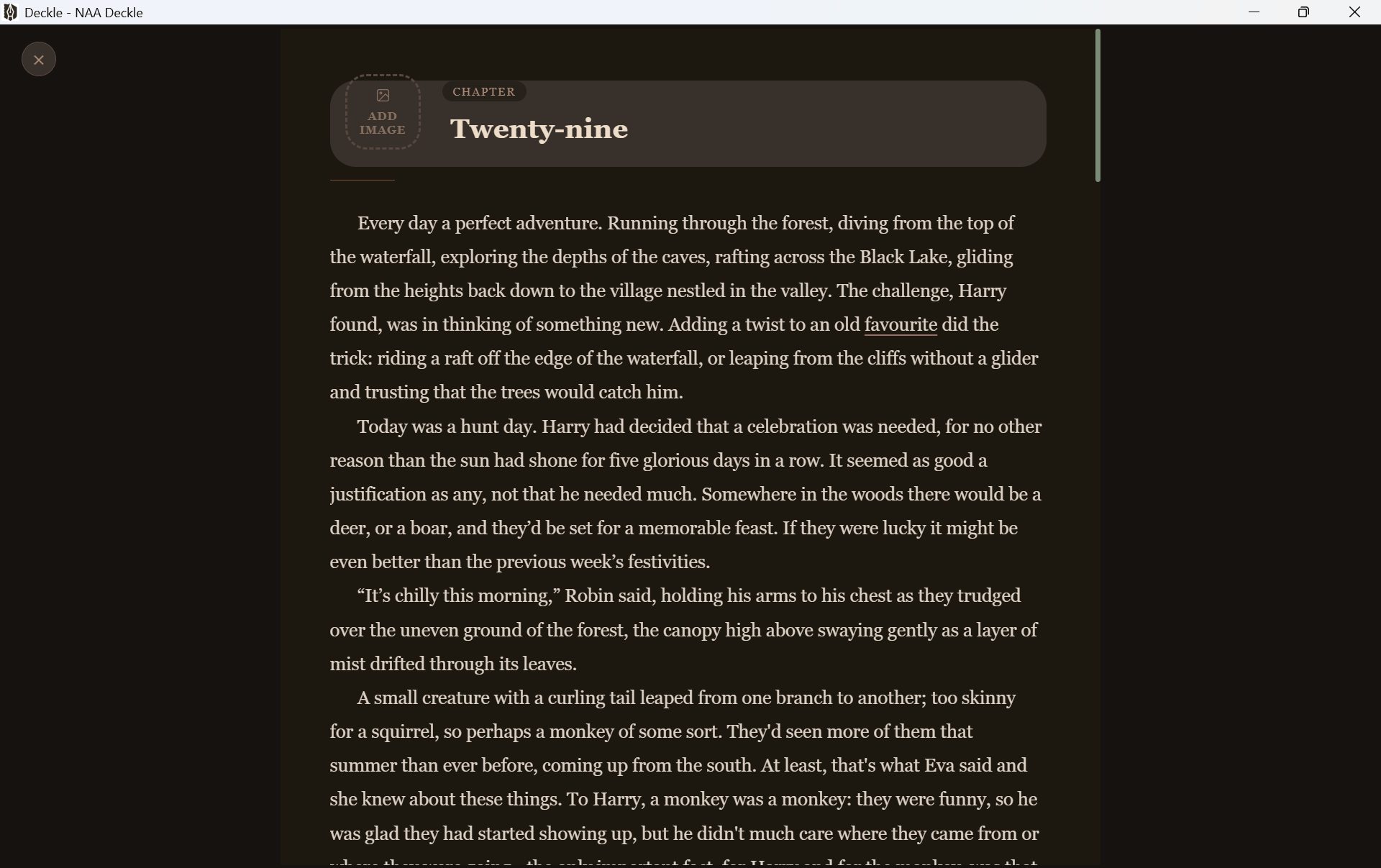
There’s even a focus mode that strips everything away except for the words:
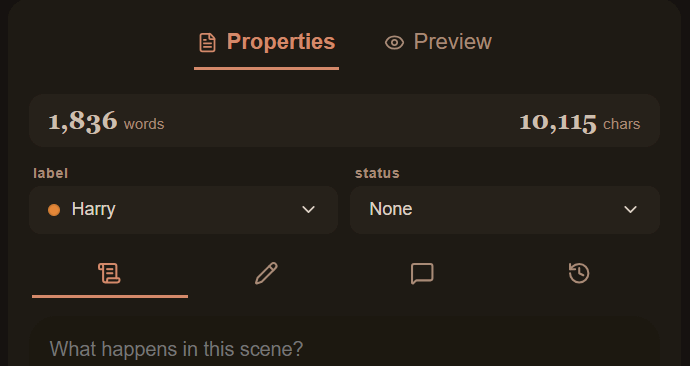
Chapters also have metadata properties you can use in whatever way makes sense:
Structurally, a book can be comprised of Parts, Chapters and Scenes, and you can deploy folders to keep things tidy. As well as the manuscript draft, there’s also a ‘research’ section where you can keep your notes:
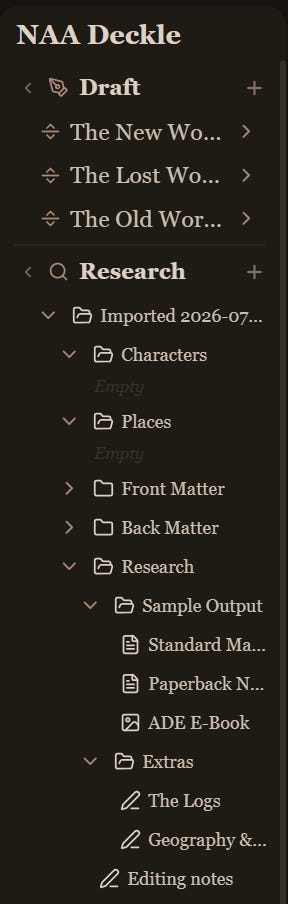
One thing to note is that everything you’re seeing in these screenshots was imported from my Scrivener project file. Deckle can import files from most of the common word processors, and having my entire project arrive intact, manuscript and research, was a pretty big deal. It makes the switching cost very low.
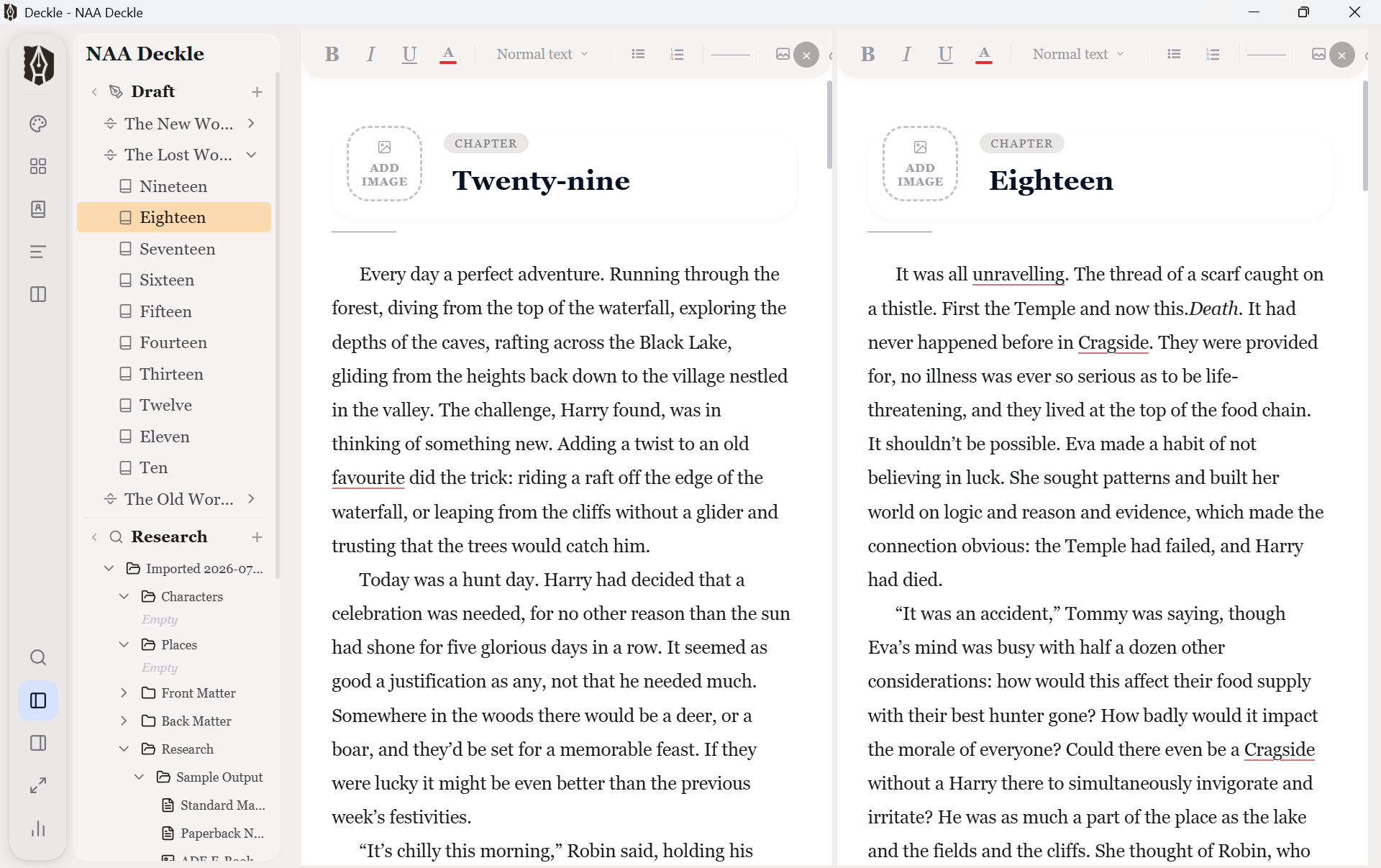
You can split the editor for a dual view and switch to outliner or continuous modes. Deckle is never as feature-rich as Scrivener, but that also means it’s never as complicated. Something I’ve always appreciated about Google’s office suite is that they focused on the Microsoft Office features you actually use day-to-day, made them much easier to use and dumped the rest. If you’re a power user, that can be limiting, but for 80% of users it’s a good experience. Deckle seems to be taking that same approach.
There’s a bunch of useful settings, like auto-updates and the ability to quickly change the interface style:
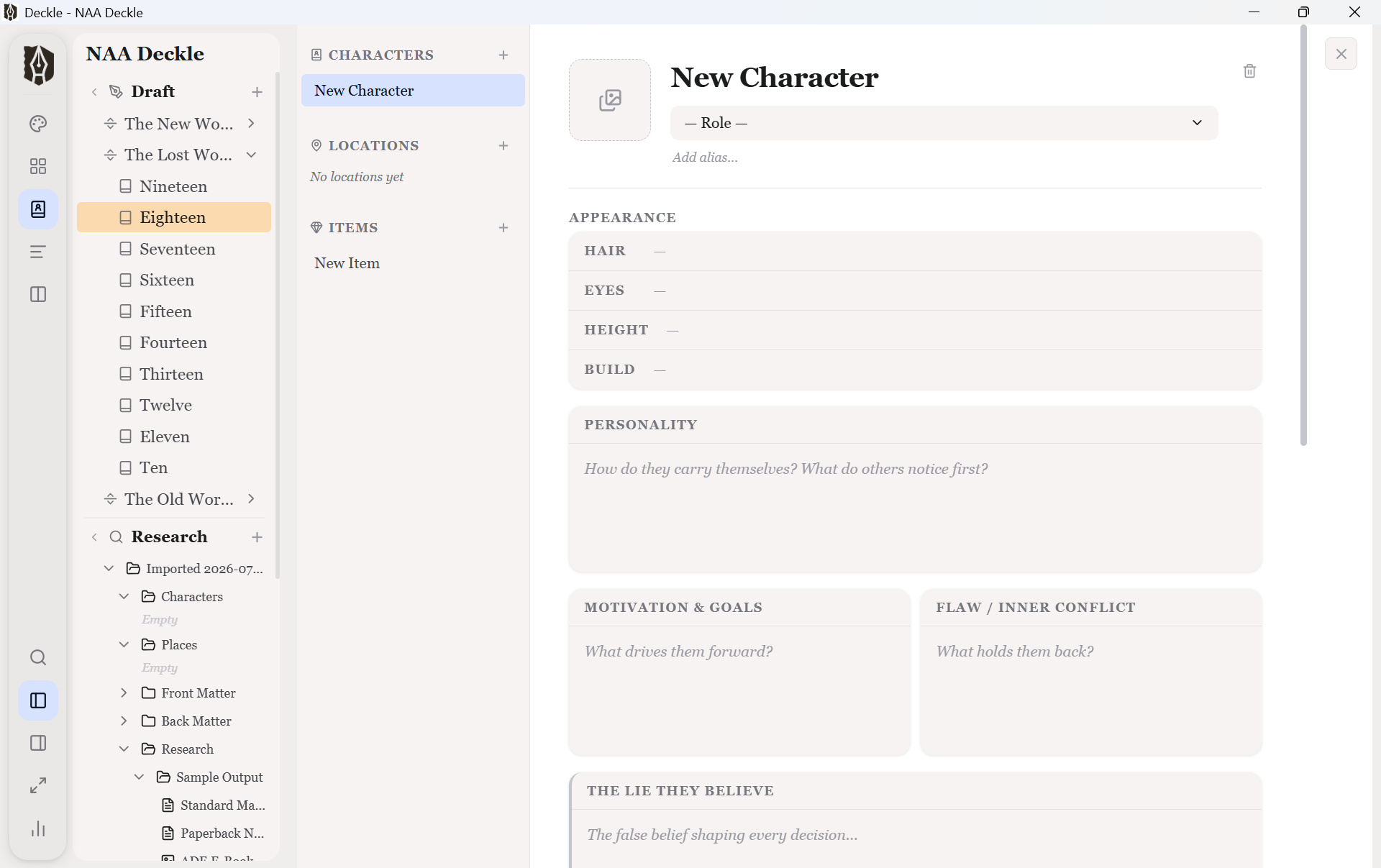
Remember all those overly-detailed templates that I mentioned in my article about Reedsy Studio? Well, if that’s your sort of thing you’ll find them in Deckle’s codex section:
So far, I’ve been describing a streamlined version of Scrivener. If you’ve always liked the idea of Scrivener but have found it too tricky to tackle, that might be enough to give Deckle a look. Even if you’re a veteran Scrivener user, there are all sorts of quality of life bonuses here, too: super fast loading and saving (my large serials can take several minutes to load and save in Scrivener!), a modern, responsive interface, those nifty UI stylings…
But we haven’t got to the main event yet. Which is the export, and the styles. Take a look at this:
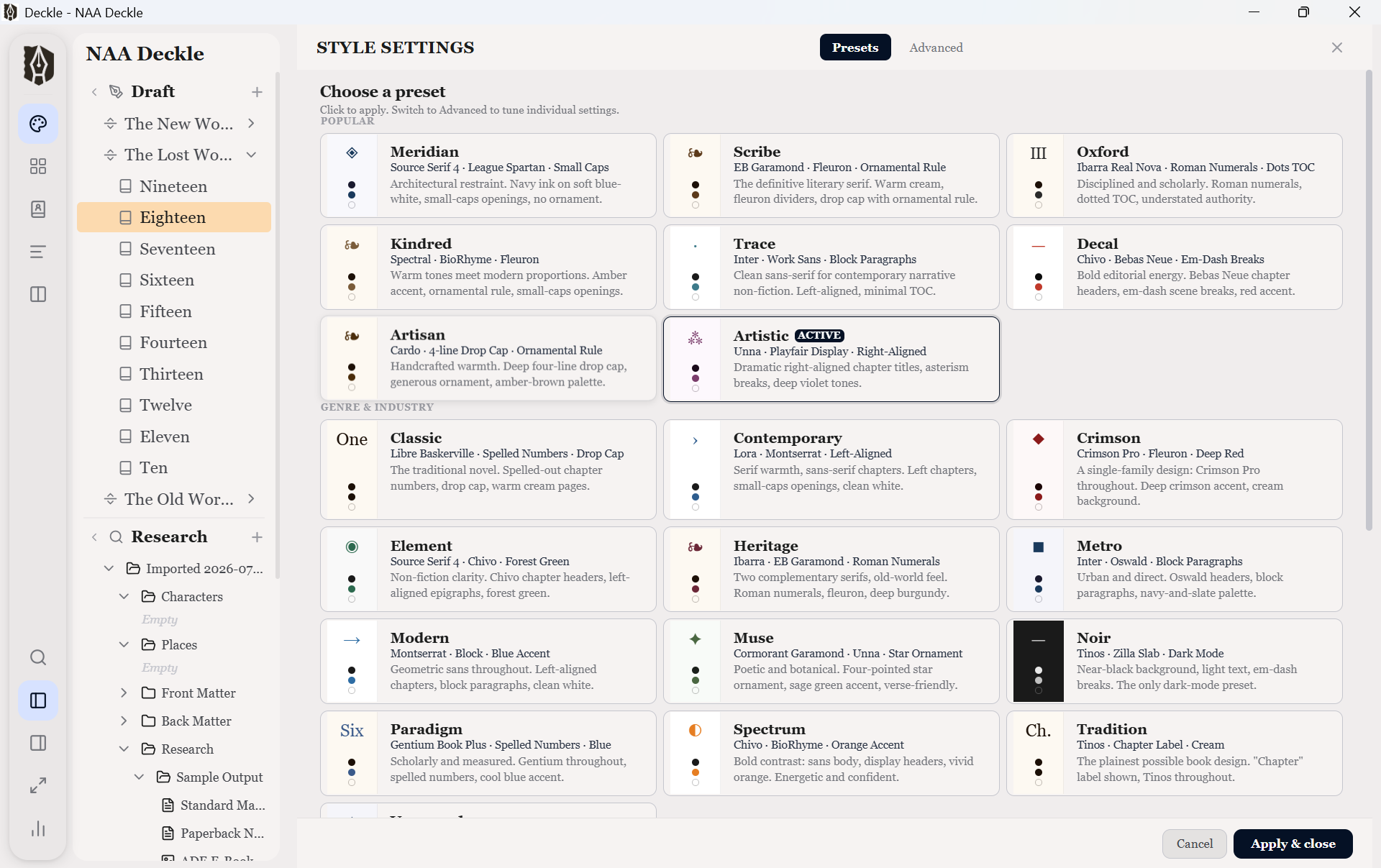
These are Deckle’s built-in style presets. In the screenshots I’ve been using the ‘Artistic’ preset. Here is a different preset, ‘Decal’, with the preview turned back on:
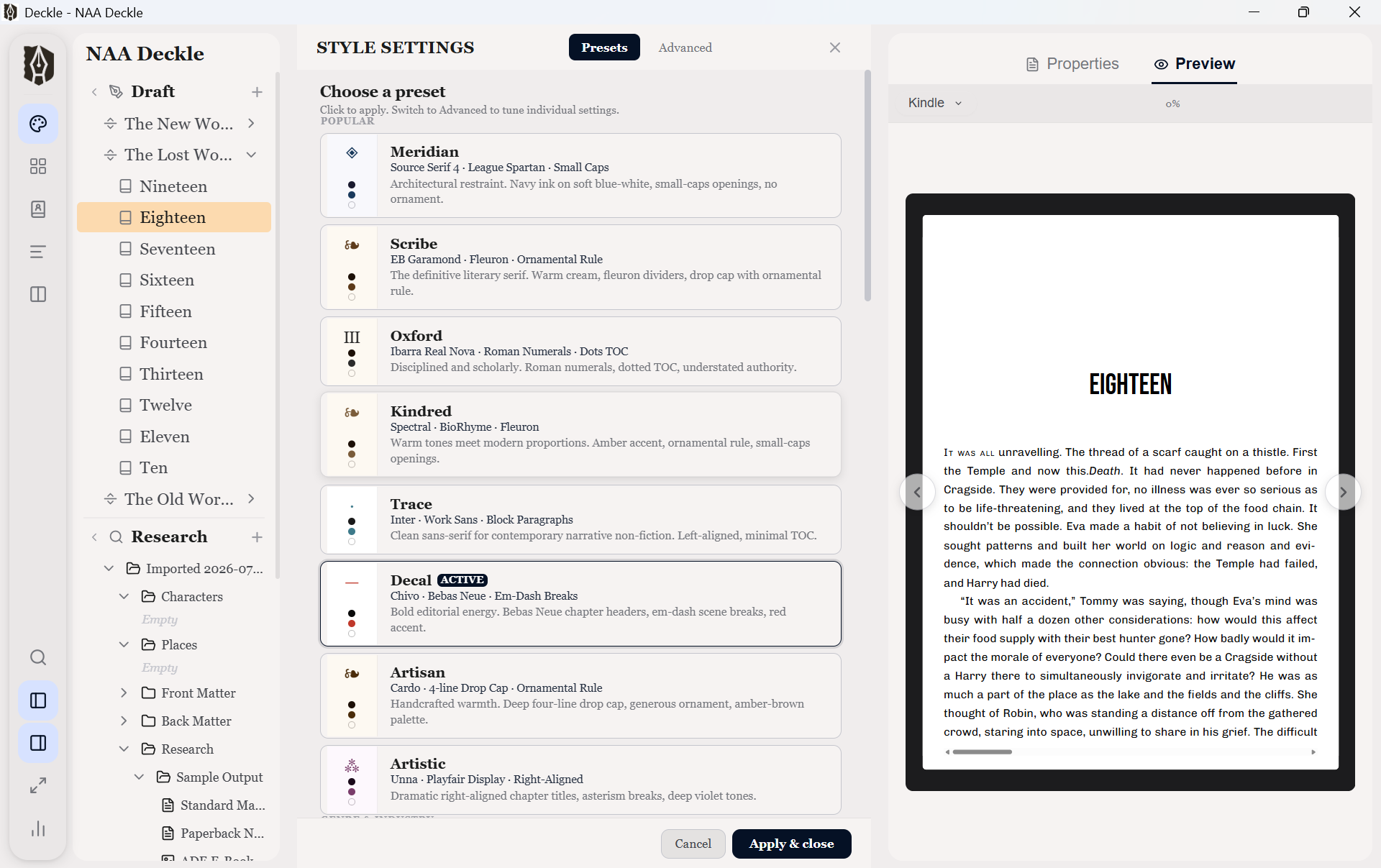
Note how the chapter preview has changed, with new fonts and positioning. Clicking a style updates the preview and you can move through pages to see how the text flows.
As you can see, there are are many more presets here than in something like Reedsy Studio. I haven’t delved into the presets in great detail yet, so I can’t speak to how good they are in terms of professional output, but at first glance they seem decent. If it was limited to the presets that’d still be a decent situation, but you can also dive into the ‘advanced’ settings:
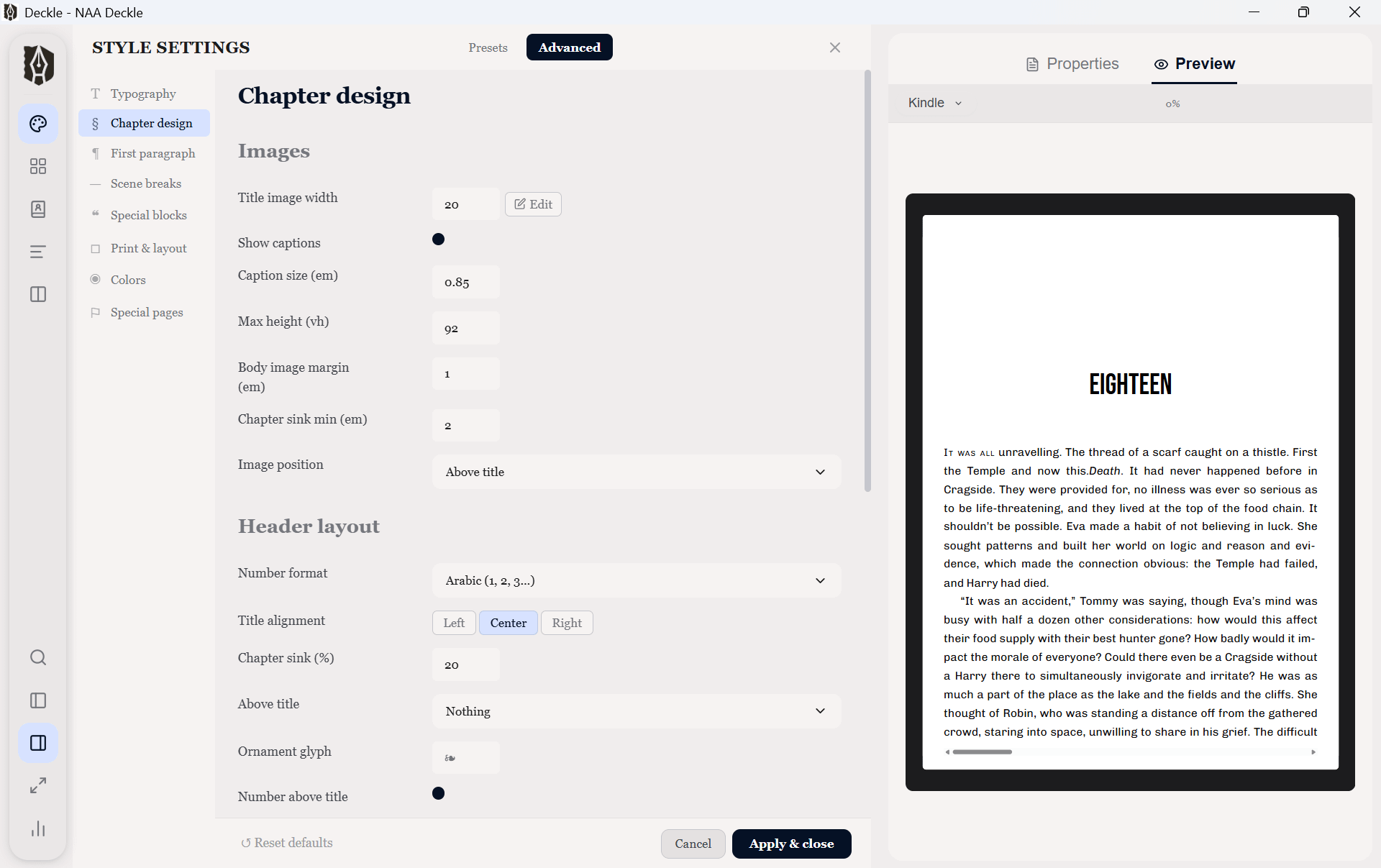
Here you get to customise the fine details and make the output whatever you need it to be, putting your own personal stamp on it. Again, I need to dig into these in more detail and test it out in anger — but it looks very promising. The styles are separate to the text of your manuscript, so you’re never locked into decisions made during writing.
Once you’re ready, you can export:
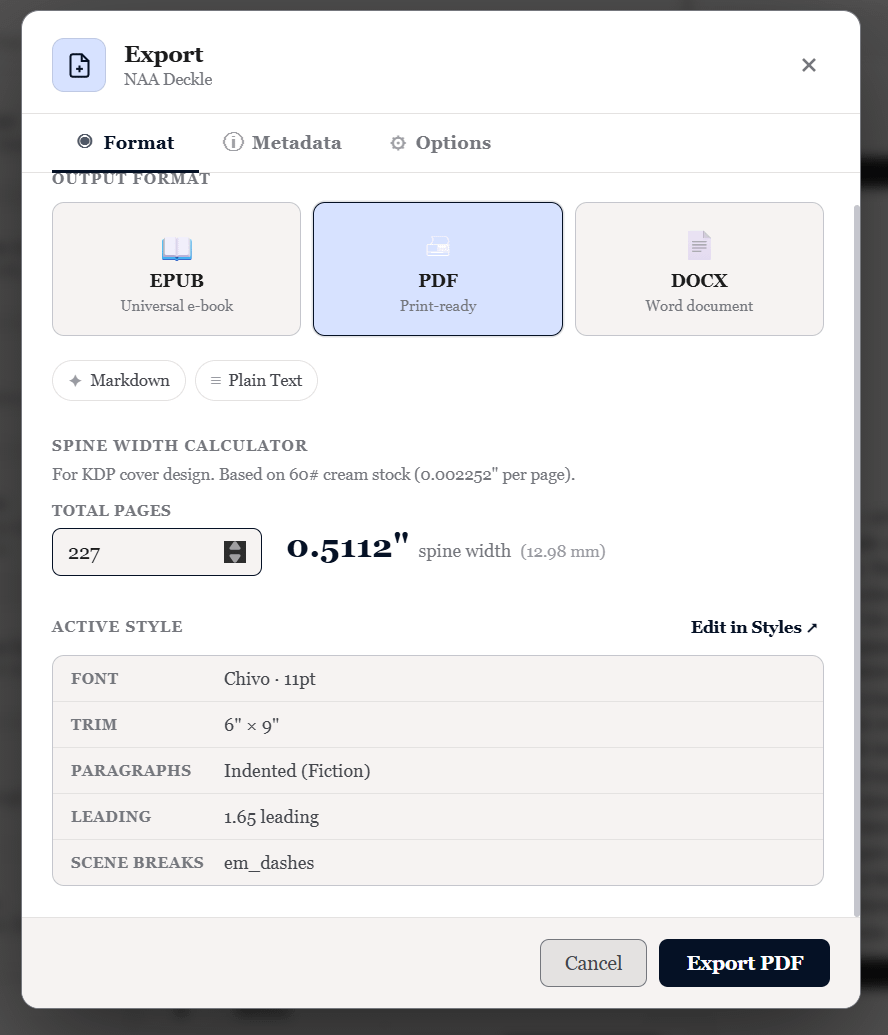
You can produce an epub file for digital distribution, a PDF for print-on-demand or a DOCX Word file to send to your agent or publisher or an editor. It all seems comprehensive.
Deckle is the first time in over a decade that something has caught my eye which offered an alternative to Scrivener. The ease of importing my projects, the speed and simplicity of the interface, and of course the combination of power and effortlessness in the export are all deeply appealing.
I’m not switching right now, though. Deckle is still in early access, although it’s scheduled for its V1 release on 8 August. I’m looking forward to that, but I’m also aware that this is very new software. Scrivener is old and often clunky, but it’s also tried and tested: I trust Scrivener not to mess up my projects, and that’s worth a lot. Thousands of people have used Scrivener for years, which means it’s a solid tool that’s been used in the factory without breaking.
Deckle has none of that heritage. Yet. I would be nervous to move my next big serial project into it, for example. As a professional writer, I can’t risk a project imploding halfway through. I mean, that’s why I don’t use Microsoft Word. I’m not saying that would happen with Deckle, but it’s thus far unproven. I don't know anything about the devs — who they are, what they've done before, and so on.
There’s also the price: Deckle’s $197 is considerably more expensive than Scrivener’s $59. From one point of view, Scrivener has a lot more features. From another, Deckle provides a better end-to-end book production solution. Deckle’s pitch is that Scrivener users end up having to buy additional software to properly export their projects, and that their single proposition is better value. Regardless, it’s not a quick and simple comparison.
Update: Piotr Niedzieski correctly points out in the comments that my price comparison was a little skewed, as that $59 is for the Windows-only version of Scrivener. To get a multi-platform bundle is $95. There is no Linux version of Scrivener.
My plan is to use Deckle to create a new ebook and paperback of No Adults Allowed. That book is currently languishing in the Amazonian dungeon, and I’m desperate to get it out of there and more widely available at actually decent bookshops. It’s the perfect test case for Deckle: a pre-existing project, which I can import and style appropriately, then export out for distribution. It’ll be a real world test that will tell me a lot more than the last month of poking and prodding. That’s when I’ll be able to properly answer the question posed at the top of this piece. I’ll report back.
If you want to jump on board and have a look yourself, you can use this link to support the newsletter at the same time:
Last week I posted a video guide of the new audience-specific content blocks that are now available to writers on Substack. I didn’t want to bombard your inboxes so didn’t send it out, but you can find it here if it’s of interest:
Incidentally, that’s the first video I’ve made using Substack’s built-in recording setup, and I think it turned out pretty well. Excellent for quick turnaround on simpler videos.
The Atlantic magazine has something of a habit of publishing reactionary, slightly odd editorials, so I enjoyed this response to one of its recent all-is-woe articles:
This was a really interesting explanation of algorithms from a Substack employee:
While fascinating, Chris doesn’t get to the main issue of the day: for all of the clever engineering he describes, algorithmic feeds simply aren’t working for an in increasing number of people. If algorithms are so sophisticated, why are they so bad? Why does it feel like the complex algos of 2026 are significantly less useful than the simpler ones of 2016, or 2006?
I do wonder whether the engineering emphasis in the tech sector is resulting in them largely forgetting how humans actually function.
I have yet to see Nolan’s The Odyssey, but this interview between Tom Holland and Tom Holland is absolutely delightful:
And finally, the Origin Story podcast is back with an episode all about the perennially misunderstood Luddites:
Origin Story is always superb, and this is an especially good one. I like that the video version of the podcast is a bit like watching Star Trek: Nemesis, in that it features two bald guys who at some point in the scriptwriting were supposed to be identical clones, but they’ve inexplicably cast different actors in the roles.
Right, I’ll park it there. Do join me and S.E. Reid on Wednesday for the final (?) part of our Crafting serial fiction mini-series.
Comments
Nothing yet. Say the first thing.
Sign in to join the conversation.