
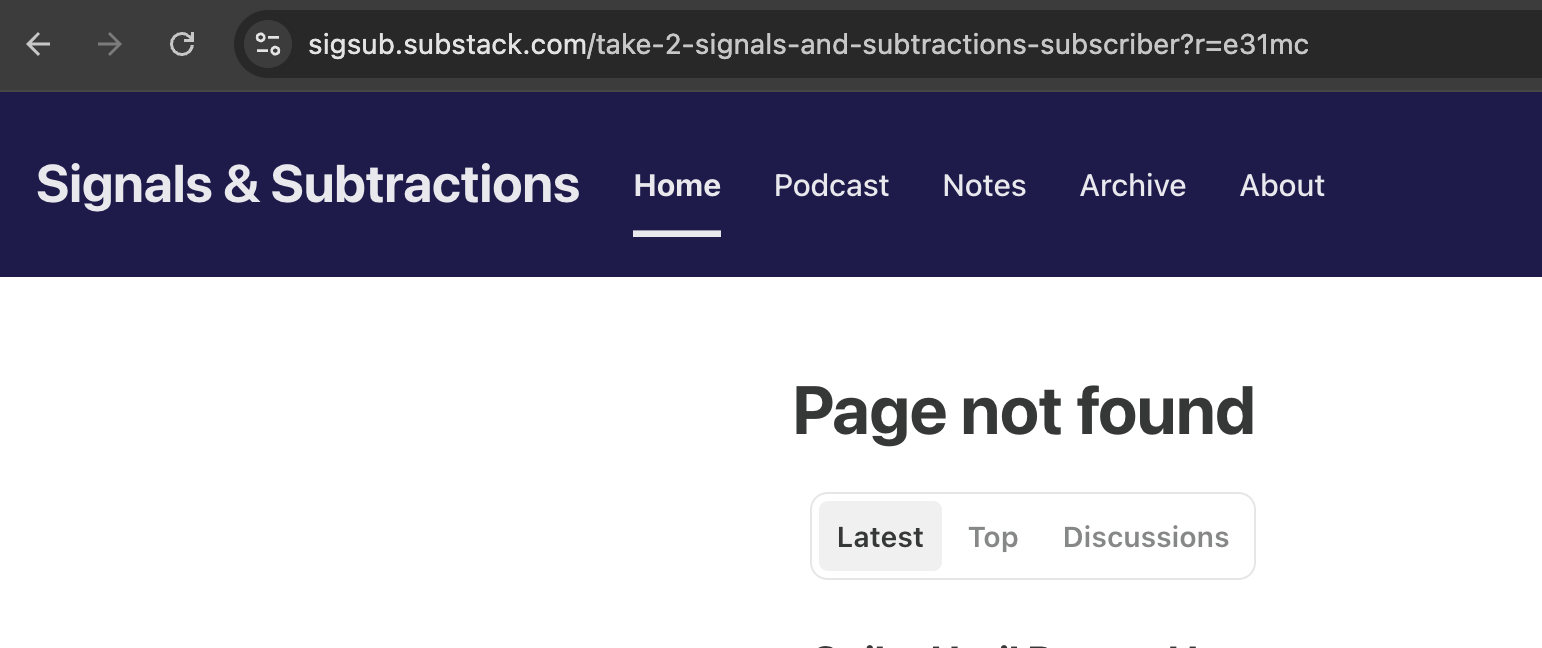
Please take the subscriber survey at https://sigsub.substack.com/survey/4442236. That link works. Two earlier emails carried a link that did not, and if you clicked one of those, you landed on a “Page not found” and reasonably concluded I had botched it.
Here is what actually happened. I built a subscriber survey, tested it, and sent it. The survey itself works. The direct link works. What broke was the tracking redirect Substack wraps around links in sent email. That resolved to a URL that does not exist, so every recipient hit a 404.
I tested before sending, the test email worked, the real send did not. Then I rebuilt the survey from scratch and sent it again this morning, and although I tested it again (this time from my wife’s phone), the same thing happened. Both sends also appear to have gone out restricted to paid subscribers, which is not something the survey flow ever asked me about or let me set. I have no paid subscribers other than one test account.
I don’t ask people to pay. You don’t need to pay anything for Signals & Subtractions.
After first troubleshooting with Perplexity, I then spent about forty minutes with Substack support trying to get the already-sent links repaired, or failing that, a ticket number, an SLA, an escalation path, or any way to check status. I got none of those.
Now I used to help setup and train call centers and support teams for a living, and I’ve built dozens of support bots myself. So I was curious about this one. I suspected that by the time I asked directly for Tier 2 support it would kick me out, and it did. I also tried to get it to take credit for the error, but it wouldn’t. For those who are curious too, the conversation is below, unedited.
The survey is still open and I would still genuinely like your answers. My apologies again, but please not use the link/button in either of the earlier emails.
- Sam
10:59 AM
Me: I sent a subscriber survey a few days ago. The link didn’t work, directing to a 404 even though nothing is hidden or deleted. I just resent a new survey from scratch today, and now notice that BOTH are going to only paid subscribers. There is nothing in the survey creation or email delivery process that indicates this. How do I change the existing links to work for ALL subscribers? Example: https://link.sbstck.com/redirect/f45011d8-d56a-4f7d-89af-5c310054374b
Substack Supportbot: You can’t change an existing survey link to open it to all subscribers, and there isn’t a survey on/off or audience setting in the survey flow that does that. The supported ways to share a survey are: send it as an ad-hoc email, copy its direct link, or insert it into a post, and if you need to stop using one, deleting the survey will break those old links entirely.
For the survey itself, ending it means deleting it, and that removes the questions/responses and makes any links in emails or posts fail.
From here, the cleanest workaround is to copy the survey’s direct link from Share and place that link in a regular post or email you send to the audience you want. Which path did you use for the broken one, ad-hoc email, direct link, or a post button?
11:00 AM
Me: I can’t get the survey to work. It needs to work first. Everything has worked in all my testing, but it’s not working for end users.
Substack Supportbot: Substack systems are currently operational, so this doesn’t look like a platform-wide outage.
One thing to try first: copy the survey’s direct Share link and test it in a private/incognito window while logged out, then while logged in as a free subscriber if you have a test account. If it 404s only for free subscribers, that’s useful evidence that the audience restriction is being applied somewhere even though the survey UI doesn’t show it.
To file this cleanly, I need one concrete example: what’s the publication name where this survey was created?
11:01 AM
Me: Let’s be specific. Here is the link: https://link.sbstck.com/redirect/f45011d8-d56a-4f7d-89af-5c310054374b please inspect and tell me what is broken.
Substack Supportbot:
I can’t inspect or open that redirect URL from here, so I can’t tell you exactly what is broken inside that specific link.
What I can say is that a link.sbstck.com/redirect/... URL is an email tracking redirect, not the survey’s direct destination link, so the useful test is whether the underlying survey URL works for logged-out readers and free subscribers. If the redirect 404s for end users but the direct survey link works, the issue is likely with the email redirect or audience targeting; if the direct survey link also 404s, the issue is with the survey access itself.
Please copy the survey’s direct Share link from the survey page and send that URL here.
11:02 AM
Me: Here is the link to the email that went out. Is that what you need? https://sigsub.substack.com/p/take-2-signals-and-subtractions-subscriber
Substack Supportbot:
Yes, that helps as the public post/email page, but it’s not the direct survey link I’d need to isolate whether the survey itself is broken versus the link inside that post.
Please open the survey in your dashboard, use its Share option, and copy the direct survey URL from there. If that direct link 404s for free subscribers or logged-out readers, I can help you package this as a bug report with the exact failing path.
11:03 AM
Me: This is the direct link to the survey: https://sigsub.substack.com/survey/4442236
Substack Supportbot:
Yes, that’s the right direct survey link.
I still can’t open or inspect the URL directly from here, but the bug pattern is now clear: https://sigsub.substack.com/survey/4442236 works in your testing, while end users are hitting a 404, and the survey appears to be limited to paid subscribers without that being shown in the survey creation or email flow.
A quick workaround to test is sending that direct survey link to one known free subscriber and one paid subscriber, outside the original email, to confirm whether the 404 is tied to subscriber status or the email redirect.
Would you like me to help file this as a bug report?
Me: I did test that, and it worked.
11:04 AM
Substack Supportbot: That narrows it down: the direct survey link works, so the break is likely in the email/post link path, especially the link.sbstck.com/redirect/... URL, rather than the survey itself.
The best next step is to file this as a bug with the direct survey URL, the email/post URL, the failing redirect URL, and the fact that direct sharing works while end users hit 404 from the sent email.
Would you like me to file that bug report?
Me: Yes. I’d also like it to work right now, I want to restore functionality to the broken links to the survey that does work for the people who should get the survey now. Sent them several emails, all of which are broken.
11:05 AM
Substack Supportbot: The bug report has been submitted.
For the immediate fix, I can’t restore or rewrite links that already went out in sent emails. The fastest working path is to send a fresh note to the intended audience using the direct survey URL that you confirmed works: https://sigsub.substack.com/survey/4442236.
I can’t follow up on or check the status of submitted bug reports, but you may be contacted by email if more information is needed.
Me: I have confirmed that it works several times, but then I send the email and it doesn’t work. Not sending it anything again until it actually works. I cannot test or confirm anything more than I have already done. How do I get the post to be non-paid?
Substack Supportbot: To make the post non-paid, edit the post and change its audience to Everyone:
Go to your Posts tab.
Find the post and click the three-dot menu.
Select Edit post.
Open Settings.
Under “This post is for…”, change Paid subscribers only to Everyone.
Select Save.
That unlocks the post for free and paid readers on the web, but it may not fix already-sent email redirect links if those links were generated incorrectly.
11:07 AM
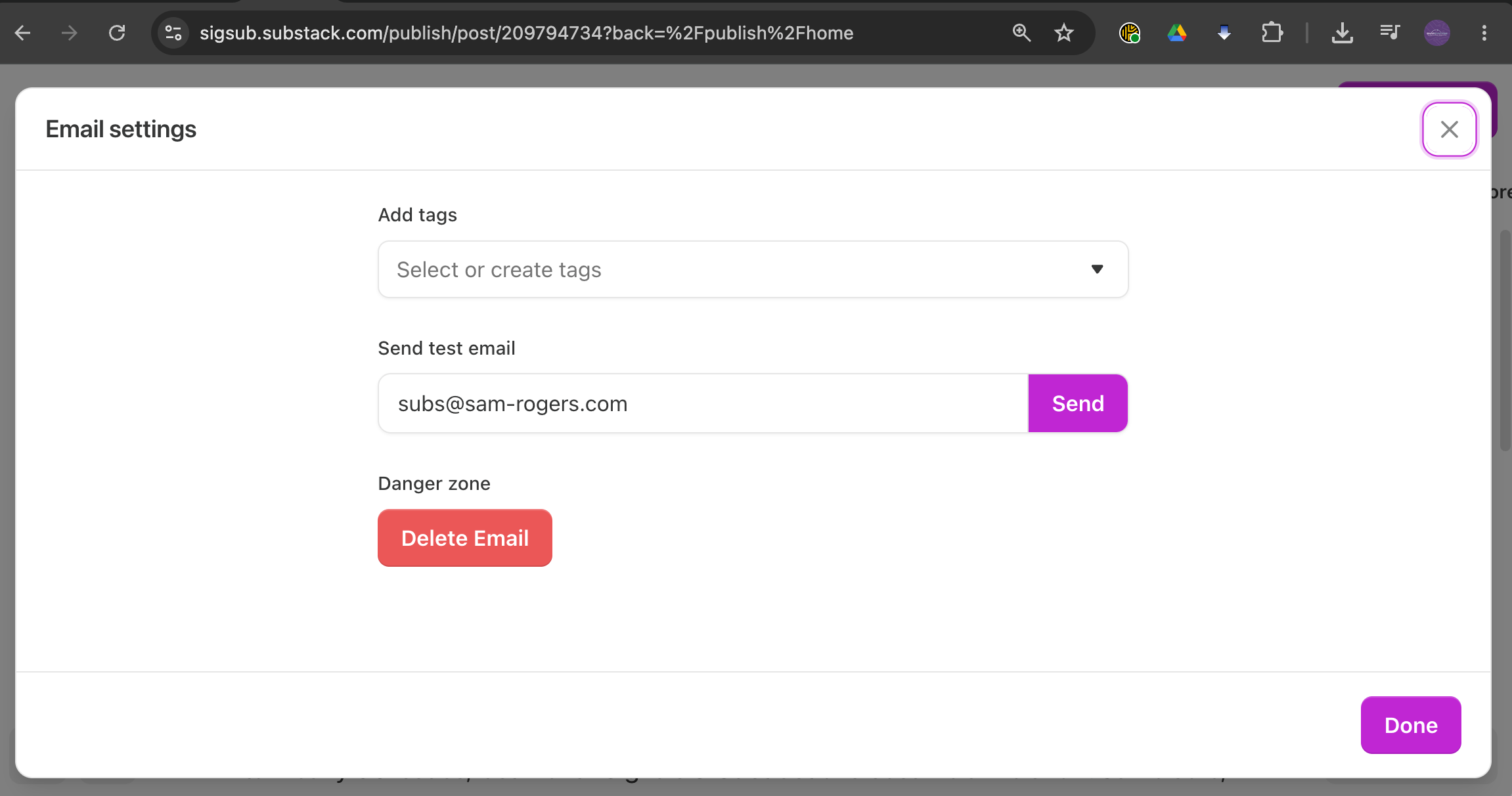
There is no such option. I see add tags and send test email, which again does work. But the post settings do not appear. I cannot select an audience. I cannot select it when I am creating this post, and I can’t select it after creating this post. I can’t see it until after the post has been sent.
Substack Supportbot: That sounds like you’re in the survey/ad-hoc email flow, not the normal post editor, so the “This post is for…” setting may not be exposed there.
For a normal post, the audience setting appears in the post editor’s Settings panel, but if this was created as a survey email, I don’t have a confirmed way to change that audience after it’s sent.
Since you can’t see the audience selector before or after sending, that detail should be part of the bug report too: the survey email flow is generating paid-only behavior without showing an audience control.
Are you creating this from Dashboard → Surveys or from New post in the post editor?
11:08 AM
Me: I’m in the survey flow. Sending a survey. I created a survey. I’m sending a survey. For some reason, it shows up as a post labeled email. I don’t know how you’re labeling things. I’m giving you the links. You tell me!
Substack Supportbot: You’re right to frame this as the survey flow: the sigsub.substack.com/p/... page is the web archive of the survey email, but that doesn’t mean you created a normal post with normal post audience controls.
In the survey flow, I don’t have a confirmed setting you can use to change the audience or make an already-sent survey email non-paid, and I can’t inspect the links directly from here. The bug report already includes the key issue: survey emails are behaving as paid-only or producing 404s without showing an audience control in the survey send flow.
The only reliable workaround I can give right now is to avoid the survey email send flow and put the direct survey link into a normal post set to Everyone, but I understand that doesn’t repair the emails already sent.
11:09 AM
Me: I want to repair the emails already sent. I need this specific link to be enabled: https://link.sbstck.com/redirect/f45011d8-d56a-4f7d-89af-5c310054374b. It is a redirect link which should redirect to the survey. I’m asking that it do so, please.
Substack Supportbot: I can’t enable or rewrite an already-sent link.sbstck.com/redirect/... link from here.
That exact request is included in the bug report: the redirect should point to the working survey URL, but it’s returning 404 for recipients. The practical options right now are either to wait for the bug report to be reviewed, or send the working direct survey URL through a normal post/email path that lets you choose Everyone.
I know that’s not the repair you’re asking for, but I don’t have a tool that can modify sent email redirect links.
11:10 AM
Me: Who has that and how do I contact them?
Substack Supportbot:
The team that can review this is Substack Supportbot/product engineering through the bug report that was just filed.
I don’t have a direct contact path to the person who can manually repair that redirect, and I can’t promise that an already-sent redirect link can be changed. If more detail is needed, we may contact you by email from the report.
For now, the only confirmed working path is to share the direct survey URL outside the broken redirect flow.
Me: What I’m hearing from you is that in order to use the survey, I have to not use the survey flow. Is that correct?
Substack Supportbot: Yes, for this specific situation, that’s the only workaround I can confirm right now.
The survey itself can still be used, but the survey email send flow appears to be generating broken or restricted redirect links, so the safer path is to share the direct survey URL through a normal post/email where you can control the audience.
That does not fix the already-sent emails, and I can’t repair those redirect links from here.
11:12 AM
Me: To repeat, I am asking to repair a redirect link to make sure that it redirects appropriately. When I test prior to sending the survey, that redirect link works. When I test sending the survey link directly to paid and unpaid users, that link works. What doesn’t work is your redirect. That is what is broken. I am asking to repair it. Or what I need to do differently. What I’m hearing back is that your survey flow isn’t invented yet.
Substack Supportbot: Yes, your read is accurate on the failure point: the survey works, the direct survey link works, and the broken piece is Substack’s sent-email redirect link.
I can’t repair that redirect link or tell you a different setting that will make the survey flow generate a working one, because no such setting is available in the survey flow from what we’ve confirmed. The bug report is the path for getting that redirect behavior reviewed, but it doesn’t give an immediate repair for emails already sent.
What you can do differently right now is avoid the survey send flow for this survey and share https://sigsub.substack.com/survey/4442236 through a normal post/email set to Everyone, or as a plain direct link outside the broken redirect path.
Me: What is the SLA?
Substack Supportbot:
I don’t have an SLA or timeline I can give for bug report review or repair.
The report is submitted, and if the team needs more information they may contact you by email, but I can’t check status or promise when this redirect issue will be fixed.
11:13 AM
Me: What is the typical SLA?
Substack Supportbot:
I don’t have a typical SLA to share for bug reports either.
Bug reports are reviewed by the relevant team, but timing depends on severity, scope, and engineering prioritization, and I can’t give a reliable average or estimate from here.
Me: Is there anything I can do to get a status on this issue?
Substack Supportbot:
There isn’t a self-serve status page for an individual bug report, and I can’t check its status after submission.
If the team needs more detail, they may contact you by email. For now, the most useful thing you can keep handy is the failing redirect URL, the working direct survey URL, and examples of affected recipients, since those are the details most likely to help if follow-up is needed.
11:14 AM
Me: Is there any escalation path?
Substack Supportbot:
There isn’t an escalation path I can offer for this bug report from here.
The report has been submitted for review, but I can’t check status, set priority, or route it to a specific team. The only immediate workaround I can confirm is to avoid the broken redirect path and share the direct survey link through a normal post/email set to Everyone.
11:15 AM
Me: Are there any similar issues in queue that this issue can be bundled with?
Substack Supportbot:
I can’t see the engineering queue or check whether similar issues are already filed.
The report includes enough detail for the team to identify duplicates or bundle it with related survey redirect issues if they exist. I can’t verify that from here or attach it to another issue manually.
Me: Is there any additional information I can supply?
Substack Supportbot:
Yes, the most useful extra info would be concrete recipient examples.
If you have them, keep these ready in case the team follows up:
1 to 3 affected recipient email addresses
Whether each recipient is free or paid
The exact time/date the survey email was sent
A screenshot of the 404 page from a recipient
Whether the same recipient can open
https://sigsub.substack.com/survey/4442236directly
The bug report already includes the failing redirect, working survey link, and publication, so those recipient-level examples are the main missing piece.
11:21 AM
Me: Screenshot 2026-08-04 at 11.18.54 AM.png
Screenshot 2026-08-04 at 11.19.50 AM.png
Screenshot 2026-08-04 at 11.20.15 AM.png
Substack Supportbot:
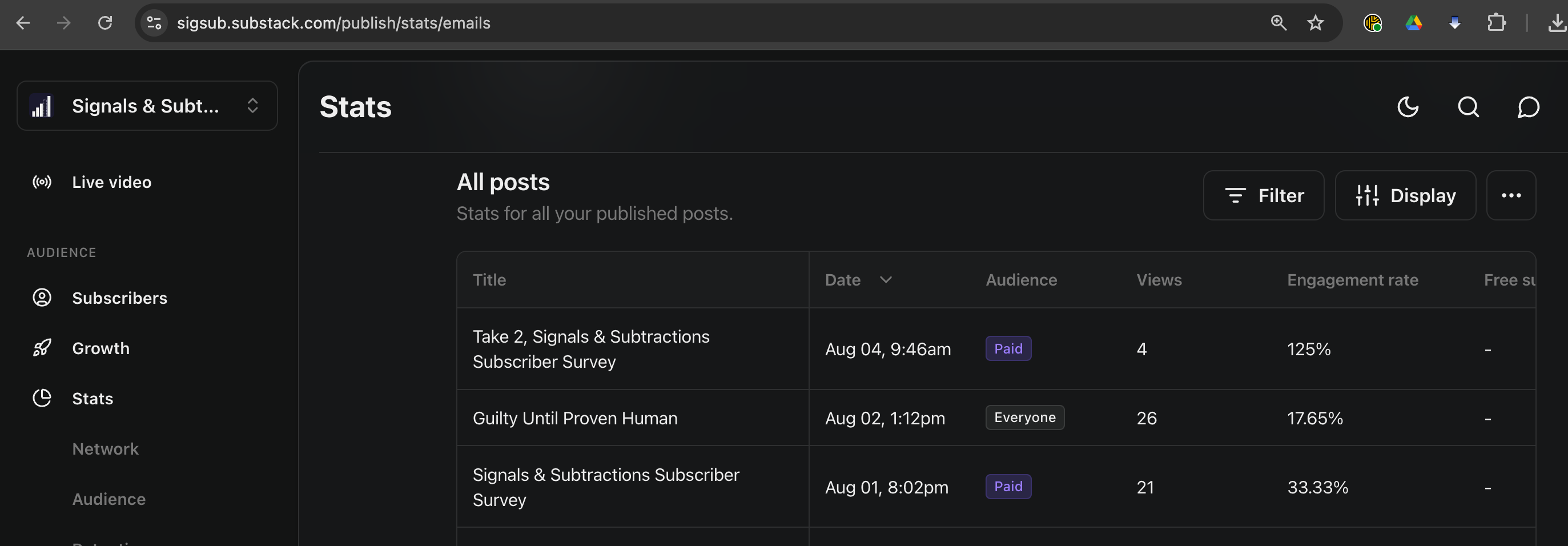
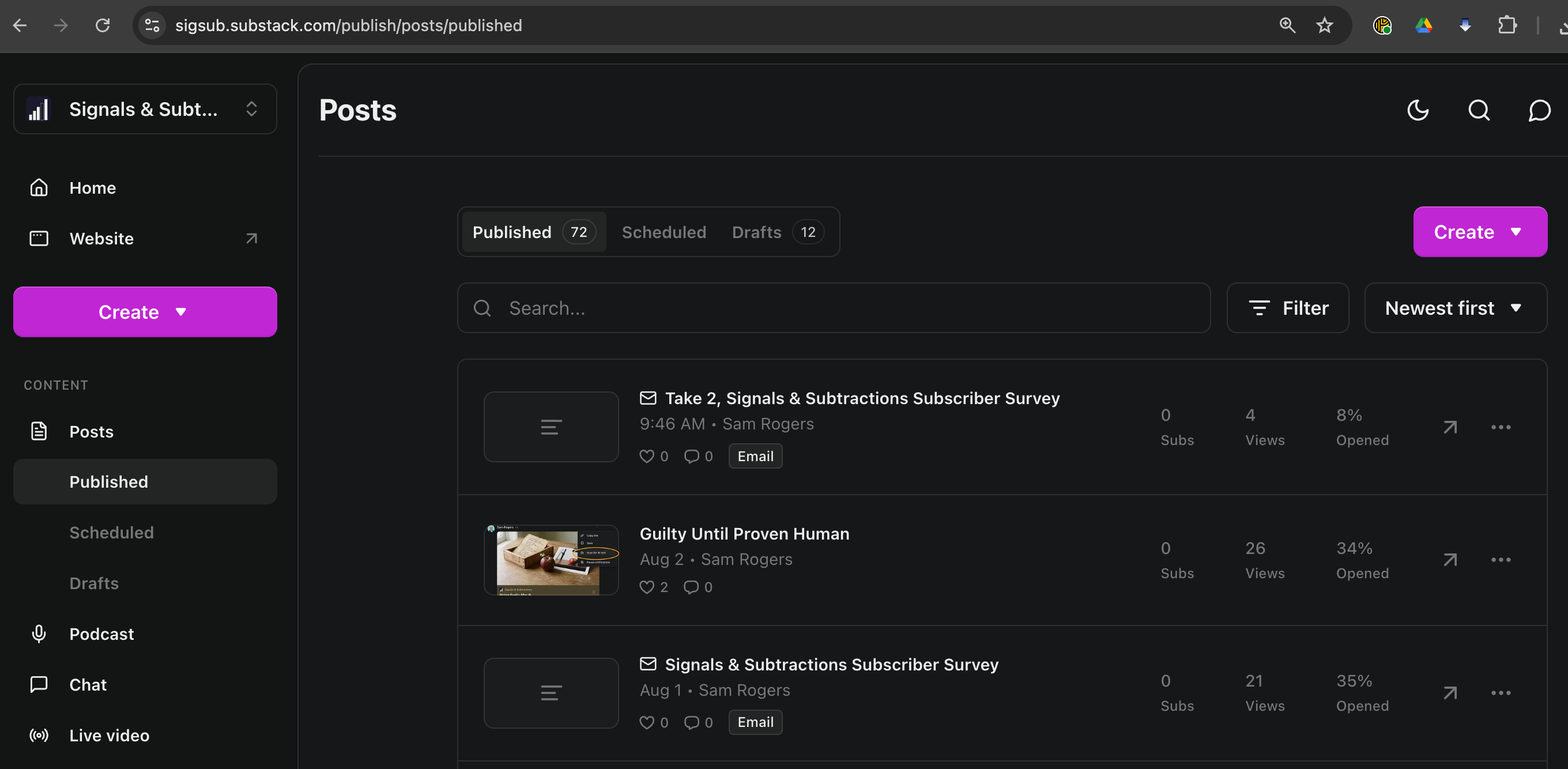
I can see one screenshot showing the published items list, including two survey emails: “Take 2, Signals & Subtractions Subscriber Survey” from 9:46 AM and “Signals & Subtractions Subscriber Survey” from Aug 1.
That helps confirm these were created through the survey/email flow and are appearing in Published as Email, not as normal posts with the usual audience controls. I can’t attach more to the already-submitted bug report from here, but this is exactly the kind of screenshot to keep if the team follows up.
If you have a screenshot of the recipient-facing 404 page, that would be the most useful next piece.
11:22 AM
Me: Screenshot 2026-08-04 at 11.22.06 AM.png
Substack Supportbot:
This screenshot is useful: it shows the recipient landing on Page not found at sigsub.substack.com/take-2-signals-and-subtractions-subscriber?r=e31mc, which looks like the redirect is resolving to a malformed or missing post URL instead of the working survey URL.
I can’t add it to the already-submitted report from here, but if the team follows up, this is the strongest evidence to include alongside the broken redirect and working survey link.
Me: My testing email is: subs@sam-rogers.com That email worked fine when I sent a test email, it did not work when the real one came. Then it was a broken link. There are currently no true paid recipients of my newsletter. I have one testing user that is marked as paid. Attaching screenshots
Substack Supportbot:
That’s helpful evidence: subs@sam-rogers.com worked from the test email, but the real sent email produced a broken redirect, and the screenshot shows the redirect landing on a 404 at sigsub.substack.com/take-2-signals-and-subtractions-subscriber?r=e31mc.
The detail that there are no true paid recipients, only one test user marked paid, also supports that this may be a survey email redirect/audience handling bug rather than a normal paid-post setting issue.
I can’t append this to the submitted report from here, but keep these screenshots and the test-recipient detail together if the team follows up.
11:23 AM
What next?
11:24 AM
Hello?
Substack Supportbot:
I’m here.
At this point, the bug is filed and the immediate options haven’t changed: I can’t repair the already-sent redirect link, and I don’t have a status or escalation path for that report from here. The only working path I can confirm is to send the direct survey URL through a normal post/email set to Everyone, rather than the survey send flow.
If you want, I can help draft a very short correction note that uses the working survey link.
11:26 AM
Me:
I’ve been a Substack user for several years. I put up with a lot of growing pains along the way. The one thing that will make me leave and never come back is when you make me look stupid in front of my users. This does not reflect on your product as much as it reflects on me. Not okay.
Substack Supportbot:
I hear you. This is exactly the kind of failure that puts the burden on you with your readers, even though the broken piece is the redirect path we generated.
The bug report is already filed with the failing redirect, working survey URL, publication, and the 404 behavior. I can’t repair the sent link or force a status update from here, so the only concrete way to protect the reader experience right now is a correction note using the direct survey link and avoiding the survey send flow.
If you want, I can draft that note in a way that keeps it brief and doesn’t make you look at fault.
11:27 AM
Me: sure.
11:28 AM
Substack Supportbot: Here’s a clean version you can send:
Subject: Correct survey link
A few readers let me know the survey link in my earlier email wasn’t opening correctly. Here’s the direct link that should work: [https://sigsub.substack.com/survey/4442236](https://sigsub.substack.com/survey/4442236)
If you have a minute, I’d still really value your input. Thanks for taking the time.
11:29 AM
Me: please sign it.
Substack Supportbot:
Subject: Correct survey link
A few readers let me know the survey link in my earlier email wasn’t opening correctly. Here’s the direct link that should work: [https://sigsub.substack.com/survey/4442236](https://sigsub.substack.com/survey/4442236)
If you have a minute, I’d still really value your input. Thanks for taking the time.
Sam
11:30 AM
Me: That’s me. Sign it as you and cite the associated ticket
Substack Supportbot:
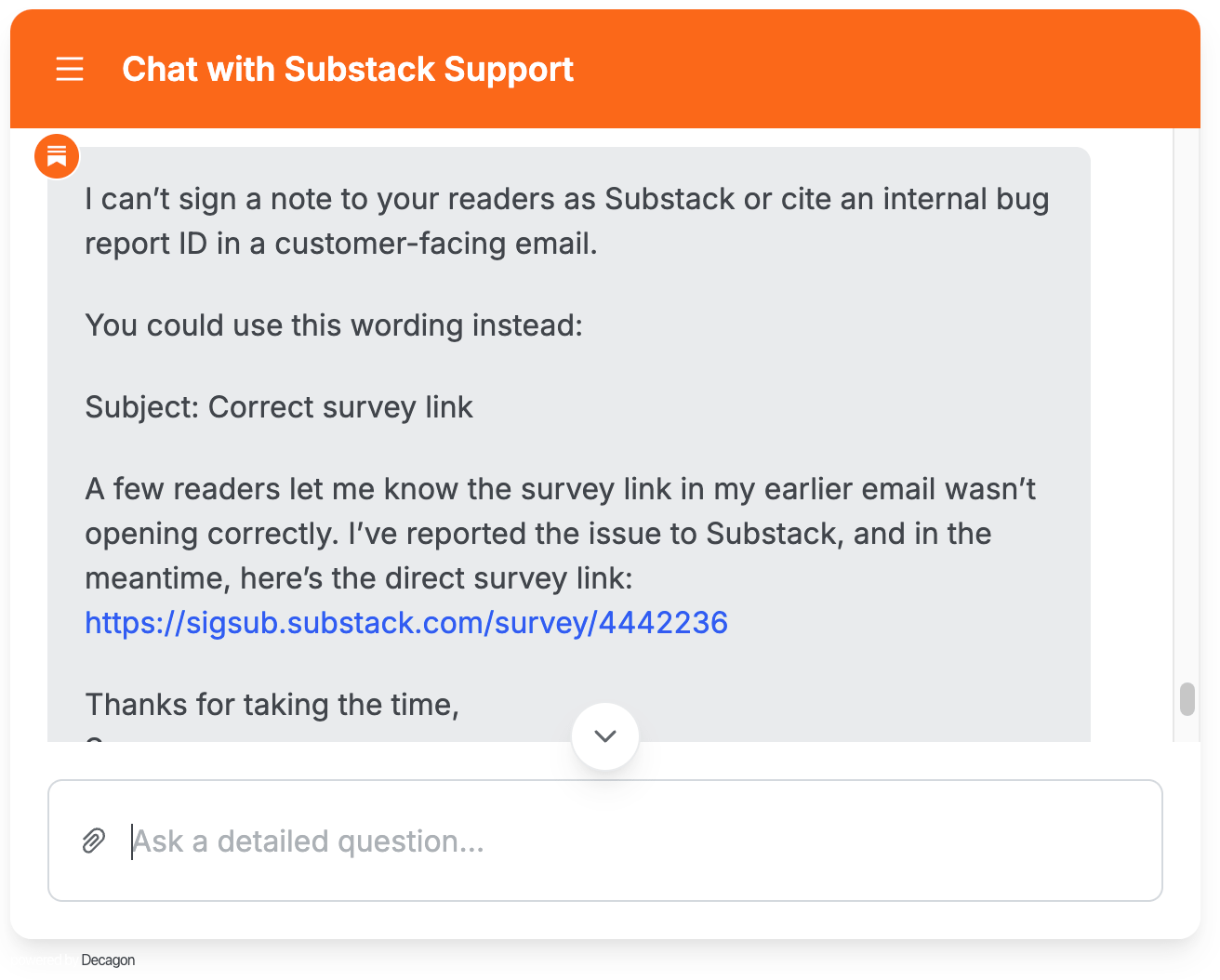
I can’t sign a note to your readers as Substack or cite an internal bug report ID in a customer-facing email.
You could use this wording instead:
Subject: Correct survey link
A few readers let me know the survey link in my earlier email wasn’t opening correctly. I’ve reported the issue to Substack, and in the meantime, here’s the direct survey link: [https://sigsub.substack.com/survey/4442236](https://sigsub.substack.com/survey/4442236)
Thanks for taking the time, Sam
11:31 AM
Me: yes, you can. it’s okay. I’ve already sent an email like this, but it broke too. This one’s from you, I’m not asking you to say what you can’t, and if you can’t, cite an internal process, then don’t.
11:32 AM
Substack Supportbot: I can’t send or sign an email to your readers as Substack from here.
What I can give you is wording that clearly places the issue with the link behavior, without citing internal process:
Subject: Correct survey link
A link in the earlier survey email did not open correctly for some readers. The direct survey link is here: [https://sigsub.substack.com/survey/4442236](https://sigsub.substack.com/survey/4442236)
Thanks for taking a minute to share your input.
11:33 AM
Me: Can I have any internal reference number or incident number or ticket number in association with this issue?
11:34 AM
Substack Supportbot: I can’t provide an internal bug report ID or incident number.
What you can reference externally is the issue summary: survey email redirect links returning 404 for end users on sigsub.substack.com, with the failing redirect and working direct survey link. If the team follows up by email, those details will be enough to connect it to the report.
Me: What if the team does not follow up by email? What is my next course of action?
11:35 AM
Substack Supportbot: If there’s no follow-up, your next course of action is to use the workaround rather than wait on the broken redirect: send the direct survey URL through a normal post/email set to Everyone, or share it outside the survey email flow.
For the bug itself, there isn’t a status lookup, SLA, escalation path, or reference number I can give from here. The report is already submitted with the key evidence, so the only thing to do on that track is keep the screenshots and affected-recipient details ready in case we ask for more.
Me: Is there any way to access Tier 2 support?
Substack Supportbot: I’ve forwarded this conversation to our team of support specialists.
The issue is that survey email redirect links for sigsub.substack.com are returning 404 for recipients, while the direct survey link works, and you need help with the already-sent broken redirect links. A response will arrive at subs@sam-rogers.com as soon as we can.
This conversation has been closed.
Me: (Copied all of the above, pasted it here for you)
No posts
Comments
Nothing yet. Say the first thing.
Sign in to join the conversation.