Caching is the process of storing the data that’s frequently used so that data can be served faster for any future requests.
💡 This tutorial targets .NET 10 LTS. The sample also moved off the external users API it used to call, which started requiring a key. If you are on an older framework, see Older .NET versions at the end.
Suppose we have a very lightweight process which talks to another server whose data is not going to change frequently; “Our service” and “Users Service” (which returns an array of users) respectively.

Without any caching in place, we would be making multiple requests which will ultimately result in timeouts or making the remote server unnecessarily busy.
Walkthrough video
If you like to watch a video walkthrough instead of this article with a thorough explanation, you can follow along on my Youtube channel too 😊
Introduction to IMemoryCache
Let’s have a look at how we can improve the performance of these requests by using a simple caching implementation. ASP.NET Core provides two common cache abstractions:
IMemoryCache- The simplest option, with entries stored in the application process.IDistributedCache- An abstraction for a cache shared by multiple application instances.
This example uses IMemoryCache with .NET 10.
These are the steps we are going to follow:
- Create or clone a sample .NET app
- Naive implementation
- Refactoring our code to use locking
1. Create or clone a sample .NET app
You can clone the complete sample repository. To start from scratch instead, create an ASP.NET Core MVC project:
dotnet new mvc -n InMemoryCachingSample --framework net10.0The MVC template registers IMemoryCache, so the sample can inject it into a small cache provider without adding another package:
public class CacheProvider(IMemoryCache cache) : ICacheProvider
{
    private readonly IMemoryCache _cache = cache;

    public T? GetFromCache<T>(string key) where T : class
    {
        _cache.TryGetValue(key, out T? cachedResponse);
        return cachedResponse;
    }

    public void SetCache<T>(string key, T value, MemoryCacheEntryOptions options)
        where T : class
    {
        _cache.Set(key, value, options);
    }
}
2. Naive implementation
For this tutorial, the sample fetches users from JSONPlaceholder. Let’s imagine this is an expensive upstream call whose response we want to reuse. The cache logic follows the same pattern described in the .NET 10 in-memory caching documentation.
// Code removed for brevity
...

// Look for cache key.
if (!_cache.TryGetValue(CacheKeys.Entry, out cacheEntry))
{
    // Key not in cache, so get data.
    cacheEntry = DateTime.Now;

    // Set cache options.
    var cacheEntryOptions = new MemoryCacheEntryOptions()
        // Keep in cache for this time, reset time if accessed.
        .SetSlidingExpiration(TimeSpan.FromSeconds(10));

    // Save data in cache.
    _cache.Set(CacheKeys.Entry, cacheEntry, cacheEntryOptions);
}
Explanation
The code is pretty straightforward. We first check whether we have the value for the given key present in our in-memory cache store. If not, we do the request to get the data and store in our cache. What SetSlidingExpiration does is that as long as no one accesses the cache value, it will eventually get deleted after 10 seconds. But if someone accesses it, the expiration will get renewed.
Suppose we want to get a list of users as per our use case. Here’s my implementation with a bit of code re-structuring:
var users = _cacheProvider.GetFromCache<IEnumerable<User>>(cacheKey);
if (users != null) return users;

// Key not in cache, so get data.
users = await func();

var cacheEntryOptions = new MemoryCacheEntryOptions()
    .SetSlidingExpiration(TimeSpan.FromSeconds(10));

_cacheProvider.SetCache(cacheKey, users, cacheEntryOptions);

return users;
await func() will wait and return the response from our external API endpoint (provided that it’s passed into our method) so that we can use that value to store in our cache.
GetCachedResponse in CachedUserService.cs shows the complete implementation.
This gets the job done for a very simple workload. But how can we make this more reliable if there are multiple threads accessing our cache store? Let’s have a look in our next step.
3. Refactoring our code to use locking
Now, let’s assume that several requests arrive while the cache is empty. IMemoryCache is thread-safe, but it doesn’t guarantee that only one caller runs the code that creates a missing value. A SemaphoreSlim can prevent a burst of requests from all calling the upstream service at once.
💡
IMemoryCacheis thread-safe. The semaphore protects the expensive cache-fill operation, not the cache itself. It only coordinates requests inside this application process.
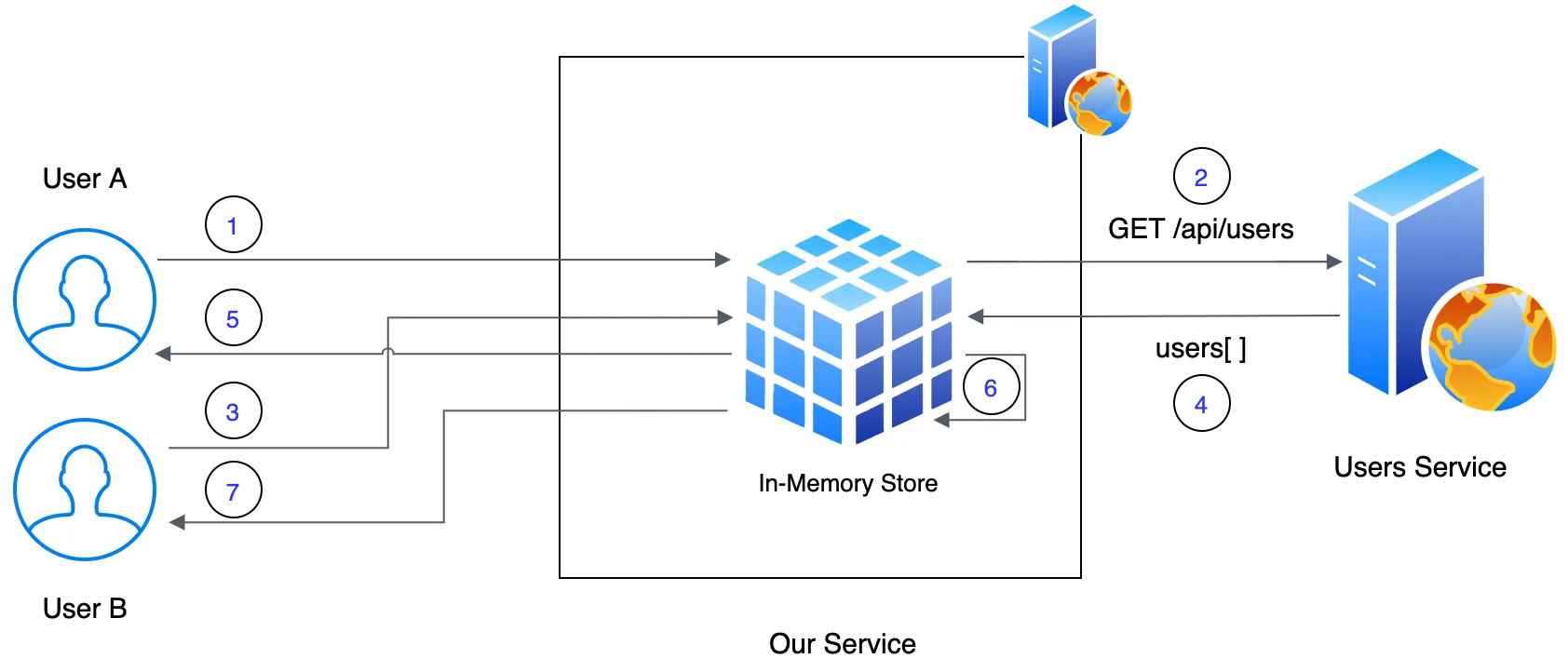
Let’s breakdown the sequence of requests and responses:
- User A makes a request to our web service
- In-memory cache doesn’t have a value in place, it enters in to lock state and makes a request to the Users Service
- User B makes a request to our web service and waits till the lock is released
- This way, we can reduce the number of calls being made to the external web service. returns the response to our web service and the value is cached
- Lock is released, User A gets the response
- User B enters the lock and the cache provides the value (as long it’s not expired)
- User B gets the response
The above depiction is a very high-level abstraction over all the awesome stuff that happens under the covers. Please use this as a guide only. Let’s implement this!
private static readonly SemaphoreSlim GetUsersSemaphore = new(1, 1);

var users = _cacheProvider.GetFromCache<IEnumerable<User>>(cacheKey);

if (users != null) return users;
try
{
    await GetUsersSemaphore.WaitAsync();

    // Recheck to make sure it didn't populate before entering semaphore
    users = _cacheProvider.GetFromCache<IEnumerable<User>>(cacheKey);

    if (users != null) return users;
    users = await func();

    var cacheEntryOptions = new MemoryCacheEntryOptions()
        .SetSlidingExpiration(TimeSpan.FromSeconds(10));

    _cacheProvider.SetCache(cacheKey, users, cacheEntryOptions);
}
finally
{
    // It's important to do this, otherwise we'll be locked forever
    GetUsersSemaphore.Release();
}

return users;
Explanation
Same as in our previous example we first check our cache for the presence of the value for a key provided. if not, we then asynchronously wait to enter the Semaphore. Once our thread has been granted access to the Semaphore, we recheck if the value has been populated previously for safety. If we still don’t have a value, we then call our external service and store the value in the cache.
Have a look at CachedUserService.cs for the full implementation and its double-check after entering the semaphore.
Demo

Hope you enjoyed this tutorial. Happy to know your thoughts! 🙂
Older .NET versions
The sample keeps a branch per framework, so the code in this article still runs on the version you are on:
| Framework | Branch |
|---|---|
| .NET 10 | main |
| .NET 9 | net9-upgrade |
| .NET 6 | dotnet6 |
| .NET Core 3.1 | dotnet3.1 |
The .NET 7 revision was never branched off, so it lives only in the main history.
IMemoryCache itself has barely changed across these versions. What moves is the hosting
model around it, so the older branches are mostly useful for the project layout rather than
for the caching code.
- Distributed Caching in ASP.NET Core with Redis - the same problem once one process is no longer enough.
- ASP.NET Core Health Checks - checking that the cache, and everything behind it, is actually up.
Comments
Nothing yet. Say the first thing.
Sign in to join the conversation.