
Hello dear reader! 👋
Another month has flown by, so another newsletter has arrived in your mailbox. January is traditionally the month of setting goals, targets and resolutions for the new year. Some of which we've managed to keep, and others, well, let's just say they're a work in progress (I swear I’ll start going to the gym again when the New Year’s rush has passed 😅).
Inspired by a couple informative New Year events and meet-ups, I set out for a weekend to the Belgian Ardennes to disconnect from work and do some reading, journalling and hiking. Let’s call it my shorter version of Bill Gates’ Think Week.
As luck would have it, during the week it had shown, making the trip a bit more adventurous but the landscapes were magical.

That brings me to the core of this post. I’m excited to share with you that I’m working on a new project! But let me build up some suspense first. If you’ve been following along with my past newsletters you know that last April I built a GenericExcuse for April Fools that allows you to generate some excuses for common occasions. This was just a simple API wrapper around OpenAI. For me, it was the beginning of a journey on how I could implement Generative AI in web apps in a playful and useful way.
I toyed around with different ideas and prototyped a few. (See "Building an AI Toolbox" for some examples) But I didn’t make any of them available because :
They would only work in certain use cases under specific circumstances
I thought they were crap
Perfectionism and/or Scope Creep
I already moved on to the next shiny thing.
But while I was scrolling social media, I saw other people publishing their AI-powered apps, and people were raving about them. Some of them were simple ChatGPT wrappers, and some of them were great products! And for some of them, I had built something similar that had better results or a better experience. So why didn’t I just put my work out there?
I think I found my why, I didn’t like the idea of just spamming random tools and abandoning them later. I needed a bigger purpose and I think I found it. Workflow optimisation!
In the last few newsletters, I talked about "Optimising Your Own Factory" and "Building Systems". And I kept playing with the thoughts of how I could make daily tasks more efficient. So I started thinking what if I could still experiment with, and build small AI tools but in a way that they could work together in a bigger ecosystem to optimise or automate (a part of) your workflow?
The initial idea for Contraptions AI is to build a suite of AI tools that users can utilise to speed up their workflow. Currently, there is only one tool available, more on that one below. And I have a couple more in the making. I’m currently focussing on building templates and procedures for myself so I’m able to test and launch a lot of ideas since this is what gives me energy.
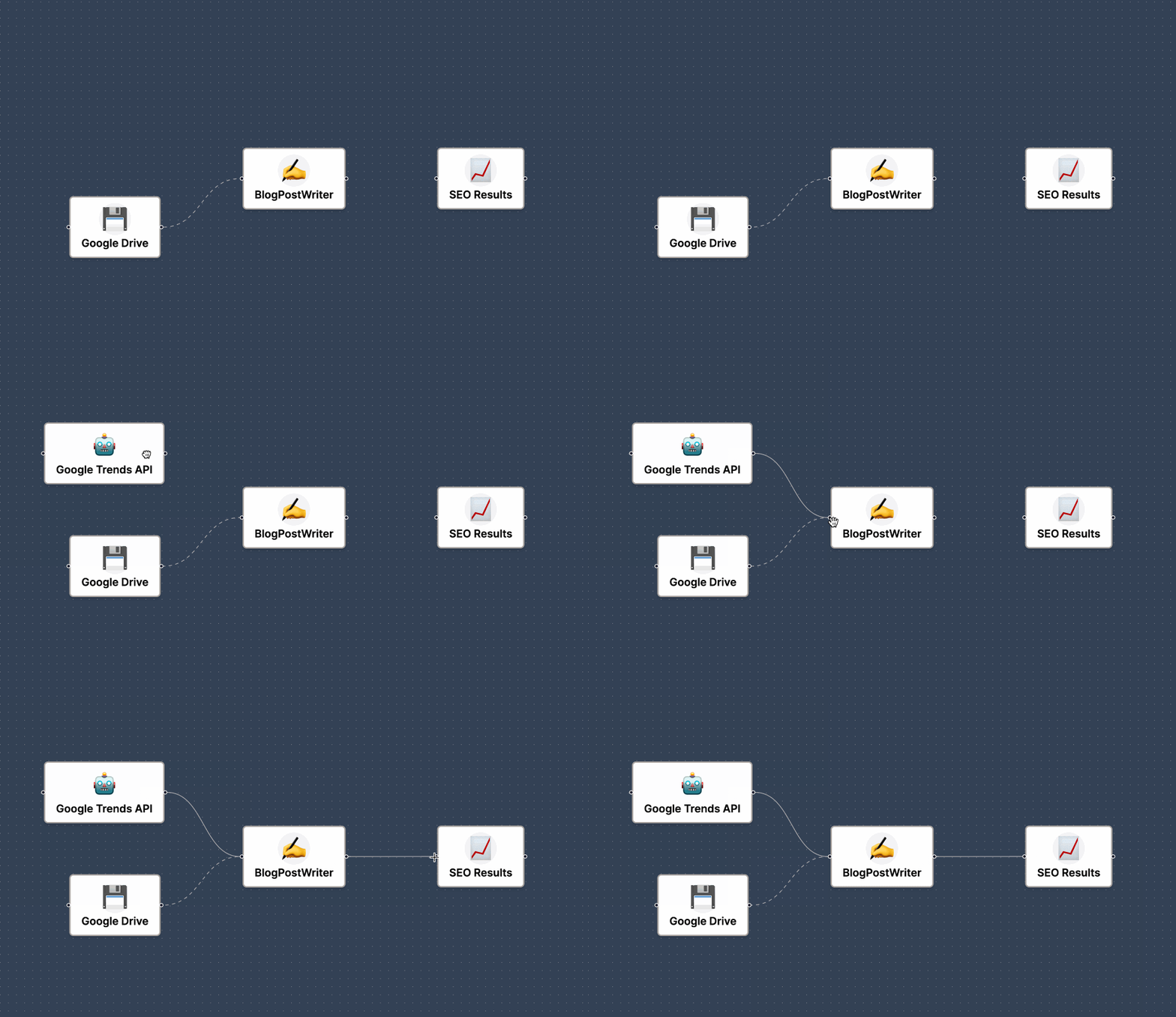
In the long term, you can use these tools together to build your own workflows to automate or bulk-process your tasks. Isn’t that what Zapier does? You might ask. Well yes, the main differentiator with Zapier is that we want to focus on existing industry processes. A bit of a level above Zapier where instead of combining multiple blocks and configuring them you can just take a “BlogPostWriter“ block and connect your data to it. This could, for example, allow marketing teams to automatically repurpose content for different platforms or have your sales teams generate proposals in bulk based on competitor websites without a lot of technical know-how.
And then it’s now time to announce the first tool available!
YouTube is the second biggest search engine. Yet when it comes to finding the information you need, it is often hidden in a long podcast episode. Sometimes you’re not sure if a video is worth your time. With the YouTube Summarizer, you can condense a YouTube video into:
A couple of Bullet Points to get the main takeaways from a video.
A Summary to get the gist of what the video is about.
A Blog Post to get a more structured format that allows for skimming and getting most of the information from the video without actually watching it.
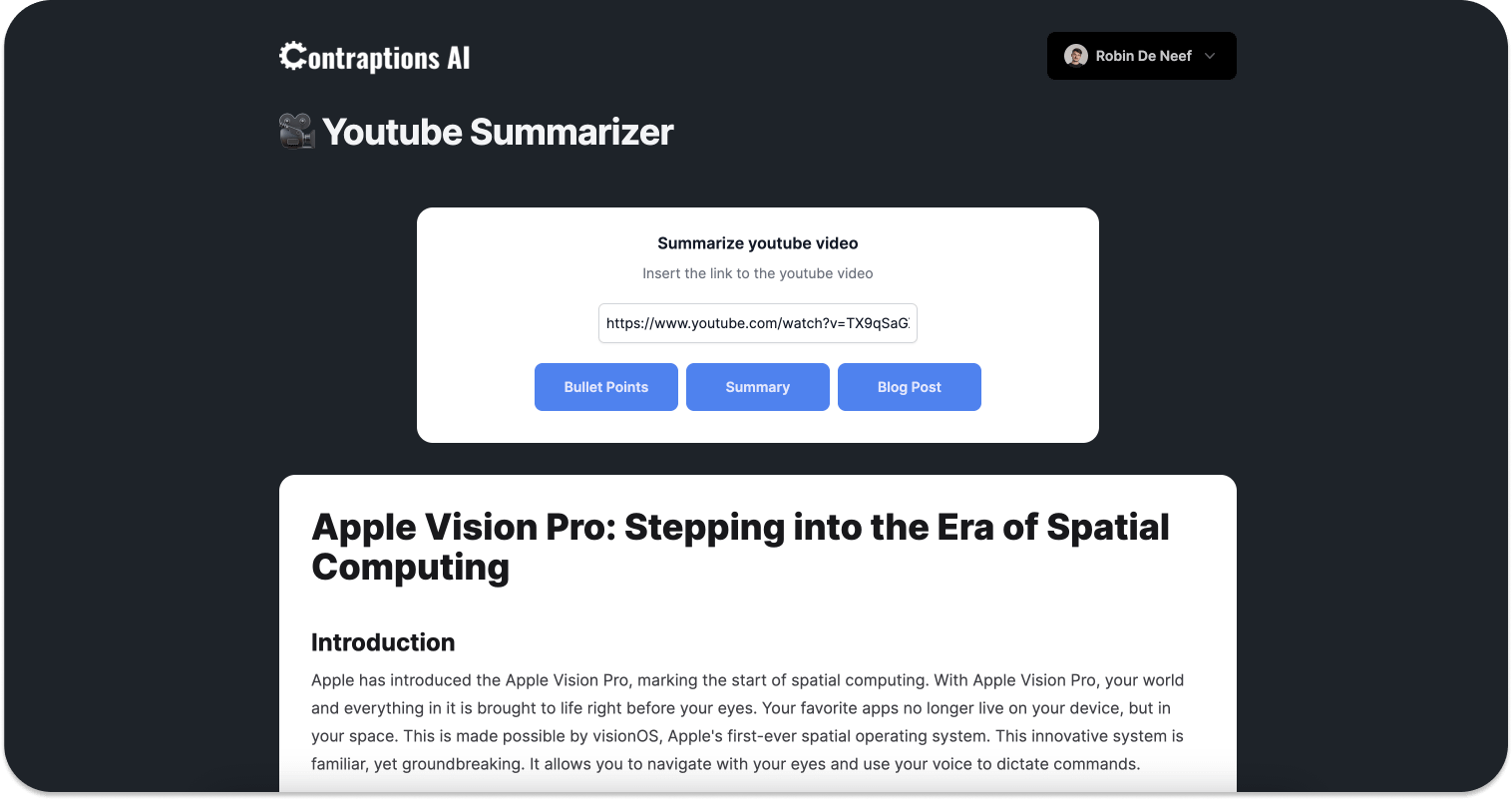
Personally, I use the Blog Post feature a lot to get through my backlog of videos that could be interesting. However, a content creator could use the tool to repurpose content for a LinkedIn list post (Bullet Points) or to create posts from their YouTube videos.
I’d like to use this newsletter to share some technical, behind-the-scenes information about the tools. Since I’m still a techie by heart. 👨💻
One of the limitations of Large Language Models (LLMs) is their token size. In short, the token size is the maximum amount of input a model can process at a time. One token is around 4 characters in the English language. Gpt-4 has a token limit of 8,192 tokens, gpt-3.5-turbo around half of that. To process these bigger transcripts we’ll have to split them up in smaller parts.
I built the summarisation part in quite a modular way so I could play with different models and configurations. I played with 3 different techniques to summarize the data.
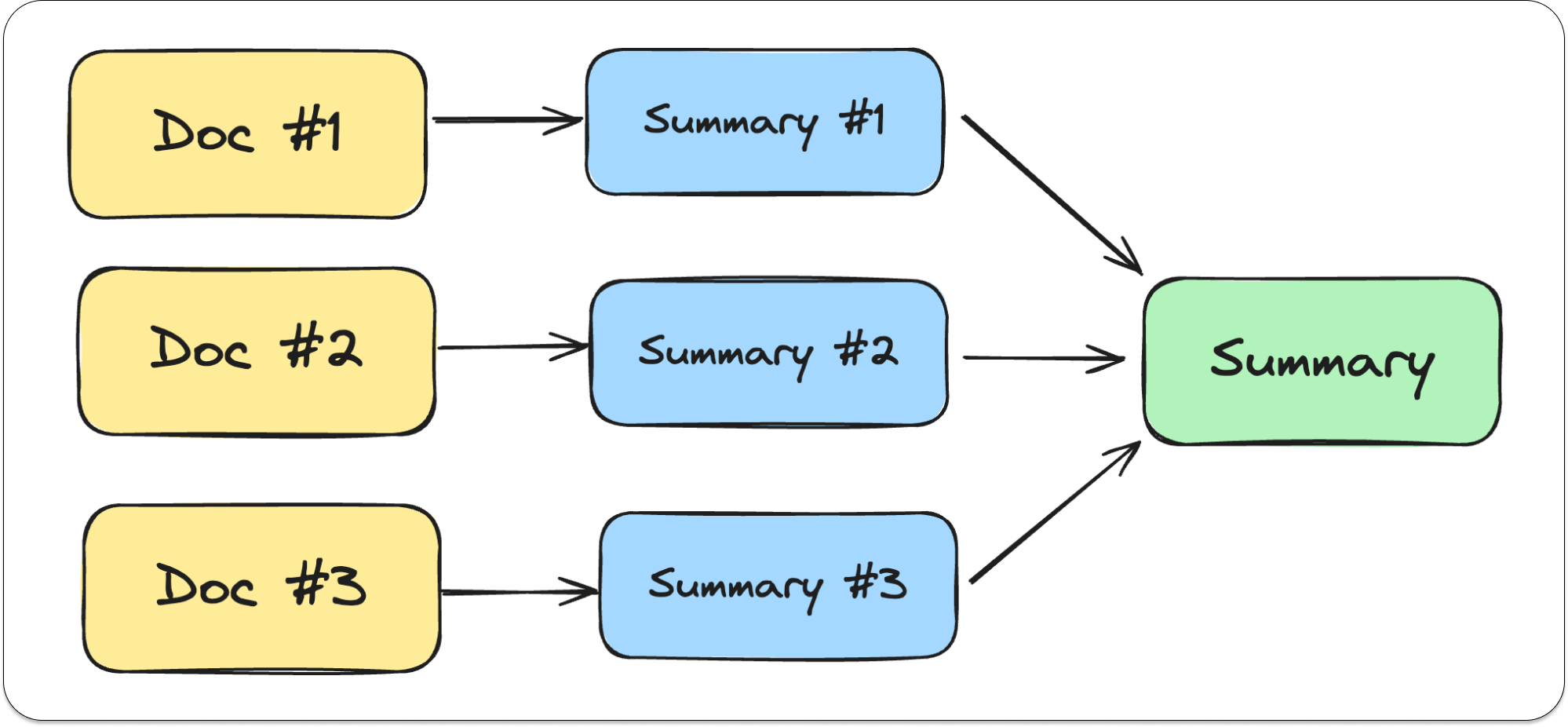
MapReduce method — where you chunk the whole transcript into different roughly equal parts (also referred to as documents). Then you summarize the individual blocks and combine them again in a big summary. This is the most conventional method. But depending on where you cut off the individual documents, information might get lost during the summarization step (For example when you cut off right in the middle of a paragraph, that topic might only be a sentence or 2 in the individual chunk and deemed unimportant during the summarization step.)
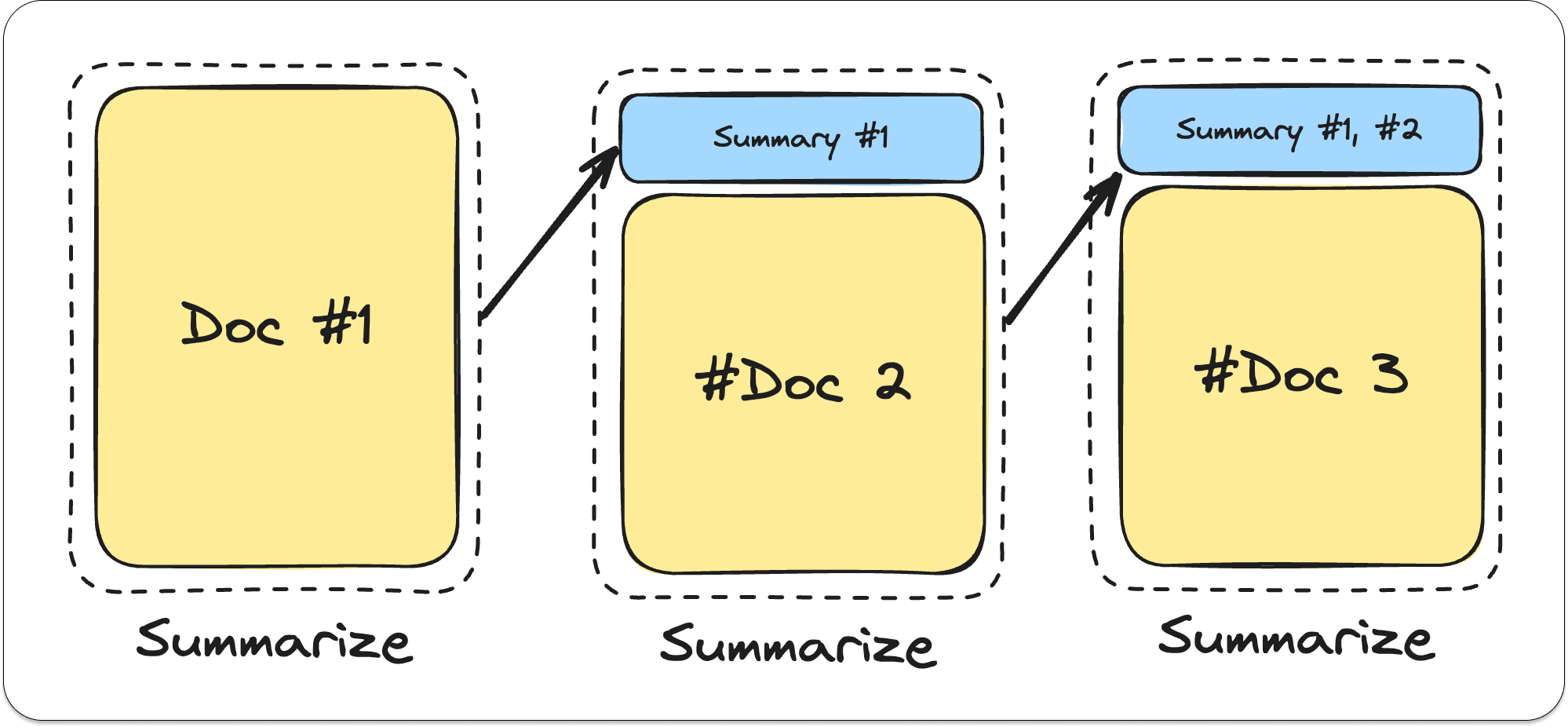
A summarize and append method — where I chunked the transcript as above. However, I would summarize the first document and append the summary of the first document to the second document. This was with the idea that no information would be broken up and got lost during the summarization step like in the Map Reduce step. (by for example splitting the document in the middle of a paragraph.)
But the downside was that by the end, the first document had gone through so many summarization steps that it was a mere footnote in the final summary.
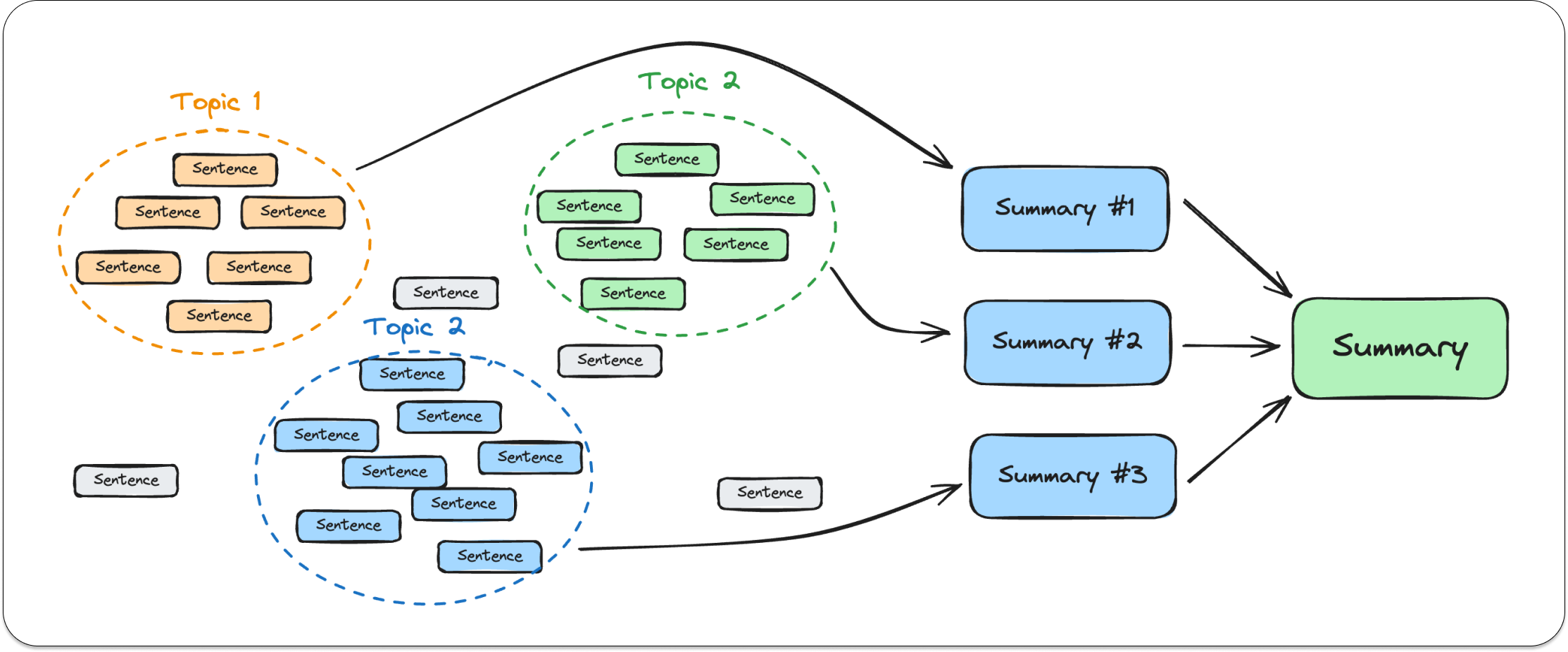
A K-means clustering method — This method is quite different from the others. In this one, I would split up the initial text into sentences (Which are not always formed or formulated correctly with generated transcripts.) And create clusters of sentences that are about a similar topic. I could then summarize these clusters.
Quality-wise, this is probably the best one. In podcasts for example, since the conversation is not always very structured, people tend to go on a tangent or circle back to a topic at a later moment. With this method, all that data still gets grouped to a topic before being summarised, where it would get filtered out if the documents are just split up by size.
But I decided against this method because I couldn’t get it to work in a consistent and perfomant way. I’d still need a human in the loop to fix the quality of the transcript or to check if the clusters make sense.
In the end, I stuck with the conventional MapReduce method and played with different models. I was able to reduce a 4-hour long video in a blog post with gpt-3.5-turbo for the staggering amount of 0,07 EUR. In contrast, a 15-minute video in gpt-4 can cost me up to 0,20 EUR.
Currently, the YouTube Summarizer uses gpt-3.5-turbo since I’m offering it for free. But I actually got the most bang for my buck when combining gpt-3.5-turbo for summarization and gpt-4 for writing the actual blog post. However, my basic cost and performance metrics don’t support multi-model reporting yet. 🙃
Great question! For now, it will be building more tools. I like that I’m able to test ideas in this way without much commitment. The tools themselves don’t require much upkeep and work as is.
The tools itself also allow me a certain degree of freedom. The summarization step and writing step are built in a way that they can easily be applied in different workflows. For example, summarizing a lot of data into weekly reports for marketing or finance departments. Making big knowledge bases more digestible. As a matter of fact, I’m currently trying to prioritise the tools I build by “In how many different workflows they could be applicable”.
If there is a huge demand for a more specialised product (eg. YouTube Summerizer Chrome Plugin like Pocket.) I can also take a certain tool and make a stand-alone SaaS product from it complete with persistent user data and third-party integrations.
But for now, play around and experiment. That being said, I’m open to any ideas. Do you have daily tasks or processes that take a lot of time out of your day? Do you think you can apply AI to make your life more easier? My mailbox is always open. You can always just reply to this email to start a one-on-one conversation! Don’t forget to check out Contraptions AI, all feedback is welcome!
Thanks for reading!
No posts
Comments
Nothing yet. Say the first thing.
Sign in to join the conversation.