

Hola from the suburban sprawl outside Los Angeles, where every strip mall has the exact same mix of nail salon, Subway, and vape shop. It's not glamorous, but it's home.
I've been learning about AI agents for the past few months, and here's my honest take: they're... fine. Don't get me wrong: that doesn't mean they're not useful. But after diving deep into building an automated short-form video generation workflow, I've learned that agents are just one piece of a much more complex puzzle.
Let me back up. What exactly are agents? At their most basic, an agent is a system that can perceive its environment and take actions to achieve goals. In an AI context, it's software that can reason (loosely speaking), plan (sort of), and execute tasks with some degree of autonomy. Think of it like having a digital assistant that doesn't just answer questions but actually does things—researching topics, writing code, calling APIs, managing files.
OpenAI recently released "agent mode" for ChatGPT, which can browse the web, analyze data, and create PowerPoint presentations for you. Other tools like Cursor and Claude Code have their own agent implementations for coding workflows. The zeitgeist is thoroughly agent-pilled, as the kids might say.
The best way for me to understand new technology is to build something with it. So I thought: why not create an automated pipeline for generating those short-form videos you see on Instagram Reels or YouTube Shorts? You know, the kind of content that floods your feed. I was going to make some premium AI slop.
What I discovered is that the "agent" is only one component of the entire system. The full architecture includes custom code, API integrations, and MCP servers (Model Context Protocol servers that let AI systems use tools and communicate with applications). It's less "magic AI button" and more "carefully orchestrated digital Simone Gietz machine."
My high-level workflow looked deceptively simple:
Phase 1: Script Generation
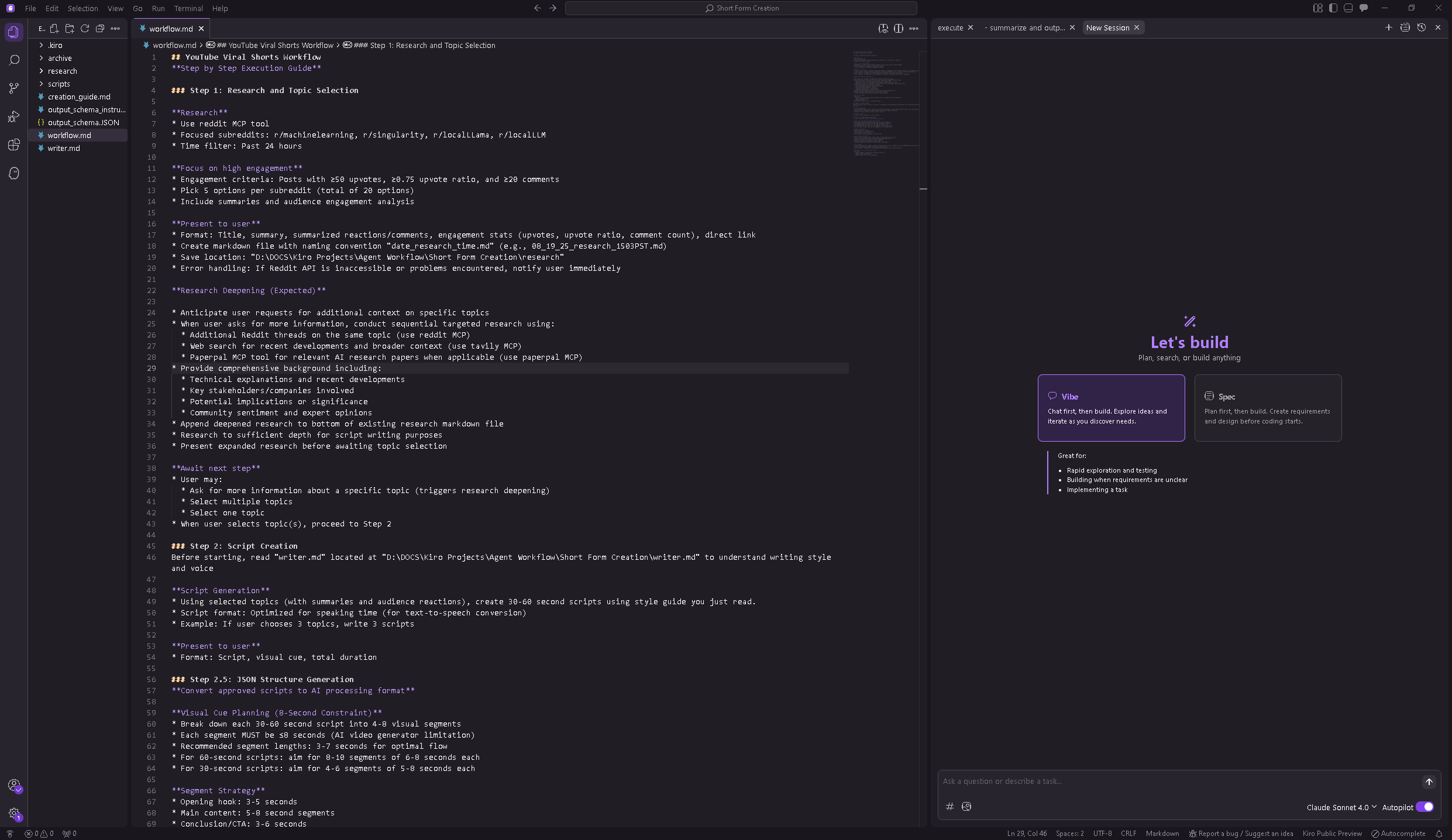
Using Kiro (an AI IDE similar to Cursor—I chose it because it gave me fewer headaches, though maybe I was just using Cursor wrong), I built this flow: Research → Summarize → Curate (me) → More Research → Check work (me) → Write Script → Output JSON
Phase 2: Content Generation
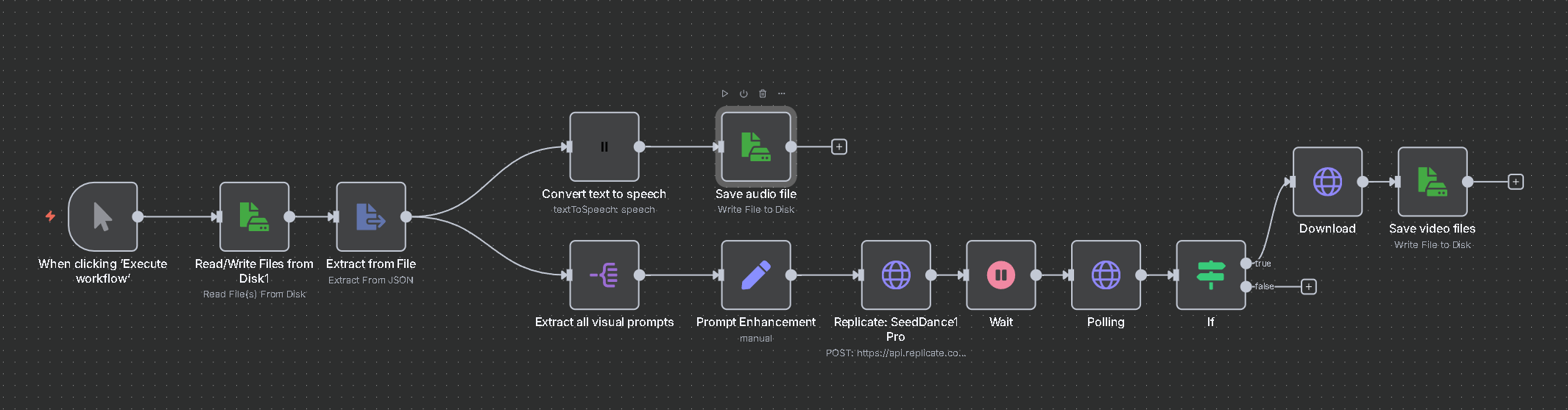
Using n8n (an automation tool with a nice node-based UI), I processed the JSON:
Visual Prompts → AI Video Generator
Speaking Prompt → Text-to-Speech Generator
Outputs: MP3 audio file and MP4 video file
Phase 3: Assembly I haven't figured out a clean automated way to combine audio and video, so I manually sync them in DaVinci Resolve. (Dev readers: yes, I know this is probably doable with ffmpeg—please share your wisdom in the comments.)
Phase 4: Distribution Upload to Instagram through an anonymous account. This could probably be automated too, but I haven't gone down that rabbit hole yet.
The topic? AI and tech commentary in short-form format. Basically, trying to distill complex tech concepts into digestible 60-second (brainrot) takes.
Here's something I didn't expect: I became way more micromanaging with AI than I am with humans. I found myself constantly peering over the agent's digital shoulder: watching its thinking traces, making sure it created the files I wanted, scanning folders to verify it did the job properly.
This behavior says something interesting about human-AI collaboration. With people, I tend to give clear instructions and trust the outcome. With AI, I'm hovering like a helicopter parent watching their kid's first bike ride.
The most expensive example of this anxiety? My beginner-level API knowledge led me to accidentally leave a video generation model running without knowing how to cancel it. That little mistake cost me an extra $5 as the API cheerfully generated video after video while I frantically searched through documentation trying to figure out how to make it stop.
Let's talk costs, because APIs aren't free:
Video Generation API: $25 (including my expensive mistakes)
Text-to-Speech: Free (trial period)
Kiro: Free (trial period, but likely subscription-based in the future)
n8n: Free (open source, local install)
Total damage: roughly $30, though initially I burned more money trying to save money. I started with an image model thinking it would be cheaper, but ended up generating way more images because they couldn't capture the look and feel I wanted. And weren't nearly as engaging as video anyway.
Time investment: About five days, but that's learning the tools, and understanding agentic flows. To be fair, I've been exploring AI since 2022, so I had some foundation.
The kicker? It's not clear which approach is actually faster—just different. Manual creation involves familiar work: research, recording, editing. Automation handles some steps automatically and eliminates the need for video clips or self-recording, but introduces new complexities like API management and system debugging. The question isn't speed, it's what kind of work you prefer doing.
Results: Four videos generated, two actually posted. They weren't terrible, but they weren't great either. Below is one of them:
API Wrangling is Real Work It looks deceptively simple in tutorials, but implementation involves serious API documentation diving, schema understanding, and input/output debugging. AI helped fix some bugs, sure, but I spent considerable time figuring out how each API wanted its data formatted and what it would spit back out.
Context Engineering is Everything The built-in AI agents in Kiro are genuinely smart (they're using Claude 4, currently the king of AI coding). But I had to be incredibly precise with my instructions. I ended up creating separate markdown files for each component: workflow steps, JSON output schemas, available tools (MCPs), writing style guidelines, and overall project goals. It's like being a very specific creative director for a very literal assistant.
My Workflow is Janky (And That's Okay) The current setup definitely needs iteration. I could probably consolidate everything into either Kiro or n8n instead of jumping between platforms. But sometimes "janky but working" is better than "perfect but never finished."
The Big Question: Who's This For? Making the content forced me to confront a fundamental question: who would actually watch these AI-generated tech commentary videos? Would they find them engaging? This feels more like a marketing and audience research challenge than a technical one.
Building this system taught me that AI agents aren't magic. They're powerful tools that require careful orchestration, clear communication, and realistic expectations. They excel at automating repetitive tasks and handling complex multi-step workflows, but they need human guidance, oversight, and course correction.
The technology will only improve from here. The videos I generated aren't perfect, but they're a starting point. More importantly, the process taught me about the current state of AI tooling, the importance of human-AI collaboration patterns, and the gap between "automatable in theory" and "actually automated in practice."
Will I continue generating short-form AI content? Maybe. But will I use agents for other projects? Absolutely. Now I just know to watch my API spending a little more carefully.
If you want to dive deeper into the technical implementation, drop me a line. And seriously, if you know how to automate video-audio syncing with ffmpeg, please share—thanks in advance!
Comments
Nothing yet. Say the first thing.
Sign in to join the conversation.