
Hi there Booth Monitor Bistro Owners,
If you’ve been DJing a long time the chances are your library has grown. I’ve analysed libraries with 10’s of thousands of tracks. When that happens the library becomes more of a liability than an asset.
If you find yourself at that point you have two options. Delete, or archive. I’m mean, so I usually prefer deleting.
But there are some tracks that may have been difficult to source. Or if you play events like weddings, there might be tracks you’ll get randomly asked for 10 years down the line and need to retrieve quickly.
In this email I’m going to walk through a no-delete library plugin strategy to keep your main library clean but your hoarding instincts fulfilled.
Before we get into this plugin idea it’s worth defining the difference between archiving and just backing up.
Archive: intentionally moved out of the working library and kept for likely future retrieval (requests, seasonal events, niche gigs).
Backup: insurance if something fails or you delete the wrong thing
Because archiving isn’t about retrieving lost files or keeping things ‘just in case’, we can focus on designing the archive system around retrieval time, certainty and modularity.
I think of a bit like this.
Your core library is like some music production software. You are working on a track that needs a particular synth sound so you buy that plugin and activate it. It’s laggy and takes up space, but it’s necessary for that particular tune.
After you’re done with the track you uninstall the plugin. Your software is back to its base state and the lag is gone so you can work on your next tune.
Your archives are like plugins for your main library that you turn off and on as you need them.
So what do you actually archive?
Remember, the core goal is to get stuff out of your working library that you don’t need all the time. But they are tracks that still add value and you need easily accessible.
By doing this you can keep your decisions on the decks faster, without losing flexibility in future. Here are a few archive ‘plugin’ ideas.
You probably don’t need to hear about some guy driving home for Christmas in the middle of summer at a beach party. And Monster Mash doesn’t need to come out at the Easter Bunny’s stag do. Seasonal tracks like these are great candidates to get out of your core library.
In the digital era there aren’t too many tracks that are totally impossible to find again. But there are definitely some that more problematic or cost prohibitive. These can be good archive candidates providing that you do actually play them at lease semi-regularly. If not, put them in the backup category.
But If a track is easy to replace legally, quickly and cheaply then streaming may be a better option.
Wedding, 95th birthday party, a Poodle’s Bar Mitzvah. Specific event types often have specific groups of tracks that crop up often. You probably won’t need Come on Eileen if you’re playing a uni graduation party.
Creating archive plugins around events is a great way to make sure you have the right selection of tracks for the actual gigs (and/or age groups) you are playing for.
There are 3 layers of storage when it comes to archiving. And it’s all based on how often you need access to the tracks within them.
This is your core library day to day library. Tracks that you are likely to rely on in almost all gigs and want immediate access to at all times.
🕣 Access frequency: Regular
💾 Storage type: Laptop HDD
This is for tracks that come up fairly often, but not every gig. These are your ‘plugin packs’. The fast SSD storage means you can retrieve them quickly and easily.
🕣 Access frequency: Sometimes
💾 Storage type: SSD (if you can afford it these days - thanks AI)
The tracks you almost never reach for, but they come up once in a blue moon. The hard to replace files. That dubstep mix of Celine Dion. They all go in cold storage. Your full backup is likely to be on this kind of storage too - usually 3.5” hard drives. You’ll get more space, but at the cost of slightly slower speed.
🕣 Access frequency: Rarely
💾 Storage type: HDD/NAS
There’s an elephant in the room here.
If you delete tracks from rekordbox and then re-import them later you are going to lose your hot cues, grids and other prep. That means the ideal solution is not actually deleting them from your library once they are archived.
So here’s what I actually recommend doing for most people:
Add a special MyTag category called ‘Plugins’ for tracks you aren’t using every gig
Use tags like ‘Christmas’, ‘Hard to replace’ or ‘Kids birthday party’
In your core library playlists add a rule to actively exclude these tracks from view
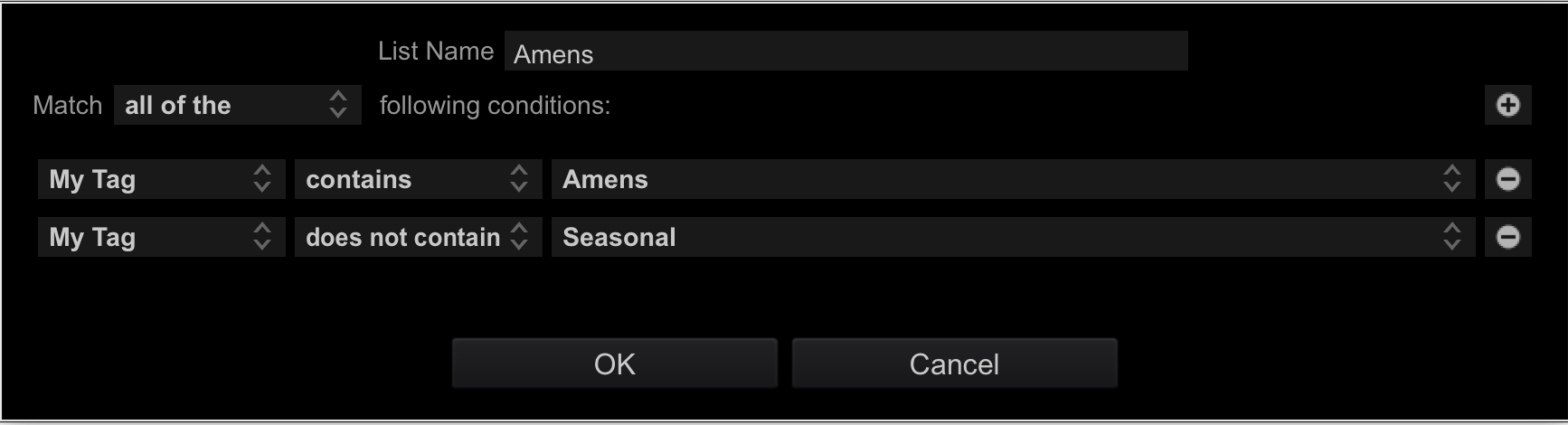
Then in future when you need to ‘active’ your plugins, you can just remove (or flip) the rule again.
To take this further you could store those plugin files on your external warm storage and relink them in your library when the time comes.
But this is a little more involved to get everything playing nicely so your library isn’t full of missing file warnings. Let me know if you’d like me to do a video on this.
How do you decide what tracks to archive in your library?
See ya next time
Comments
Nothing yet. Say the first thing.
Sign in to join the conversation.