
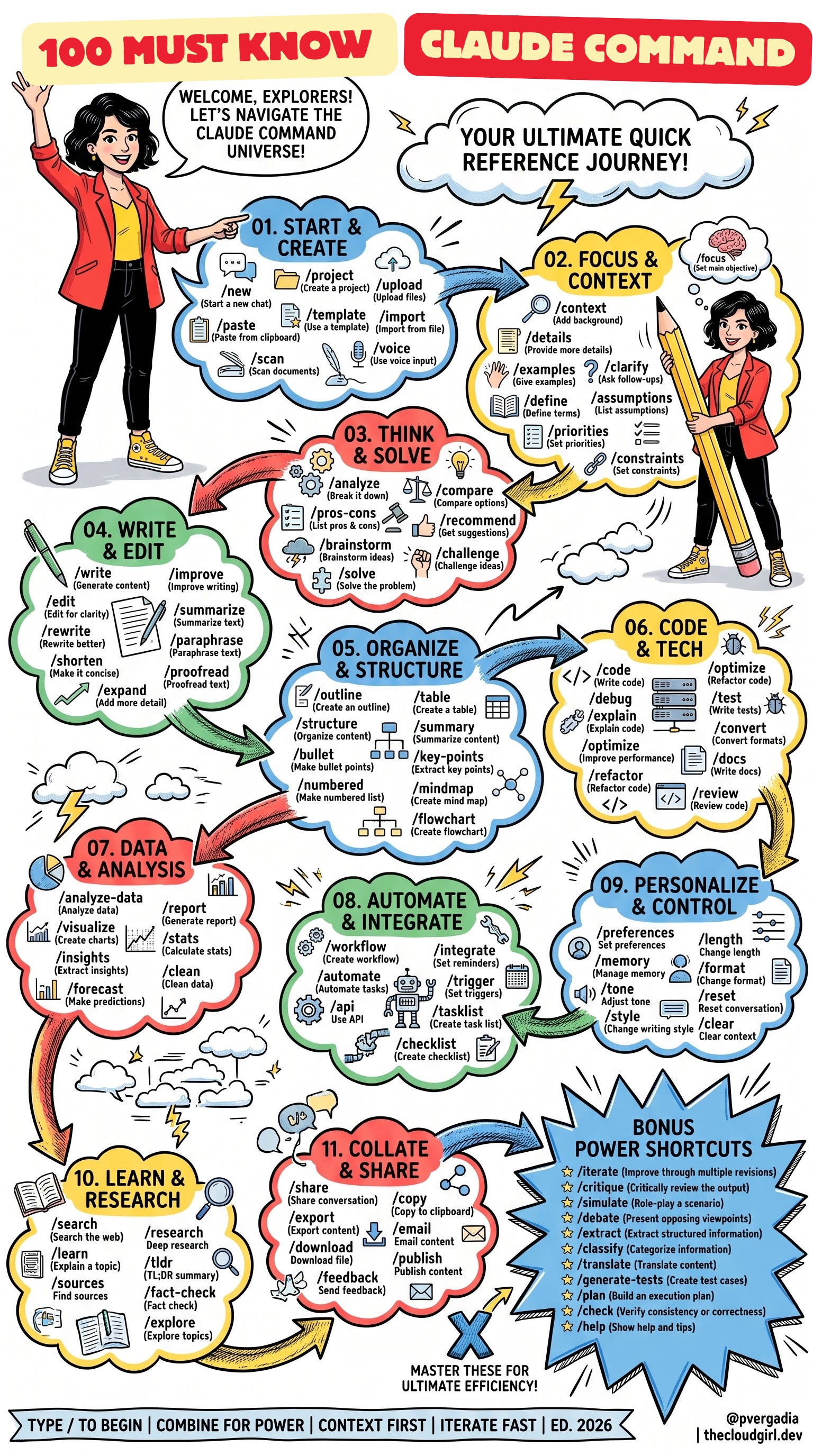
If you’ve ever stared at a blank chat window wondering how to get Claude to actually do what you want, this one’s for you. Slash commands are the fastest way to skip the small talk and go straight to the output whether that’s a first draft, a debugged function, or a fully structured research brief. Below is your cheat sheet: 100 commands, organized into 11 categories plus a bonus power-user set, each explained in a single line. Bookmark it, screenshot it, or just start typing “/” and see what shows up.
/new — Start a new chat from scratch.
/project — Create a project to organize related work.
/upload — Upload files for Claude to reference.
/paste — Paste content straight from your clipboard.
/template — Use a template to skip the blank page.
/import — Import content from an existing file.
/scan — Scan and digitize documents.
/voice — Use voice input instead of typing.
/focus — Set the main objective for the conversation.
/context — Add background information Claude should know.
/details — Provide more specifics on the task.
/examples — Give examples to guide the output.
/clarify — Ask Claude to pose follow-up questions.
/define — Define key terms up front.
/assumptions — List the assumptions in play.
/priorities — Set what matters most.
/constraints — Set limits or boundaries for the response.
/analyze — Break a problem down into its parts.
/compare — Compare two or more options.
/pros-cons — List the pros and cons.
/recommend — Get a suggested course of action.
/brainstorm — Generate a batch of ideas.
/challenge — Stress-test an idea or plan.
/solve — Work through and solve the problem directly.
/write — Generate new content from a prompt.
/improve — Sharpen existing writing.
/edit — Edit for clarity.
/summarize — Condense text into a summary.
/rewrite — Rework a piece to read better.
/paraphrase — Restate the same idea in different words.
/shorten — Make it more concise.
/proofread — Catch grammar and typo issues.
/expand — Add more depth and detail.
/outline — Build a structured outline.
/table — Turn information into a table.
/structure — Organize loose content into a clear shape.
/summary — Summarize the content of a document or chat.
/bullet — Convert content into bullet points.
/key-points — Pull out the key takeaways.
/numbered — Format as a numbered list.
/mindmap — Create a mind map of related ideas.
/flowchart — Create a flowchart of a process.
/code — Write code for a given task.
/debug — Find and fix bugs.
/explain — Explain what a piece of code is doing.
/optimize — Improve performance.
/refactor — Restructure code without changing behavior.
/test — Write tests for existing code.
/convert — Convert between formats or languages.
/docs — Write documentation.
/review — Review code for quality and issues.
/analyze-data — Analyze a dataset for patterns.
/visualize — Turn data into charts.
/insights — Extract insights from data.
/forecast — Make predictions based on trends.
/report — Generate a data report.
/stats — Calculate key statistics.
/clean — Clean and tidy messy data.
/workflow — Design a multi-step workflow.
/automate — Automate a repetitive task.
/api — Work with an API.
/integrate — Set up reminders or connections between tools.
/trigger — Set a trigger for an action.
/tasklist — Create a task list.
/checklist — Create a checklist.
/preferences — Set your working preferences.
/memory — Manage what Claude remembers.
/tone — Adjust the tone of the response.
/style — Change the writing style.
/length — Change how long the response is.
/format — Change the output format.
/reset — Reset the conversation.
/clear — Clear the current context.
/search — Search the web for current information.
/learn — Get an explanation of a topic.
/sources — Find supporting sources.
/research — Run a deep research pass.
/tldr — Get a TL;DR summary.
/fact-check — Verify a claim.
/explore — Explore a topic more broadly.
/share — Share the conversation.
/export — Export content out of the chat.
/download — Download a file.
/feedback — Send feedback.
/copy — Copy content to your clipboard.
/email — Turn content into an email.
/publish — Publish content externally.
/iterate — Improve output through multiple revision passes.
/critique — Critically review the output.
/simulate — Role-play a scenario.
/debate — Present opposing viewpoints on a topic.
/extract — Pull structured information out of raw text.
/classify — Categorize information into groups.
/translate — Translate content into another language.
/generate-tests — Create test cases.
/plan — Build a step-by-step execution plan.
/check — Verify consistency or correctness.
/help — Show help and tips.
Try chaining these commands together and magic starts happening. Set your /context, run a /brainstorm, tighten it with /edit, and close the loop with /iterate. That’s the whole game: context first, then structure, then refine. Master this handful of moves and you’ll spend less time prompting and more time getting the answer you actually came for.
No posts
Comments
Nothing yet. Say the first thing.
Sign in to join the conversation.