
Three weeks ago, Apple unveiled OS27, the operating systems coming to this fall to Mac, iPhone, iPad, and Apple Watch. The biggest news was, of course, the new, AI-powered Siri.
But the second-place news was also pretty big: Instead of cramming in new features, Apple says its main focus has been fixing its current software (26.5.2).
I can’t endorse that mission highly enough. We really don’t need more features, more redesigns; most of us would rather have what we’ve got, but working smoothly.
In that spirit, I asked on social media: “What are some broken elements in macOS or iOS? Not feature requests. Not ‘here’s what I’d do differently’ ideas. I want to compile a list of BUGS—repeatable demonstrations of broken things AS DESIGNED—for Apple to fix.”
I thought this was a great idea. I’d round up a tidy list of all the bugs you’ve all found, and forward them to Apple for fixing. Public service merit badge!
It didn’t quite work that way. Of the 700 comments that poured in overnight, about 95% misunderstood the assignment.
They were mostly feature requests.
Now, some of them have real merit. For example:
“Why can’t I sort emails by subject line or sender in the Mail app on iOS?” —Jonathan Rick
“Why doesn’t predictive text know to add a question mark at the end of a question?”—Michel Corbin
“Make individual text message threads searchable. I have lots of messages from my husband that I’d like to search without having to search all of my messages from everyone.”—Kerrin Goodspeed
Another batch of responses had to do with intermittent bugs. Many were edge cases (“Rename command stalls when changing 10,000 files at once”), and most of them I couldn’t reproduce.
A few, though, I’ve experienced myself:
AirDrop. Sometimes, people’s phones just don’t show up, even if WiFi, Bluetooth, and “Everyone for ten minutes” are turned on.
Texting Android phones. One example: “If I receive a message from an Android user to multiple people, when I reply, the reply only goes to the sender and anyone else using iPhone,” says David Morrison.
Contacts. People just have a lot of trouble figuring this app out. Profile photos disappear randomly. Names sometimes refuse to drag into a “list” (a folder).
Dozens of people wrote to report clunkily designed features. They’re not exactly bugs, but I have to agree with them.
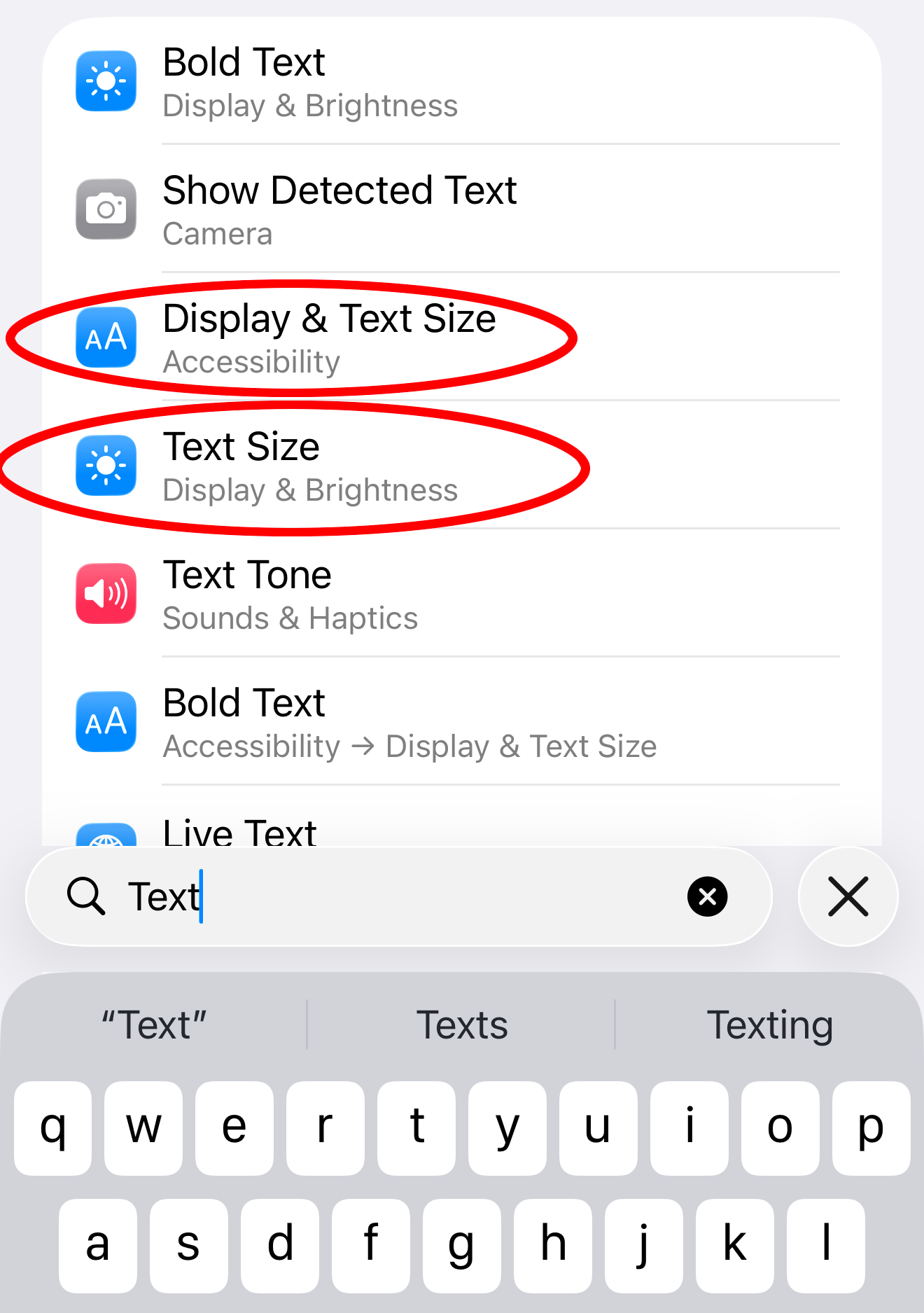
Why is it so hard to find the global type-size setting on the iPhone? Ralph Begleiter tried searching Settings for “font size,” “font,” and “fonts”; nothing came up. He found the setting he wanted only by searching for the word “text.” Even then, the choices appeared in multiple locations. Which is the right one?
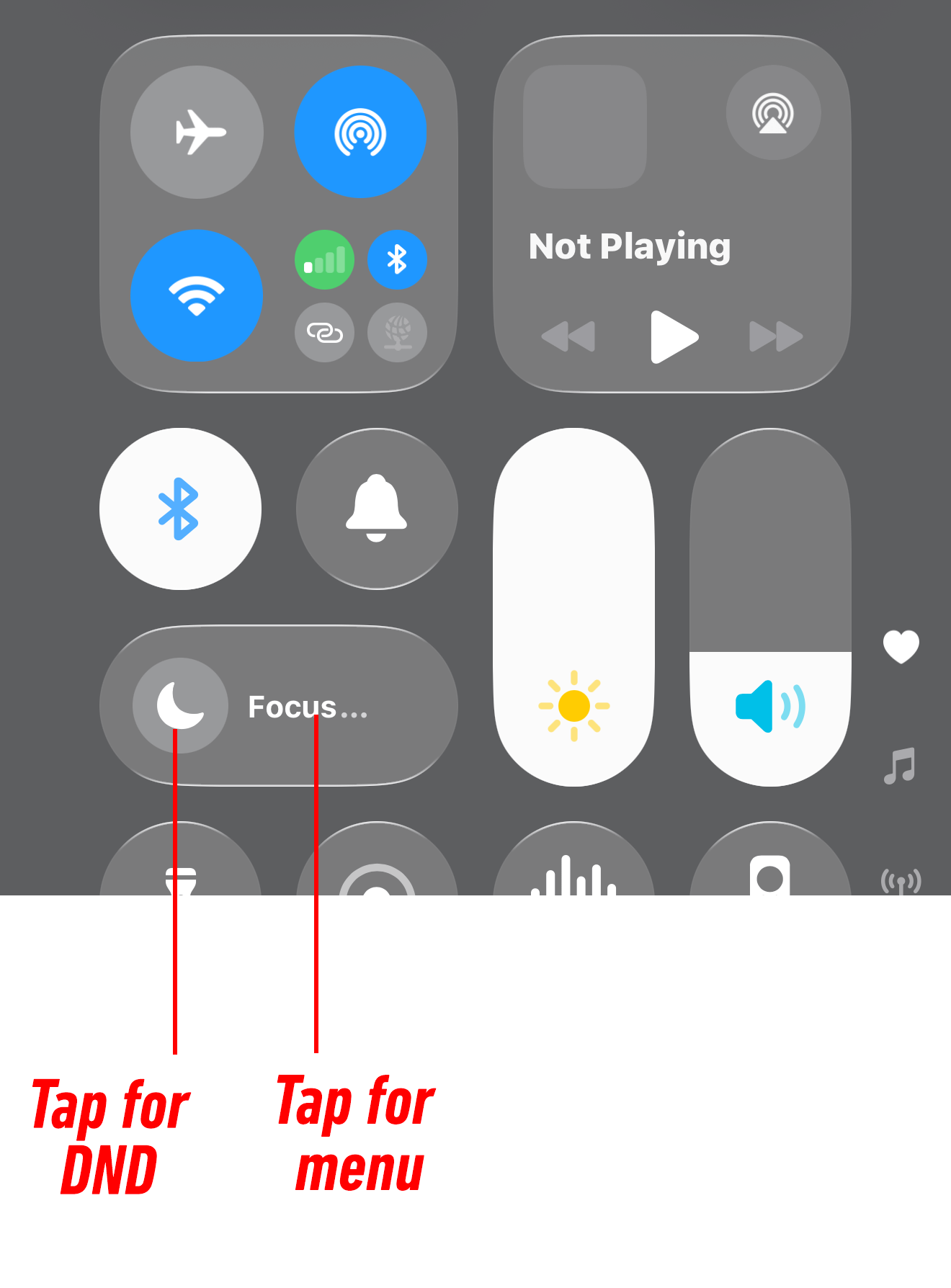
Also: Why isn’t there a one-tap Do Not Disturb button? It now takes at least two taps to silence your phone, three to silence your watch. “The whole Focus system needs to be discontinued immediately,” noted @davecdesign on X. Is anyone going to guess that there are two different places to tap on this button?
Controlling ringtone and alarm volume is a running headache, too. “Same buttons control volume for ringer / alarms and media volume—but in unpredictable ways depending on context,” says S. Miria Jo.
Finally, lots of people complained about editing text on the phone. For example, as Walter Ian Kaye notes, “The Select All button only appears when the cursor is an insertion point. If any characters are selected already, the command is not available.”
For me, a big surprise was how many people are frustrated by features that Apple intended to be helpful. For example:
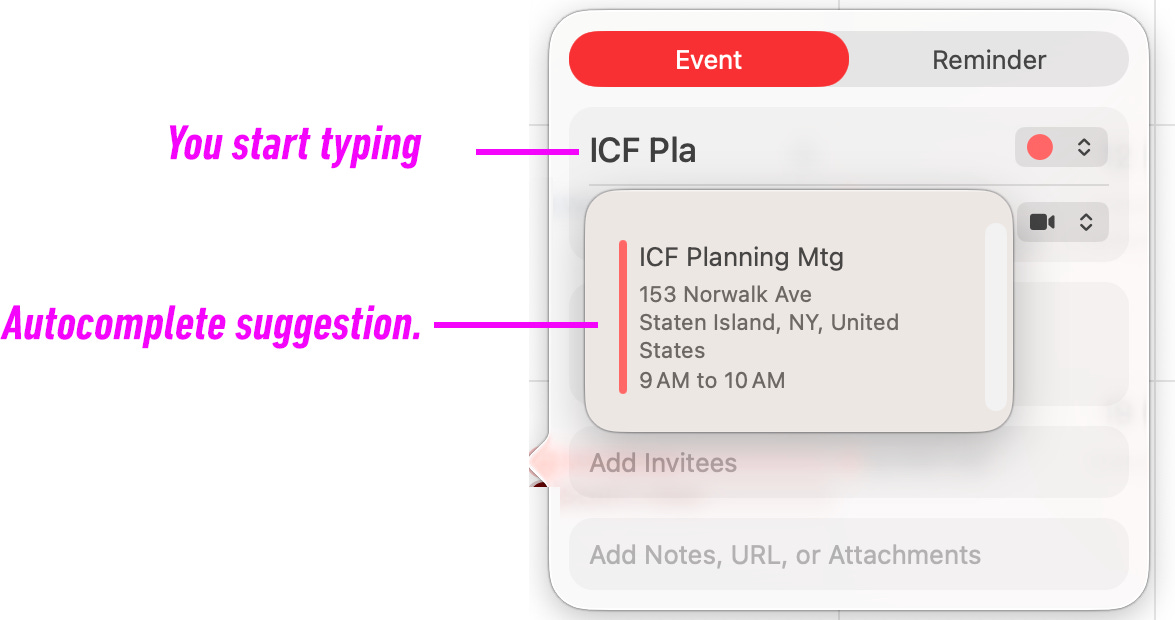
In the Calendar app, if you start typing the name of a meeting that matches an earlier one, Calendar offers to save you time by offering an autofill with all the details: appointment name, address, time, and so on. But when Paul Ferguson clicks to accept the suggestion, “it silently changes the starting time to that from the previous meeting. This misfeature has bitten me several times.”
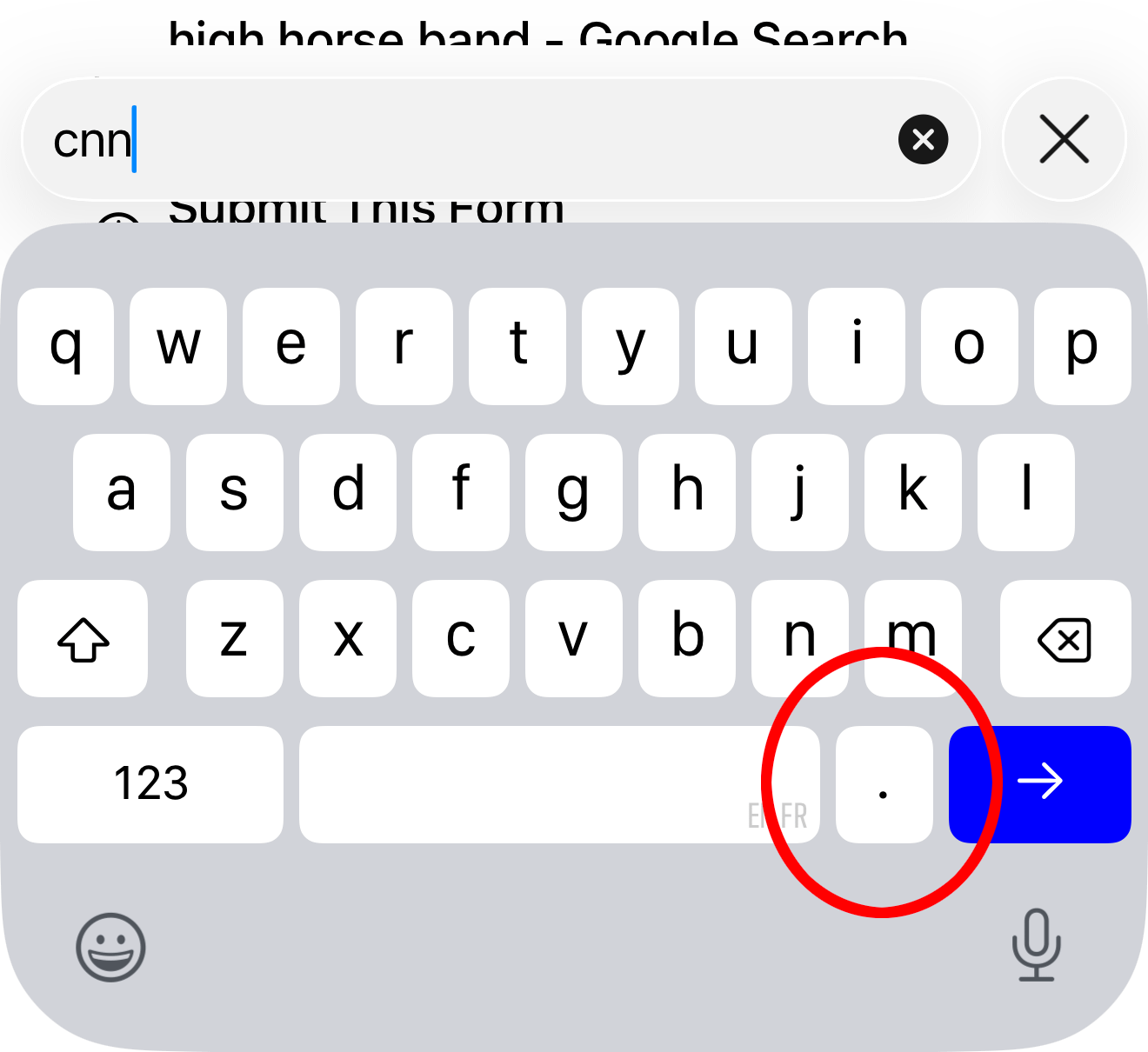
In Safari on the phone, a period key appears next to the Space bar when you’re typing in a web or email address. That’s supposed to be a convenience, so you don’t have to flip back and forth to the punctuation keyboard. But Tom Maguire hates it, because he winds up hitting that new period key when he’s going for the Space bar.
@Sweetcorn Season wrote: “At some point in the last few years, I think they wanted to add some smarts, so if you tapped a word that’s a proper noun with a space in it, like Santa Barbara, it’ll highlight the whole term instead of just the word you tapped. But 99% of the time, this feature triggers false positives.”
A huge number of you sent requests for features that are already in place. It’s not that you’re stupid for being unaware of them; it’s more a commentary on just how complex and sprawling phone OSes have become. As a public service, I’ll write a column about these later this week.
In the meantime, next time a feature is frustrating you, consider Googling it. I bet you’ll find the solution!
In the end, this exercise really did produce some bona fide, inarguable, repeatable bugs. I could confirm only ten, which is not bad—but they’re all worth fixing.
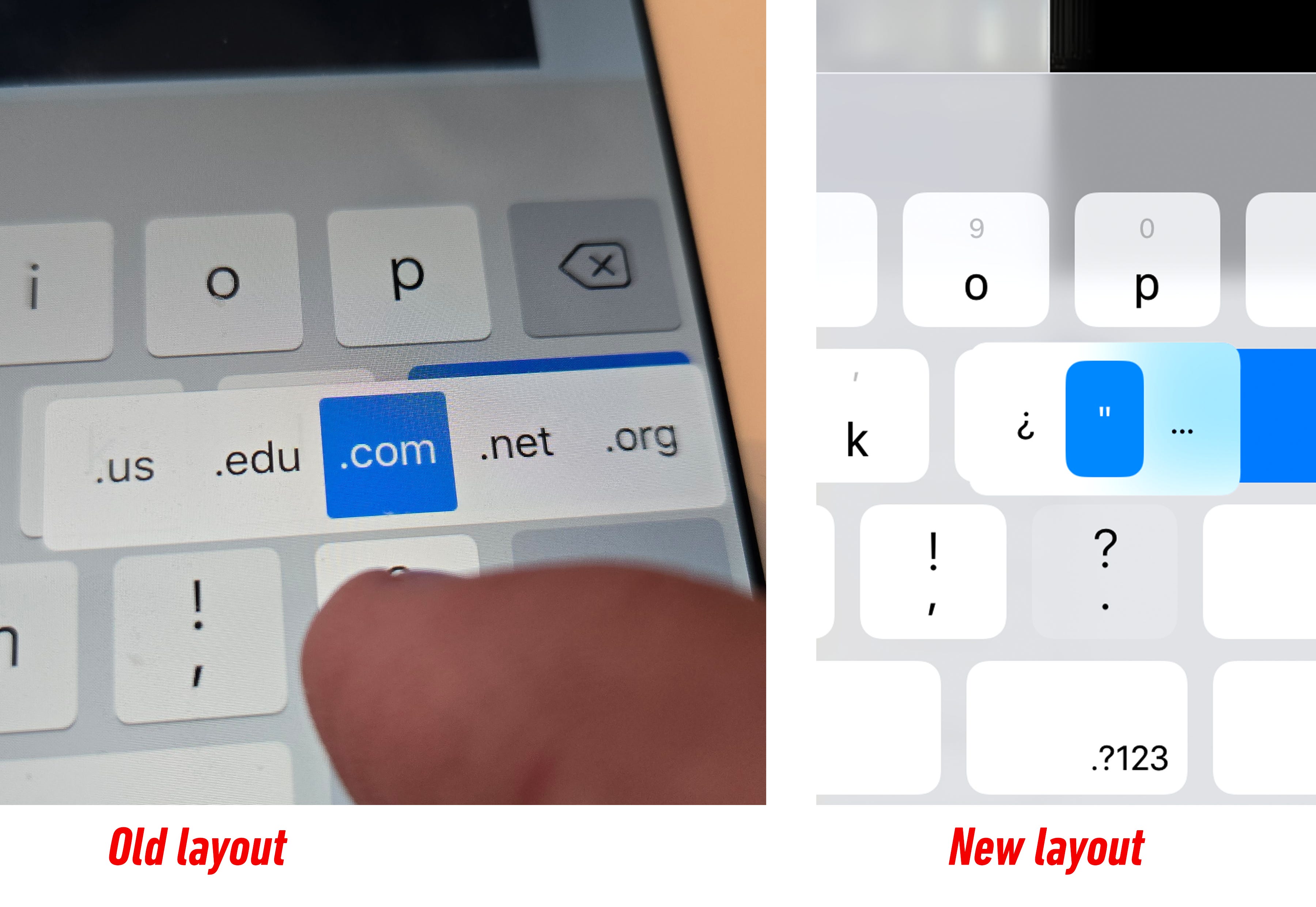
“In iPadOS 26, when typing a website in the Safari address bar, holding the period no longer gives you domain shortcuts (like .com and .net). I have experienced this yearly with a new release, but it usually gets fixed in the first update. This year, Apple has yet to fix it.” —Margot Belgorod
“If you don’t allow Siri access to your location, it refuses to answer questions like ‘how far is Atlanta from Boston?’ or ‘Greek diners in Merced’—questions that don’t need your location in order to answer.” —Dave Marcus
“If you’ve just charged your watch, pop it on and start a workout, it seems to hang when you hit Start.” —Ted Brunt
“MacOS Terminal app sometimes hangs when selecting the New Terminal menu item. The only thing to do is to force kill all terminal windows.” —Peter J. Kootsookos (and several other people)
“iOS: If you go to Files and open a file (screenshot, PDF, etc.), it opens in the new Preview app. But if you tap the Back arrow, you’re still in the Preview app (rather than back in Files), and you’re suddenly browsing a different folder location than you were in the Files app.” —@monkeysort on X
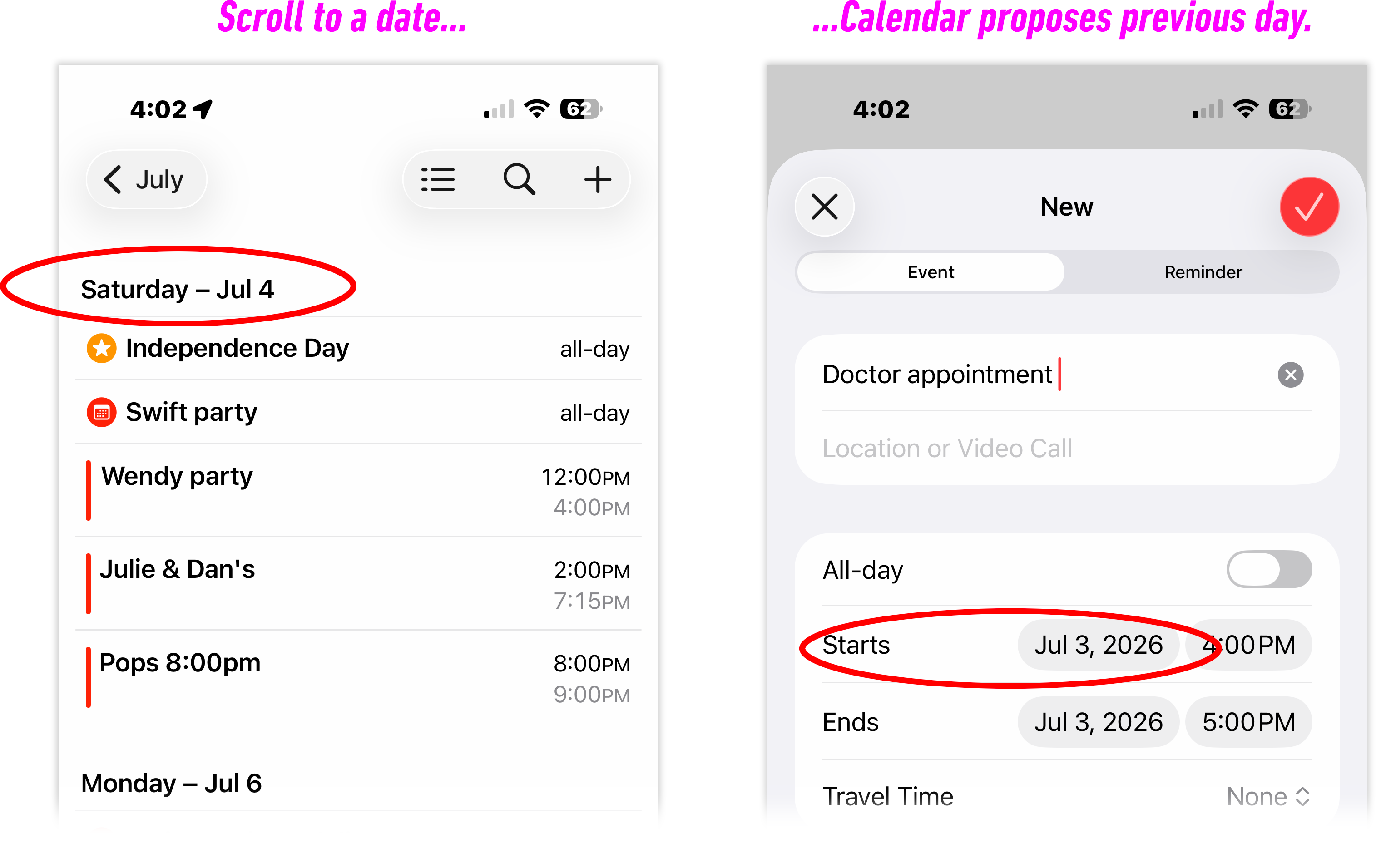
“List view in iPhone calendar: Scroll to the day, so that it’s on the header at the top of the list. Find a good time. Hit the New Appointment (+) button. The time that’s picked out is the current time the DAY BEFORE the day you’re looking at. I can’t tell you how many doctor appointments have been saved on the wrong day.” —Dave Somers
“On the web version of Calendar (at iCloud.com): You can’t add additional calendars like sports teams, etc. It should be a direct reflection of your Mac’s calendar and it isn’t.” —Brinke Guthrie
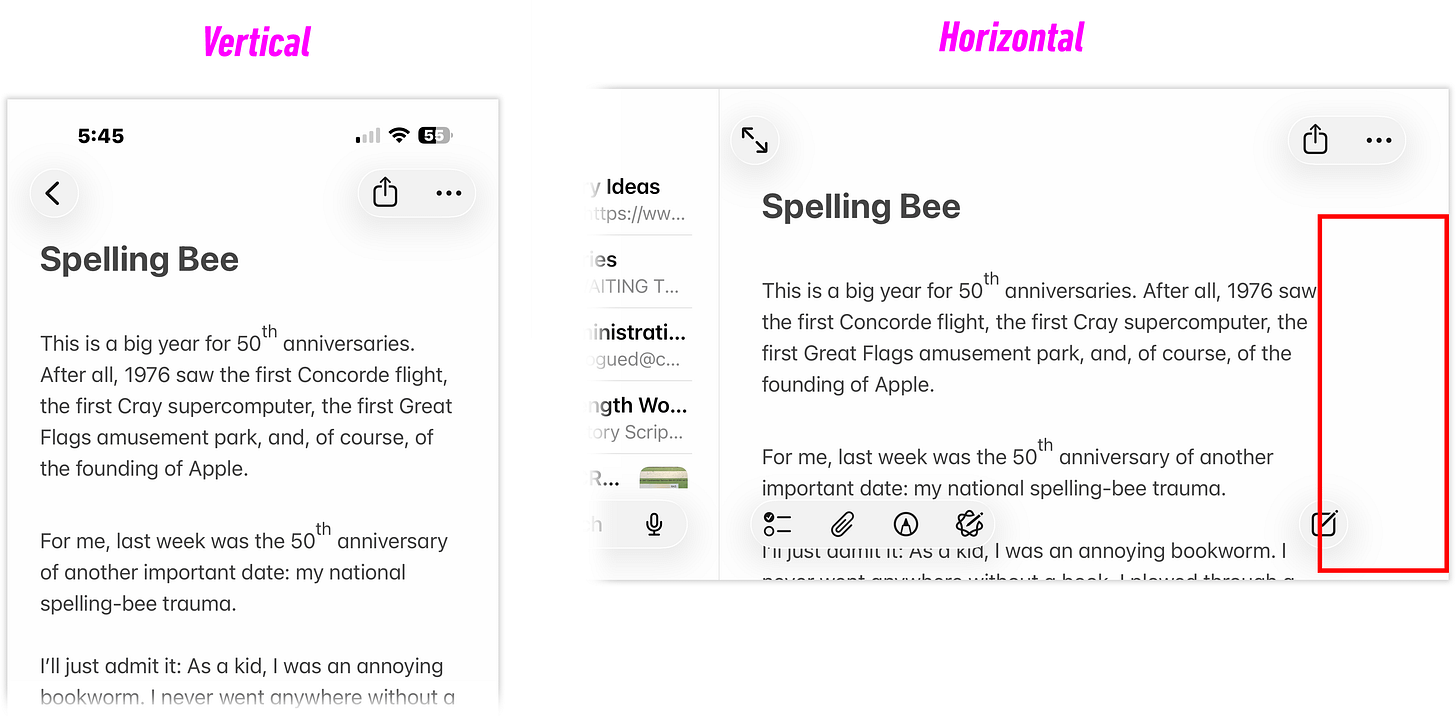
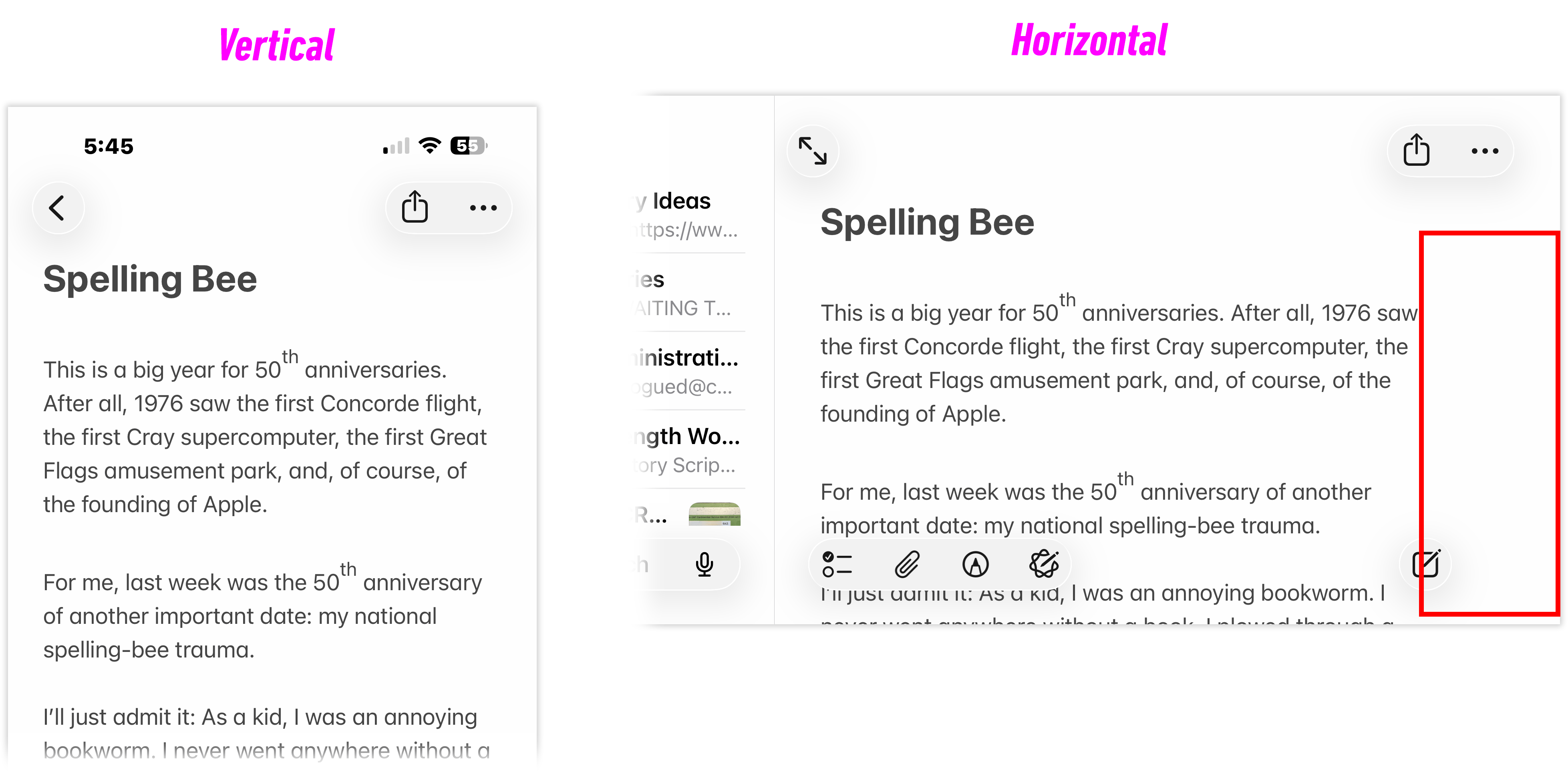
In landscape mode on the iPad or iPhone Max, every Notes page sprouts a bizarre one-inch white margin that wastes 20% of your screen.
To save space, “iOS offloads apps it considers ‘unused,’ but it ignores widgets. If an app’s only job is displaying a widget, iOS still offloads it, leaving behind a blank ‘Waiting...’ widget with no indication of what app it belongs to.” —@imthaz
“From the phone’s Lock screen: Launch camera (side-swipe or camera button). Swipe up from bottom edge to exit camera and return to Lock Screen. Quickly swipe up again to unlock phone and go to Home Screen—except this will not work! It simply scrolls any notifications on the Lock Screen. This bug has existed FOR-EV-ER.” —@piffman
(As always, you’re encouraged to submit bugs you find directly to Apple at this link.)
One of the most popular complaints is iOS autocorrect, which, as @jeremychrysler notes, “has gotten consistently worse over time. It is terrible.”
“If I type ‘I went to the doctof,’ it will replace the misspelled word to ‘doubtful’ or something stupid like that,” notes Drift on Reddit.
For many people, the quick fix is resetting the keyboard dictionary (the invisible list of words iOS consults when suggesting an autocorrection). Every time you make a typo and don’t fix it, you’re inadvertently adding that wrong word to the dictionary, so it does indeed get worse and worse. To do this reset, tap Settings > General > Transfer or Reset iPhone > Reset > Reset Keyboard Dictionary.
When the problem is weird capitalization, Dave Marcus says, it’s because autocorrect relies on names in your Contacts app. “Thus, when you see a word capitalized oddly, it often can be traced back to Contacts,” he says. “Try adding ‘A Bippy Deck Company’ as a name in Contacts, and then use voice dictation to say, ‘You bet your bippy.’” And sure enough: iOS capitalizes “bippy.” (Carol Anne Buckley feels his pain. “Because I know a guy named Said, I can’t use the word ‘said’ anymore without its being capitalized,” she says.)
Unfortunately, that trick doesn’t work for everyone. Fortunately, iOS 27 is supposed to fix all this.
For me, the shock of this exercise was how vast and different people are. I fancy myself a power user, but you guys use corners of these OSes I’ve never even poked at. Everyone wants something different from this stuff.
One person complained that by default, the Find command searches the whole Mac; another complained that it searches only the current folder. Who’s right? (Neither realized they could choose this setting in Finder > Settings > Advanced.)
Some people want more features; some want simple and streamlined. Some people want their devices to save them time by doing more things automatically; others want total control. No tech designer will please all the people all the time.
I know, too, that no operating system is ever bug-free. Every tech company keeps a master bug-tracking database. (Apple’s is called Radar.) They try to fix as many of the biggies as they can—but the list never gets to zero. At some point, the engineers prioritize the bugs to fix, consider the timeline, and draw a black line at a certain spot on the bug list. Everything below it will have to wait for another time.
In any case, there you have it: ten certified, repeatable, known bugs for Apple’s software team to tackle as they finish up OS 27. They’ve got three months left.
If you enjoyed “Pogue’s Posts,” consider subscribing! It’s free and ad-free. It just means you’ll get each week’s column by email. You can unsubscribe at any time.
Comments
Nothing yet. Say the first thing.
Sign in to join the conversation.