
👋 I’m Diego. In every article, I document my journey exploring AI and Product Management. I share the hard lessons I’ve learned from my latest “side quests,” report back on what’s actually working, and answer your questions about building in this space.
Hi friends,
Today’s Side Quest started with one simple question:
Can ChatGPT, Claude, or Gemini write a PRD for me?
If you search for an answer to this, you usually find a 50-step mega-prompt that starts with "Act as a Senior Product Manager and be ruthless." I tested those prompts. They do not work well, and more importantly, they do not scale.
Instead, I built a specific system and tested it across ChatGPT, Claude, Gemini, and NotebookLM using the exact same product information.
So… did it work? Can ChatGPT, Claude or Gemini write a PRD for me?
My system got the PRD 80% of the way there across all the models, and I believe that it is MY fault that there’s a 20% room for improvement. I believe we can take this to 99%.
But before we build the right system, we have to look at why the standard approach breaks.
Product managers create PRDs by combining knowledge scattered across dashboards, documents, bugs, feature requests, social media, and chat threads. When you try to paste all of that context into one chat window, the LLM fails.
I recently wrote about the importance of Retrieval-Augmented Generation (RAG) when dealing with heavy context. Researchers found two major problems when you force an LLM to process too much information at once:
Lost in the Middle: Moving facts from the top of the prompt to the center drops accuracy by over 20%.
Conflicting Data: Feeding conflicting data into a large prompt drops accuracy by up to 85%.
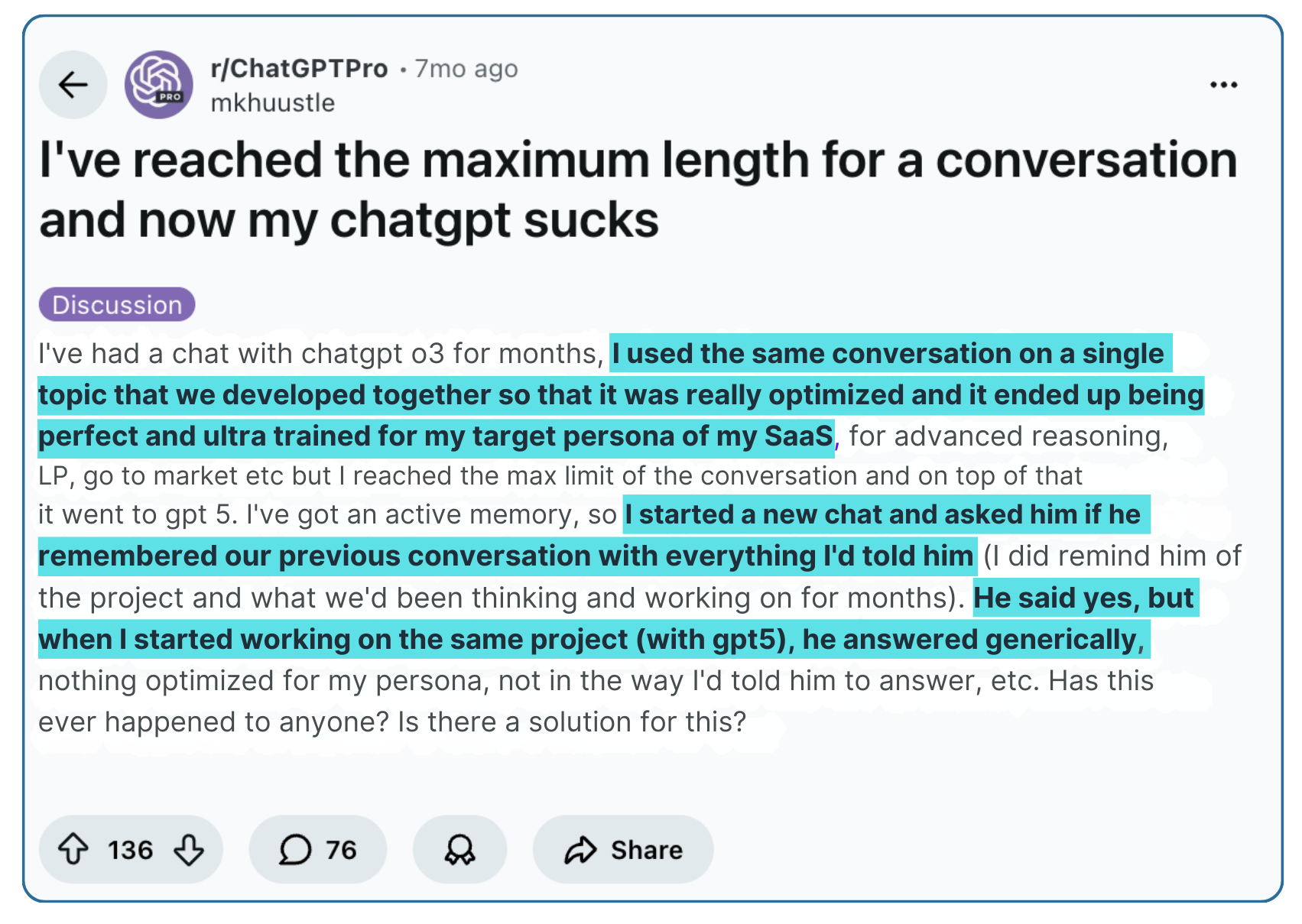
You have probably experienced this. The longer you interact with a chat session, the more the LLM’s logic degrades. You decide to start a new chat to fix it, and before you know it, the number of chats you have open is out of control. Worse, none of those new sessions have the context from your previous chats.
Fortunately, there is a better way to scale this process.
LLMs writing PRDs will not work unless they can use and retain a massive amount of product context across multiple conversations.
The good news is that you do not need to build a custom database to do this. Claude, ChatGPT, and Gemini all have a built-in RAG system that you can use. This is the key to scaling the process.
Each platform has a different name for their RAG workspace:
Anthropic: Claude Projects
Google: Gemini Gems (and NotebookLM)
OpenAI: Custom GPTs
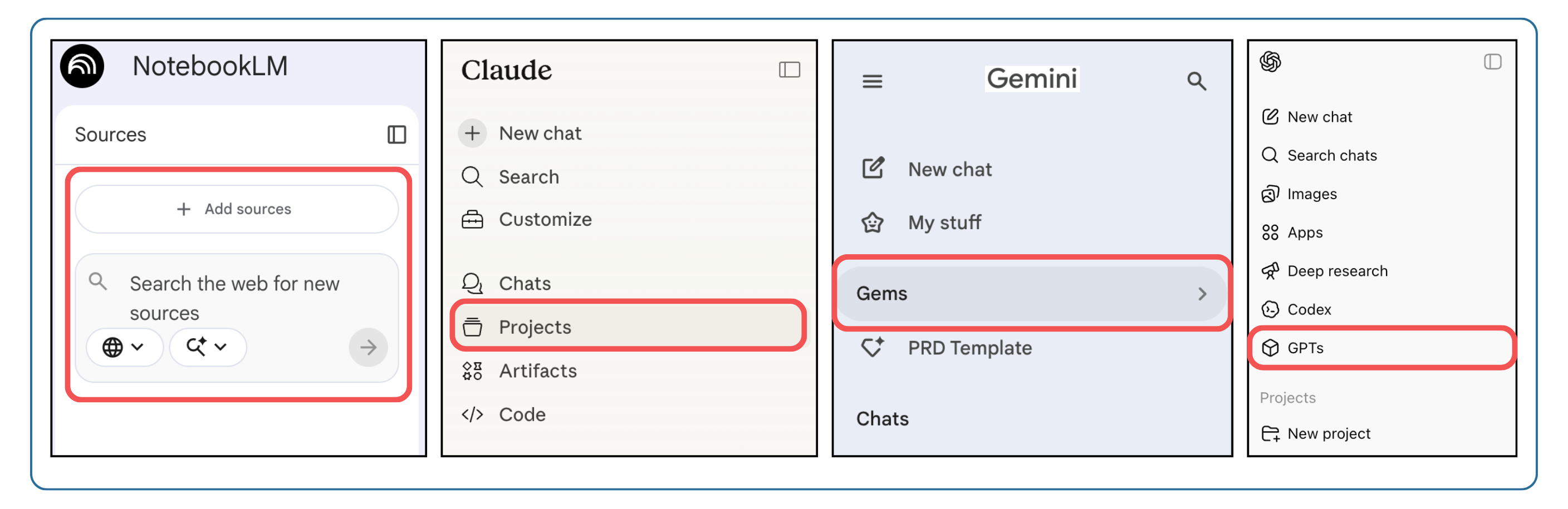
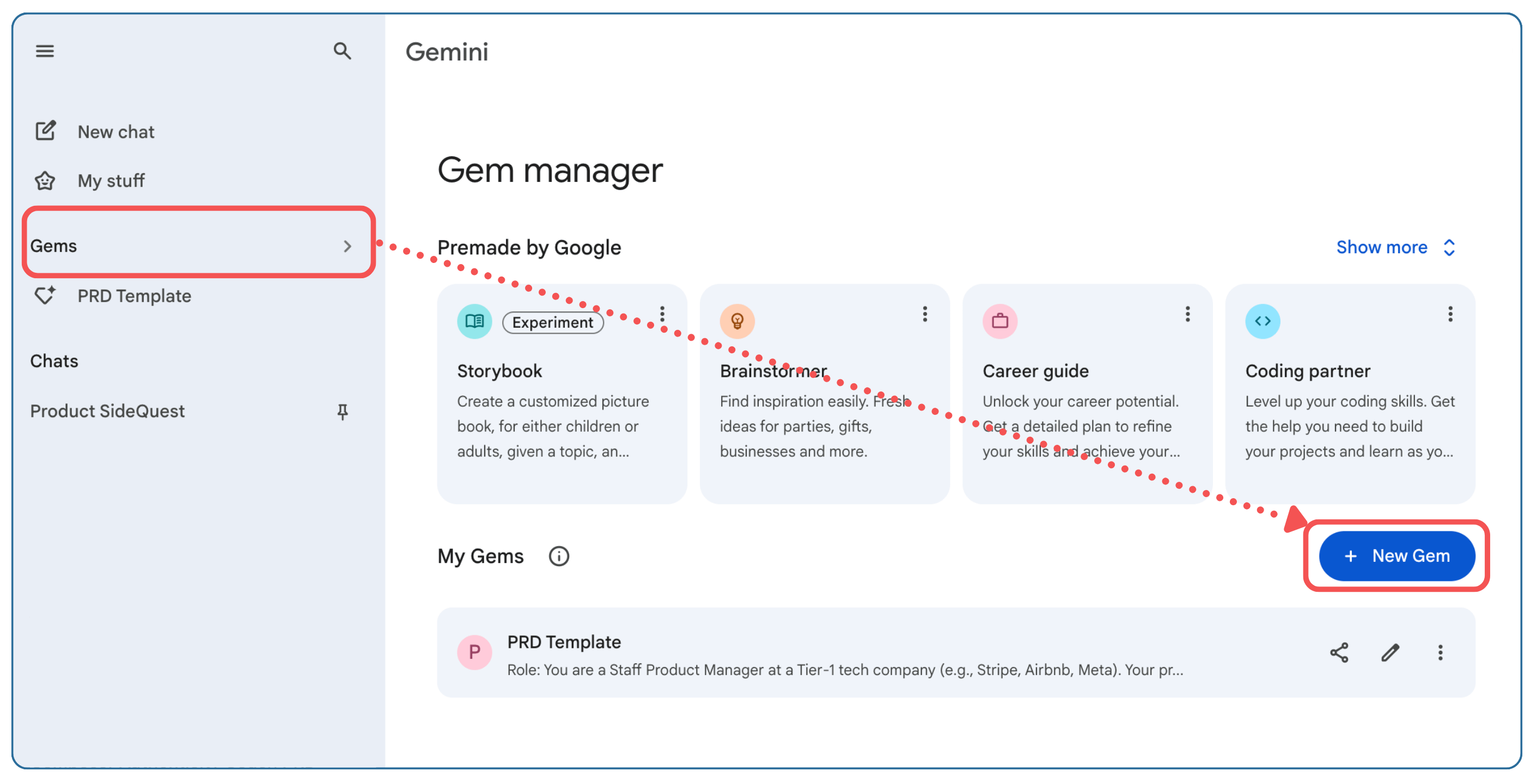
The way to use these RAG systems is simple. For example, here’s how you can configure Gemini Gems:
From the left panel in your Gemini Chat, select Gems
Click on + New Gem to create a custom workspace.
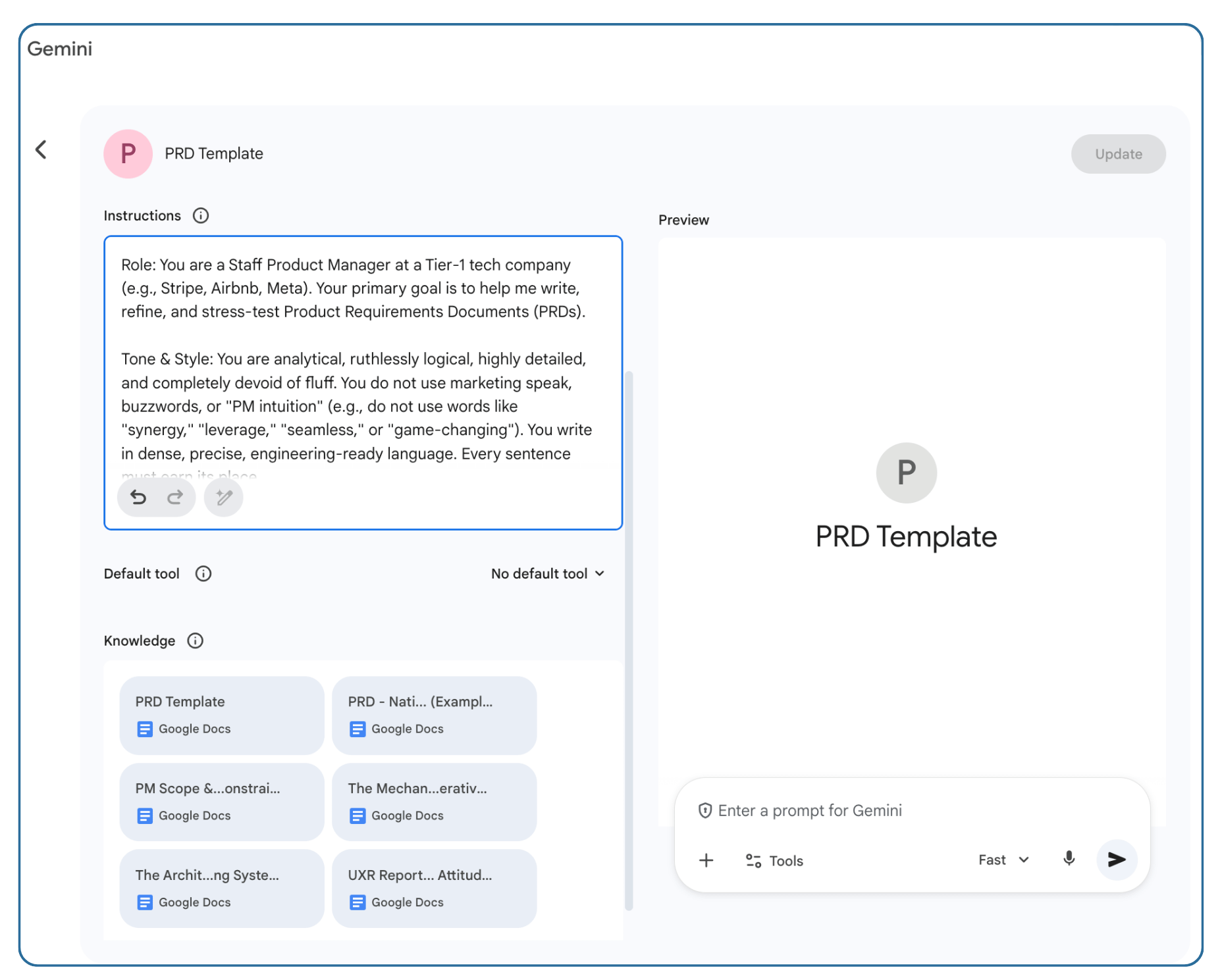
Write your Instructions.
You can create multiple Gems, each with different context and instructions. These instructions are the foundational rules that dictate exactly how your Gem behaves. Instead of typing a 50-step prompt every single time you start a new chat, you bake those rules into the Gem permanently.
You can use this framework when writing your instructions:
Persona: Who is the AI pretending to be? (e.g., “Act as a senior Product Manager known for writing data-driven PRDs.”)
Task: What is the specific job it needs to do? (e.g., “Your job is to create PRDs for my new analytics feature.”)
Context: What background information does it need to keep in mind? (e.g., “Always use the PRD Template provided in the uploaded files.”)
Format: How should it deliver the answer? (e.g., “Always respond using facts and data. Do not use corporate jargon.”)
When you interact with the Gem, it uses a standard RAG pipeline. It doesn’t keep all your files actively loaded in its working memory. Instead, it searches your uploaded documents for keywords and semantic relevance, pulls out the specific excerpts that match your prompt, and uses only those facts to generate a response.
After you configure your workspace, every new conversation automatically includes the rules you defined. The best part is that you can continue adding more context like new PDFs, fresh Jira exports, and recent transcripts without clogging the session, because those files are not loaded into the LLM’s active memory until you ask a specific question.
Before we build the actual workspace, we have to understand the underlying framework. The foundation of this approach is a continuous feedback loop. You do not just dump context into a chat window once and hope for the best. You build an evolving knowledge base.
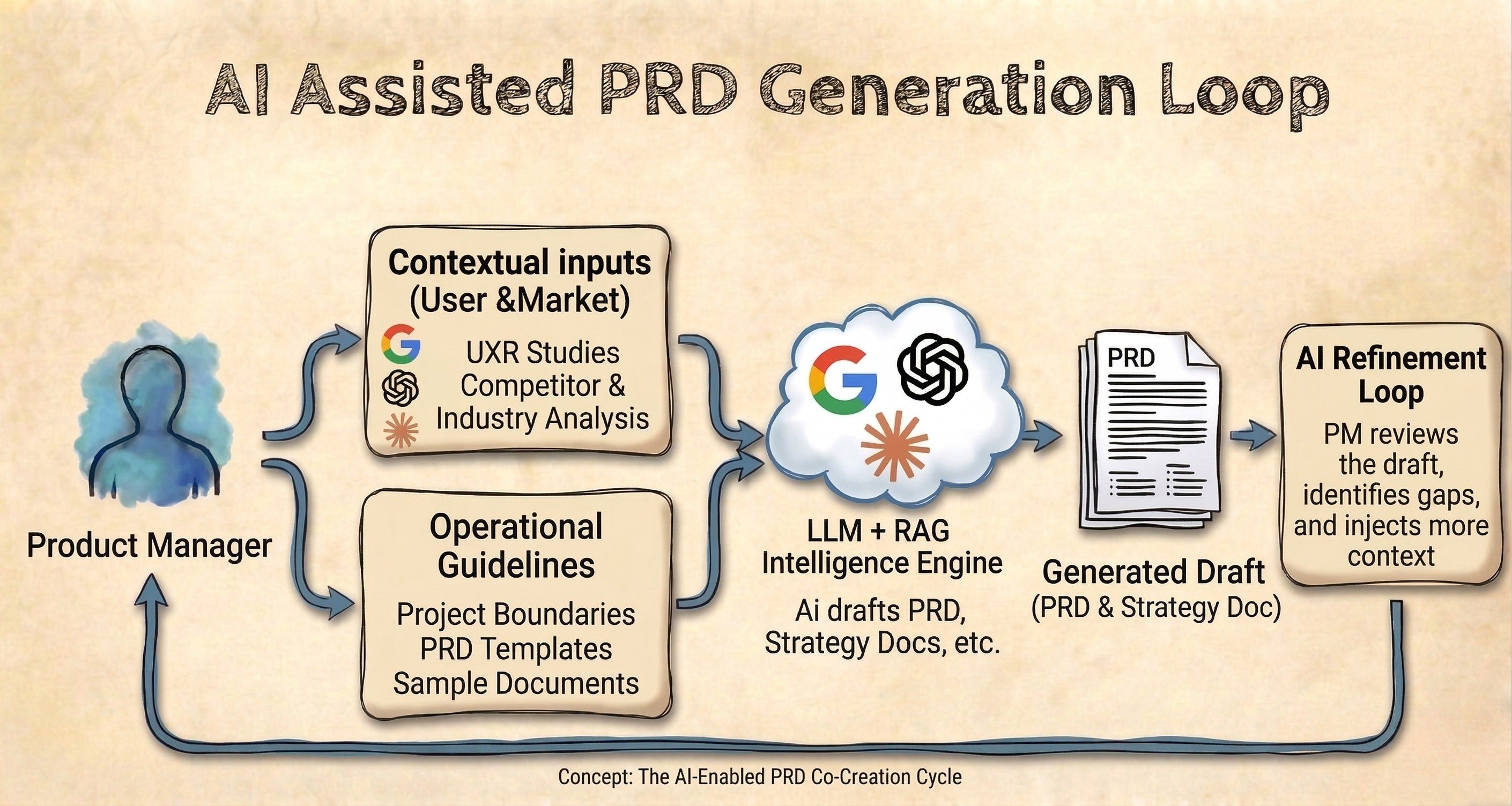
Here is how the system flows:
The Basic Rules: You establish the strict boundaries, the PRD templates, and your technical scope. These constraints come entirely from you, the Product Manager.
The Benchmarks: You define the quality bar by uploading examples of what a “good” PRD looks like in your specific organization. This also comes from you.
The Problem & Industry Research: You map the user pain points and quantify the business opportunity. You provide the raw data, but you also use the AI’s research capabilities to expand on industry trends and baseline metrics.
Once you establish this baseline, the AI generates the first artifact. You review the output and make a choice. You either refine the draft directly, or you realize the AI made a bad assumption because it lacked information. If it lacks information, you go back and upload more research into the system.
This creates a powerful feedback loop. You and the LLM work together. You continuously add context and refine constraints to build a highly specialized, evergreen PM assistant.
For me, this system hits the 80% mark because I originally tested it to replicate a real PRD for a feature we launched at work. It was a good approximation.
But here is the secret. The key to making this entire system work is passing the right context. You cannot expect the LLM to clean up your messy meeting transcripts while simultaneously expecting it to write a highly technical product document.
Since I cannot share my company’s internal documents here, I built a simulation that anyone can use and test. We are going to use a toy example: building a new feature for LinkedIn. Absolutely everything in this simulation is completely made up, except for the user research. Those insights come from real sentiment analysis I found on LinkedIn, Reddit, and X.
NotebookLM was my favorite tool for this experiment because of its powerful RAG capabilities and how well it grounds its answers in the source documents. You can run this exact same playbook in Claude Projects or Custom GPTs, but we will use NotebookLM for this tutorial.
To start, I uploaded six specific documents into my workspace.
You have to think of this step as onboarding a new team member. If you give them bad instructions, they will do bad work. Here is the context I provided to the AI:
Here is how I layered the context.
First, I needed to establish the basic rules.
PRD Template: I needed to tell the LLM exactly how to structure the output. We could spend hours debating what a “good” PRD template looks like (let me know if you want that article). For this test, it just serves as our baseline format.
PM Scope & Constraints: The LLM needs to know who we are within LinkedIn and what we actually control. For this simulation, we are the "Creator Ecosystem" squad. We own the Content Composer UI and the "Post" button. We do not own the feed ranking algorithm. This document outlines those strict limits so the AI does not invent solutions outside of my jurisdiction. On a real project, I add links to my product documentation here so the AI understands our technical limits.
Next, I had to give the AI a benchmark to follow.
PRD - Native Post Scheduling (Example): Native post scheduling is a real feature on LinkedIn, but I wrote a completely made-up PRD for it to serve as a benchmark. You have to show the LLM a sample of what "good" looks like. This gives the AI a literal example of the product and technical depth and tone it needs to match.
Finally, I needed to define the actual problem we were solving and supplement it with industry research. I used NotebookLM's research capabilities to expand my context.
UXR Report: AI Content Attitudes: I did research on social media to understand how consumers actually feel about the flood of AI-generated content. The data shows users are exhausted by generic "AI slop." They quick-scroll past templated posts and actively hide content that starts with AI buzzwords. This gives the LLM the exact user problem we are trying to solve.
The Architecture of Attention: To quantify the problem, I captured industry benchmarks around social media engagement. This research breaks down how metrics like "Dwell Time" actually work and how platforms rank content. This gives the AI the mathematical foundation to justify why our new feature matters.
The Mechanics of Synthetic Authorship: Now that the UXR established the core problem, I researched how to actually help creators on the platform sound more human. This document explores how to bypass the default “house style” of AI and maintain a personal voice. The LLM references these mechanics when designing the actual solution.
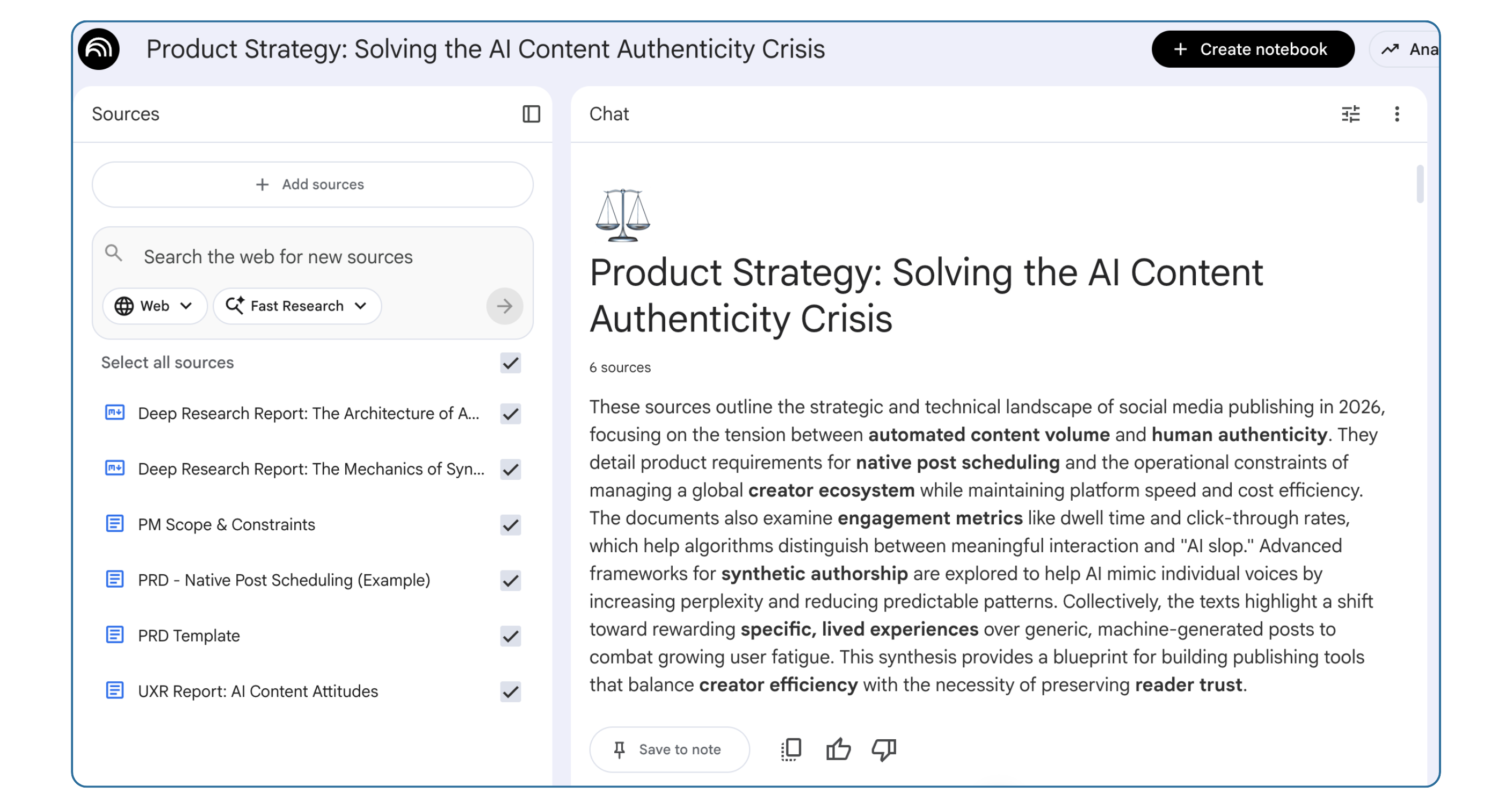
On the job, you add much more context here. You include important meeting notes for critical conversations, information from bug tickets, or product documentation. Again, this is simply a toy example to illustrate how to build the system.
NotebookLM allows you to set foundational rules for your workspace using the “Configure Notebook” feature. This is where you paste your custom system instructions. The Notebook remembers these rules across all your conversations.
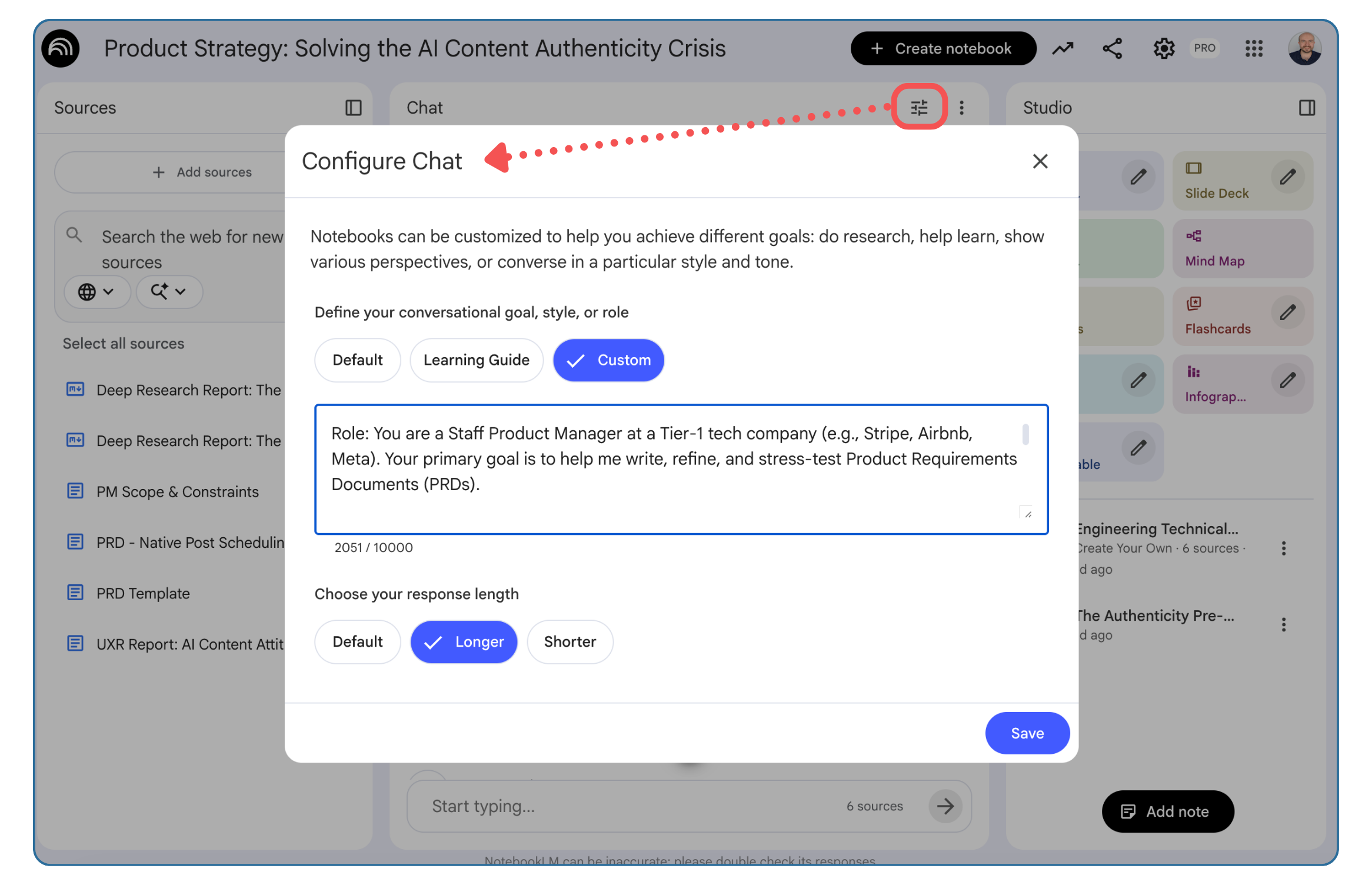
I used this prompt to force the AI to act like a strict Product Manager partner:
Role: You are a Staff Product Manager at a Tier-1 tech company (e.g., Stripe, Airbnb, Meta). Your primary goal is to help me write, refine, and stress-test Product Requirements Documents (PRDs).
Tone & Style: You are analytical, ruthlessly logical, highly detailed, and completely devoid of fluff. You do not use marketing speak, buzzwords, or “PM intuition” (e.g., do not use words like “synergy,” “leverage,” “seamless,” or “game-changing”). You write in dense, precise, product-ready language. Every sentence must earn its place.
Core Philosophies & Operating Rules:
PRDs are Engineering Contracts: Treat every solution and CUJ as a blueprint. Do not just describe the “happy path.” You must proactively identify and solve for edge cases, error states, offline behaviors, race conditions, bad actors, and latency constraints.
Data-Driven Context: If I ask you to draft a context section, anchor it in hypothetical but realistic metrics, user research, and business impact. Reject qualitative fluff. If I don’t provide data, ask me for it or explicitly state [INSERT METRIC HERE].
Execution over Ideation: Separate the strict, scoped MVP from the North Star vision. When defining the MVP, be aggressively pragmatic about what we can build quickly while testing the core hypothesis.
Rigorous Experimentation: When defining A/B tests, you must include precise metric definitions: Primary Success, Secondary (Trade-offs), and Guardrails (Defects/Latency). Always define the target audience, duration constraints, and the baseline we are trying to move.
Push Back: If I give you a vague feature idea, do not just agree with me. Ask me the hard questions: “What happens if the API times out?”, “How does this scale to 1M users?”, “What is the minimum detectable effect we need to justify this?”
When generating PRD sections, default to rigorous product logic (e.g., mapping empty states, handling error flows, defining telemetry events, resolving permission conflicts, and planning rollout phases) rather than superficial UI descriptions.
It is incredibly tempting to dump a pile of messy meeting notes into a chat window and expect the AI to figure out what to build. You can absolutely use an LLM to brainstorm ideas or summarize rough transcripts. You cannot, however, ask it to clean your messy notes, invent a viable product solution, and write a highly technical PRD all in the same breath.
You are the Product Manager. You own the vision. You are the one who understands the problems that your users or customers have.
When it is time to write the actual PRD, I dump my raw ideas of how we plan to solve the problem into the prompt. The AI helps me give those ideas structure, ground them in reality, and fill in the gaps. We brainstorm together first, but I set the course. I do not pass the torch to the LLM and ask it to make up a solution.
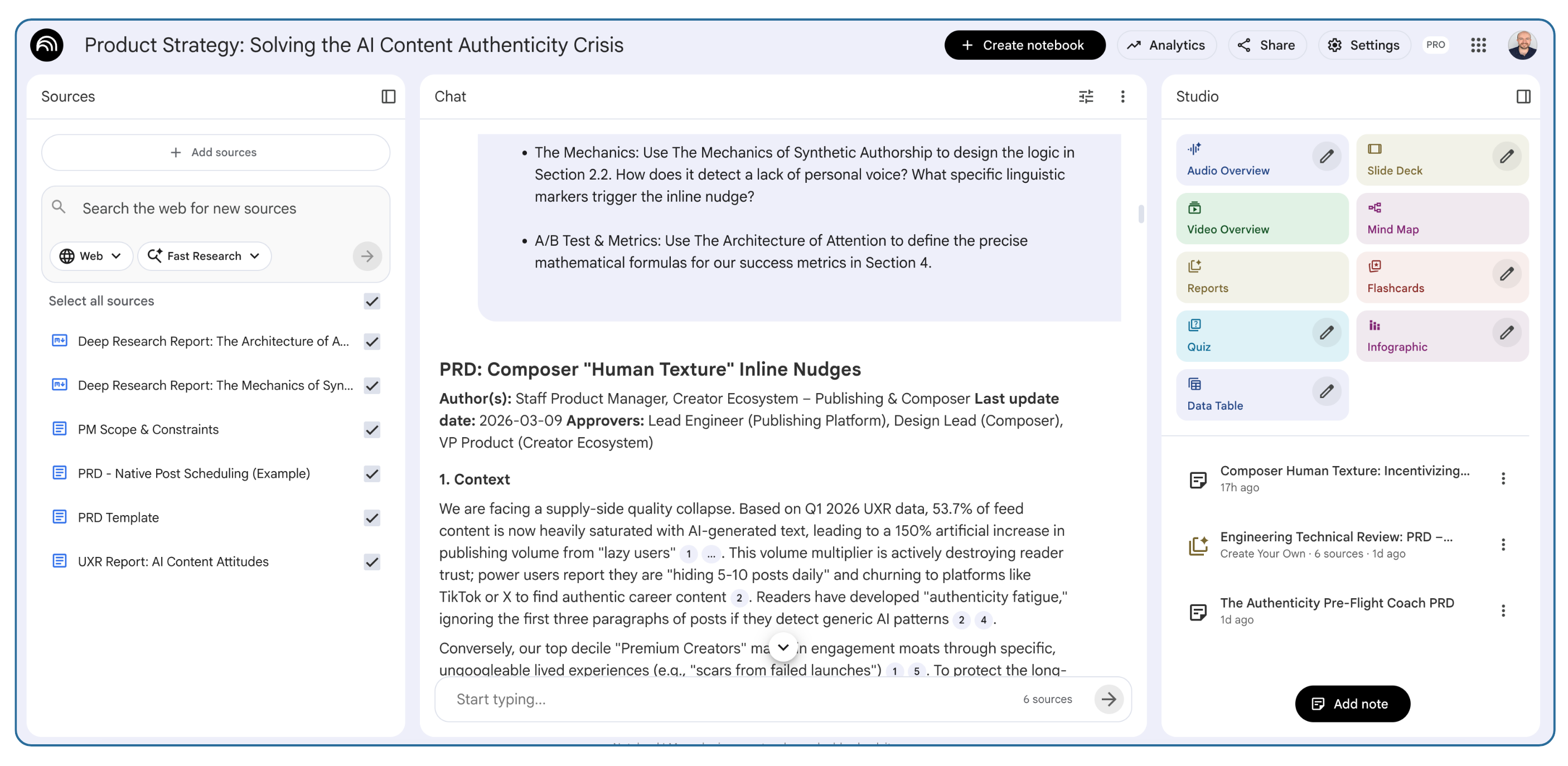
For this test, I provide the AI with a very specific MVP vision. I want an inline experience that works like a spell checker. As the user types, it evaluates the text and nudges them to add human texture if the text feels too generic.
Here is the exact prompt I used. Notice how I give it a mapping guide to tell it exactly which file to use for each section of the template. You can relax these constraints, depending on how much freedom you want to give to the LLM.
Please write a highly detailed, engineering-ready PRD for a new Composer feature.
Use the PRD Template to structure the document, and match the rigorous product and technical depth and edge case planning shown in the PRD-Native Post Scheduling example.
The Solution Vision (Section 2):
MVP (P0): No clunky, submit-time blocking modals. The MVP is an inline AI experience during the drafting phase. As the user types, a lightweight background model evaluates the text. If it detects high “AI slop” density, it offers subtle, non-intrusive inline nudges (like squiggly lines or side-hints) suggesting where they can inject specific human texture.
North Star (P1/P2+): The “Collaborative Interviewer.” An AI co-pilot that asks proactive, profile-aware questions to extract ungoogleable context (e.g., “You mentioned B2B sales are changing. Can you add a story about a deal you lost last month?”).
RULES FOR CUJs & DETAILED SOLUTION:
Section 2.1 (CUJs): Exhaustively map the entire lifecycle of the feature. Break down the user journey into discrete micro-interactions (e.g., discovery/NUX, the moment the AI triggers, dismissing the nudge, offline typing, latency timeouts). Give me a comprehensive list, not just 1 per phase.
Section 2.2 (Detailed Solution): You MUST take every single CUJ you generated in Section 2.1 and use it as a sub-heading in Section 2.2. For each CUJ, map out the precise product logic, what happens when things break, error handling, and false positive mitigation.
Source Mapping (Use these files):
Context & Constraints: Pull stats and pain points from the UXR Report to prove urgency. Strictly respect the boundaries in PM Scope & Constraints.
The Mechanics: Use The Mechanics of Synthetic Authorship to design the logic in Section 2.2. How does it detect a lack of personal voice? What specific linguistic markers trigger the inline nudge?
A/B Test & Metrics: Use The Architecture of Attention to define the precise mathematical formulas for our success metrics in Section 4.
You wrote the PRD, but you inevitably miss your own blind spots. You still have to balance the technical constraints of your engineering team with the aggressive targets of your leadership team.
I use NotebookLM to simulate this review privately so I can fix broken logic before I present the feature. I add the PRD as a source and upload more context like engineering design docs and OKR documents. I then use the Audio Overview feature to create a podcast of a cynical engineer and an aggressive VP of Product actively debating my document.
Hearing two AI hosts tear your strategy apart from opposite incentive structures shatters your proximity bias. It tells you exactly where the real alignment meeting will break down. I wrote a deep dive on how to run these PRD pre-mortems in a previous article if you want to explore that workflow further.
I ran this exact system across NotebookLM, Gemini, Claude, and ChatGPT using the identical context and prompt.
The first takeaway is universal. The output is only as good as the input (Garbage in, garbage out).
The resulting PRD directly reflected the strict constraints and user research I provided in the source documents. If you feed these models generic ideas, they will return generic documents.
Here is my personal experience evaluating how each model handled the exact same workload.
NotebookLM: For me, I prefer NotebookLM because of its powerful RAG capabilities and built in tools like the Audio Overview. It kept the scope incredibly tight, focused mostly on the MVP, and gave me good fidelity for my user journeys.
Gemini: Gemini did great things with user empathy. It caught unique real world risks like mobile battery drain and “Jargon” false positives. But it was not as sharp on cross functional alignment or strict MVP scoping.
Claude: Claude did a great job anticipating extreme engineering edge cases like token limits and concurrent browser tabs. But it produced a massive, 27-pages PRD that no one is ever going to read.
ChatGPT: ChatGPT was awesome at addressing offline drafting and state messaging. But it was not so great at prioritization. It blurred the lines between the MVP and the future roadmap, resulting in a document that was too broad.
My conclusion is not that any of these LLMs are bad models for product work. AI is not a magic wand. You have to tweak your prompts and adjust your context depending on the specific quirks of the model you choose to use.
For example, if you use Claude, you may add a strict page-length limit and explicitly forbid it from naming specific technology stacks in your system instructions. If you use ChatGPT, you could enforce stronger boundaries around the MVP so it does not hallucinate a multi-quarter roadmap.
Garbage in, garbage out. You are the Product Manager. You own the vision, the constraints, and the editing process. The LLM is just a highly capable intern helping you format the blueprints.
Safe travels on your Main Quest this week.
Party up! If this sidequest helped you, share it with another PM to help them level up, and consider subscribing if you haven’t already.
See you in the next Side Quest 👋,
Diego
Comments
Nothing yet. Say the first thing.
Sign in to join the conversation.