
Once a week Pip delivers a short post with AI tips, copy-paste materials, and work shortcuts made specifically for real estate agents.
No theory, no fluff - just actionable stuff to use right away.
For a long time, AI mostly wrote things. Emails, descriptions, captions.
That changed.
Now it makes things: documents, designs, print-ready pages.
Which means the question stops being “what can AI write for me?” and becomes something better:
What can AI make for my clients?
Pip spent the week on exactly that, and came back with two favorites.
One helps your buyers make the biggest decision of their year. One ends up taped to their fridge.
📊 The buyer decision sheet - a designer-grade comparison PDF for buyers torn between homes
🖍️ The new-home coloring sheet - the $0 closing gift that beats the $50 gift basket
Let’s dive in!
You know this moment: tour day is over, your buyers loved two houses (maybe three), and now they’re stuck.
Most agents send a “any thoughts? 😊” text.
You’re going to send a one-page decision sheet with their exact priorities down the side, built by AI in two minutes.
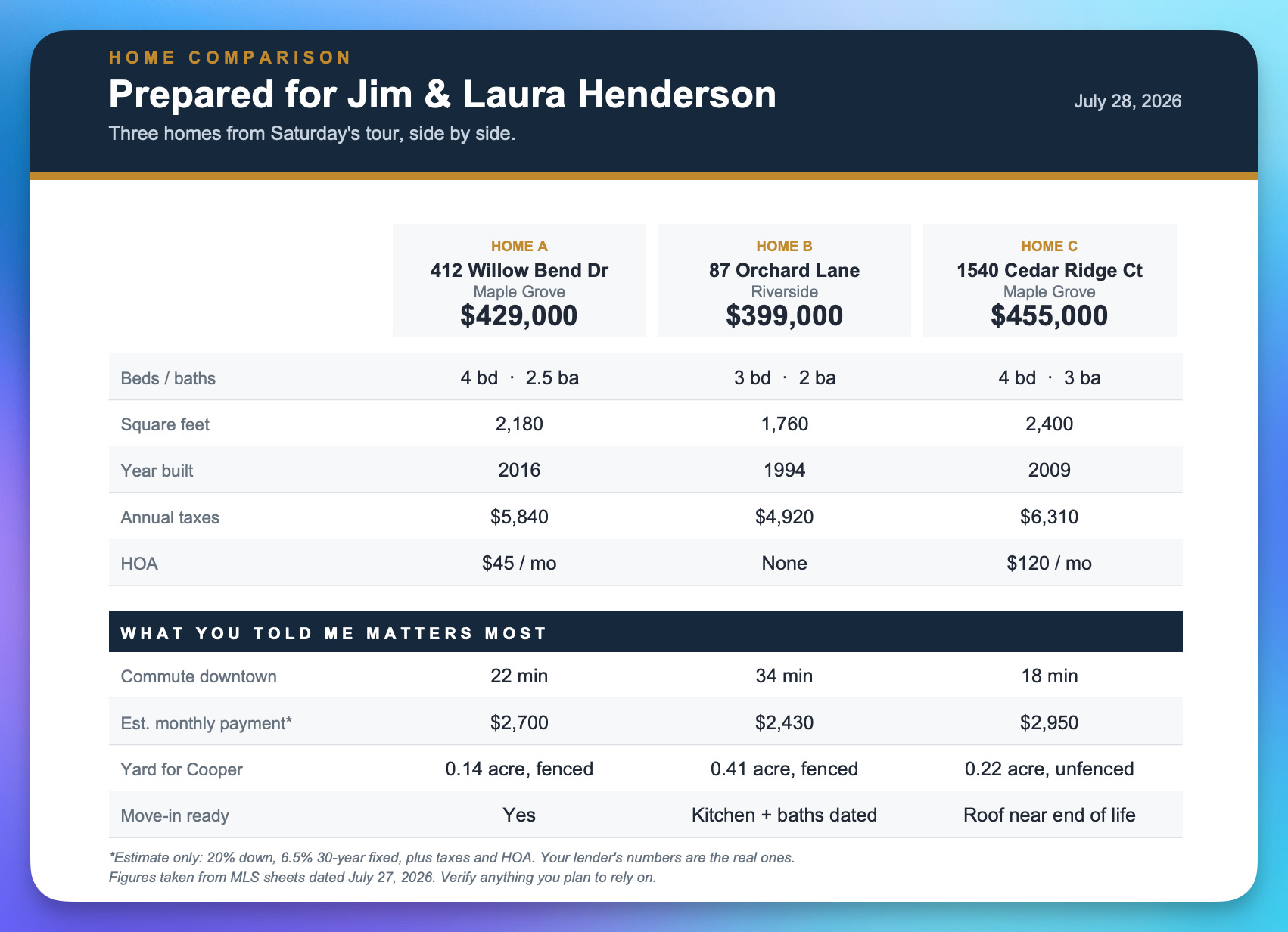
Here how to do it step by step:
Step 1: Write down what your buyers told you they care about, in their order. (”Commute under 30 minutes, monthly payment, yard for the dog.”)
Step 2: Open ChatGPT or Claude (both make PDFs now, use whichever you like), and paste this with the details filled in:
Create a one-page home comparison sheet PDF for my buyers who are deciding between the homes below.
MY BUYERS CARE ABOUT (in their order): [commute to downtown, monthly payment, yard for the dog, move-in ready]
AGENT INFO (for the footer): [NAME · PHONE · EMAIL]
BRAND COLORS (optional): [two hex codes, or write "you pick: one deep neutral plus one warm accent"]
THE HOMES (facts from my MLS sheets - use ONLY these):
HOME A: [address, city, price, beds/baths, sqft, year built, annual taxes, HOA, key features]
HOME B: [same]
HOME C: [optional]
BUILD IT IN THIS ORDER:
1. A header band: my buyers' names and today's date.
2. A side-by-side table, one column per home, each headed by its address and price. Rows: beds/baths, square feet, year built, annual taxes, HOA.
3. A clearly separated section titled "What you told me matters most" - one row for each priority I listed above, showing how each home does on it.
4. "How each home fits": 2-3 honest bullets per home, tied to their priorities, tradeoffs included.
5. A "Questions to settle before you decide" box: the 3-4 open questions that should drive the final call.
6. A footer band with my info.
DESIGN RULES (these are what make it look designed instead of like a spreadsheet):
- US Letter, portrait, ONE page. Nothing spills to a second page or runs off the edge.
- Generous margins and white space. Let it breathe, and fill the page - no big empty gap at the bottom.
- Use ONLY plain letters, numbers and normal punctuation inside the PDF. No emoji, no checkmarks, no arrows, no stars: they come out as black boxes.
- No heavy gridlines. Separate rows with thin light lines or pale alternating shading.
- Two colors maximum plus greys: one deep neutral for the header and footer bands, one warm accent used sparingly for small highlights.
- Clear hierarchy: after the title, the prices are the biggest thing on the page.
- Before you finish, check that no two pieces of text overlap and no column is cramped.
CONTENT RULES:
- Use only the facts I gave you. Missing something? Put a "-" in that cell. Never guess a number.
- Do NOT declare a winner or recommend a home. The sheet frames the decision. The buyers make it.
- Label every estimate as an estimate.
- Plain language. No jargon, no hype words.
Give me the finished PDF as a download, then ask me what I want changed.
Step 3: Check against your MLS sheets to make sure it’s accurate, download, and text it over.
💡 If the first version looks plain, don’t accept it.
These are the three fixes Pip needed most, say them in plain English and it rebuilds in seconds:
“Too cramped. More white space, and make the prices bigger.”
“The header looks dull. Give it a deep navy band with a thin accent rule under it.”
“The footer text is overlapping. Fix the spacing and keep it on one page.”
One round of this is normal. Two gets it sharp.
Notice the rule buried in that prompt: AI never picks the winner.
That’s on purpose.
The sheet’s job is to organize the decision. Making the decision is your buyers’ job, and helping them make it is yours.
That’s the part they’ll remember you for 😎
This one is small, costs nothing, and might be the best closing gift you’ll give all year.
Take two photos of the home your buyers just bought, the front and the backyard, and turn them into a printable coloring sheet for their kids.
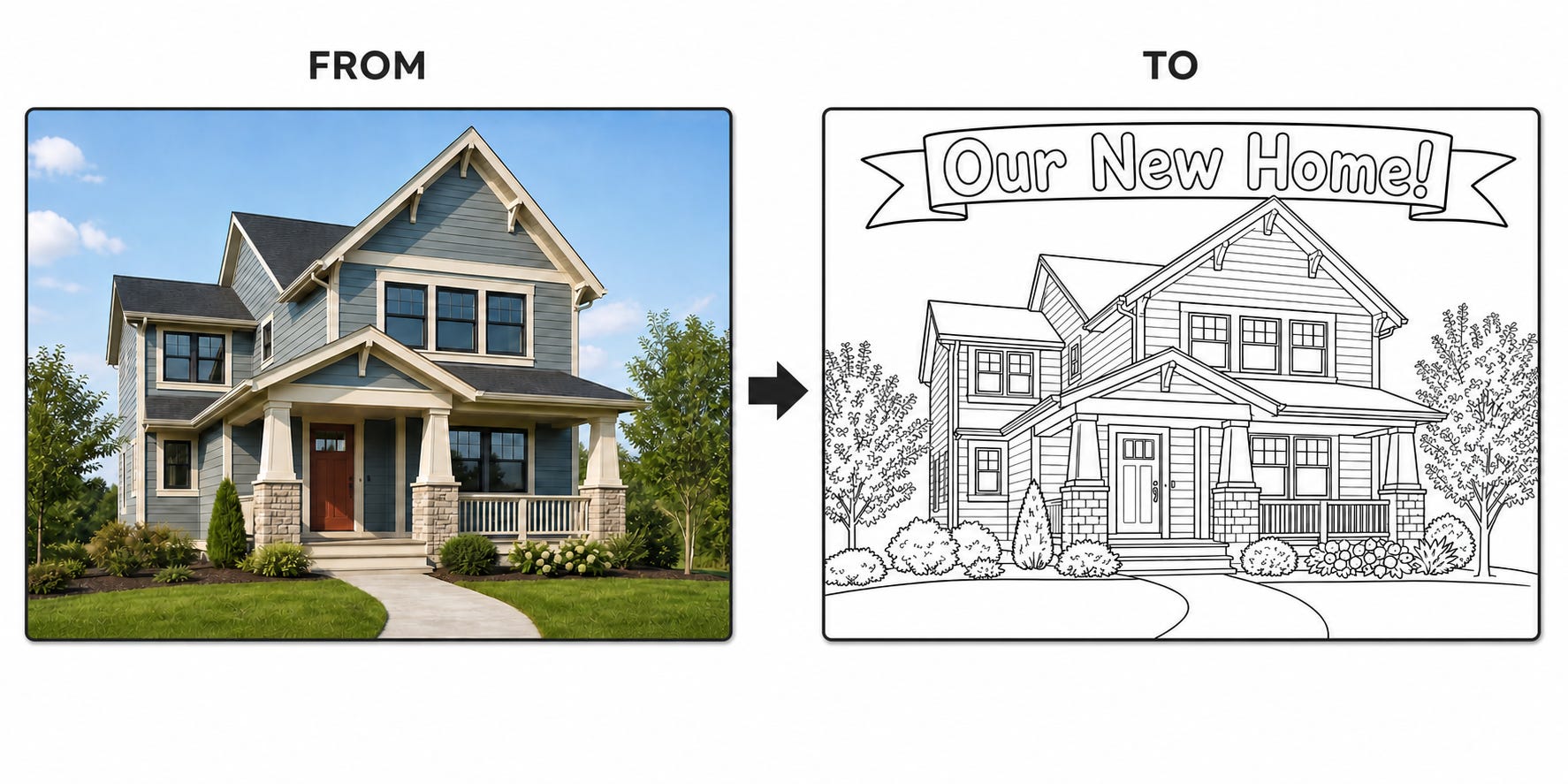
Step 1: Open ChatGPT and upload two photos of the home: the front exterior, and the backyard.
(Your listing photos are perfect for this.)
Step 2: Paste this:
Analyze these two photos of the same home:
- Image 1: front exterior
- Image 2: backyard/rear exterior
Turn each photo into a children's coloring-book style image, then combine both images into one printable PDF page.
FOR BOTH IMAGES:
- Preserve the home's recognizable architecture, viewpoint, and composition.
- Simplify small details while keeping the complete house visible.
- Use bold, smooth black outlines on pure white.
- No color, shading, gray fills, hatching, or added objects.
- Add an outline-only banner: the front says "Our New Home!", the backyard says "Our New Backyard!"
CREATE A ONE-PAGE US LETTER PORTRAIT PDF:
- Add "WELCOME HOME!" at the top in cheerful, outline-only lettering.
- Stack the front coloring page above the backyard page.
- Make both equally wide and as large as possible within printer-safe margins.
- Preserve their proportions without cropping or stretching.
- Use consistent spacing and a thin border around each image.
- Do not include the original photos in the PDF.
Deliver the two standalone coloring-page images and the finished PDF. Complete everything without follow-up questions, then render and inspect the PDF to confirm it is one page, sharp, correctly spelled, and free of clipping or overlap.
If the drawings come back too busy, say: “simplify it, fewer lines, bigger shapes, this is for a 5-year-old.
Step 3: Print a few copies on plain paper, grab a box of crayons, and hand it over at closing!
You get the two drawings on their own, plus the finished sheet ready to print.
🎨 Want it to be more personal?
Change the banner lines to “The Hendersons’ New Home!” before you generate.
Here’s the thing about closing gifts: the gift basket gets eaten. The wine gets drunk.
The drawing of their new house, colored by their kids, goes on the fridge.
And your name is the story attached to it.
(Bonus, with the family’s permission: a photo of the kids coloring their new house is the warmest social post an agent can make. No caption needed.)
That’s the delivery! 🎉
Two prompts, two things made, and at least one fridge in your future.
If you make a coloring page, Pip demands to see it. Hit reply with your creations, the comparison sheets and colored-in masterpieces especially. Pip reads every single one.
Till the next delivery,
Pip
No posts
Comments
Nothing yet. Say the first thing.
Sign in to join the conversation.