Do you really need to have a code editor anymore? (Hint: you’re not still trying to drive, are you? I won’t take away your footbrake, I promise.)

A little over 6 months ago, I started experimenting with Claude Sonnet 3.5 and the Cline plugin to VS Code… to help me overcome my lack of TypeScript experience (I’m mostly a Python developer now, but previously Ruby, C#, Java, C++, Pascal, BASIC ad nauseam). It forever changed my life as a developer, and inspired me to write these articles. It’s probably time to have a bit of a retrospective about that, and why I think things are changing… again. Why? Because the world of AI-assisted development has changed. A lot. No, seriously… really a lot. And sadly, not all for the better.
In the eternal 🧙Gandalf vs. 👿Balrog battle of open-source monetization, Microsoft open-sourced VS Code and charges for CoPilot, which begat open-source Cline and Roo Code which monetized as Cursor and Windsurf and begat open-source Zed and monetized Claude Code and Jules and open-sourced Codex and opencode and sst-opencode and deepseek engineer…. the list goes on. It’s hard to choose tools in this environment that are making stable forward progress while not being attacked by rivals improving at dangerously fast speeds in order to monetize by extracting “inference rent” under the guise of a “low, fixed monthly cost” with hard to assess throttling, usage limits, and up-charges for “premium” use.
Up until now, I’ve been quite happy in my Python (and sometimes TypeScript) world with VS Code and Cline. But that is changing. I’ve been hitting a lot of performance limits caused by BigQuery as a database and Python/Pandas as a data analysis programming language. I have become very 🦀Rust- and 🦆DuckDB-curious. Could I repeat my “epiphany” with TypeScript from 6 months ago, and quickly develop in a language I don’t fully understand (okay, who fully understands any language). …wait. I take that back. Bjarne Stroustrup definitely fully understands C++ 😐.
But seriously, can I pair with my AI to write Rust code and speed things up?
Yup.
To run a lot faster (like 100x faster).
How do I know? Because Claude Code helped me prototype it in a day.
But it required a different tool set I wasn’t expecting. My tried-and-true Cline/VS Code combination has kinda poor Rust support, it turns out. (It awkwardly runs a number of plugins with background processes while editing/syntax highlighting, for example) and since all building, running (with cargo) was taking place in the terminal window anyway… I began asking myself, “What am I doing here?” I tried Zed, which was much more snappy and a better experience (being written in Rust)… but it still has some rough edges around model support and providers like Vertex AI (which I use at work). Again… is a better editor what I need? Not really. I’m not “driving” while pair-programming with AI. I’m “navigating”.
I’m also, at this point, growing a bit weary of the tried-and-true workflow I started with 6 months ago. Keeping changes small, starting new tasks often, bootstrapping the context every time by explaining things and having the AI read the README file at the beginning. I’ve been very busy getting things done, and neglected learning better ways of doing things. I’ve known about Cline’s memory bank for months now, but have not had the gumption to try it and change my workflow, even though I knew it would save me time in the long run.
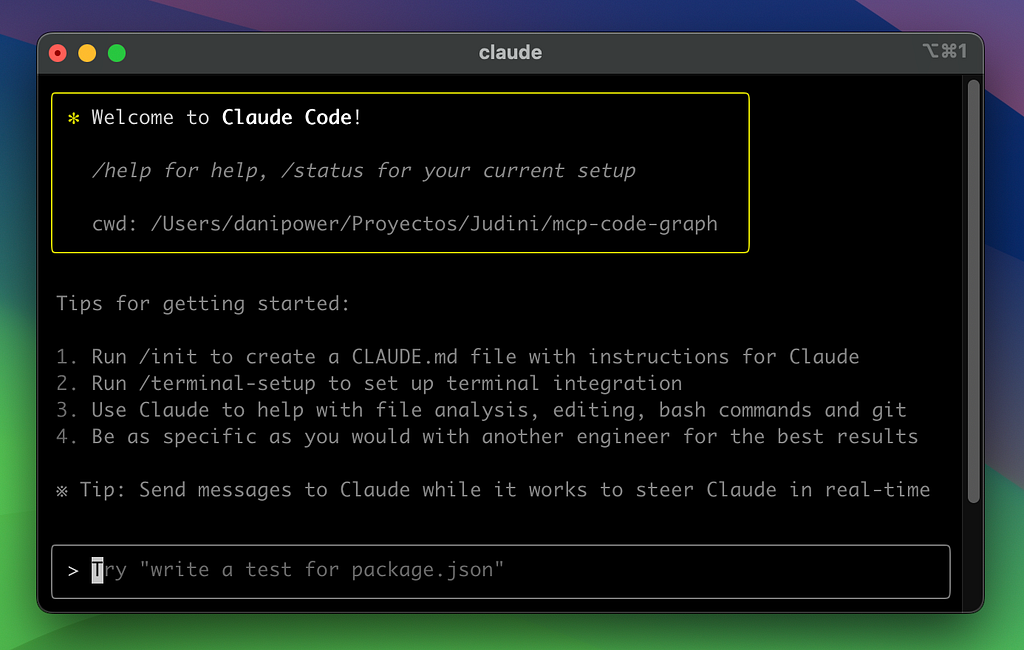
So imagine surprise when I discovered… Claude Code supports Vertex AI! Sweet! Then, firing it up for the first time (install was painless) I discovered that the first thing it asks to do is understand your codebase (permanently!) with /init (much like memory bank). Nice. I started working with it in a Pairing with Bots kinda way, and it seemed to be showing me the code changes I needed to see (not so much the terminal commands), but mostly everything seemed… surprisingly great. I didn’t miss Cline, like… at all!
I’ve seen some videos from Anthropic talking about how Claude Code is used a lot internally, and the “dogfood eating” feedback really shows. Whatever kind of system prompt and tool use they have going on in there is really flawless, you can tell the tool makers know the model they’re working with, a far cry from most other IDEs and command-line tools I’ve seen, for which the choice of model seems to yield vastly different results in a Pairing with Bots scenario.
The “footbrake” (esc button) works at any time like Cline’s cancel button, but with modern Claude’s bigger context window and memory… and if you properly design together (Ctrl-Tab twice to enter plan mode!) you probably won’t end up using it all that much. Plus, it just makes a lot fewer mistakes and stays on-task much better than earlier models from just months ago.
This CLI-as-an-interface operation has a number of additional benefits: With Rust (and especially with DuckDB libraries and a lot of data) the compile, processing, analyzing times can be long. I don’t have to develop locally on my wimpy 6-year-old laptop. I can ssh into the beefy machine of my choice with 96GB of RAM, 32 processors and terabytes of local storage to really speed things up. I can have multiple terminal windows open and not take up the whole screen or be relegated to a corner of an IDE. I can use things like Starship, Nerd Fonts and Ghostty to fine-tune the look and feel of my terminal windows. The interaction is clean, linear and uncluttered by expandable doohickeys, options and action buttons and you can copy-and-paste as much or as little as you’d like. Slick. Minimal.
But Claude Code was only half of my adventure involving the terminal window. The other half is what we built… or perhaps I should say, started to build. And that is the key here… how we started the project (with no web or graphical UI).
I’ve been so used to graphical UI’s… the web browser (mostly), but also IDE’s and editors, phone apps, kiosks, the rolling iPad I call my new car… whither the command-line app? I’m so used to making back ends to pair with front-ends or subscribe to pub-sub events or be used in Jupyter notebooks or cloud functions. Command-line apps seem so quaint and outdated now. Except they’re not. They’re hands-down the best way to start a non-UI application with AI.
Why the command line?
- It’s the lowest-level user interface that is not programming.
- It’s very, very well understood because it’s so old
- Everything supports it (all operating systems/platforms)
- You have I/O options: environment, stdin, stdout, stderr, files, sockets
- Many other OS “support” programs can interact with your program
- The command-line is visible to both you and your AI pair programmer
- Tests can be performed and experiments run without additional code
- It’s simple to program for and requires no extra libraries or frameworks
All these things make a command-line utility or sub-program or administration interface an excellent starting point for any new greenfield (or even not-so-greenfield) project. It helps you solidify an interface which can then be easily translated into a JSON-driven REST API, or a library/sdk or even a full-blown web or app UI… without any of the up-front baggage involved with setting up the infrastructure for those things.
Also, it keeps the AI (and you) focused on the business-level task at hand, without the technological distractions that come with supporting web or UI infrastructure. It is the antithesis of “iteration zero” in agile speak (which is that long period of time where you’re trying to set up your environment, infrastructure, choose appropriate tools, etc. It just helps you focus on getting the job done in the simplest way possible, and when things don’t work it’s unlikely to be environment- or framework- or library-related, which narrows your troubleshooting considerably.
You don’t have to take the advice of this ol’ tired programmer, but I’m kinda tired of chasing UI- or web-based 🌊waterfalls. I’ll stick to the CLI rivers and 🏞️ lakes I was used to, that seem to suit me just fine again in 2025.
IDE: RIP (it’s now CLI, FYI) was originally published in Pairing with Bots on Medium, where people are continuing the conversation by highlighting and responding to this story.
Comments
Nothing yet. Say the first thing.
Sign in to join the conversation.