
A lovely Sunday morning to you my friends. For the past couple of years I have been kicking around the idea of using an iPad as an “all-in-one-box” creator’s studio. I wasn’t sure it was possible so about a month ago I finally bit the bullet to satisfy my curiosity. The question I have asked far too many friends far too many times is “Can I make iPad into my primary device for creative work?” Much like shopping for a stereo … irrespective of reviews and feedback, I needed to experience it for myself to answer that question. I’ve got some thoughts on iPad for creators. So grab a cup of coffee and let’s discuss.
Marketing people love to throw around the term “Pro.” It’s a much easier market position to defend and sell than “Advanced Amateur.” In reality most creatives are practicing their craft at a level that could be considered “professional” but are actually enthusiastic amateurs who typically create with far less repetition than professionals. A hobbyist photographer is practicing their craft when time allows, but a professional photographer or photo retoucher might be working 3-5 days a week. For the professional, they will have a large dedicated workstation and use software that takes a proper amount of time to master. Same story of professional graphic designers and movie makers. Professionals live in these tools.
Software such as Photoshop, Affinity Suite, Davinci Resolve, InDesign, et al are fully featured but frankly difficult to master, especially if you’re taking breaks between projects. The reality is, most of my work is personal work. When I dive into creative mode, the last thing I want to think about is how to find a feature in the obscure and complex menu systems of “professional” tool. I just want to make things!
I want amateur tools! (See! I told you, it’s impossible to market that).
A good friend, who is a legendary photographer and former Apple employee recently told me that Apple will only add a feature to software if it’s easy to use. I love this philosophy and it is reinforced to the extreme on anything iPad related. Call it “dumbed down” if you want, but in the month since I’ve had my new iPad I have recorded voiceovers and acoustic guitar using Logic Pro. I have edited a corporate video in Final Cut Pro. I have edited photos in Capture One Mobile. I have written this blog multiple times. I’ve even done a little calligraphy.
And all of that has been accomplished with minimal reliance on tutorials. I think I spent about 15 minutes on Final Cut tutorials and another 15 on Capture One Mobile (with the occasional query to ChatGPT to find the odd hidden feature). iPad apps are made to be easy to use. Folks could argue that they’re “not full featured apps” … okay sure, but I’ve yet to come across a task that I, the advanced amateur, can’t perform.
I saved up and decided to go all-in on a powerful iPad. I purchased the 13 inch, M5 Pro with the big hard drive so that it would come with the faster processor. Compared to my Macbook Pro M1 Pro, this iPad is an absolute beast. It’s SO fast. I was warned that with video editing, thermals might be an issue. But thus far that hasn’t been a problem. The keyboard and Apple Pencil are, in my opinion essential. From the perspective of pure compute power, iPad Pro cooks.
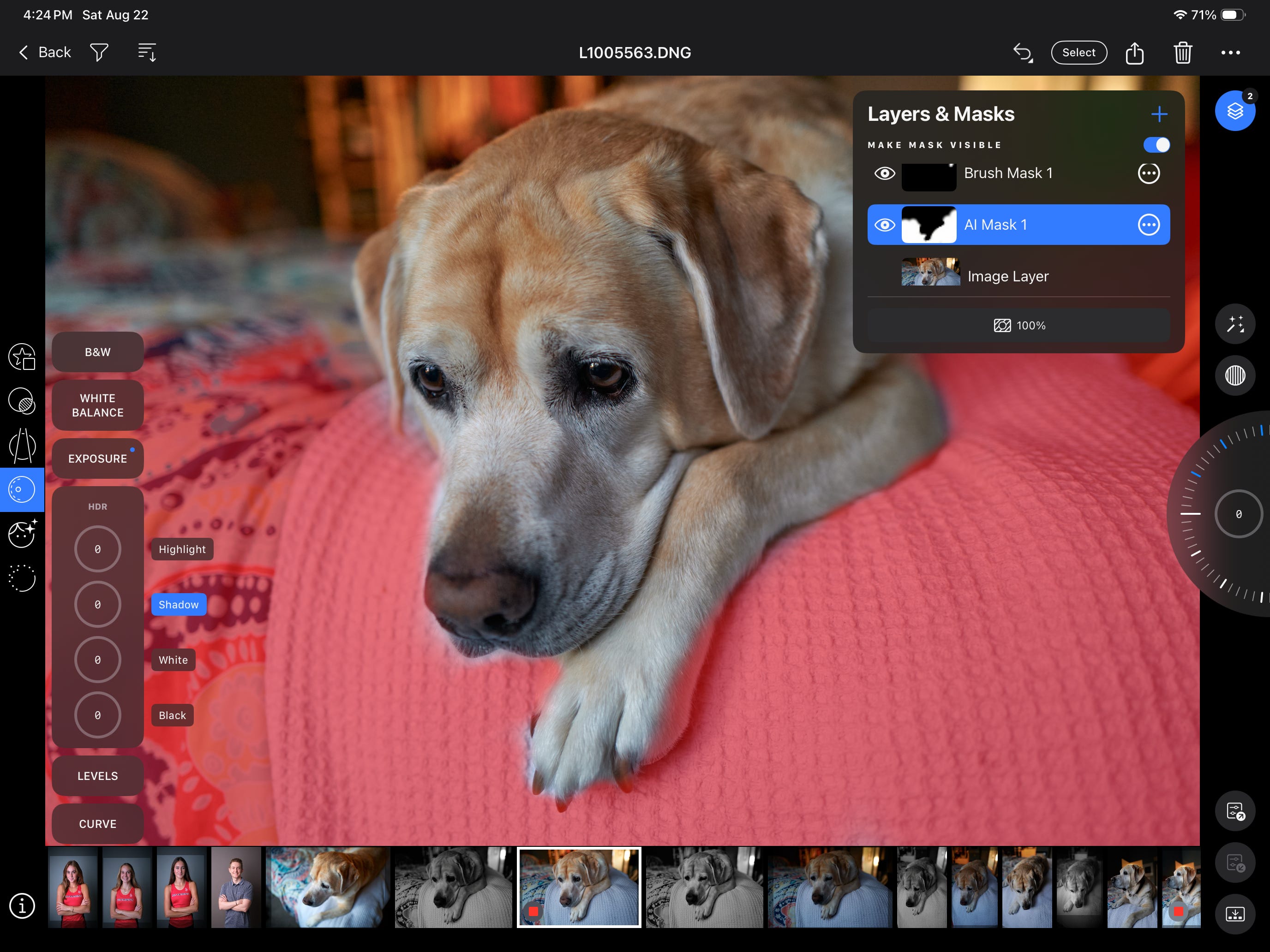
Capture One Mobile is, frankly incredible. The user interface is designed so that menus appear under the left thumb and an adjustment wheel appears under the right thumb. Post processing while sitting on the couch is a simple and joyful experience. The workflow is designed to support actual professional studio photographers with amazing tethering capabilities, including a gorgeous live-view workflow. Pro studio photographers mount the iPad on a c-stand, tether with a long USB-C cable and let it rip. I’m keen to mount my iPad on my tripod on an upcoming landscape photography trip to see how it goes.
https://youtu.be/Uc9Z6uTiN2E?is=kgS7JHaXo3pgbrFW
Oddly, there’s no traditional spot retouching tools in C1M (it’s coming apparently). But there is an A.I. enabled skin retouching algorithm that is truly astonishing. I do the portraits for the local cross country teams, and usually spend multiple evenings retouching zits from teen faces. Now, it happens in an instant. Using the Apple Pencil you can draw in masks, and even draw in areas to protect from the A.I. retouching (think freckle or beauty mark). I am fully ramping up for some portraiture in the near future and iPad will be in the center of my workflow.
This is quickly turning into an essential app for me. Want to do simple layout, photo editing, collages, brochures, whatever without having to learn the ins-and-outs of Adobe Creative Cloud or the complex menus of Affinity Suite? Pixelmator is great. Open the app. Drag in your media. Create. Export. It even exports CMYK. It’s so easy.
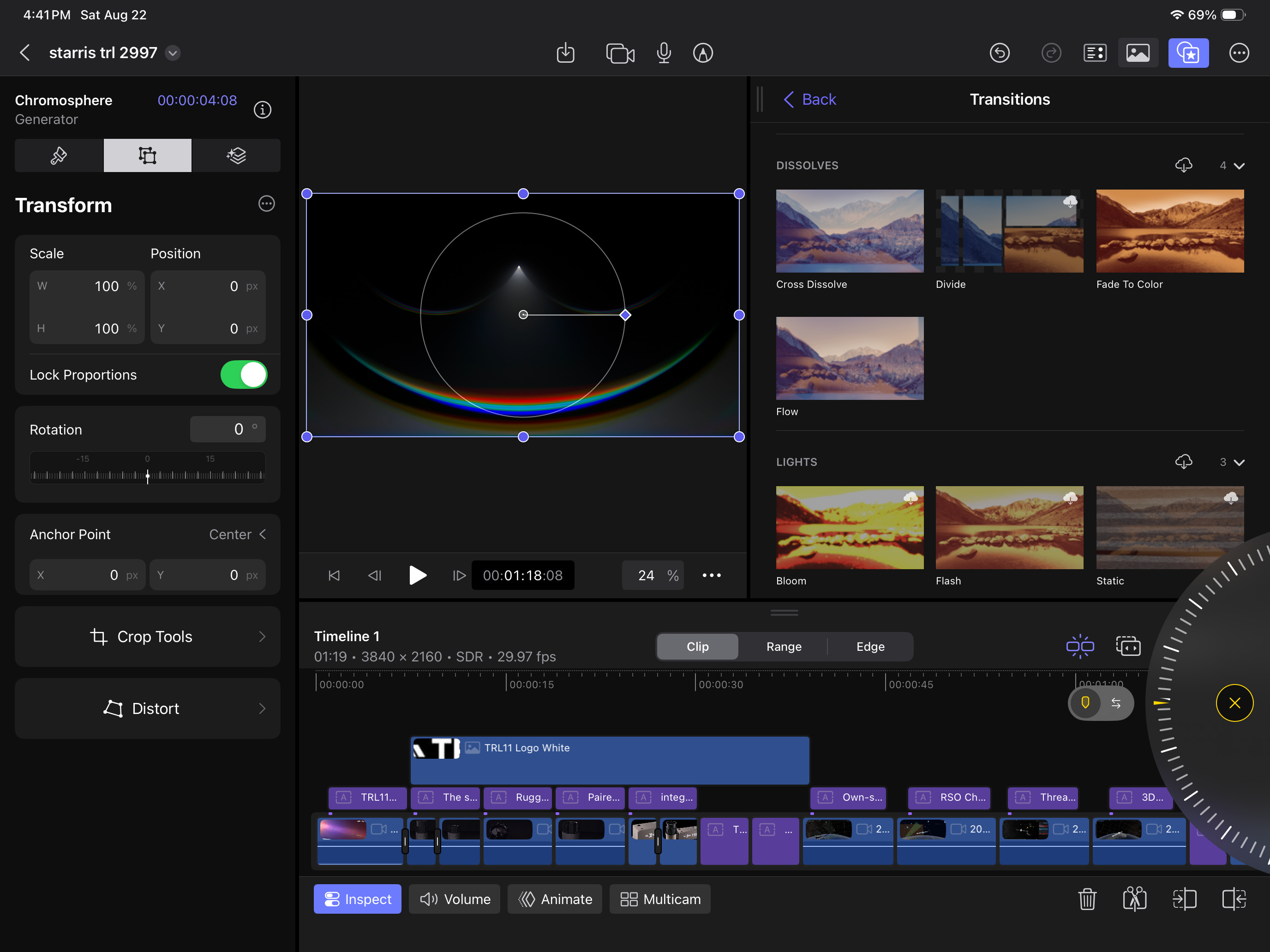
Again, super simple video editing will all the features right there under your thumbs. Import media. Skim. Select. Drag into the timeline. Add effects and color grade. It’s scary easy. The right hand scroll wheel is frame accurate for scrubbing edits and incredibly intuitive. I still haven’t finished the 4-hour YouTube tutorial for Davinci Resolve, and with the iPad in hand now … I never will. Same to be said of Logic Pro. Create project. Attach digital interface with mic. Record. Add effects and beats. Done.
Yes. Absolutely. If you’re a savant fine art printmaker like my friend Rand, you’ll need a desktop class machine for your color managed workflow with proper print drivers. If you’re a professional fine art photographer like my friend David, then having a big monitor and your Adobe CC sub is probably the right move, especially for sharing files with print vendors.
But if you’re an aficionado of making digital art - be it audio, video or photo - and you want the process to be easy and enjoyable, I think the iPad is a big win. It’s fast. It’s quirky. It’s different than your work computer (super important for mental health). And most importantly it’s fun. I’m heading to Maine to shoot fall colors this autumn and I will not be bringing a Mac.
And … when I get home and really get deep into editing, I’ll be doing that on the iPad too.
Comments
Nothing yet. Say the first thing.
Sign in to join the conversation.