
As of 2026, the ATF Form 1 process remains the required method for legally making and registering certain NFA firearms, such as Short-Barreled Rifles (SBRs) or suppressors. While recent changes have eliminated the $200 tax in many Form 1 cases, the application process itself remains detailed and must be completed correctly to avoid delays or denials.
This guide walks through the entire Form 1 process from start to finish, following the exact order shown inside ATF eForms, and explains what information and documents you need at each step.
PLEASE NOTE: THIS INFORMATION IS NOT LEGAL ADVISE AND YOU ARE SOLELY RESPONSIBLE FOR YOUR ATF APPLICATION(S)
Article updated frequently, refresh to see latest updates.
Last update 12:26pm CT on 1/3/2026.

ATF Form 1 is the application used to make and register a firearm regulated under the National Firearms Act (NFA). When approved, it authorizes you to manufacture or assemble an NFA-regulated item such as:
Short-Barreled Rifle (SBR)
Short-Barreled Shotgun (SBS)
Suppressor
Other NFA firearm types
Even though the 2026 changes allow a $0 tax-paid submission, approval is still required before you manufacture or configure the firearm.
The ATF eForms system presents each Form 1 in a fixed sequence. Understanding what belongs in each section prevents errors and rejections.
This is the first screen in the Form 1 process and establishes the foundation of your application.
Here you will select:
Form Type: Form 1 – Application to Make and Register a Firearm
Tax status: Tax Paid (now $0 where applicable)
Applicant type: Individual or Legal Entity like a Trust
This selection determines whether later sections—such as Responsible Persons—will appear.
This section is optional.
You may enter an alternate mailing address if you want correspondence sent somewhere other than your primary residence or entity address. Most applicants leave this section blank unless they have a specific reason to use it.
This section defines who is legally applying for the Form 1.
If filing as an individual, you will enter:
Full legal name
Home address
Place of birth
Date of birth
Sex
Citizenship
Contact information
Optional Social Security Number
Providing your SSN is optional, but doing so may help speed background processing and reduce delays.
Individuals do not submit Responsible Person forms.
If filing as a trust, LLC, or corporation, you will enter:
Full legal name of the entity (exactly as written in documents)
Entity address
Type of entity
Choosing this option activates the Responsible Persons section later in the form.
This section applies only to trusts, corporations, or other legal entities.
Each “responsible person” must be added separately. A responsible person is anyone with the authority to possess or control the firearm under the entity.
For each responsible person, you must provide:
Full legal name
Home address
Date and place of birth
Citizenship
Title or role within the entity
ATF Form 23 (Responsible Person Questionnaire)
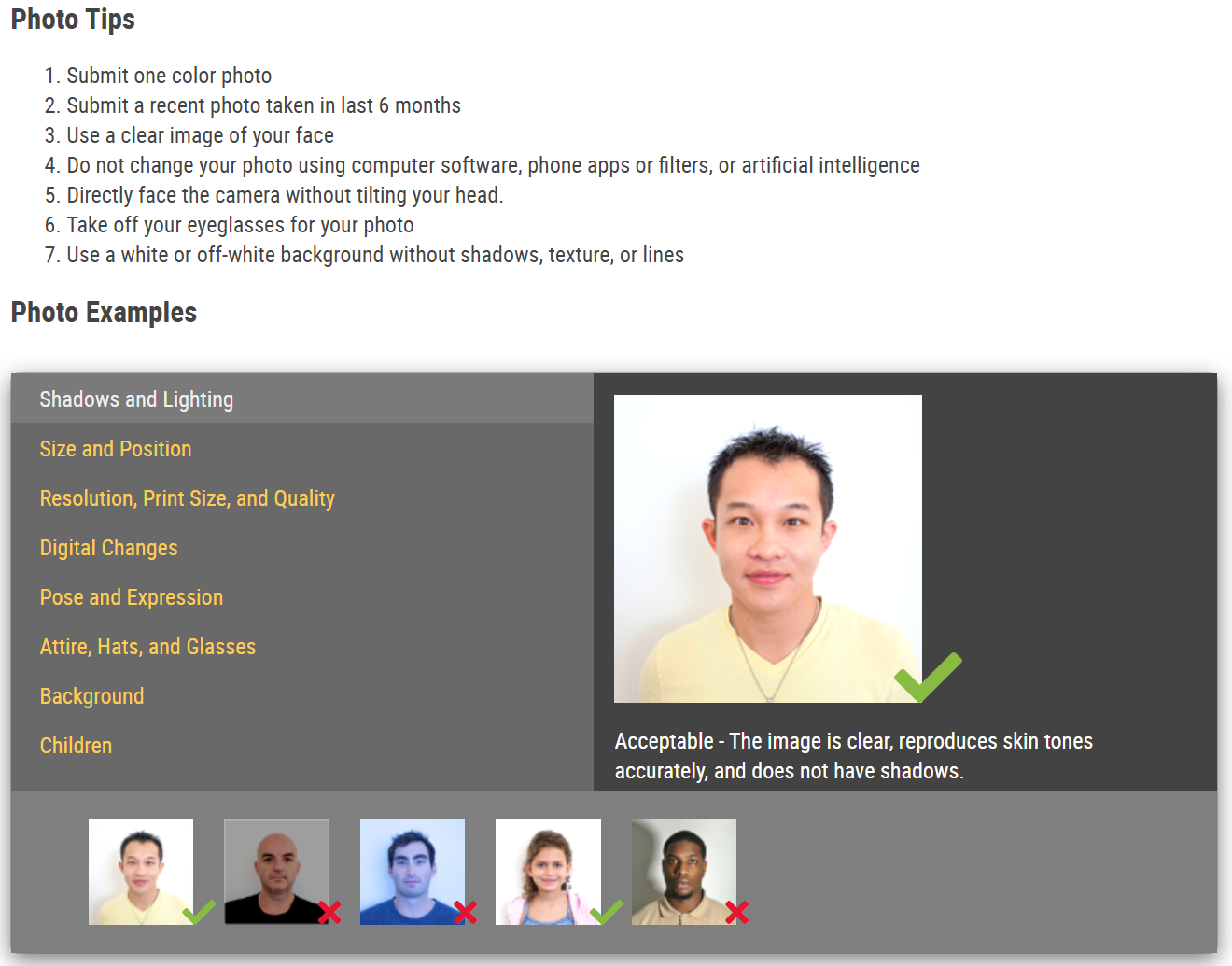
Passport-style photograph

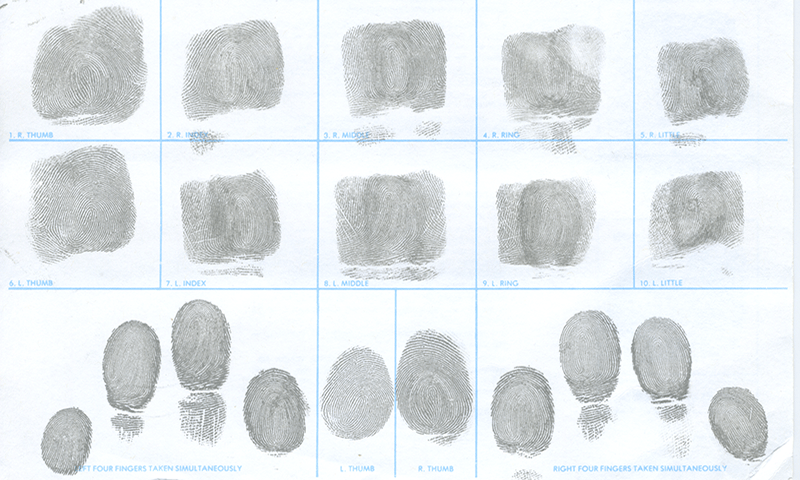
Fingerprints (depending on submission method) (Read more on how to obtain here)
A completed set of FD-258 Fingerprints must be submitted with application cover letter you receive via email after application.)

MOST RECCOMMENDED - A completed Electronic Fingerprint File (.EFT File) and upload directly under each responsible person.
Individual applicants do not complete Form 23.
This section identifies the CLEO who will receive notification of your application.
Acceptable CLEOs typically include:
County Sheriff (If you live in the county)
Chief of Police (If you live in a city)
State Police Superintendent (Possible Alternative)
State Attorney General (Possible Alternative)
You must enter:
Name and title (Joe Smith, Sheriff)
Agency (XYZ County Sheriff’s Office)
Mailing address
CLEO approval or signature is not required, but notification is required. After submission, you must send a copy of the application to the CLEO listed. Read this Article for more about this.
This is one of the most critical sections and must be completed carefully and accurately.
You will enter the firearm’s identifying information, including:
Manufacturer (original)
Model
Serial number
Firearm type (SBR, suppressor, etc.)
Caliber
Barrel length in inches
Overall length (OAL) in inches
All measurements should be realistic and precise. Incorrect or inconsistent information is one of the most common reasons Form 1 applications are delayed or rejected.
Because a Form 1 involves making a firearm, federal law requires the maker to properly mark the firearm.
You should indicate your intent to engrave the required markings, such as:
WILL ADD “TRUST NAME” & “CITY, STATE USA” ENGRAVING MARKS ACCORDING TO ATF STANDARDS
This confirms your understanding of federal marking requirements and your intent to comply.
It is highly encouraged that applicants submit a photo of both sides of an SBR Receiver to showcase engravings/markings that already exist. For new suppressor designs, an upload of CAD drawings/Renderings may be needed. This is simply due to the fact that the ATF has not previously approved the design and has no information about the item.
ATF requires a brief reason for the application. A commonly accepted and appropriate entry is:
INVESTMENT AND ALL OTHER PURPOSES.
This phrasing is widely used and accepted.
This section is where supporting files are uploaded.
Depending on your filing type, this may include:
Form 23 for each responsible person
Passport-style photos
Fingerprint files (if applicable)
Trust or entity documents
If you have had an approved ATF Form 1 or Form 4 within the last 24 months, and no changes have been made to your trust or entity documents, you may upload a 24-Month Exemption Certification instead of resubmitting the full trust.
The certification must state:
That no changes have occurred
The prior approved form number
The prior approved control number
The prior approved Firearm Serial number
The prior approval date
This can significantly reduce paperwork for repeat applicants.
Pursuant to 27 CFR § 479.85(c)
This is the final step before submission.
You will:
Review all entered information
Confirm its accuracy
Certify under penalty of law that the information is true
Electronically sign the application
Submit the form
Under current 2026 rules, eligible Form 1 submissions show $0 due, but the certification step is still required to complete submission.
Once submitted, eForms generates:
A confirmation notice
A control/cover sheet
Instructions for fingerprints (if applicable)
If using physical fingerprint cards:
Mail them with the generated cover letter
Follow the timeline shown on the form (commonly within 10 days)
You must send a copy of the submitted Form 1 (and Form 23s, if applicable) to your listed CLEO.
Once approved:
You will receive your approved Form 1 electronically
You may then legally manufacture or configure the firearm
Required engraving must be completed before or during final assembly
Before submitting, confirm you have:
✔ Correct applicant type selected
✔ Accurate firearm make, model, serial, caliber, barrel length, and OAL
✔ Reason for making entered
✔ Engraving plan stated
✔ Form 23 completed for each responsible person (if applicable)
✔ Passport-style photos ready
✔ Fingerprints prepared
✔ Trust/entity documents or 24-month exemption letter uploaded
✔ CLEO selected
✔ Application reviewed and certified
No posts
Comments
Nothing yet. Say the first thing.
Sign in to join the conversation.