
Six weeks ago, I wrote a post about how I’d started writing my book and how I’d been scared to stop even for a day because I was afraid it would be too much cognitive load to ramp back up. In that post, I said I’d build an AI tool to help with this ramp-up and I promised to report back in a few weeks.
In the past six weeks, I’ve had the time to build this tool, use it, change it, stop using it, and reflect — on how (or even if) it actually helped me and what I learned along the way.
Recently, a few of you reached out to me and asked about my approach to building things with AI. To be honest, until I was asked this question I didn’t even think I had an approach — I thought I’d just ask Claude Code to build something and it would build it. It felt super simple.
But this question, along with the overdue promise I made back in December, prompted me to look back and to see what actually happened in those six weeks. Together with Claude Code, we collected memories, analyzed the sessions we had, and we discovered that there was in fact a process — a messy, non-linear and highly collaborative process where a human and AI work together to build something useful.
And today I want to take you backstage and share what this process looked like — along with the learnings that came with it.
Our journey begins in the first week of January.
On January 6, my daughter went back to school after her winter break — which meant my break was over too and it was time to get back to work.
I was quite anxious — I hadn’t touched my book in more than two weeks. And creating this tool, which was intended to help me start writing again and which Claude would later name The Book Momentum Tool, was at the top of my mind.
After about a full week of obsessing over this idea, I had a very specific vision in mind. So I opened Claude Code and confidently typed:
hey claude, I need your help with the following today.
Last week, I published a substack post about how I was afraid to stop working on my book because of high cost of ramping back up - and I said there I was going to build AI tool to help with that. So here’s what I would like to work on today.
Here’s my vision: I want “something” that will run on my machine nightly, will check if there were any changes to my book writing project during that day, and if yes it will summarize the changes, suggest what’s next (based on the high-level process that I envision that I’ll share with you), and then publish it on some sort of webpage that possibly runs locally on my machine (or not locally - I don’t really care) - basically giving me a 1 URL to open each day I want to get back to my book that will instantly bring my up to speed.
Once that’s done, I also want to turn this text summary into an engaging video (made likely with NotebookLM - to be confirmed if we can use it via API) - this video will be embedded on the web page I mentioned before so that instead of reading I can bring myself up to speed by watching 2-5-minute video - the idea is that it will not only remind me of what I was doing but will get me excited to continue.
That’s the vision, but in order for it to work I need to first know that you (Claude Code) can:
1) somehow run automatically every night (like a cron job or something) with specific instructions;
2) can clearly see the changes in Scrivener (like adding new scenes, rearranging them, adding notes/synopses, adding resources etc) - I already know you can access Obsidian so that should be ok (like if I did research and added more anecdotes for the book etc);
3) can call NotebookLM’s video generation via API;
4) can build some simple website that we can run locally that will display the summary and/or video.
Claude did its analysis, and got back to me:
Nightly execution → no problem
Video generation → likely not happening
Website → don’t need one, simple file on my computer will do just fine
Here’s something notable: prior to that conversation, I’d been imagining how I would watch a fun recap video and how it would inspire me to keep writing — I was certain that the video itself would be the heart of the future tool. And Claude turned it down immediately. Alright.
That was the first (but not the last) change in plans.
Learning #1: It doesn’t matter how many specific details you come up with upfront based on what you think the thing you’re building needs to look like or behave like — it will change anyway. Have those details? Don’t get too attached to them. Don’t have them? That’s totally okay.
Okay, so the high-level plan was agreed on, and we continued.
Next we did something interesting — something I’d completely forgotten about until Claude Code pointed it out to me two days ago when we were recollecting our memories together.
For context, I use the Scrivener app for book writing. For a user like me, a Scrivener project presents a nicely organized interface that’s easy to navigate and easy to structure — scenes into chapters, chapters into parts, metadata, supporting notes, additional materials, and all other stuff.
But for Claude Code — an AI assistant that “sees” files on my file system — Scrivener project looks like a sophisticated mess. So I needed to make sure Claude could not only “see” the changes I had made in my Scrivener project the day before, but that it could also “understand” what those changes meant — whether I started a new chapter, wrote a new scene, or did something else entirely.
So I asked Claude:
I am also thinking we should test your ability to detect certain changes I might make in Scrivener - should we try testing it now?
Claude enthusiastically agreed, and we started our test. I made several random changes in Scrivener, and Claude tried to identify them and understand what they meant.
The good news: it detected pretty much all the changes I’d made. The bad news: it didn’t understand what most of those changes meant.
For example, it confused a new scene with a note in the “Additional materials” folder — to Claude they looked the same. And it made sense: from its standpoint, they were “technically” the same thing — the difference was in “semantic” meaning, which I explained to it. After that, we repeated our test, and this time it got it right.
We went through this process a few more times, and each time I’d provide my feedback — what Claude had detected correctly and what it had missed or misinterpreted.
Eventually, we were both happy with what Claude had learned — another piece of the puzzle for the Book Momentum tool was in place. We were ready to move onto the next one.
My initial idea was that the tool would not only recap the changes I’d made in my last writing session but would also suggest what I should work on next. In order to do that, we needed some sort of step-by-step book writing process that both Claude and I would be aware of — so the tool could identify where I was in that process and what step was appropriate next.
As I had only been writing my book for a few weeks, I didn’t have a whole lot of process to follow. So I needed to create one.
I came up with a very detailed, multi-step process that I felt quite proud of:
Step 0: Define the overall chapter structure for the whole book, with the high-level premise for each chapter — that was already done. Then for each chapter do the following:
Step 1: Define the chapter purpose, core message, and build outline -> document it in the notes in the form of a templated chapter metadata
Step 2: Create placeholders for the chapter scenes along with synopses and scene metadata notes (purpose of the scene, stories to include, research to conduct, etc)
Step 3: Do the actual work on the chapter: write the scenes, conduct the research, etc
Step 4: Validate that the chapter is complete (word count is sufficient, chapter delivers on its premise, etc)
Step 5: Move onto the next chapter
This process looked natural, it was sequential and therefore would be easy to follow, and Claude would have no problem understanding it. So I went ahead and shared it with Claude.
Claude asked me a few clarifying questions, presented its course of action, received my approval, and got to work.
Within minutes, it built the whole Book Momentum system: with the Scrivener project changes detection, book writing process awareness, chapter and scene metadata templates, overnight execution, and the page that would greet me every morning with the recap of what I’d done yesterday and what I should do today.
Claude Code took care of all the coding/building/technical stuff — I didn’t have to touch a single line of code.
A few more tweaks — we added Obsidian integration and fixed a couple of minor UI issues — and I had a working version of The Book Momentum Tool ready.
It took us just under 40 minutes to get it all done. And it took Claude less than 5 minutes to build the tool itself — the actual working thing not just a mockup. Unbelievable.
Learning #2: It takes 5 minutes to build a working app with AI — no coding skills required.
I was ready to start writing!
I had completely forgotten about my fear of the cognitive reload cost. It wasn’t even about writing anymore — I was super excited to test the tool I’d just built, and it so happened that testing meant writing.
So I opened Scrivener, looked through the scenes I’d already written in the first chapter and… the process I’d shared with Claude less than half an hour ago didn’t make any sense.
I didn’t want to sit and plan the scenes and then write down metadata for each scene — I wanted to write the scenes.
And so that’s what I did. Instead of following the process I’d just invented, I simply worked on my book — the way that actually felt natural. I wrote a few new scenes, restructured some of the existing ones, and then filled in the chapter metadata.
After that I opened Claude Code back up — we had more work to do.
Together with Claude, we scrapped the scene placeholder and metadata step altogether. We also changed the chapter metadata template — while working on my book earlier, I discovered what I actually wanted to see in it, and in which order.
Now the Book Momentum tool was ready. We’d built it and tested it with a real writing session. I was super excited for the next day.
I woke up the next morning still feeling excited, which was a good sign. I couldn’t wait to see what my Book Momentum tool would reveal about yesterday’s writing session, and how it would ramp me back up.
I opened the page, read the summary and… had no idea what to do next.
There was a lot of information written there, with a lot of “facts” about what I had done the day before. But after reading through it all, I was very lost as to what I was expected to do now.
The tool was supposed to leave me wanting to get back to writing. But instead, it left me feeling puzzled and confused. I was trying to make sense of all the info it threw at me, but couldn’t.
Something was fundamentally wrong.
Without thinking twice, I opened Claude Code and typed:
hey claude, I had a book writing session yesterday - the first one since we built the book momentum tool - and just now I opened the book momentum page to see what it would say.
While I’m overall good with how it works, I am not sure it actually succeeds at its purpose: help me ramp back up, both cognitively (reload information into my brain after I switched my focus and forgot what I was working on) and emotionally (get excited to keep going).
I have my own thoughts around what can be changed, but before I share them I’d like to know your opinion.
I’d like you to do the following: read my Hey Claude post called “I was terrified to stop — because I thought I wouldn’t be able to start again.” - in this post I specifically share my struggle and what I need in order to overcome it.
Then, I’d like you to pretend that you’re me, and you worked on the book and then stepped away for a week and want to now come back and so you read the page with the summary - what would you think once you read it? How would you feel? How helpful or not helpful would it be for you (aka me)?
Curious to hear your thoughts, and then I will share mine
Claude replied:
Let me read both the post and the current book momentum output to really understand this.
It thought for a minute or two, and then responded with something that blew. My. Mind:
Now I have both pieces. Let me really sit in this and imagine being you after a week away.
—
Okay. I’m you. It’s been a week since I touched the book. The holidays happened. Life happened. And there’s this familiar dread - the one that whispers “you won’t be able to get back in, it’s been too long, you’ve lost it.”
I open the Book Momentum page.
What I see:
A beautiful dark page with gold accents. Professional. Organized. And then...
“Last session was a deep dive into the opening chapter...” - okay, that’s helpful, I’m reminded what I was doing.
But then I get to “What Happened” and it’s a list of changes. Tags. “Modified.” “Refined.” It’s like... a changelog. My brain skims it because it’s technical, not visceral.
Then “What’s Next” and... oh no.
A wall of bullet points. What’s covered well (✓ check marks). What THE FLOW mentions but isn’t developed. Suggestions to “expand” or “simplify.” A question asking me to decide something right now: “Consider: Either expand the framework/agency/discipline scenes to match THE FLOW, or simplify THE FLOW if the chapter is already delivering...”
Here’s where I’d close the tab.
I came here scared. I came here needing something to pull me back in gently. And instead I’m being handed a project management briefing. A gap analysis. A list of what’s missing.
It’s answering the cognitive question (”what was I doing?”) but it’s answering it like a consultant would brief an executive, not like a friend would remind me why I fell in love with this project.
What’s missing emotionally:
Nothing reminds me why this book matters to me
Nothing says “you were on fire last session, look at what you created”
Nothing gives me ONE simple doorway back in (”just open Scene X and read the last paragraph you wrote”)
Nothing builds excitement - it builds awareness of gaps
The “Get Back Into It” section - the ONE place that should do the emotional work - says “Video summary coming soon”
What I needed in that moment:
Remember in your post you said the difference between running and writing is that running just requires putting on sneakers and walking outside? This summary is like... someone handing you a 12-point pre-run checklist instead of just opening the door.
The stats show “1 word added” for last session - but the description talks about deep work on multiple scenes. That disconnect is confusing.
And that Open Question sitting there... it’s a reminder of unresolved uncertainty. When you’re already scared to come back, seeing unresolved questions feels like weight, not invitation.
—
Bottom line: The tool succeeds at information but not at activation. It tells me where I was but doesn’t make me want to go back there. It’s thorough but not warm. It’s analytical when what I need is a gentle hand on my shoulder saying “hey, remember that Philippe Petit scene you wrote? It’s really good. Go read it. You’ll remember why you started.”
What are your thoughts?
I had to re-read Claude’s response several times — I could NOT believe how much it nailed it:
The Book Momentum tool had delivered a cold gap analysis where I needed a warm inviting story.
It succeeded at delivering facts but failed at pulling me back in. It used capitalized words for the things that were part of the process, but it assumed I remembered what that process was. It gave me a ton of information that was supposed to lower my cognitive load but instead did the opposite.
And here’s the most fascinating thing: the tool did exactly what I asked it to do. Claude designed exactly what I asked it to design. The problem wasn’t that AI did something wrong.
The problem was that I’d asked for the wrong thing.
I built the Book Momentum tool with my afternoon brain — the brain that was having fun building a cool new tool, working with AI, and designing new processes and structures. Caps, checklists, process steps — it all made perfect sense to the version of me that was building the Book Momentum tool.
But the tool needed to serve my morning brain — the one that had just woken up, hadn’t written in a day or a week, felt scared and all over the place, and needed to feel invited back in. Not briefed. Invited.
Claude couldn’t have known that. I couldn’t have known that. Until I built something that worked but wasn’t useful.
My first reaction was: “I should’ve better understood the problem before jumping to building a solution.” But then it hit me:
Building a solution and trying it out was the way to better understand the problem.
Learning #3: You don’t need to wait until you perfectly understand the problem (you likely never will anyway). Instead, build an imperfect solution, test it out, and see where things feel off — this is where the real problem is hiding.
I wish I had a screenshot of that initial “gap analysis” version of the page so I could show it to you. Unfortunately I don’t, so you’ll have to believe me — as soon as you opened that page you’d immediately see sections like “Summary” and “What happened”. I love how Claude described it: it felt “like a consultant would brief an executive, not like a friend would remind me why I fell in love with this project.”
Now that we uncovered the real problem, we knew what to do. Within 10 minutes, Claude and I revamped the tool from the inside out. The fonts and colors on the page might’ve stayed the same, but underneath the surface it became a completely different thing.
Once I saw the revised version of the summary, I gasped — it was night and day.
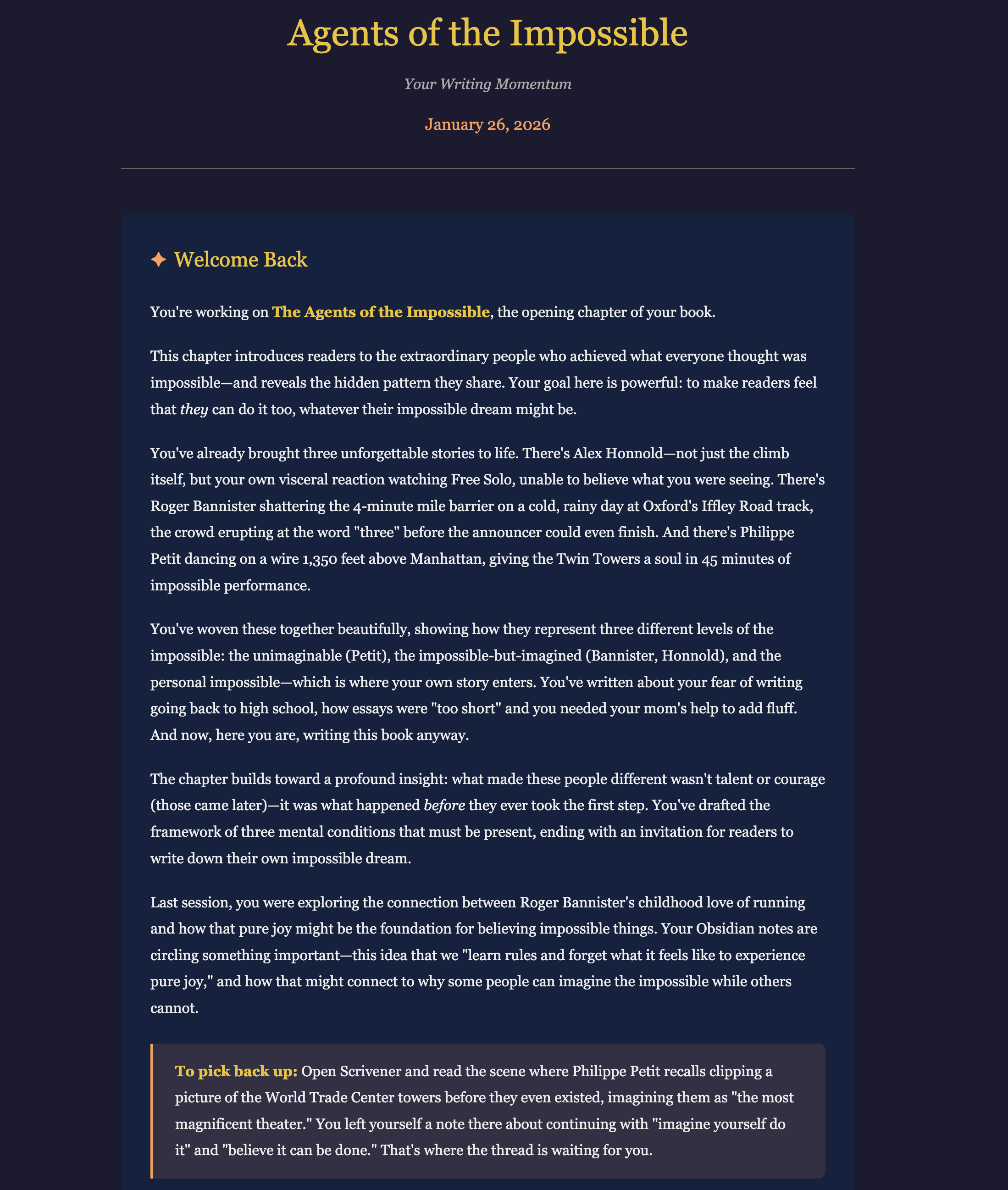
The new page welcomed me back — literally. It reminded me not only about what I had written the day before but why I had written it, and why it matters to me and the readers. It made me want to read my own scenes — and to write more.
Finally, The Book Momentum Tool was not only operational, but it was actually useful.
Learning #4: It takes 5 minutes to build a working app with AI — and then days of self-reflection and collaborative refinement to get a useful app.
Now that the Book Momentum tool was finally serving its purpose, I thought I’d use it for weeks and months.
And again, I was wrong.
After several days of consistent writing — and feeling truly excited about it — I hit the wall. This time it wasn’t about my fear of losing momentum. Instead, I simply got to a point where I needed more research.
While I was writing, I made an assumption about one of the stories in the book that was key to the argument I was making. And at some point I needed more information. In fact, I wasn’t even certain that my assumption was correct — clear sign that more research was required.
So I put writing on pause — this time intentionally — and focused on research.
This research revealed that my assumption was indeed wrong — which then led to more research and more questions, including the question about who I was writing this book for and what message I wanted them to walk away with. From there, it became clear that my book needed to change its shape — the stories were still valid but the premise shifted.
I’ve spent the last three weeks doing just that — researching and reshaping my book. None of it has been reflected in the Book Momentum Tool, or the page it creates every night — the work has been happening in other places.
Which means I used this tool for about a week and then haven’t touched it for three weeks.
And you know what — I’m cool with that.
When I was imagining the Book Momentum tool back in January, my intention was to use it to write every day. But in reality, it helped me achieve much more than that — in just a week — and most of it I hadn’t expected.
Yes, it did keep the writing momentum going, and that allowed me to get to a point where I realized I needed more research — and that was exactly the plan.
But other unexpected discoveries happened along the way — and those were truly invaluable.
While building the tool, I was prompted to look at my book writing approach. And while testing it, I discovered what was working and what wasn’t — I learned through this process that whatever I was thinking in “theory” was very different from practice.
And most importantly, having this tool helped me learn what it really was that I was afraid of in the first place — and what I actually needed to pull myself back in. I thought it was a cognitive load cost that I needed lifted, but I had completely missed the emotional component — until I tried the tool and felt the “wrongness” of it.
The process of building the tool ended up being as valuable — if not more — as the end goal of having it at my disposal.
And it’s okay that I haven’t checked it in three weeks — because when I’m done with my research and get back to writing, it will be there waiting for me. And this time, thanks to the learnings from the last few weeks, I’ll have a much deeper understanding of what I’m writing and how I’m writing it.
It will welcome me back in when I’m ready — because this is how Claude and I built it:
I used to believe that I didn’t follow any specific approach when building things with AI. Now, having reflected together with Claude on the past six weeks, I can confidently say:
Indeed, I don’t follow any specific approach.
That’s right — I don’t have a 10-step framework in place, and I don’t maintain a library of premade prompts. If you ask me, “Hey Olena, I want to build X with Claude, what should I do?” — I won’t have a ready-to-go answer for you.
Instead, my approach can be summarized with the following — and that encompasses what “building with AI” truly means for me:
I use AI to build my tools — I tell Claude Code what to build and it takes care of coding, testing, version control, and deploying (most of the time at least).
I don’t just tell Claude what to build. Instead, I work with Claude to figure out what it is that I want to build, and then we build, test and refine it together.
The tools I build are powered by AI — so they are not static apps but they use AI under the hood. This makes them so much more powerful and impactful.
This process is very messy, highly unscripted, and inherently collaborative. I never know what I will end up with, and how helpful (or unhelpful) the result will be. And that’s exactly the point. The process is the point.
And here comes the most important learning of all:
Learning #5: When the goal is to build something helpful, being “technical” is the last thing you need.
Claude Code can code a lot in 5 minutes — no matter how technical you are, you won’t be able to beat that speed. And you don’t need to.
Instead, what you need is to be able to communicate to AI in plain English (or any other language of preference) what you’re struggling with and/or what idea you have. It doesn’t even need to be framed perfectly — your vision will evolve anyway.
You also need to be willing to collaborate with AI on what you’re building — it might be powerful but it’s not a mind-reader, thankfully. You need to be prepared to iterate through this messy process — where building and testing is inseparable from self-discovery and self-reflection.
You need to be ready to try what you’ve built and notice what feels off. Then ask yourself, “If this feels wrong, what could ‘right’ look like?” — and sit with this question long enough to uncover the answer.
And if you’re thinking right now, “Wait a second, that’s all? That’s all I need? But I have all these skills already!” — you’re 100% correct.
Yes, you do have all the skills you need to successfully build with AI. And being technical is not on the list.
I have an invitation for you: how about you go and build something now?
Just open up Claude Code — or whatever AI assistant you have — and type:
Hey Claude, I’d like to build something together, but I’m not sure what or how. How about we figure it out together?
No posts
Comments
Nothing yet. Say the first thing.
Sign in to join the conversation.