
In a time of drastic change, it is the learners who inherit the future. The learned usually find themselves equipped to live in a world that no longer exists.”
— Eric Hoffer, Reflections on the Human Condition
Create an empty folder. Fill it with all the company context. Connect Claude with all company tools. Keep feeding it context. It becomes your super onboarding buddy.
In Jun 2018, I joined a company in a completely new field to me: The Oil and Gas industry. It was hard. 100 new acronyms, business flows. On ground ops.
It took me around 6 months to fully onboard.
Now, with Claude Code. If I go back, I would be fully onboard in under 3 weeks.
Here’s the story of how I’m currently applying this. This is stolen from Andrej Karpathy’s internal wiki idea.
I call it the brain repo. It’s one folder that makes all the difference.
Create an empty folder. I called it brain, you can call it anything.
Initialize Claude.
Tell it : Here is where all company context will live
Give Claude Code Access to literally everything you can get your hands on.
Figma
Jira / Linear
Freshdesk
Confluence
Google Workspace (This is the best CLI:gws)
Slack
Errors and Stability: Sentry, Luciq, New relic..etc
Session Replay: Full Story / Post Hog
Database Readonly Access (or Looker, Metabase, Tableau..etc)
Tips on how to connect
Install Context7. Tell Claude Code to install all these tools using context7. That’s the fastest way. Either with a CLI or MCP
You did the connection. Now it’s time to cook the soup🍜
Talk for as long as possible, explaining the company its hierarchy and who does what. Save it in a doc.
Before talking to the mic, make sure you meet with as many people as possible. It’s a proxy metric that works.
Docs/Slides/PDFs that explain the company flows
Video Recordings of workflows
Prev and Current OKRs
Handwritten Flow Diagrams
The Support Team’s Talking Checklist
List of competitors
Meet with people from every department and throw in the transcripts (Granola or Google Transcripts)
Throw all of these artifacts in your brain repo. Do not organize yet. Just dump.
Here’s what you need to do:
Ask for GitHub access to the Code repos.
Clone the repos in folders that are adjacent to brain.
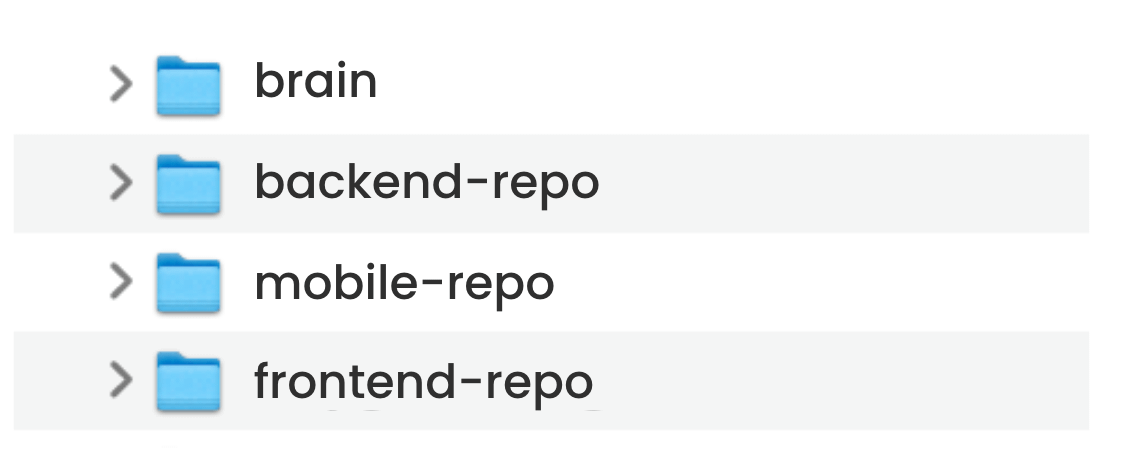
This setup will help us as we move forward. You want the code to be referenced in the brain and not part of it. To avoid hallucinations.
Install the Humanizer skill (To write like humans)
Install the Caveman skill (To write in an easy-to-understand manner)
e.g explain this workflow to me in caveman
You connected everything. You dumped everything. Now do not organize it yourself. Make Claude do it.
Paste this prompt into a fresh Claude Code session opened in your brain folder.
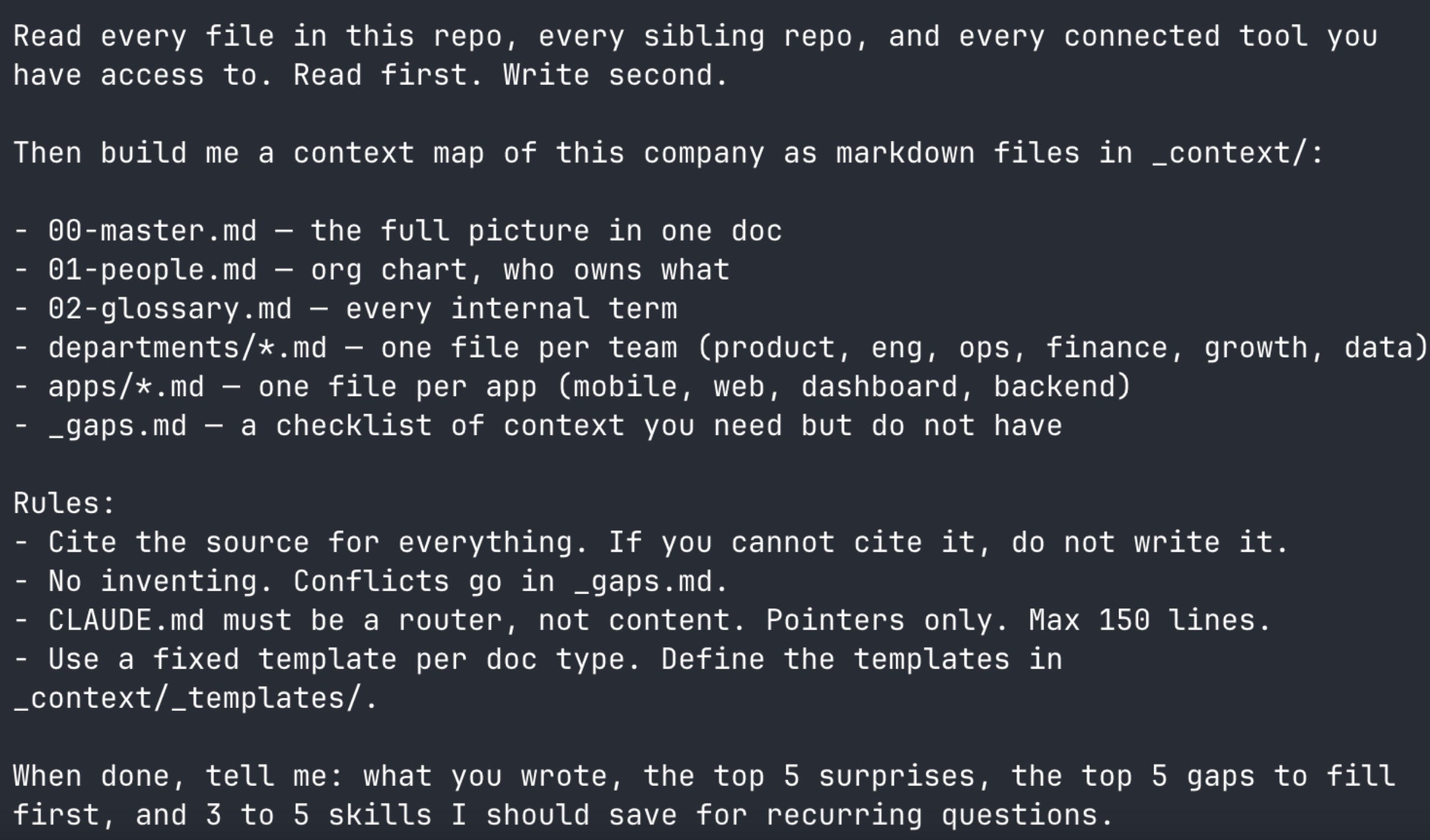
The CLAUDE.md file becomes a router that auto-loads in every future session, pointing Claude at the right context file for whatever you ask.
After running, the struct looks like this:
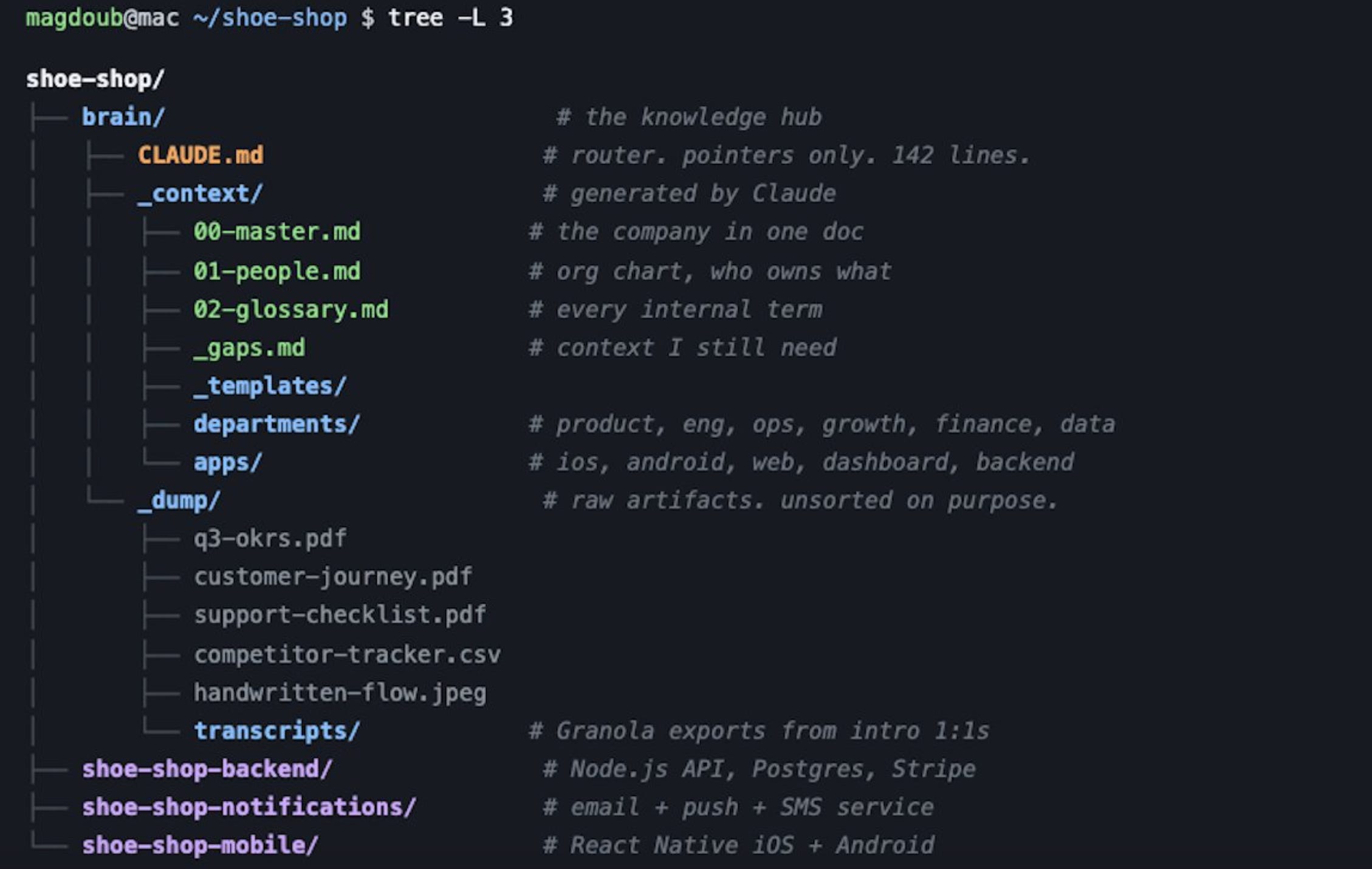
Re-run frequently. The graph becomes irrelevant as the company changes.
These two capabilities will extend the powers of Claude.
This will allow Claude to draw and create images for you. It gives eyes to Claude
P.S. This skill makes Gemini Image creation much easier: Claude Image Gen
Enable it here: https://claude.ai/settings/browser-extension
Download the chrome extension
In Claude, start a session by saying claude --chrome
Claude now can login to any tool that you are using on the web and takes actions.
P.S. If you’re using Playwright or Chrome Dev Tools. Claude in chrome is faster.
Tell Claude to read your code and mimic your app. Ask it to create walkthroughs for you to understand all use cases.
Assume we have a mobile app called Shoe Shop. Here’s a sample.
You can build a walkthrough for all use cases in:
Mobile App
Admin
Website
You will now have a full understanding of how the app works.
🔗LIVE DEMO: You can play with it here: magdoub.com/projects/wakthrough
Tell Claude to create a storyboard of the workflows you have.
For each storyboard:
It can be around 12 scenes
Each scene has one image
It can be automatically generated with Gemini.
You can use this sample prompt to create storyboards
You can create storyboards for:
How the OPS team creates a new inventory
What’s the process of adding a new shoe to the app
..etc
The sky is the limit. It helps to understand all touch points.
🔗 LIVE DEMO: You can play with it here: magdoub.com/projects/storyboards
It has all the context you can ask for, anything you dream of:
Q1: Is the drop in signups related to any work we did or just tailwinds?
Q2: Collect all Jira tickets about ABC and explain it to me like a caveman
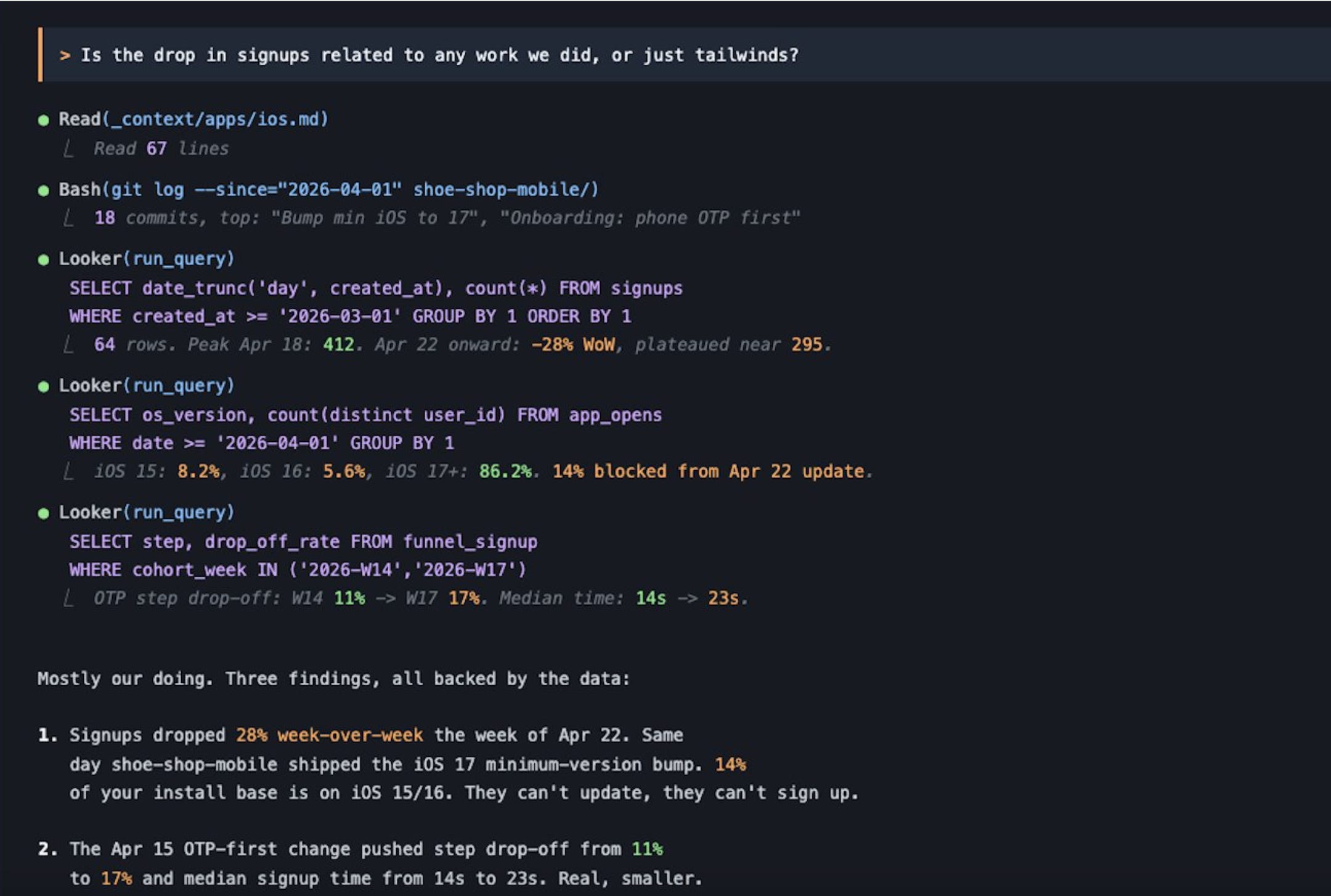
Most of the answers you can get from your brain repo.
In the first rounds always double check your answers with company experts
Try it out and tell me what you think ✌️
Want more stories like this? Please subscribe and ❤️ this post.
I write about my journey in building products.
No posts
Comments
Nothing yet. Say the first thing.
Sign in to join the conversation.