
First, welcome to all new subscribers. We have finally made it to 39,000+. I am very grateful to each of you and am still overwhelmed by the support, pledges, and encouragement you have sent — Thank you once again.
In the previous issue, I covered the CLAUDE.md masterclass and, in the introduction to the masterclass series, mentioned the Deep Dive series, which covers important non-core topics.
This issue brings you the first article in the Claude Code Deep Dive series — Claude Code Ralph Loop Deep Dive
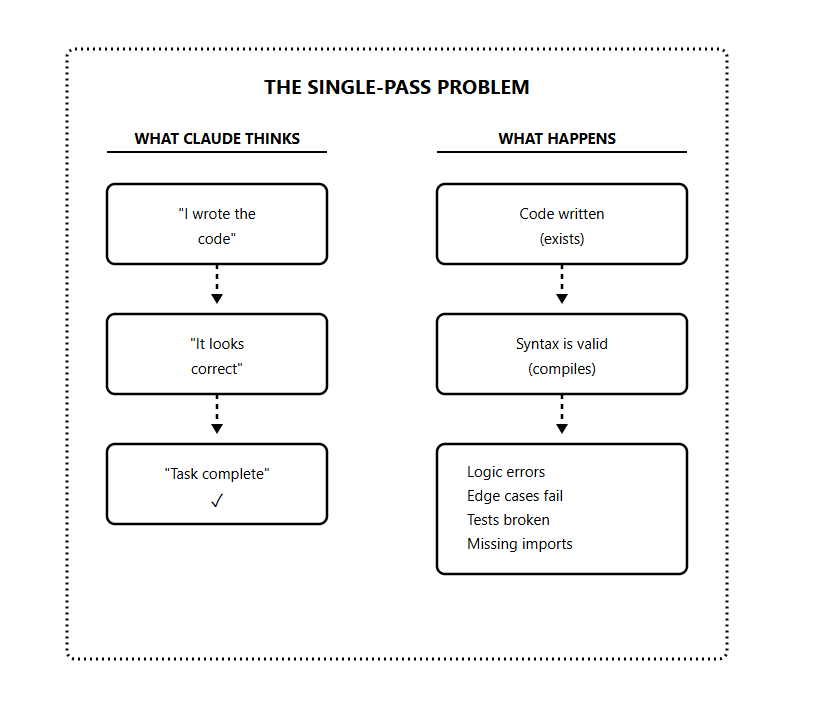
Every Claude Code session has the same hidden flaw; Claude stops when it thinks the job is done.
Tests broken
API half-implemented,
Edge cases untouched
But it declares complete and exits. And the longer and more complex the task, the worse it gets.
There is a technique designed to fix this problem. You have probably heard the word “Ralph” thrown around.
It’s a simple idea that forces Claude to keep iterating until the work is genuinely completed.
Surprisingly, this technique has been used to ship entire projects overnight at a fraction of the actual cost.
In this newsletter, I’ll take you from understanding why Claude fails on complex tasks to building the full Ralph Loop system and running it on real projects.
We’ll cover the Ralph core mechanism, the PRD and memory architecture, and everything you need to put Ralph Loop to work.
Let’s start with the basics.
Let me start with something that might surprise you.
Ralph Loop isn’t a framework, and it is not a sophisticated AI orchestration system. At the core, it’s a Bash while loop.
while true; do
  cat prompt.md | claude
done
The technique was created by Jeffrey Huntley
The name comes from Ralph Wiggum, arguably the dumbest character in The Simpsons. Ralph fails constantly, making silly mistakes. But stubbornly continues in an endless loop until he eventually succeeds.
This childlike persistence is the philosophy behind the technique.
With Ralph Loop, Claude is no longer allowed to exit when it thinks it’s done. It’s forced to keep working until the task is truly finished.
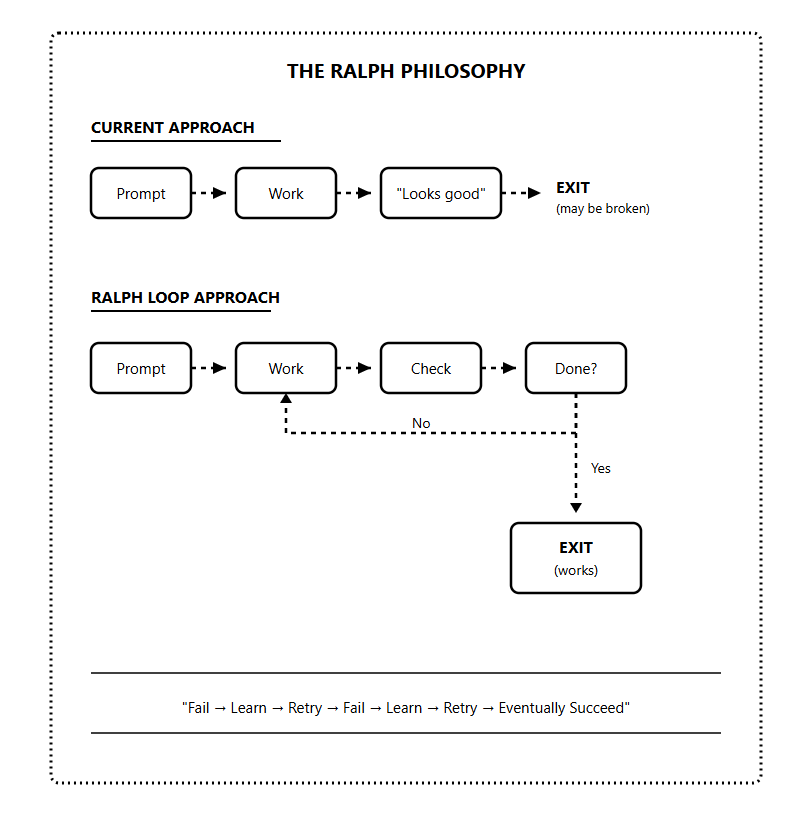
The key insight is that Ralph Loop treats failure as expected, not exceptional.
Each iteration builds on the last. The AI sees what it did before, recognizes what’s still broken, and improves.
Claude Code has a limitation that most developers don’t recognize until they’ve hit it repeatedly.
It operates in single-pass mode.
Even though Claude reasons extremely well, it stops as soon as it believes the output is “good enough.”
The model has what you might call an implicit execution budget. Once it feels like it’s done reasonable work, it wraps up and exits.
The problem is that “ good enough”, according to Claude, often isn’t good enough.
I’ve seen this pattern dozens of times:
Claude builds a feature, declares it complete, but the edge cases are broken
Claude writes tests, says they pass, but they don’t actually run
Claude implements an API, marks it done, but forgot error handling
It believes it’s finished, but it’s making that judgment based on what the code looks like, not whether it works.
Another problem that makes this worse is the context rot.
As the conversation with Claude gets longer, the context window fills up. The model’s reasoning quality degrades as it has to juggle more information.
Jeffrey Huntley calls this “compaction” — when the context gets summarized and loses important details. The model starts forgetting things it knew earlier in the conversation. It makes mistakes it wouldn’t have made with a fresh context.
This is why the single-pass approach fails for complex tasks.
By the time Claude reaches the end of a big feature, its context is bloated with attempts, errors, and fixes. The quality of its reasoning has degraded.
Ralph Loop solves both problems:
Forces verification — Claude can’t exit until it proves the work is done
Fresh context — Each iteration starts clean, avoiding context rot
Let me break down how Ralph Loop works.
The Anthropic plugin uses the stop hook. This is a feature in Claude Code that runs whenever Claude finishes responding and tries to end the session.
Here’s the flow:
You give Ralph your prompt and a completion promise (like “DONE” or “COMPLETE”)
Claude works on the task
Claude tries to exit
The stop hook intercepts the exit
It scans the output for the completion promise
If no promise is found, it feeds the same prompt back to Claude
Claude sees its previous work in the files and improves it
Repeat until the completion promise appears
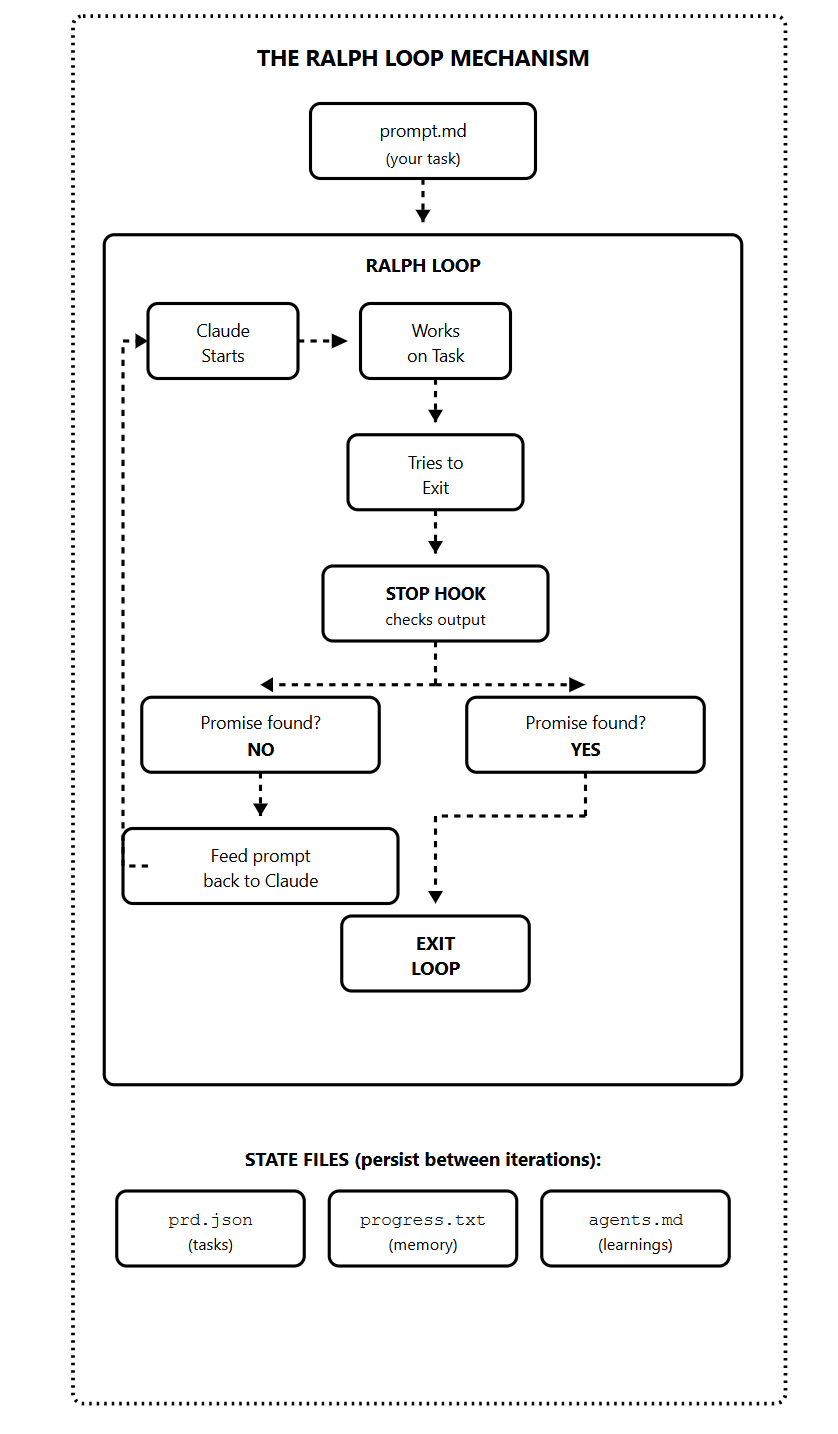
The magic happens in those state files at the bottom.
prd.json — Contains your task list with passes: true/false flags. Claude reads this to know what’s done and what’s left.
progress.txt — Short-term memory. Claude appends learnings after each iteration. The next iteration reads this to avoid repeating mistakes.
agents.md — Long-term memory. Patterns and knowledge that persist beyond the current sprint.
When Claude starts a new iteration, it reads these files and sees the code it wrote. It sees what passed and what failed, and it sees notes from previous iterations.
This is what makes Ralph Loop more than just “run it again.” Each iteration is informed by all previous iterations.
The completion promise is how Ralph knows when to stop.
You define a specific word or phrase — typically “DONE” or “COMPLETE”. Claude must output this wrapped in a specific format:
<promise>COMPLETE</promise>The stop hook scans for this pattern. If it finds it, the loop exits. If not, the loop continues.
This creates a contract between you and Claude:
You define what “done” means (clear criteria in your prompt)
Claude works until those criteria are met
Claude signals completion with the promise
Ralph verifies and exits
The promise should represent actual completion. Your prompt needs to define what must be true before Claude outputs the promise.
Bad prompt:
Build a todo API. Output COMPLETE when done.Good prompt:
Build a REST API for todos.
Requirements:
- CRUD endpoints for todos
- Input validation
- Error handling
- Tests with 80% coverage
Run tests after implementation.
Only output <promise>COMPLETE</promise> when ALL tests pass.
The second prompt gives Claude binary criteria that can be verified.
Before we go deeper, let me clear up some misconceptions.
Ralph is not the Anthropic plugin.
The plugin is convenient, but it’s a simplified implementation. It doesn’t fully reset context between iterations the way the original bash loop approach does. For simple tasks, the plugin works fine. For complex projects, you’ll want the full approach.
Ralph is not magic.
It amplifies whatever you feed it. Good planning and clear criteria produce great results. Vague prompts produce expensive loops that go nowhere.
Ralph is not a replacement for thinking.
You still need to design your tasks, write clear criteria, and review the output. Ralph automates the iteration cycle, not the engineering judgment.
Ralph is not always the right tool.
Some tasks need human judgment at every step. Some tasks are one-shot and simple. Ralph is ideal for complex, multi-step work that has verifiable completion criteria.
Everything starts with the PRD.
Before you run a single iteration, you need a clear definition of what you’re building. The PRD is the definition that guides every Ralph Loop iteration.
Most developers get it wrong: they try to write the PRD themselves.
I don’t do that.
Generate it through a conversation with Claude.
Describe your idea, let Claude ask clarifying questions, then have it produce a structured document. This approach is faster and often produces better results than writing from scratch.
Here's a PRD generator prompt you can use:
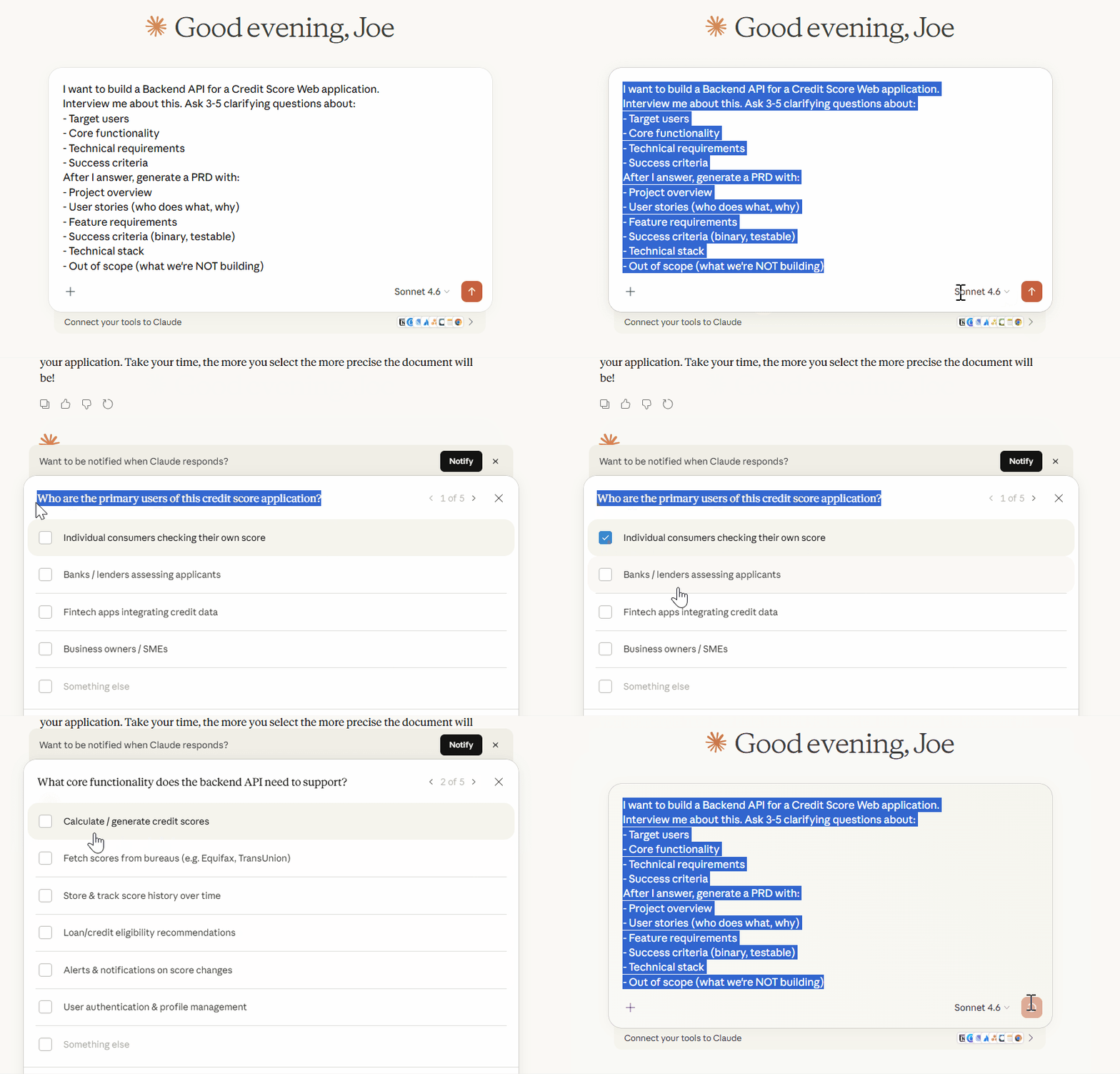
Key principle: Every success criterion must be binary and testable.
Not “the UI should look good” — that’s subjective. Instead: “the dashboard loads in under 2 seconds,” or “all buttons have hover states,” or “accessibility score is 90+.”
The PRD describes what you’re building. The task list breaks it into atomic pieces.
This is where Ralph Loop gets its power.
Instead of asking Claude to build an entire feature in one shot, you give it a sequence of small, focused tasks. Each task completes in one iteration with a fresh context.
The format follows Anthropic’s recommendation from their long-running agents documentation:
The passes: false flag is crucial. As Ralph completes each task, it sets this to true. The loop continues until all tasks pass.
Task sizing is critical. Each task must:
Complete in ONE iteration
Fit comfortably in the context window
Have verifiable acceptance criteria
Result in a working, committable change
If a task feels big, split it. “Build authentication” is too big. Split into: “Add users table” → “Create signup endpoint” → “Create login endpoint” → “Implement JWT tokens” → “Write auth tests.”
Ralph Loop has memory, both short-term and long-term.
Short-term memory: progress.txt
This file tracks what happened during the current sprint.
After each iteration, Claude appends:
What was implemented
What files were changed
Any learnings or patterns discovered
Blockers encountered
The next iteration reads this file. It knows what the previous iteration did, what worked, and what didn’t.
Long-term memory: agents.md
This is permanent knowledge. Things that should persist beyond the current sprint.
You can have agents.md files in any folder. Claude reads them when working in that folder. They’re like sticky notes for future iterations (and future sprints)
The memory system is why Ralph gets smarter over iterations instead of repeating mistakes. Each iteration learns from the last.
Without feedback loops, Ralph Loop is just expensive guessing.
Claude needs automated ways to verify its own work.
It can’t just look at code and decide it’s correct — it needs to run tests, check types, and execute builds, which is the real verification.
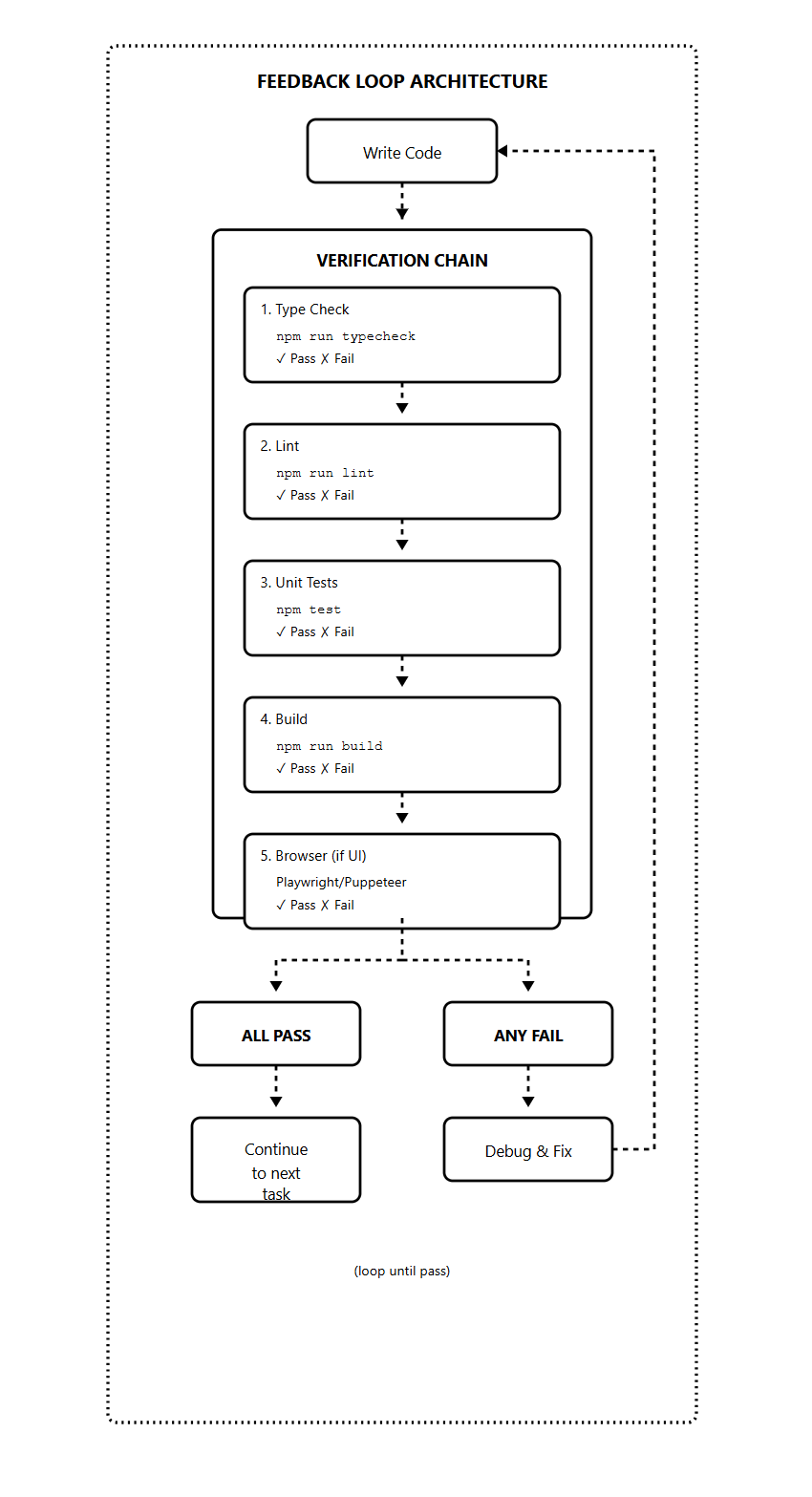
Build verification into every prompt:
Feedback types and what they catch:
For backend work, types + tests + build are usually sufficient.
For frontend work, add browser automation. Claude can’t “see” a UI by reading code. It needs to render pages and interact with elements to verify they work.
The feedback loop creates self-correction. Claude writes code, runs checks, sees failures, fixes them, runs checks again.
Next, let’s move from architecture to execution, the progression from manual runs to overnight autonomous operation.
There’s a right way and a wrong way to start using Ralph Loop.
The wrong way: install the plugin, fire off a complex prompt, go to sleep, wake up to chaos.
The right way: progress through levels, building understanding at each stage.
Jeffrey Huntley, the creator of Ralph, puts it simply: “Don’t start with the jackhammer. Learn the screwdriver first.”
The screwdriver is a manual single runs while the jackhammer is an overnight autonomous operation.
You need to master each level before moving to the next.
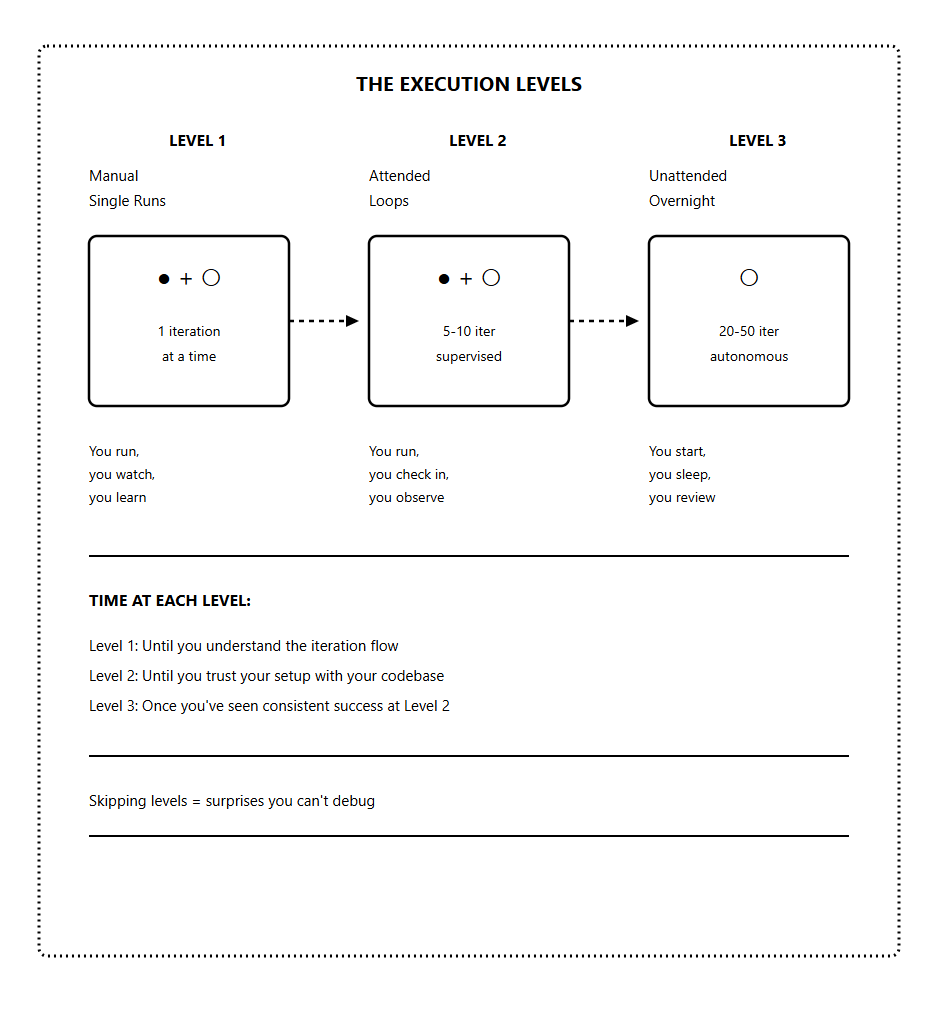
Each level teaches you something you can't learn at the next level.
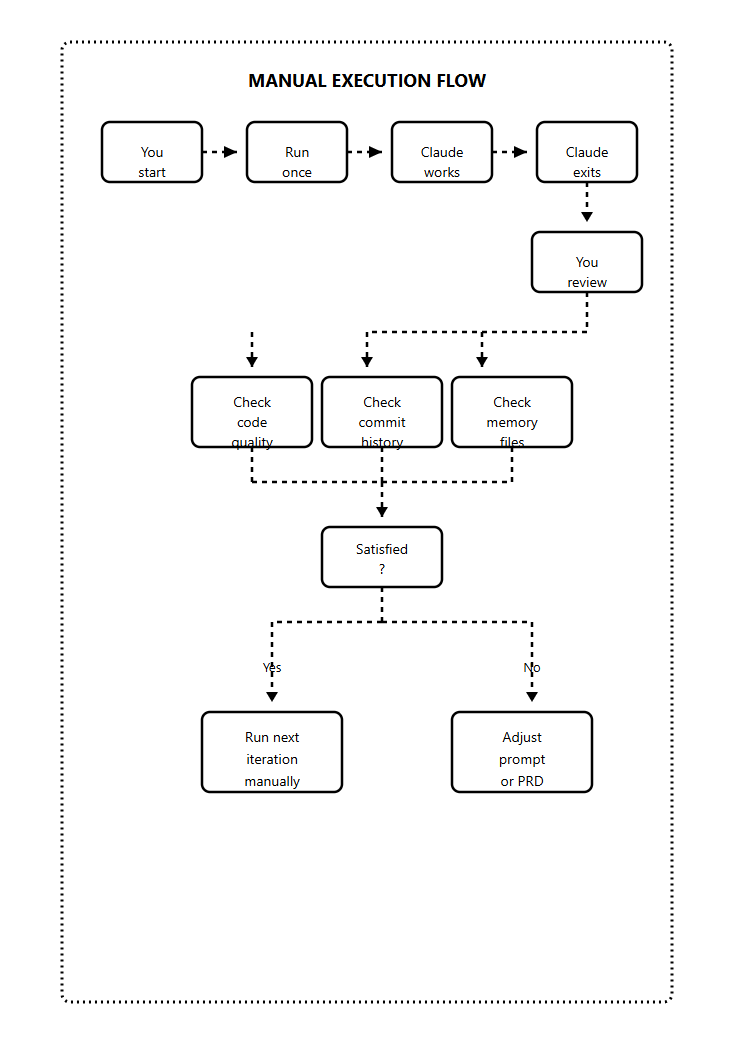
Start here with every new project.
At Level 1, you run one iteration at a time and watch everything.
You see what Claude does, what it gets right, what it gets wrong.
Run Level 1:
After each iteration:
Read the code Claude wrote
Check if it was committed properly
Verify the prd.json was updated
Look at progress.txt entries
Run the tests yourself
Then run the next iteration.
What you’re learning at Level 1:
How Claude interprets your prompts
What patterns does your codebase trigger?
Where Claude gets confused
How long does each iteration take?
What the token cost looks like
Whether your criteria are clear enough
This is important knowledge. You can’t debug overnight runs if you’ve never watched a single iteration complete.
When to move to Level 2:
You’ve run 10+ manual iterations
You understand the flow completely
You can predict what Claude will do
You know what success looks like
You know what failure looks like
At Level 2, you let Ralph run multiple iterations
Every few iterations, you look at:
Is it picking tasks in the right order?
Are commits happening after each task?
Is progress.txt being updated?
Are the tests actually passing?
Any strange patterns emerging?
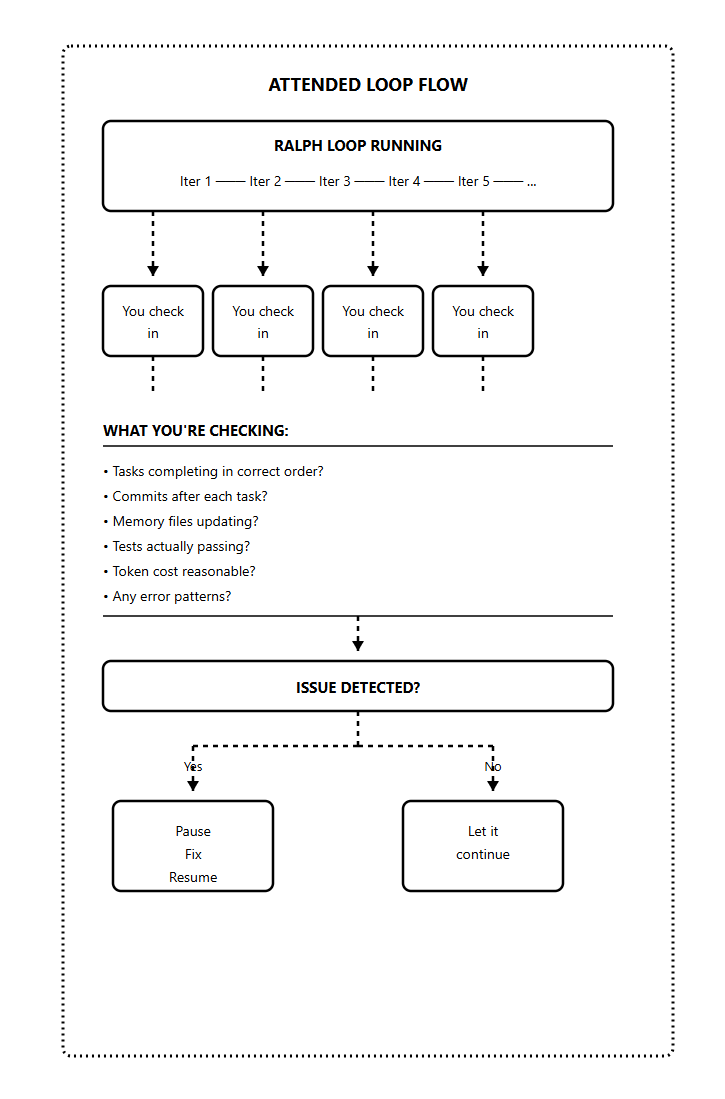
The key at Level 2 is catching problems early.
If something’s going wrong at iteration 3, you want to know before iteration 15. Pause, fix the issue (usually in the prompt or PRD), then resume.
What you’re learning at Level 2:
How the loop handles your specific codebase over time
What failure patterns look like in your setup
How quickly issues compound if not caught
What is your actual token cost per task
Whether your max-iterations is set appropriately
When to move to Level 3:
You’ve run 3-5 attended loops (50+ total iterations)
No surprises in the last 2-3 runs
You trust the setup
You know exactly what to check in the morning
You have a recovery plan if things go wrong
The goal is to set it running before bed, wake up to completed work.
But you only get here after mastering Levels 1 and 2.
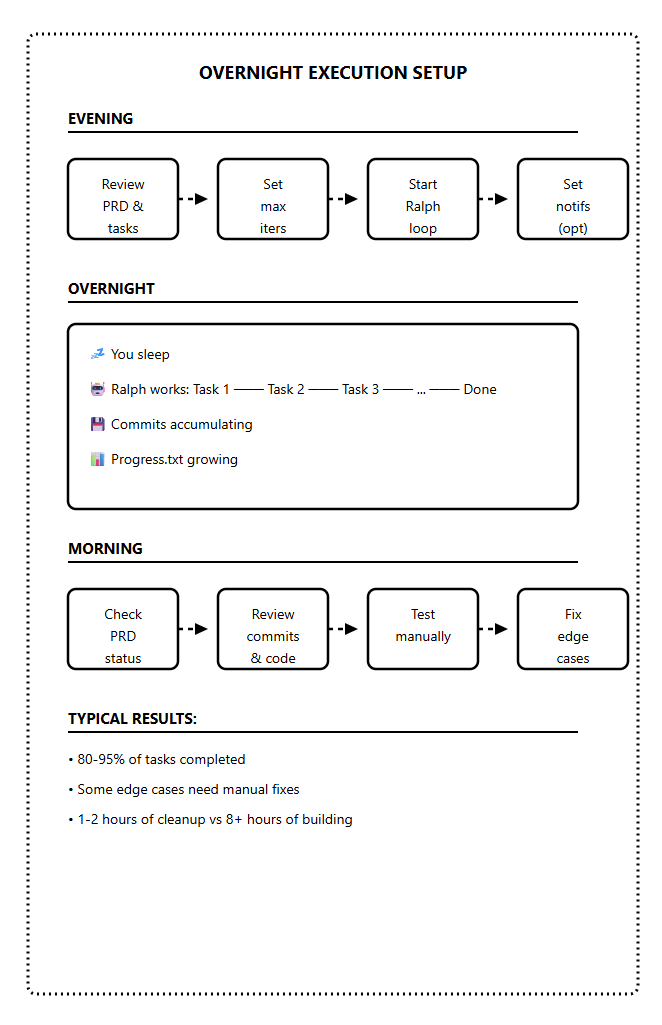
The overnight checklist:
Before starting an unattended run:
PRD is complete and reviewed
All tasks are atomic with clear criteria
Feedback loops built into prompt (tests, types, lint)
Max iterations set (30-50 for overnight)
Git branch is clean and ready
Notification system configured (optional but helpful)
You know what “success” looks like in the morning
Morning review process:
Check prd.json — how many tasks passed?
Read progress.txt — any errors or blockers?
Review git log — are commits sensible?
Run tests manually — do they pass?
Test the feature yourself — does it work?
Expect 80-95% completion on a good run. Some edge cases always need human attention.
The goal isn’t perfect code but 8 hours of work done while you slept, with 1-2 hours of cleanup in the morning.
Setting up notifications:
You can add a notification when Ralph completes:
Some developers set up WhatsApp or Slack notifications using simple scripts. Useful if you want to check progress before morning.
Different projects need different approaches. Here are four patterns that work for specific use cases.
Building new features from a PRD
This is the classic Ralph Loop use case. You have a feature to build, you break it into tasks, and Ralph builds it piece by piece.
Prompt template:
Example project: REST API with 15 endpoints
Task 1-3: Project setup, database, basic structure
Task 4-10: Individual endpoints (one per task)
Task 11-13: Validation, error handling, edge cases
Task 14-15: Documentation, final tests
Expected: 15-20 iterations, 2-4 hours unattended
Improving test coverage on existing code
You have code that works but lacks tests. Ralph writes tests until coverage hits your target.
Prompt template:
What makes this pattern work:
Clear binary goal (coverage >= 80%)
Claude can verify progress with each iteration
Natural small units (one function = one iteration)
Built-in feedback loop (coverage report)
Expected: Varies by codebase. 10-30 iterations typically.
Best for: Code quality and production readiness
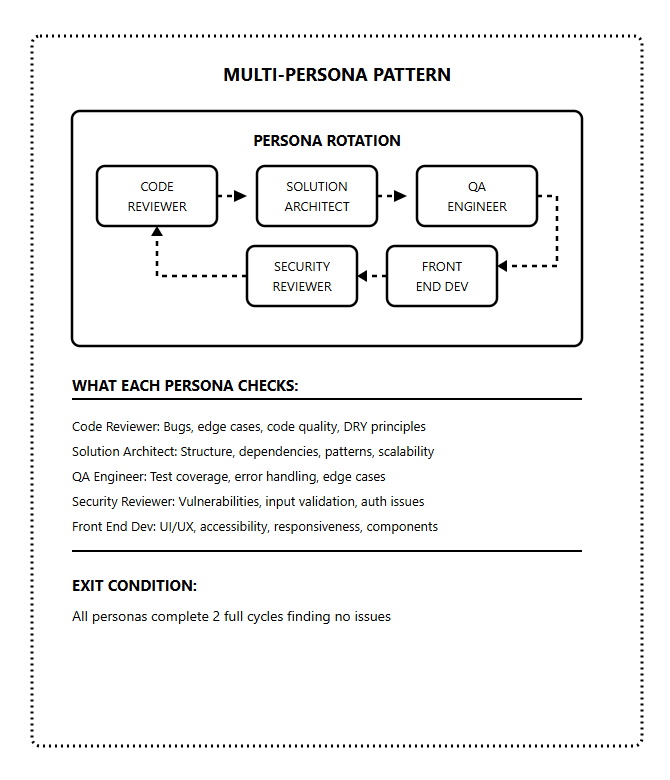
Instead of just building, Claude rotates through different reviewer personas. Each persona catches different issues.
Prompt template:
Why this works:
Different personas catch different problems.
Code reviewer sees bugs.
Security reviewer sees vulnerabilities.
QA engineer sees missing tests.
Rotating through all of them creates comprehensive coverage that single-pass reviews miss.
Expected: 15-30 iterations for thorough review
Best for: Quickly validating ideas, testing tech stacks
You want to see if an idea works before committing to full implementation. Ralph builds a rough version fast.
Prompt template:
When to use this pattern:
Validating a new architecture
Testing if a tech stack works for your use case
Building a demo for stakeholders
Exploring a new API or service
Key difference: Lower quality bar. You’re not building production code. You’re answering the question “Does this approach work?”
Expected: 5-10 iterations for basic POC
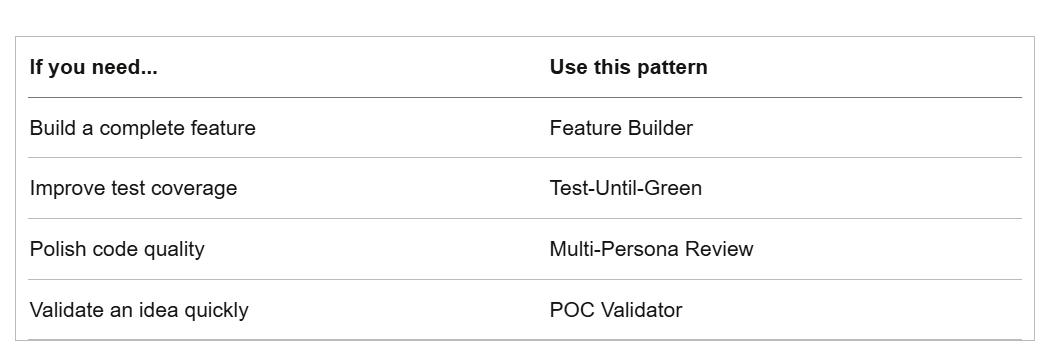
Choosing the Right Pattern
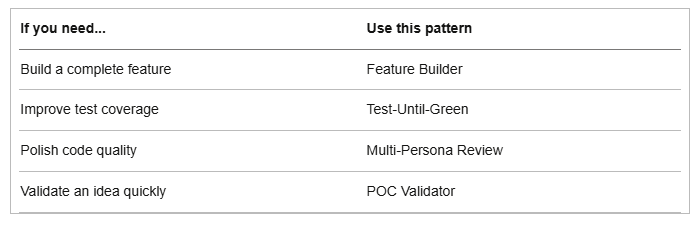
You can also combine patterns. Build with Feature Builder, then polish with Multi-Persona Review.
Ralph Loop is simple at its core - a while loop, a stop hook, and a completion promise.
But mastery requires:
Understanding the fundamentals
Building the right architecture
Progressing through the levels
Choosing the right pattern
PS: I launched the Claude Code Masterclass Git repo, where I will be adding all these code snippets and templates for quick and easy access.
Finally, this newsletter belongs to all of us. If there’s something that can make it better or something you don’t like, please let me know.
See you in the next one.
Let’s Build It Together
— Joe Njenga
No posts
Comments
Nothing yet. Say the first thing.
Sign in to join the conversation.