
Disclaimer: I do not encourage nor condone using maliciously crafted barcodes or QR codes against systems that you do not own! Don’t hack things you don’t own!
I was talking to a friend the other day and they told me something that I think is going to stick with me for a long time:
You are a massive nerd.
— Trusted friend
As you read this, you’re probably going to see why they came to that conclusion.
Long Morse Code
Quite often something will come along that will pique my interest and just suck me right in. Barcodes are one example of that. We see them pretty much everyday, and use them almost every other day. I guarantee that there is at least one object near you right now that has a barcode printed on it. I can count over 20 near me right now. You may even find that there are barcodes hiding in plain sight (more on that further later). But why the random interest in barcodes?
Veritasium recently released a video about barcodes and QR codes which explained their origin and their methods for encoding information. I learnt that barcodes are basically just morse code but with the dots and dashes turned into lines and thicker lines. While they are most commonly used to encode numbers (the same numbers that you see underneath them on every product you’ve ever bought at a store), there are a few types that can also encode text and some special characters. In no particular order they are:
Before I tell you about how barcodes can be used for evil, I would highly recommend that you watch Veritasium’s video on QR codes. You don’t even need to leave this page to do so! You’re welcome.
After finishing Veritasium’s video, I started thinking about fun things that I could do with barcodes. I’ve always had trouble trying to work out what I need to put on my shopping list before I go to the supermarket. I normally spend a good 20 minutes staring at my cupboard trying to decide what I need to buy. What if I knew exactly which food items I had in the house at any given time? How would I quickly key in the names of the items that I had? Barcodes!
The only problem with that idea was that I didn’t have a way to scan them. I’m a minimalist, so I didn’t want to go and buy a proper barcode scanner on a whim just to satisfy some fleeting obsessive interest in something that most people don’t even think about. Instead, I wondered if it would be possible to create my own barcode scanner using the hardware that I already had available.
Barcode Scanner in Python
So in case you haven’t already figured it out, it is definitely possibly to create your own barcode scanner. All you need is a webcam, a computer, and the Python programming language. I found a great tutorial from a channel aptly named Python enthusiast. There he clearly shows how to create a Python script that can use your computer’s webcam to scan both barcodes and QR codes. It only requires two Python libraries to function; cv2 and pyzbar.
cv2 is the Python version of OpenCV, a computer vision library that was originally developed and released by Intel way back in 2000. It is the library that is responsible for accessing and running the device camera.
pyzbar is the Python implementation of the Zbar library, which is a barcode-reading library written in C.
Dependency Hell
Past me was so young and naive, and opted to just install Python packages and libraries directly. Big mistake.
The problem arises when you end up with multiple versions of the same package, or when you get packages that depend on specific versions of other packages. Or maybe your packages get upgraded (possibly along with your OS) and suddenly your code doesn’t work anymore because it is using functions that only come with specific versions of your library/package. That is textbook dependency hell.
The recommendation from experienced Python developers (which I will be adhering to from now into the future) is to use a virtual environment. A virtual environment is an isolated space where Python libraries can be installed, and it will prevent other existing libraries on the system from interfering with those installed inside the virtual environment. According to the Python docs, a virtual environment is typically set up to include the existing libraries that are installed outside of the virtual environment in addition to those that are installed while working inside the virtual environment. It’s also possible to set it up so that only the packages installed whilst inside the virtual environment can be used.
As I tried to install both cv2 and pyzbar, I found that I had fallen into my own dependency hell. After struggling with it for a couple of hours, I was finally able to resolve it by giving up and re-implementing everything in a virtual environment on a different machine.
Source Code
Here is the Python script that I wrote to scan barcodes and QR codes. It even plays a *beep* sound upon a successful scan of a code.
 1import cv2
 2from pyzbar.pyzbar import decode
 3import os
 4import time
 5
 6# initialise camera
 7cap = cv2.VideoCapture(1)
 8cap.set(3,360)
 9cap.set(4,480)
10
11# logging
12print(cap)
13print(cap.isOpened())
14scanned_count = 0
15
16while True:
17    success, frame = cap.read()
18
19    for code in decode(frame):
20        print(code.type)
21        print(code.data.decode('utf-8'))
22        print(f'Scanned {scanned_count} times')
23
24        scanned_count+=1
25
26        os.system('afplay beep.wav') # indicate successful scan
27        time.sleep(3) # wait a bit before scanning the next one
28
29    cv2.imshow('Barcode scanner', frame)
30    cv2.waitKey(1)
So the scanning worked, but how could I make it even better?
Adding In A Database
Going back to my original idea of creating an inventory of the food items that I have in the house, I added in a database to store the SKU (Stock Keeping Unit) numbers of the food in my cupboard. The SKU is the number encoded by the barcode, and is visible at the bottom of it.
In the interest of simplicity and quick prototyping, I used a sqlite database. Sqlite can be accessed and queried without needing any server software since it’s just a file on the disk. The sqlite library also comes pre-installed with Python.
Here is the modified script that inserts every scanned SKU into a sqlite database.
 1import cv2
 2from pyzbar.pyzbar import decode
 3import sqlite3, os, time
 4
 5# sets up sqlite database and return connection object for other functions to use
 6def setup_db():
 7    con = sqlite3.connect("food.db")
 8    try:
 9        cur.execute("CREATE TABLE products(name, sku)") # just in case the db is new
10    except:
11        print("Table already exists; continuing...")
12    return con
13
14def insert_into_db(con, product_sku):
15    print(f'Inserting into db...')
16    cur = con.cursor()
17    query = f'INSERT INTO products VALUES("example_product", {product_sku})'
18    cur.executescript(query)
19    con.commit()
20
21# initialise camera
22cap = cv2.VideoCapture(1)
23cap.set(3,360)
24cap.set(4,480)
25
26# setup database and get connection object
27con = setup_db() #
28
29# logging
30print(cap)
31print(cap.isOpened())
32scanned_count = 0
33
34# run the camera
35while True:
36    success, frame = cap.read()
37
38    for code in decode(frame):
39        print(code.type)
40        print(code.data.decode('utf-8'))
41        print(f'Scanned {scanned_count} times')
42
43        scanned_count+=1
44        os.system('afplay beep.wav') # indicate successful scan
45
46        # insert barcode data into database
47        insert_into_db(con, code.data.decode('utf-8'))
48
49        time.sleep(3) # wait a bit before scanning the next one
50
51    cv2.imshow('Barcode scanner', frame)
52    cv2.waitKey(1)
By this point I had effectively created the basis for a self-checkout machine. With this new script, I was able to scan any barcode that I had on hand, and the SKU number would be inserted into a database which I was then able to query.
Initially, the database started out empty:

I then scanned the barcode on the can of Pepsi that I was drinking. The scanner picked up the barcode and the SKU was inserted into the products table:

How Can I Ruin This?
Immediately after adding the database to my barcode scanner script, I thought about how I could break it. Where is the fun in building something if you can’t also break it? The question then was how could I go about doing that?

I’m sure you read the title.
The Tale of the Dodgy Supermarket
Imagine a hypothetical supermarket. We’ll call it Dodge Mart. They need to have a central database that contains information about every product that they sell. This allows their checkout machines to find the price of any and every item, as well as check that the item being scanned is actually sold by that particular store.
SQL (Structured Query Language) is a language that is used to query databases. A simple query looks something like this:
SELECT * FROM products WHERE sku = 12345;
It says; please give me all of the data that you have for products that have an SKU of 12345.
When a checkout machine scans a barcode, it needs to lookup the product in the database to find the price along with other information such as if there are any promotions or discounts currently running for that item. When an item is scanned, a new SQL query is created to ask the database for information that it has for the item being scanned.

When the programmer doesn’t know what the user is going to need to query the database for, they will append the user’s input to the query so that the database can be queried dynamically for whatever the user is looking for. In the case of the checkout machine above, it will append the product SKU to the database query. If the programmer is careless in implementing this, it can result in very bad things.
SQL injection is a cyberattack where a hacker is able to trick the database into doing things that it shouldn’t by manipulating the SQL queries that are sent to it. They can force the database to give them all of the user passwords that are stored inside, change important data (like product prices), or just destroy the database entirely. To prevent this from happening, database queries need to be sanitised, which is the practice of ensuring that input provided by the user does not contain malicious things before it is added to the query that is sent to the database.
Dodge Mart doesn’t sanitise their database queries. Not surprising for an establishment with a name like that. All it takes for Dodge Mart’s product database to come crashing down is for some naughty customer to come in and scan a malicious barcode that they made at home.
Creating Custom Barcodes
Creating your own barcode is really easy. There are a couple of Python libraries out there that can do all of the hard work for you: python-barcode and Pillow. The former enables the easy creation of barcodes using Python, while the latter is only required if you want to save your barcodes as .png image files.
This is the script that I wrote to create my own barcodes. I used Code 128 since it is capable of encoding letters and special characters.
1import barcode
2from barcode.writer import ImageWriter
3
4data = 'https://nathan-ellison.com'
5
6# define barcode format and save as image file
7barcode_format = barcode.get('code128', data, writer=ImageWriter())
8barcode_file = barcode_format.save('domain-barcode')
9print(f"Barcode saved as {barcode_file}.png")
I used this to make the barcode at the top of this post.
Evil Barcodes
So it’s possible to make custom barcodes that encode more than just numbers. It is also possible to interfere with the product database queries if just the right string of text is sent to the database, and the programmer also doesn’t bother to check what is being sent. Here is where barcodes turn into badcodes. Get it?
The database query used in my script looks like this:
INSERT INTO products VALUES("example_product", product_sku)
Whether the query is reading data or inserting data is not really important. What is important is the fact that the scanned SKU number is added into the query without any form of sanitisation. This is how SQL injection vulnerabilities arise.
Let’s say that the following text gets inputted as an SKU number:
"");DROP TABLE products;--
This is obviously not a valid SKU. Regardless, when inserted into a database query, it produces a query that looks like this:
INSERT INTO products VALUES("example_product", "");DROP TABLE products;--)
It says; add in a product called example_product with no SKU value, and also delete the products table please. The payload can be encoded as a barcode using the barcode generation script from earlier.
1import barcode
2
3from barcode.writer import ImageWriter
4data = '"");DROP TABLE products;--'
5
6# define barcode format and save as image file
7barcode_format = barcode.get('code128', data, writer=ImageWriter())
8barcode_file = barcode_format.save('evil-barcode')
9print(f"Barcode saved as {barcode_file}.png")
After running the script, out popped an evil barcode.

With the evil barcode in hand, and a little bit of prior knowledge about the database, it was possible to mess with it.
I first inserted some dummy data so that I could validate if the injection was successful at all.

Finally, I scanned my evil barcode, and then went back to look at the database…

I was able to successfully delete the products table just by scanning a barcode!
You were probably wondering what I was talking about when I mentioned “barcodes hiding in plain site” earlier. While I was playing around with the barcode scanner, I was holding the camera towards the ground while I checked something on my computer, and it registered a successul scan. Confused, I added an extra time delay to the script so I would be able to screenshot the image that it scanned, and I found that it was literally just my carpet.
According to my scanner, my floor is a valid Intervealed 2 of 5 barcode that when decoded produces the number 991514. It’s been right in front of me the whole time and I didn’t even notice!
Conclusion
You need to be really careful when you’re handling data that has been supplied by a user because they will inevitibly input something that you’re not expecting. Case in point:
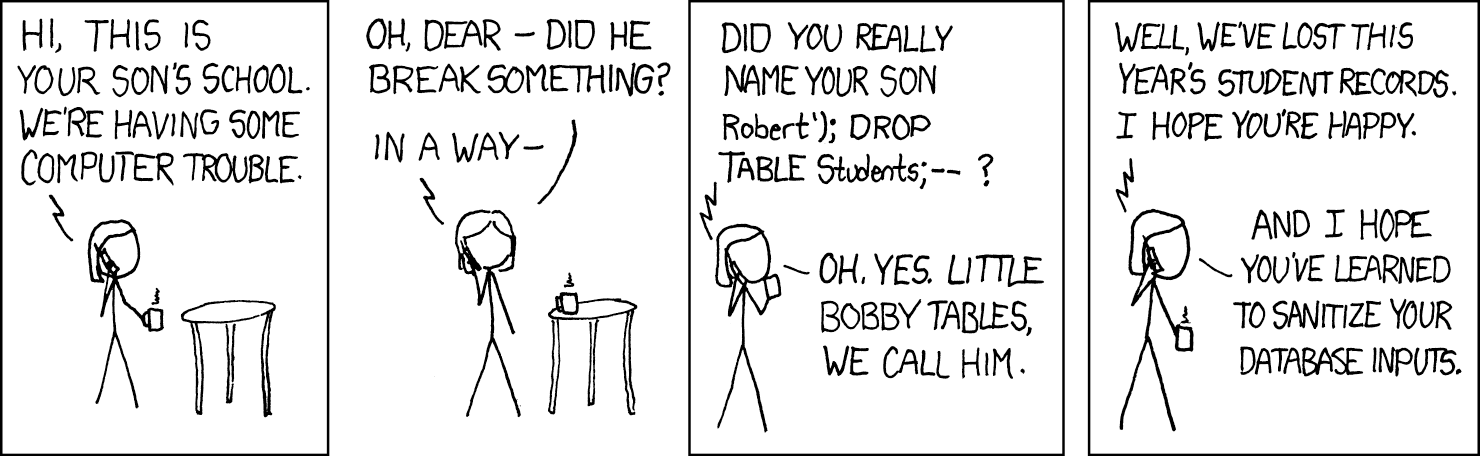 (Source: xkcd.com)
One other thing that you’ve got to be careful of is actually QR codes. They’re commonly used to encode links to websites, and you need to make sure you know where you’re going when you click that link. Be just as cautious as you would be about clicking links inside emails from people that you don’t know. Your camera will show the link that you’re about to visit when it scans a QR code, so just make sure you think before you click / tap.
I’ve come to really enjoy tearing things apart and learning how they work. It’s really satisfying to take something that was at first entirely unknown, and make it known. I think this is why I enjoy reading/writing code and playing CTF challenges. There is a fun mix of problem solving by applying your own knowledge/skills, and learning what is going on under the hood of whatever it is you’re working with. The whole process makes me more appreciative of the complexity of the world around me.
One of my favourite quotes is:
Remember kids, the only difference between screwing around and science is writing it down.
— Adam Savage
Since I’ve written down my barcode schenanigans to make this blog post, it can officially be classed as science. Although that still probably means that my friend was right about me.

Comments
Nothing yet. Say the first thing.
Sign in to join the conversation.