

There are already tons of articles and courses about Asyncio. Why “yet another article”? This article aims to explain concepts of asynchronous programming in Python in a straightforward way. This article explores Python asyncio API with good examples to enable a developer to run.
I used asyncio in my projects and liked how it enables concurrency with little code. I hope you will feel the same.
Python’s asyncio is a co-routine-based concurrency model that provides elegant constructs to write concurrent python code without using threads. The mindset of designing concurrent solutions is different from traditional thread-based approaches. We know that threading is mainly used for I/O bound processing, whereas multiprocessing is advantageous for CPU-bound tasks in Python.
All the Es6, Node.js programs execute in an event loop if you ever programmed in JavaScript. Python brings the same functionality by allowing developers to create custom loops and functions to be scheduled on those loops.
Python asyncio standard library package allows developers to use async/await syntax while developing concurrent programs.
asyncio is often a perfect fit for IO-bound and high-level structured network code
Common use-cases for I/O bound processing:
Metric-collection systems
Chat rooms
Real-time online games
Streaming in Python
Typically, a python program runs functions to process input values. Similarly, in asyncio, one needs to create unique functions called co-routines. What makes a normal function co-routine is the async keyword. Let’s see a simple add function that sums two integer numbers and returns the result. We use Python 3.9 interpreter for our examples throughout this article.
This file contains bidirectional Unicode text that may be interpreted or compiled differently than what appears below. To review, open the file in an editor that reveals hidden Unicode characters. Learn more about bidirectional Unicode characters
| # A normal function | |
| def add(x: int, y: int): | |
| return x + y | |
| # A co-routine | |
| async def add(x: int, y: int): | |
| return x + y |
What happens when you make a function special by adding the async keyword? Now event loop can execute this particular function as a co-routine.
This file contains bidirectional Unicode text that may be interpreted or compiled differently than what appears below. To review, open the file in an editor that reveals hidden Unicode characters. Learn more about bidirectional Unicode characters
| import asyncio | |
| # A co-routine | |
| async def add(x: int, y: int): | |
| return x + y | |
| # An event loop | |
| loop = asyncio.get_event_loop() | |
| # Pass the co-routine to the loop | |
| result = loop.run_until_complete(add(3, 4)) | |
| print(result) # Prints 7 |
In the code snippet, we create a new event loop by calling `asyncio.get_event_loop method`. It returns a new loop that can execute co-routines. The method run_until_complete means three things implicitly:
Start the loop
Execute co-routine passed as an argument
Stop the loop
The run_until_complete method returns the value from co-routine completion. It is a simple example of creating a co-routine and scheduling it on an event loop.
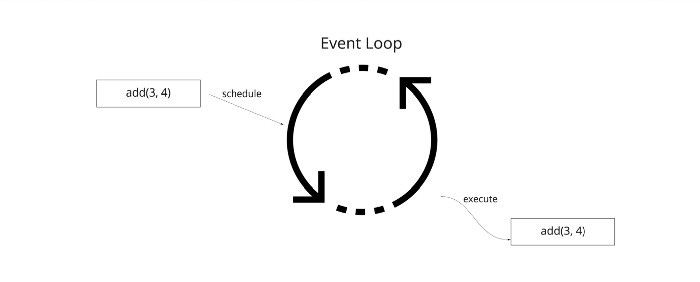
Let us see how to schedule multiple co-routines next.
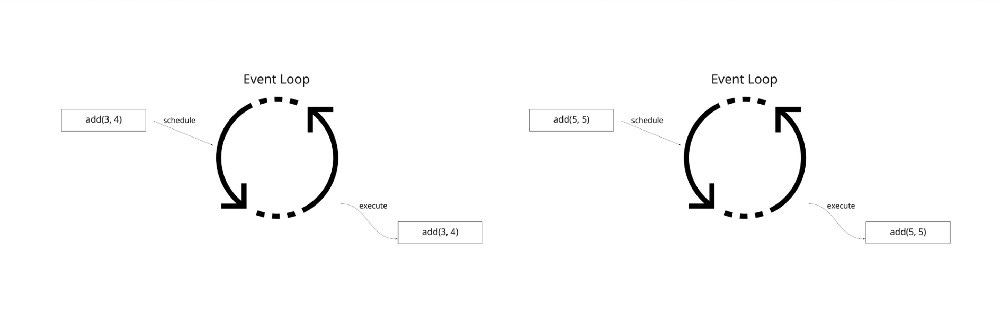
If we call run_until_complete multiple times, it is equivalent to running the event loop twice in a synchronous fashion. So result1 and result2 in the below program occurred synchronously.
This file contains bidirectional Unicode text that may be interpreted or compiled differently than what appears below. To review, open the file in an editor that reveals hidden Unicode characters. Learn more about bidirectional Unicode characters
| import asyncio | |
| # A co-routine | |
| async def add(x: int, y: int): | |
| return x + y | |
| # An event loop | |
| loop = asyncio.get_event_loop() | |
| # Execute two co-routines | |
| result1 = loop.run_until_complete(add(3, 4)) | |
| result2 = loop.run_until_complete(add(5, 5)) | |
| print(result1) # Prints 7 | |
| print(result2) # Prints 10 |
In the program, the event loop starts, then execute the first coroutine and stops. This process is repeated for the second coroutine too. It is similar to a plain synchronous invocation of two functions running one after another.
The process looks like this:
What if we need to schedule multiple co-routines on the same event loop as a batch asynchronously? We can do it like this:
This file contains bidirectional Unicode text that may be interpreted or compiled differently than what appears below. To review, open the file in an editor that reveals hidden Unicode characters. Learn more about bidirectional Unicode characters
| import asyncio | |
| # A co-routine | |
| async def add(x: int, y: int): | |
| return x + y | |
| # An event loop | |
| loop = asyncio.get_event_loop() | |
| # Create a function to schedule co-routines on the event loop | |
| # then print results and stop the loop | |
| async def get_results(): | |
| result1 = await add(3, 4) | |
| result2 = await add(5, 5) | |
| print(result1, result2) # Prints 7 10 | |
| loop.stop() | |
| loop.create_task(get_results()) | |
| # Blocking call interrupted by loop.stop() | |
| try: | |
| loop.run_forever() | |
| finally: | |
| loop.close() |
The important lines of code here are from 8 to 25. The algorithm is simple:
Get the event loop
Run event loop forever with loop.run_forever method as Line no: 23. That line blocks until someone call loop.stop method. Once the loop.stop method is called in future, loop.close will stop the event loop (Line no: 25).
Create a task from co-routine get_results and schedule it on the event loop (Line no: 19)
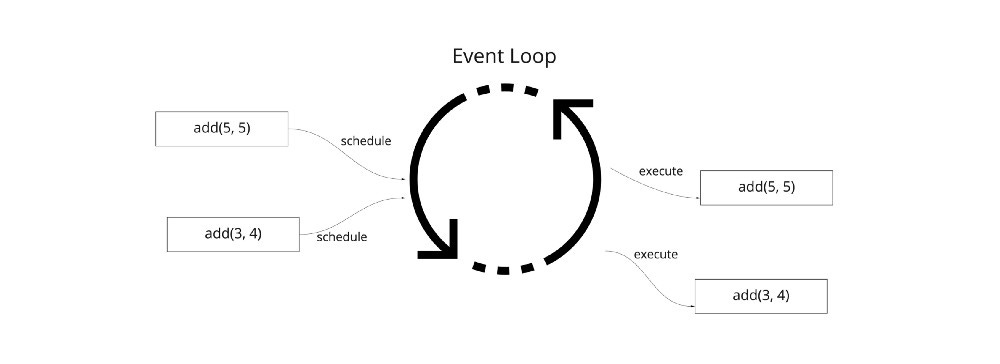
When get_results is executed, it schedules two more co-routines onto the loop using the await keyword. The await statement runs the co-routines immediately and returns the result.
Finally, we stop the event loop after having the results of two co-routines (Line no: 17)
Overall process looks like this:
The previous example looks like a lot of boilerplate code for scheduling two co-routines on an event loop and fetching results. The asyncio library package has a wrapper method called asyncio.run, which exactly does the same as above. We can re-write our program to this:
This file contains bidirectional Unicode text that may be interpreted or compiled differently than what appears below. To review, open the file in an editor that reveals hidden Unicode characters. Learn more about bidirectional Unicode characters
| import asyncio | |
| # A co-routine | |
| async def add(x: int, y: int): | |
| return x + y | |
| # Create a function to schedule co-routines on the event loop | |
| # then print results and stop the loop | |
| async def get_results(): | |
| result1 = await add(3, 4) | |
| result2 = await add(5, 5) | |
| print(result1, result2) # Prints 7 10 | |
| asyncio.run(get_results()) |
In this brief version, asyncio creates a new event loop underneath (Line no: 15), uses it to run the co-routine get_results. In this case, we don’t even need to call the stop method exclusively on the event loop and the asyncio.run() takes care of it.
Python asyncio provides two basic constructs for running on the event loop.
Co-routine
Asyncio task
Co-routines are created using async def syntax, as seen in our previous code examples. There are two ways to make an asyncio task:
# 1
loop = asyncio.get_event_loop()
loop.create_task(cor) # cor = co-routine
# 2
import asyncio
asyncio.create_task(cor)
If we control the event loop within a program, then Option #1 makes more sense. In contrast, high-level asyncio.run method suits Option #2.
One can easily confuse between a task object vs. co-routine. A co-routine is similar to a generator object, and you cannot use a generator directly but only with supporting keywords. Similarly, a co-routine must be used with the await keyword. A co-routine can also be wrapped inside a task to get fine-grained control properties like canceling a task, checking ready status, etc. We will see the usage of asyncio-tasks in upcoming examples.
The event loop executes the scheduled co-routines synchronously. But it achieves concurrency by skipping the blocking period of a co-routine to do work for the next co-routine, just using a single thread.
Let us see an example of how the above statement works. Assume we have two types of additional functions, and one is slow and the other one fast. We will run an operation that runs two functions concurrently with different inputs. We can schedule those functions as co-routine-based tasks and add virtual blocking using asyncio.sleep function. Modifying the previous program to add these two functions looks like this:
This file contains bidirectional Unicode text that may be interpreted or compiled differently than what appears below. To review, open the file in an editor that reveals hidden Unicode characters. Learn more about bidirectional Unicode characters
| import asyncio | |
| # A fast co-routine | |
| async def add_fast(x, y): | |
| print("starting fast add") | |
| await asyncio.sleep(3) # Mimic some network delay | |
| print("result ready for fast add") | |
| return x + y | |
| # A slow co-routine | |
| async def add_slow(x, y): | |
| print("starting slow add") | |
| await asyncio.sleep(5) # # Mimic some network delay | |
| print("result ready for slow add") | |
| return x + y | |
| # Create a function to schedule co-routines | |
| async def get_results(): | |
| task1 = asyncio.create_task(add_slow(3, 4)) | |
| task2 = asyncio.create_task(add_fast(5, 5)) | |
| print(await task1, await task2) # Prints 7 10 | |
| asyncio.run(get_results()) |
We added a few print statements to functions to debug the lifecycle. Instead of an await directly on co-routines, we are creating tasks. If we execute this program, we see the following output exactly after 5 seconds.
starting slow add
starting fast add
result ready for fast add
result ready for slow add
7 10
As we mentioned earlier, the event loop executes the co-routines synchronously in the way we create tasks as per Line numbers: 19, 20. But, once the loop sees a blocking wait, it executes the other co-routine. The below timeline chart tries to capture this phenomenon.
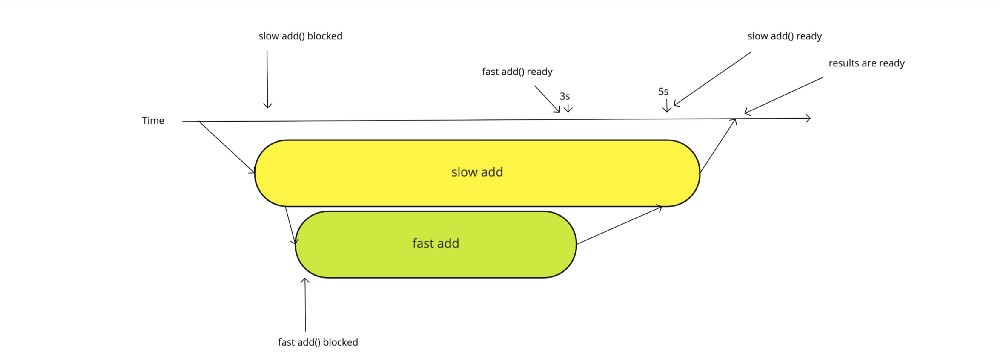
For I/O bound operations, this is how asynchronous co-routines can save operation time (improve latency) compared to a sequential program. Instead of eight seconds taken by a sequential program, this concurrent program only needs 5 seconds for both the results to be ready.
Until now, we scheduled co-routines manually in the code. What if we have to create co-routines at run-time dynamically. The most important construct to do that is asyncio.gather method.
Let us say we have ’n’ number of inputs, and we need to process them concurrently and get back results; asyncio.gather is the default way to go.
Problem statement: We have few integer tuples to be added individually and returned as a result once the operation is complete.
This file contains bidirectional Unicode text that may be interpreted or compiled differently than what appears below. To review, open the file in an editor that reveals hidden Unicode characters. Learn more about bidirectional Unicode characters
| import asyncio | |
| # A co-routine | |
| async def add(x: int, y: int): | |
| return x + y | |
| # Create a function to schedule co-routines on the event loop | |
| # then print results | |
| async def get_results(): | |
| inputs = [(2,3), (4,5), (5,5), (7,2)] | |
| # Create a co-routine list | |
| cors = [add(x,y) for x,y in inputs] | |
| results = asyncio.gather(*cors) | |
| print(await results) # Prints [5, 9, 10, 9] | |
| asyncio.run(get_results()) |
This example shows a usage of asyncio.gather method (Line no: 14) to schedule execution of multiple co-routines dynamically. Once the results of all co-routines are collected successfully, await call returns values as results and prints them.
Note: *cors (star syntax, Line no: 14) will unpack a list and pass them as keyword arguments to asyncio.gather. You cannot give a list of co-routines directly to that method.
Analogy: Think of this scenario: Walk into a restaurant and order four items. The waiter then prepares all four items and brings them to the order table. That is how asyncio.gather() method works.
One can also modify the above program to create tasks instead of co-routines, and the rest stays precisely the same.
Sometimes, you don’t want a waiter to bring all items at once, and you might want to consume one at a time as they are ready. That can be achieved using asyncio.as_completed method. Instead of collecting all concurrent results in one go, we can now consume the earliest available result from scheduled co-routines.
This file contains bidirectional Unicode text that may be interpreted or compiled differently than what appears below. To review, open the file in an editor that reveals hidden Unicode characters. Learn more about bidirectional Unicode characters
| import asyncio | |
| # A co-routine | |
| async def add(x: int, y: int): | |
| return x + y | |
| # Create a function to schedule co-routines on the event loop | |
| # then print results | |
| async def get_results(): | |
| inputs = [(2,3), (4,5), (5,5), (7,2)] | |
| # Create a co-routine list | |
| cors = [add(x,y) for x,y in inputs] | |
| # Prints results of co-routines as they are ready | |
| # Beware of Non-deterministic ouput. The order can change based on | |
| # which co-routine finishes first | |
| for cor in asyncio.as_completed(cors): | |
| print(await cor) | |
| asyncio.run(get_results()) |
The asyncio.as_completed method takes a list of co-routines, unlike keyword arguments of asyncio.gather method. The asyncio.as_completed returns iterable co-routines that can be used with the await keyword. You can consume the result right away if you want in a for-loop.
Note: The above program: asyncio_basic_9.py also works with tasks. Maybe try it as an exercise.
Sometimes, one needs to schedule a co-routine but only wait for a certain amount of time and stop execution. That is where asyncio.wait_for method comes in handy.
The asyncio.wait_for method takes a co-routine or task with a timeout and raises an exception if the result is not ready within the timeout period. Let us see an example where we have a co-routine to add numbers that take up to five seconds to execute and prepare the result. If we can’t bear that delay, we can specify our custom threshold as a timeout. We can add a simulated block using asyncio.sleep method, and a random delay using Python’s random package.
This file contains bidirectional Unicode text that may be interpreted or compiled differently than what appears below. To review, open the file in an editor that reveals hidden Unicode characters. Learn more about bidirectional Unicode characters
| import asyncio | |
| import random | |
| # A co-routine | |
| async def add(x: int, y: int): | |
| # function can do work between 1 second to 5 seconds | |
| await asyncio.sleep(random.randrange(1, 5)) | |
| return x + y | |
| # Create a function to schedule co-routines on the event loop | |
| # then print results | |
| async def get_results(): | |
| result = None | |
| try: | |
| # Wait for 3 seconds for co-routine to execute | |
| result = await asyncio.wait_for(add(3, 4), timeout=3) | |
| except asyncio.exceptions.TimeoutError: | |
| result = "fallback payload" | |
| print(result) | |
| asyncio.run(get_results()) |
As we see from Line No: 16, we are scheduling a co-routine with a deadline of three seconds. If that deadline is exceeded by co-routine while executing, a TimeoutError is raised (this exception is from the asyncio package). By using that, we can make decisions about the result.
Thanks to high-level constructs, asynchronous programming in Python is easier than you think. One should know a few essential asyncio package methods to compose concurrent programs in Python.
I hope, as a reader, you got a basic understanding of asyncio by now. There are few advanced primitives which allow us to take more control over the execution of co-routines, for Ex: asyncio.wait method lets the developer stop executing a batch of co-routines when there is at least one exception. We will see those advanced use-cases in another post. Also, testing the asynchronous code is another aspect of learning concurrency in Python.
The asyncio package also provides synchronization primitives similar to thread and thread-safe data structures like queues to communicate between co-routines. We will discuss them in deep in upcoming articles.
Please stay safe and have a great new year!
https://docs.python.org/3.9/library/asyncio-task.html#coroutine
https://docs.python.org/3.9/library/asyncio-eventloop.html#asyncio-event-loop
https://docs.python.org/3.9/library/asyncio-exceptions.html
This is Dev Bits, a newsletter about The finest bits on programming.
No posts
Comments
Nothing yet. Say the first thing.
Sign in to join the conversation.