
A customer emailed us this week with a fair question. One of their sites was running PHP 8.5.7 and the mySites.guru dashboard showed an amber badge. Another was running PHP 8.4.24 and showed green. The bigger number was getting the worse colour, which looks like a reporting error.
The badge is right, and the reason deserves more than the one-line reply we sent back, because the same confusion sits underneath a lot of expensive hosting decisions.
Accurate on 16 August 2026
Every version number, release date and support window below was correct on the day this was published. They will not stay that way. PHP ships a patch roughly every four weeks, so 8.5.9 will stop being the newest 8.5 release soon enough, and branches move from active support to security-fixes-only to end of life on a published schedule.
The mechanism does not age. The difference between a branch and a patch level, and the reason a higher version number can be the more out-of-date one, holds whatever the current numbers happen to be. For today's figures, php.net publishes the timetable.
The Short Answer
PHP 8.4.24 is the newest release php.net publishes for the 8.4 branch, so it goes green. PHP 8.5.7 is two releases behind the newest 8.5 release, which is 8.5.9, so it goes amber. Both 8.4 and 8.5 are currently supported branches. The badge is not ranking one branch above the other.
A PHP Version Number Answers Two Questions
Read 8.5.7 as three separate facts rather than one number that gets bigger over time.
| Part | Example | What it tells you |
|---|---|---|
| Major | 8.5.7 | The language generation. PHP 8 has been current since 2020. |
| Branch | 8.5.7 | The support window. Each branch has its own start date and its own death date. |
| Patch | 8.5.7 | Whether you have taken the fixes that branch has already shipped. |
The branch and the patch are independent. A brand new branch can be badly out of date on patches, and an older branch can be perfectly current. That is the situation our customer was looking at: 8.5 is the newer branch, and their 8.5 site was the one behind.
Branches also run in parallel rather than in sequence. When PHP 8.5 arrived, PHP 8.4 did not stop. It carried on receiving patches on the same monthly rhythm, and it will keep doing so into 2028.
What the PHP Badge Actually Checks
Every hour, mySites.guru fetches the list of current releases straight from php.net’s own machine-readable feed of active branches:
curl -s https://www.php.net/releases/activeReduced to the part that matters, that feed currently says:
{
  "8.2": "8.2.33",
  "8.3": "8.3.33",
  "8.4": "8.4.24",
  "8.5": "8.5.9"
}
The mySites.guru badge rule itself is blunt:
- Green. Your PHP version string is exactly one of those four. You are on the newest patch of a branch php.net still publishes for.
- Amber. It is anything else. One patch behind and ten patches behind get the same colour, because both mean there are published fixes you have not taken.
- Red. The version starts with 5 or 7, so the entire major series is dead, or the string contains
betaorrc, because pre-release builds do not belong on production sites.
Because the list refreshes hourly, sites move from green to amber on their own within an hour of php.net publishing a new patch. Nobody has to notice and nothing has to be re-scanned.
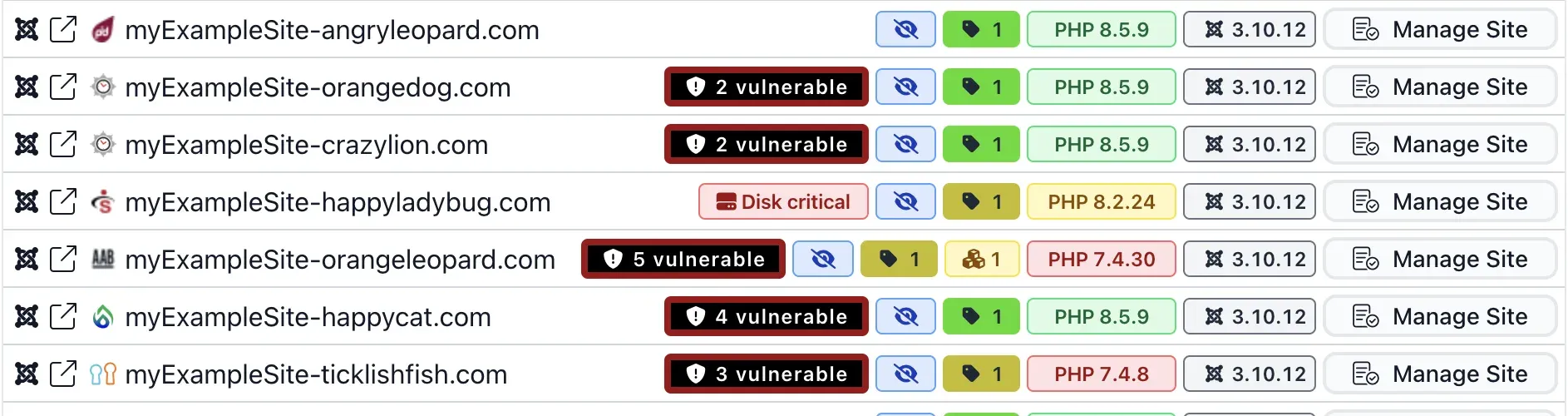
All three rules at once, on real rows. The green badges are sites on 8.5.9, the newest 8.5 release. The amber one is a site on 8.2.24, which was current until the 8.2 branch moved on to 8.2.33. The red ones are PHP 7.4, dead since November 2022, and no patch level rescues them because the rule catches the series by name.
Notice what the badge does not do. Every site in that list is running Joomla 3.10.12, and their PHP badges range from green to red. The PHP colour is only ever about PHP.
A shortcut that is not signposted anywhere
Clicking a PHP badge in mySites.guru site lists drops that exact version into the site search box as a filter. Click the amber 8.5.7 on one site and you immediately have every other site in your account sitting on 8.5.7, which is usually the whole server rather than the one site you were looking at.
Why Does a Newer PHP Version Show a Worse Colour?
Because two patch releases separate 8.5.7 from the current 8.5, and both of them carried security fixes. The 8.5 branch went 8.5.7 on 4 June 2026, 8.5.8 on 2 July, then 8.5.9 on 30 July.
The 30 July release went out across all four live branches at once, which is what the PHP project does when the fixes are security fixes rather than bug fixes. It carried CVE-2026-17544, an out-of-bounds write in BCMath, CVE-2026-17543, a SQL injection in the PostgreSQL extension, and CVE-2026-7260, a crash in Phar. The July release before it fixed memory corruption in openssl_encrypt().
The amber badge in mySites.guru is therefore a statement about exposure rather than about version numbers. A site on 8.5.7 is missing named, published, exploitable fixes that a site on 8.4.24 already has. The smaller number is the safer server today.
This is also why the amber tier exists for PHP at all. Joomla and WordPress version badges skip it: anything short of the current release goes straight to red, because CMS releases are less frequent and a missed one matters more. PHP ships a patch roughly every four weeks, on a Thursday, so amber fits a gap that is often only days old.
Which PHP Versions Are Supported Right Now?
Every PHP branch gets two years of active support, where ordinary bugs and security issues are both fixed, followed by two years where only critical security issues are patched. After four years it receives nothing at all.
| Branch | First released | Active support until | Security support until | Status today |
|---|---|---|---|---|
| 8.2 | 8 Dec 2022 | 31 Dec 2024 | 31 Dec 2026 | Security fixes only |
| 8.3 | 23 Nov 2023 | 31 Dec 2025 | 31 Dec 2027 | Security fixes only |
| 8.4 | 21 Nov 2024 | 31 Dec 2026 | 31 Dec 2028 | Active support |
| 8.5 | 20 Nov 2025 | 31 Dec 2027 | 31 Dec 2029 | Active support |
Anything below 8.2 is already gone. PHP 8.1 died on 31 December 2025, PHP 8.0 in November 2023, and PHP 7.4 back in November 2022.
PHP branch support windows
Green is active support, amber is security fixes only, and the dashed line is today.
8.0
8.1
8.2
8.3
8.4
8.5
2023 2024 2025 2026 2027 2028 2029
Today: 16 August 2026
- Active support.
- Bugs and security issues are both fixed, with regular patch releases.
- Security fixes only.
- Critical security issues only, released as needed.
- End of life.
- No further releases of any kind. Known vulnerabilities stay unpatched.
PHP 8.6 reached its first beta in August 2026, with general availability targeted for late November. It is not a supported branch yet, and a production site running an 8.6 beta gets a red badge rather than credit for being early.
How Bad Is It to Be Running PHP 5, 7, 8.0 or 8.1 in 2026?
It depends enormously on which one, and lumping them together is how the warnings get ignored. PHP 8.1 stopped receiving fixes seven months ago. PHP 5.6 stopped more than seven years ago. Treating those as the same emergency is how you get a client who tunes out the whole subject.
| Series | Last ever fix | Unpatched for |
|---|---|---|
| 8.1 | 31 December 2025 | 7 months |
| 8.0 | 26 November 2023 | 2 years 8 months |
| 7.4 | 28 November 2022 | 3 years 8 months |
| 7.0 | 3 December 2018 | 7 years 8 months |
| 5.6 | 31 December 2018 | 7 years 7 months |
The Advisory List Stops Mentioning You
Here is the part that catches people out. When PHP published CVE-2026-17543, a SQL injection in the PostgreSQL extension, the advisory listed its affected versions as everything below 8.2.33, 8.3.33, 8.4.24 and 8.5.9. PHP 8.1 is not mentioned. Neither is 7.4, or 5.6.
That absence is not a clean bill of health. Those branches are missing from the range because nobody assessed them, not because the bug stops at 8.2. The vulnerable code was almost certainly there long before the branches that got named, and there will never be a fix, an advisory, or a version number to check against. Your scanner reports nothing, because there is nothing published to report.
So the risk on a dead branch is unknowable rather than merely high, and it compounds every month. PHP shipped fixes for eighteen CVEs across 2026’s releases alone. A few of those only touch code introduced in 8.5, but most reach back across the branches, and none of them are being backported to anything that has already died.
What Actually Gets Sites Hacked
In the compromises we clean up, the PHP interpreter itself is rarely the way in. It is almost always the CMS or an extension. A site on PHP 8.1 that is otherwise current and well maintained is not in immediate danger from the interpreter, and anyone telling you it will be breached this week because of the PHP version is selling something.
The reason old PHP still matters is what it does to everything above it. You cannot run current Joomla or WordPress on it. You cannot take extension updates once vendors raise their floors. So the layer that genuinely does get exploited is frozen along with the interpreter, and it stays frozen until PHP moves. That is the mechanism, rather than the interpreter itself being kicked in.
Which gives a rough grading:
- PHP 8.1. Not an emergency, and a reasonable place to be mid-migration. It is a deadline you have already missed rather than a fire, so put a date on it.
- PHP 8.0 and 7.4. Three years without a fix, and past the point where current CMS and extension releases will install. Plan the move now, because the stack above it has already stopped moving.
- PHP 7.0 and 5.x. A rebuild conversation. Seven-plus years unpatched, no current CMS will run, and the code will need real work to port. W3Techs still has 29.0% of PHP sites on version 7 and 7.9% on version 5, so more than a third of the PHP web is here. Common is not the same as safe.
Green Means Patched, It Does Not Mean Future-Proof
Look again at the four versions that can earn a green badge in mySites.guru today: 8.2.33, 8.3.33, 8.4.24 and 8.5.9. Two of those four are on branches that left active support months or years ago. PHP 8.3 has been security-fixes-only since 31 December 2025, and PHP 8.2 since the end of 2024.
So a site running PHP 8.3.33 shows a perfectly green badge while sitting on a branch that no longer receives bug fixes at all, only critical security patches. A site on 8.2.33 gets the same green, and the 8.2 branch stops receiving even those on 31 December 2026, roughly four months away. The badge says nothing about any of it.
So half the versions that can go green are on branches already past their active-support window.
What happens next is the sharpest limitation of the whole colour scheme. When 8.2 reaches end of life, php.net drops it out of the active releases feed, 8.2.33 stops matching, and the badge turns amber by itself. That is the right direction to move, but amber is also the colour for “one patch behind on a perfectly healthy branch”. A dead branch and a fortnight-old patch level end up looking identical.
You can watch this happening today on PHP 8.1, which died on 31 December 2025. An 8.1 site shows amber rather than red, because the red rule only catches the PHP 5 and PHP 7 series by name. The colour understates the problem, and if you are running 8.1 the amber badge is doing you a disservice.
So read green as “you have taken the patches that exist”, which is a question you can act on this afternoon, and treat the branch end-of-life dates in the table above as a separate question that belongs in next year’s budget. A site on 8.2 or 8.3 is fully patched and on a countdown at the same time. Our end-of-life version tracking does the equivalent job for Joomla and WordPress core versions.
What PHP Version Do WordPress and Joomla Actually Need?
The CMS minimums are considerably lower than what you should actually run, which is where a lot of the “but my site works fine” arguments come from.
| Platform | Latest release | Minimum PHP | Recommended PHP | Highest PHP it runs on |
|---|---|---|---|---|
| WordPress | 7.0.4 | 7.4 (dead since 2022) | 8.3 or greater | Moves with PHP |
| Joomla 1.5 | 1.5.26 (2012) | 4.3.10 | 5.3 | PHP 5.3 era, never PHP 7 |
| Joomla 2.5 | 2.5.28 (2014) | 5.2.4 | 5.6 | 5.6, never PHP 7 |
| Joomla 3 | 3.10.12 (2023) | 5.3.10 | 8.0 | 8.1, dead since Dec 2025 |
| Joomla 5 | 5.4.7 | 8.1.0 (dead since Dec 2025) | 8.3 | Moves with PHP |
| Joomla 6 | 6.1.2 | 8.3.0 | 8.4 | Moves with PHP |
Both projects set their floor at whatever will not break existing installs, so the minimum is a compatibility statement rather than a recommendation. WordPress says so directly on its requirements page, noting that it still runs on PHP 7.4 while pointing out that 7.4 reached end of life years ago.
The last column is the one that matters for older sites, because it is a ceiling rather than a floor. Joomla 3 is the sharpest case. The project backported PHP 8.1 compatibility fixes to the 3.10 branch before that branch closed, so 8.1 is the highest PHP a Joomla 3 site was ever made to run on. PHP 8.1 itself died on 31 December 2025.
Which means a fully patched, best-case Joomla 3 site is sitting on a PHP branch that has been receiving nothing for seven months, and no hosting change fixes it. Selecting PHP 8.2 in the control panel breaks the site instead. This is the extension problem from the previous section, one level up: the CMS is the thing pinning PHP down, so the CMS has to move first. Joomla 1.5 and 2.5 are worse again, since neither ever ran on PHP 7 at all.
Joomla 3 support formally ended on 17 August 2023, though a paid Extended Long Term Support programme carried on patching it until early 2025, and our own Joomla 3 patch tool still applies known security fixes to 3.10.12 sites. None of that moves the PHP ceiling.
The gap between those two columns is where most of the web lives. W3Techs data from 16 August 2026 puts PHP on 70.3% of all sites whose server-side language is known, and among those, 29.0% are still on PHP 7 and 7.9% on PHP 5. More than a third of the PHP web is running a major version that has not received a security fix in years. Every one of those sites gets a red badge from us, and the badge is being generous.
If you are planning upgrades, our Joomla 6 technical requirements and WordPress 7 compatibility posts cover what each jump actually needs, and the managing CMS updates at scale guide covers doing it across a portfolio rather than one site at a time.
How Do I Move a Site From Amber to Green?
PHP belongs to your host, not to your CMS, so there is nothing to click inside WordPress or Joomla. On most mass-market hosting the answer is a PHP version switcher somewhere in the control panel, and for the majority of sites that switcher is the entire story.
Two things make it messier than that sounds, and both of them explain amber badges that look like nobody’s fault.
A Server Does Not Have One PHP Version
It has several, and they can all differ. The CLI binary, PHP-FPM, CGI and any legacy mod_php can each sit on a different version on the same machine. Beyond that, a decent host will let you set the version per domain, and often per directory through .htaccess overrides, which means the front end and the administrator area of one site can genuinely run different PHP versions. Per-file overrides exist too.
So running php -v over SSH tells you the version of the command-line binary and frequently nothing whatsoever about what serves your pages. It is the check most people reach for first, and it is the one most likely to send you off in the wrong direction.
The version that counts is the one the site itself reports while serving a request. Both WordPress and Joomla surface that on their own system information screens, and mySites.guru reads the same self-reported value from each connected site, which is why the badge reflects reality rather than what the server’s shell says.
Your Host Only Offers What It Has Installed
The switcher lists the versions your host has bothered to load onto that server, and hosts lag behind PHP releases considerably. Patch releases arrive roughly every four weeks. Plenty of hosts are weeks or months behind that, and some never offer a specific patch at all, jumping straight from one to the next.
An amber badge in mySites.guru is not always something you can fix
If your host has not installed the current patch, it will not be in the switcher and there is no setting that conjures it up. At that point the useful action is to ask them when it is coming. A host that is habitually months behind on security patches is telling you something about the rest of their operation.
With that in mind:
- Amber, and the current patch is in the switcher. Select it. This is the common case and takes a minute.
- Amber, and the current patch is not offered. Ask your host when they are applying it. Nothing on your side changes this.
- Amber on a branch that is near end of life. Move up a branch rather than chasing the patch, but test first: a branch change is a real upgrade, unlike a patch bump.
- Red. Treat it as a migration, not a switch. PHP 5 and 7 code often will not run unmodified on PHP 8, so work on a copy. If the CMS itself is what pins you to the dead branch, the CMS is the thing that has to move first.
Patch bumps inside a branch are designed to be safe, which is the reason to take them quickly. Branch changes are where things break, so those get a staging copy and a proper test.
If you want this across everything you run rather than one site at a time, a free audit reports the PHP version alongside the rest of a site’s state. Watching it on every site, every hour, and colouring it against what php.net published this morning is part of the mySites.guru subscription.
Your Extensions Get a Vote
Moving up a branch reads like a hosting decision, but the code running on the site has to agree, and often it does not.
Old code blocks the move up. Every PHP release removes things as well as adding them. An extension written in 2019 was tested against the PHP versions that existed in 2019, and nobody validated it against PHP 8.5, because PHP 8.5 did not exist yet. Where the vendor has disappeared, or the extension was abandoned years ago, or it is the bespoke component a previous developer wrote and never documented, there is nobody left to do that validation now. The site cannot move until the code moves.
New code blocks standing still. This is the half people miss. Vendors raise their own PHP floors, and when they do, the update stops being offered to you at all. When Regular Labs patched its entire Joomla extension catalogue, the release also raised the minimum to PHP 8.2. Sites still on PHP 8.1 were not offered the security update, so an old PHP version left them stranded on the vulnerable builds of everything that vendor makes.
That is the vice. Old extensions stop you going forwards, and new extension releases stop you staying where you are. A site nobody has touched for a few years usually has both problems at the same time, and each one is being made worse by the other.
Which is why “just upgrade PHP” is glib advice. A patch bump inside a branch is low-risk and should be taken quickly. A branch change is a project: it needs a staging copy, a real test, and before either of those, an inventory of what is actually installed and how far behind it is. mySites.guru keeps that inventory for every connected site, with the version of every extension, which is the part that turns “we have no idea what will break” into a number of hours.
Further Reading
- PHP: Supported Versions - the official support timetable, and the source of the dates in this post.
- PHP: Unsupported Branches - every branch that has already reached end of life, with the date it happened.
- PHP 8 ChangeLog - what was actually in each patch release, including the CVEs.
- WordPress Requirements - the official minimum and recommended PHP versions for WordPress.
- Joomla Technical Requirements - the current Joomla manual, which supersedes the old docs wiki.
Comments
Nothing yet. Say the first thing.
Sign in to join the conversation.