
Github Repo
Itch Game Page
Setup export_presets.cfg in your Godot project and make sure it is NOT part of the .gitignore. This file defines how your game is being exported (HTML, Windows, Mac, Linux, etc.). This file should be generated when you export your game via the Godot UI.


Here's an example of what it looks like for Survive the Island (an HTML export):
[preset.0]
name="HTML5"
platform="HTML5"
runnable=true
custom_features=""
export_filter="all_resources"
include_filter="api_key.env"
exclude_filter=""
export_path="../exported/SurviveTheIsland/Survive the Island.html"
script_export_mode=1
script_encryption_key=""
[preset.0.options]
custom_template/debug=""
custom_template/release=""
variant/export_type=0
vram_texture_compression/for_desktop=true
vram_texture_compression/for_mobile=false
html/export_icon=true
html/custom_html_shell=""
html/head_include=""
html/canvas_resize_policy=2
html/focus_canvas_on_start=true
html/experimental_virtual_keyboard=true
progressive_web_app/enabled=false
progressive_web_app/offline_page=""
progressive_web_app/display=1
progressive_web_app/orientation=0
progressive_web_app/icon_144x144=""
progressive_web_app/icon_180x180=""
progressive_web_app/icon_512x512=""
progressive_web_app/background_color=Color( 0, 0, 0, 1 )
https://github.com/HaywardMorihara/SurviveTheIsland/blob/main/export_presets.cfg
Go to https://itch.io/user/settings/api-keys and click "Generate new API key". Copy the generated key.


Go to the settings page of your game’s repository
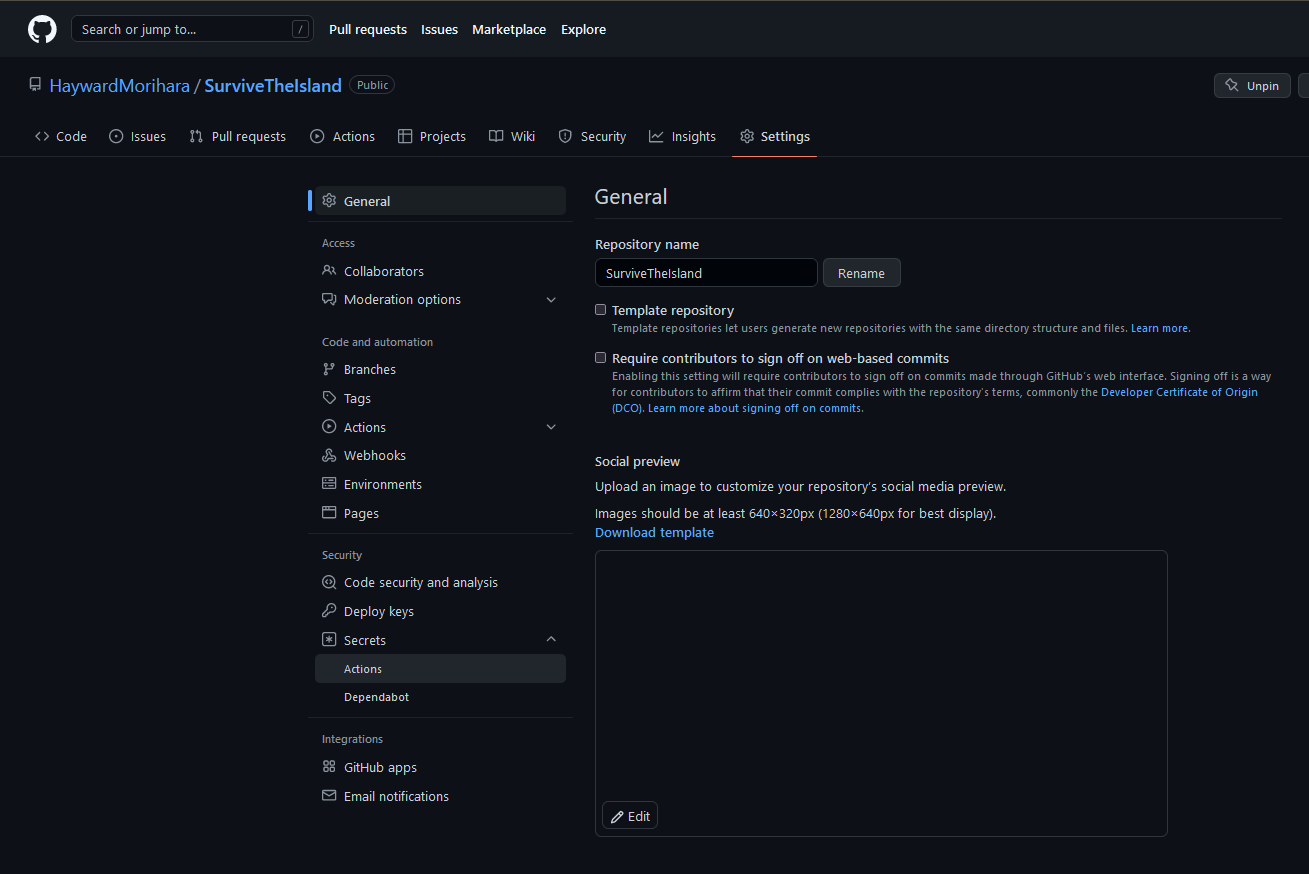
Select Secrets > Actions

Click "New repository secret"

Provide the key that you copied from Itch.io.
Add the .github/workflows/deploy.yml file to your Github repo. You can use this as a template:
name: godot-ci
on:
  push:
    branches: [ main ]
env:
  EXPORT_NAME: <<YOUR_GODOT_GAME_NAME>>
  GODOT_VERSION: <<GODOT_VERSION>>
jobs:
  export-web:
    name: Web Export
    runs-on: ubuntu-20.04
    container:
      image: barichello/godot-ci:${GODOT_VERSION}
    steps:
      - name: Checkout
        uses: actions/checkout@v2
        with:
          lfs: true
      - name: Setup
        run: |
          mkdir -v -p ~/.local/share/godot/templates
          mv /root/.local/share/godot/templates/${GODOT_VERSION}.stable ~/.local/share/godot/templates/${GODOT_VERSION}.stable
      - name: Web Build
        run: |
          mkdir -v -p build/web
          godot -v --export "HTML5" ./build/web/index.html
      - name: Upload Artifacts
        uses: actions/upload-artifact@v2
        with:
          name: web
          path: build/web
      - name: Install rsync 📚
        run: |
          apt-get update && apt-get install -y rsync
      - name: Publish to itch.io
        uses: manleydev/butler-publish-itchio-action@master
        env:
          BUTLER_CREDENTIALS: ${{ secrets.BUTLER_API_KEY }}
          CHANNEL: web
          ITCH_GAME: <<YOUR_ITCH_GAME_NAME>>
          ITCH_USER: <<YOUR_ITCH_USERNAME>>
          PACKAGE: build/web
Replacing:
<<YOUR_GODOT_GAME_NAME>> with the name of your game in Godot
<<GODOT_VERSION>> with the version of Godot that you're using
<<YOUR_ITCH_GAME_NAME>> with the name of your game in Itch
<<YOUR_ITCH_USERNAME>> with your Itch username
See Survive the Island's as a reference: https://github.com/HaywardMorihara/SurviveTheIsland/blob/main/.github/workflows/...
Note that it has a few extra configurations beyond the minimal configuration above, including a notification to post to Discord and an API key for using SilentWolf leaderboard services.
Another Helpful Tutorial: https://dev.to/jeremyckahn/automating-godot-game-releases-to-itchio-1a96
godot-ci Github Action: https://github.com/marketplace/actions/godot-ci
Source Code: https://github.com/abarichello/godot-ci
Docker Hub: https://hub.docker.com/r/barichello/godot-ci
Official Example Config: https://github.com/aBARICHELLO/godot-ci/blob/master/.github/workflows/godot-ci.y...
Butler Github Action: https://github.com/marketplace/actions/butler-push
No posts
Comments
Nothing yet. Say the first thing.
Sign in to join the conversation.