
If you've been researching how to run AI on your own machine, you've seen these three names collide in the same search results: OpenClaw, Ollama, Open Interpreter. They get compared as if you have to pick one. You mostly don't, and treating them as rivals is the fastest way to build the wrong thing.
So this is the honest map. What each tool is, what job it's good at, where it falls down, and which one you actually want for what you're trying to do. I run OpenClaw for my own setup, which I documented in the main guide, so I'll be upfront about that bias and try to be fair to the other two anyway.
OpenClaw is an autonomous agent framework. It wakes up on its own, reaches you through Telegram or Slack, calls dozens of tools, and runs tasks while you're not watching. It's the "JARVIS that texts you" tool.
Ollama is a local model runner. Its job is to download and serve open-source models on your machine with one command. It is not an agent. It's the engine other things plug into.
Open Interpreter is a local code interpreter. You talk to it in your terminal, it writes and runs code on your computer to do what you asked, with you in the loop. It's interactive, not autonomous.
Notice these aren't three answers to one question. They're answers to three different questions: how do I run an agent, how do I run a model, and how do I get an AI to run code on my machine right now.
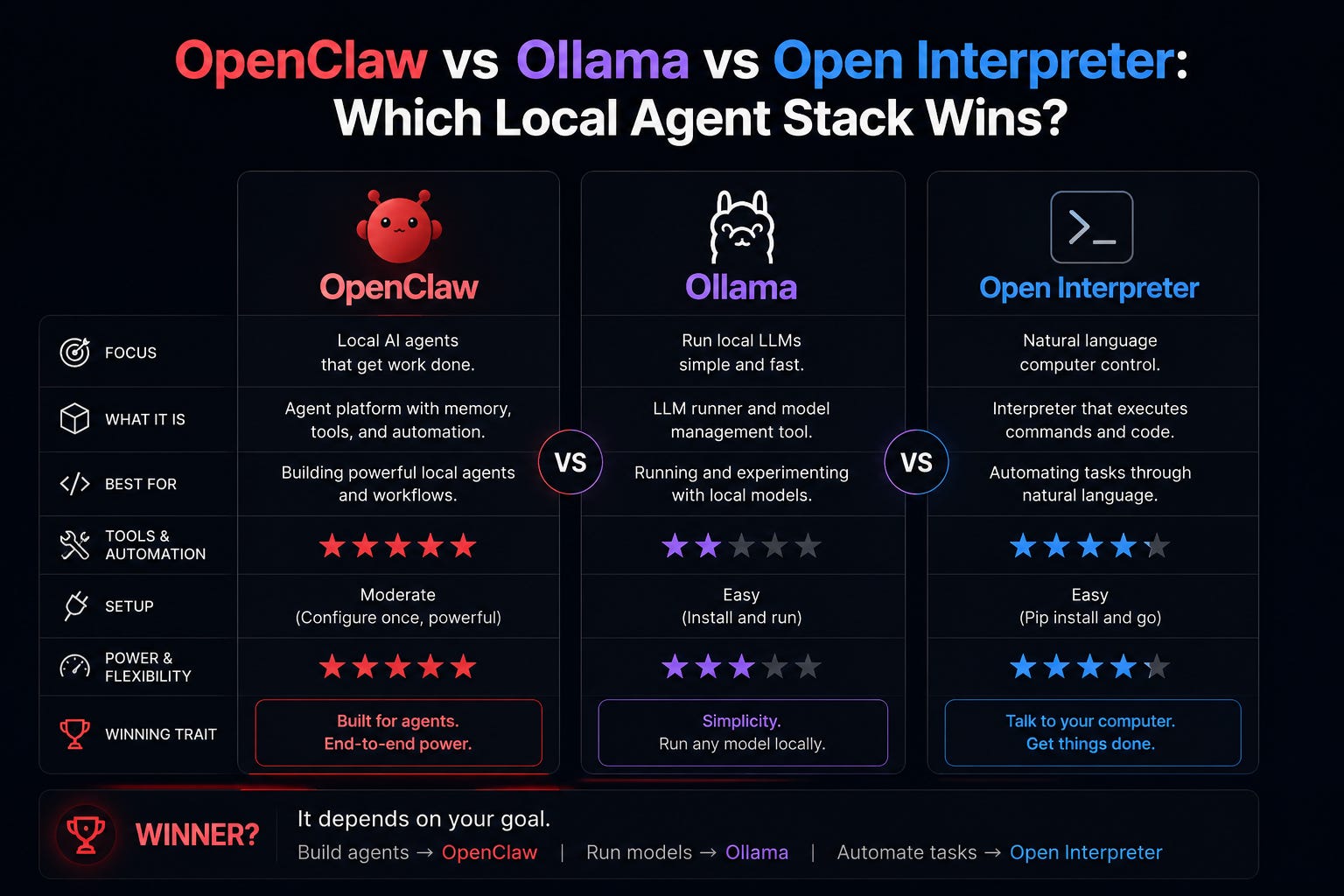
OpenClaw is the heaviest of the three and the only one that's actually an agent in the autonomous sense. Once it's set up, it runs as a background service, checks for work on a heartbeat, and reaches you on your phone.
Where it wins. Genuinely hands-off operation. You message it from anywhere, it works while you sleep, and it integrates with 50-plus tools through reliable function calling. Nothing else here does the "running on its own and texting you results" thing.
Where it costs you. It's the most involved to set up, it has real security implications because it gets real system access, and it leans on a strong model for reliable tool-calling, which usually means a paid API for serious work. The main guide and the security companion exist precisely because there's more to get right here.
Who it's for. People who want an assistant that operates autonomously, not a tool they sit and drive.
Ollama isn't competing with OpenClaw at all. It's competing with LM Studio, the local-model runner I use in my own setup.
Where it wins. Dead-simple model serving from the command line. ollama run qwen3 and you have a model answering on a local endpoint. Developers who live in the terminal love it, and it's lightweight.
Where it costs you. It's a runner, not an agent and not an interface. On its own it does nothing autonomous. It also leans command-line, which is friendlier to engineers than to everyone else.
Who it's for. Anyone who needs to serve a local model for something else to use. In fact, Ollama can be the engine underneath OpenClaw, the same role LM Studio plays in my guide. They're not either/or.
This is the key reframe: the real comparison isn't "OpenClaw vs Ollama." It's "Ollama vs LM Studio," and both can feed OpenClaw. I default to LM Studio in the main guide because it's friendlier if you're not in a terminal all day, but Ollama does the same job. The local-model tradeoffs are in Best Local Models for OpenClaw in LM Studio.
Open Interpreter is the one that's genuinely different in shape. It's interactive. You type a request in your terminal, it writes code to accomplish it, asks for your okay, and runs it on your machine right then.
Where it wins. Immediate, in-the-moment tasks where you want to watch and approve each step. "Rename these 200 files," "parse this CSV and chart it," "clean up this folder." You're present, it's fast, and the human-in-the-loop approval is reassuring.
Where it costs you. It's not autonomous and not persistent. Close the terminal and it's gone. It won't wake up at 3am, it won't text you, it won't run a heartbeat. It's a power tool you operate, not an assistant that operates.
Who it's for. People who want an AI that executes tasks on their computer while they watch, without the weight of a full agent framework.
Wrong question, but here's the useful answer by what you actually want.
You want an assistant that runs on its own and reaches your phone. OpenClaw. Nothing else here does autonomy. Start with the main guide.
You just want to run open models locally for something else to use. Ollama or LM Studio. Pick LM Studio if you prefer a GUI, Ollama if you prefer the command line. Then plug it into OpenClaw.
You want an AI to do things on your computer right now, with you watching. Open Interpreter. Lightest lift, no daemon, no security setup, no phone integration.
You want all of it. Run OpenClaw as the agent, with Ollama or LM Studio as its local model engine, and keep Open Interpreter around for hands-on terminal tasks. They genuinely complement each other.
The reason these get compared is that they all wear the "local AI" label, and search engines smash them together. But they sit at different layers. Ollama and LM Studio are the engine. OpenClaw is the autonomous driver built on top of an engine. Open Interpreter is a separate, manual vehicle for a different kind of trip.
If I had to give one piece of advice to someone starting out: don't try to choose the winner. Figure out whether you want autonomy (OpenClaw), a model engine (Ollama or LM Studio), or hands-on execution (Open Interpreter), and you'll find you often want two of them, not one instead of another.
Yes. Both serve a local model over a compatible API, and OpenClaw connects to either. My guide uses LM Studio, but the provider config for Ollama is nearly identical.
Only loosely. They overlap in "AI that runs code on your machine," but OpenClaw is autonomous and persistent while Open Interpreter is interactive and session-based. Different jobs.
Open Interpreter's human-in-the-loop approval is the most cautious by default. OpenClaw is the most powerful and therefore needs the most deliberate locking down, which I cover in OpenClaw Security: The 7-Step Lockdown Checklist. Ollama and LM Studio are just model servers, so their surface is smaller.
All three can run free on local models. The cost question is really about your primary model for real work, which is the same conversation regardless of which stack you pick.
My OpenClaw setup: How to Set Up OpenClaw with LM Studio
OpenClaw docs:
docs.openclaw.aiOllama:
ollama.comOpen Interpreter:
openinterpreter.com
If you've been paralyzed trying to pick one of these, hopefully this unstuck you. Forward it to whoever's been arguing about it in your group chat.
Comments
Nothing yet. Say the first thing.
Sign in to join the conversation.