
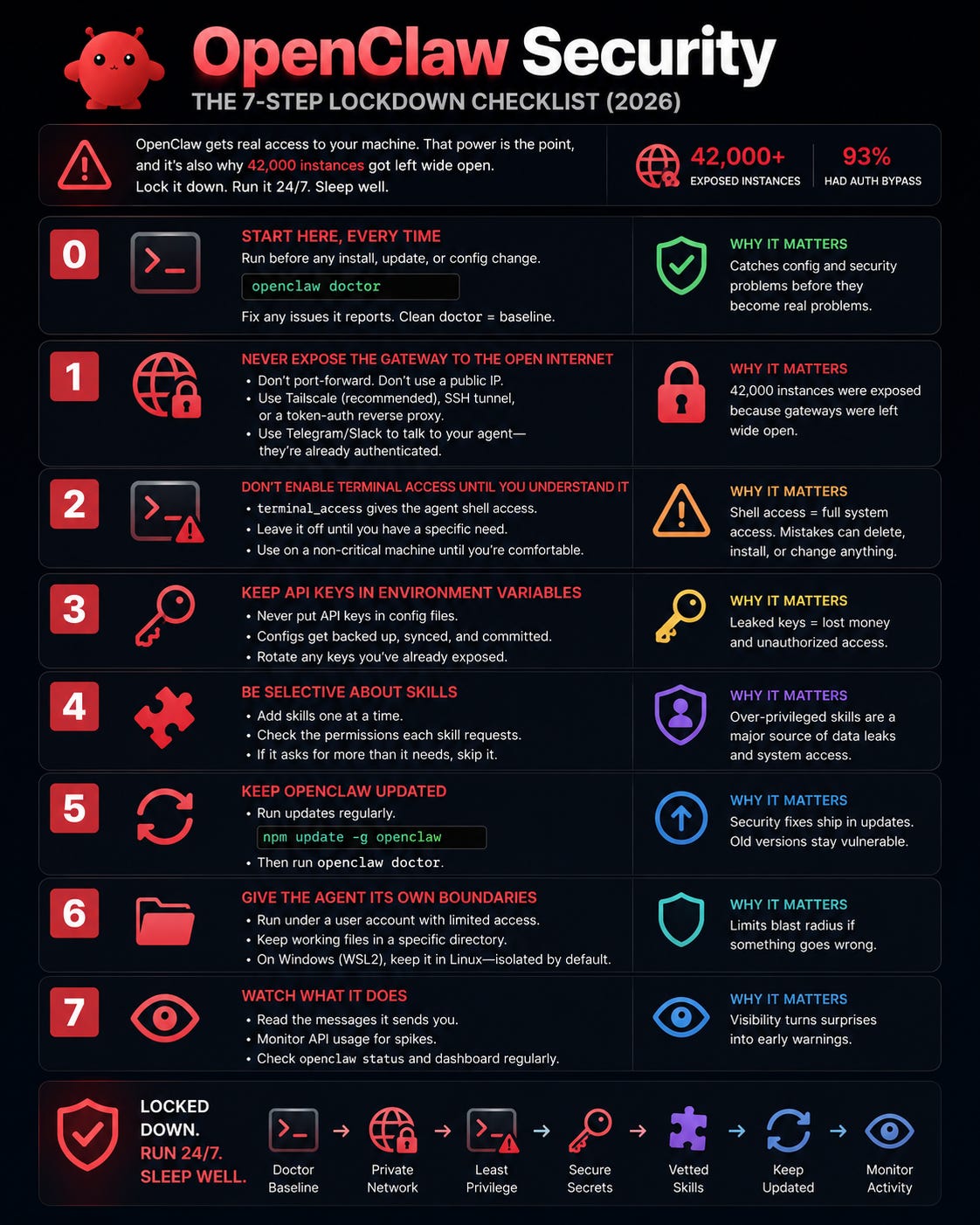
In January 2026, a security researcher found over 42,000 exposed OpenClaw instances on the public internet, and of the ones tested directly, 93% had authentication bypasses. A separate Cisco audit flagged data-leakage risks in third-party skills that ask for more permission than they need.
That's not a reason to avoid OpenClaw. It's a reason to set it up like it has the access it actually has. OpenClaw can read your files, run shell commands, browse the web, and send messages as you. The whole value is that it can act on your behalf. The whole risk is the same sentence.
The main guide covers this as Step 7. This is that step expanded into a checklist you can run top to bottom. None of it is optional if your agent is going to run 24/7.
Before anything else, run the built-in check:
openclaw doctordoctor surfaces config problems, including security ones, and it's the first thing to run after any install, update, or config change. If it flags something, fix that before moving down the list. Treat a clean doctor as the baseline, not the finish line.
This is the one that created those 42,000 incidents. If your OpenClaw gateway is reachable from the public internet without authentication, anyone who finds it can drive your agent, which means drive your machine.
Do not port-forward the gateway. Do not put it on a public IP. If you need to reach your agent remotely, and the whole point is reaching it from your phone, do it through a private network layer instead:
Tailscale (or another mesh VPN) is the easiest. Your phone and your agent's machine join a private network, and the gateway is only reachable inside it.
An SSH tunnel works if you're comfortable with it.
A reverse proxy with token auth in front of the gateway, if you need a more traditional setup.
The messaging channel itself (Telegram, Slack) is how you talk to the agent day to day, and that's already authenticated. The gateway is the admin surface, and that's what must never be naked on the internet.
OpenClaw can be given terminal_access, which lets the agent run shell commands directly. That's genuinely useful and genuinely dangerous, because shell access means the agent can delete files, install packages, and change your system.
Leave it off until you have a specific reason to turn it on and you understand the blast radius. When you do enable it, do it on a machine where a mistake is survivable, not your primary workstation with your only copy of everything.
It's tempting to paste your API keys straight into a config file. The problem is config files get backed up, synced, and sometimes committed to a git repo, and a leaked key is someone else spending your money or using your access.
Store keys in environment variables instead, and keep them out of any file that might travel. If you've already put keys in a config that lives in a repo, rotate those keys now and move them out.
This is the one the Cisco audit was about. Every skill you add expands what the agent can do, and unvetted community skills can request broad file and message permissions they don't actually need for their stated job.
Before you install a skill, ask what access it's requesting and whether that matches what it claims to do. A skill that summarizes web pages does not need write access to your whole filesystem. When something asks for more than its purpose justifies, that's the signal to skip it. Add skills deliberately, one at a time, rather than bulk-installing a pile because they looked handy.
Security fixes ship in updates, and an agent with system access running an old version is a standing risk. Update regularly:
npm update -g openclaw
openclaw doctor
Run doctor right after every update, because it applies migrations and re-checks your config. Make this a habit, not a one-time thing. The authentication-bypass problem behind those 42,000 instances is exactly the kind of thing that gets patched, and the patch only helps if you take it.
Beyond the built-in settings, think about what the agent can reach at the OS level. A few principles:
Run it under a user account that has access to what it needs and not your entire machine, where your setup allows.
Keep its working files in a defined directory rather than pointing it at your whole home folder.
If you're on Windows via WSL2, the agent lives in the Linux environment, which already gives it a natural boundary from your Windows files. Keep it that way.
The goal is that even if something goes wrong, the agent's reach is scoped to what it's supposed to touch, not everything you own.
Autonomy is the feature, but autonomy without visibility is how surprises happen. Keep an eye on your agent's activity, especially in the first weeks:
Read the messages it sends you. If it starts doing something you didn't expect, that's your early warning.
Watch your API usage dashboard. An unexpected spike can mean misconfiguration or, worse, something driving the agent that shouldn't be.
Check
openclaw statusand the dashboard periodically to confirm only the agents you created are running.
You don't need to hover. You do need enough of a habit that you'd notice if the agent's behavior changed.
openclaw doctorfirst, and after every change.Gateway never on the public internet. Use Tailscale, SSH, or a token-auth proxy.
terminal_accessstays off until you understand it.API keys in environment variables, never in synced or committed files.
Skills added one at a time, only when their permissions match their purpose.
Update regularly, run
doctorafter each update.Scope the agent's OS-level access, and watch its activity.
Yes, run through this checklist. The 42,000 exposed instances weren't unsafe because OpenClaw is unsafe. They were unsafe because they were left open. A locked-down instance on a private network is a different situation entirely.
Step 1. Keeping the gateway off the public internet prevents the exact failure that caused the headline. If you do nothing else today, do that.
Take the gateway off any public-facing path immediately, rotate every API key it had access to, run openclaw doctor, and update to the latest version. Then go through the rest of the list.
They raise the stakes, because a cloud VPS is already internet-facing. The same rules apply, with extra care on Step 1: bind the gateway to a private interface and reach it over a VPN, never expose it on the VPS's public IP.
The setup this hardens: How to Set Up OpenClaw with LM Studio
OpenClaw security docs:
docs.openclaw.ai/securityTailscale:
tailscale.com
Security is the least exciting part of running an agent and the part you'll be glad you did. If someone you know is running OpenClaw, forward this and ask if their gateway is exposed. A lot of people genuinely don't know.
Comments
Nothing yet. Say the first thing.
Sign in to join the conversation.