
After my last post on AI Incognito modes, I got several questions. Turns out, most of us (myself included) don't fully understand what "private" means when chatting with AI. So let's dive deep into what is actually happening with ChatGPT, Gemini, and Claude when you go incognito.

Let’s set the scene.
It is 9:06pm.
You are exhausted, but your brain is buzzing with that weird thing your toddler said, or the email you need to draft to the teacher that requires the diplomacy of a UN ambassador (I've been there!).
You open ChatGPT or Gemini. You feel a little exposed dumping your messy thoughts into the digital void. So, like a responsible digital citizen, you hunt for the settings and toggle on the “Temporary Chat” or turn off “Chat History.”
You go incognito.
You exhale. You are in the clear.
It’s just between me and the bot now.
Or is it?
Spoiler alert: It doesn’t mean what you think it means.
We tend to treat browser Incognito Mode like the “Vegas Rule”: what happens here, stays here. We assume that when we turn off chat history in AI tools like ChatGPT, Claude, or Gemini, our conversation effectively vaporizes the moment we close the tab.
This is not true.
Here’s what’s actually happening:
When you use standard mode, the AI companies are essentially saying: “Thanks for chatting! We are going to save this conversation to your history so you can find it later. Also, weare going to study this conversation to help train our future, smarter models.”
When you switch to “Incognito” (which OpenAI calls “Temporary Chat,” Google calls pausing “Web & App Activity,” and Anthropic handles through settings), you’re changing the deal. You’re saying: “Don’t save this to my sidebar, and please don’t use my words to train your robot.”
That is the primary function of these privacy modes: To opt out of training data.
It is not a cloak of invisibility.
Think of standard AI chat like writing in a notebook with a pen (imagine you are a 15 year old student). It stays there permanently, and the teacher (the AI company) reads through everyone’s notebooks to check on homework.
AI Incognito mode is like writing on a chalkboard. When you are done, you erase it. It doesn’t go into your permanent notebook.
But here is the kicker: The teacher was still standing in the room watching you write on the chalkboard. And if you wrote something alarming on that board, the teacher is absolutely going to document it before you erase it.
Even when you are in “Temporary Chat” or incognito mode, your data is not immediately deleted on the company’s servers.
Nearly every major AI provider (OpenAI, Google, Anthropic) has a policy that they retain “temporary” chats for a specific window (usually 30 days) before permanently deleting them.
Why? Safety and abuse monitoring.
They run automated systems over your “private” chats to scan for things like:
Self-harm indicators
Illegal activities
Violence or threats
Severe terms of service violations
Child safety concerns
If that automated system gets triggered by something you typed, your “private” chat is flagged.
And who reviews flagged chats? A real human being.
Yes. If you ask a highly sensitive medical question in a way that triggers a safety filter, it’s possible that a safety analyst at OpenAI, Google, or Anthropic will read your conversation before it’s deleted.
They aren’t reading it to gossip about you. They are reading it to ensure their tool is not being used for harm. But still. A person might read it.
This is buried in the privacy policies, but it’s there. Let me show you what each major platform actually does.
How to activate:
Quick option: Click the dashed-line bubble icon in the top-right corner. Its tooltip says “Turn on Temporary Chat” - see screenshot below.
Long-term privacy: Go to Settings > Data Controls > Turn off “Chat History & Training”
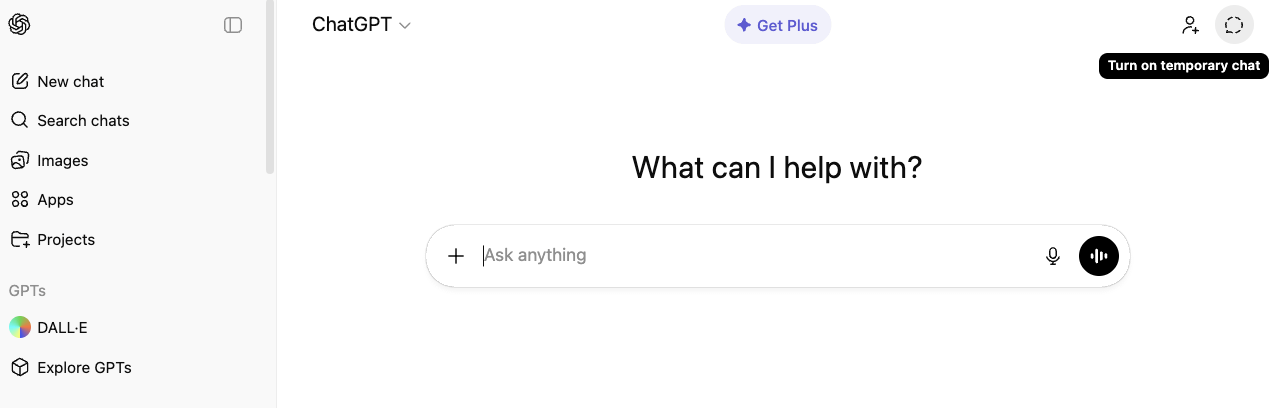
What it means:
Conversation won’t appear in your history sidebar
Won’t be used to train their models
Retained for 30 days for safety and abuse monitoring
After 30 days, permanently deleted
Can still be reviewed by humans if flagged
From their Help Center: "Temporary chats won't be used to train our models, won't appear in your history on your devices, and will be deleted from our systems within 30 days."
How to activate:
For one-off chats: Click the New Chat panel on the left side of the screen and then click on the dashed line chat bubble icon. Its tooltip says “Turn on Temporary Chat” - see screenshot below.
For long-term privacy: In the Gemini app, go to your profile icon > Gemini Apps Activity (or “Keep Activity”) > Turn off
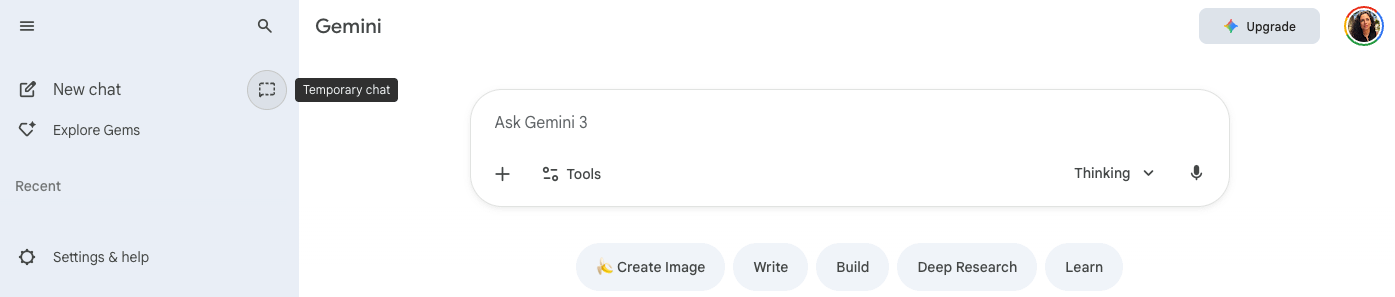
What it means:
Conversations won’t be saved to your Google Account
Won’t be used to train their models
Retained for up to 72 hours for safety and security purposes
After 72 hours, non-flagged conversations are deleted
Flagged conversations may be retained for up to 3 years (in a de-identified form, disconnected from your account)
Can still be reviewed by humans if flagged
From their Privacy Hub: "When Gemini Apps Activity is off, your Gemini conversations aren't saved to your Google Account. Google may keep these conversations for up to 72 hours to provide the service and for safety and security purposes."
How to activate:
Quick option: Click the ghost icon in the upper right corner when starting a new chat. Its tooltip says “Use Incognito” - see screenshot below.
Long-term privacy: Go to Settings > Privacy > Turn off “Help improve Claude”
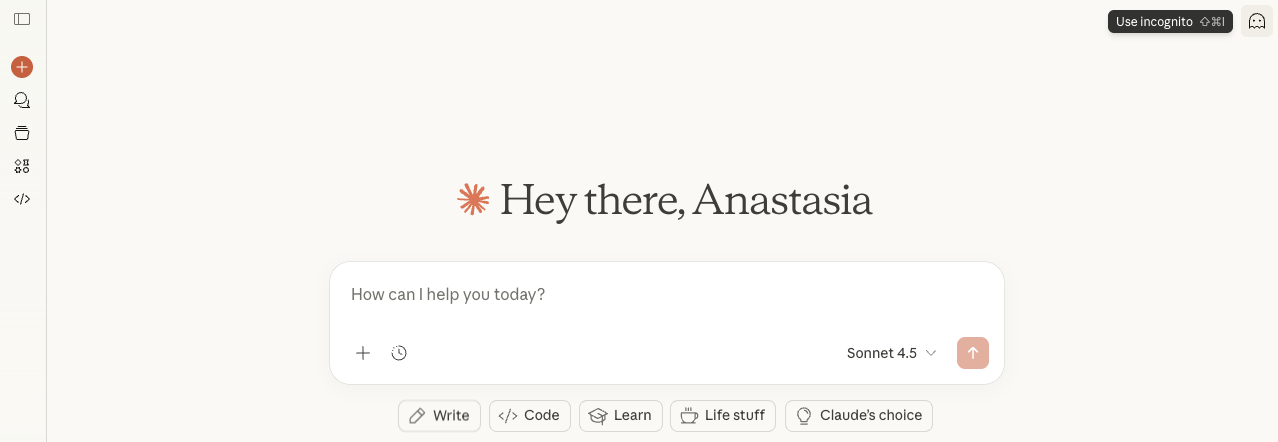
What it means:
Conversation won’t appear in your chat history
Won’t be used to train their models
Retained for at least 30 days for safety monitoring and compliance
Flagged conversations may be retained for up to 2 years for safety monitoring
Can still be reviewed by humans if flagged
From their Help Center: “Incognito chats are temporary conversations that aren’t saved to your chat history or to Claude’s memory... While incognito chats are retained according to your existing data retention policies (30 days for safety, longer if flagged), they are not saved to your chat history.”
These tools are incredibly helpful for managing life. We just need to learn to use them wisely.
The oldest rule of the internet remains the best: Never type anything into an AI, even in incognito mode, that would ruin your life if it ended up on a billboard.
If you are discussing highly sensitive legal matters, corporate secrets, protected health information, or your deepest darkest secrets, don’t use a cloud-based chatbot. 😊
Do use temporary chat when you’re just brainstorming and don’t want your main chat history cluttered with:
“Birthday party ideas for 7-year-old obsessed with axolotls”
“How do I politely tell my mother-in-law to stop giving my kids sugar before bed?”
It keeps your main workspace clean and prevents training on your personal musings.
Be extremely cautious about entering PII (Personally Identifiable Information).
Okay: “weird circular rash that isn’t itchy, what could it be?”
Not Okay: “My son, [Full Name], born [Date of Birth], has this rash on his leg...” followed by uploading a photo of his face.
AI incognito modes are useful, but they’re not magic invisibility cloaks. They primarily do two things:
Keep your conversation out of your visible history
Opt you out of model training
What they don’t do:
Make your conversation immediately disappear
Prevent human review if safety flags are triggered
Think of these tools as having a conversation in a coffee shop with a really smart person who has an excellent memory and a legal obligation to report certain things. You can have great, helpful conversations, just don’t share anything you would regret if someone at the next table overheard.
Have questions about AI privacy that I didn’t cover? Drop them in the comments and I’ll address them in my next post.
One last thing: If this was helpful, would you mind tapping the 🤍 on this post? It takes literally one second and helps other parents find this when they need it. Thank you for being here.
Until next time,
Anastasia
About the author: She is a Senior Computer Scientist based in Silicon Valley, where she uses her expertise in mathematics and artificial intelligence to help ensure the safety and reliability of critical systems (think airplanes and beyond!) She is also the parent of a curious 3-year-old daughter. Each night, she reflects on how AI is reshaping the world her daughter is growing up in. This newsletter is her space to explore those reflections on technology, the future, and what it truly means to raise children in an age of rapid and often unpredictable change.
No posts
Comments
Nothing yet. Say the first thing.
Sign in to join the conversation.