
Hi friends!
If you read the hygiene post, you may have noticed I threw around terms like “custom instructions,” “Claude.md,” “MCPs,” and “project knowledge files” like everyone knows what they mean. Some of you do. Some of you very politely ignored it and kept reading. Both are fine.
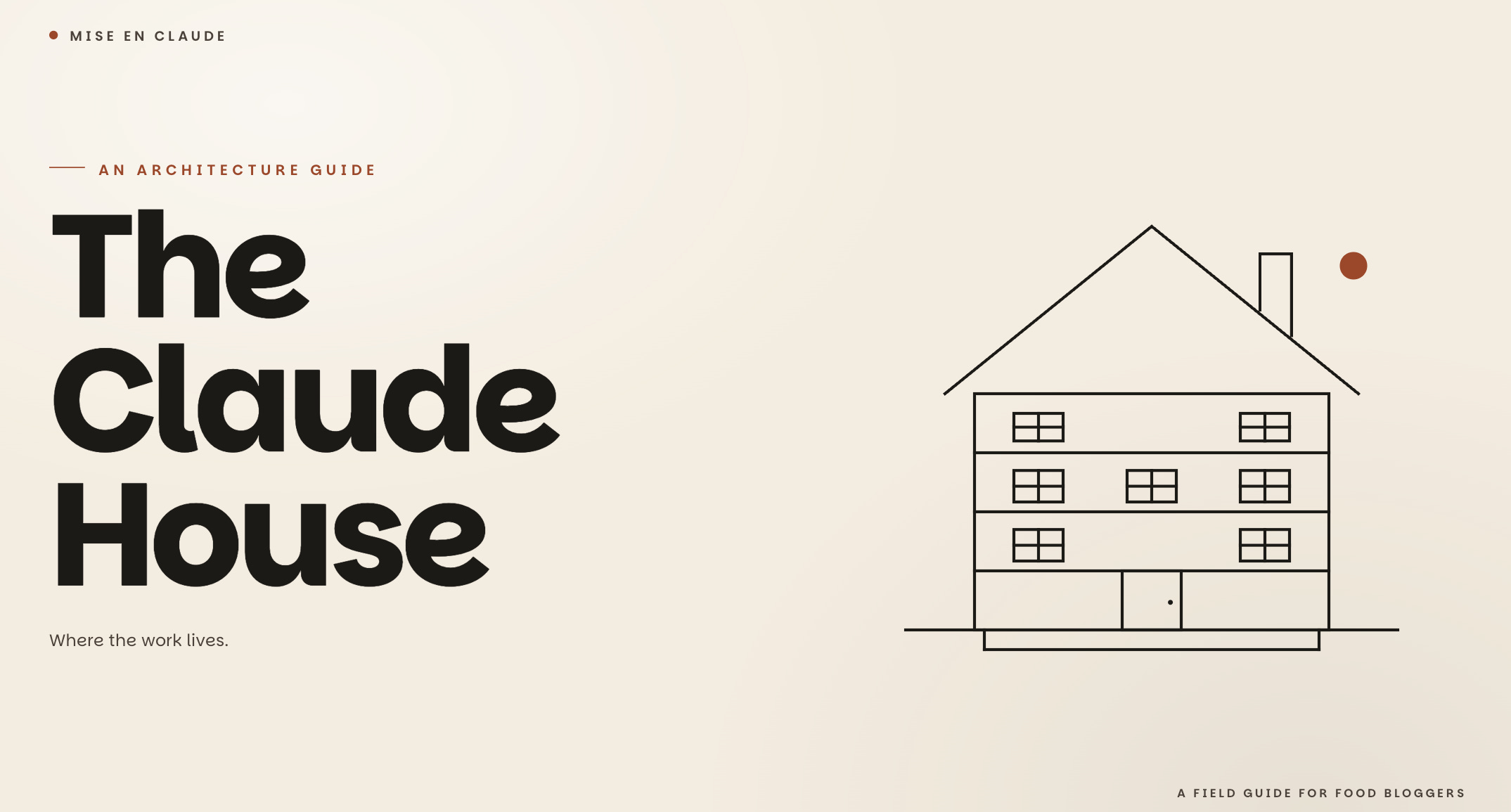
But before I keep writing posts that assume you know the layout of the Claude house, I want to walk you through it. Or at least how I tend to think about it.
If you haven’t yet, keep it open the first time you set up your own stack. If you already have your stack sorted, and have questions, leave a comment, I read all of them.
Most food bloggers I talk to are using Claude (or ChatGPT, or Gemini) primarily as a chatbot. And I hate to say it, but that’s not a stack - that’s just the front door.
Claude has several different surfaces, each built for a different kind of work, and each of those surfaces can be configured to know who you are and what you’re working on. Knowing what goes where is the difference between feeling like AI is a slightly faster typewriter and feeling like it’s doing real thinking work alongside you.
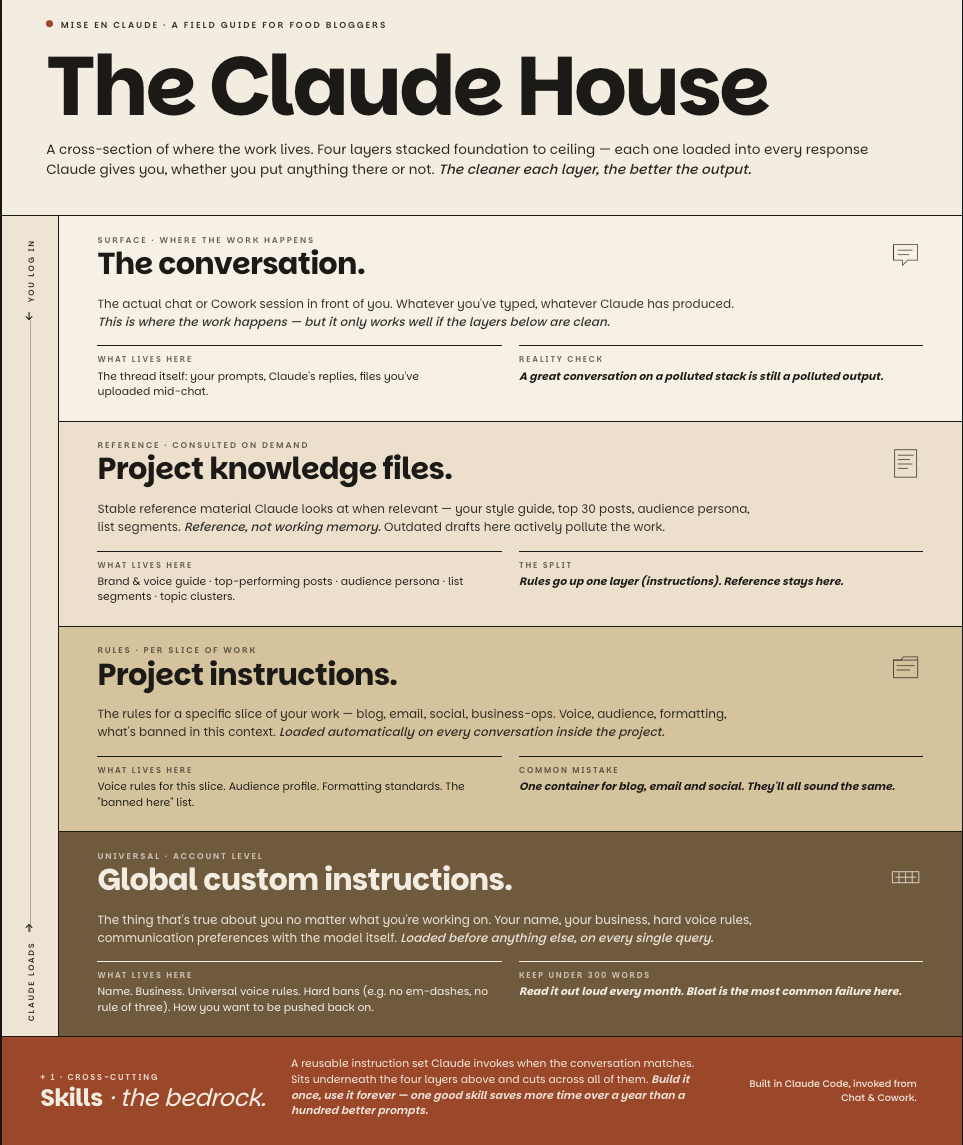
I’m going to walk through this the way you actually experience it as a user. Top down. From the moment you log in to the moment Claude generates a response. Then at the end, I’ll flip it and show you the same architecture from the bottom up, which is how Claude actually loads context. Both views are useful at different moments.
[And your global custom instructions, aka the stuff you put in at the account level]
The top of the house. You log in. Before you’ve chosen what to do or where to work, Claude already knows a few things about you, because you told it once and it remembered.
That memory lives in your global custom instructions. These are account-level. They apply to every conversation you have with Claude, no matter what surface you’re on or what project you’re in. They load before anything else.
This is the floor. The thing that’s true about you no matter what you’re working on. You want this short and sweet. This will literally run on EVERY SINGLE THING you do with Claude.
What goes here:
Your name.
Your business.
Your overall voice in one or two sentences.
The hard rules you want applied everywhere (for me, that’s “no em dashes” (though as a British-English educated soul, this deeply pained me) + “no bolding” (I’ll do that if I want to) + “no rule of three” (really hated this even before AI became a thing, sorry copywriters) + “default to markdown unless asked otherwise” (markdowns are like .txt, but AI compatible. I write everything in .md since I have a vault that I connect across LLMs).
Your communication preferences with the model itself (e.g., “push back, ask for evidence, surface tradeoffs I’d rather not see” lives here for me).
What doesn’t go here:
Anything that’s only true for a specific project. If you put “use casual conversational voice” in custom instructions because you write casually for your blog, you’re now also using that voice when you’re drafting a contract with a sponsor or asking Claude to help you write to your CPA. Welp, not great.
So ask yourself: Is this true about me regardless of what I’m doing right now? If yes, custom instructions. If no, save it for the project layer.
The most common mistake here is bloat.
People add things over months and never delete. Six months in, the model is processing 2000 words of rules on every single query, half of which contradict each other.
Keep it short. Under 300 words ideally. Read it out loud every month.
[Aka, where you actually work]
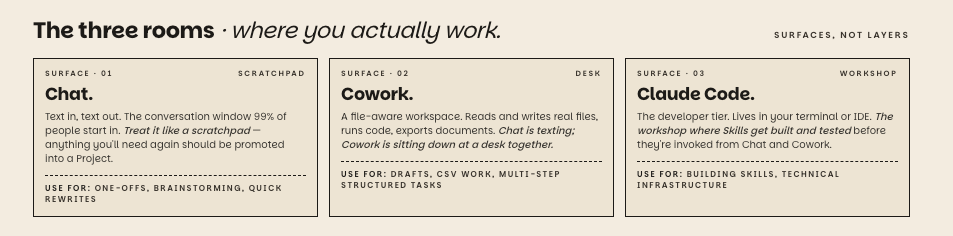
Once you’ve logged in, you choose where to work. These are the surfaces. Chat, Cowork, and Claude Code. They’re different products with different capabilities, not deeper versions of each other.
Quick orientation before I go into each:
Chat is the conversation window you probably already use. It’s text in, text out. Works on desktop, web, mobile.
Cowork is the longer-running, file-aware workspace. It can read and write actual files, run code, generate documents.
Claude Code is the developer-tier surface. Lives in your terminal. Most food bloggers won’t use it directly.
Now into each one.
The default. You type, Claude responds. 99% of people start here, and a lot of them never leave.
What it’s for:
Everything one-off, exploratory, or you’ll never need again. A quick question. A fast rewrite.
Brainstorming when you don’t even know what you’re brainstorming about yet.
Asking Claude to explain something you don’t understand.
Anything you want to access on your phone or across devices.
I treat chat like the scratchpad. If a conversation produces something I want to use again, it shouldn’t live in chat. It should be moved into a Project (more on that in a minute).
Why move up from a one-off chat? Because every new chat starts from zero. The model doesn’t know your voice. It doesn’t have your reference files. It doesn’t carry over what you established last time. You’re paying the setup cost on every single query.
Some people try to solve this by pasting their voice rules into the chat itself every time, which works in a clunky way and also burns tokens. Better to set up a Project.
One-off chat use cases are perfect for “give me 10 synonyms for crispy” or “explain what a Maillard reaction is and why it matters for tofu.” You wouldn’t set up a whole project for those. They’re chat.
Cowork is Claude’s longer-running, file-aware workspace. It can read and write actual files, run code, generate documents. The conversations are more structured and the work is more substantive.
What it’s for:
Work that has multiple steps, produces files, or needs real document handling.
Writing a full blog post draft and exporting it to markdown.
Drafting an entire email sequence and getting it back as a structured file.
Generating a CSV of Pinterest pin variations.
Analyzing a spreadsheet of your traffic data and producing a chart.
Why not just do this in Chat? Because a Chat conversation, even inside a Project, doesn’t produce a file you can download, edit, and re-upload. It can give you text on screen that you copy-paste, but it’s not a file-aware workspace. Cowork is.
The mental model that helps me:
Chat is texting.
Cowork is sitting down at a desk together with documents and a laptop between you.
I use Cowork for things like “take this CSV of my last 50 posts and tell me which clusters are underrepresented, then output a content calendar as a new CSV.”
That’s a real piece of file-aware work. It would be miserable to do in a chat window. Trust me, I’ve tried (lol).
One thing worth flagging: Cowork has its own workspace setup, separate from your Chat Projects. So if you want your blog voice rules and reference files available in Cowork, you'll set those up inside Cowork itself. Same concept (configuration container with instructions and reference files), separate setup.
Cowork is also device-specific, which sucks if you have a work laptop and a home laptop. There’s no real solution (yet) but you could have the project files for both call on a Google Drive (vs. from your laptop) and use that to set up twin projects in both.
Yes, this is a little annoying. No, I don’t love it. But it’s how things work today.
Claude Code is the developer-tier surface. It lives in your terminal or your IDE (the program developers use to write code). It can read your filesystem, run scripts, edit code files, and build skills.
Most food bloggers won’t use Claude Code directly, and that’s fine.
I include it because it’s where my skills get built and tested. Once a skill is built in Code, it can be invoked from Chat and Cowork, which is where the actual work happens.
Why bother knowing about it at all? Because once you have a few well-built skills, the leverage compounds dramatically. And you’ll likely want to either learn enough to build them yourself, or work with someone who can. Either way, you should know the layer exists.
I don’t use Claude Code for content work. I use it to write and test the skills that then run inside my Chat Projects and Cowork sessions. It’s the workshop where my tools get built. The kitchen is where I actually cook.
[Projects in Chat and Cowork]
This is the layer that takes the most getting used to, because these aren’t surfaces, they’re configuration containers that live inside surfaces.
Both Chat and Cowork let you set up a container that holds project-specific instructions and reference files. Functionally, they do the same thing: they hold the rules and reference material for a specific slice of your work, so every new conversation inside that container starts with all of that context already loaded.
THE ANNOYING PART IS THAT THEY ARE NOT CONNECTED.
A Project you set up in Chat doesn’t automatically exist in Cowork, and vice versa. If you want your blog voice rules and reference files available on both surfaces, you’ll set them up twice. I’ve made peace with this. You will too.
For the rest of this section, I’ll talk about the Chat version because that’s where most food bloggers start. The same logic applies to Cowork workspaces. Just know you’re configuring two things, not one.
A Project is a container that holds project-specific instructions, reference files, and an ongoing set of conversations. Every conversation inside the project automatically inherits the configuration.
This is where the leverage starts. Once you’ve set up a Project with project instructions and a few reference documents, every new conversation inside it starts with all of that context already loaded. You stop re-explaining who you are.
Why not just create one giant project for everything?
Because voices bleed across! Your business-ops voice is not your blog voice. Your email voice is not your social voice. If you put them all in one project, the model averages them and you get something that sounds like none of them. Separate projects keep separate voices clean.
And listen, I’m not saying that you sound totally different on your blog than your social media, but what works on social media is going to be different than what works on your email (it definitely does for me, for instance, because my email skews a good decade older than my social media audience, at the very least, so no Gen Z puns there). Anything relevant to all of them should live in your global custom instructions.
I run several projects but here’s four that might be of interest: blog, email, social, business-ops. Each has its own project instructions tuned for the work that happens there. The blog project knows about EEAT and recipe structure. The email project knows about my list segments and broadcast cadence. The social project knows about Instagram caption length and Reels hook formulas. The work doesn’t bleed across, and that matters more than people realize.
A Project has two main configuration pieces. Both of them load whenever you open a conversation inside that Project.
If you create a Project inside Chat, there’s an instructions field you fill in. That’s your project instructions. If you’re working in Cowork, the same set of rules typically lives as a file called Claude.md. Same job, different names depending on where you are.
What goes here:
The voice rules specific to that project (my blog project bans wellness language and vegetarian cheerleading, but my business-ops and Work Life Myth projects don’t care about either of those).
The audience profile for that work.
Formatting standards.
The “what’s banned in this context” list.
Anything that’s true here but not everywhere.
Why this matters: Without project instructions, every conversation inside a project starts from the same blank state your global custom instructions left it in. With project instructions, the project knows the specific context the moment you open a new conversation. You don’t have to re-explain the brand, the audience, the voice, the formatting rules. They’re already loaded.
My blog project instructions run about 800 words. They cover my food writing voice, EEAT principles, the explicit list of banned patterns from my humanizer skill, recipe structure standards, and how I handle cultural authority on regional cuisines.
My email project instructions are about 400 words and completely different. Email voice is more conversational than blog voice, sentences are shorter, openings drop you into a specific moment.
Same business, two different sets of rules, two different sets of project instructions.
The question to ask: Is this true about a specific slice of my work? Then this is where it goes.
These are documents you upload into a project for Claude to consult when relevant. They’re different from project instructions in an important way:
Project instructions are rules (how to behave).
Knowledge files are reference material (what to look at when behaving).
What goes here:
Stable, reusable reference documents.
A list of your top 30 highest-traffic / revenue posts.
Your brand style guide.
Your brand positioning and audience profiling (I did a lot of audience persona and branding work in the last three months, so all of that lives here - who my “people” are, what their product ladder is, what my brand positioning is, etc.).
A spreadsheet of your email list segments.
Examples of your best work.
A reference list of recipe categories or topic clusters.
What doesn’t go here:
Drafts in progress.
Working documents you’ll edit constantly.
Outdated information. Anything that’s about to change. Knowledge files should be reference material, not working memory.
Why split this from project instructions? Two reasons.
First, project instructions are processed on every query inside the project, but knowledge files are consulted only when relevant. So big reference docs go in knowledge files (cheap), and rules go in project instructions (every query).
Second, it forces a useful distinction: am I telling Claude how to behave or what to know? Mixing them up makes both worse.
The question to ask: Is this a stable reference I want Claude to consult, or a rule I want it to follow? Reference goes in knowledge files. Rules go in project instructions.
The top of the stack. The actual conversation you’re having right now. Whatever you’ve typed, whatever Claude has produced, all of it sits on top of everything below and informs the next response.
This is where the work happens. But it only works well if the layers below it are clean.
So, that’s the whole house, walked through the way you experience it. From the top down, you have: your account, your surface choice, your project (if you’re using one), and your conversation.
But Claude actually loads it from the bottom up. When you ask it something, here’s what gets considered, foundation to ceiling:
THE RESPONSE
    ↑ shaped by
CONVERSATION CONTEXT (this chat or Cowork session)
    ↑ on top of
PROJECT KNOWLEDGE FILES (consulted when relevant)
    ↑ on top of
PROJECT INSTRUCTIONS (if you're in a Project)
    ↑ on top of
GLOBAL CUSTOM INSTRUCTIONS (account-level, universal)
Everything below the surface is invisible to you in any given moment, but it’s all shaping what comes back. The cleaner each layer is, the better the output. The bloated each layer is, the worse and slower the output. (See the hygiene post.)
[A workflow layer that cuts across everything]
Skills don’t fit cleanly as either a configuration layer or a surface. They’re their own thing, and they’re the most under-discussed layer of the whole stack.
A skill is a reusable instruction set Claude can invoke on demand. Think of it as a saved workflow that knows how to do one specific job, from start to finish, the way you want it done.
Skills live as files (the SKILL.md format) and get invoked when the conversation matches what the skill is built for.
You build it once. You use it forever.
What lives as a skill:
Any task you do more than three times in a similar shape. The shape matters. “Write me an intro for this recipe” is too vague to be a skill. “Write me an intro for an Urban Farmie recipe, following our voice rules, with no em dashes and no rule of three, using one of our four hook structures, ending with a transition to the recipe card” is a skill.
Why build a skill instead of just writing a better prompt?
Because a prompt is something you write fresh every time. A skill is something you build once and that gets triggered automatically when the work matches. If you’re writing recipe intros 4 times a week, a skill saves you from re-prompting 200+ times a year. Multiply that across every recurring task and the math gets serious fast.
This is the highest-leverage layer of the stack, and building one good skill saves you more time over a year than 100 better prompts.
A few skills I think any food blogger could benefit from building: recipe FAQ generator, Pinterest description generator, alt text writer, voice audit on draft posts, headline tester. Each one is a task most food bloggers do constantly and prompt fresh every time. Each one is a candidate for a skill.
When you’re about to start a piece of work in Claude, ask yourself, in order:
Is this a one-off question or quick task with no specific context needed? Use Chat (no project).
Will this benefit from knowing my voice, audience, or context? Use Chat inside a Project (and make sure that project has its instructions and reference files set up).
Does this involve creating or editing actual files, or running multi-step structured work? Use Cowork (with its own workspace set up for the relevant slice of your work).
Is this a task I’ll do this exact way again and again? Build a skill.
Am I working on the technical infrastructure of my AI setup itself? Claude Code.
Most food bloggers could be operating across Chat and Cowork actively, with Projects set up for the work that benefits from context, building skills for their most repeated tasks, and either learning enough Claude Code to support that or partnering with someone who can.
Let me make this less abstract by walking through how mine is actually structured. Names changed for things I keep private, but the architecture is real.
My global custom instructions hold a short paragraph: my name, what I do, my hard voice rules (no em dashes, no bolding, no rule of three, no negative parallelism), and a line about defaulting to markdown unless asked otherwise. Under 250 words.
My blog project instructions contain my food writing voice rules, EEAT principles, recipe structure standards, and an explicit list of what’s banned. Knowledge files in that project include a list of my top 30 posts as voice references, my topic clusters, and my published voice guide. I have an equivalent setup in Cowork for when I’m drafting full posts there.
My email project has its own instructions with email-specific voice rules that differ from the blog (more conversational, shorter sentences, openings that drop you into a specific moment). Knowledge files include my list segments, my last 10 broadcast performances, and my welcome sequence.
The social project’s instructions are mostly about platform-specific formats (Instagram caption length, Reels hook formulas). Knowledge files include my Reels idea log and best-performing past captions.
The business and ops project’s instructions cover how I want to be talked to about business decisions (push back, ask for evidence, surface tradeoffs I’d rather not see). Knowledge files include my quarterly goals, my P&L structure, and my contractor list.
Skills sit underneath all of it. Several, kept private. Each one handles a specific repeated workflow that touches more than one project.
Claude Code is the workshop where I build and test those skills before deploying them into projects.
Global custom instructions doing the universal work, project instructions doing the project-specific work, knowledge files doing the reference work, skills doing the repeated-workflow work, and Claude Code as the workshop where the skills get built. Chat and Cowork are the surfaces where I actually do the work.
If you’re starting from a single chat window, here’s the build order I’d recommend (and the build order I wish someone had given me when I started).
Spend one focused hour writing your global custom instructions. Keep it under 300 words. Only put in what’s true about you globally. Resist the urge to dump in project-specific rules. Those come next.
Create one Project for the part of your work you do most often. For most food bloggers, that’s blog content. Write its project instructions. Upload one or two of your best, most representative past posts as knowledge files. Don’t overthink it. You can iterate.
Use that Project for everything in that domain for two weeks. Notice what works. Notice what’s missing. Update the project instructions as you go.
Then create the second Project. Then the third. When you start needing file-aware work, set up the equivalent workspace in Cowork (and yes, you’ll redo the instructions there, see Level 3 for the rant). Build your first skill only after you have a clear sense of which task you’d build it for and you’ve prompted that task at least a dozen times.
The build is iterative. You don’t need to set up everything in one weekend. You need to set up one thing this week, use it deliberately, and improve it before adding the next.
If you haven’t done the hygiene audit yet, that’s the post to read first. There’s no point setting up a clean stack on top of accumulated cruft.
If you have questions about any of the layers above, drop them in the comments. I read all of them and the questions often shape the next post.
P.S., Huge thanks to my husband, who is far too early an adopter of all the things AI even for my own liking, for helping me patiently as I kept harassing him about the most random things. How our relationship looks like these days:
No posts
Comments
Nothing yet. Say the first thing.
Sign in to join the conversation.