Introduction
Collections are fundamental in C# for storing and managing groups of objects. Choosing the right collection type impacts your application's performance, memory usage, and maintainability. This guide covers all essential C# collections with clear examples, performance metrics, and practical use cases.
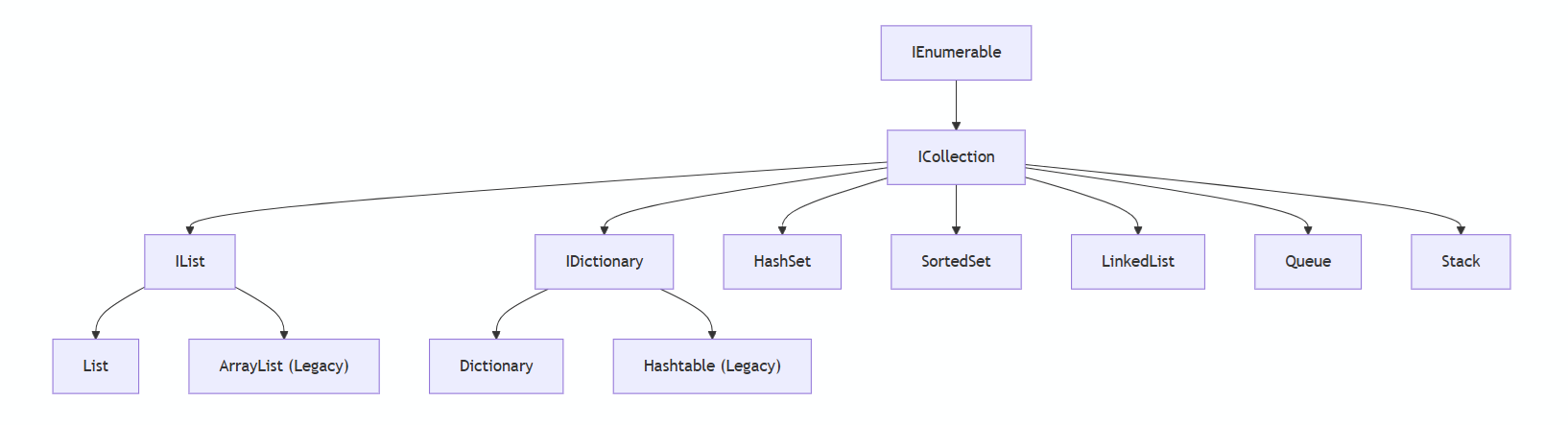
C# Collections Hierarchy
Here is the hierarchy of the most important collections in C#:
1. List<T> – The Dynamic Array
A resizable array that automatically expands as needed.
When to Use
✅ Storing and accessing elements by index
✅ Frequent additions/removals at the end
✅ Sorting and searching
Code Example
List<string> fruits = new List<string>();

// Adding items
fruits.Add("Apple");
fruits.Add("Banana");

// Access by index
string firstFruit = fruits[0]; // "Apple"

// Iteration
foreach (var fruit in fruits)
{
    Console.WriteLine(fruit);
}

// Remove
fruits.Remove("Banana");
Performance
| Operation | Complexity | Reason for Complexity |
|---|---|---|
| Index Access | O(1) | Direct array lookup by index. |
| Search | O(n) | Linear scan required for unsorted data. |
| Insert/Remove (End) | O(1)* | Amortized constant time (may resize backing array). |
| Insert/Remove (Middle) | O(n) | Requires shifting elements. |
2. Dictionary<TKey, TValue> – Fast Key-Value Lookups
A hash table that stores key-value pairs with O(1) lookups.
When to Use
✅ Fast lookups by unique keys
✅ No duplicate keys allowed
✅ Caching scenarios
Code Example
Dictionary<int, string> employees = new Dictionary<int, string>();

// Adding entries
employees.Add(101, "Alice");
employees.Add(102, "Bob");

// Lookup by key
if (employees.TryGetValue(101, out string employee))
{
    Console.WriteLine($"Found: {employee}"); // "Alice"
}

// Remove
employees.Remove(102);
Performance
| Operation | Complexity | Reason for Complexity |
|---|---|---|
| Key Lookup | O(1) | Hash-based bucket access. |
| Insert/Delete | O(1)* | Hashing + amortized resize cost. |
| Memory Usage | High | Stores buckets + entries + collision chains. |
3. HashSet<T> – Unique Item Storage
A collection that enforces uniqueness with O(1) membership tests.
When to Use
✅ Ensuring no duplicates
✅ Fast Contains() checks
✅ Set operations (Union, Intersect)
Code Example
HashSet<string> tags = new HashSet<string>(StringComparer.OrdinalIgnoreCase);

// Adding (duplicates auto-ignored)
tags.Add("C#");
tags.Add("c#"); // Not added

// Check existence
if (tags.Contains("C#"))
{
    Console.WriteLine("C# tag exists!");
}

// Set operations
var otherTags = new HashSet<string> { "Java", "C#" };
tags.IntersectWith(otherTags); // Now only "C#"
Performance
| Operation | Complexity | Reason for Complexity |
|---|---|---|
| Add | O(1) | Hash-based insertion. |
| Contains | O(1) | Direct bucket check. |
| Remove | O(1) | Hash-based deletion. |
4. Queue<T> – First-In-First-Out (FIFO)
Processes items in the order they were added.
When to Use
✅ Task scheduling
✅ Message processing
✅ Breadth-first algorithms
Code Example
Queue<string> tasks = new Queue<string>();

// Enqueue
tasks.Enqueue("Process order");
tasks.Enqueue("Send email");

// Dequeue (process in order)
while (tasks.Count > 0)
{
    string currentTask = tasks.Dequeue();
    Console.WriteLine($"Processing: {currentTask}");
}
Performance
| Operation | Complexity | Reason for Complexity |
|---|---|---|
| Enqueue | O(1) | Fixed tail pointer update. |
| Dequeue | O(1) | Fixed head pointer update. |
5. Stack<T> – Last-In-First-Out (LIFO)
Processes the most recent item first.
When to Use
✅ Undo/redo functionality
✅ Depth-first algorithms
✅ Expression evaluation
Code Example
Stack<string> history = new Stack<string>();

// Push
history.Push("Homepage");
history.Push("Products");

// Pop (go back)
string lastPage = history.Pop(); // "Products"
Performance
| Operation | Complexity | Reason for Complexity |
|---|---|---|
| Push | O(1) | Single top pointer update. |
| Pop | O(1) | Single top pointer update. |
6. LinkedList<T> – Efficient Node Operations
A chain of nodes where each item points to the next and previous.
When to Use
✅ Frequent insertions/removals in the middle
✅ Implementing custom collections
Code Example
LinkedList<string> playlist = new LinkedList<string>();

// Adding songs
var first = playlist.AddFirst("Bohemian Rhapsody");
var last = playlist.AddLast("Sweet Child O'Mine");
playlist.AddAfter(first, "Hotel California");

// Traverse
var currentNode = playlist.First;
while (currentNode != null)
{
    Console.WriteLine(currentNode.Value);
    currentNode = currentNode.Next;
}
Performance
| Operation | Complexity | Reason for Complexity |
|---|---|---|
| Insert/Remove Node | O(1) | Only node pointer updates needed. |
| Index Access | O(n) | Requires traversal from head/tail. |
7. SortedSet<T> – Auto-Sorted Unique Elements
A self-balancing binary search tree that maintains sorted order.
When to Use
✅ Maintaining sorted unique elements
✅ Range queries
Code Example
SortedSet<int> scores = new SortedSet<int>();

// Add (auto-sorts)
scores.Add(85);
scores.Add(90);
scores.Add(75);

// Get range (80-100)
foreach (var score in scores.GetViewBetween(80, 100))
{
    Console.WriteLine($"High score: {score}");
}
Performance
| Operation | Complexity | Reason for Complexity |
|---|---|---|
| Add/Remove | O(log n) | Red-Black Tree rebalancing. |
| Contains | O(log n) | Binary tree traversal. |
Collection Comparison Table
| Collection | Index Access | Search | Insert/Remove | Best For |
|---|---|---|---|---|
List<T> | O(1) | O(n) | End: O(1), Middle: O(n) | General-purpose storage |
DictionaryTKey,TValue> | N/A | O(1) | O(1) | Key-value lookups |
HashSet<T> | N/A | O(1) | O(1) | Unique items |
Queue<T> | N/A | N/A | O(1) | FIFO processing |
Stack<T> | N/A | N/A | O(1) | LIFO processing |
LinkedList<T> | O(n) | O(n) | O(1) at node | Frequent middle changes |
SortedSet<T> | N/A | O(log n) | O(log n) | Sorted unique items |
Conclusion
Selecting the optimal collection depends on your specific needs:
- For Indexed Access: Use
List<T>when you need fast positional access - For Key-Value Pairs:
Dictionary<TKey,TValue>provides O(1) lookups - For Unique Items:
HashSet<T>ensures uniqueness with fast membership checks - For Ordered Processing:
- FIFO →
Queue<T> - LIFO →
Stack<T> - Sorted →
SortedSet<T>
- FIFO →
Key Recommendations:
- Start with
List<T>orDictionary<TKey,TValue>for most scenarios - Use specialized collections only when their unique features are needed
- Always consider your most frequent operations (searching, inserting, accessing)
- Prefer generic collections over legacy non-generic versions
Remember to profile performance with realistic data before optimizing. The right collection choice can significantly impact your application's efficiency and maintainability.
Comments
Nothing yet. Say the first thing.
Sign in to join the conversation.