
Note: This post is part of my July 2025 series on building a human‑centred AI assistant. Since then, our focus has evolved from a single chatbot to designing full AI systems and automations. For the latest on what we built and why we pivoted, read my new piece, “From Chatbot to System: Reflections on My AI Journey.”
In Part 1, I outlined the vision behind building a custom AI assistant for UnifiedLabs.ai — not just a chatbot, but a helpful, brand-aligned guide built from real-world business context.
Today, I want to walk you through the early foundation we’re laying — the minimal viable version of that assistant.
Here’s the high-level plan I’m working through. We're going lean on purpose — fast, modular, and smart.

We mapped out core intents that users might have when visiting UnifiedLabs.ai — things like “What do you do?”, “How much is the audit?”, “Can I schedule a call?”, etc.
These form the logical backbone of the assistant — each one has trigger phrases and a response designed to reflect our tone and positioning.
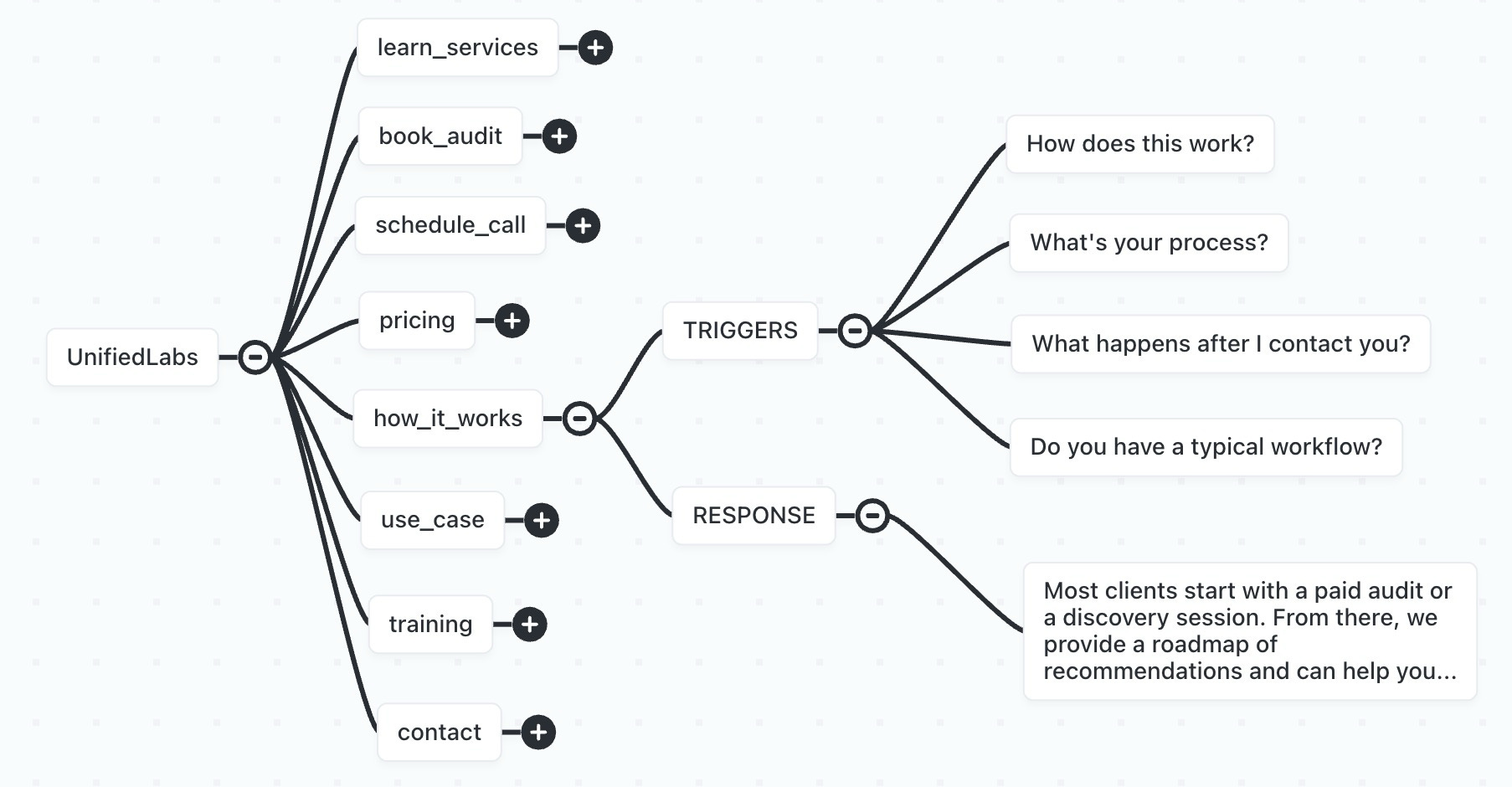
To start with, following a minimal approach, I’ve kept this pretty simple. Some common questions to start with and just one layer (we’ll add follow ups or other conditions and depth later).
If you’re not familiar with how this works, the AI doesn’t rely on users typing these exact questions word-for-word. Instead, it uses these sample questions and responses as general reference points. When someone types in a variation — even if it’s phrased differently — the AI will recognize the underlying intent and adapt its reply accordingly. It draws from this foundation, along with other inputs and contextual knowledge, to generate a helpful and relevant response.
We’re creating a CompanyFacts table in Airtable to serve as the assistant’s structured memory — things like years in business, team size, onboarding process, tools we use, and more.
This allows the assistant to answer real, business-specific questions (e.g., “How long have you been doing this?”) with confidence and consistency.
We’ll craft the system prompt that shapes how the assistant “speaks.” This is where we’ll inject:
Our tone: clear, strategic, human
Boundaries: avoid overpromising, stay helpful
Context: reference our audit, UX philosophy, and team training approach
Once the pieces are in place, we’ll build a lightweight Node.js app in Replit that:
Accepts user input
Sends it to OpenAI (with our system prompt and context)
Routes the input based on intent
Returns a friendly, helpful response
Later, we’ll layer on n8n for automation workflows, Airtable lookups, live routing, and embed the assistant on the UnifiedLabs.ai site. And... who knows, maybe we’ll put some lipstick on it and make it look amazing. 🤩
Rather than getting stuck building a “perfect” AI system, I’m focused on getting a smart version of the assistant live — fast.
We’ll test it, improve it, and let real interactions shape where it goes next.
This mirrors how I might guide a client: start with the top 5–7 things people ask or need help with. Get the tone right. Then evolve the system with data, not guesswork.
This won’t just be a chatbot.
This will be:
A knowledge layer for my business (which I’ll likely replicate on our other websites — unifiedlabs.ai, unifiedplugins.com, unifiedwebdesign.com, and even mattlevenhagen.com — maybe even tying them together in various ways)
A showcase of our own consulting/AI capabilities
A reusable pattern I can offer clients: custom AI assistant design + buildout
A living, breathing asset that evolves with UnifiedLabs.ai
For now, we’ll use Replit as the development environment, likely starting with Node.js. Once the assistant is functional, there are a few ways we could integrate it into the site — from a simple embed (like an iframe) to a fully custom front-end that calls our chatbot logic via API. The goal is to stay flexible while we validate how people interact with it.
In the next post, I’ll break down the Airtable schema and how we’re using it to store "CompanyFacts" that the assistant can reference in real time.
From there, we’ll start building the actual Replit bot and testing it against live prompts.
If you’re building anything similar — or want to — feel free to reach out or leave a comment. I’d love to hear what you’re exploring.
~Matt “The Builder” Levenhagen
=
No posts
Comments
Nothing yet. Say the first thing.
Sign in to join the conversation.