
Your to-do list is a time sink and burden for you and your team.
The hardest part of productivity isn’t doing the work—it’s deciding what to do next when tasks are scattered across 5 apps. What if your task list organized, prioritized, and updated itself all the time?
Hello there, my name is Mark, founder of Mindify AI where we help SMB in the U.S and Taiwan to set-up their on-premise AI solutions from end to end. Meanwhile, I am a student at the University of London studying the program remotely with serval research projects going on. You will, for sure, ask how do I managed my time or in other words, how do I manage my to-dos?
The simple answer is: I don’t
The system I built around Notion, ChatGPT and other connectors make this possible with ease. And here is the how.
Traditional task lists break down because they treat tasks as isolated text snippets without context. A line item like “Reply to client email” lacks:
The actual email thread and attachment
Relative urgency against an upcoming University research deadline
Historical background or previous agreements
And more and more and more….
Instead of copying tasks into a static checklist, I created an environment where tasks arrive pre-packaged with their full context and get auto-triaged by an agent.
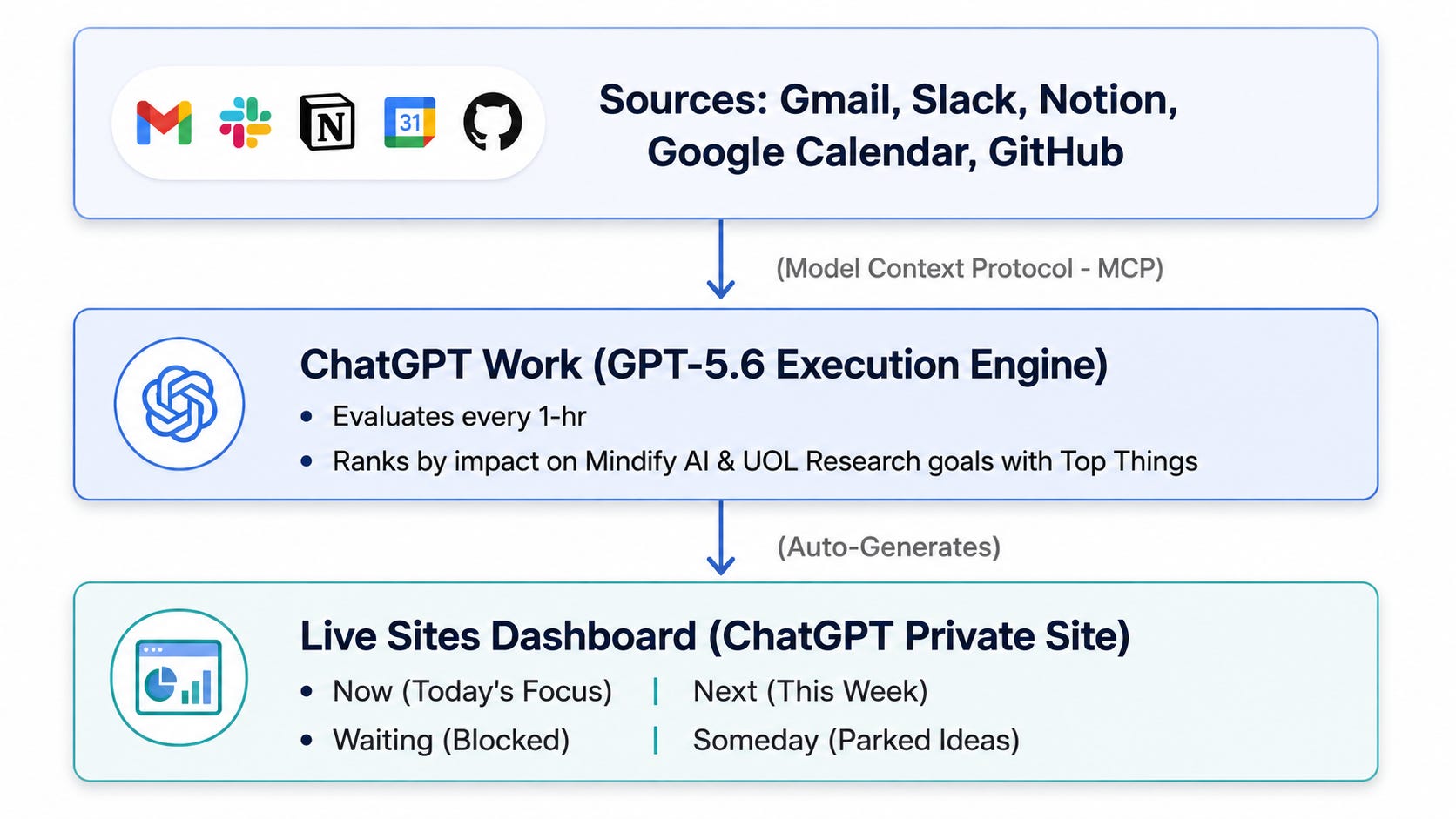
Using OpenAI’s Model Context Protocol (MCP) Connectors, ChatGPT Work maintains live secure connections to my existing app ecosystem:
Gmail: Actionable client requests and vendor messages
Notion and Calendar: Mindify AI deliverables, client project trackers, and research notes
Google Calendar: Meeting schedules, deadlines, and travel buffers
Powered by GPT-5.6 Terra and Work agent capabilities, ChatGPT Work executes end-to-end workflows. Every hour, it scans all connected data sources, compares new items against my quarterly objectives, and ranks priorities without manual prompting.
Rather than navigating five different browser tabs, ChatGPT Work auto-renders a living, interactive Site artifact:
Now: Top 3 focus blocks for today (pre-filtered by energy level and meeting schedule)
Next: Primary queue for the remaining week
Waiting: Tasks blocked on external client or partner feedback
Someday: Parked ideas and long-term research backlog
Copy and adapt this system prompt for your own ChatGPT Work setup:
You are my Chief of Staff. For every 1 hour, pull all new items from my connected MCP tools (Gmail, Notion, Google Calendar).
For each item:
1. Extract deadline, source link, estimated effort, and category (Mindify AI, UOL Research, Personal).
2. Priority Rules:
   - Hard deadlines < 24 hours = High Priority - P0
   - Direct revenue or key client deliverables = High Priority - P1
   - Internal administrative tasks = Medium / Low - P2
3. Output a clean daily plan to update my task Site:
   - Top 3 Focus Blocks (with time estimates)
   - Top 5 Things for the Week
   - Quick Wins (< 10 minutes)
   - Blocked / Waiting on Others
Design a modern dashboard using @Site skill to design {"put your prefer design here"} to show the all of the to-dos and projects I am working on.
Productivity isn’t about working faster—it’s about eliminating the meta-work of organizing, remembering, and context-switching.
By pairing ChatGPT Work, Sites, and MCP Connectors, you convert static, stressful to-do lists into an automated execution system that lets you focus on high-value thinking.
Comments
Nothing yet. Say the first thing.
Sign in to join the conversation.