
Let’s talk about formatting! This part of the publishing process can seem daunting, but it’s actually one of the easiest steps in self-publishing. Yet, many authors pass it off to a designer.
Formatting is taking your manuscript in its Microsoft Word format and transforming it to what you see when you open the pages of a book or e-book. This includes having stylized chapter headings, adding images, sizing the file for your desired trim size, and more.
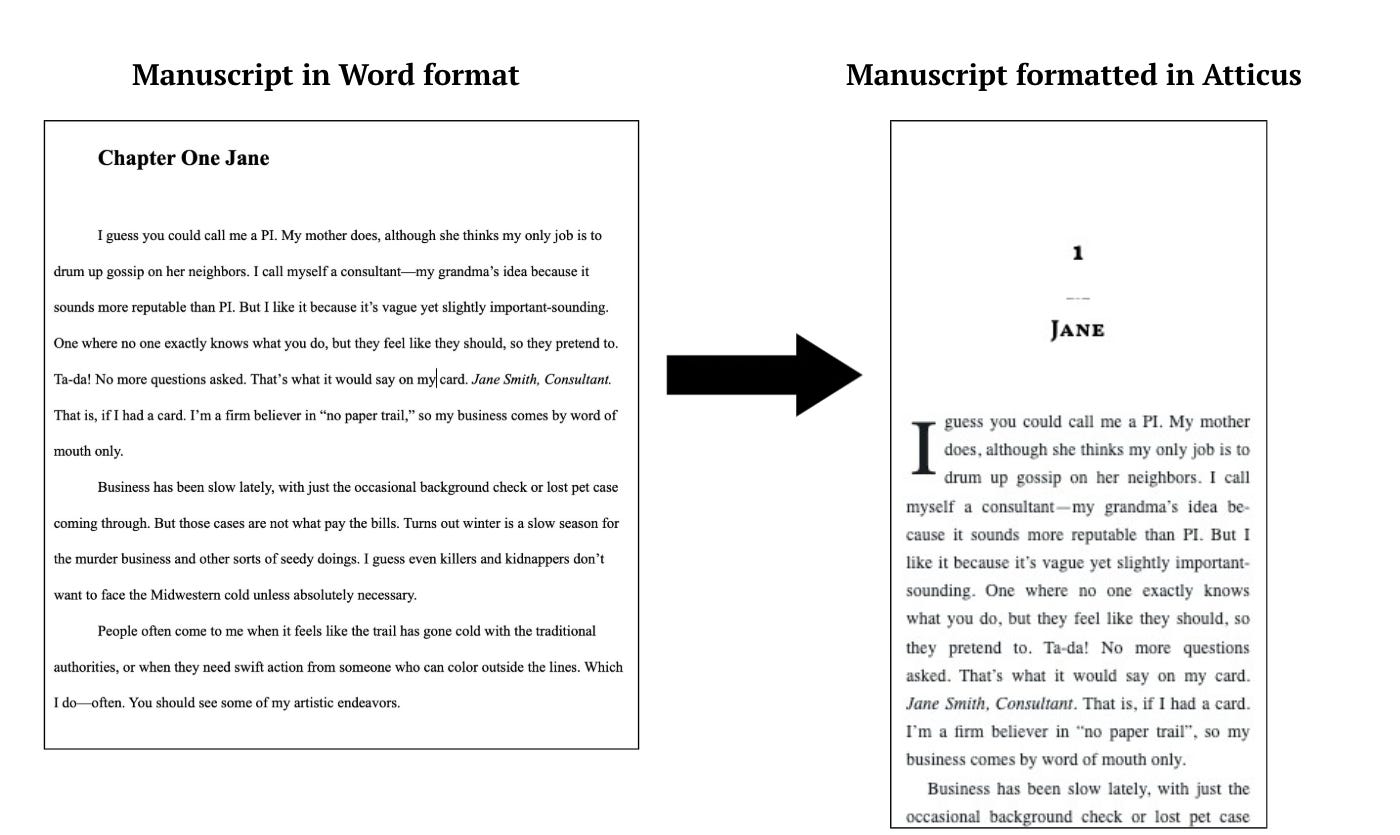
You can hire a designer to format the interior of your book, but there are tools that make it easy to do it yourself. Hiring a designer for formatting is another added publishing expense. It also means that any time you need to make a change to your interior files you will need to wait and pay for the designer to make the changes.
Now you may think you won’t need to make many changes to your interior files once your book is published, but I can say for certain that has not been my experience. I’ve updated my first book’s front matter and back matter multiple times. And I’ve been able to make these changes without waiting on someone else to do it and more importantly without paying for it.
You also may think that formatting will be very time consuming—and that’s true if you are trying to format it without a specific formatting software. But let me debunk this myth—I formatted each of my books in less than five minutes.
You’ll obviously want to play around with settings and themes, but the entire process of uploading my Word document and transforming it into a basic format was literally less than five minutes. I can’t think of many other publishing tasks you can do that quickly!
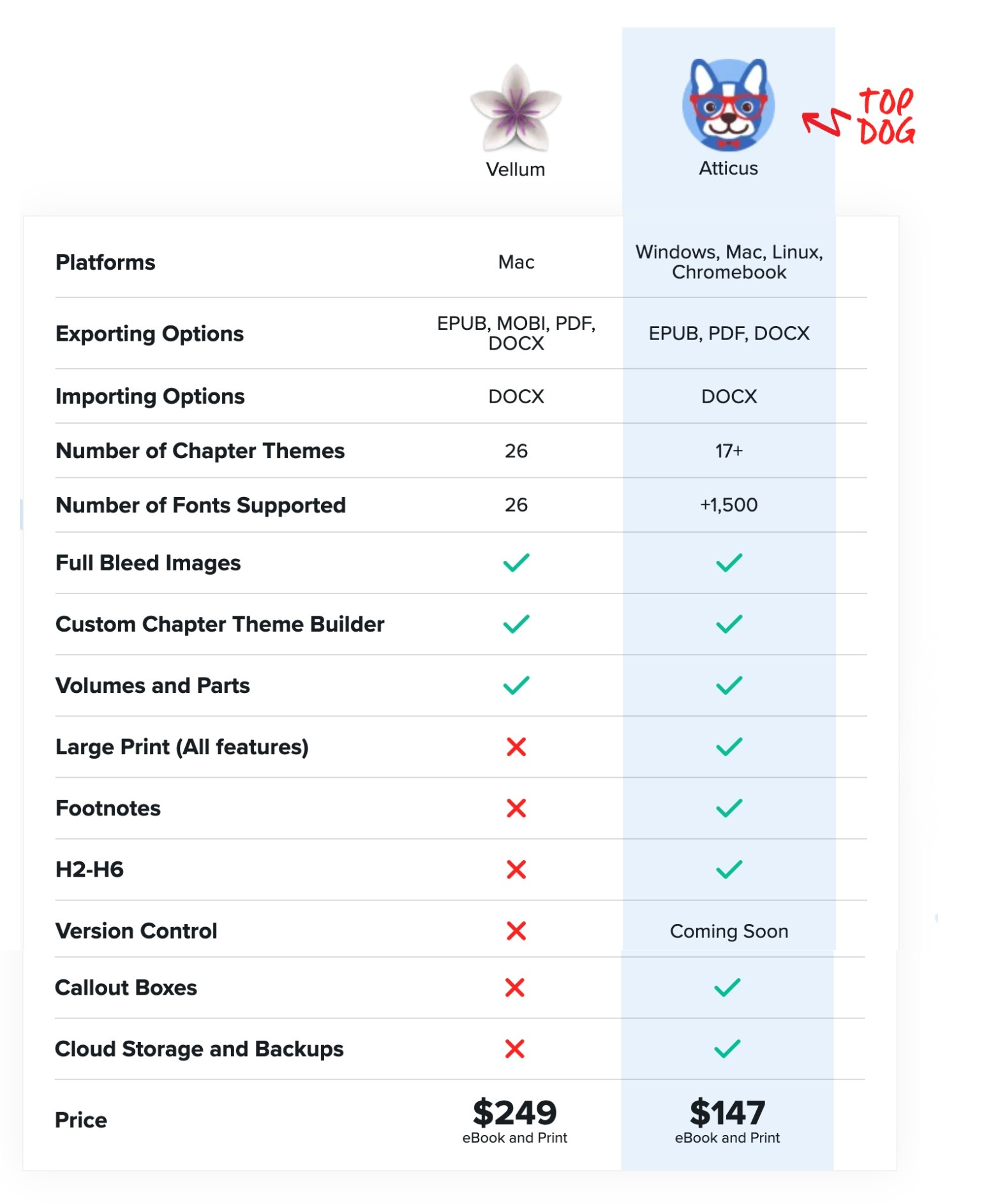
The most common and easy to use software for formatting is: Atticus (priced at $147 for both e-book and print formatting) or Vellum (priced at $199.99 for e-book formatting only or $249.99 for print and e-book formatting). Both are one-time fees with no recurring cost.
For authors who only plan to publish one book, hiring a designer may make sense. But for authors who are planning to write multiple books, then the one-time software fee outweighs the cost of hiring a designer for every book.
Note: If you are a children’s book author then your illustrator will also likely be your interior designer. These tools work great for manuscripts with and without images, but for children’s books I recommended working with your illustrator.
As you can see there are pros and cons to each software. Vellum is only available for Mac devices, while Atticus supports fewer chapter themes.
My pick is Atticus. It’s 59% cheaper than Vellum and provides more flexibility for the number of supported devices. While there are less chapter theme options, the themes they offer appeal to a variety of genres. I’ve used it for nearly two years, and they’ve consistently rolled out updates to make the tool better, even though it was already pretty great to begin with.
Once copy editing and proofreading are complete and your manuscript is in its final version then you move onto formatting. (Note: You will still want to do a final proofread with your manuscript formatted. Proofreaders can edit using the formatted PDF).
If you choose to use Atticus or Vellum, when you upload your manuscript the formatted version will be generated within minutes. Additional formatting can also be done quite quickly (i.e. choosing how your font and chapter headings look, etc.).
During formatting you will select the “trim size,” meaning the size of your printed book. You’ll also select the font size. Average font sizes range from 10 - 12, but I recommend using an 11 point font.
As soon as you are happy with your book’s interior you can then export the files as a PDF for print books and an EPUB for e-books.

Stay twisted!
Author, Marketer, Gif Aficionado
No posts
Comments
Nothing yet. Say the first thing.
Sign in to join the conversation.