
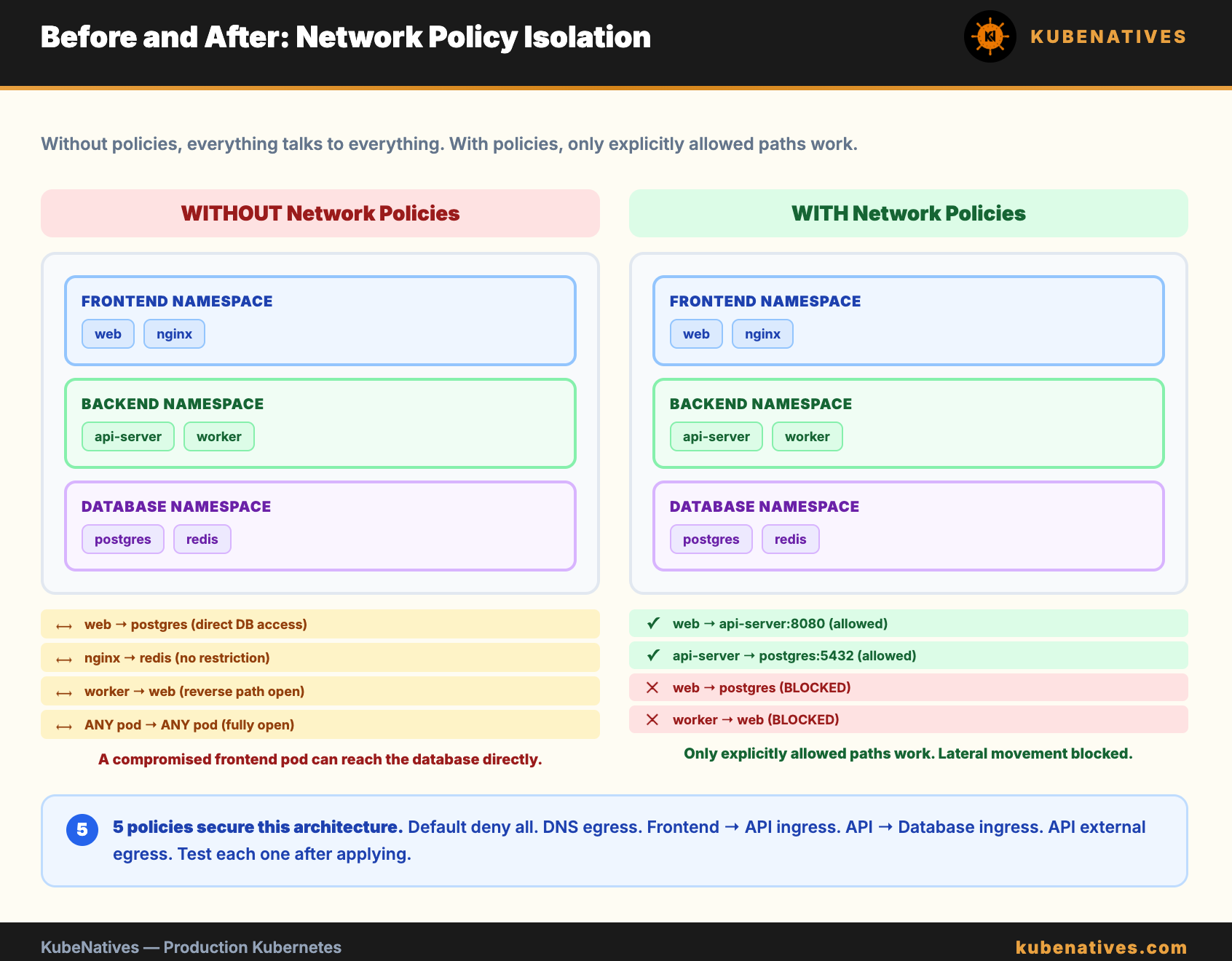
By default, every pod in Kubernetes can talk to every other pod. No restrictions. No isolation. A compromised pod in the frontend namespace can reach your database in the backend namespace.
Network policies fix this. They are firewall rules for pod-to-pod traffic. But most teams implement them wrong. They add a restrictive policy, DNS breaks silently, and they spend hours debugging before removing the policy and giving up.
This article covers how to implement network policies correctly. Starting with the one rule that prevents 90% of the problems.
With no network policies, Kubernetes networking is fully open. Every pod can reach every other pod on any port. Every pod can reach external services. There are no restrictions.
The moment you create a NetworkPolicy in a namespace, the behavior changes. Pods selected by the policy are now restricted. Traffic not explicitly allowed by a policy is denied.
This is the part that catches people. Adding one policy does not just restrict what that policy covers. It implicitly denies everything else for the selected pods.
# This policy allows port 8080 ingress from the frontend namespace.
# But it ALSO denies all other ingress to these pods.
# AND it denies all egress from these pods (if policyTypes includes Egress).
apiVersion: networking.k8s.io/v1
kind: NetworkPolicy
metadata:
  name: allow-frontend
  namespace: backend
spec:
  podSelector:
    matchLabels:
      app: api-server
  policyTypes:
  - Ingress
  ingress:
  - from:
    - namespaceSelector:
        matchLabels:
          name: frontend
    ports:
    - protocol: TCP
      port: 8080
This is the single most important rule. Before you create any other network policy, deploy this one in every namespace:
apiVersion: networking.k8s.io/v1
kind: NetworkPolicy
metadata:
  name: allow-dns
  namespace: backend
spec:
  podSelector: {}
  policyTypes:
  - Egress
  egress:
  - to:
    - namespaceSelector:
        matchLabels:
          kubernetes.io/metadata.name: kube-system
    ports:
    - protocol: UDP
      port: 53
    - protocol: TCP
      port: 53
Without this, pods lose DNS resolution the moment you add any egress policy. The failure is silent. No error message. No rejection. Queries are dropped and the application waits for a timeout.
This is the #1 cause of “network policies broke everything.” Deploy the DNS egress rule first. In every namespace. Before anything else.
The safest approach is to start with a default deny policy and then explicitly allow what you need. Here is the order:
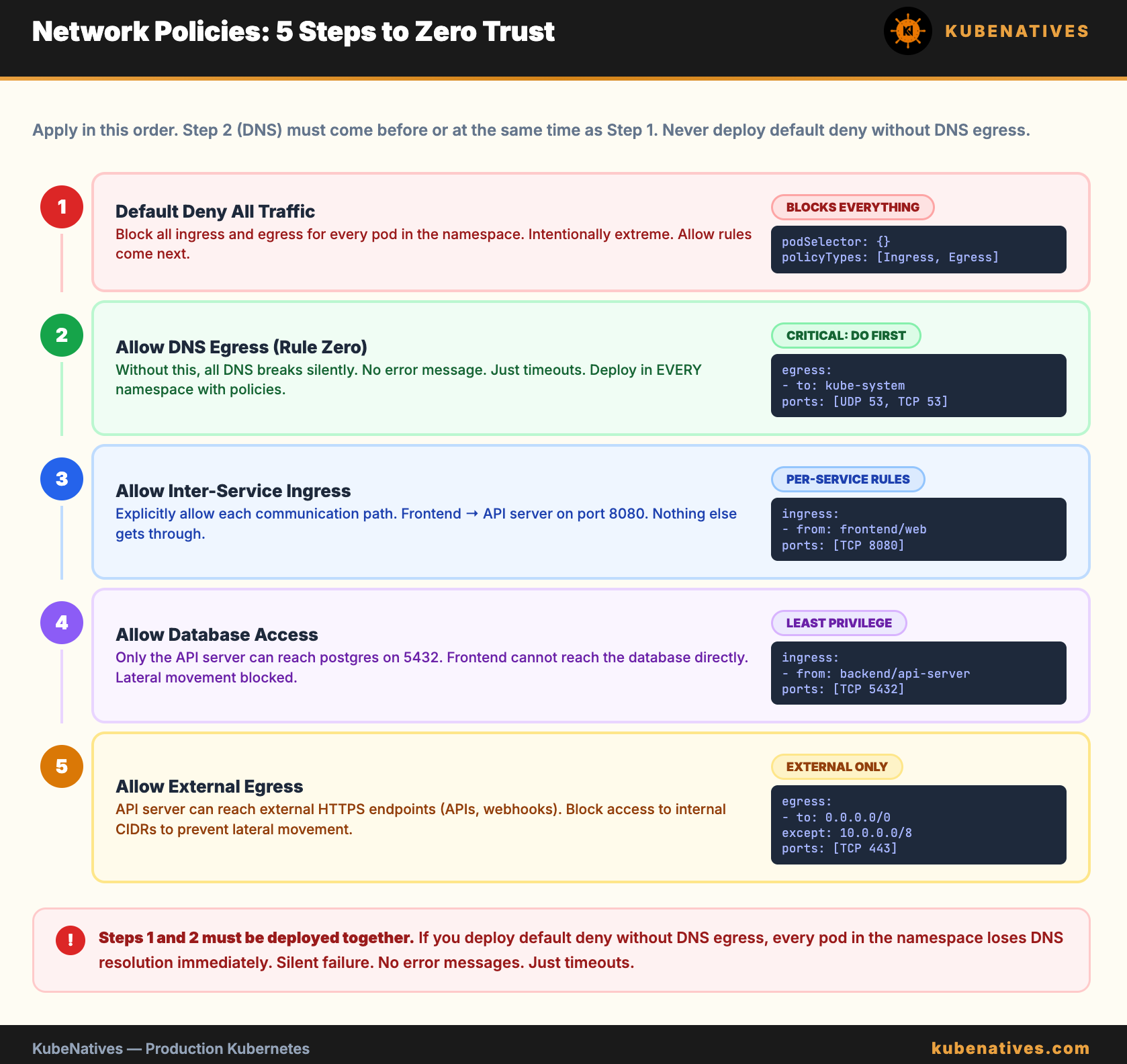
Step 1: Default deny all traffic
apiVersion: networking.k8s.io/v1
kind: NetworkPolicy
metadata:
  name: default-deny-all
  namespace: backend
spec:
  podSelector: {}
  policyTypes:
  - Ingress
  - Egress
This blocks all ingress and egress for every pod in the namespace. Nothing can communicate. This is intentionally extreme. You will add allow rules next.
Step 2: Allow DNS egress (Rule Zero)
Deploy the DNS policy from above. Pods can now resolve names but cannot reach anything else.
Step 3: Allow inter-service communication
apiVersion: networking.k8s.io/v1
kind: NetworkPolicy
metadata:
  name: api-server-ingress
  namespace: backend
spec:
  podSelector:
    matchLabels:
      app: api-server
  policyTypes:
  - Ingress
  ingress:
  - from:
    - namespaceSelector:
        matchLabels:
          name: frontend
      podSelector:
        matchLabels:
          app: web
    ports:
    - protocol: TCP
      port: 8080
This allows the web pod in the frontend namespace to reach the api-server pod in the backend namespace on port 8080. Nothing else can reach the api-server.
Step 4: Allow database access
apiVersion: networking.k8s.io/v1
kind: NetworkPolicy
metadata:
  name: database-ingress
  namespace: backend
spec:
  podSelector:
    matchLabels:
      app: postgres
  policyTypes:
  - Ingress
  ingress:
  - from:
    - podSelector:
        matchLabels:
          app: api-server
    ports:
    - protocol: TCP
      port: 5432
Only the api-server in the same namespace can reach postgres on port 5432. The frontend cannot reach the database directly. A compromised frontend pod cannot access your data.
Step 5: Allow external egress for pods that need it
apiVersion: networking.k8s.io/v1
kind: NetworkPolicy
metadata:
  name: api-server-egress
  namespace: backend
spec:
  podSelector:
    matchLabels:
      app: api-server
  policyTypes:
  - Egress
  egress:
  # DNS
  - to:
    - namespaceSelector:
        matchLabels:
          kubernetes.io/metadata.name: kube-system
    ports:
    - protocol: UDP
      port: 53
    - protocol: TCP
      port: 53
  # Database
  - to:
    - podSelector:
        matchLabels:
          app: postgres
    ports:
    - protocol: TCP
      port: 5432
  # External APIs (HTTPS)
  - to:
    - ipBlock:
        cidr: 0.0.0.0/0
        except:
        - 10.0.0.0/8
        - 172.16.0.0/12
        - 192.168.0.0/16
    ports:
    - protocol: TCP
      port: 443
The api-server can reach DNS, the database, and external HTTPS endpoints. It cannot reach anything else inside the cluster. The ipBlock with except clauses blocks access to other internal services while allowing external API calls.
Mistake 1: Forgetting DNS egress. The #1 cause of “network policies broke everything.” Always deploy the DNS allow rule first.
Mistake 2: Using podSelector without namespaceSelector. A podSelector alone only matches pods in the same namespace. To allow traffic from another namespace, you must include a namespaceSelector.
# WRONG: only matches pods in the SAME namespace
- from:
  - podSelector:
      matchLabels:
        app: web
# RIGHT: matches pods in the frontend namespace
- from:
  - namespaceSelector:
      matchLabels:
        name: frontend
    podSelector:
      matchLabels:
        app: web
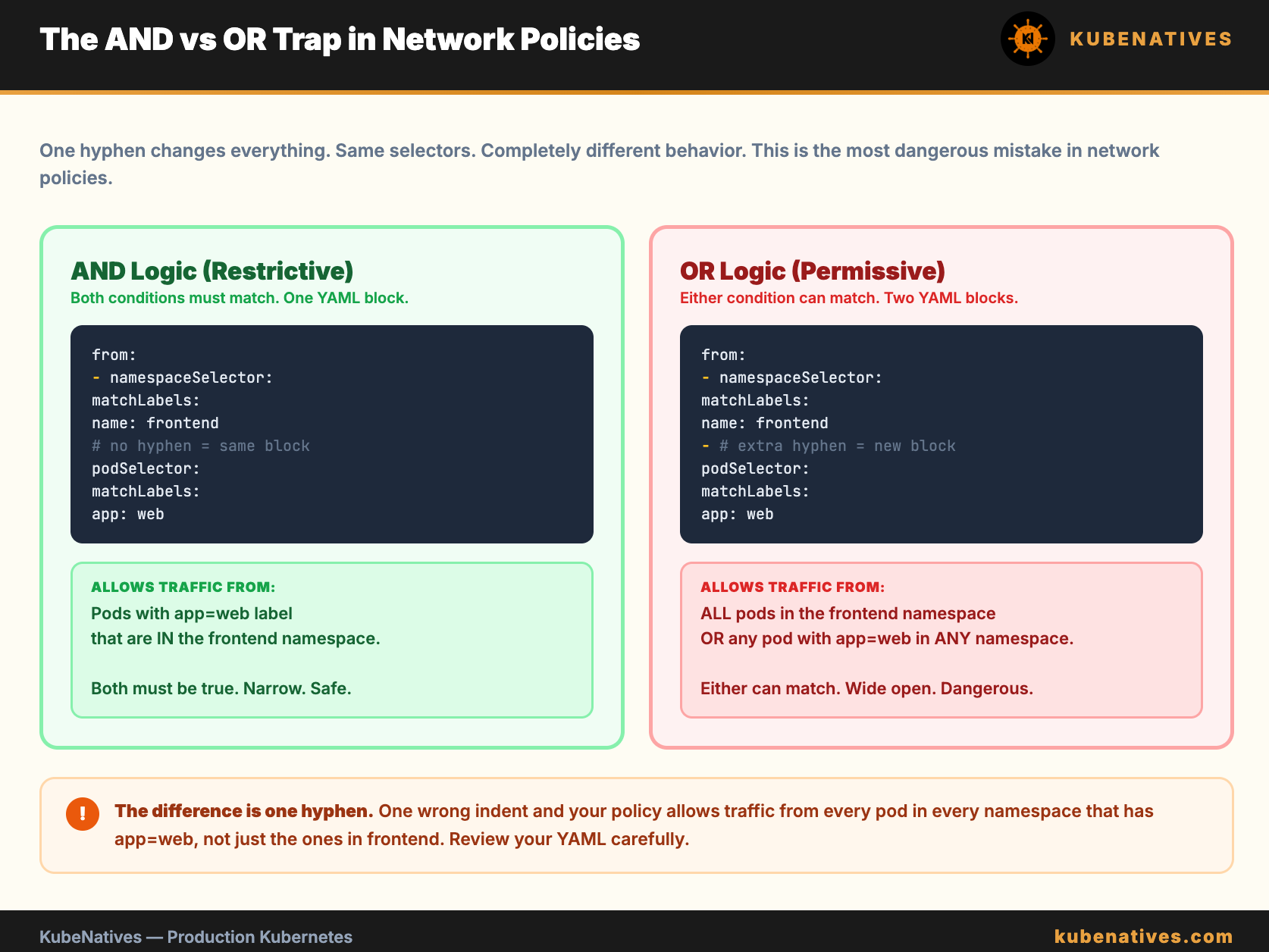
Mistake 3: AND vs OR logic. When namespaceSelector and podSelector are in the same from entry (same YAML block), they are AND logic. Both must match. When they are separate entries (separate list items), they are OR logic. Either can match.
# AND: must be in frontend namespace AND have app=web label
- from:
  - namespaceSelector:
      matchLabels:
        name: frontend
    podSelector:
      matchLabels:
        app: web
# OR: anything in frontend namespace OR anything with app=web label
- from:
  - namespaceSelector:
      matchLabels:
        name: frontend
  - podSelector:
      matchLabels:
        app: web
The difference is one hyphen. One wrong indent and your policy allows far more traffic than intended. This is the most dangerous mistake in network policies.
Mistake 4: Not labeling namespaces. NetworkPolicies select namespaces by label, not by name. If your namespace does not have a label, the namespaceSelector cannot match it.
# Label your namespaces
kubectl label namespace frontend name=frontend
kubectl label namespace backend name=backend
Kubernetes 1.21+ automatically adds the label kubernetes.io/metadata.name to every namespace. Use that for reliability.
Mistake 5: Forgetting monitoring and logging egress. Your pods need to reach Prometheus (for scraping) and your log aggregator. If you block egress without allowing these, you lose observability.
Never deploy network policies blind. Test them first.
# Deploy a test pod
kubectl run nettest --image=busybox:1.36 -n backend --rm -it --restart=Never -- sh
# Test DNS
nslookup kubernetes.default
# Test service connectivity
wget -qO- --timeout=3 http://api-server:8080/health
# Test external connectivity
wget -qO- --timeout=3 https://httpbin.org/get
Run these tests before and after applying each policy. If something breaks, you know exactly which policy caused it.
The Debug Checklist
When a pod cannot reach a service after network policies are applied:
Check if DNS works:
nslookup kubernetes.defaultfrom inside the pod.If DNS fails: the DNS egress rule is missing.
If DNS works but the service is unreachable: the ingress policy on the destination does not allow traffic from the source pod or namespace.
Check namespace labels:
kubectl get namespace <ns> --show-labels.Check pod labels:
kubectl get pod <pod> --show-labels.Verify the policy is selecting the right pods:
kubectl get networkpolicies -n <ns> -o yaml.
The Bottom Line
Network policies are simple in concept and dangerous in practice. The implicit deny behavior catches everyone. The AND vs OR selector logic catches even experienced engineers.
Start with Rule Zero (allow DNS). Add default deny. Then explicitly allow each communication path. Test after every policy. Do not deploy all policies at once.
Five policies can secure a namespace. One missing DNS rule can break it.
Next week: Kubernetes Upgrade Strategy: kubeadm Cluster Upgrades Without Downtime.
If you are running production Kubernetes clusters, I cover networking, GPU infrastructure, and operations every week. Subscribe at kubenatives.com.
No posts
Comments
Nothing yet. Say the first thing.
Sign in to join the conversation.