
About a decade ago, I wrote a blog post titled "SmarterChild and Other AIM Bots" where I talked about some nostalgic memories from my early days with software development when I programmed my own chatbots that ran on AOL Instant Messenger.
I said on that post that I would follow it with a blog about MSN Messenger chatbots, but I never ended up getting around to doing so! So let me get into that finally, a decade later, with this blog.
In 2026, it is possible to get back online with MSN Messenger and sign them in to new servers hosted by Escargot.chat, so I have recently been playing around with MSN as well as AOL Instant Messenger in recent days -- AIM is also back with new, open source online servers that can revive the old messenger apps (and chatbots!) and give this old software something new to do in the modern era.
👉🏻 See Also:
I have recently posted a video on YouTube where I get my old Perl chatbots that I last touched in 2004 back online again connected to modern MSN and AIM chat servers, so check this out as well!
Without further ado, let's get into some of the weird & interesting quirks of MSN Messenger that was revealed when we popped open the hood of the MSNP protocol to develop our chatbots back in the day!
RunABot
As with my previous blog post about AOL Instant Messenger chatbots, my story with MSN bots goes back to the RunABot days.
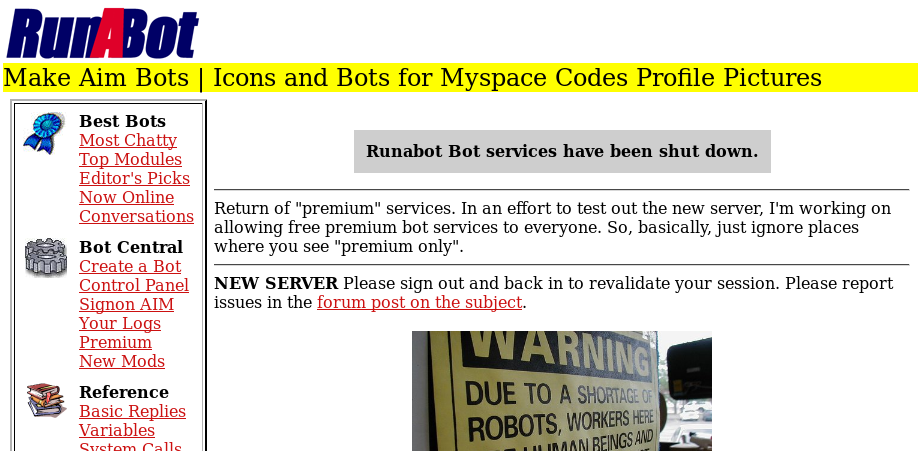
After I met SmarterChild on AIM and became curious to learn how I could create my own AIM chatbots, one of the first platforms I found to do so was RunABot. RunABot was a free chatbot hosting platform where you could create your own chatbot personality, writing your own triggers and responses to ensure your bot talks and responds in exactly the way you want it to, and then you would download a desktop app that would connect your chatbot to AOL Instant Messenger for your friends to chat with it.
I was just a young teenager without a credit card when I first began playing with chatbots, so I was only able to use a free account with RunABot. For their paid supporters, though, they had added support for MSN Messenger bots as well. While AOL Instant Messenger had a rate limit for how rapidly a single screen name could send messages to others, AIM bots were naturally throttled and couldn't handle too many simultaneous conversations with many people, whereas MSN Messenger had no such rate limit at all, which is why RunABot reserved MSN bots only for their paying members -- it could add that much more strain on the RunABot servers to handle responding to so many more messages at once!
I ended up moving on from RunABot and finding software I could run myself to 'self host' my own chatbots, as I described in my previous blog post, and one of my motivations to leave RunABot was also to (eventually) satisfy my curiosity about running a bot for MSN Messenger.
SmarterChild on MSN Messenger
While SmarterChild itself was originally an AOL chatbot, eventually its parent company ActiveBuddy had ported SmarterChild over to MSN as well.
As foreshadowing, I remember observing an interesting quirk with SmarterChild on MSN as compared to AIM: after I added him to my contact list and opened a chat window, SmarterChild immediately greeted me with a message, before I even began to type anything! How did it know I was going to chat with him in that moment? Was he reading my mind?
I'll get to some of that soon!
Finding an MSN Messenger Chatbot
One day, I finally decided to google for how exactly could I run my own chatbot on MSN Messenger, and I landed on a (now defunct) website called WiredBots.
WiredBots offered a couple of barebones, minimal chatbot template programs written in Perl. One program connected to AIM, and the other connected to MSN.
These template programs were very simple, and could hardly even really be called "chat bots" because when you sent the bot a message, it would respond by sending you a random line from a text file. It wasn't taking your message into account at all, but just using the opportunity to send you a random quote from a text file. But still, these simple programs provided the skeleton for how I could build my own custom chatbot and make it do something more interesting.
Perl is the very first 'real' programming language that I learned, and I learned it because these chatbot templates were written in Perl! And I mainly learned Perl by studying and tinkering with the source code. It would be a few years before I would actually look up a Perl tutorial and learn the language properly!
I started with these barebones templates and then started writing my own Perl bots from scratch, and iterated on that again and again, going back to the drawing board to write a better chatbot now and again. Eventually I was able to unify the AIM and MSN bots and run both messenger clients from a single Perl program!
I still have some of my old-school Perl chatbot codebase hosted on GitHub at aichaos/graveyard if you'd like to check them out!
Anyway, let's move on to some of the interesting quirks of MSN Messenger that were revealed by playing with my chatbots.
Pre-emptive Greetings with "Ring & Answer"
The first quirk of MSN Messenger will explain how exactly it was that SmarterChild was able to "read my mind" and send me a pre-emptive greeting just as soon as I opened a chat window with him!
Unlike AOL Instant Messenger which had the one centralized server (which ran the OSCAR Protocol), MSN Messenger's infrastructure was spread out across different kinds of servers.
The main MSN Messenger protocol is called MSNP and no, that doesn't stand for "MSN Protocol" but instead it stood for "MicroSoft Notification Protocol". The MSNP protocol handled things like notifying you about your contacts signing on, or when they update their status, or when somebody added you to their contact list, and that kind of thing.
On MSN, when you opened a chat window with somebody, a different kind of connection would be established: your chat client would negotiate with your partner to establish a Switchboard Connection which would carry the actual chat messages.
On the MSNP protocol, when you opened that chat window, your client would send a RNG message to your friend (RNG = "Ring"). If your friend's MSN Messenger client wanted to accept the chat request, they would send back an ANS message (ANS = "Answer"). Using the standard MSN Messenger client programs, a RNG was always met with an ANS and a Switchboard Connection was established. This would all happen "under the hood" and wasn't anything that you would notice as a casual user of the messenger app!
For our chatbots, this underlying quirk of the MSNP protocol meant we could do two interesting things:
If our chatbot didn't want to talk to you, for example because you were spamming the bot before with too many messages and the botmaster wanted to 'soft block' you, then the chatbot could be programmed to see your RNG but then not deliver an ANS to it.
To you, the chat window would have opened and you could start writing messages, but none of those messages would be received by the bot, because under the hood it had left your Ring on "unread" and the Switchboard Connection was never established! This was a super cheap and free method for a chatbot to save its resources for not having to deal with a spammy or abusive user!
But more amusingly: because of the RNG request, the chatbot would know that you have opened a chat with it, and so after delivering its ANS and establishing the Switchboard Connection, the bot could immediately say hello!
Below is a screenshot I took in 2026 using MSN Messenger 7.0 (running on new community-hosted MSNP servers), with my old 2004-era chatbot running, showing how my Juggernaut chatbot program immediately sent its greeting to me as soon as I opened its chat window:

(Click for a larger version of the screenshot)
And then Display Pictures broke it later!
As of MSN Messenger 7.0 at least (pictured above), this fun workflow for our chatbots still worked even after Display Pictures were introduced, but not long after, a later update to the official Messenger applications sadly broke this workflow.
Here is how that happened.
A while after Display Pictures were introduced, Microsoft wanted the Messenger app to go and pre-emptively download the pictures of all of your online friends, and to do so, the Messenger app would go down the list and open Switchboard Connections with all of your friends in order to download their pictures.
This manifested as RNG requests being sent to everybody, and our chatbots would now misinterpret these rings to mean you had opened the chat window (which you had not! There was no window being opened when MSN was downloading display pictures). What would happen then is: the chatbot would send you an unsolicited message, opening its chat window with you and saying hello even when you didn't want to talk to the bot!
This naturally was very inconvenient and not at all ideal behavior.
As a work-around, I instead programmed my bot to wait for a typing indicator from a user to determine whether they had the chat window open and were in the process of typing their first message.
As a plus side to this approach, it also translated over well for AOL Instant Messenger which also had typing indicators, though, without the RNG/ANS workflow to signal that a new chat was recently started, AIM bots would have to be more careful about timing as it couldn't tell for sure if you were starting a new chat with it or if you had kept the chat window open for hours and were simply coming back with your new message after a long delay.
Five Contact Lists!
The next interesting quirk I remember about MSN Messenger was that there were a lot of "contact lists and block lists" going on under the hood!
There were four of them from the beginning with a fifth one added in later versions:
- The Forward List (
FL) was your actual buddy list that you see in the Messenger app, the people you had added yourself and can see their status and chat with them. - The Reverse List (
RL) was the "who added me" list, or, all of the people who list you on their Forward List. This list could not be edited by you but was managed by the MSNP server. - The Allow List (
AL) was the users who are explicitly permitted to see your presence status (Online, Away, etc.) and to send you chat messages. - The Block List (
BL) was the list of users who you had blocked. - Later versions added the Pending List (
PL) which held users who added you to their contact list while you were offline, awaiting your approval or denial the next time you signed in.
These various lists were a little bit messy to handle and could lead to some confusing bugs! For example:
- When somebody adds you to their contact list, they would immediately appear in your Reverse List. Client apps would have to cross check the lists and compare your FL to your RL to determine if a relationship was mutual. If somebody was on your RL but not your FL, the classic MSN client would let you know so you could easily add them back to your Forward List.
- When you accepted an add request from somebody, they were typically added to both your Forward List and your Allow List. If they were added only to your Forward List, they wouldn't have been allowed to see your status or send you messages otherwise!
- When you Blocked somebody, the client would have to remove them from your Allow List and add them to your Block List. Otherwise, the blocked user would still see your presence as permanently "Offline" because their requests to check your status (per the Allow List) were denied by the server (per your Block List).
- When you deleted a contact, they would be removed from your Forward List, however if they were still on your Allow List, they could still see your online status and send you messages!
For regular people using the official MSN Messenger clients, most of these details were again hidden from view and handled in a mostly sane way. For our chatbots, since we were up close and personal with the MSNP protocol directly, it was required that we wrap our head around this and manually fiddle with these various lists to ensure our bots were behaving correctly!
One last quirk was that MSN Messenger imposed a maximum limit on the size of your Forward List, so you could only have about 150 contacts or so on your list. Later iterations of MSNP raised the limit to 240, then 600, then eventually capped at 1,000 contacts.
For chatbots who want to be accessible to a lot of users, we could work around the limitation by only adding new contacts to the bot's Allow List instead.
When Skype became MSNP
A while back, I wrote a blog about Skype and Windows Live Messenger and how Skype literally became MSN Messenger and switched over to the MSNP protocol!
If you don't remember the history around this, let me fill you in briefly:
- Skype originally was an independent chat app which had a famously secure and obfuscated protocol. Everything was encrypted! It was peer-to-peer and decentralized! The protocol was so opaque and hard to break into that there existed basically NO chatbots or third-party clients for Skype!
- On May 10, 2011 Microsoft purchased Skype for around $8.5 billion.
Microsoft then began an initiative to migrate or merge MSN Messenger accounts into Skype accounts.
This merger was a little bit clunky. They asked you to connect your Windows Live account to your Skype account (in much the same way that, more recently, they had Minecraft players link their legacy Mojang accounts to Microsoft). The promise was that once linked, you would seamlessly be able to chat with MSN Messenger and Skype contacts from the same account!
In practice, it was more like the Skype client acted more like a multi-protocol messenger (like Pidgin or Trillian): if you signed in with your Skype credentials, you would only see Skype contacts, but if you signed in with your MSN credentials, you would see both Skype and MSN contacts. The client actually signed in both to the Skype protocol and the MSNP protocol on separate connections!
On the MSN Messenger side, since MSN usernames were e-mail addresses, if a Skype contact sent you a chat message, their "e-mail address" username had a fake suffix of @SkypeDomain.fakedomain!
Eventually, Microsoft scrapped the Skype protocol completely and made Skype use the much simpler MSNP protocol. Skype literally became the next iteration of Windows Live Messenger!
And I think that was a bit tragic. The original Skype protocol was rock solid, and the MSNP protocol was plain text based! MSNP messages resembled in a lot of ways the other plain text protocols of the era including HTTP and SMTP.
For example, this is what a typical chat message on MSNP looked like over the wire:
MSG [email protected] Bob 137
MIME-Version: 1.0
Content-Type: text/plain; charset=UTF-8
X-MMS-IM-Format: FN=Arial; EF=I; CO=ff0000; CS=0; PF=22
Hey Alice! Are you free for lunch?
By the time of the Skype era, the MSNP protocol was at least wrapped with standard SSL/TLS encryption so the plain text protocol wasn't plainly visible to eavesdroppers on the network. Older versions of MSN were completely out in the open! But it was rather sad to see the impenetrable fortress of the original Skype protocol be downgraded to something so objectively inferior.
AIM & MSN Back Online in 2026!
If you have nostalgia for the good old days of AOL & MSN Messenger (or if you weren't born yet and have misplaced nostalgia to tinker and explore vintage old software!), the good news is that these messengers can be brought back online!
The current best way to access these old messengers is with Escargot.chat for MSN and Nina.chat for AIM (and ICQ and others too!)
Both projects are run by the same people, and your Escargot.chat username is also your AIM screen name.
The MSN Messenger client historically was 'hard coded' with Microsoft's server names built in, so Escargo.chat provides patched downloads for various old versions of MSN and Windows Live Messenger. They also provide the unpatched clients and the patch files to fix them yourself. If you use a third-party chat client like Pidgin, you can often plug in the new hostnames in your settings to connect to the Escargot servers.
For AOL Instant Messenger, official client apps always had a Settings screen where you could easily substitute out the login.oscar.aol.com hostname with alternatives.
On AOL Instant Messenger, there are a lot of other options I found for third-party OSCAR servers you can check out as well:
- On GitHub, Open OSCAR Server is a Free & Open Source OSCAR server program written in Go so you can self-host your own OSCAR server for friends and family. But, you may want to join a more established server if you want to meet and chat with new strangers.
- Nina.chat as linked above may be the most reliably hosted OSCAR server for now.
- I also had an AIM account on aim.chivanet.org but their server has gone offline for extended periods of time and may not be very reliable.
- There once was a runningman.network but it seems offline recently. It may come back one day, I have seen it online sometimes over the years including somewhat recently.
Disclaimer: when playing with these legacy old messengers, be careful NOT to reuse your main passwords for them. These platforms are from a bygone era where their password security methods were not great by modern standards, for example AIM uses the now obsolete MD5 hashing algorithm as part of its login flow. These features are coupled so tightly with the protocols and clients that there is no good way to better secure them, so choose your passwords accordingly and don't take these apps too seriously!
Summary
So, there you have it: all of my favorite memories about dealing with MSN Messenger back in my chatbot days!
If you enjoyed this post, check out my recent YouTube video too where I dusted off my old 2004-era Perl chatbot code and got them back online again in 2026 on both MSN and AOL Instant Messenger:

And if you hadn't seen it, my previous post on this topic "SmarterChild and Other AIM Bots" covers some of the interesting quirks from the AOL Instant Messenger days, including the way that SmarterChild himself was an "AOL Administrator" account which had no rate limit and could not be blocked!
Until next time!
Copyright © 2026 Noah Petherbridge — All rights reserved
Hosted by DigitalOcean
Page generated in 0.0085s.
Comments
Nothing yet. Say the first thing.
Sign in to join the conversation.