
As soon as I started preparing for teaching my fall classes, writing here ceased. It was not my intention. It was Amy Turn Sharp’s encouragement that brought me back on this lazy Sunday (I don’t get many of those). Here I am, writing in bed, a house full of kids and music playing on the Sonos system. I intend to publish this later in the week.
Five years ago, while under lockdown, I started the process of ripping my CD collection, and doing it the right way. I used XLD on my Mac to rip bit-perfect copies of my CDs, complete with accurate tagging and properly organization on my external hard drive. Yes, I was bored. But it was a fun activity to tend to the CD rips between episodes of whatever I was binging at the time.
It didn’t stop there though. I logged into my Bandcamp account and grabbed everything that I had purchased over the years. Then I went through vinyl download codes, sometimes surprised that they offered WAV or FLAC. Finally, I found many, many bootlegs that were backed up to hard drives, CD/DVD-R, etc. (No Zip drives were involved).
I’ve been enjoying this collection in the years since, so recently I thought, “What if I could load up the library in shuffle mode and broadcast on my own stream?” It would be so 1990s of me. I knew I would be the only person using it, perfect for those long commutes to my teaching job.
I began by setting up my Mac Mini, which is my home server. I installed Icecast, an open source broadcasting app. It’s all command-line, so I was copying and pasting the more complex commands to install and set up the server.
I really wanted to utilize Rogue Amoeba’s wonderful Audio Hijack for the broadcast. I bought it years ago to record audio straight from online streams. I didn’t use it much, but I loved the features, and it was easy to process my audio with Audio Hijack before being sent to my local Icecast server.
But where would the audio be hijacked from? I tried many, many audio players: Swinson, foobar2000 and VLC were all promising. There was even a command-line player called Shuffle that caught my eye. However, none had all the features I wanted.
But foobar2000 has a platform to create add-ons. I went on a search for macOS compatible components, but there were very few. Having used Claude AI in the past to learn about coding plugins for REAPER, I set out to do the same here. Long story but I ended up downloading xcode to keep track of the code, and to build the components. I soon had what I needed:
The ability to export a “Now Playing.txt” file, so that Audio Hijack could include the artist, song title and album name in the broadcast metadata.
Skip titles with certain keywords. Since I had so many bootlegs, I could skip titles that include the words encore, applause, or intro.
Artist Cooldown. I had so many files by certain artists that the odds were very high they would be played often: Dylan, Bowie and Prince, primarily. This plugin quarantines every artist once played, and will keep them from being played for a pre-determined amount of time. I started with 4 hours, but currently I have it at 8 hours. I might increase it.
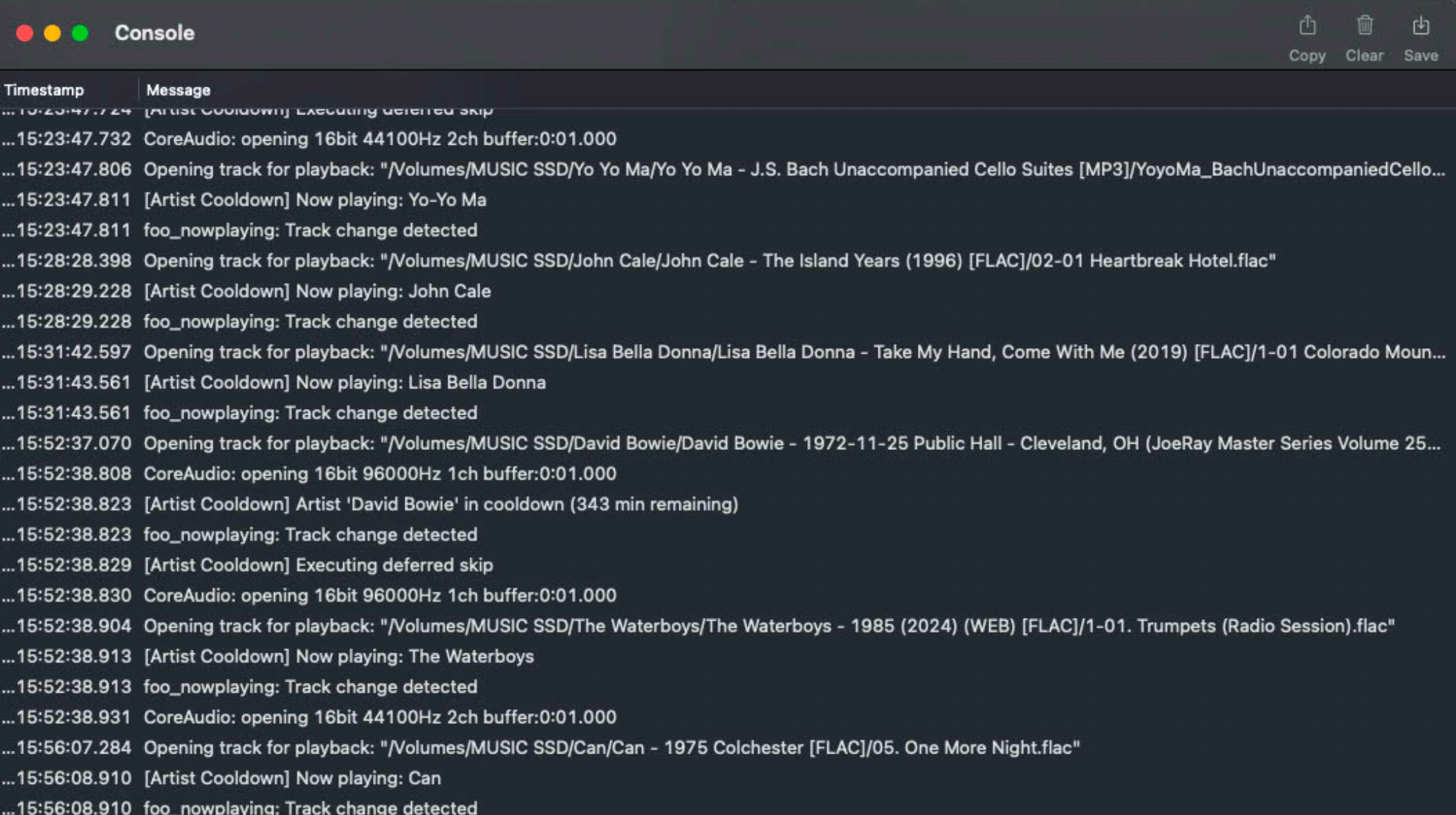
The image above is foobar2000 console. Notice about halfway down (at 15:52:38:070), you’ll see that a Bowie track from a 1972 bootleg shuffled up, but then foobar2000 skipped it: “Artist ‘David Bowie’ in cooldown (343 min remaining).” Bowie can’t be played for another 5.7 hours.
There were a few additional settings, but this is already getting too long.
Now that foobar2000 was playing everything the way I wanted it, I could move on to Audio Hijack. The software is primarily used for recording audio off of live streams, but it also can be used to send audio to a live stream.
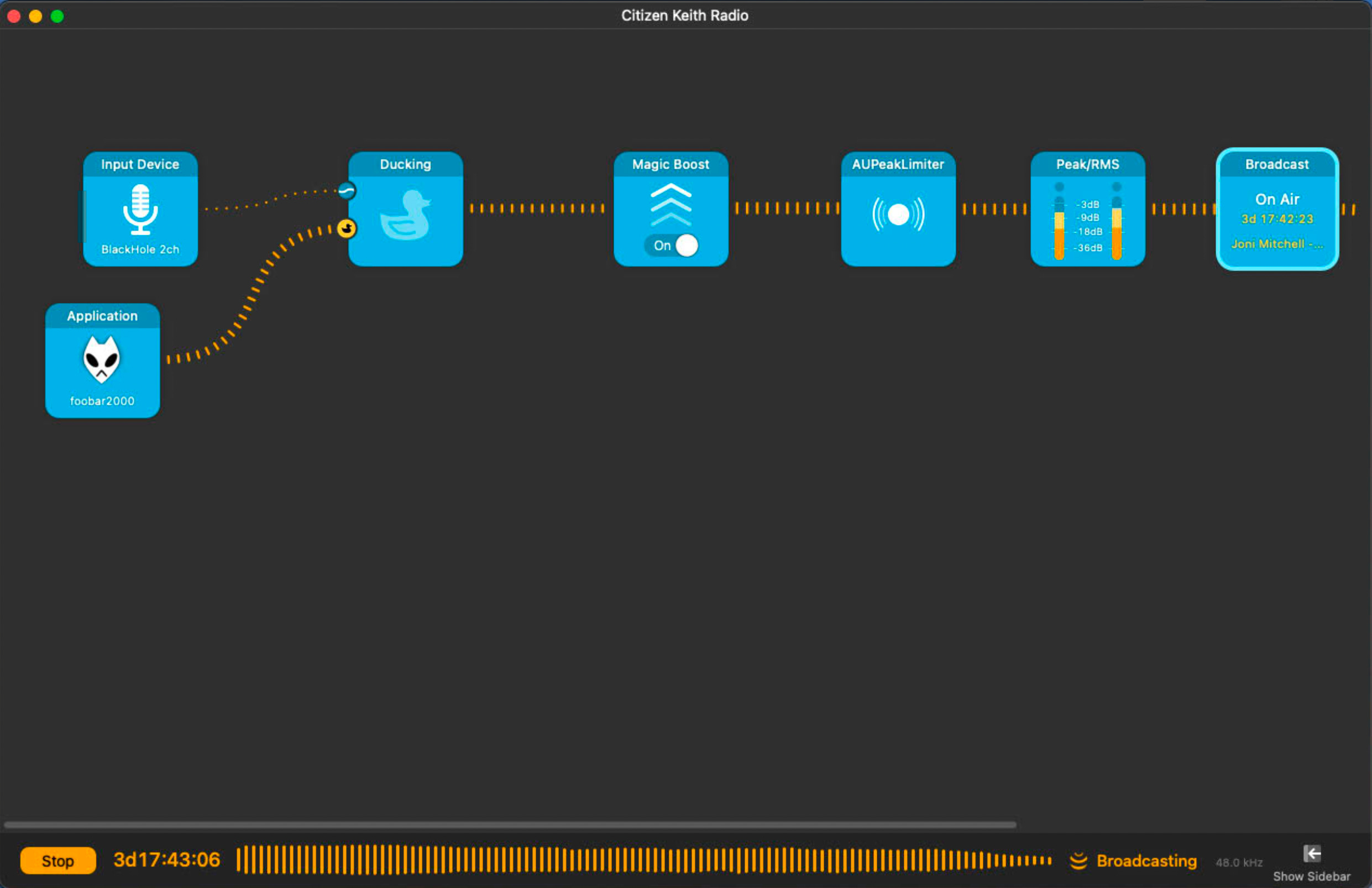
In the above picture, going backwards, from right to left:
The Broadcast block - The last thing in the chain. This contains all the Icecast settings and pushes the audio to the server.
Peak/RMS - This was used to dial in the volume to avoid clipping (distortion).
AUPeakLimiter - This never really gets used, but it’s a limiter that will prevent audio from going over 0db (after which comes distortion).
Magic Boost - This is basically a compressor. It brings the quiet stuff up and the loud stuff down. It’s that radio sound, for which I am sometimes nostalgic.
Ducking - This will turn down the music while a short Station Id is played.
Input Devices - One for the Station ID, which is played every hour, and one for the music library from foobar2000.
And that is how I started my own radio station. I hope you enjoy listening:
Next steps: create an HTML page to archive the playlist, and perhaps build a little website around the station.
UPDATE: I found a new bug. In foobar2000, when a file comes up to play that doesn’t have meta data, the component crashes the app. As a result, the station was down most of the day! Hopefully the new code will prove to be stable.
No posts
Comments
Nothing yet. Say the first thing.
Sign in to join the conversation.