
TL;DR: Cluing is an AI second brain that saves what you read, links it in a knowledge graph, and feeds it to Claude, ChatGPT, Codex, and Perplexity Computer over MCP. It started life as Collabwriting and carries a 4.9 rating from nine Product Hunt reviews. Pricing runs $0 on the free tier, $12/month on Professional billed yearly, $120/month on Superhuman. Below: nine workflows I kept, two custom agents, one skill, and a 20-30% discount for PwA readers.
I’m preparing for an AI Architect exam, which means I spend several hours a week asking AI to teach me how to AI, then searching the web for more AI, so I can pass an exam about AI.
A few weeks back, I was doing exactly that. Things were going well until I searched for a page and discovered I already had it open.
Twice.
Around the same time, Sandra Idjoski from Cluing reached out and asked me to test their newest features. I already knew about Cluing and had been meaning to try it, so this was cosmically super well-timed.
A, I needed help. And B, I’m obsessed with second brains. I’ve written about them, built them, and tested them.
Which is how I discovered, that for a second brain to be useful long term, it needs to self-maintain with minimal upkeep from me, and connect to everything else I use. Cluing does exactly that. I know, because I tested it for three weeks before writing this article.

What Is Cluing? An AI Second Brain for All Your AI Tools
What Cluing costs in 2026
My PM read: Additional notes from a PM point of view
Get Cluing running in three minutes across all your AI tools
Today’s article (and discount for my readers) is sponsored by Cluing.
My opinion isn’t. Learn how I evaluate sponsorship requests.
Cluing is a research and knowledge management platform that saves what you find, organizes and visualizes it for you, and turns it into context for the AI tools you already use.
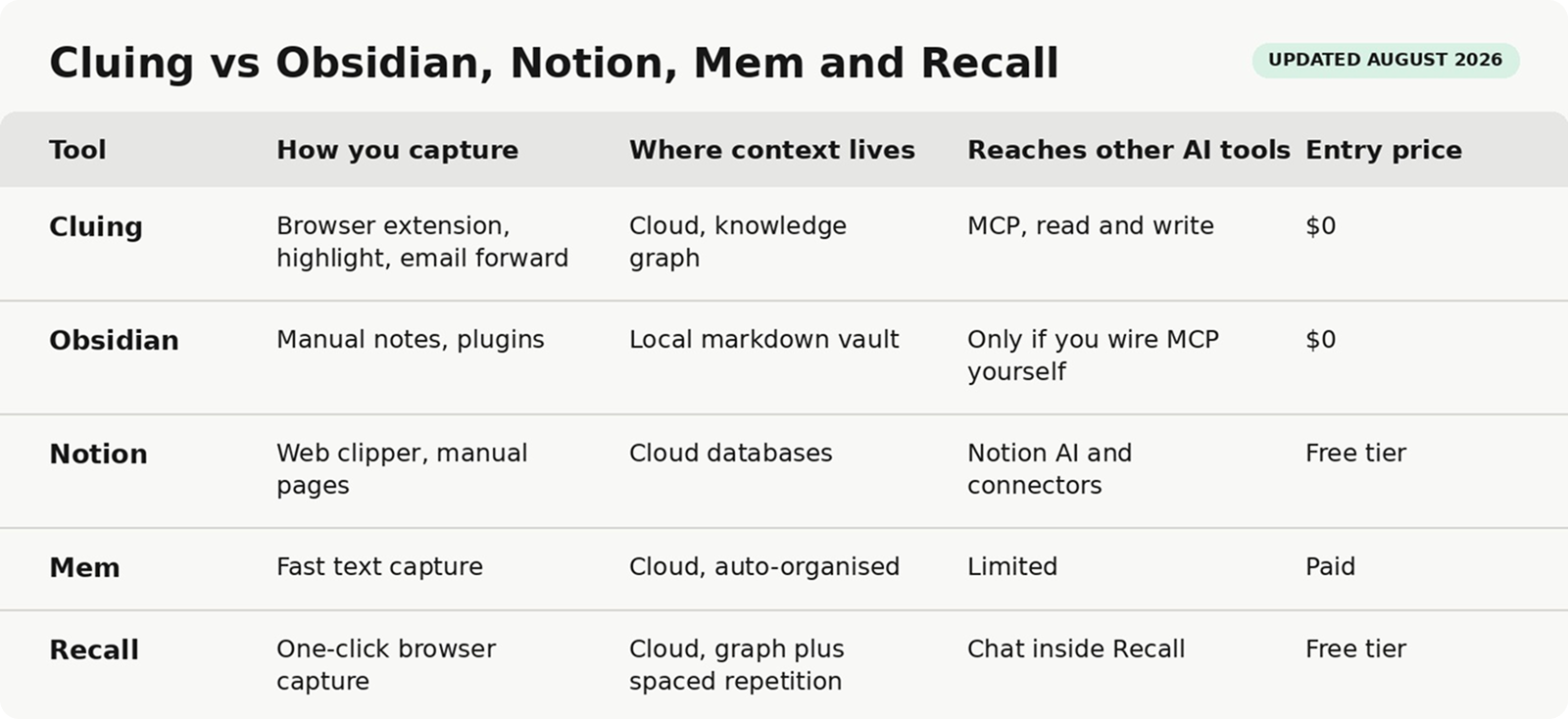
It sits in the Personal Knowledge Management category, alongside tools like Mem, Tana, Notion, and Obsidian.
The big difference: Cluing is much easier to use. You don’t need to understand markdown or be an AI expert to make any of this work. I’ll show you exactly how below.
If you research first and create second, Cluing makes sense. That includes the obvious suspects (consultants, students, journalists, marketers, researchers), but also artists, chefs, curators, screenwriters, trend forecasters, and investigators. Teams can work together inside it too.
And for Substack writers, it can support the entire newsletter workflow: idea, research, draft, publish, repurpose.
Cluing costs $0 on the free tier, $42 per month on Pro. Teams start at $135 per month. These are the new pricing plans starting from today (19 August 2026).
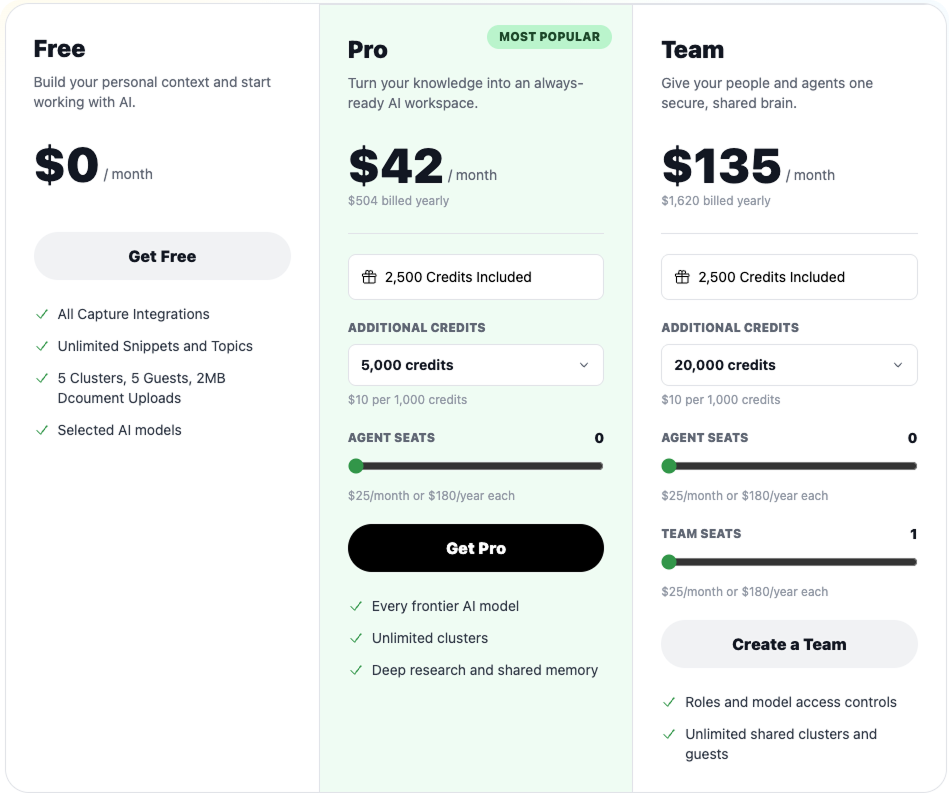
Paid PwA subscribers get 30% off Cluing during the launch week (until 26.08.2026) and 20% off afterwards.
Grab the code from the Discounts page and use it at checkout.

Hey, I’m Karo Zieminski 🤗.
AI PM and builder. I write Product with Attitude, an AI newsletter for tens of thousands of readers across 146 countries, helping them develop critical AI literacy the only way it sticks: through practice.
Welcome to the 514 of you who have joined us since last week! Here’s what you might have missed:
IMPORTANT:
Paid members get an exclusive 30% off Cluing during the launch week (until 26.08.2026) and 20% off afterwards. The code is here, use it at checkout.
I also have 10 offers for 2 months of LinkedIn Premium to give away. The next 10 people who upgrade to paid will get one, on top of all other discounts. Upgrade to a paid membership, then send me a DM asking for the LinkedIn Premium link. First come, first served, so be quick.
And if you share this article with 3 friends or colleagues,
I’ll thank you with 3 months of a premium subscription.
I did so much with Cluing over the past few weeks, that not all of it made it to this post. The nine things that did: web clipping, visual boards, MCP context portability, per-obsession email inboxes, custom agents, a scheduled Cowork task, a testimonial mining pass, a reader-question skill, and writing this article.
The Cluing team is one of those product teams that ships relentlessly. There’s a decent chance they’ll release another feature before I finish writing this article. Rather than giving you the full feature tour, I’ll show you how I use the ones that made it into my workflow.
Or rather, a mobile home, because it follows me into every tool I use.
Cluing lets me highlight and save text from any web page. Or even a single word. Save posts from Quora, Reddit, LinkedIn, X, Instagram, and—most importantly, ahem—Substack.
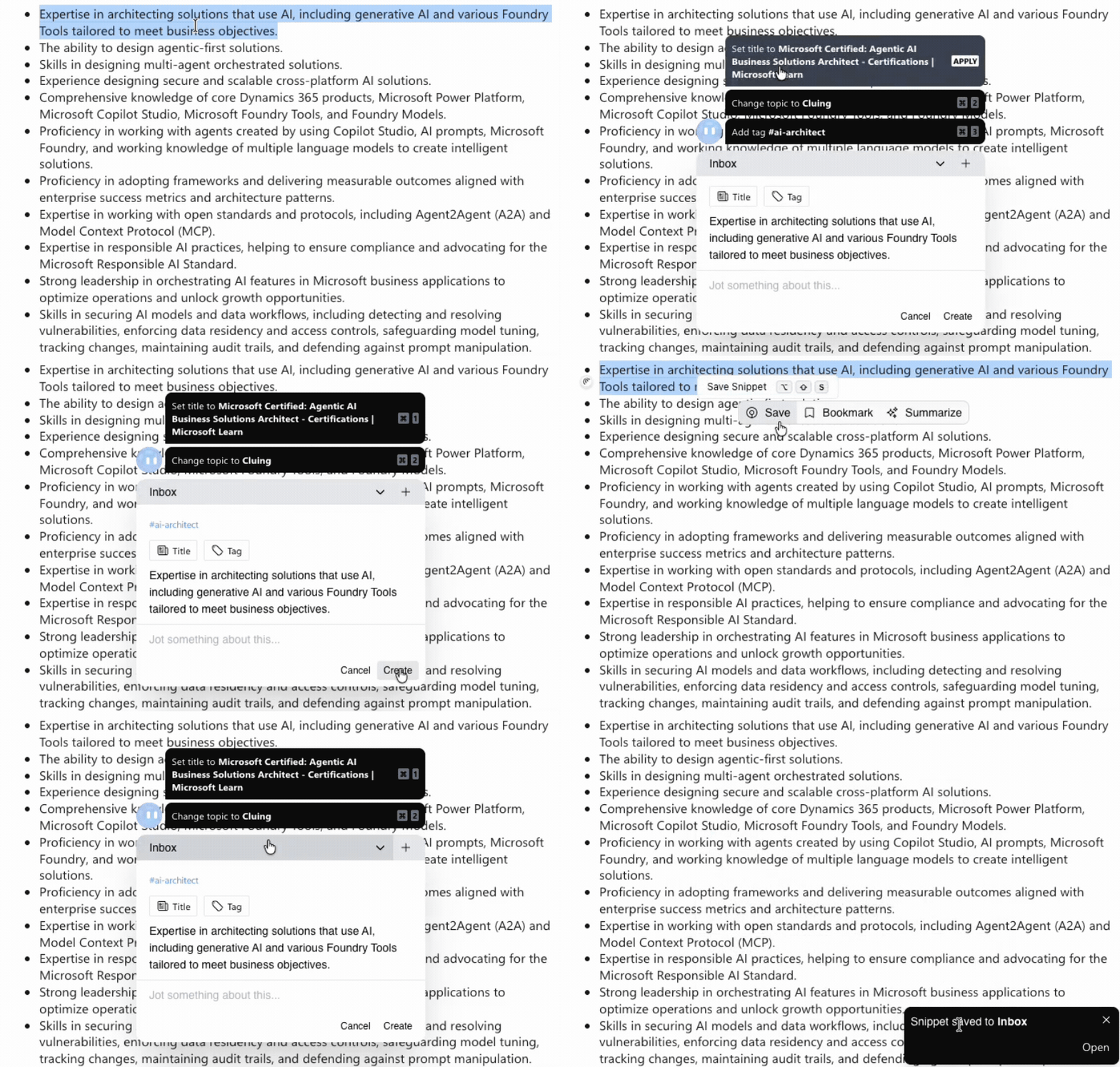
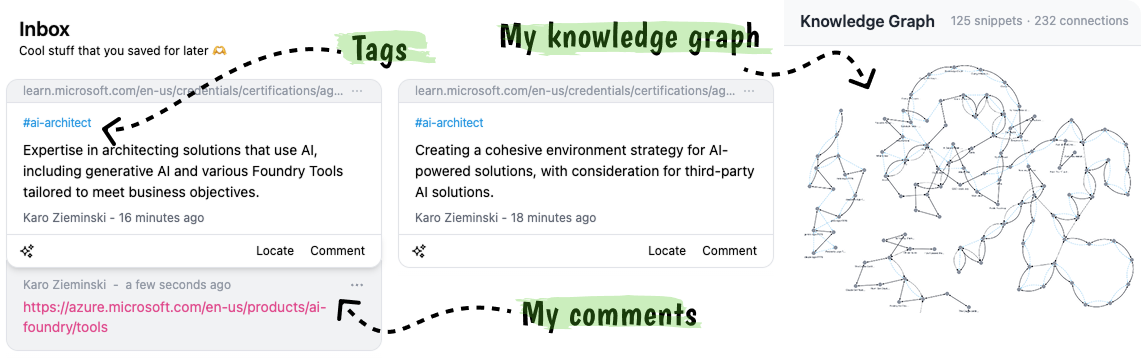
Once I save something, Cluing keeps the source, tags, and my comments attached, then connects it to related ideas in my knowledge graph.
The knowledge graph is very much my thing: a visual map of what you’ve saved and the relationships between it. It mirrors how I think, and it’s one of the main reasons I’m so fond of Perplexity Brain too. Future me doesn’t need to remember the connections I made when I was deep in research mode. The tool will.
Try for yourself, you just need to create an account and download their free Chrome extension which currently sits at 4.8 stars across 32 ratings.
My PM read:
This is what makes knowledge graphs so interesting to me as both a PM and a newsletter author: they show relationships between things. Users, readers, problems, feedback, ideas. Exactly the breadcrumbs I’m constantly trying to connect.

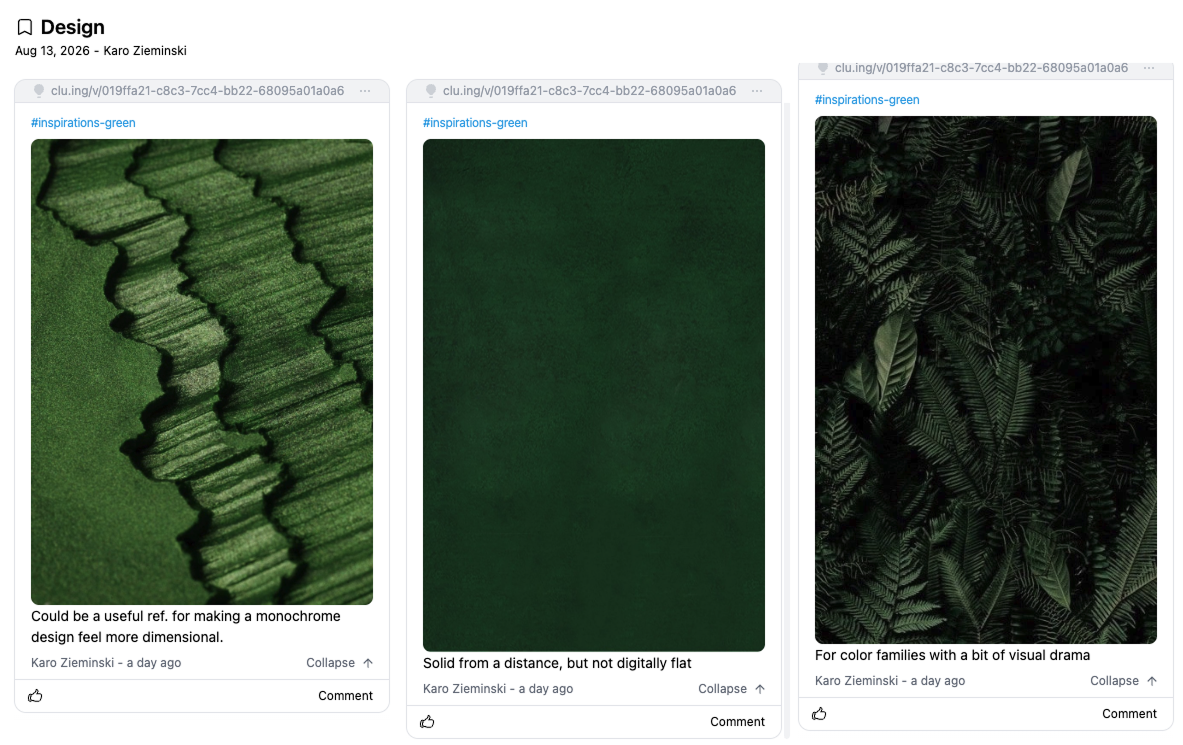
Adding notes is what I always missed with Pinterest (back when I used it, before it turned into an online store). You could save what caught your attention, but not really why. And there’s only so much you can do with a what without a why.
In Cluing, I can add as much interpretation and context as I want.
I can also do roughly 101 other things with those visuals. Cluing can tell me what my collection is giving away. Things like recurring styles, references I keep coming back to.
From there, I can turn those patterns into moodboards, art direction, UI guidance, prompt libraries. Build a website (yes, really. And you can even publish it on your own custom domain). Or even use my saved references as the benchmark for critiquing my own work. I now have a visual knowledge base I can think with.
My PM read:
This is actually quite extraordinary. Even tools like Canva don’t let me analyze my designs at this scale.
If you’re like me and you bounce between AI tools all day long, you’ll appreciate this feature. Your context follows you, so you can move between tools without losing it. You connect to Cluing through MCP. Here’s how to set it up in two minutes.
I’ve already paired Cluing with Claude, ChatGPT Work, and Perplexity. All of them can save things back into Cluing too, not just pull from it.

My PM read:
Context portability changes the switching cost, the mental load, the maintenance load. All of my AI tools can participate in workflows they don’t own. Claude can be the reasoning layer, Cluing the memory layer, and Perplexity Computer the execution layer. This is composable AI in practice.
The workflow belongs to me, not the tool.
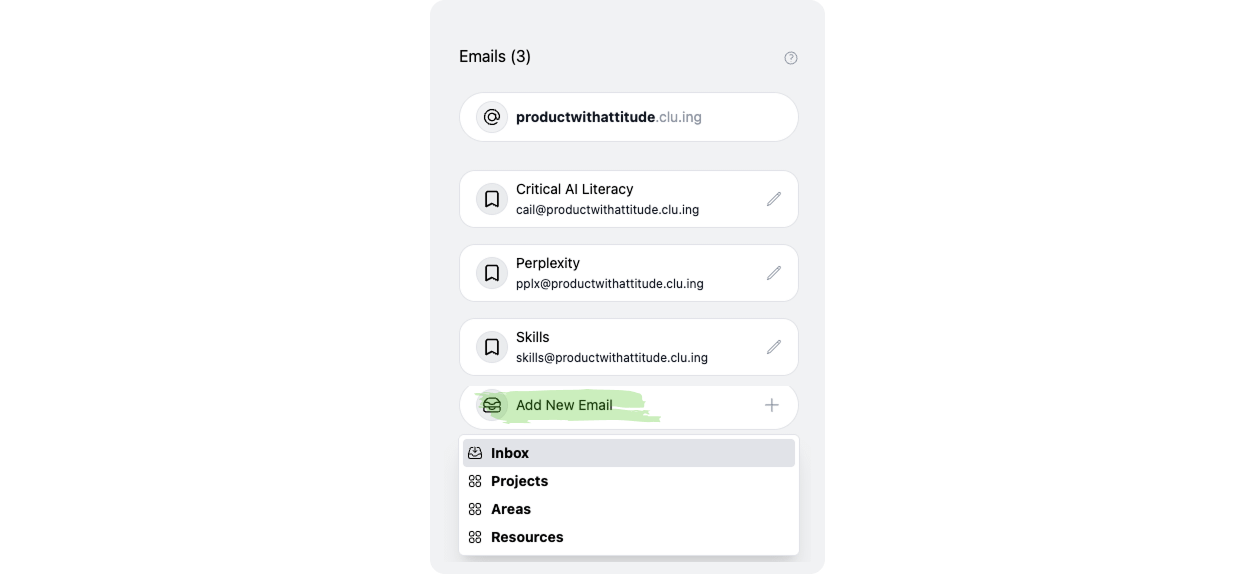
I don’t read newsletters the proper way (as in, when they come out). I read them in obsession chunks.
So I gave each obsession its own Cluing inbox: Critical AI Literacy, Logic, Claude, Perplexity, you name it. Every time I see something interesting in my inbox, I forward it to the relevant email address. Newsletters wait there until my brain decides we’re no longer casually interested. We’re researching.
And when that happens, the newsletter snippets I curated are ready to go.
My PM read:
This way, the benefits compound almost invisibly. Something I saved six months ago can suddenly become useful because of something I added today.
But saving the source is only the beginning. Below is the system: two agent builds, one scheduled Cowork task, the testimonial prompt, and the reader-question skill.
Cluing agents run inside Cluing, learn from the topics you feed them, and update their own instructions when the underlying source changes.
This feature is brand new.
Agents can do pretty much anything agents in Claude Code can, but you can build them inside Cluing, without the need to switch context.
Every tool that self-learns earns my attention right away. And Cluing agents are dynamic, they learn. Let’s say you have a skill that helps you with Substack SEO. As soon as Google publishes new guidance, you can add it to the topic and the SEO agent updates itself for future tasks.
I built a GA4 analyst agent. It patrols my Google Analytics data. I gave it an actual investigative method (from finding the baseline, to dissecting the deviations). If you’d like to build your own Cluing Agent, I recommend you read this article first.
Paid members: copy my complete Google Analytics 4 Cluing Agent instructions + daily analysis prompt and customize the metrics, thresholds, property, reporting cadence, and destination for your own site.
Copy my GA4 Cluing Agent Instructions
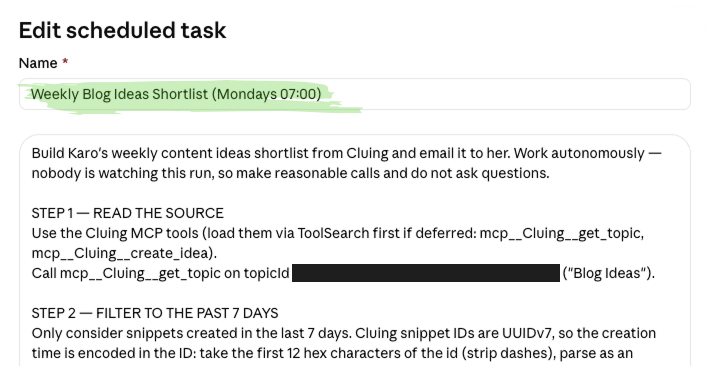
What it does each week: reads my new Blog Ideas topic in Cluing, keeps only snippets created in the last 7 days, picks the 5 strongest, emails them to me, and archives the whole thing as a snippet in Weekly Content Shortlists. Every email closes with a line reminding me that I can ask Claude to pull up previous shortlists, with a link to the archive.
Testimonials are customer-language datasets.
Back in 2014, Joanna Wiebe from Copyhackers published a rather spectacular example. While writing copy for Beachway, an addiction treatment center, she mined 500+ Amazon reviews of books about addiction for the language people actually used. One phrase became the homepage headline. Tested against the original, it drove 400%+ more CTA clicks and 20%+ more lead submissions.
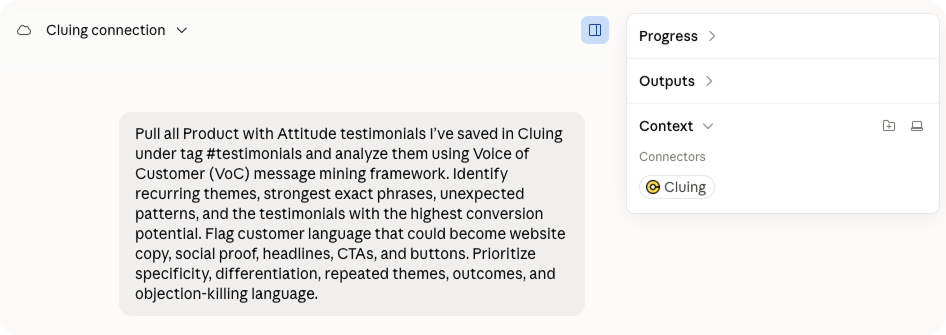
I used the same underlying method on my own website. If you’d like to squeeze more value out of your testimonials, connect Claude to Cluing MCP, and run this prompt in Cowork. You’ll get suggestions for headlines, section headers, button text, and CTAs.
Side note: For something more playful, try my subscribe button that runs away from your visitors. Code is here.
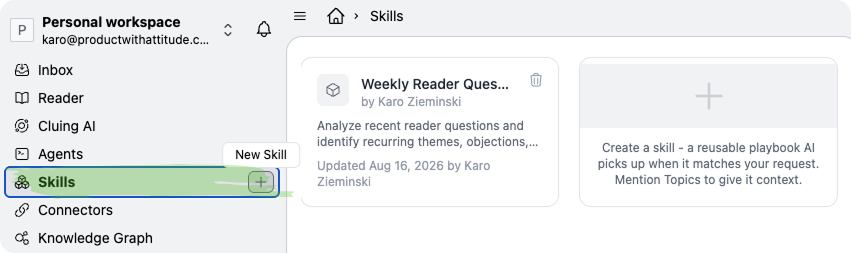
It scans the reader questions I’ve saved in Cluing from Substack, spots patterns, then turns them into newsletter ideas worth writing.
Paid members can skip the setup and simply copy my Skill to mine real reader language for newsletter ideas, Substack Notes, FAQs, and conversion opportunities.
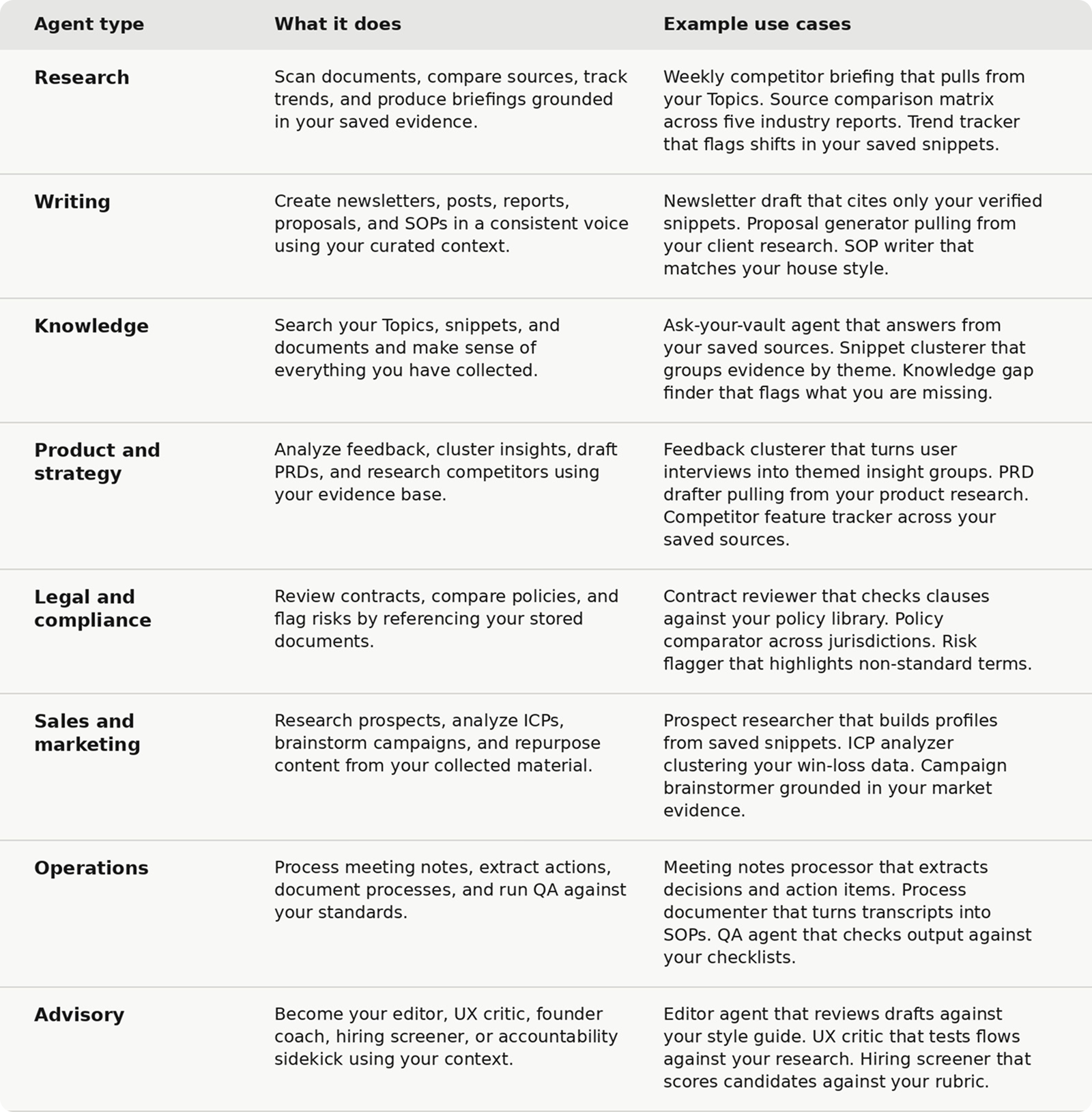
A few more Cluing Skill and Agent ideas to try next:
I used Cluing to write the article you’re reading now. I researched, sourced, and outlined inside Cluing, then wrote the piece myself. My usual process needed minimal adjustments.

Once the article is done, Cluing finds new ways to reuse the same material through links, quotes, and Notes. The snippets from research get more than one life.
Additional things I appreciated
Cluing places tiny bits of UX copy exactly where my brain is about to come up with a problem: “Creating this agent adds nothing to your bill.’’
What could be better:
I wish I could password-restrict links I share. That would turn Cluing into an ideal tool for paid subscriber resources. In fact, if Cluing ever builds this feature, I’d be interested in white-labeling the tool as an extension for my website.
The good thing is that users can request new features directly from the Cluing team.
Starting with Cluing takes less than a minute: register, install the extension, save your first idea. After 2-3 days of saving things as I found them, I started doing it subconsciously. I barely notice the habit now, but the research keeps compounding.
In a way, my second brain is learning faster than I am. It remembers where everything is, and why I saved it, so my first brain doesn’t have to.
Reminder: Paid members get an exclusive 30% off Cluing during the launch week (until 26.08.2026) and 20% off afterwards. The code is here, use it at checkout.
And if you’re in a builder mood, support Sandra Idjoski on Product Hunt. I did.

Comments
Nothing yet. Say the first thing.
Sign in to join the conversation.