

I wrote a blog about how to process Apple HDR Gain Map using both ImageIO and Core Image approaches:
In general, you may want to proceed with the Core Image approach, as it’s much simpler and more straightforward. However, personally I’m still going with the ImageIO approach because it gives us deeper control over the auxiliary metadata of the image.
As of iOS 18 with the ISO 21496-1 standard, it now supports RGB HDR Gain Map image, meaning that the Gain Map image is not monochrome but Chromatic and it gives better HDR result.
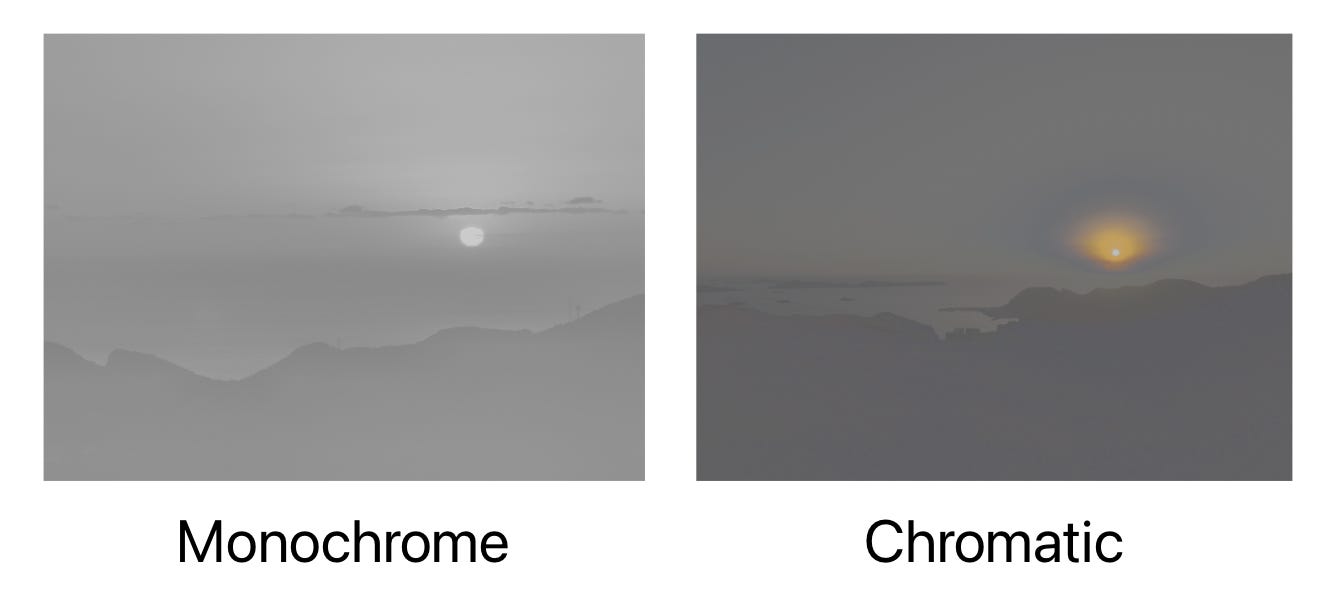
For Core Image, you can get the RGB Gain Map image by simply using:
let image = CIImage(contentsOf: url, options: [.auxiliaryHDRGainMap: true])Then, when saving the image, you can specify the hdrGainMapImage and set hdrGainMapAsRGB to true to save it as RGB Gain Map. Core Image does the rest for you.
ciContext.writeHEIF10Representation(
    of: image,
    to: url,
    colorSpace: CGColorSpace(name: CGColorSpace.displayP3)!,
    options: [.hdrGainMapImage: gainMap, .hdrGainMapAsRGB: true]
)
However, using ImageIO can be a bit tricky. I ran into this issue while working with RGB Gain Map in PhotonCam, which uses RGB Gain Map when saving HDR photos processed from Bayer RAW. I hope the following content helps.
To recall, you can use this API to get the auxiliary HDR Gain Map metadata:
func extractAuxiliaryDictionary(data: Data) -> CFDictionary? {
    let options: [String: Any] = [
        kCGImageSourceShouldCacheImmediately as String: false,
    ]
    guard let source = CGImageSourceCreateWithData(data as CFData, options as CFDictionary) else {
        return nil
    }
    guard let auxiliaryData = CGImageSourceCopyAuxiliaryDataInfoAtIndex(
        source,
        0,
        kCGImageAuxiliaryDataTypeISOGainMap
    ) else {
        return nil
    }
    return auxiliaryData
}
Please note that only ISO 21496-1 standard supports RGB Gain Map, and you may have noticed that it uses kCGImageAuxiliaryDataTypeISOGainMap instead of kCGImageAuxiliaryDataTypeHDRGainMap above.
To be able to proceed with the auxiliary metadata, the dictionary returned must contain 4 keys:
kCGImageAuxiliaryDataInfoDataDescription: the data description (CFDictionary) with info like PixelFormat, BytesPerRow, etc.
kCGImageAuxiliaryDataInfoMetadata: metadata (CGImageMetadataRef)
kCGImageAuxiliaryDataInfoData: the gain map Bitmap data (CFDataRef)
kCGImageAuxiliaryDataInfoColorSpace: the color space associated with the aux image (CGColorSpaceRef)
However, for an image file that contains an HDR Gain Map in the ISO 21496-1 format, you would only get 3 keys and kCGImageAuxiliaryDataInfoData is missing.
You may say that if we are missing kCGImageAuxiliaryDataInfoColorSpace , we can somehow “guess” it or “assume” it in a way to proceed. But without kCGImageAuxiliaryDataInfoData that represents the Bitmap Data, we won’t be able to get the image to proceed.
If you check the log in the console, you would find there’s a line saying:
updateAuxiliaryDataInfoFromPixelBuffer:1857: *** ERROR: Unsupported AuxiliaryData format '420f'It seems that ImageIO won’t support this pixel format, even it’s saved by iOS.
Since we can’t get the bitmap data using CGImageSourceCopyAuxiliaryDataInfoAtIndex from ImageIO, I then tried to get the image using Core Image. As simple as it is, we just need to:
let image = CIImage(contentsOf: url, options: [.auxiliaryHDRGainMap: true])That’s it—now we get the HDR Gain Map image as a CIImage. Then you will be able to leverage Core Image to process the image as you may already do.
Unlike Core Image, there’s no such hdrGainMapAsRGB method when saving images using CGImageDestinationAddAuxiliaryDataInfo. This method receives a CFDictionary that is like what we have from CGImageSourceCopyAuxiliaryDataInfoAtIndex. If you have made changes to the Gain Map image, you should also update the data in kCGImageAuxiliaryDataInfoDataDescription accordingly.
Additionally, as we are missing the kCGImageAuxiliaryDataInfoData before, and instead get the CIImage directly using Core Image, we need to get the Bitmap Data that represents the Gain Map image.
let width = Int(image.extent.width)
let height = Int(image.extent.height)
guard width > 0, height > 0 else {
    return nil
}
var mutableDesc = Dictionary<String, Any>()
let format = CIFormat.BGRA8
let bytesPerPixel = 4
let cvPixelFormat = kCVPixelFormatType_32BGRA
let targetBytesPerRow = nextMultipleOfFour(after: width * bytesPerPixel)
let gainMapImageData = image.getBitmapData(
    ciContext: ciContext,
    bytesPerRow: targetBytesPerRow,
    format: format,
    colorSpace: colorSpace
)
The way to get Bitmap Data from a CIImage:
func getBitmapData(
    ciContext: CIContext,
    bytesPerRow: Int,
    format: CIFormat,
    colorSpace: CGColorSpace? = nil
) -> Data? {
    let height = self.extent.height
    let dataSize = bytesPerRow * Int(height)
    var gainMapImageData = Data(count: Int(dataSize))
    gainMapImageData.withUnsafeMutableBytes {
        if let baseAddress = $0.baseAddress {
            ciContext.render(
                self,
                toBitmap: baseAddress,
                rowBytes: bytesPerRow,
                bounds: self.extent,
                format: format,
                colorSpace: colorSpace
            )
        }
    }
    return gainMapImageData
}
Note that:
Make sure you also update the
kCGImageAuxiliaryDataInfoColorSpacewith the same color space you use to render the CIImage to the Bitmap Data.
If you have ever changed the size of the image, also
kCGImageAuxiliaryDataInfoDataDescriptionshould be updated accordingly.
Then after having the Data representing the Bitmap Data, make it as the value of the key kCGImageAuxiliaryDataInfoData , and add it as an auxiliary metadata:
func saveToFile(
    file: URL,
    cgImage: CGImage,
    utType: UTType,
    properties: CFDictionary? = nil,
    auxiliaryData: CFDictionary? = nil
) throws -> URL {
    guard let dest = CGImageDestinationCreateWithURL(
        file as CFURL,
        utType.identifier as CFString,
        1,
        nil
    ) else {
        throw IOError("Failed to create image destination")
    }
    CGImageDestinationAddImage(dest, cgImage, properties)
    if let auxiliaryData = auxiliaryData {
        CGImageDestinationAddAuxiliaryDataInfo(dest, kCGImageAuxiliaryDataTypeISOGainMap, auxiliaryData)
    }
    if CGImageDestinationFinalize(dest) {
        return file
    }
    throw IOError("Failed to finalize")
}
kCGImageAuxiliaryDataTypeISOGainMap should be used in this case.
If you’re dealing with RGB HDR Gain Maps on iOS 18+, I hope this saves you a few hours of head-scratching.
My current takeaway is pretty simple: when you just need a reliable RGB gain map pipeline, Core Image is the most pragmatic choice. It’s concise, it “just works”, and it abstracts away a lot of fragile details.
But if you care about the deeper auxiliary metadata (or you need to integrate with an ImageIO-based stack), the hybrid approach is a workable compromise: use Core Image to obtain and render the gain map image, then feed ImageIO the fully-populated auxiliary dictionary so it can be written back correctly.
Comments
Nothing yet. Say the first thing.
Sign in to join the conversation.