In one of my previous blog posts, I wrote about how to Extend logs in Node.js with unique trace ID. It is a great starting point to improve logging and tracing of your application. But... can it be upgraded to somehow connect the trace IDs into a usable diagram?
This is where AWS X-Ray can help. It generates its own unique trace ID, which you can send to AWS services or other microservices in your environment, and then collects the data. This allows it to show a map of all services that are used along with a lot of other important information.
I first tried it on my project Zdielaj.si. This is a small application where you can quickly share photos and videos. Let me introduce the project a bit, so that you have a basic overview.
Architecture
The whole application consists of a frontend (React), API (Node.js), User Service (Node.js), and Upload Service (Node.js).
The API is responsible for reading, creating, updating, and deleting albums. The User Service is a wrapper over AWS Cognito and is used to register, log in, and log out a user. The Upload Service handles all uploads and has its own worker to generate thumbnails and converts videos to mp4 files. Data is stored in a DynamoDB database and files are stored in an S3 bucket.
AWS X-Ray Trace Map
I opened the application and:
- Logged in
- Created a new album by uploading several files
- Checked the album and profile page
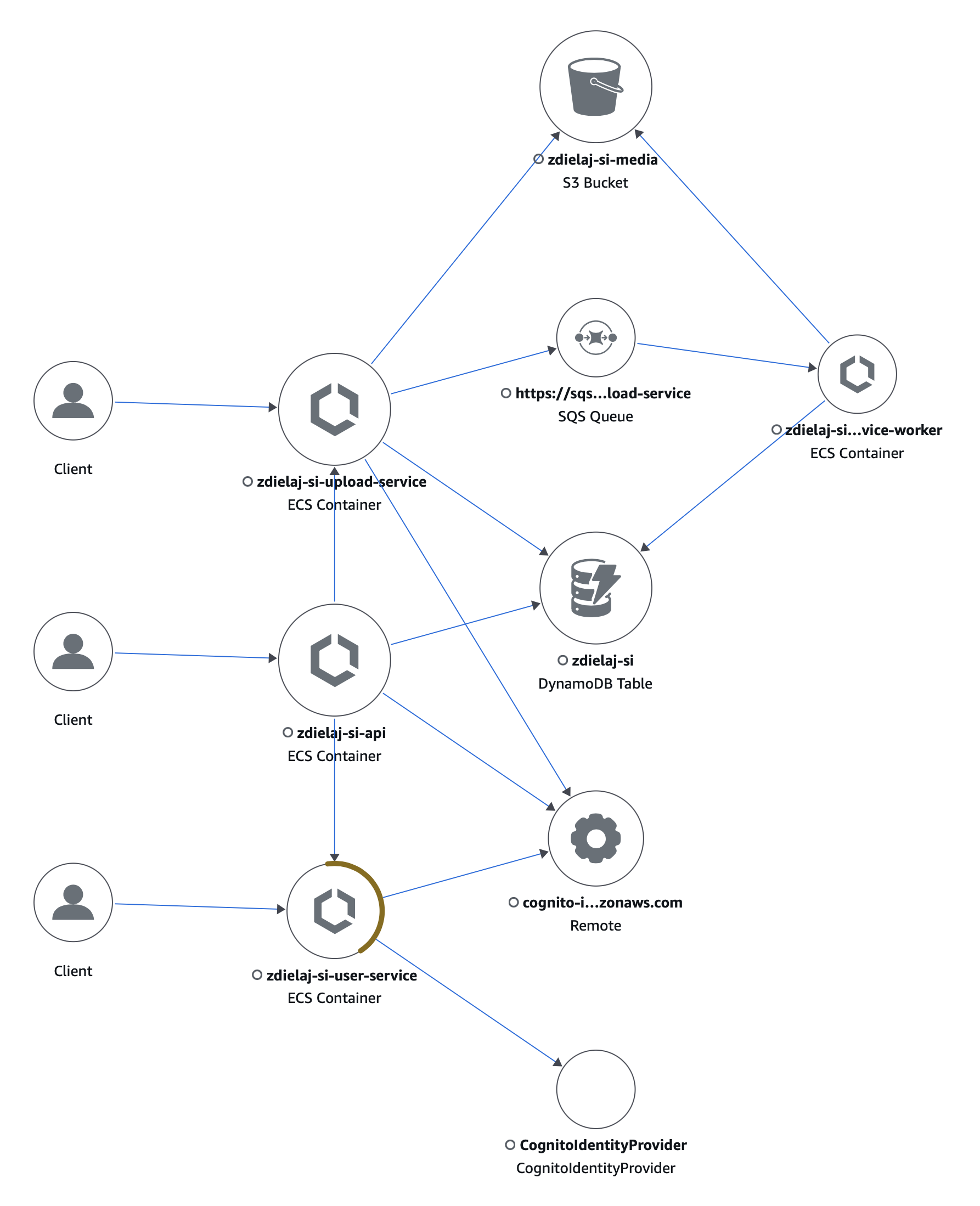
1. Logged in
The frontend sends a request directly to the User Service to check for credentials and obtain an access token. The User Service passes the request to the AWS Cognito Identity Provider. Middlewares in both the User Service and the API use AWS Cognito to load the JSON Web Key Set for JWT token verification.
2. Created a new album
The frontend calls the API to create a new album and then usees the Upload Service to upload files. The Upload Service stores those files in an AWS S3 bucket and notifies the Worker through AWS SQS to resize photos. Resized photos are also stored in the AWS S3 bucket.
3. Checked the album and profile page
This last step is not that important here. When the API wants to get files details, it asks the Upload Service for those, and there is again a call to the API and User Service to get user details along with some statistics (how many albums the user has and how much space they take).
Summary
You can see the whole communication among services from the trace map. If you click on a service or on a trace, you can check how many calls were successful, what is the response time and response code are, and much more.
Comments
Nothing yet. Say the first thing.
Sign in to join the conversation.