
Yes, Analog Synthesizers may require firmware updates if they have digital code for MIDI to Control Voltage conversion, Sequencers, Arpeggiators, or any settings beyond turning dials. Sometimes these firmware updates expand features, most of the times they are bug fixes addressing conflicts that ideally would’ve been sorted before shipping the instrument.
Given the focus of Joy of Synths is analog synths, the last thing I’d thought I’d struggle with this Summer 2025 is firmware. Oh, what a struggle it’s been. What follows are some notes and solutions for Behringer’s reissue of the Kobol Expander semi-modular synthesizer. This is a really nice synth that I’ve owned since November 2023, playing it in combination with the LFO and Envelope Generator output from the Stylophone Gen R-8 semi-modular synthesizer.
Alas, in trying to connect the Kobol Expander to another synth with MIDI cables, as well as play it with KBCV and GATE voltage outputs from the Behringer Swing controller, well, that’s when problems revealed themselves. Let’s get started with the fixin’.
On Mac and Windows, download Synthtribe software direct from Behringer. Unfortunately you will have to hunt for it on their poorly designed download center. Use the search bar for “Kobol” and that will reveal product info faster than the Product Groups/Main Categories drop downs.
You want Behringer SYNTHTRIBE for Mac or Windows. The download should be an installer for SYNTHTRIBE_V.2.9.0 or later.
Mac AppStore SYNTHTRIBE is outdated for iOS, though it will run on macOS laptops. This old version will NOT recognize the Kobol Expander or more recent synths.
Install may be blocked, but the dmg file opened on a different Mac with less lockdowns. You have to drag the icon to Applications folder, despite the installer giving zero instructions. Launch SYNTHTRIBE from Applications folder.
Thankfully Behringer synths have USB jacks for MIDI USB and firmware updates so connect to computer w a printer style USB cable for the Kobol Expander synth. I had issues using a dollar store USB to USB-C adapter. The synth was not recognized until I used a USB hub to USB-C.
The app should identify the synth and confirm w a product photo.

Go into the app. Click “Update” side tab. Update firmware as it should be 1.2.4 or later. This app allows you to adjust settings and Restore Factory Settings, which is the updated firmware default settings. This won’t reinstall the earlier firmware. Aside from firmware and Restore Factory Settings, there is no button for apply or commit changes.
General Settings changes happen live. For example, change Pitch Bend Semitones from 0 to 12. Next, test the pitch bend if you have a controller with a pitch bend wheel or strip. You should hear a difference between 0 and 12 Semitones if you connect a headset to the synth. (Most synths do NOT play Audio over USB so unless your synth offers that feature, you won’t hear anything through the computer’s speakers.)
When you’re happy with settings then disconnect Kobol Expander from USB. I didn’t have to power cycle off/on for setting changes to take effect. Again, this happens live.
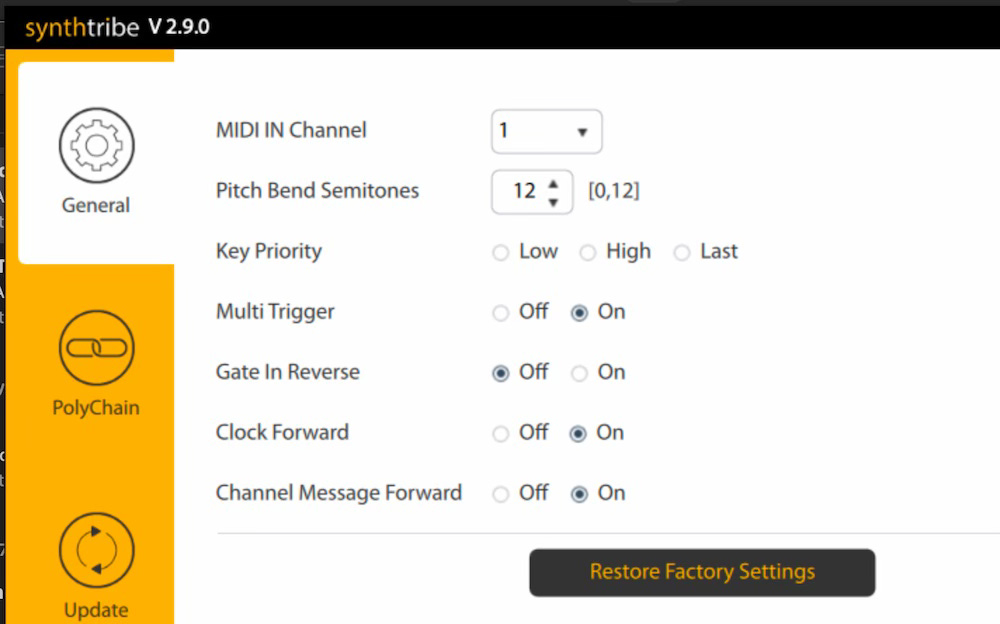
For some dumb reason turning off MIDI THRU is an option. Only it’s not worded as MIDI THRU. Nope. It’s “Channel Message Forward” which is an indirect way of saying “MIDI THRU.”
The firmware release note say “Fixed the issue where a note Gate was remaining open.” Only, it does and it doesn’t. The release note doesn’t specify if this is a MIDI or an external GATE IN patch point voltage issue.
Read “Gate In Open” below to understand Gate in Reverse’s utility. If you are committed to using the Kobol Expander with a Swing controller and no other CV or Gate Keyboard or Step Sequencer, then go ahead and see what Gate in Reverse does. This - in theory- should fix the Behringer Swing Gate In issue. BUT that Gate In Open issue will now apply to every other CV/Gate controller.
If you cut a patch cable wire in half you have a “dead patch” cable. You can plug either half into any mod or cv input on a synth to “break” the internal circuit signal path. The use of a dead patch cable is useful on the Kobol Expander synth because they wired it differently.
If you don’t want to cut a patch cable wire in 2 then just plug in one end and leave the other disconnected. It’s the same result.
Well, turns out the GATE IN keeps the Gate open with a dead patch plugged in. Okay, maybe DON’T use a dead patch on the GATE IN. What purpose does that serve but to shut off the GATE, meaning no sound would pass out of the Kobol Expander.
Well, this is a problem that persists if you connect a Gate voltage Out on the Behringer Swing controller to GATE IN jack on the Kobol Expander synth. The Kobol Expander’s GATE IN indicator light remains on, meaning the gate is open. This means you will hear continuous tone, as the Attack, Decay, and Sustain dials have no influence on the sound’s start or end. Pitch will change if you connect Swing’s KBCV (Keyboard Control Voltage) output to the Pitch In on the Kobol Expander. But it will be continuous tone.
This does not happen if you connect the Swing controller to B. Model D using KBCV and Gate Out voltage.
It does not happen if you connect Gate Out and CV signals from KORG SQ-1 or Arturia Keystep to Kobol Expander. The problem is Swing to Kobol Expander.
There is no problem if connected by MIDI, and frankly, there was no difference between MIDI Gate On (Note On/Off) or Voltage GATE IN when cranking up the rate/speed of working controllers.
Pitch was wildly different as fast speeds, however. MIDI pitch could not keep up with CV Volts per octave changes.
A workaround (if you’re stuck with the Swing) is to connect Swing MIDI OUT to Kobol MIDI IN, and Swing KBCV to Kobol Pitch jack. The Gate will be controlled by MIDI and the CV patch point will override the MIDI pitch information. More to the point, CV patch point will override the MIDI to CV conversion hiccup when playing a sequencer or arpeggiator at a high rate.
To expand on the above, MIDI sends messages for Pitch and Gate, possibly MOD wheel and Pitch Bend wheel. You’ll have to look at MIDI Implementation Charts for the Controller sending MIDI and the Synthesizer with MIDI IN.
The MIDI Implementation Chart may have a column for Function, Transmitted, and Recognized. If there is an “o” in Transmitted or Recognized then that means that function is available. An “x” means it’s not available.
For example, the Korg SQ-1 has an x for Aftertouch and Pitch Bend. Kobol Expander responds to Pitch Bend if settings are enabled in SYNTHTRIBE app. However, you won’t hear Pitch Bend on the Kobol Expander if it’s controlled by a Korg SQ-1 because it doesn’t offer Pitch Bend so it won’t transmit Pitch Bend over MIDI even though
Analog synths with MIDI IN are similar to MIDI to CV Eurorack Modules: MIDI messages are converted to Voltage and prewired to V/O Pitch inputs and Gate In inputs, at a minimum.
If the Kobol Expander were a digital device then the device should respond with minimal delay because it’s a digital message controlling digital settings. Converting digital to analog appears to get bogged down if you increase the speed of a sequencer beyond a threshold. Changes in Voltage, however, did not bog down the Voltage Controlled Oscillator.
The take away is that MIDI will be converted to CV, Gate or Mod voltage for use with an analog synthesizer at some point. Gate responds the same be it through MIDI or Gate. Pitch is more sensitive, so CV may be a clearer path. Either way, look for a controller with CV and MIDI outputs. Behringer Swing has its problems with the Kobol Expander, though, but you can play with settings in SYNTHTRIBE app to see if it plays nice with GATE out voltage to Kobol GATE IN.
I bought both Behringer products - Kobol Expander and Swing- at the same time from Sweetwater in Nov 2023. I noticed in the past year that they were promoting a free 2 year warranty on purchases. Would this apply to the Kobol Expander?
Warranty never figured in buying decisions. I bought on price primarily. This has worked out until testing gear from July to August 7 and discovering these issues.
Here are 2 suggestions to buying gear and weigh against price:
With stores selling on Reverb and eBay and Amazon, read the store’s return policy for that platform. I found those to be more restrictive than if I bought from their site. Why? They lose seller fees on returns and refunds. Amazon as seller and shipper generally has the best return policy but they won’t price match or offer extended warranty or repair.
If price drops within 30 days, will they match it and refund or credit the difference? Holiday buying switches things up, so read up before buying.
Some products have a one year warranty and no repairs. It’s full replacement with possibly new or refurbished product if they don’t offer repairs.
This saved me with the Kobol Expander issue. Sweetwater quickly responded to the Gate In issue and shipped a replacement within 24 hours. It arrived 3 days later. In this case they allowed me to keep the problem synth for future parts.
Unfortunately, pre and post firmware updates, this Gate In issue persists with a dead patch or connection to Behringer Swing. The answer is to just use MIDI IN or use another CV/Gate controller other than the Swing.
To review, connect the Kobol Expander to a computer and update its firmware. Make sure MIDI IN and MIDI THRU work. Enjoy the drone with a dead patch cable, maybe buy a KeyStep, though the Behringer Swing does offer ratcheting and better user control of changing certain settings live. But, KeyStep has a more interesting Arpeggiator and it can operate the Kobol Expander’s Gate In without firmware update. But yeah, update the firmware.
Behringer clones circuits designed by others. They don’t advertise known problems or quirks with those 40-50 year old designs. They may not be consulting the original team or owners of these vintage synths. As a result these problems are passed down to clones.
The clones are usually updated with MIDI IN, which again, is connected to a MIDI to CV circuit that converts MIDI messages to Voltage.
And again, MIDI to CV voltage is internal wiring. Patching Voltage to the IN jacks with Patch Cable Wires overrides the internal signals.
To that end, you can verify internal wiring by connecting outputs to inputs with patch cables. If a LFO is prewired to modulate an Oscillator’s pulse wave’s Pulse Width Modulation, connecting LFO Out to PWM Mod CV In should produce the same result.
Semi-modular synths allow for playing without patch cables but they are more interesting with more patch points.
The Kobol Expander has a lot of patch points so it’s a shame that it doesn’t play well with the Swing’s Gate voltage output without a firmware update.
So run a sequencer with MIDI OUT to MIDI IN. Then connect CV Pitch out to PITCH IN. The external patch point should override the internal voltage. Listen for differences!
I expect variance in sound and control between analog semi-modular synths. Alas, basic controls and connections should work between synths and controllers. If they don’t, it is frustrating that these are not due to wear and tear from over use. These problems may have existed for decades, at worst, and require some time before they are addressed with new firmware, at best.
This experience has cooled my jets on clones. I would have been happily unawares of any of these issues had I not decided to forward the Kobol Expander synth and Swing controller (plus a Behringer Model D) to family. I wanted to record basic instructions on video before shipping them out and here is where the troubles revealed themselves.
New synths are not without their need for firmware updates. Ideally those firmware updates occur regularly. Check the manufacturer product support page for updates before purchase.
Of course you can disavow MIDI and just work with voltage to control an analog synthesizer. But that has its drawbacks, particularly with the Gate conflict between the Swing and Kobol Expander. Thankfully the Kobol Expander has a Gate indicator light that turns on when the Gate is on/open. Many synths don’t have LFO Rate lights or Gate indicator lights. For the sake of sanity, get a semi-modular synth with both LFO and Gate lights. They are so helpful when troubleshooting MIDI and Gate voltage issues. And you will be troubleshooting MIDI, though the answer generally is a mismatch between MIDI Channel numbers. Set every device to MIDI Channel 1 and you should be fine, so long as you connect the controller’s MIDI OUT to the instrument’s MIDI IN. Controllers may have a MIDI IN jack, so verify the MIDI connections are correct. And if either Controller or Device has a mini-jack for MIDI, read the manual to determine if it uses a Type A or Type B mini MIDI cable. For example, the East Beast uses Type A but the SV-1b uses Type B adapters. Thankfully the Taiga Keyboard uses full size MIDI so I don’t have to search for those adapters.

This newsletter will return to twice a month schedule this month of August 2025. The troubleshooting for the Kobol Expander has taken a lot of time, and as much time putting it into actionable words.
This process has further revealed an issue with the East Beast synth’s MIDI THRU. As in, it’s non-existent at present. Thankfully, Pittsburgh Modular and Cre8audio have great service folks and this MIDI THRU issue may get fixed by reinstalling the v.1.5 firmware update. If not, the bug will be addressed with a later firmware update.
Quite frankly, the best investment is a MIDI Splitter Y Cable. This does the job of MIDI THRU without the hassles of firmware. It also saves you with multiple Eurorack MIDI to CV converter modules as those don’t tend to have MIDI THRU options anyways.
Enjoy your time before Back to School!
All Content Copyright 2025 Anthony Torres, All Rights Reserved.
Comments
Nothing yet. Say the first thing.
Sign in to join the conversation.