
For months, I had been selecting “high” for thinking effort in Claude Code without being sure it was doing anything useful.
I had a vague assumption that “high” was better, the way you might choose the premium fuel option without fully understanding your engine. But I really didn’t know what I was actually “buying”. In other words, how much more thinking, for what kinds of tasks, at what cost.
That uncertainty started to bother me when I noticed a quality regression warning from Anthropic’s engineering team in April 2026. They had briefly dropped the default effort level from high to medium during a model update, and performance degraded visibly enough that they reverted it. That single fact told me these settings are not cosmetic and that they can have an impact.
So, I went and read the docs properly.
What I found was that thinking levels are really only useful when coupled with the well-know planning mode, and, more recently, the goal mode. Each solves a different problem, but from experience, each problem and tools is confused with one another.
This is why I wanted to deep dive into the topic of thinking levels and planning modes to help you get the most out of Claude Code (and other vendors such as Codex).
What are Claude Code thinking levels? What effort levels actually are, how the values map to different models, and when to stop using “high” by default.
What is Claude Code planning mode? Why agents fail when they act too early, and why plan mode has become my default working posture for anything non-trivial.
Planning mode as the umbrella: model, effort, and execution. How
opusplanexpress the same idea in product form — and why model and effort selection makes more sense once you understand planning phases.What is Claude Code /goal mode? How
/goalworks, how it differs from/loopand Stop hooks, and why the evaluator mechanism matters.Writing a goal that has a finish line. The five things every effective goal needs, with weak and strong examples.
Does Codex do the same? A brief comparison showing these controls are converging as a standard across agentic coding tools.
When not to use these modes. High effort is not always better. Plan mode is not always necessary. Goal mode without a verifiable end state is a bad idea.
4 practical patterns for combining planning mode and goal mode. Reusable combinations for common real-world situations.
Let’s get started!
Effort levels sit along what Anthropic calls the test-time-compute curve.
Given a prompt to Claude, the model can reason before it acts. For example, it can generate more or less internal steps, evaluate narrower or more different approaches approaches, and can check orthogonal assumptions. Now, the amount and the breadth of this “reasoning” is controlled by effort levels.
Before we go into details, let’s understand different thinking levels that Anthropic offers
max thinking sounds pretty cool. It’s like if Tony Stark is chatting with Jarvis.
But, guess what? max means using more tokens than medium. Simple as that (and a bit disappointing really).
Higher thinking levels “just” use more tokens to evaluate more or different approaches. Check Anthropic’s own chart on accuracy vs tokens used for their agentic platform.
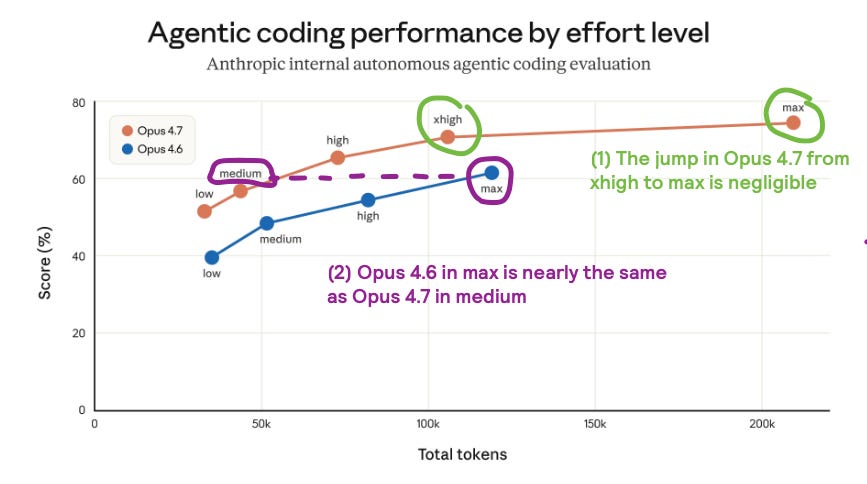
2 patterns stand out:
Opus 4.7 gets way higher scores than Opus 4.6… but check the saturation curve.
xhighreally gives you most of the power. The jump tomaxis negligible.What we thought was amazing in Opus 4.6 using
max, it is really amediumthinking level in Opus 4.7. This means that if you did have services running on Opus 4.6, you can achieve the same with much lower thinking time.
Therefore, thinking levels does not equal to intelligence. What higher effort buys is more deliberation: more opportunity to catch inconsistencies, compare approaches, and avoid shallow mistakes. Reasoning effort is budgeted deliberation, not guaranteed correctness.
So yes, more budgeted deliberation also means, lots more money spent.
PS: For the purists, I know there is an argument about getting an answer right in fewer retries, but still… max in Opus 4.7 is 4x the cost compared to medium. Are you sure you need max levels all the time?
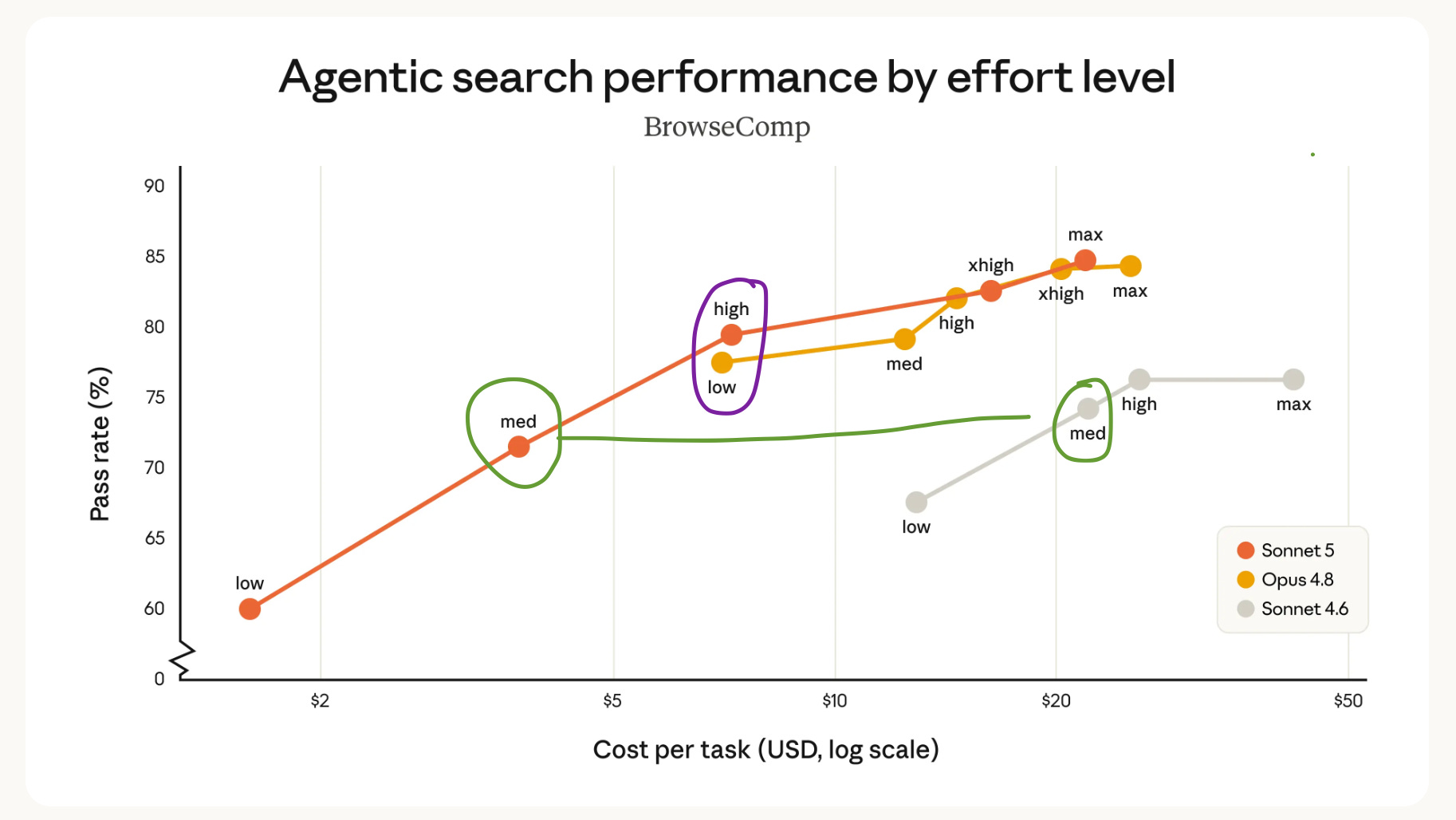
With the release of Sonnet, I am been surprised by the benchmarks that Anthropic shared. We all know that Sonnet is way cheaper in terms of token input and output than Opus, but I really like that Anthropic compared them against “Cost per Task”.
You can see how if you use Sonnet on High, the accuracy is slightly above Opus 4.8… but the cost you will pay is pretty similar. So, yes a “higher thinking simpler” model, can cost the same as a “low thinking smarter model”.
On the other hand, at the “medium” level, you should see a great cost performance (not a great accuracy performance) if you compare Sonnet 5 and Sonnet 4.6.
Therefore, are thinking levels a deal breaker?
I would argue, not really. Or at least, not out of the box. The key is on trying effort levels for your tasks knowing that the tradeoff is on spending more tokens (ie, spending more money on the task).
I personally use a 3 tiered approach:
low— find a file, explain a function, run a known command. The reasoning load is minimal. Low effort is fast and accurate.medium— standard bug fixes, adding tests, straightforward refactors. The default is well-calibrated for most everyday work.high/xhigh— architecture decisions, multi-file migrations, debugging with an unclear root cause, security-sensitive code, public API changes. These are the cases where shallow reasoning produces mistakes.
In fact, if you didn’t know, you can set effort levels in your skills and agents! For example, if you have a skill that builds data visualisation code, you most probably can live with medium efforts. Good news, you can force your skill or agent to use medium thinking efforts!
For more info, check my post on skills to see this in detail.
Before we continue with a deeper view, let me share how easy it is to change effort levels in Claude code.
Changing effort levels in Claude code is super easy.
Type this command:
/effortUse the arrows in your keyboards to move left or right
←/→, decide the effort level and hitEnter.You will see a message confirming the chosen effort level



Click the
[/]iconClick the effort level you want
Click anywhere in the chat to close the pop-up window
If you click the
[/]icon again, the preferences should have been saved.
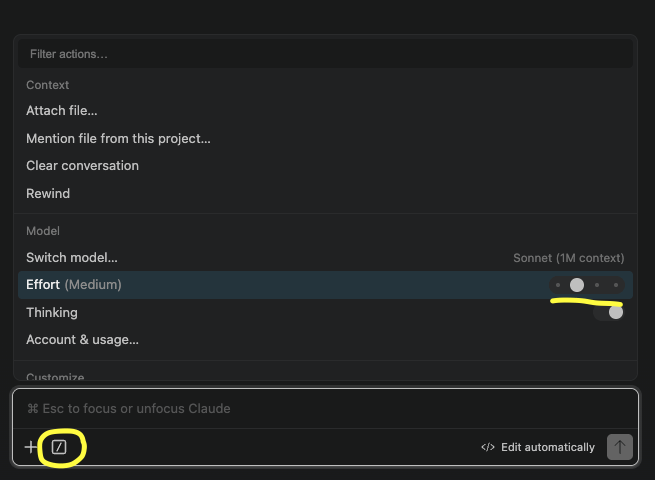
As you see, it is as easy as that.
⚠️ Small caveat! Haiku doesn’t have effort nor thinking versions
So… if there is no friction in changing thinking levels, and if I can ask an agent to think for longer, do I even need plan mode? The answers is yes but it’s important to understand why.
The most common way coding agents go wrong is not the reasoning. It is the timing.
This is similar to how we do things as humans. How many times have you had success doing anything (not only writing code) if you didn’t fully understand the problem, and sometimes, even knowing the problem jumping directly to a solution? Probably you had less success doing this compared to when you do the same exercise but having thought a bit about what you were solving.
Well, Claude Code has a similar mode: the Planning mode.
Planning mode creates a phase boundary. The agent moves into a mode where it explores and proposes, but does not edit. The flow becomes:
inspect → reason → propose plan → waitTechnically “does not edit” is incorrect, because it does create a plan file in a /temp staging. You can read and see what the agent intends to do before it does anything. Therefore, you can correct misunderstandings at the cheapest possible moment — before they are baked into code.
Anthropic’s official best practices guide describes a 4-phase workflow:
Explore
Plan
Implement
Verify
Plan mode enforces the boundary between phases 2 and 3. The agent does not move from planning to implementation until you explicitly allow it.
One way is to simply use the command /plan

Another way is to use Alt + Shift. This will loop through the different modes that Claude Code can activate.
Click the </> button and select the mode in the panel that pops-up.
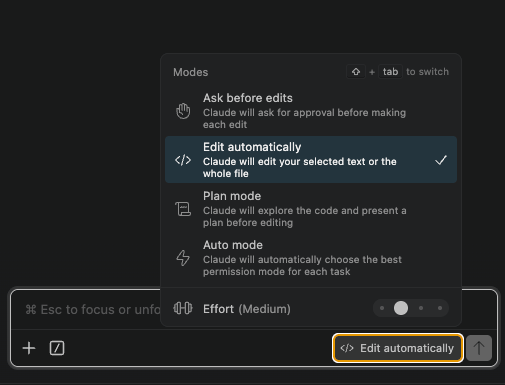
The Ctrl+G shortcut opens the proposed plan in your editor before Claude proceeds, which means you can annotate, reorder, or discard it before a single file changes.
I have made plan mode my default working posture for anything that touches more than 2 files, involves architecture, or carries a non-trivial reversal cost. In fact, I even have it defined in my operating model with Claude Code by defining stating the importance of plan mode in my global Claude.md file. If you want to see more details, check my Claude.md post!
Now, the deeper reason planning mode has value is not just that the LLM has better context of the system and that it can state all the required steps to proceed. What I have experienced is that planning changes the question you ask. Without plan mode, the question is: “Did Claude do this correctly?” With plan mode, the question first is: “Is this the right plan?” Those are different questions, and the second one is much easier to answer before files change.
The other thing that planning enables is the ability to decide what models or effort levels to use for each stage. Let’s cover this in the next section.
If planning and execution are different phases, they can use different configurations.
All best practices indicate to use more reasoning during the design phase, followed by lighter execution or thinking or efforts once the plan is approved and the path is clear.
In fact, this is such a standard practice that Anthropic actually enabled specific model aliases that would:
First, trigger Opus during plan mode for complex reasoning and architecture decisions
Then, automatically switch to Sonnet during execution for code generation and implementation
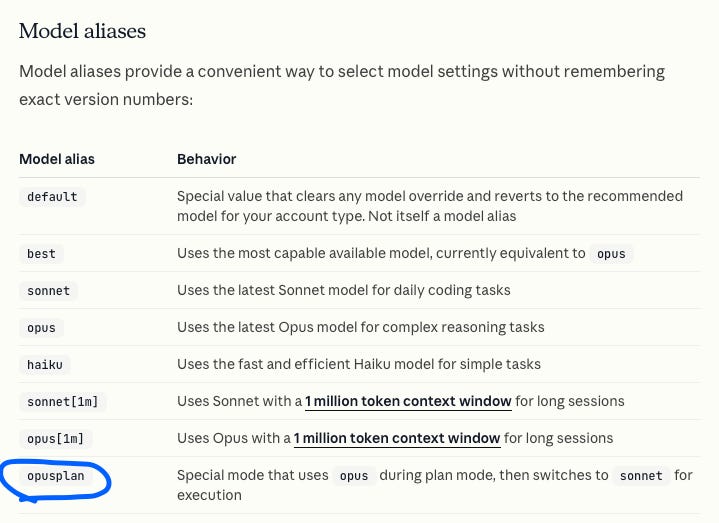
You can see this in my terminal screenshot:
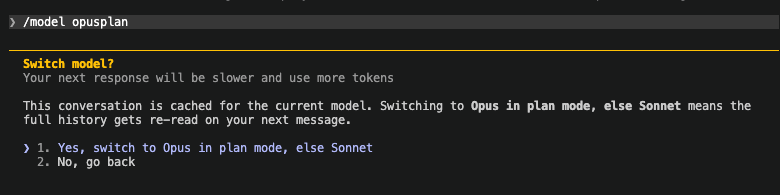
But, the above does not necessarily mean you need to use Opus for planning and Sonnet for implementing. Given that you understood the differences between thinking efforts and planning modes, you can decide your own workflow.
I personally use Opus in low or medium for most planning tasks and Sonnet with medium or high for implementations. Now, remember this depends on how you work. If you have an agentic workflow that creates atomic PRs, then executing of these smaller changes doesn’t need ultra complex token spends. But, if you are running complex research agents and spawning agent teams which need coordination, then probably Opus and high effort levels are your best friends.
In the next section I want to introduce a new feature that Anthropic introduced: goals.
What we have just seen above is a sequential way of working with Claude Code. As a human, you prompt, review plans or outputs, and iterate with Claude on the task. For example, something like this:
This is still a good way of working, but, you become the scheduler deciding after every turn whether Claude should continue.
If you want more automation, Anthropic has you covered too with goal mode!
Goal mode removes that overhead. The official Claude Code docs describe it as: set a completion condition, and Claude keeps working across turns until a model evaluator confirms the condition holds.
Comments
Nothing yet. Say the first thing.
Sign in to join the conversation.