
💃TGIF Party People!🕺🏽
I got caught in the Pacific Northwest’s version of a torrential downpour yesterday: thunder, lightning, hail, raindrops the size of grapes. We don’t really do weather like that here, so by late afternoon, when Apple’s Weather app showed one harmless little cloud spooning a smiling sun, I totally believed it.
Rookie mistake.
After a full day cooped up inside, everyone on the farm needed out. So around 4 o’clock, I climbed on one horse, led a second, and set off with three dogs unleashing a day’s worth of zoomies.
Then came our “oh, hail no” moment. Like, for real, little icy rock chunks started coming in hot. Erm…cold. Not 30 seconds later, the sky opened like upstairs had kicked over an Olympic-size swimming pool. Rain splashed down, hail melted into my hair, and our whole rag-tag lot soaked in seconds. At one point, I swear, the horse I was leading (from the back of another horse) gave up on trotting and simply water-skied.
We made a break for my aunt’s barn, waited out the worst of it, and eventually squished home — soggy, ridiculous, and with a story you only get when technology fails you spectacularly.
Apple Weather: one little cloud, smiling sun, 100% chance of betrayal.
And yet here I am, doubling down on trusting even more unfinished Apple software: the iOS 27 public beta, living on my phone all week because apparently I enjoy turning perfectly functional technology into a trust exercise.
📱 Should you install the iOS 27 beta? My verdict in 60 seconds — what’s awesome, what’s wet paint.
🎒 My new back-to-school buying rules — why the smartest time to buy the laptop is right now, and the trap hiding at $300.
👀 As The Silicon Valley Turns: we now know what Apple and OpenAI are really fighting over — and it has eyes.
✨ And a TRY THIS: the $300 color analysis ChatGPT does for free from one selfie.
Let’s dive in. 👇
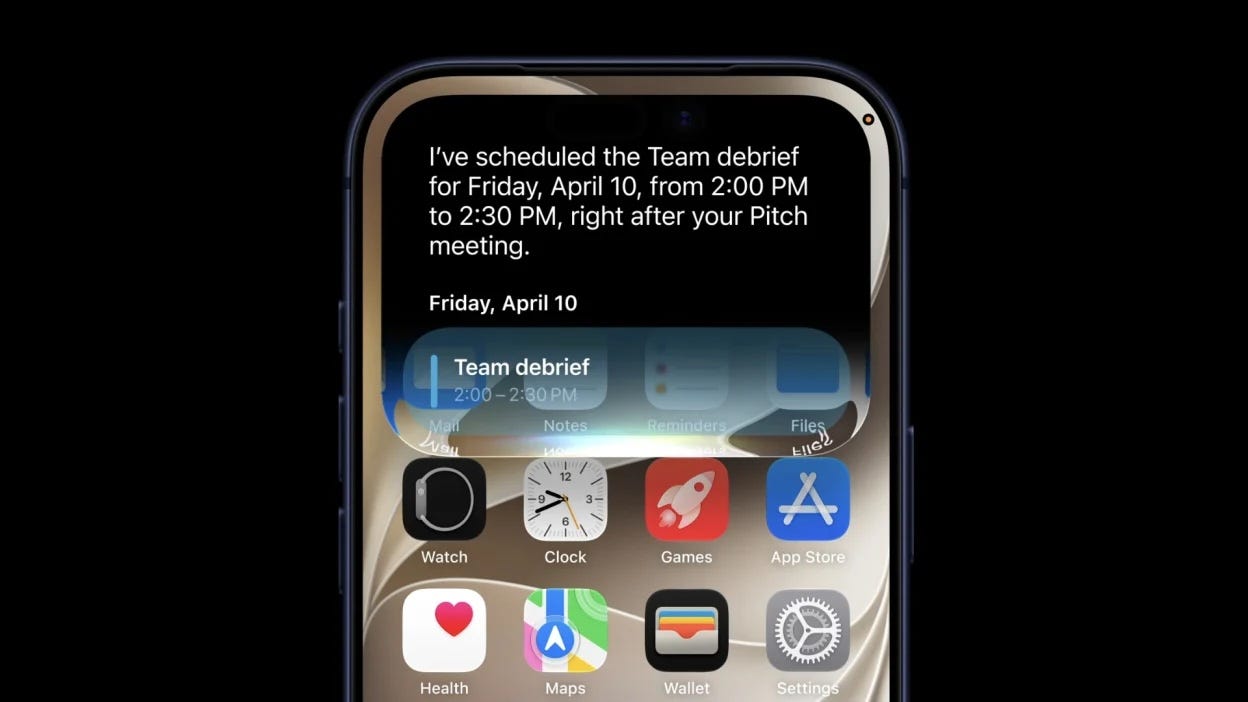
The beta’s been on my phone all week, so let me answer the question many of are asking:
Should you download it? Honestly — yes. This time, yes. I’ve spent years telling you to skip day-one betas, so that surprises even me. This is the first beta in years — maybe ever — that feels stable enough for me to recommend on day one. I said it on camera this week, and I’ll say it again and again. I’ve had it on my phone all week, I LOVE it, and I keep finding new things.
The grown-up caveats still apply: back up first (iCloud or a computer — no exceptions), expect a rogue bug or faster battery drain here and there, and know that going back to iOS 26 isn’t a tap — it’s a wipe-and-restore project. If your phone is truly mission-critical — health apps, work, a kid’s check-in — the polished version arrives free in September and waiting costs you nothing but Apple fan-girl/boy bragging rights.
One insider heads-up: the new Siri sits behind a waitlist after you install. Mine cleared in a minute or two — good luck with yours; your mileage may vary.
(And yes, the classic advice is “put betas on a spare phone.” Who actually has a spare phone — aside from a tech reviewer like me?! As long as you realize there’s a learning curve, this is the rare beta where you don’t need one.)
What you get once you’re in: your phone truly does get faster, not slower, even on older iPhones. Parents get the biggest Screen Time overhaul in years — one-tap controls, time allowances by app category, school-day schedules, and Ask to Browse, which extends approval to websites, not just apps. And Reframe lets Apple Intelligence fix a photo’s angle after you take it. Botched the shot at the summer T-ball game? Fix it by Tuesday.
The wet paint: the new Siri — impressive one minute, confidently lost the next. The beta is solid; Siri is the part still drying. Temper your waitlist excitement accordingly, and check back in September.
(The full feature-by-feature breakdown hits Techish this weekend.)
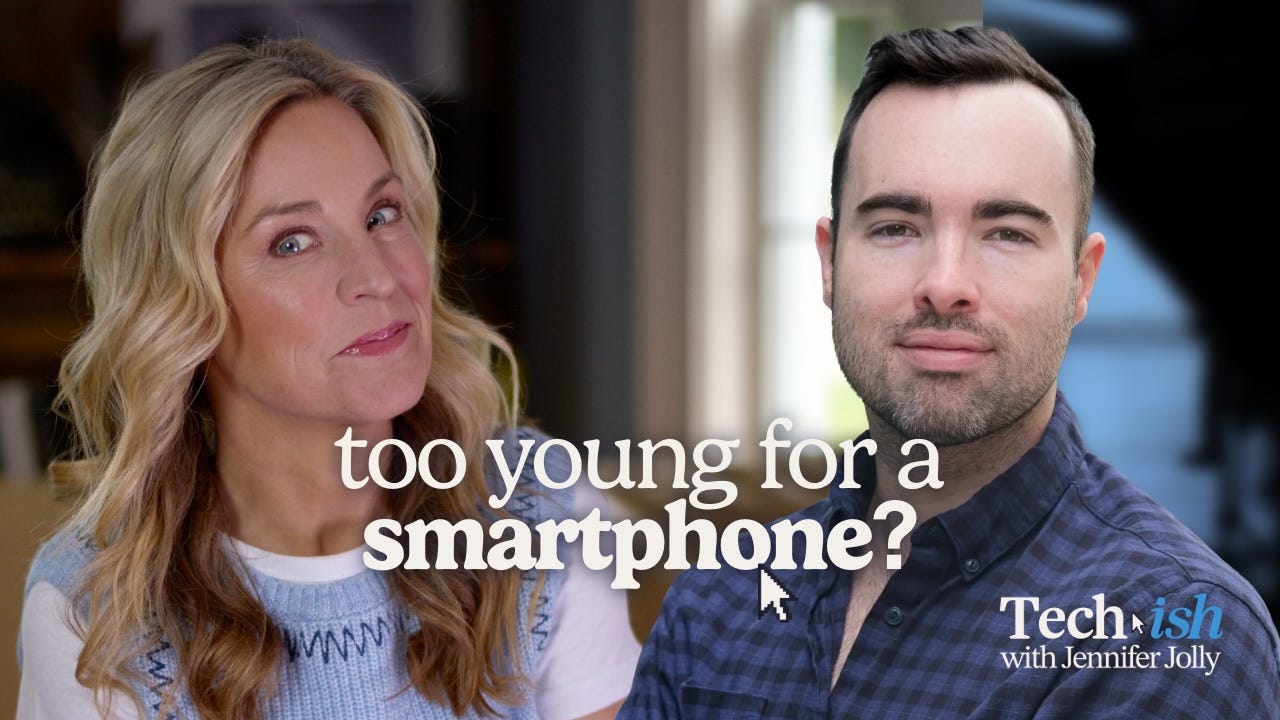
This week on Techish with Jennifer Jolly (that’s me), I sit down with Russell York, founder of kids’ smartwatch maker Cosmo, for the question so many parents ask: Is a smartwatch the right first device? We get into Australia’s and the UK’s under-16 social media crackdowns, what the research actually says about early smartphone adoption, why “training wheels” tech is having a moment — and yes, I push back, including on the surveillance question this whole category would rather not talk about.
Watch the full episode [HERE], listen wherever you get your podcasts, or right here → [WGN]
Every July and August, I test a mountain of back-to-school tech and tell you what’s promising. This year, I’m doing something different: I’m telling you what to buy right now — because for the first time in my reviewing career, waiting for my full, in-depth reviews could cost you money.
Here’s why, and here are my rules.
AI companies are buying up all the memory chips. The same RAM that goes into your kid’s laptop? Data centers want it too, and they’ll pay whatever it takes. So the chipmakers are selling to them first, and everybody else is fighting over what’s left.
The result? Industry analysts say memory prices are on track to more than double this year. Laptop prices are already creeping up $100, $200 at a time. And this isn’t blowing over by Christmas — building new chip factories takes years, so we’re stuck with it for a while.
So the usual back-to-school advice — wait for Labor Day sales — is backward in 2026. The deal you see today may be the best deal you see all year.
Pay attention to RAM, because that’s where laptop makers are cutting corners to keep prices looking normal. Consumer Reports calls it shrinkflation, which is a much more PG term than what I call it. Same price tag, worse laptop.
A real-world example from my own desk: I’m testing the Lenovo IdeaPad Slim 3i, and as I write this, it’s $400 off — just under $900. My full review isn’t done, but the price is the story: 16GB of RAM and 512GB of storage at a price where other brands are starting to ship 8GB and hoping you won’t notice. Deals like this are what the memory crunch is killing off, which is why I’m flagging it now instead of waiting. (If the price has crept back up by the time you click, that’s RAMageddon working in real time.)
I get this question every August, and this year the answer changed: Normally, a $300 laptop is a compromise. This year, it’s a trap. That’s the price where all the corner-cutting hides — 4GB of RAM, slow storage, dim screens — because the cheap memory that used to make those machines okay-ish is gone. A $300 Windows laptop in 2026 will feel slow the day you open the box and be even more painful by spring break.
The exception: Chromebooks. If your youngster lives in Google Classroom and Docs — and way most elementary and middle schoolers do — a $300 Chromebook is still totally fine, because ChromeOS doesn’t need much to run well. Just be honest with yourself about what you’re getting: a browser with a keyboard, not a computer that grows with them.
My rule this year: under $400, buy a Chromebook or don’t buy at all. For a real Windows machine, start where the 16GB models live.
Can’t stomach the new prices? The same AI boom that's pushing up laptop costs — Apple just raised Mac and iPad prices by as much as $200 — makes refurbished tech the smart move for many families. The short rules: buy certified refurbished (manufacturer stores or major retailers with warranties), not “used, trust me” from a stranger; check the battery health before you check out; and never buy without a return window — 90 days minimum. My full refurbished guide, with where to shop and the new catches this year, hits Techish this weekend.
Here’s the claw-back for those price hikes: education discounts. Almost every major tech brand runs an education store, and eligibility is broader than most families realize. Case in point: Apple’s back-to-school offer is live right now — education pricing plus an Apple Gift Card from $100 to $150 with an eligible Mac or iPad, through August 27, and it covers college students, their parents, faculty, staff, and homeschool teachers. (Education pricing also drops the new MacBook Neo to $599 — basically undoing the AI-price hike.) Verification takes two minutes with a school email.
Three things to know: the discounts usually stack on top of sale prices — check the education store after you find the deal, not instead of it. A gift card is not a discount — those promos only count as savings if you were going to buy the accessory anyway. And verify before you count on it — offers change midsummer, and two minutes on the terms page beats a surprise at checkout.
Not everything on my desk is still “in testing.” Some of it has already survived the wringer.
Kids’ smartwatches — the training wheels of family tech. I’m in the final stretch of a months-long, head-to-head test of three of the highest rated ones — TickTalk, Cosmo, and Pinwheel. Here’s what I know for sure: Calling, texting, and GPS with zero social media are a great deal at a fraction of a smartphone’s cost, and each has real strengths and real quirks. The winners, by age group and with all my testing receipts, land in about a week.
Headphones with a permanent parent in the volume knob. The iClever Q950 ($70) caps the volume at safe-for-young-ears levels no matter how hard your kid mashes the button, and noise canceling kills the background racket so they never want to crank it in the first place. It’s certified under an actual hearing-protection standard — rare in the kids’ headphone aisle — with a 60-hour battery that survives the whole school week.
The college end of my testing table is trending gloriously backward in time. (Google’s search data says I’m not imagining it: “dorm designer” searches just spiked over 500%, and the top trending dorm aesthetic is “coastal.” Fairy lights, as ever, remain undefeated.
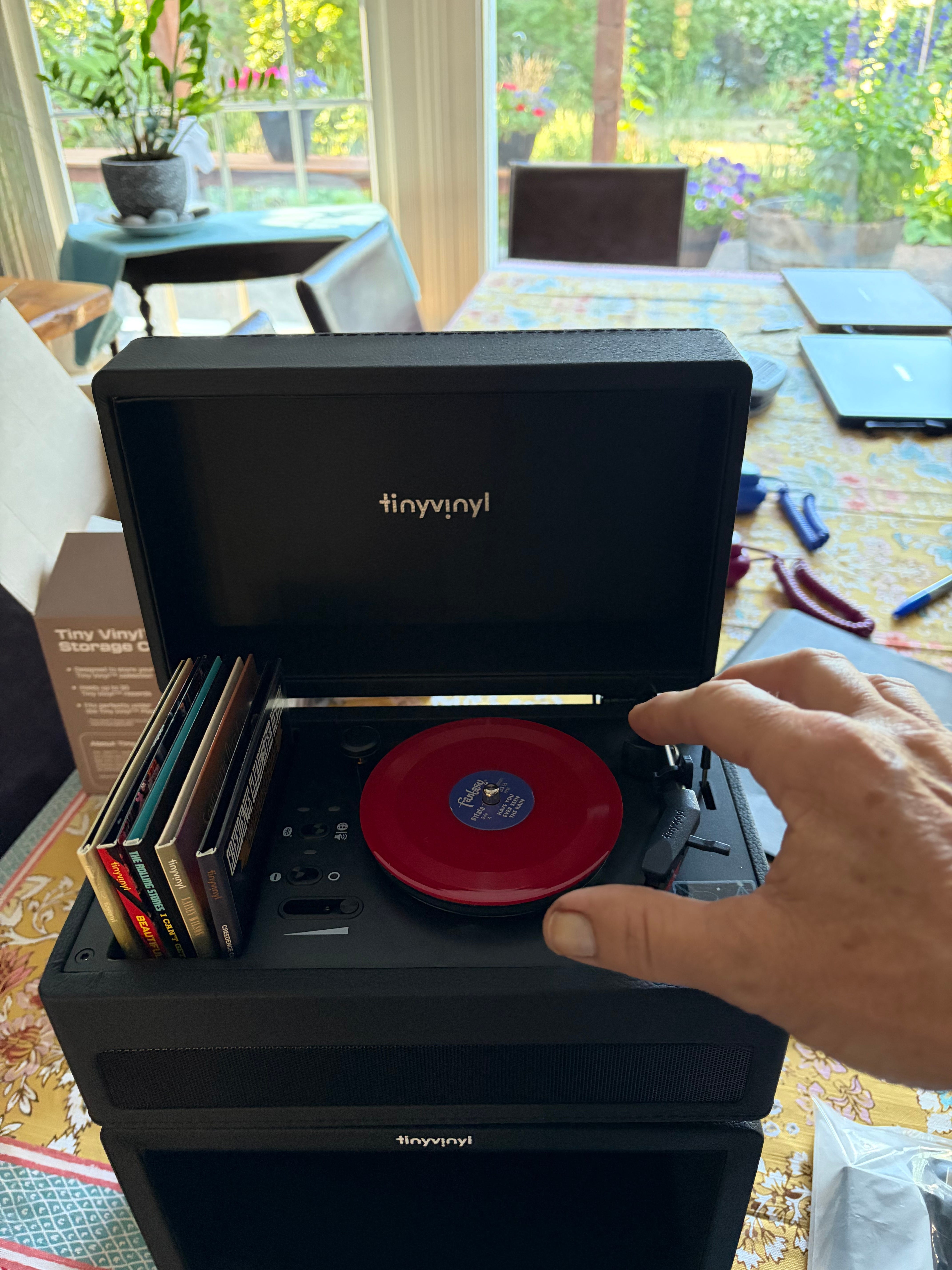
Tiny Vinyl is exactly what it sounds like: real 4-inch vinyl records ($15) from Olivia Rodrigo, Chappell Roan, BTS, and more, plus an adorably tiny record player ($50) that just launched exclusively at Target. Music with zero screens and zero algorithm.
IKEA’s viral VARMBLIXT “Donut” lamp ($100) just went smart, with colors you change by remote or app — study glow, movie mode, and the room’s whole personality in a single ring.
The $10 mic drop: IKEA’s KALLSUP Bluetooth speaker made a splash at CES for sounding way better than ten bucks should. Backpack-sized, dorm-priced, and cheap enough not to cry about when a roommate borrows it forever.
And because you know I’m a sucker for nostalgia: the Camp Snap 2 ($69.95) blends a vintage point-and-shoot’s simplicity with an 8MP sensor, room for 2,000 photos, and USB-C. Its new sibling, the CS8 Video Camera ($199), channels the iconic Super 8, with no playback screen at all, so kids (and by kids, I mean ME) can capture the moment instead of reviewing it for 10 minutes. Screen-free cameras for the screen-free childhood movement. The theme writes itself.
The rest of the pile is mid-wringer: the ASUS Zenbook A16 (16 inches, a frankly absurd 48GB of RAM, making the “buy once, keep all four years” argument), the battle of the comeback landlines (I promised you a winner — it’s close), the new Greenlight Family Hub, and a MagSafe case with an E-Ink screen your kid can update from campus. AND SO MUCH MORE. Verdicts soon.
Last week: Apple sued OpenAI over stolen hardware secrets. This week, a suspiciously well-timed leak revealed what those secrets allegedly helped build — a screen-free speaker with a camera, a battery so it can roam your house, and mechanical parts that move on their own so it feels alive. No screen, but it has eyes. (Um…how do you feel about that?)
Apple wants a court order blocking OpenAI from using its secrets — which, if granted, could stall OpenAI’s hardware plans while Apple builds its own kitchen-counter device. (OpenAI’s side says the speaker is nothing like anything Apple sells; nothing’s been proven.)
The punchline: OpenAI’s actual first hardware product went on sale this week, and it’s... a $230 keyboard accessory for programmers with a knob that makes the AI think harder. I wish I were kidding about the knob.
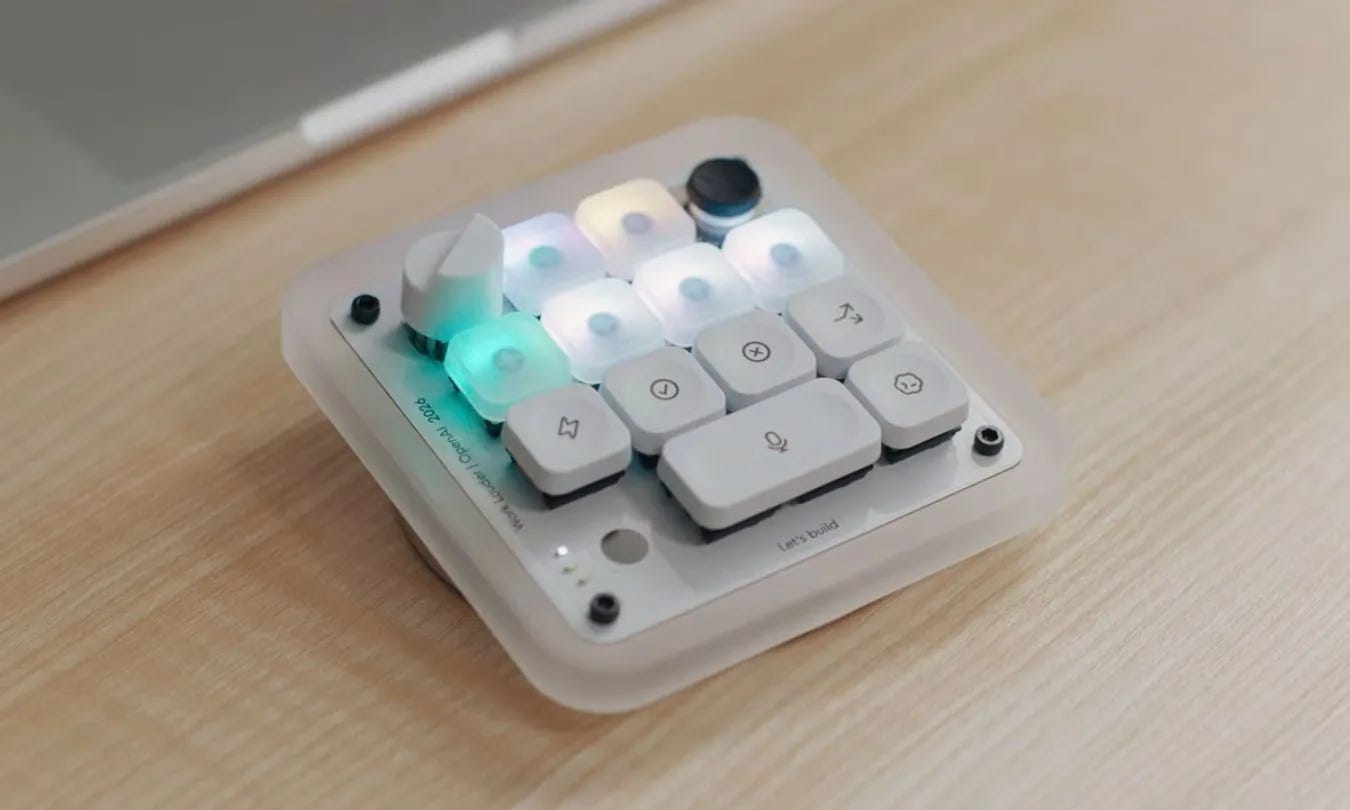
The craziest part in all of this, though, is that they’re still partners. ChatGPT is literally built into your iPhone. That tangled mess, and why it matters to you, is next week’s story, and it’s messier than you think.
Would you let a robot with a camera and a personality live in your kitchen? I will, but only if it actually does the dishes.
Seasonal color analysis — the “which colors actually look good on me” service that took over TikTok — runs a few hundred dollars with a human expert. ChatGPT does a surprisingly good version in minutes. I know because I just did it, and I am apparently a Light Spring. More on that in a second.
Here’s how to do it (I have the paid Pro version of ChatGPT, so that’s what I used to test this one out):
Take one clear, well-lit photo of your face — natural light, no filter. I started with this one (which I took right after someone called Punky Brewster 🤣.
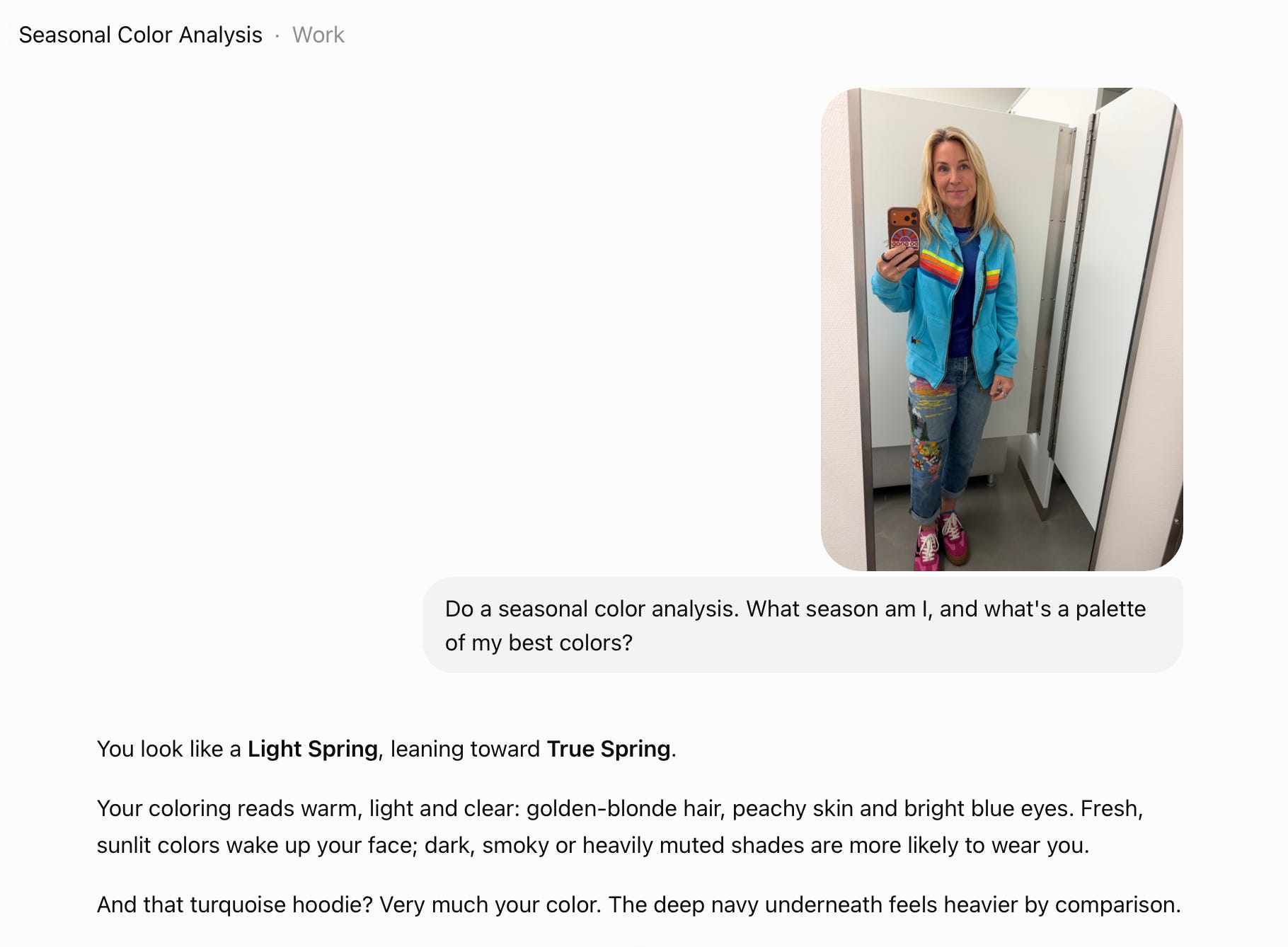
Attach it to ChatGPT and ask: “Do a seasonal color analysis. What season am I, and what’s a palette of my best colors?”
Then ask it to generate your palette as an image — you’ll get a color card to save on your phone for shopping. (Because all those words don’t mean anything to me, I need to see it all in action.)
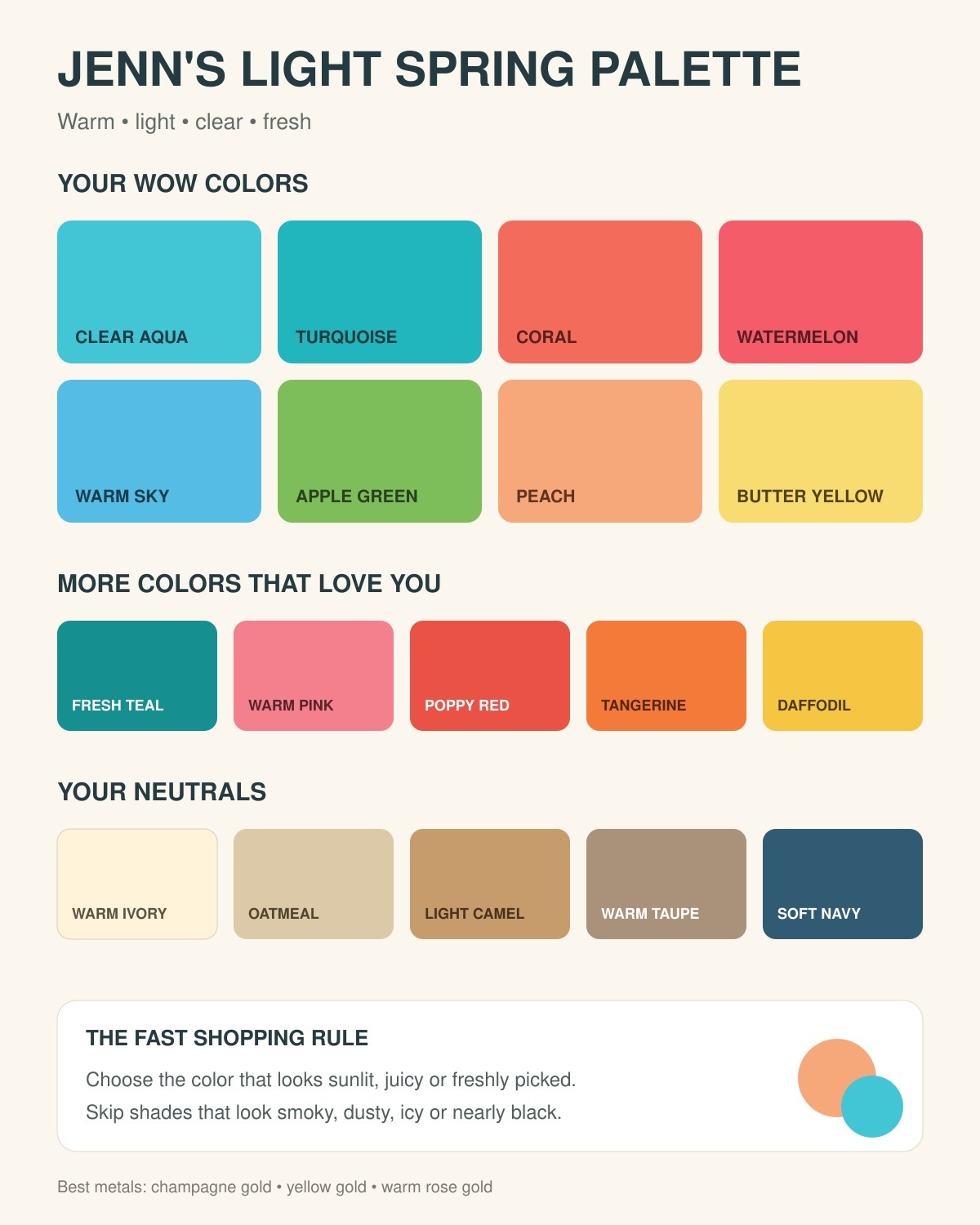
Okay, now for the big payoff: Upload one more photo and ask, “Can you show my best and worst colors on me?” It generates side-by-sides of you wearing your winners and your losers.
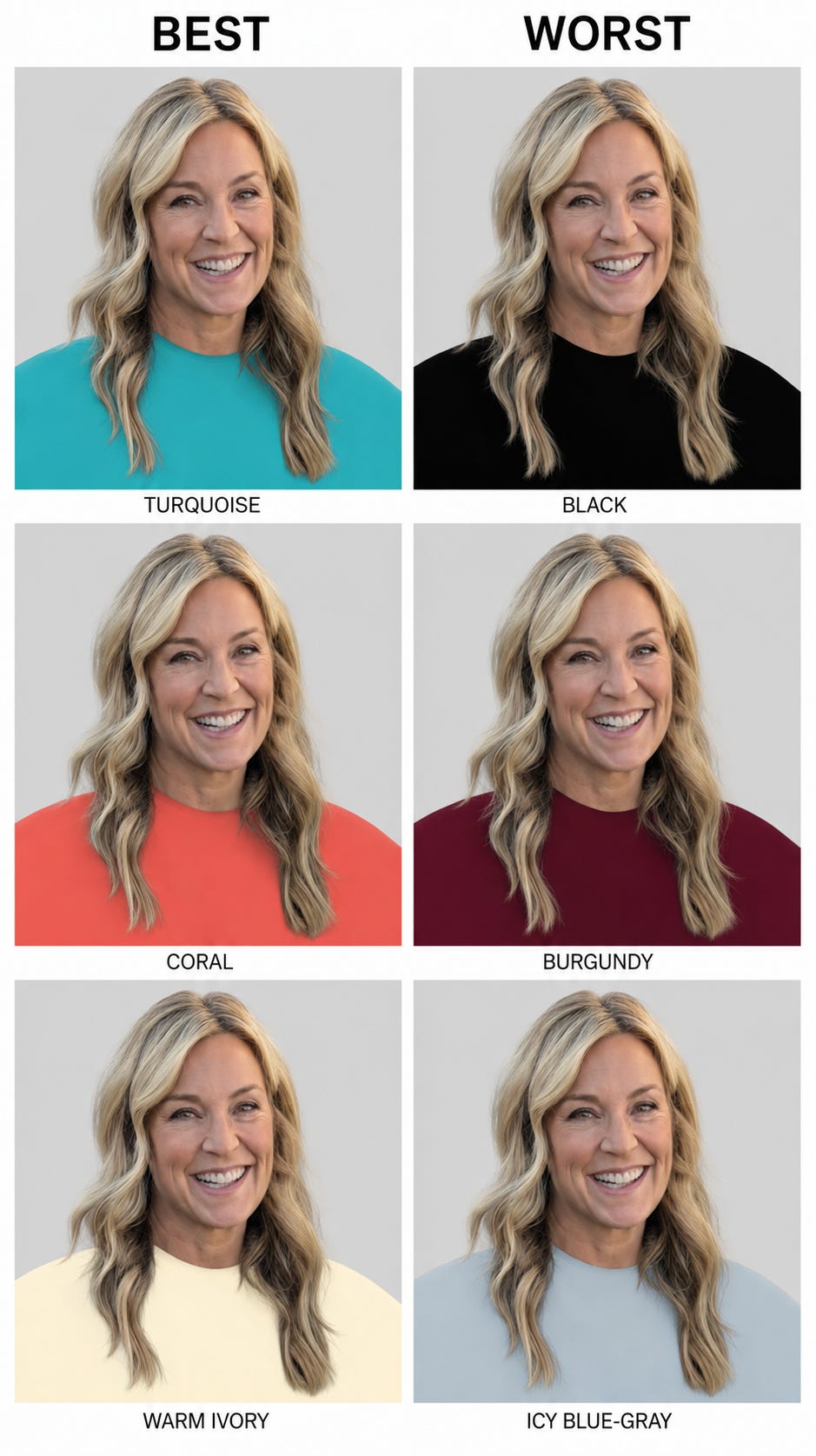
My results: coral was “the winner,” turquoise apparently sharpens my eyes, and burgundy “pulls your face downward” — rude, but after seeing the side-by-side... its not wrong. It even called out the hoodie I was wearing in the photo as one of my colors, then told me to swap stark white for cream and black for a warm navy. My shopping list just rewrote itself.
The bonus round for the season: “Now tell me which colors to look for — and which to avoid — when I shop this fall.”
Then hit reply and tell me your season — I’m collecting the results, and I want to know if the robot stylist is onto something.
Fair warning, as always: you’re handing an AI photos of your face. That’s the trade — decide how you feel about it first. And treat the verdict as a fun second opinion, not gospel — even ChatGPT admits the try-on images are directional, not a controlled draping test.
(This is tip #2 from my upcoming insider guide — the rest are coming to paid subscribers first. Stay tuned.)Fair warning, as always: you’re handing an AI a photo of your face. That’s the trade — decide how you feel about it first. And treat the verdict as a fun second opinion, not gospel.
(This is tip #2 from my upcoming insider guide — the rest are coming to paid subscribers first. Stay tuned.)
This week’s assignment: hit reply, comment, or message and tell me the back-to-school tech decision you’re stuck on. Give me three things: who it’s for (age/grade), your budget, and what they actually need it to do. For example: “9th grader, $500, needs it for essays and Canvas but will absolutely try to game on it and I want to block that, most of the time.”
I’ll pick the best dilemmas and answer them in next Friday’s issue — with your first name on it, unless you tell me otherwise. Your problem becomes everyone’s answer.
(And if you take me up on the iOS 27 beta, or are already using it: send me the best and most broken things you find. I’m collecting both.)
I read every reply. Yours often decides what I test next.

🎮 NEXT WEEK: I’m headed to the Games for Change Festival in NYC and can’t wait to spend time with the people using games to actually help kids rather than just harvest their attention. I’m moderating this panel discussion with some of the top minds in the world when it comes to raising healthy — and tech-connected — kids.
Plus: your smartwatch winners (with all my testing receipts), your back-to-school dilemmas answered, and the Apple–OpenAI mess finally untangled. It’s going to be a big one. Get your replies in. 👇
More soon.
XO, Jenn
Techish stays free every week because readers who can chip in help keep it going. If this issue saved you a Google search, a bad purchase, or $200 on a laptop, it did its job.
Comments
Nothing yet. Say the first thing.
Sign in to join the conversation.