
A short note: I originally dictated this post. I then had Gemini 3 Pro thinking model to transcribe it and then I refined the output a bit. The “—” that you see in this post IS ACTUALLY ME writing it, even though they have become popular with AI tools!
Vibe coding a fitness app from scratch. From just a basic idea and a prompt to an MVP, working application that is useful for people wanting to get into fitness and understand their goals better.
In the second half of this year, I decided to join an AI sprint as part of the Google Developers program. Along with that, I decided I wanted to test out the capabilities and the agentic coding prowess of Google’s latest models—specifically the latest Gemini Pro iterations—to see what they could do for me.
I wanted to know: how far could I get with just prompts and no actual coding? And, perhaps more importantly, how useful would this application be for someone else?
A bit of background on me: I am not a fitness person at all.
Recently, I’ve started going to the gym a bit more. After lifting a little bit myself, I decided I wanted to get a structured program going based on my specific goals. One of the things I’ve struggled with in the last decade of being an office worker—sitting at a computer all day—is that I don’t move as much as I should.
That means I have that annoying and seemingly never-disappearing belly fat (or visceral fat, if you want to be technical). My primary goal is to reduce that.
When the latest Gemini models dropped, I initially just used the chat interface. I used it to discuss my goals and create a program. Shortly after, the latest image generation models came out, which were able to create some pretty amazing infographics and advanced images at incredible speed.
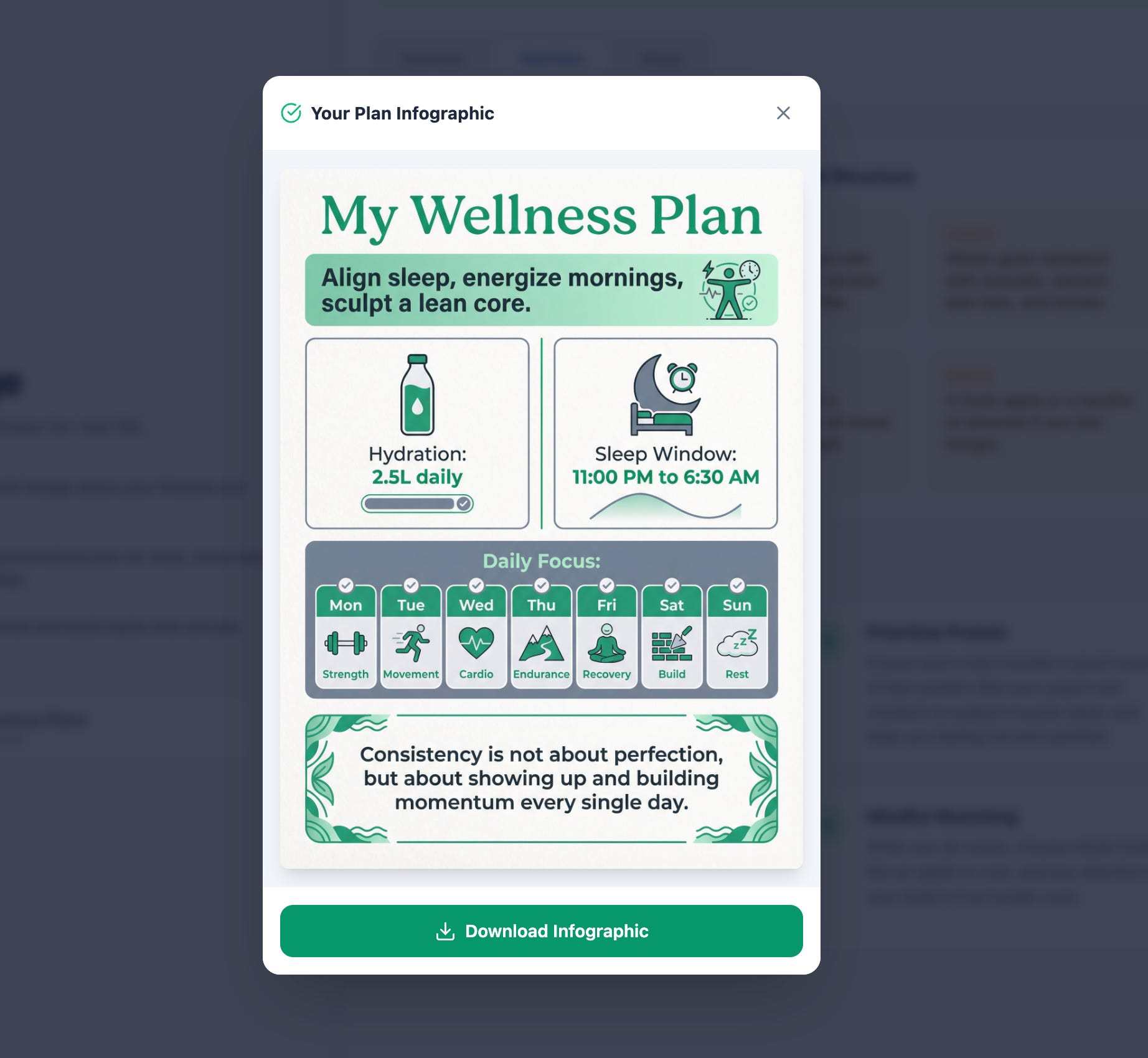
I discussed a plan with the Pro model: different exercises, lifting focuses, eating habits and so on, and then I asked it to create some infographics. Sort of like those wallet cards or printable cards that I could have nearby as a reminder of what to do.
Focus areas for the day: Running? Lifting? Cycling? Rest?
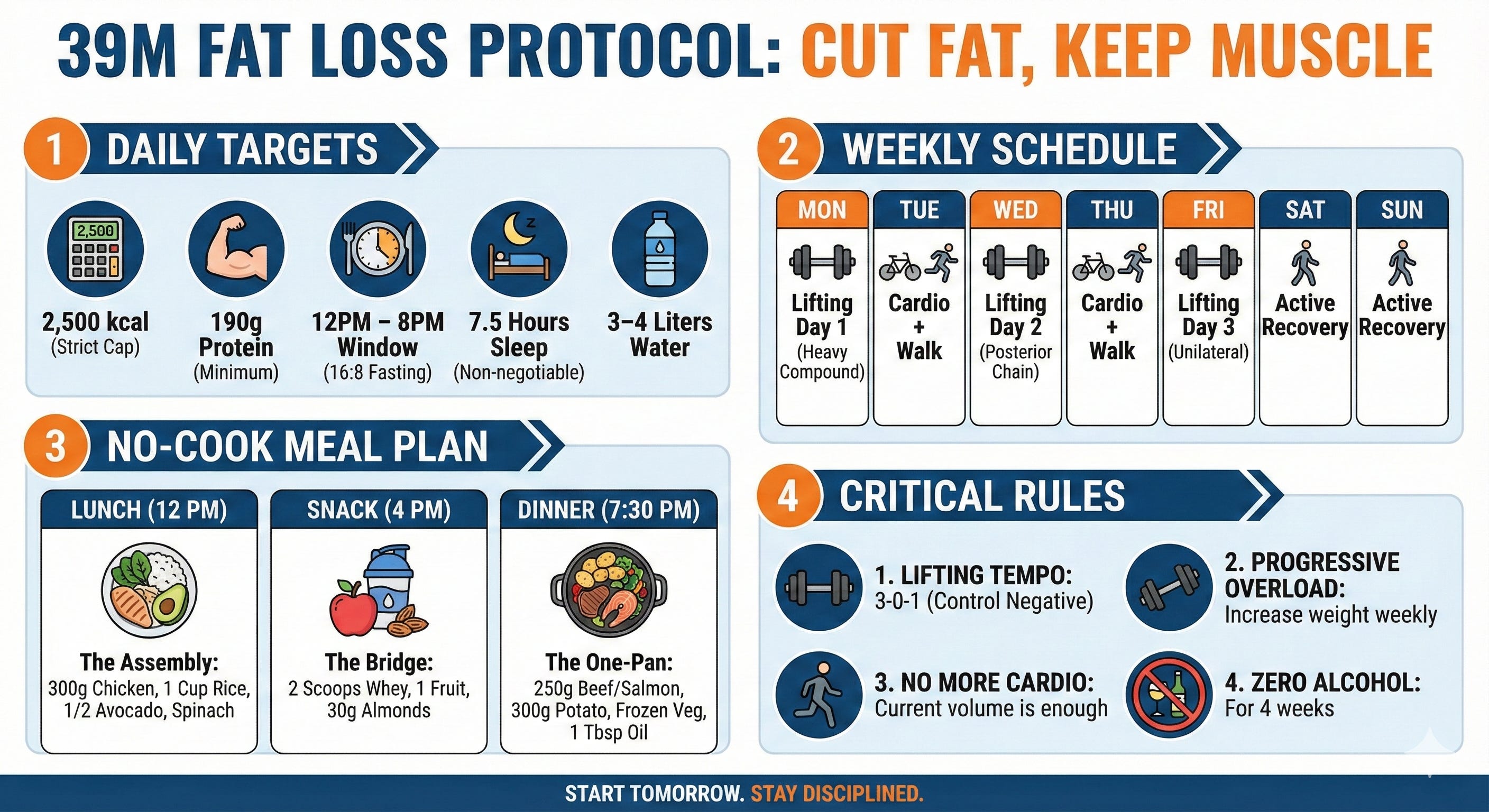
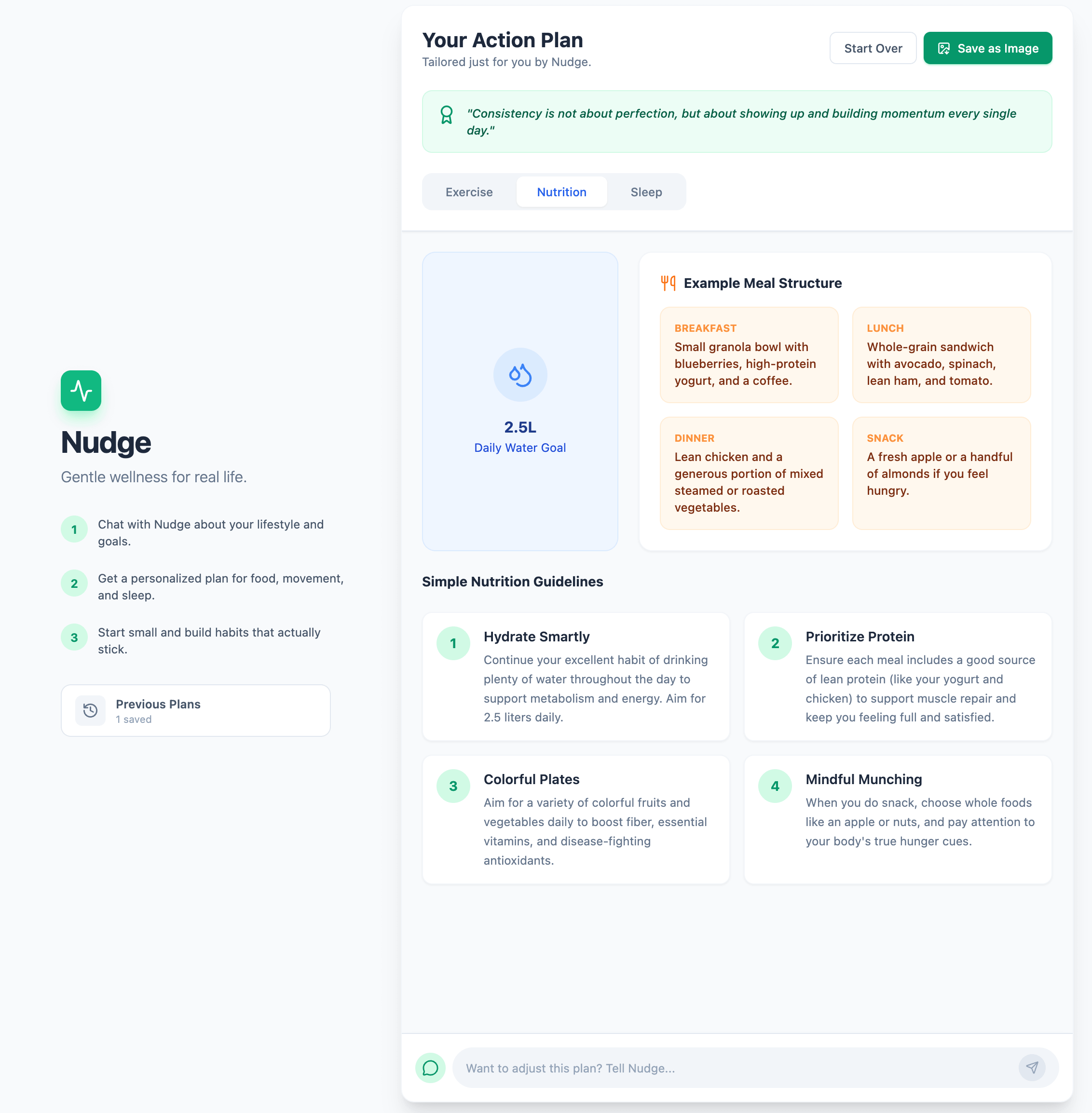
Nutrition: Morning snacks, evening dinners, and options for someone who (like me) really doesn’t enjoy cooking.
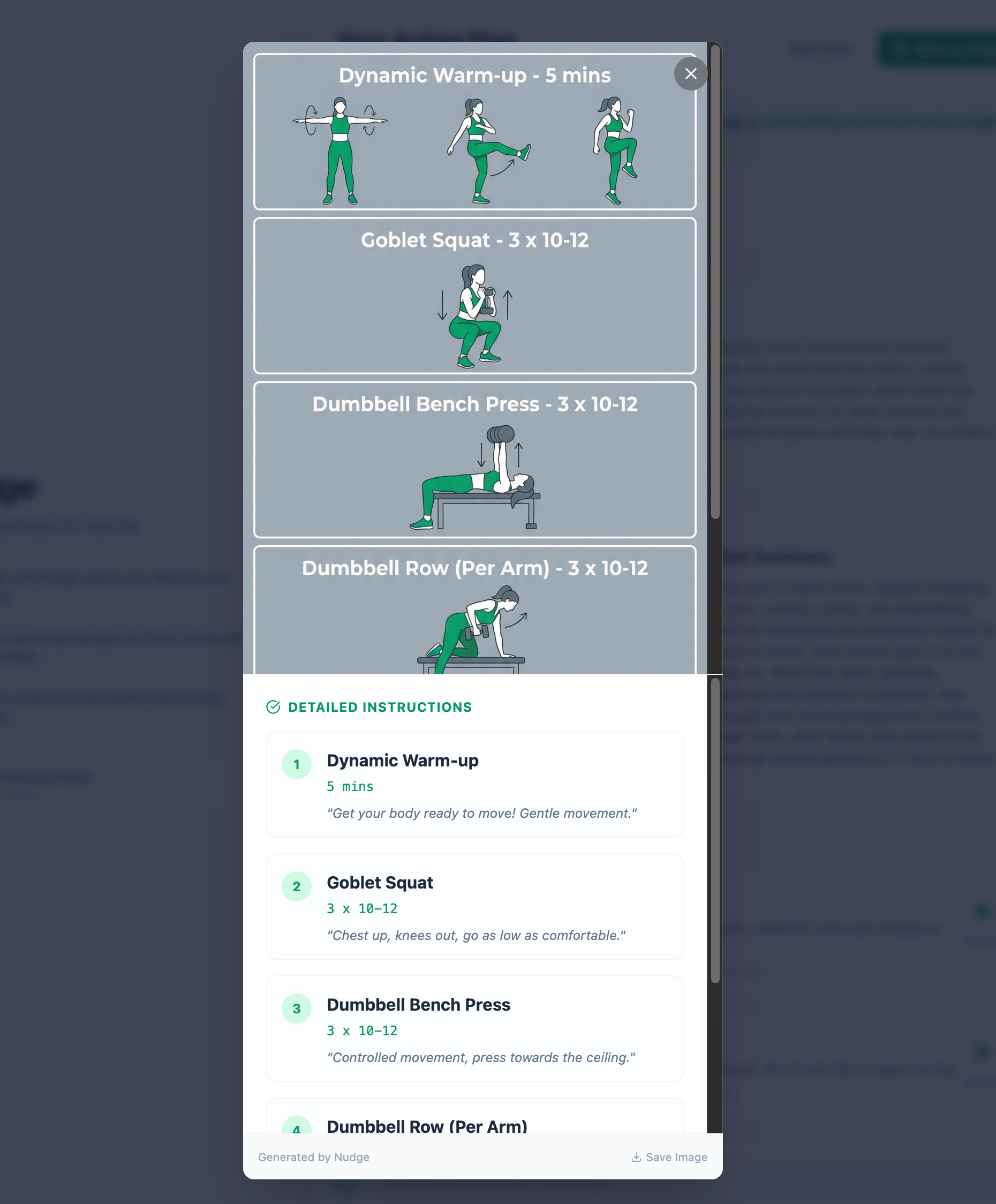
The output was really good. I actually downloaded the graphics onto my phone. Now, when I go to the gym, I have a quick interface to glance at: “Okay, yep, I’ve got to do this weight next.” I get a diagram of how it works, understand what I’m supposed to do, and mentally track my lifting targets.
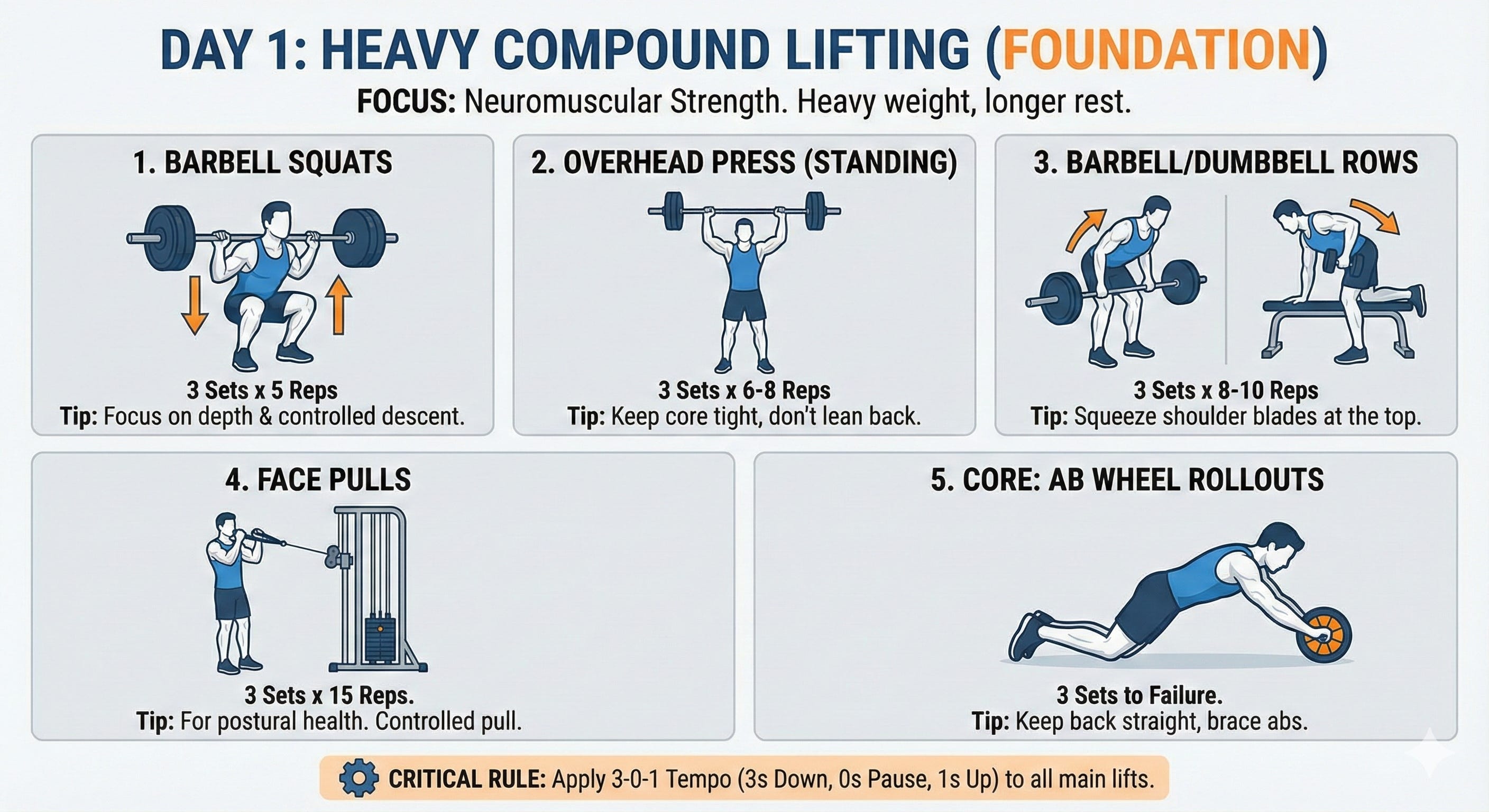
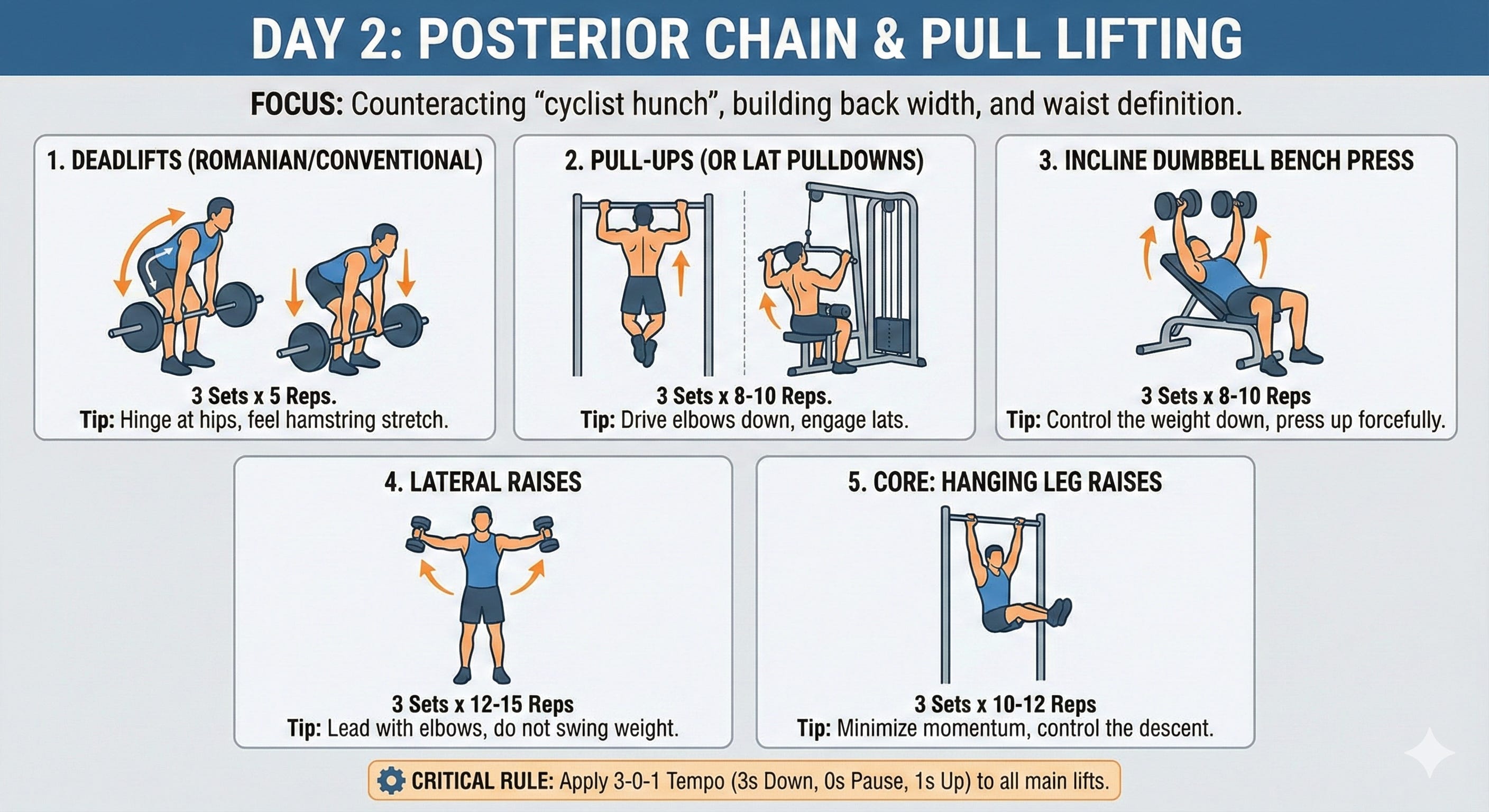
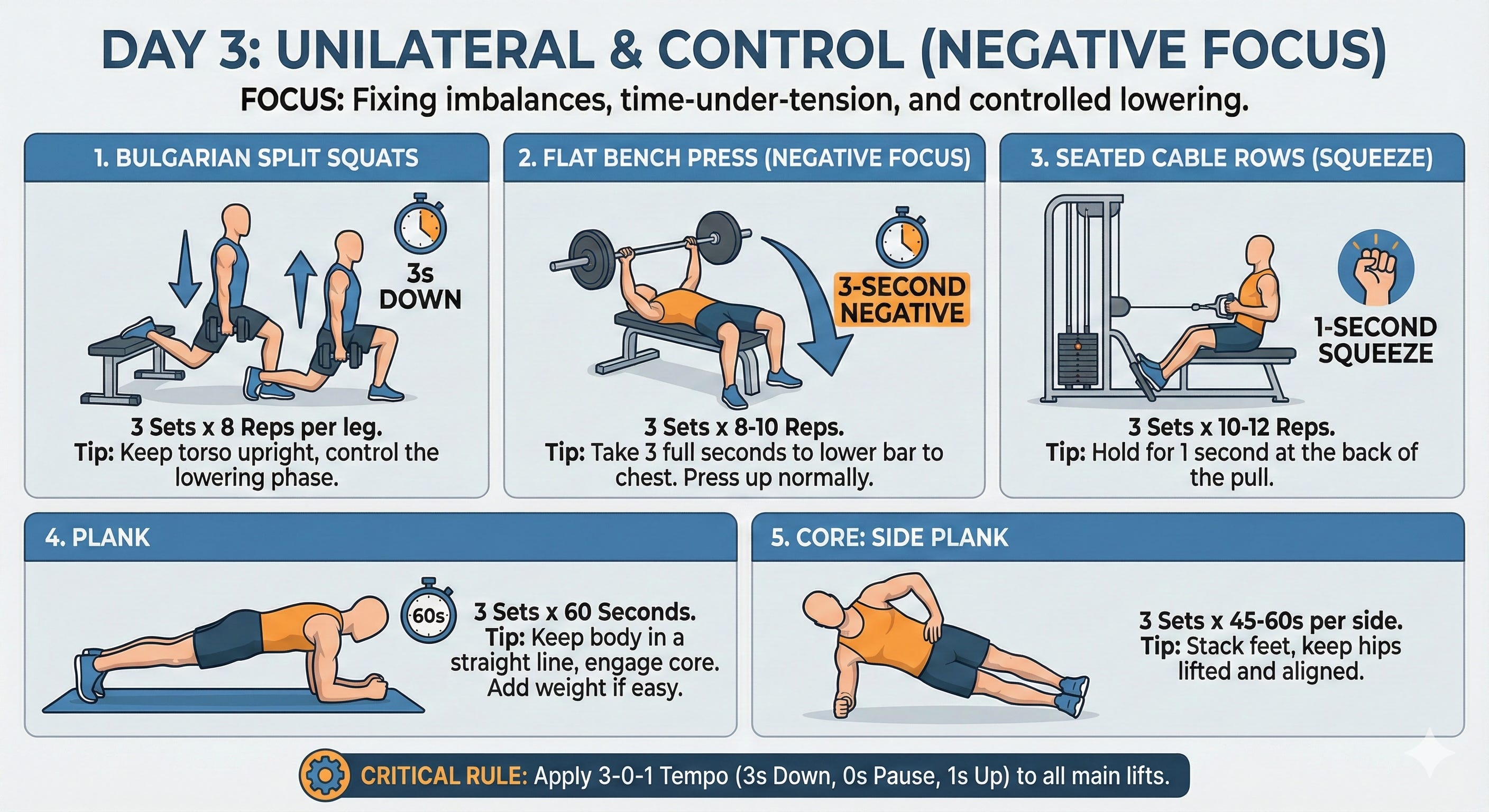
These outputs are what I refer to at the gym so I know what exercises to do for that session.
The overall infographic is like a desktop printable or something to stick on the fridge. Super useful! Including low-effort cooking, weekly schedule and targets.
So far, the manual process was going well. But for the AI sprint, I wanted to turn this into an app using AI Studio’s agentic coding capability.
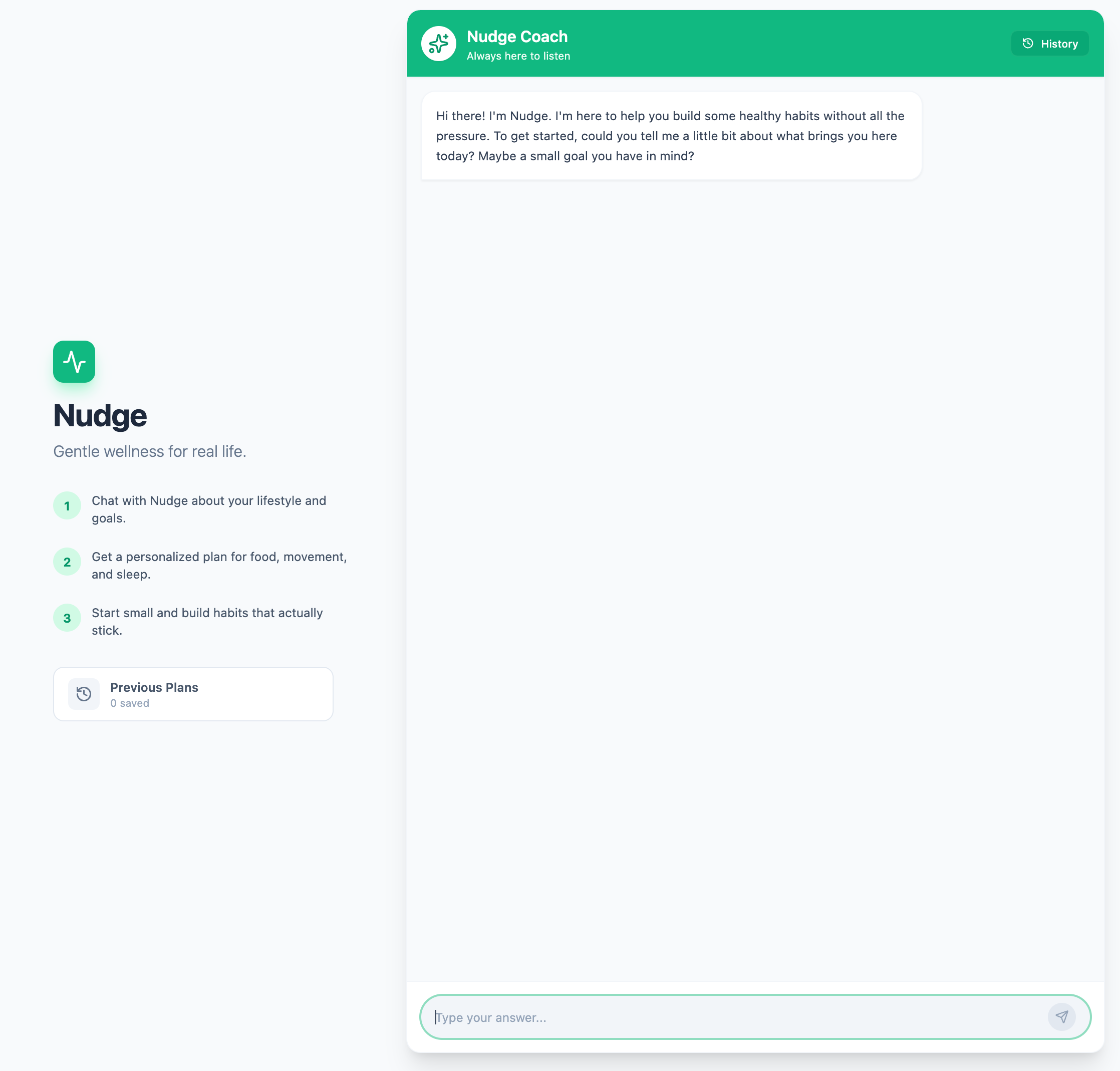
The goal was to mix the reasoning model with the image generation model to create a nice interface. The user chats with the bot, the bot prompts with questions, and once the information is provided, the user automatically gets those infographics, plans, and meal suggestions without doing all the heavy prompting work themselves.
Really, it’s a glorified UI interface that handles the prompting engineering on behalf of the user.
Over in the AI Studio console, there are plenty of “draw cards” to get you started, but I have a specific workflow I prefer. I like chatting with the AI first to generate a Product Requirement Document (PRD). I get a back-and-forth going to flesh out ideas I might not have thought of.
There is a secret tip I can offer here. When you upload or discuss a project with an AI chatbot, use this prompt:
“Please ask me any clarifying questions one at a time.”
This is a handy technique to force the chatbot to slow down and keep the conversation focused. It steers the conversation much better than letting it ask three or four questions at once, which can get messy.
I also clearly stated my output: I wanted a PRD. Once I got that document, I handed it over to the “vibe coding” agentic bot in AI Studio.
The bot did a pretty good first job. I had to refine it and ask for a few more things, but in total, I didn’t actually write any lines of code.
All I did was prompt.
Sometimes it took a few goes to get a feature I wanted the way I wanted it (“do what I mean, not what I say”), and there were moments where I felt I could have done it faster manually, but it is a massive step up from where we were six months or a year ago. The reasoning capabilities are significantly better.
I’ve tried quite a number of AI models, but I gravitate toward Gemini. I’m already in the Google ecosystem, I have the CLI running, and as a GDE (Google Developer Expert) I like to stay on top of the roadmap. The latest Pro models are doing everything I need them to do. Many models are “mostly the same” like a prompt chat with Grok or Open AI will give you similar answers, each one does different things a little better than the others. I find Gemini sort of sits in the middle of everything and is good at most things, given a suitable prompt and context, like any other AI model I suppose.
I find that, in general, people tend to ask too much of their AI agents. There is an expectation that you can say, “Here is a problem, go solve it.”
I think people are thinking about the problem too broadly. A better approach is to ask for very specific things.
The Booking System Example: Instead of saying “Create a booking system,” break it down:
“Create a form where users can submit times and availabilities.”
“Create an availability schedule based on that data.”
“Create a booking form for customers to select from those available times.”
The narrower the task, the better the output. It prevents the model from having to “think” too much about the architectural glue all at once.
I maintain the position that AI cannot “do the whole job” of any task. It can do a lot and it can certainly make some repetitive tasks or boring tasks much faster, but we need the human aspect, and especially the “human in the loop”.
I read or heard somewhere, that AI tends to amplify the existing behaviours of the user, and I wholeheartedly agree with this take. In software engineering, if a developer isn’t paying attention and just “vibe codes” a ticket: clicking generate and shipping it to code review—they are wasting everyone’s time. They’re just adding “AI slop” to the codebase.
If you don’t understand the problem, how on earth are you going to fix it when it breaks?
Take the flipside of this though, and if you work with the AI tool to help you debug something specific, or refactor some code to improve readability. Or even if you take the TDD approach of converting all the acceptance criteria of a ticket into a suite of tests, and then asking the AI to implement the features until the tests go green. That’s amplifying the behaviour and attitude too, but in the right way!
These tools are exceptionally capable, but we aren’t at the point where we can switch off our brains. Used correctly, they maximize output and reduce back-and-forth. Used lazily, they just create technical debt faster.
I’ve hosted the app, and you can use it for free until my cloud credits run out!
Here is a video explaining how it all works with a recorded demo.
I’d love to hear your feedback. What kind of outputs did you get? And importantly, what are you building? I love hearing how people are solving problems with these new tools.
https://nudge-gentle-wellness-831957673304.us-west1.run.app Google Cloud credits were provided for this project.
Happy vibe coding!
No posts
Comments
Nothing yet. Say the first thing.
Sign in to join the conversation.