
In the post, Choosing Timeless Technology: Colors, Spiders, & Spreadsheets in Kindergarten we shared techniques for introducing students to spreadsheets with an intentional set of activities designed to support skills and understanding for young learners. We provided many insights into the ideas that we have noticed arise from students during these activities. Among these, we highlighted the following:
Be ready to engage in a conversation about conditional formatting if it arises naturally. We explain to the children that the computer only knows to follow the rules that have been given to it by a human. Our spreadsheet is set up so that the computer knows: “If we type a certain number, then this color will appear.” This is an excellent teachable moment for “If, then” statements as well as the idea of cause and effect relationships.
In this post, we take this conversation a step further as we introduce Wool Shopping in Google Sheets, inspired by the nursery rhyme Baa Baa Black Sheep.
As we enjoy our focus nursery rhyme, Baa Baa Black Sheep, we transform our dramatic play area in our Sheep Shop. We add shopping carts or baskets, bags of colored yarn, play money, Chromebooks (which serve as the register for check out), and paper receipts, creating one of our most popular centers for learning and play!
In this center, children take turns playing different roles in the store. In our classrooms these roles include:
Customer- Selects the colors of yarn for purchase
Shopkeeper - Places the requested colors in the cart or basket and restocks for the next customer
Receipt Manager - Creates the receipt on the Chromebook
Money Manager - Writes out the paper receipt and takes the money from the customer, counting to ensure it is correct
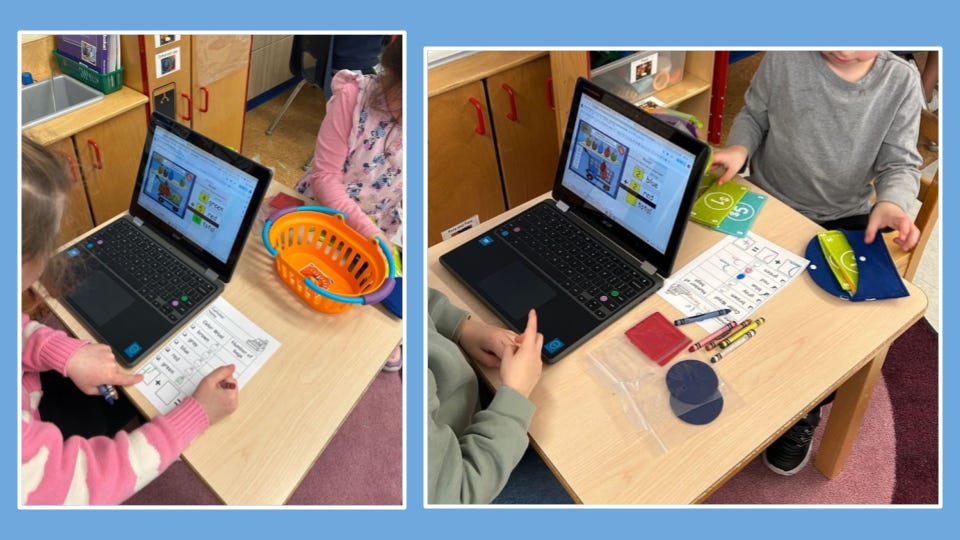
The activity begins with the customer selecting the colors of yarn (wool) from the store. As the shopkeeper and customer work with the concrete materials, the receipt and money managers work together to create a matching visual on the Chromebook by opening up the Google Drawing and placing the corresponding number of each color into the image.
Once the items have been selected, the customer goes to the check out where the managers check to match the image in the drawing to the concrete objects in the cart. The receipt manager types the corresponding numbers and color words into the receipt and then types in the total. If it is correct, the total box turns green. If it is not correct, the total box turns red and they must problem solve to correct the error. The money manager is in charge of the paper receipt that can be handed to the customer. Once the digital and paper receipt is completed correctly, the customer counts out the correct amount of money and pays for the purchase. The shopkeeper can then restock the store and students switch roles to continue play.
Through playful exposure, students are exploring the concept of conditional formatting alongside the ways that technology can improve or make daily tasks more efficient. Through their play, they naturally come to see the pattern behind the formatting of the spreadsheet. “If I type in the correct number, then the box turns green. If I type in the wrong number, then the box turns red.” This also leads to the understanding that, “If I make a mistake, the computer can help me to see and fix it.”
This simple exposure in the early years begins a foundation for understanding the nuances of formatting spreadsheets (or other digital spaces) to organize information that helps humans to do their jobs. While we do not push further conversations, we carefully attend to and invite curiosity that is built through natural conversations. Students often wonder aloud and we encourage questioning vocabulary such as:
What if ______?
What would happen ______?
How does the computer know _____?
Can we change it?
How can we change it?
Could the computer be wrong?
We recognize the value of the questions and curiosity that are natural extensions of this experience as a critical pathway for continued higher level thinking.
Computer Science and Design Thinking Standards that are considered to be foundational concepts in K-2 are also addressed:
Individuals use computing devices to perform a variety of tasks accurately and quickly. Computing devices interpret and follow the instructions they are given literally.
Computers follow precise sequences of steps that automate tasks.
Individuals develop and follow directions as part of daily life.
Within this playful setting, students expand cross-curricular ideas as they:
Count objects and represent addition up to 10 with objects, drawings, acting out situations, verbal explanations, expressions, or equations (Mathematics).
Explore the ways in which people exchange goods and services (Social Studies)
Follow conversations through multiple exchanges (ELA).
The activity template the kids used in this post can be accessed here on our Teachers Pay Teachers Store.
No posts
Comments
Nothing yet. Say the first thing.
Sign in to join the conversation.