
If this whole topic gets you down, please visit the S’truthless channel on YouTube (specifically this, this—and this one is just a fun look at 1965’s thoughts about 2025). Two of his recent videos do the hard thing—fight against doomerism by giving us practical things we can do to face and fight these societal challenges. He’s not about Doom. He’s all about Bloom (see his latest book)—and he’s refreshing as heck right now.
On the CraftLit podcast this week (episode 702), I described my previous week as one plagued with AI-slop and scammy YouTube channels. My frustration might not seem justified on the episode, but this came after several months of stumbling on — or being served — AI-Bot-read audiobooks, fully AI-made videos masquerading as human-made podcasts and channels (which had such bad quality that they were easy to catch), and several years of websites that purposefully left off or removed dates from articles and posts, making it impossible to trust their content — especially for tech reviews.
My new mission, and I hope you'll join me, is to volunteer at a local library or set up at a local coffee shop, sit there, and use the information offered here to help people find out if they are being served AI-slop or scams.

I’m not preparing to teach people what AI-slop is; instead, my mission will be to help them gain confidence in recognizing AI warning signs and get some practice with research options so they can be reasonably confident that they can independently identify content to avoid.
Feel free to bookmark this page, watch the episode, and download and print the attached PDF to refer to (and hand out). I’d like to invite you to share any tips you use below in the comments (with links if you have them) then share the heck out of this.
I am not anti-AI—not generally. Like any powerful tool, it has its uses. But like any powerful tool, it can also do damage, and apparently, we humans haven’t paid enough attention to Mary Wollstonecraft Shelley: Just because we can create something, doesn’t mean we should.
I’ll spare you my soapbox speech about the importance of literature and the dangers of an aliterate (as opposed to an illiterate) society.
You're welcome
I am anti-scammer. I don’t think that needs any additional explanation, right?
Below is the beginning of a larger and longer conversation about spotting AI-slop and the scams that hover around it. Nothing here—not the research nor the lists below—are exhaustive. Please add what you’ve learned in your own pursuit of sanity in the comments so everyone else can learn from you, too.
We’re going to need to fight the slop together.
I’m a firm believer that the best weapon we can have against any kind of scammy behaviour foisted upon us by others is knowledge. If you can recognize spoiled food before you eat it, you’ll save yourself a bundle of misery. It is the same with AI content and scams—if you’re going to catch it when it’s fed to you, you’ll save yourself heaps of trouble by not trusting it. But to do that, you’ll need to be able to see it and recognize it for what it is in its native habitat: the Internet.
How can you find out if your suspicions are correct? First, examine why you might be suspicious.
The content is too slick, polished, doesn’t look/sound like the creator (this works well if you know other trusted works by the creator)
Something about the content is ringing warning bells in your head—is it too good to be true? Too bad to be true? Too unlikely to be true?
Trust yourself —
Check the date the channel/account started—too recent?
If there is a website associated with the account, check it out. Sometimes scammy channels have placeholder “under construction” sites.
Is there a date on the post? If not, the site may be trying to force its content to appear “evergreen”—even if it’s not. (e.g., reviews of tech should absolutely have a date posted and be easy to see. If it doesn’t, click away and find a better review.)
If you’re looking at YouTube, Instagram, TikTok, Facebook, LinkedIn, or any other social media site — look for information under the video/image/post/content (i.e., tags, shownotes, comments) and see what’s there, if anything.
Unclear if what you’re seeing means anything?
Follow the money—qui bono? Who benefits if you “buy it”—mentally or economically?
Some scammers (and scammy businesses) are playing a long con. If they can convince you slowly, over time, that you really need them as a trusted part of your life, they will drag you down a very slippery slope. They’ll slowly erode the thing that makes you uncomfortable/doubtful until you finally arrive at, “Well, that makes sense. I suppose I do believe/need that!”
If you check comments or reviews, are others suspicious of the content?
For reviews—Amazon etc.—check to see who is leaving the reviews —
Are the reviews a range of polar opposites—5s or 1s? One one-star rating isn’t a problem. Several, all saying, “this is useless!” or “too many spelling errors!”1 is a red flag
Has anyone else posted, “AI Bot?” or similar in the reviews or comments? That’s a warning sign that you’re on the right track, too.
Scammers and AI-Bots/slop are not the same things — but the results and impact are similar.What can you do when you’ve checked the easy stuff and still aren’t sure? Links to help you are supplied here:
Do a Reverse Image Search.
Snopes for political things is a good start — for example, this AI Image check. You can read the Snopes origin story here and why they’re reliable, as are non-partisan, free-to-use data aggregators like OpenSecrets.
Ground News helps you see who is covering a story so you can see who will benefit from the bias presented. AP Wire and Reuters are still amazingly clear/unbiased, just-the-facts sources.
NB: Walter Cronkite was a news reader. Not an anchor2, not a pundit.3 If all we see is people talking about a news story, we’re not hearing the news. We’re hearing opinions. Follow the money, find the source of the story.
If you’re in the U.S. and you haven’t before, try watching international news from another country — you’ll be amazed at how different the USA news looks from the outside.
What to do when you think you’ve found AI slop/scams?
Don’t accuse. Perhaps post a comment like, “Are you a bot?” or “AI-slop?” Logging a small comment may encourage someone else (with more time than you) to dig a little more.
Post a link to the questionable content on social media, asking, “Anyone know if this is AI-generated?”
Do not accuse any post of being a scam or a bot.4
Share in comments here any techniques you’ve used to successfully react to or track down AI slop/scams.
Use AI to Quickly Confirm AI-Slop
It may seem counterintuitive, but platforms like ChatGPT can search the web for corresponding answers far faster than you can. Here’s one way to use it like a research tool, not a Magic 8-Ball5:
With an AI like ChatGPT, copy/paste a link to a website or transcript text from a video or podcast, and write, “Something in here seems fishy/untrue. Am I mistaken or on the right track? Please don’t return an answer unless you have citations or paths to your research.”
You can also start, first, by asking the AI to “think like a researcher” or a detective.
Tell your AI that you always want links to any answer it gives you (you’ll need to remind it more than a few times).
If it returns “You’re right to wonder if something is wrong with this!” it does NOT mean you’re on to something.
AI/ChatGPT has been directed to value answering—giving any answer—as a better response than a non-answer or not knowing. This is one reason it can hallucinate—functionally, it “wants” to please you. It’s also been programmed6 to respond with a positive statement about your question/comment. (e.g., “Great question!”) You can try to stop it from doing that, but it may be a losing battle.
Know that you can go back after any response and say, “That strikes me as odd. Can you look more at [this aspect of the issue]?” Filling in your own phrase between [ and ], of course.
Sometimes it takes me upwards of five go-rounds to get to a complete, verifiable answer from ChatGPT. Patience is key. You’re talking to a research aid, not a human researcher who can think ahead like you do.
What does a complete, verifiable answer look like?
You’ll have received links to explain/support the AI’s conclusions;
You’ll need to have checked those links for bias, validity7, and truth (see below for resources);
You will have enough background to explain why it’s a scam or AI-slop to a 10-year-old.
There may be many steps, it might be complicated, but a 10-year-old will catch if the explanation circles back on itself or makes no sense.
When you finally get to a valid, complete answer, tell your AI! Bonus points if you ask it to revise and improve on your original question—you might have gotten to this point more quickly if you’d used different phrasing.
Not long ago, my husband wrote a post on this topic from a different angle. He’s sharing his downloadable with you here.
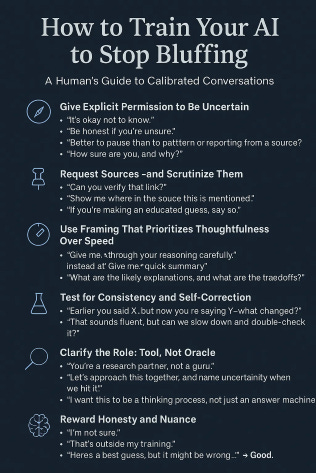
A fiendish curiosity overwhelmed me, and I fed all my notes into my ChatGPT. This is what it gave me (downloadable 1-sheet here):
1️⃣ Quick Reality Check
Does the content feel too polished or “off” for the creator?
Is something nagging at you? Trust that feeling.
Look for a posted-on date, an associated website, or a real-world presence.
Check comments — do they look human or bot-made?
2️⃣ Fast Verification Tools
Reverse Image Search: improperly credited/used photos
Snopes / AP / Reuters / Ground News: bias + story origin checks
Follow the Money: who benefits from believing the scam or slop?
3️⃣ When You Suspect AI Slop
Comment: “Can anyone confirm if this is a bot/AI?”
Don’t accuse — ask. (We are a litigious country.)
Share the post with people who like digging.
4️⃣ Use AI to Spot AI
Ask your model:
“Something here seems off. Am I right? Please don’t return an answer unless you cite sources.”
Then check:
Are the links real?
Do they support your concern?
Do you need to rephrase your question to your AI?
Can you explain how this is a scam or slop to a 10-year-old?
5️⃣ What a Good ChatBot Answer Looks Like
External sources given
You’ve checked those sources for bias and validity
Explanation is linear, not circular (i.e., “this is a lie because a liar said it and liars always lie.”8)
You can summarize the answer simply
💡 1. Repetition patterns
AI and scammers both reuse phrases at weird intervals: “in this essay,” “that being said,” “overall,” “it’s important to note...”
If you hear the same phrase every 2–3 paragraphs, it’s AI.
💡 2. “Forced evergreen” tricks
Scammers avoid dates, timestamps, or references that age. If everything feels generic/on-purpose timeless = bad sign.
💡 3. Too many emojis or a weirdly formal tone
Bots tend to do:
Overly cheerful tone
Formal academic tone
Rarely the natural in-between.
Heather breaking in here—I, personally, human Heather, for real and everything, have typed several emojis into this document. I’ve also *ahem* used em-dashes. I love em-dashes and Oxford commas. These are hills I will die on.
Bonus points if you can identify my emojis as opposed to the ChatGPT emojis. 🧐 (←hint: that one is mine)
💡 4. ‘Pattern of Praise’ comments
Bot networks leave comments like:
“This is so helpful!”
“I never knew this before!”
“Great content as always!” with no specifics.
If comment sections feel like a smile wallpaper, be suspicious.
💡 5. Misused idioms AI struggles with:
“throw someone under the bus”
“free rein” (often becomes “free reign”)
Idioms = fingerprint tests.
💡 6. No local details
AI-authored slop avoids anything local, tactile, or sensory. Human-people will mention:
weather
specific places
concrete memories
sensory language
Bots = abstractions.
💡 7. Answering confidently with zero sources
If the AI model drops no citation trail, that’s not knowledge — it’s improv.
If I hadn’t told you that the above Bonus Red Flag guide was 100% AI-created, would you have been able to tell? (What gives it away? 😏)
Algorithms feed us slop for lots of reasons. Algorithms are the Great Anti-blogroll—we don’t know why content is being served to us in our feeds, but I know I have certainly become very suspicious of how they work.
There are some things you can turn off to avoid algorithms—or avoid data-spying apps. I’m listing here the things I’ve found (and done). Again, this is far from an exhaustive list. The apps and platforms we all commonly use continue to change where they hide ensconce embed bury place these controls. If the instructions found here no longer apply, please add updates in the comments. I’ll fix the main text to match your findings as reality rolls along.
Nearly all of the steps listed below come from an excellent article from 2024 at Sitra.com.
A “reset” of YouTube’s recommendation algorithm is possible: you can clear watch and search history so YouTube’s algorithm has less data to use.
Steps (clear):
Go to Google My Activity → filter to YouTube then delete your watch history / search history.
On YouTube app: go to Home feed → at the top of a Shorts grid tap More → “Show fewer Shorts”.
Optionally: Disable autoplay of next video so you don’t keep going down algorithmic rabbit holes. (Mentioned in some sources)
Note: However, YouTube does not offer a native full “chronological only” feed from subscriptions where algorithmic suggestions are fully off. The “Subscriptions” tab still may include algorithmic ordering.
Instagram now offers a “reset” feature that lets you wipe your recommendations across Feed / Reels / Explore and start fresh.
Steps (clear):
Open Instagram app → go to your profile → tap the three-bar “More options” icon (top right).
Select Content preferences (or similar) → Choose Reset suggested content.
Review the accounts you follow and possibly unfollow ones you no longer want.
After reset you’ll need to engage with the content you do want (like, comment, etc) to shape the new algorithm.
Note: This doesn’t guarantee you’ll be only on a chronological “Following” feed; the algorithm still plays a role.
Also, another article shows how to switch to a “Following” tab vs “For You/Recommended” tab if available (for Instagram, Facebook) via a feed-view change.
According to the Sitra article (April 2024) you can manually select the “Feeds” view and choose “Most recent” rather than “Recommended” on Facebook.
Steps (clear):
Open Facebook app → menu → select Feeds (rather than Home / For You) to see latest posts from friends/pages.
Within Settings & Privacy → Settings → News Feed Preferences: you can add favourites, unfollow, which affects what appears.
Note: Facebook doesn’t provide a full “switch off algorithm” feed mode in all regions according to Sitra (usability rating lower) but you can approximate it.
According to the overview by Sitra (April 2024), you can turn off personalised feeds (algorithmic) and use a “following” view that shows content only from people you follow, in chronological or near‐chronological order.
Steps (clear):
Open TikTok → go to Settings → “Content preferences”.
Switch “Personalised feeds” to Off.
Possibly also disable “Personalised search”.
Note: The ability to force only Following‐feed may be limited depending on regional roll‐out or app version; see discussion.
Add -site:pinterest.com to a web search to stop being fed links to Pinterest. You might be able to get the same result with simply -pinterest.
Note: Some forum posts indicate that you can install a browser extension (e.g., uBlock Origin) or custom search filter add-ons to permanently block a site from results in certain browsers, but there is no official Google account setting to ban Pinterest images globally.
I haven’t touched Twitter/other social chat platforms.
If you’d like, I can compile more information on how to improve privacy in apps and decrease app tracking (the reason why, having looked at a blender on Pinterest, you will shortly be served a lovely blender for sale the next time you go to Amazon). Just let me know in the comments.
This was recently shared with me (I am not on Windows, so I haven’t done this/can’t vouch for this, but I know and trust the source):
For anyone on Windows 11—What the feature (below) does is allow generative AI to produce texts and images with Windows 11. There are tons of other AI features. This post, though, instructs how to turn off the text + image generation and prevent it from running in the background and taking up system resources.
Validity is an actual “thing” in the study of logic. A logical argument can be “true” without being “valid”.10 If that seems ridiculous, keep reading.
Authority
Who wrote it? Credentials? Track record?
Accuracy
Are facts cited?
Are the citations real? ← that’s a big one
Do not trust citations just because they appear with a source! That goes double for Bibliographies and Works Cited pages!
Can the citations be found so you can check them?
Transparency
Can you tell how the source information was gathered?
For studies and surveys, was the sample size big enough or too small?
Independence
Is the writer financially or ideologically invested?
e.g., the research results on the effect of sugar in children is probably not valid or reliable since it was funded by the sugar industry.11 Again, follow the money.
Corroboration
Do multiple independent sources say the same thing?
Logical Validity
Does the argument proceed in a straight line?
Does the conclusion follow from the premises? (see footnote 10)
Soundness
Are the premises true?
A valid argument can still arrive at a false conclusion if one or more of its premises are false.
Absence of Fallacies—Confirm:
No circular reasoning
No appeals to emotion
No straw men
No cherry-picking data (to name a few)
I’m not going to go into all the ways you can check whether a source is free of logical fallacies—we’d be here a good, long while—but I am happy to link out to several sites (which are valid and trustworthy 😉) that can help you learn more:
These focus on checking credibility rather than logic.
These pages are consistently clear, neutral, and non-political:
Cornell University Library – Evaluating Sources
UC Berkeley Library – Evaluating Resources: Criteria
https://guides.lib.berkeley.edu/evaluating-resources
Covers bias, authority, scope, accuracy, and currency very cleanly.
Purdue OWL – Research and Source Evaluation
Great for helping students understand how to judge the quality of sources.
FYI—English teacher hat on—Purdue’s OWL pages also have some fantastic writing and grammar support
Why these sites are useful:
No ads
No political agenda
Clear definitions
Lots of examples
Updated regularly
Designed to be taught and used
They are excellent “first stops,” especially if you want to understand why some sources are more reliable.
These deal with structural validity, not whether the facts are correct.
Search: validity, soundness, deductive reasoning
Very rigorous
Explains validity vs. soundness
Defines how arguments work independent of content
May be too academic for beginners
But it is the gold standard.
Search: validity, logic, fallacies
Easier to read than SEP
Still academically reliable
Good diagrams and examples
Many “fallacy lists” online are… not valid. 😂 These are correct:
Neutral
Comprehensive
Historically well-regarded
Doesn’t get political or cute — it’s straight academic logic.
https://yourlogicalfallacyis.com
Very popular
Very clear illustrations
Good for beginners
BUT: sometimes oversimplifies or mislabels complex fallacies.
Useful as an intro, not a final authority.
Excellent for:
Students
Writers
Anyone wanting clean examples without jargon
If you need to explain why some studies are valid while others aren’t:
Search: validity, reliability, construct validity, internal vs external validity
Clear
Good for all audiences
Useful when discussing medical claims, supplements, or “studies show…” style misinformation
https://www.cochranelibrary.com
Explains research quality
Trusted globally
Superb for understanding high-quality evidence vs low-quality evidence
Excessive typos are a warning sign because raw scanned content from the Internet Archive, Gutenberg, or elsewhere can easily have typos—it’s the nature of scanning and OCR—scammers aren’t going to proofread.
If that doesn’t mean anything to you, go watch the (very enjoyable) Broadcast News. Then, if you’re curious to see where the Broadcast News problems really started, watch Network. Not funny, but holy garbanzo beans! What a powerful movie!
Douglas Adams was the first place I heard pundits being ridiculed. Now I understand why: In Hitchhiker’s Majikthise and Vroomfondel represent the Amalgamated Union of Philosophers, Sages, Luminaries, and other Professional Thinking Persons. When Deep Thought gives them 42 as the Answer to the Ultimate Question of Life, The Universe, and Everything, they decide they can make a living on the ‘pundit circuit’.
In a litigious country, don’t accuse — ask.
I have nothing but love for the Magic 8-Ball, but it’s not a tool that can serve you the truth any more than AI is. At best, it’ll make you think twice about doing something. At worst…well… it doesn’t take much imagination to come up with “worsts”.
I know AI is not really “programmed,” but for brevity’s sake, please forgive. This is already a lot.
Validity is about argument structure—please scroll up to SOURCE VALIDITY—the missing piece. I haven’t yet figured out how to do page anchors here or a table of contents. 🤷🏼♀️ Sorry!
That’s an example of the logical fallacy “Begging the Question” (for real, not as used colloquially these days). It may feel like logic, but it contains no actual evidence.
I only learned “toe the line” because of Miss Trunchbull’s song, “The Hammer” in Matilda the Musical! Thank God for Tim Minchin!
One example (fallacy: Affirming the Consequent):
Premise: If it is raining, the streets are wet.
(true—but not the ONLY reason streets could be wet)
Supporting Premise: The streets are wet.
Conclusion: It is raining.
Sometimes that is true, but sometimes the streets are wet because of sprinkler systems. The conclusion is sometimes true, but the logic behind the conclusion is invalid.
How sugar has been “researched” https://pmc.ncbi.nlm.nih.gov/articles/PMC4355299/ and https://pmc.ncbi.nlm.nih.gov/articles/PMC6063770, and if you’d like to see a video on a different industry:
Comments
Nothing yet. Say the first thing.
Sign in to join the conversation.