
Extension to expose the HiFiBerryOS (Beocreate) message bus as Webhook-API for instrumentation of arbitrary frontend commands.
With interactions, HiFiBerryOS offers various options for remote control. This instrumentation is far from complete, though. Luckily, the node.js-based frontend internally communicates via message bus events. A small extension allows to emit such (largely undocumented) commands directly, thereby exposing much more functionality as single-endpoint HTTP API.
Installation
The sources just need to be copied into the user extension folder:
scp -r message-interact root@hifiberry.local:/etc/beocreate/beo-extensions/
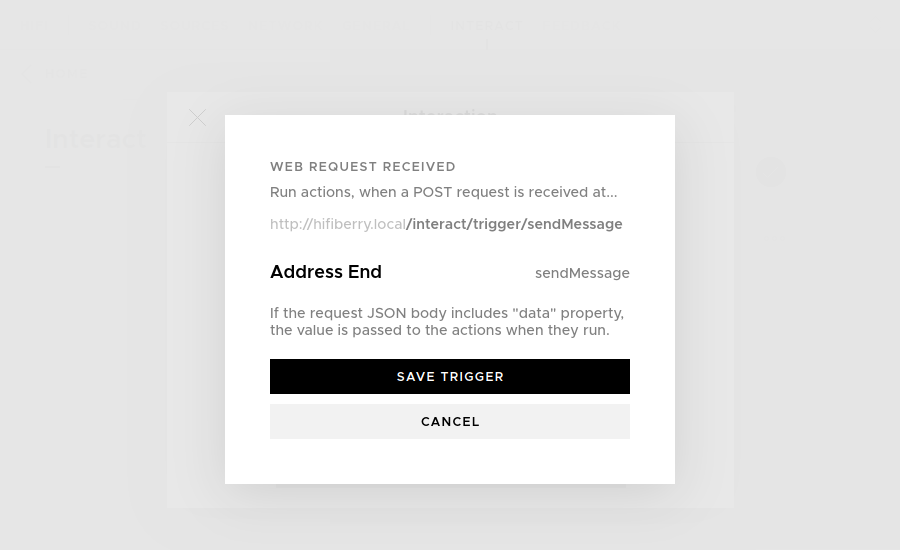
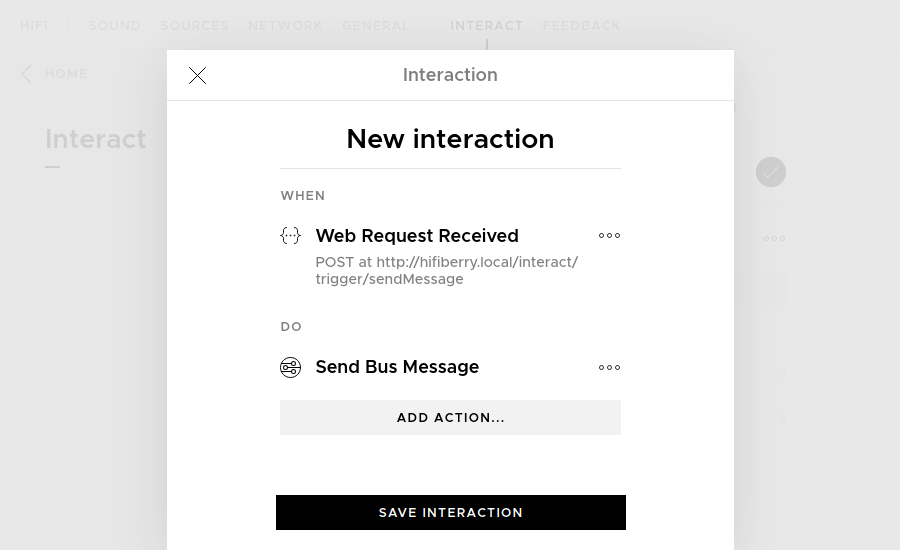
A corresponding interaction can be created afterwards, for example with sendMessage as trigger endpoint.
Received JSON data will be passed to the extension’s action.
Usage
While using the frontend, the browser console logs triggered bus message commands. Alternatively, accepted structures need to be derived by Beocreate2 code inspection. For example, using the new endpoint to start an arbitrary remote or local stream with the radio source:
curl -i -X POST -H 'Content-Type: application/json' -d '{
  "data": {
    "target": "radio",
    "header": "play",
    "content": {
      "URL": "https://st01.sslstream.dlf.de/dlf/01/128/mp3/stream.mp3?aggregator=web",
      "stationName": "Deutschlandfunk"
    }
  }
}' http://hifiberry.local/interact/trigger/sendMessage
The following event maps to the stop playback button:
curl -i -X POST -H 'Content-Type: application/json' -d '{
  "data": {
    "target": "now-playing",
    "header": "transport",
    "content": {
      "action": "pause"
    }
  }
}' http://hifiberry.local/interact/trigger/sendMessage
Use Cases
As one use-case, a corresponding systemd unit allows to start and stop playback with a certain volume automatically on demand. (Similar functionality to starting a stream using the Chromecast Audio script).
[Unit]
Description=HiFiBerry Stream
[Service]
Type=oneshot
RemainAfterExit=true
Restart=on-failure
RestartSec=10
TimeoutSec=30
ExecStart=/usr/bin/curl -sS -o /dev/null --retry 2 --retry-delay 5 -H "Content-Type: application/json" \
    --data-binary '{"data":{…}}' \
    http://hifiberry.local/interact/trigger/sendMessage
ExecStart=/usr/bin/curl -sS -o /dev/null --retry 2 --retry-delay 5 -H "Content-Type: application/json" \
    --data-binary '{"data":{"target":"sound","header":"setVolume","content":100}}' \
    http://hifiberry.local/interact/trigger/sendMessage
ExecStop=/usr/bin/curl -sS -o /dev/null --retry 2 --retry-delay 5 -H "Content-Type: application/json" \
    --data-binary '{"data":{"target":"now-playing","header":"transport","content":{"action":"pause"}}}' \
    http://hifiberry.local/interact/trigger/sendMessage
Keypad for remote control
While serial IR remotes are directly supported as triggers, only the limited built-in actions are available. Alternatively, any cheap USB numpad, fancy macropad, or even fancier wireless streamdeck can be used – as long as they register as regular input device supported by triggerhappy.
For “sideloading”, a binary must be used that is compatible with:
uname -a
Linux hifi 5.15.78-v7l #1 SMP Mon Apr 3 20:04:51 UTC 2023 armv7l GNU/Linux
One working daemon seems to be /usr/sbin/thd extracted from the triggerhappy_0.5.0-1.1_armhf.deb Jammy Jellyfish ubuntu package.
Running thd --dump --deviceglob '/dev/input/event*' shows detected KEY_ events to be placed in /etc/triggerhappy.conf.
A small jq transformation allows to directly refer to the favorite radio stations:
KEY_BACKSPACE 0 exec curl -sS -o /dev/null --retry 2 --retry-delay 10 -X POST -H 'Content-Type: application/json' --data-binary '{"data":{"target":"now-playing","header":"transport","content":{"action":"pause"}}}' http://127.0.0.1/interact/trigger/sendMessage
KEY_KP0 0 jq -ac '.favourites | to_entries | .[0].value | {"data":{"target":"radio","header":"play","content":{"URL":.url,"stationName":.title}}}' </etc/beocreate/radio.json | curl -sS -o /dev/null --retry 2 --retry-delay 10 -H 'Content-Type: application/json' --data-binary @- http://127.0.0.1/interact/trigger/sendMessage
# …
KEY_KP9 0 jq -ac '.favourites | to_entries | .[9].value | {"data":{"target":"radio","header":"play","content":{"URL":.url,"stationName":.title}}}' </etc/beocreate/radio.json | curl -sS -o /dev/null --retry 2 --retry-delay 10 -H 'Content-Type: application/json' --data-binary @- http://127.0.0.1/interact/trigger/sendMessage
Autostart can be done by a corresponding service unit (followed by the usual systemctl daemon-reload/enable/start):
[Unit]
Description=triggerhappy global hotkey daemon
After=local-fs.target
[Service]
Type=notify
ExecStart=/usr/bin/thd --triggers /etc/triggerhappy.conf --user nobody --deviceglob /dev/input/event*
[Install]
WantedBy=multi-user.target
Overall, these files have to be copied for this example:
/etc/beocreate/beo-extensions/message-interact//usr/bin/thd/etc/triggerhappy.conf/etc/systemd/system/triggerhappy.service
Comments
Nothing yet. Say the first thing.
Sign in to join the conversation.