I recently received a question about how to override the Help text for the built-in Name property in Optimizely CMS, so I decided to document my process for figuring it out.
Step 1 – locate the text you want to override in the embedded xml file
I fired up JetBrains dotPeek, and search through the embedded resources for the Optimizely dll files. I found a match in Episerver.UI.
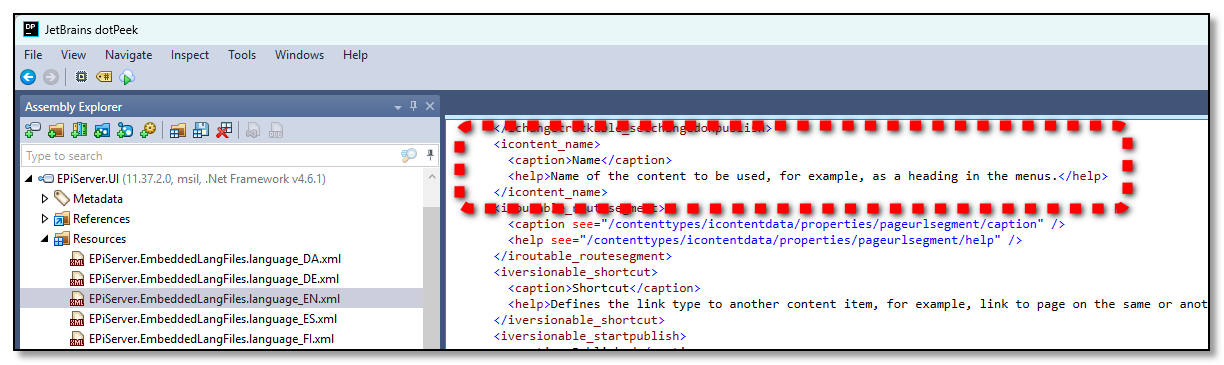
Step 2 – add override to xml file
Simply recreate the entire xml structure, like this.
<?xml version="1.0" encoding="utf-8" standalone="yes"?>
<languages>
  <language name="English" id="en">
    <contenttypes>
      <icontentdata>
        <properties>
          <icontent_name>
            <caption>The name of the thing!</caption>
            <help>Naming things is hard, but give it a try!</help>
          </icontent_name>
        </properties>
      </icontentdata>
    </contenttypes>
  </language>
</languages>
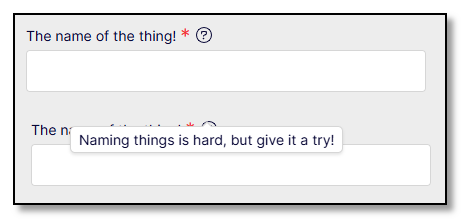
Step 3 – test the results!
The updated Name property, shown both without and with the help text.
That's it!
Comments
Nothing yet. Say the first thing.
Sign in to join the conversation.