
S/MIME serves as the industry standard for enhancing email security through two critical functions: digital signing and encryption. By signing an email, a sender proves their identity and ensures the message hasn’t been tampered with; by encrypting it, they ensure that only the intended recipient can read the contents. Because Microsoft Exchange doesn’t store messages natively in MIME, when you send or receive an S/MIME message, a level of translation is performed by the Exchange store to and from its native format. The actual behaviour is well documented in the following Exchange protocol document https://learn.microsoft.com/en-us/openspecs/exchange_server_protocols/ms-oxosmime/bb17d126-d211-462c-8cd3-454ed33c8746
S/MIME utilizes three distinct message structures, each defining how the data is packaged and accessed:
Encrypted (Enveloped-data): The content is fully secured and scrambled. The recipient must possess the private key associated with the certificate to decrypt and read the message data.
Opaque-Signed (Signed-data): The message is wrapped in a binary CMS (Cryptographic Message Syntax) “envelope.” The data is encoded, requiring an S/MIME-aware client to decode the package before the content can be viewed.
Clear-Signed (Multipart/signed): The message body remains in plaintext and is immediately readable by any standard mail client. The digital signature is sent as a separate attachment to verify the sender’s identity.
Encrypted Messages
In SMIME an encrypted message will look something like
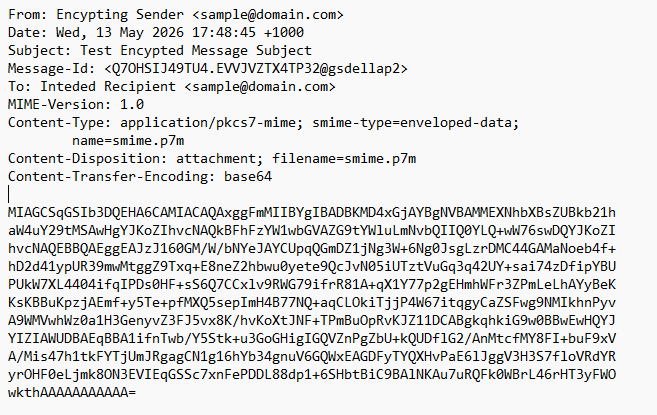
In this message, the Content-Type header (e.g., application/pkcs7-mime) identifies the message as a structured CMS (Cryptographic Message Syntax) container. While the smime-type=enveloped-data parameter is technically an optional ‘hint,’ it serves as a critical indicator for the mail client that the message is an encrypted package. This container encapsulates the entire original email—body, formatting, and attachments—typically represented as the Base64-encoded smime.p7m attachment.
Because this container is encrypted using the recipient’s public key, the content remains ‘opaque’ to the Exchange store. While the Extensible Storage Engine (ESE) can store these bytes, it cannot ‘look inside’ to index the text or perform server-side keyword searches, as the private key required for decryption exists only on the user’s client.
A CMS container (in this case the contents of the sime.p7m) attachment looks like this
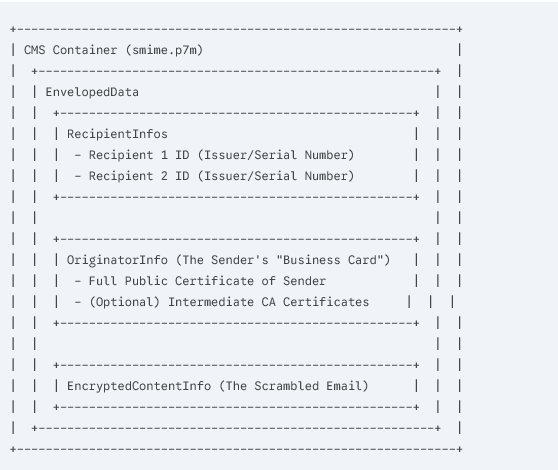
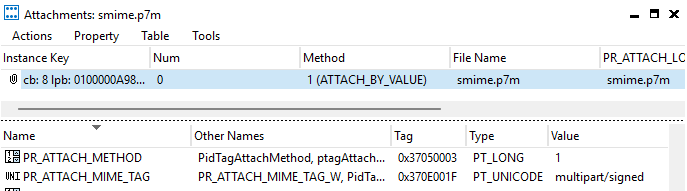
In Exchange the CMS container for an encrypted message is stored as an attachment on an Exchange Item with an Item class of IPM.Note.SMIME . If you looked at a SMIME message with a Mapi editor like mfcMapi you would see

On the Exchange Item, only the top-level envelope properties (such as To, From, Subject, and Date) are promoted to MAPI properties. These headers act as the ‘shipping label,’ telling the mail client what type of S/MIME object it is handling. From there, the client must perform the decryption locally. It uses the Recipient Identifier stored within the CMS container to find the matching private key in the user’s personal certificate store.
In an encrypted message, every other part of the original email—including the message body, HTML formatting, and all attachments—is encapsulated within the CMS container. To the server, these components are entirely ‘opaque’ and inaccessible for processing or indexing.
Opaque Signed Messages
Opaque signed messages share a similar structure to encrypted messages — the message data is stored inside a CMS container as encoded binary rather than plain text, but unlike encrypted messages, no decryption certificate is required to read the content; it is machine-readable by anyone.
In Exchange, opaque signed messages use the same item class as encrypted messages (IPM.Note.SMIME), and the same MIME content type (application/pkcs7-mime). The distinguishing header is the optional smime-type parameter, which should be signed-data rather than enveloped-data. Because this parameter is optional, you can encounter messages where the item class and content type alone are not enough to tell the two apart — in that case, you need to crack open the CMS container itself (the smime.p7m attachment) and inspect the OID in the first few bytes, which will tell you definitively whether you are looking at a signedData (1.2.840.113549.1.7.2) or envelopedData (1.2.840.113549.1.7.3) object. Note if the message is a Clear-Signed Message rather than containing a CMS signedData object, the attachment contains the entire raw multipart/signed MIME entity — verbatim, including the Content-Type: multipart/signed header and both body parts (the readable content and the detached smime.p7s signature).
Clear-Signed Messages
Clear-signed messages are the most transparent of the three S/MIME message types. The message body is fully readable as plain text, with the signature carried alongside it as a separate MIME part rather than wrapping it — this is the multipart/signed format defined in RFC 1847. Unlike opaque signed and encrypted messages which use IPM.Note.SMIME, Exchange assigns clear-signed messages their own distinct item class of IPM.Note.SMIME.MultipartSigned, making them the easiest of the three types to identify unambiguously. Microsoft Learn .
Where Exchange diverges from the RFC is in how it stores the message body and attachments. Rather than preserving the raw multipart/signed structure as-is, Exchange promotes the first body part of the multipart/signed entity to the standard message body properties of the Message object, meaning the readable content is extracted and stored natively just as it would be for a normal unprotected email. This is the opposite of opaque signed messages, where even though no decryption key is required to access the content, the message body is not promoted to the Message object and stays locked inside the CMS container.
The Exchange Item contains exactly just one attachment, and this is where things get interesting. Rather than storing just the detached signature blob, the attachment content must be set to the entire outer content of the multipart/signed MIME entity — including the Content-Type header with its original parameters — because the content is protected by the message signature in its original form and any modification will invalidate it. This means the single attachment contains both the signed body part and the detached signature together as a complete MIME structure not just the CMS container like in the encrypted/opaque signed message . A practical consequence of this is that any user attachments from the original email are not stored as separate Exchange attachment objects — they are embedded inside this single MIME blob and must be parsed out of PidTagAttachDataBinary if you need to access them programmatically.
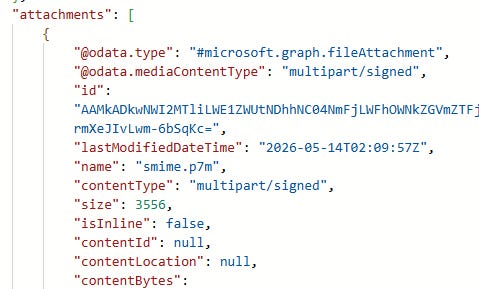
Clear-Signed Messages - Item class should be IPM.Note.SMIME.MultipartSigned but could be IPM.Note.SMIME. The PR_Attach_mime_tag will be multipart/signed.
In the Graph this will look like
Opaque Signed Messages - ItemClass will be IPM.Note.SMIME and the PR_Attach_mime_tag will be application/pkcs7-mime. Check the OID of the CMS for 1.2.840.113549.1.7.2
Encrypted Messages - ItemClass will be IPM.Note.SMIME and the PR_Attach_mime_tag will be application/pkcs7-mime. Check the OID of the CMS for 1.2.840.113549.1.7.3
Sending an SMIME message in Graph
There are two ways you can send SMIME messages in Graph the easiest is just to use the sendMail endpoint ability to send Mime Message https://learn.microsoft.com/en-us/graph/outlook-send-mime-message. You need to use something to first produce the Mime Message eg MailKit/MimeKit which uses BouncyCastle for the underlying encryption. For example, here is a script using PowerShell via the Mailozaurr PowerShell module and the Microsoft Graph PowerShell SDK to send a clear-signed S/MIME message https://github.com/gscales/Powershell-Scripts/blob/master/Send-ClearSignedSmimeMessage.ps1
Send using JSON in the Graph
While using the MIME functionality in the sendMail endpoint is generally the most convenient and supported way to send an S/MIME message, you can also use the standard JSON format.
For example, you can send an encrypted message by providing the CMS container as a file attachment while maintaining standard, unencrypted message headers for the rest of the metadata. Here is a sample of what that JSON payload looks like:
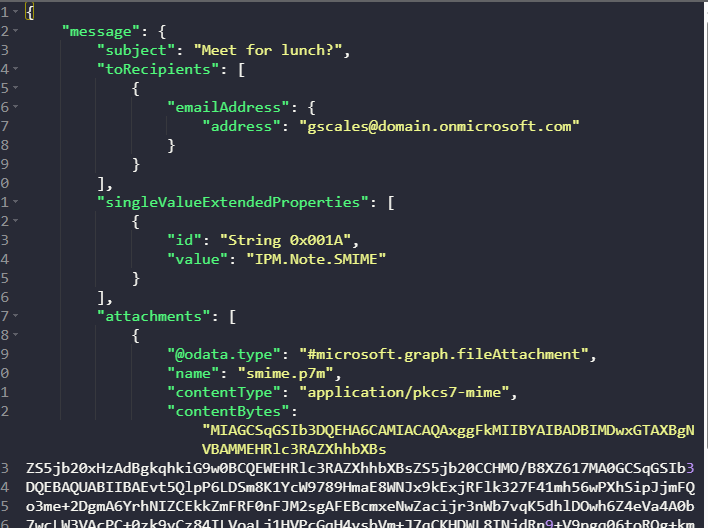
Reading an Encrypted S/MIME Message Using the Microsoft Graph
The Microsoft Graph does not perform native decryption of S/MIME messages. Instead, it provides raw access to the message data, allowing you to handle decryption within your application logic. To do this, you must have access to the recipient’s private key.
The most efficient way to retrieve S/MIME messages is to filter by the ItemClass. Since this is a MAPI property (PidTagMessageClass), you must reference it in the Graph via its extended property tag, String 0x001A.
To find an exact match for Encrypted or Opaque-Signed messages, use the following GET request:
HTTP
https://graph.microsoft.com/v1.0/me/messages?
$filter=singleValueExtendedProperties/any(ep: ep/id eq 'String 0x001A' and ep/value eq 'IPM.Note.SMIME')
To find Clear-Signed messages:
HTTP
https://graph.microsoft.com/v1.0/me/messages?
$filter=singleValueExtendedProperties/any(ep: ep/id eq 'String 0x001A' and ep/value eq 'IPM.Note.SMIME.MultipartSigned')
Once you have identified and retrieved the message, you will receive an ordinary encrypted MIME structure. You can then feed this raw data into a MIME parser like MimeKit. Before parsing, you should verify the specific type of S/MIME message using the OID detection method mentioned earlier to ensure you are applying the correct decryption or verification logic if you don’t know if its a signed or encrypted message.
I’ve put together a sample PowerShell script that use the Microsoft Graph SDK that finds the last S/MIME message in a mailbox, retrieves the encryption key from the Windows Certificate Store, downloads the attachment, and decrypts the content. https://github.com/gscales/Powershell-Scripts/blob/master/Graph101/GraphSDK/Decrypt-SmimeMessage.ps1
Regarding the sending, receiving, and reading of S/MIME messages, there is very little difference between EWS and the Microsoft Graph. Both APIs treat the S/MIME payload as an opaque BLOB in an Attachment and the item itself has a specific ItemClass . Because the heavy lifting of encryption and decryption happens at the application level (client-side), there are no significant parity gaps that would block an application migration.
If you have any questions about implementing S/MIME within the Microsoft Graph, please post them in the comments, and I’ll do my best to provide an answer!
Comments
Nothing yet. Say the first thing.
Sign in to join the conversation.