I swapped models three times to fix one flaky test. None of it helped. The problem was upstream of the model the whole time.
Here is the embarrassing part. I had a checkout test that failed about one run in five, and I decided the AI wasn't smart enough to fix it. So I did what a lot of us do when an agent disappoints: I reached for a bigger model. Same prompt, better weights, surely that lands it. It didn't. I switched again. Still flaky. Two days in, I'd cycled through three models to fix a single test and gotten three confident, wrong answers that all bumped a timeout and called it done.
The model was never the problem. I'd been feeding a stateless next-token predictor a nine-word prompt — "fix the flaky test in the checkout flow" — with none of the files, none of the failure output, no way to run the suite and see what it did. I was blaming the engine for a fuel line I hadn't connected.
Here's the takeaway, and it's the thing I wish someone had put in front of me two days earlier: you don't get better output from a better model — you get it by controlling what enters the context window and what happens to what comes out. The model is one layer. Everything that makes AI-assisted development reliable sits in the layers you build around it, and every one of those layers is yours to control. This post walks a single flaky test through all six of them, in order, so you can see exactly where the leverage was hiding.
The six layers, in the order we'll walk them:
The model — what it actually is, and why it flailed
The harness — the loop that gives it tools and checks its work
Sub-agents — dispatching the fix to a clean window
Prompt engineering — wording the instruction so it can execute
Prompt shaping — deciding what the task even is, first
Failure modes — the guardrails the five layers above don't give you for free
Start with what the model actually is, because almost every mistake I made downstream traces back to getting this wrong.
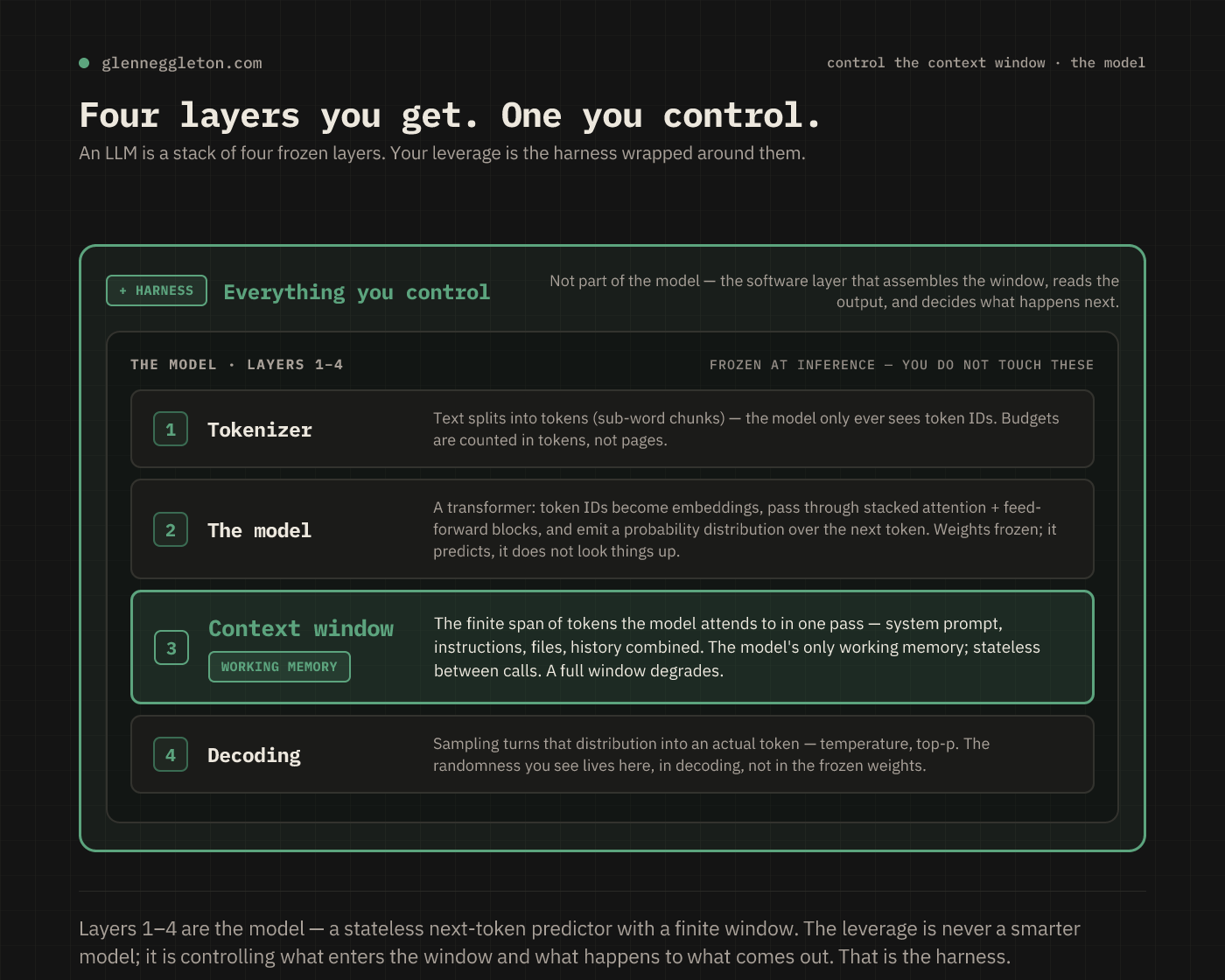
Underneath the chat box, four things are happening. A tokenizer splits your text into sub-word chunks — the model never sees characters, only token IDs, which is why it miscounts the letters in a word and why your budget is measured in tokens, not pages. The model itself is a transformer: those token IDs become vectors, pass through stacked attention and feed-forward blocks, and come out the other side as a probability distribution over the next token. The weights are frozen at inference. Its knowledge is whatever training baked in, up to a cutoff. It predicts; it does not look anything up. Then decoding turns that probability distribution into an actual token by sampling — temperature and top-p live here, and so does every bit of randomness you see. It isn't in the weights.
The layer that matters most for daily work is the third one: the context window. It's the finite span of tokens the model attends to in a single pass — your system prompt, your instructions, the files you pasted, the conversation so far, all of it combined. It is the model's only working memory. Between calls it remembers nothing. Anything the model needs to know has to be inside that window at the moment it answers, and when the window fills up, quality degrades — the model starts losing track of things in the middle of it. A better model doesn't remember your repo any better than a worse one — neither of them remembers it at all.
The only thing that "knows" your codebase is whatever you loaded into the window this turn.
So look again at what I did. "Fix the flaky test in the checkout flow." No file. No test output. No repo. I handed a stateless predictor a wish and a blank window and then upgraded the predictor when the wish didn't come true. Of course it bumped a timeout — with nothing in the window, the most probable next tokens for "flaky test" are "increase the timeout." It wasn't wrong about probability. It was starved of context, and no amount of model was going to feed it.
Everything from here is about the layer wrapped around that model — the one labeled "harness" in the diagram, the one that's entirely yours.
A raw model call is one shot: text in, text out, no memory, no way to check itself. A harness is the software loop wrapped around that call. It gives the model tools, feeds the results back, verifies the work, and decides the next step. The model proposes one move; the harness executes it, checks it, and loops. This is the whole thing:
# repeat until the task is done or a step cap is hit
loop:
    context = assemble(system, task, files)   # what enters the window
    action  = model(context)                  # model proposes ONE step
    result  = execute(action)                 # run it: edit / shell / search / API
    if verify(result) fails:                  # tests, types, lint
        context += error; continue            # feed the failure back, try again
    context += result                         # observe, then loop
Read that against my two lost days and the fix is obvious. I never had an execute step, so the model couldn't open pay.test.ts or run npm test. I never had a verify step, so nothing ran the suite ten times to confirm the flake was gone — the model just asserted it. And I never had a real assemble step, so the window stayed empty.
Put the same model inside that loop and the behavior changes completely. Now it reads the test file, runs the suite, sees the actual failure — a race between two async writes, not a slow response — reads that failure back into its own context, and tries again. Same weights. The reliability came from the loop, not from the model getting smarter.
Two halves of the harness are worth naming, because they map to two different wins:
verify()is where reliability comes from. Run the tests, the type-checker, the linter, and feed failures back until it's actually green — not until the model says it's green. If you want a guarantee that doesn't depend on the model choosing well, that guarantee lives in code that runs every time, not in a nicely worded prompt.execute()is where capability comes from. Reading files, running commands, searching the repo, calling an API — this is the jump from writing text about your system to acting on it.
Reliability is not a property of the model. It's a property of the loop you run the model inside.
In practice this is exactly what your tools already are. Claude Code's hooks and tool-permission allowlists are a verify() and a set of guardrails you configure. Cursor's Project Rules and Background Agents are the same idea. Aider builds a repo map as its assemble() and auto-commits each change as a checkpoint. If you're wiring your own, it's the loop above around any model API. The point isn't the vendor. It's that the loop is the product, and the loop is yours.
By the time my harness was running the test and reading real failures, a new problem showed up — a quieter one. The session that was fixing the checkout race was also the session that had earlier researched the payment provider, skimmed four files, and argued with itself about an unrelated refactor. The window was crowded. And a crowded window is a degrading one: the more unrelated context you pile in, the worse the model gets at the thing in front of it.
The fix is to stop doing everything in one context. A sub-agent is a fresh model instance with its own clean window, briefed narrowly on one task, that does the work somewhere else and returns only a summary. The session you're driving — the orchestrator — decomposes the work, hands each piece to a sub-agent, and stays clean.
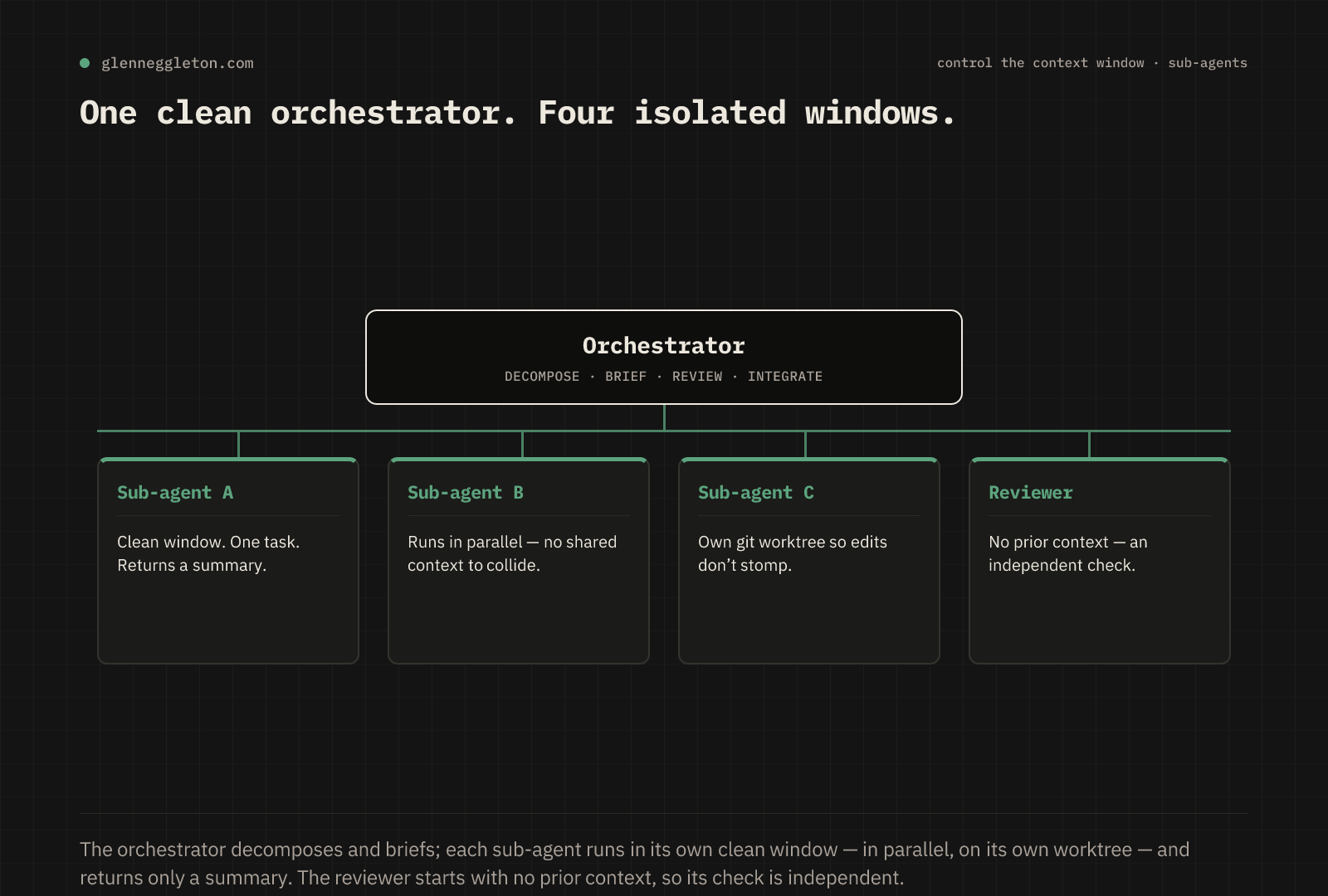
For the flaky test, that means spinning up a sub-agent whose entire world is this one problem. It gets a tight brief and nothing else:
GOAL       Fix the flaky checkout test — CI fails ~1 run in 5. Blocks release.
FILES      src/checkout/pay.test.ts
           src/checkout/pay.ts
DO         Find the race; make the test deterministic.
           Don't change pay.ts business logic.
RULED OUT  Not a timeout bump — the retry is masking a real ordering bug.
DONE       `npm test checkout` green 10x; diff under 20 lines; note the race.
That brief is doing a lot of quiet work. It states the goal and why it matters, points at the exact files, rules out the dead end I'd already wasted two days on, and defines "done" as something you can check rather than something the model can claim. A sub-agent reading only that has a full, clean window pointed at one target.
The wins stack up once you work this way:
Context isolation — each task gets its own clean budget instead of the orchestrator's crowded one.
Parallel fan-out — independent tasks run at once, so wall-clock time is the slowest single task, not the sum of all of them.
Independent review — a reviewer sub-agent that never saw the code get written gives you a second opinion that's unbiased by construction, because it has none of the author's context to be anchored by.
Worktree isolation — if two sub-agents are editing files at the same time, give each its own working tree so they can't overwrite each other:
git worktree add ../wt-checkout -b fix/flaky-checkoutA sub-agent isn't "more model" — it's a way to spend a scarce resource, the context window, deliberately instead of letting one session burn it on everything at once. One caution that cost me later: a summary describes intent, not result. When the sub-agent comes back saying it fixed the race, read the actual diff before you believe it. The dispatch pattern is decompose, brief tightly, fan out the independent pieces, then verify against what actually changed — not against the summary.
How this shows up depends on your tool. Claude Code spawns sub-agents through its Task tool, each with its own window, and pairs naturally with git worktree for parallel edits. Cursor's Background Agents run in isolated cloud environments, each on its own branch. If your tool has no sub-agent concept at all, you can approximate it: run tasks sequentially and clear the context between them, so each one starts from a clean window.
Now that the fix is going to a clean window through a real loop, the question becomes what to actually put in that window. That's prompt engineering, and it is much less mystical than it sounds. You are not coaxing a hidden answer out of the model. You are loading a finite, stateless window with everything it needs and removing everything it could misread.
A slot template makes it repeatable — role, context, task, constraints, examples, output. The difference between the wish I started with and an engineered version is the difference between a blank window and a full one:
BEFORE — a wish
"make the auth code better"
AFTER — the same ask, engineered
ROLE Senior TS engineer, security-minded.
CONTEXT [paste src/auth/session.ts]. Sessions are a JWT in a cookie.
TASK Expire a session after 30 min of no requests.
CONSTRAINTS Keep the cookie name. No new deps. Don't touch login.
OUTPUT A diff, plus one line on the eviction approach.The "before" gives the model no files, no target, and no bar, so it guesses what "better" means and edits something you didn't ask for — which is precisely what "fix the flaky test" did to me for two days. The "after" leaves almost nothing to infer. Same model, wildly different odds.
A few techniques carry most of the weight. Be specific — replace adjectives like "better" and "clean" with examples and numbers like "30 minutes idle." Ground the prompt in real context by pasting the actual code instead of describing it; the model does not know your repo, ever. On genuinely hard problems, ask for the reasoning before the answer so the conclusion is built on stated steps.
And a few anti-patterns waste a whole turn. "Fix the bug" with no repro, no file, and no expected behavior — the model guesses. "Based on your findings, implement it" — that hands the model the synthesis that was your job to do. One giant prompt for five unrelated things — split them, and give each its own clean window. A prompt is not an incantation; it's the payload you place in a finite, stateless window. When a prompt fails, ask what the model couldn't possibly have known, and put that in.
Here's the layer I skipped entirely, and skipping it is what actually cost me the two days. Prompt engineering assumes you already know what you want. I didn't. "Fix the flaky test" was not a well-worded version of the right task — it was a confidently-worded version of the wrong one.
Prompt shaping is the step before prompting. It converts a fuzzy goal into a scoped brief, so the well-worded prompt you write next is aimed at the right target. It's the difference between deciding what the work is and deciding how to say it. A beautifully engineered prompt pointed at the wrong scope still ships the wrong thing, and it does it confidently.
Watch what shaping does to my flaky test. The raw ask was "make the test less flaky." Shaping asks the load-bearing questions before any code gets touched: what's actually failing, and is making the test pass even the right goal? Sit with that for thirty seconds and the real shape appears — the retry that makes the test "less flaky" is masking a genuine ordering bug in pay.ts. The task was never "stabilize the test." It was "fix the race the test is catching." Everything I tried for two days was a well-executed answer to a question I'd never checked.
A shaped brief answers, up front:
Scope — what's in, what's explicitly out, which files get touched.
Definition of done — an observable condition, not a vibe.
Constraints — the non-negotiables and the approaches already ruled out.
Open questions — the ambiguities surfaced now, before work starts, not discovered halfway through.
The most expensive failure in AI-assisted work isn't a wrong answer. It's a right answer to the wrong question — a clean diff for a task nobody needed. Shaping is the half-hour that saves the afternoon.
Make it an explicit step, not a habit you hope to remember. In Claude Code that's a shaping skill you invoke before the real work; in Cursor it's a rule; in any tool it's a plan-mode pass that has to ask its open questions and get answers before it's allowed to edit a single file.
The five layers above make an agent capable and reliable at the task. They do nothing, on their own, about four things that bite in production. Budget for them explicitly, because none of them announce themselves until it's expensive.
Prompt injection and tool safety. Any untrusted text the model reads — a web page, a file, another tool's output — can carry instructions it may follow. The real danger is the path from that input to a sensitive sink: a shell, the filesystem, your secrets, an API holding your credentials. Treat tool input as hostile. Sandbox execution, allowlist the commands an agent can run, keep secrets out of the window entirely, and require a human to approve anything destructive or outbound. My flaky-test sub-agent could run npm test; it should not have been able to run rm -rf or push a branch, and the guardrail for that is code, not trust.
Cost. Every token in the window is paid for on every turn. A bloated project-context file, a whole file pasted when ten lines would do, a long transcript dragged along for no reason — all of it bills repeatedly, and worse, it dilutes the signal the model is trying to attend to. Load the minimum, prune as you go, and push big side-quests into sub-agents so their tokens don't stay resident in your window.
Knowing whether you actually improved anything. You cannot tell a better prompt from a lucky run by vibes. Outputs are non-deterministic; a change that "seems better" can be noise, and a regression can hide behind one good demo. Keep a small fixed set of real cases and re-run them whenever you change a prompt, a model, or the harness — then diff the outputs. This is exactly the discipline I lacked: I "confirmed" each model's fix by eyeballing one green run, which is how a flaky test stays flaky.
Knowing when not to use an agent at all. An agent adds latency, cost, and non-determinism. For work that's deterministic, trivial, or safety-critical, that's a bad trade — a script, a codemod, or a human is faster and more predictable. If you can already write the exact rule, write the rule. Reach for an agent when the task genuinely needs judgment across many steps.
I lost two days to a story I'd told myself: that the output was only as good as the model, so a better model was the fix. The story was backwards. The model was the one layer I couldn't do anything about — frozen weights, a stateless window, no memory of my repo. Everything I could control sat in the layers around it. The harness that runs the test and reads the failure. The sub-agent that gets a clean window and a tight brief. The engineered prompt that loads that window on purpose. The shaping pass that catches when I'm solving the wrong problem. The guardrails that keep it safe and honest.
Put differently: the model keeps getting better on its own, and you don't have to do anything to earn that. The leverage that's actually yours to build is everything around it — what enters the window, and what happens to what comes out. Next time an agent disappoints you, don't reach for a bigger model. Ask which of these six layers you skipped. It'll usually be the same one I skipped: you never checked whether you were solving the right problem.
If this is the kind of thing you think about — the systems around the model, not just the model — subscribe below. I write up what these setups teach me, usually by getting them wrong first.
— Glenn Eggleton builds agentic engineering systems and writes about what survives contact with production.
Want to learn more? Download my latest white paper below.
No posts
Comments
Nothing yet. Say the first thing.
Sign in to join the conversation.