
Problem: Allow users to join live sessions from the platform and track Attendance and Session duration.
Primary requirements:
We should be able to track who joined the session
How long each participant stayed on the call
We will use Zoom meeting API to make sure each user gets a unique URL through which they will join the session and at the same time Zoom will be able to keep track of who joined and for how long/ how many times.
Mentees: Users who will join the session
Captain: Mentors taking the session (Responsible for starting the session)
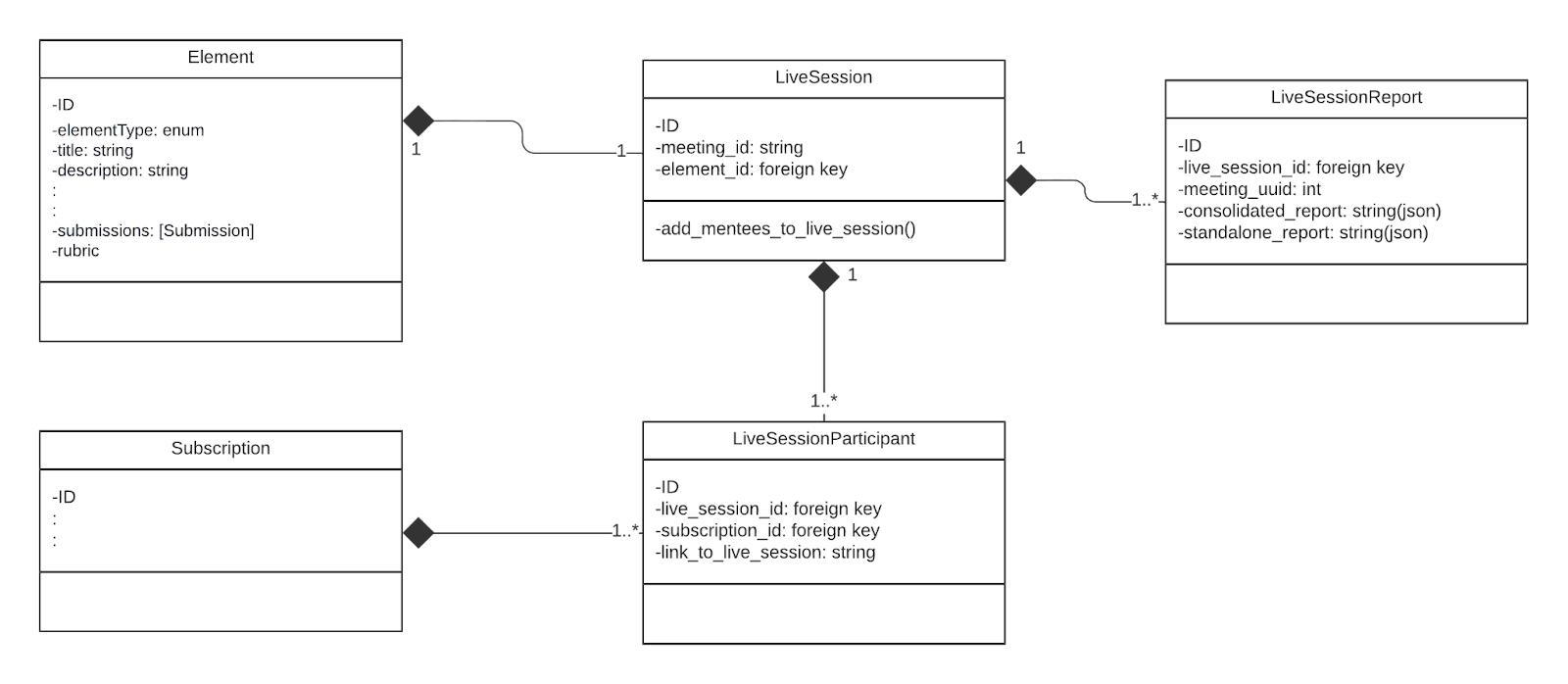
Element: Object holding the information about the topic of the live session
Subscription: Subscription of users to verify they are authorized to access the class
On Zoom, Create meeting with registration enabled so that only authorized users can join the call. Optionally we can create a meeting using the API as well.
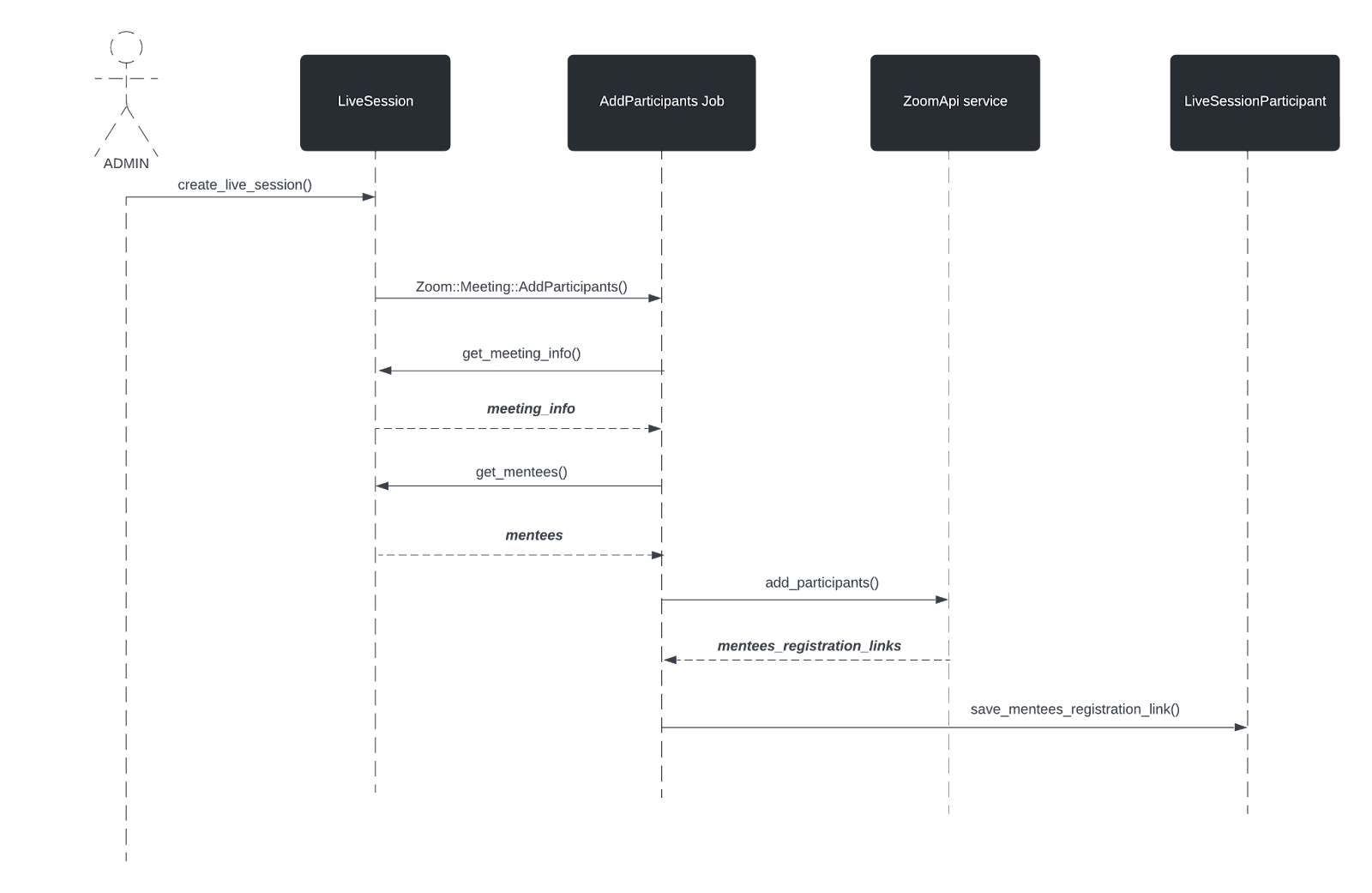
Add users as participants to this meeting and save the join meeting url(unique to each user)
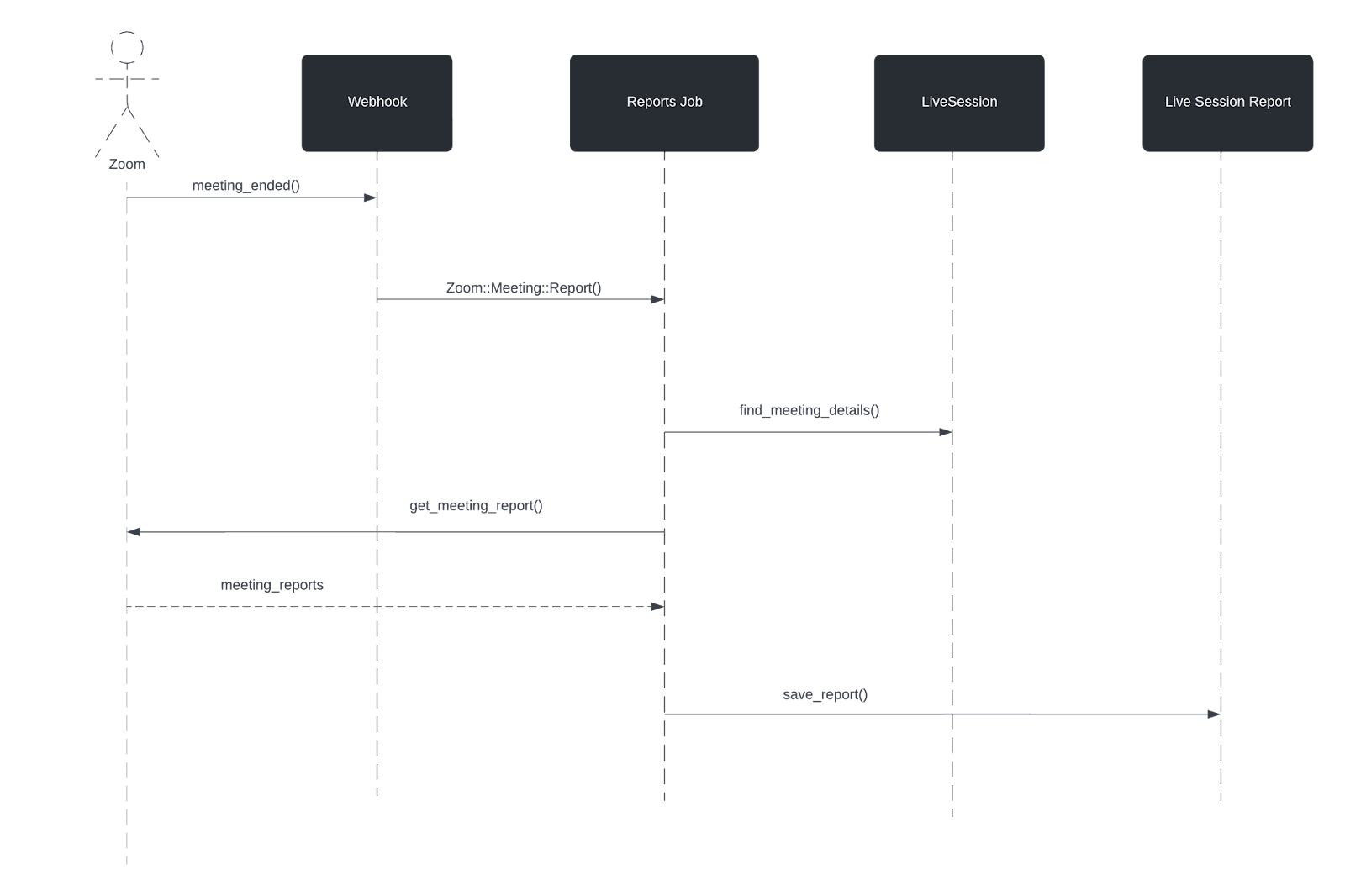
Make a call to Reports API to collect attendance and duration information for each mentee
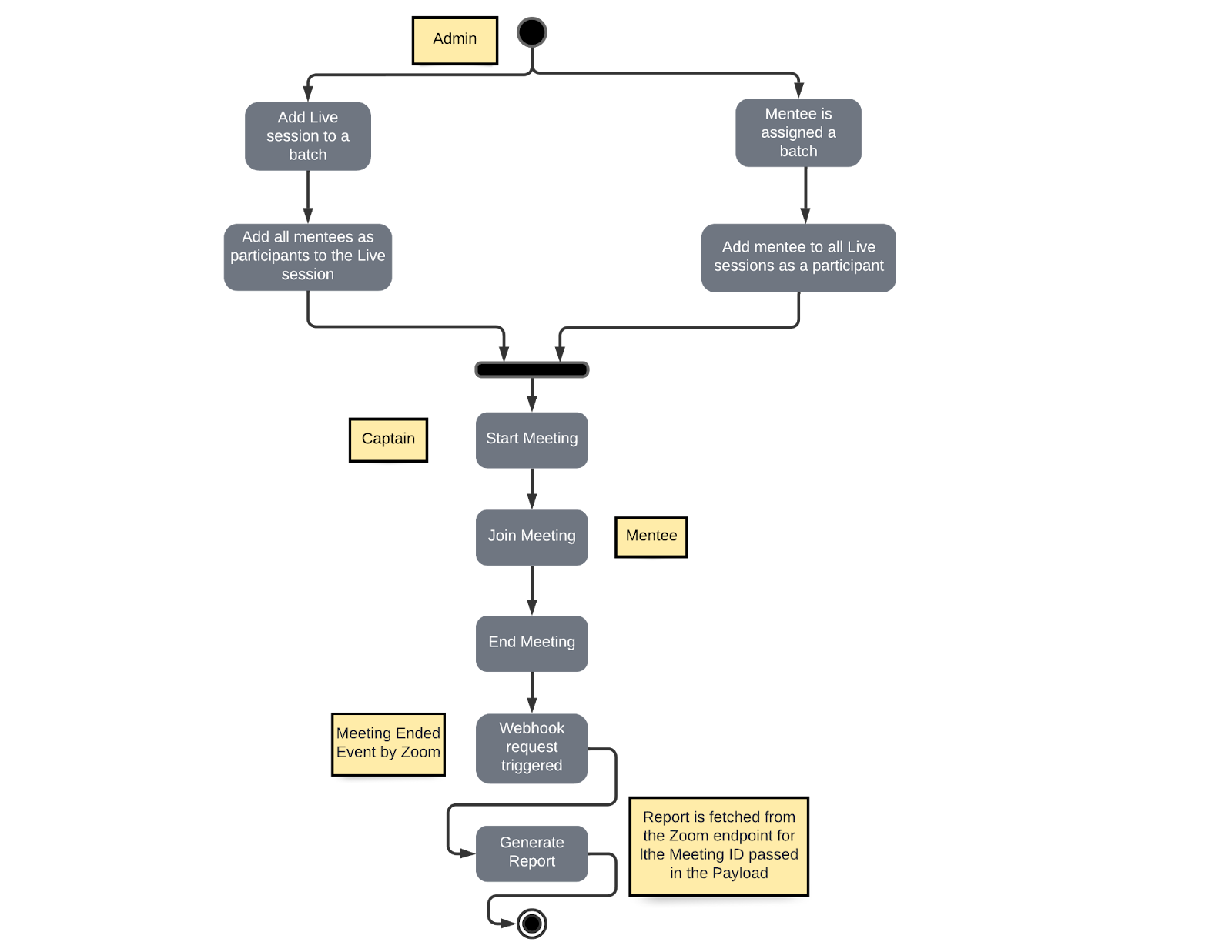
Admin adds a Live session to the batch
Mentees are added as participants to this meeting
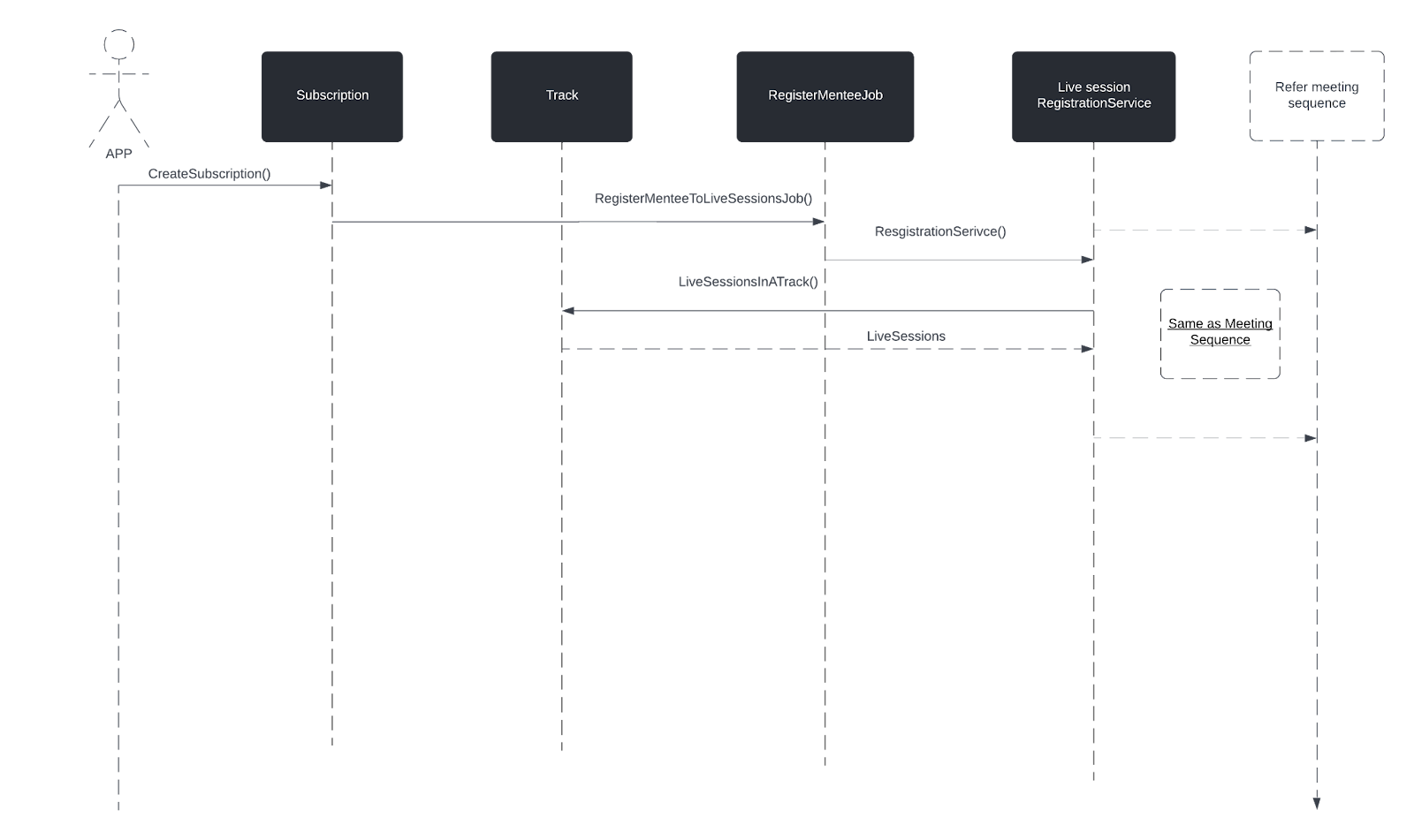
Mentee is added to the batch
Mentee is added as participants to all the exiting Live session
Captain starts the meeting and Mentees join the meeting with their uniq url
Once the meeting is over, Zoom sends the request to our Webhook endpoint with the meeting details
Report is fetched from the Zoom API endpoint
Report is saved in the DB
Models/Modules: Element, LiveSession, LiveSessionParticipant, LiveSessionReport, Subscription, ZoomApi, Zoom::Meeting
Callbacks/Methods: ZoomAPI::Meeting::AddParticipants(), ZoomAPI::Meeting::Report()
Webhook/controllers: Webhooks::Zoom::MeetingsController
Background jobs: Zoom::Meeting::AddPaticipantsJob(), Zoom::Meeting::ReportsJob()
Problem:
Mentees should be able to join the meeting from app
Video call should happen within the app
Using Zoom meeting sdk (client view)
As per the documentation, in order to initiate the video call through Zoom SDK frontend needs to pass some parameters listed below:
Here is the list of variables you need access to before proceeding:
signatureEndpoint: The endpoint url that returns a signature. Get a signature endpoint here.
sdkKey: your Zoom SDK App Key. You can get yours here.
meetingNumber: the Zoom Meeting or webinar number.
role: 0 to specify participant, 1 to specify host.
leaveUrl: the url the user is taken to once the meeting is over.
userName: a name for the user joining / starting the meeting / webinar.
userEmail: The email of the user starting or joining the meeting / webinar. (Required for Webinar, optional for Meeting, required for meeting and webinar if registration is required.)
passWord: meeting password. Leave as an empty string if the meeting does not require a password.
registrantToken: This is required if your meeting or webinar requires registration.
customerKey: This is to pass any meta information that could be useful to the consumer application at the time of accessing the report.
UI Changes
Integrate Zoom sdk (client view)
Sample code for the Zoom init() method
UI should prepare for fallback as well(In case of an error at the time of calling init() or join())
In this case we will redirect the user to the link returned in the response
Services
At the time of saving registration details, service should extract information such as
registrationToken
passcode/password
meetingNumber
userName
userEmail
role
Admin Panel
Create meeting action should create a record in LiveSession
The meeting_id, start_time and end_time should be saved in the LiveSession table while the session_type itself will be saved in the Element table. So, when the Admin submits the form, backend should do the following:
Create an Element with the selected session_type
Refer the id of the newly created Element to create a LiveSession with attributes meeting_id, start_time, end_time
Graphql API
Query to return meeting details
TESTING:
Graphql query (for reference)
Response:
Setup/Deploy signature server on Render
Endpoint to generate signature
Backend will use this endpoint to generate signatures. (This is to prevent leaking any sensitive keys/secrets on the UI)
GD!!
Comments
Nothing yet. Say the first thing.
Sign in to join the conversation.