
Introduction
New city, new homelab, new ISP. IPv6 only. That was the situation two months ago when I moved to Münster. I wanted cheap home internet that could still run a proper homelab. My phone plan includes a second SIM with no data cap, so I decided to run the whole flat off a mobile uplink.
The setup
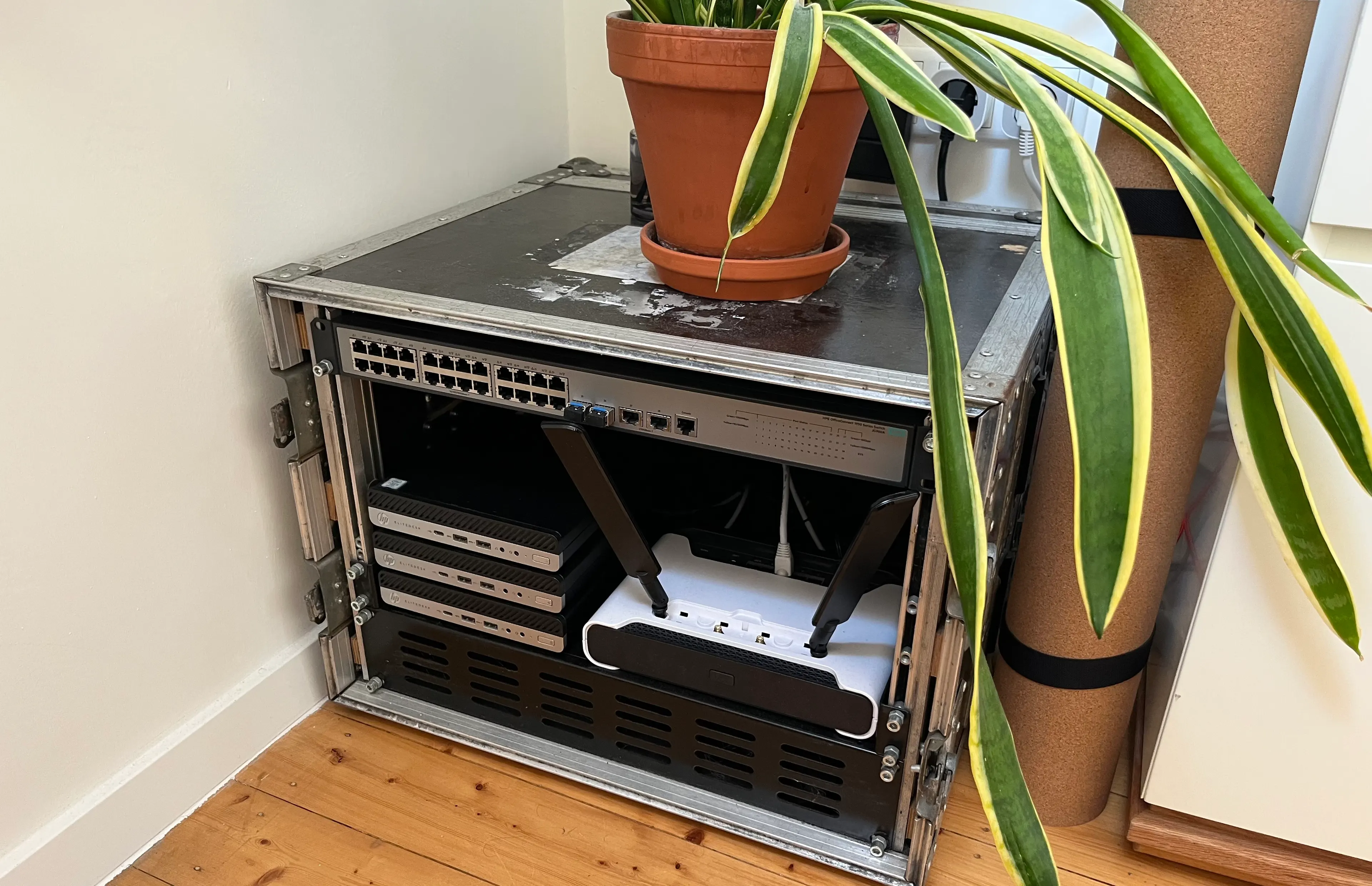
I evaluated multiple options as my main router, from separate modem to all-batteries included platforms. Finally, I found what I was looking for in a used hardware telegram group: A Mikrotik Chateau 5G ax (Model S53UG+M-5HaxD2HaxD-TC&RG502Q-EA) for 120€ shipped. I had never worked with Mikrotik before, and had heard mixed opinions. But for that price, I had to try it out.
On paper it had everything I needed: 5G modem, Wifi 6, a 2.5G port, and advanced features like BGP I had been wanting to try.
The catch with a mobile ISP is that there is no IPv4 at all. I had planned an IPv6-mostly network with my own NAT64; instead I had to use Telekom's NAT64 and build the rest of the setup around it.
One /64 is all you get
Telekom's mobile network (APN internet.v6.telekom) hands out a single /64 over the 5G interface and nothing else. There is no Prefix Delegation, no /56 or /48 to split into per-VLAN prefixes like a fixed-line ISP gives you. Being a 3GPP network, it assigns the /64 to the device itself rather than delegating a shorter prefix, the case RFC 7278 covers.
To get that /64 onto the LAN, point the APN's ipv6-interface at your LAN bridge. RouterOS then advertises the operator /64 on the bridge via RA, so clients SLAAC addresses out of the same /64. Add default route adds the default route over the LTE interface. No PD or ND proxy is involved: the mobile bearer is point-to-point and routes the whole /64 to the device, so re-advertising it on the LAN just works.
/interface lte apn
add apn=internet.v6.telekom authentication=pap comment="Telekom V6" ip-type=ipv6 ipv6-interface=LANsecure name=internet.v6.telekom user=telekom
A single /64 cannot be subnetted, so there is no per-segment global prefix. I run one VLAN and address everything internally with ULA, with the /64 on top as the global egress prefix only.
MTU trickery
I pinned the main bridge MTU to 1420 to stay under the mobile path MTU:
/interface bridge
add mtu=1420 name=LANsecure
On top of that there are two mangle rules. One clamps TCP MSS to the path MTU, the other rewrites the hop limit to a fixed 64 on everything leaving the LTE interface, which is the classic trick (sidenote: Forwarded packets normally leave with a decremented hop limit, one of the signals a carrier can use to tell tethered traffic apart from traffic originated on the modem itself. Pinning it to 64 makes every packet look like it came straight from the router. ) to keep the carrier from noticing forwarded traffic:
/ipv6 firewall mangle
add action=change-mss chain=forward new-mss=clamp-to-pmtu protocol=tcp tcp-flags=syn
add action=change-hop-limit chain=postrouting new-hop-limit=set:64 out-interface=lte1
I have not verified how necessary these are. The MSS clamp does see some traffic, so at least a few flows would otherwise negotiate an MSS the path cannot carry.
IPv6-mostly with Option 108
IPv6-only from the title is only half-true. I do keep a small IPv4 pool in the 198.18.0.0/15 range internally, but I hand out DHCPv4 Option 108 so that clients which understand it can forfeit their IPv4 address entirely and run pure IPv6.
Option 108 is the IPv6-Only Preferred option from RFC 8925. A client that advertises support drops its IPv4 stack for the V6ONLY_WAIT timer (sidenote:
0x708 is 1800, so the client goes without IPv4 for 30 minutes before asking again.
) set by 0x00000708. Android, iOS and macOS honour it; everything else ignores the option and keeps its IPv4 lease. Either way, traffic leaving the network is IPv6, and Telekom's NAT64 translates it back to IPv4 where needed.
/ip dhcp-server option add code=108 name=ipv6-only-preferred value=0x00000708
NAT64 needs DNS64
NAT64 (RFC 6146) needs something to give clients an IPv6 address for IPv4-only destinations. That is DNS64 (RFC 6147): when a name has no AAAA record, the resolver synthesises one by appending the IPv4 address to the well-known prefix 64:ff9b::/96 (RFC 6052). On my network that synthesis runs on dnsix, a small DNS64 resolver I prompted, which also synthesises AAAA for CDN endpoints that lack native IPv6. Telekom routes 64:ff9b::/96 to their NAT64, which strips the prefix, forwards over IPv4, and handles the return path. Probably Jool or a dedicated appliance.
The other direction: CLAT with tayga
That covers IPv6 clients reaching the IPv4 internet. The reverse is harder: IPv4-only devices. My ESP32s have no IPv6 stack, so on an IPv6-only uplink they are stranded.
The fix is a CLAT, the customer-side translator from 464XLAT (RFC 6877). I run tayga in a Debian LXC at 198.18.0.1, doing stateless translation of internal IPv4 into IPv6 toward the well-known prefix, which Telekom's NAT64 then turns back into IPv4 at the far end. The internal pool sits in 198.18.0.0/15 (sidenote:
The RFC 2544 benchmarking range, non-routable on the public internet, which makes it a tidy choice for a purely internal IPv4 island that never collides with anything real.
) , and a default IPv4 route forwards all IPv4 to the translator:
/ip route add comment="Route IPv4 Internet to Debian CLAT LXC" dst-address=0.0.0.0/0 gateway=198.18.0.1
Running a CLAT this way, serving IPv4-only devices rather than baked into each client's stack, is the part I suspect very few people are actually running in their homelab.
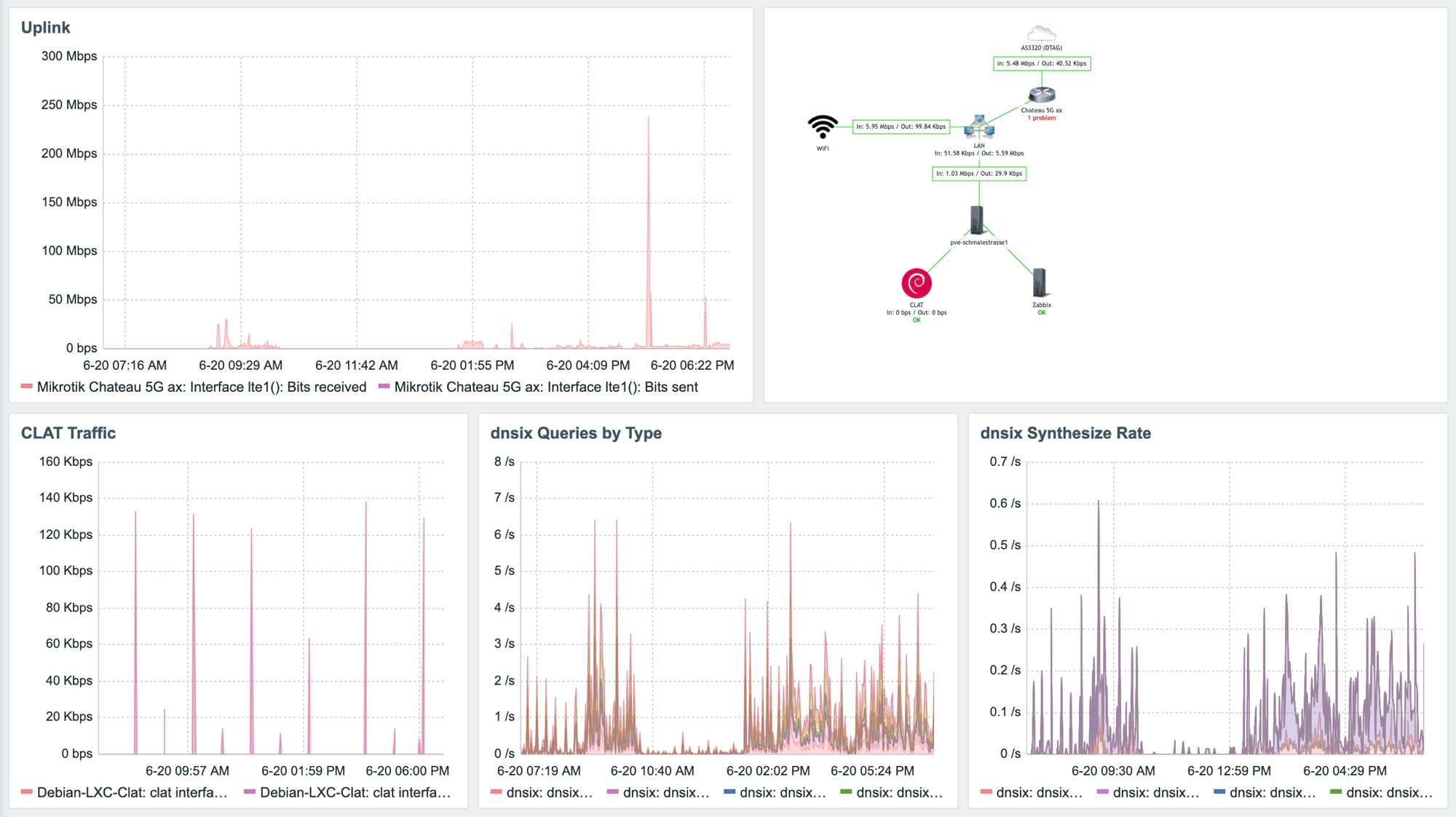
Most devices never touch tayga: the Apple clients that make up most of the network do 464XLAT natively, on-device. Only the IoT gear uses the shared CLAT, and it barely registers, spikes of a few bits to low kbit/s, mostly ESP32s doing NTP.
Staying reachable
Two things complicate inbound on a mobile uplink. First, Telekom firewalls all inbound traffic, so there is no incoming connectivity. I keep MikroTik's default firewall rules anyway, but the carrier does the real filtering (sidenote: Every major German mobile network centrally filters inbound IPv6 on consumer tariffs. Reachable inbound is generally a paid business-tariff feature regardless of carrier. ) the GUA is publicly routable in name only; Telekom drops inbound before it reaches me.
Second, the prefix is not stable. It rotates at least every 24 hours, and a couple of times the old prefix was not withdrawn cleanly: I installed a MikroTik update, the router restarted without withdrawing all prefixes first, and I had to manually drain the stale prefixes off every VM and LXC before connectivity came back. A recent beta (RouterOS 7.24beta2) lists a related fix, "correctly process RAs advertising previously expired prefix", though I have not updated since to confirm it.
Both rule out pinning anything to a global address, so all inbound runs over Tailscale. Some of it goes through a relay, which is fine since there is no usable listening address anyway. A subnet router advertises my home ULA, so even Winbox is reachable remotely.
Keeping an eye on it
I run Zabbix with a small weathermap. It tracks up- and downlink on the 5G modem, CLAT traffic, and DNS query and synthesis rates.
Comments
Nothing yet. Say the first thing.
Sign in to join the conversation.